What Is Text to Speech (TTS)? A Plain-English Explainer
Picture this: you've got a 4,000-word research report you need to absorb before a meeting, but you've also got a 30-minute commute. So you hit play and let your phone read it to you while you drive. That's text to speech — and it's been doing exactly this kind of useful, underappreciated work for years.
TTS is software that converts written text into spoken audio. Type something in, get audio out. Simple idea. Surprisingly sophisticated execution.
The short answer: what TTS actually does
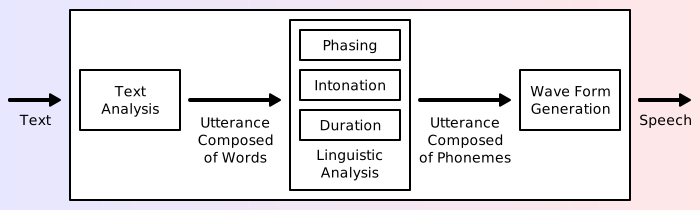
Text to speech takes text as input and produces an audio waveform as output. Between those two things there's a pipeline: the software parses your text, figures out how it should sound (which words get emphasis, where pauses belong, which syllables to stress), then renders that as audio using a voice model.
The output used to sound like someone reading through a mouthful of peanut butter. That's changed dramatically. Modern TTS — especially systems using neural voice models — can sound genuinely close to a human recording, at least for short passages. Whether that's impressive or slightly unsettling probably depends on who's listening.
This technology sits at the core of a wide range of AI voice tools — from accessibility features built into your laptop to production-grade narration for videos and podcasts.
How text to speech works (without the PhD)
There are three main stages in any TTS pipeline. You don't need to understand the math, but knowing what happens helps explain why some voices sound better than others.
Parsing and text analysis
Before any audio gets made, the system reads the text and figures out what it's actually dealing with. Numbers get converted to words ("$4.50" becomes "four dollars and fifty cents"). Abbreviations get expanded. Punctuation signals where to pause.
This stage also handles ambiguity. "Dr." means something different as a title ("Doctor Smith") versus a street abbreviation ("Oak Dr."). Getting it wrong produces those slightly off moments where a TTS voice stumbles on an address or acronym — a giveaway that the text analysis stage didn't quite nail it.
Phoneme conversion
Once the system understands the text, it converts words into phonemes — the basic units of sound. "Cat" breaks into three phonemes: /k/, /æ/, /t/. Every word maps to a sequence of phonemes, which tells the voice model what sounds to produce.
English is famously inconsistent here. "Through," "though," "thought," and "rough" all end in "ough" but sound nothing alike. Good TTS systems have large phoneme dictionaries and fallback rules for words they haven't encountered before.
Neural voice synthesis (where the quality jump happened)
Here's where the big improvement came from. Older TTS systems concatenated pre-recorded audio clips — taking snippets of a real person saying individual words and stitching them together. The seams showed. Every word sounded slightly disconnected from the next.
Neural TTS, which became mainstream around 2018–2020, works differently. Instead of stitching clips, these models learn the statistical patterns of how sounds flow into each other. They generate audio from scratch, producing smooth transitions that feel organic rather than assembled.
The gap between robotic TTS from 2010 and what neural models produce today is genuinely striking. If you haven't listened to a high-quality TTS voice recently, try one — the improvement is real.
The main types of TTS engines
There isn't just one kind of TTS. The right type depends on what you're building or using.
Cloud-based TTS
Services like Google Text-to-Speech, Amazon Polly, and ElevenLabs process your text on their servers and return audio. The quality is high — these companies train large neural models on enormous voice datasets. The tradeoff: you need an internet connection, you're sending text to a third party, and heavy usage costs money.
ElevenLabs in particular has pushed quality noticeably higher, with voices that respond to emotional context, not just phonemes. Worth a listen if you haven't tried it.
On-device / offline TTS
Both macOS and iOS have built-in offline TTS that doesn't phone home. On Mac, you can enable it under System Settings → Accessibility → Spoken Content. The default voices are decent. Higher-quality voices are available as downloads and work entirely offline once installed.

If you want to explore text to speech on Mac in more depth, there's a full guide covering the setup, the best voices to download, and keyboard shortcuts.
Several apps also bundle neural voice models locally — meaning no internet required, no data sent anywhere. That matters a lot if you're working with sensitive documents.
Browser TTS
The Web Speech API lets websites trigger TTS directly in your browser using whatever voices are installed on your operating system. No extension needed, no account required. Quality depends on your OS voices — typically fine for quick reads, not ideal for long-form content.
A read-aloud Chrome extension builds on top of this, adding word highlighting, speed controls, and better voice options. It's the quickest path to TTS for web content without installing anything substantial.
What people actually use TTS for

Consuming long content while doing something else. Reading a 5,000-word article with your eyes while commuting doesn't work. Listening to it does. Researchers, analysts, and anyone who has to stay current with a lot of written material use TTS heavily for exactly this.
Accessibility for low-vision or dyslexic users. TTS was built for this — and it's still the most consequential thing it does. For someone with dyslexia, hearing text read aloud simultaneously with reading it — a technique called dual coding — measurably improves comprehension and retention.
Language learning is another underrated use case. Hearing correct pronunciation alongside written text is genuinely one of the better ways to pick up a new language, and TTS makes that available for any text, not just sentences someone thought to record in advance.
A growing number of content creators use TTS for voiceovers — when they don't want to record, can't record (noise, no mic), or are producing content in multiple languages. Quality has improved enough that at normal listening speed, the difference is hard to detect. Video editors like CapCut even bake TTS directly in; our CapCut text to speech guide walks through how that feature works and where its limits show up.
Developers building voice interfaces. Any app that needs to speak to users — navigation systems, customer support bots, smart home devices — has TTS somewhere in the stack. This is the most technically demanding use case, where both latency and naturalness matter.
TTS vs. voice cloning — what's the difference?
These two often get conflated. They're genuinely different things.
Text to speech converts arbitrary text into audio using a pre-built voice — either a generic synthesized voice or a licensed voice from a real person. The voice exists before you write anything. You just feed it text.
Voice cloning does something different: it creates a synthetic model of a specific person's voice, typically from audio samples. Once you have a clone, you can feed it any text and it'll speak in that person's voice.
They use overlapping technology — both involve neural audio synthesis. But the intent and method differ. TTS is about making text audible. Voice cloning is about making a specific voice available.
The practical implication: if you want to narrate something in a clean, professional generic voice, TTS is the right tool. If you want voiceover content that sounds like you, or need a consistent branded voice across a lot of content, voice cloning is what you're after.
How to try text to speech right now
Three zero-friction starting points:
macOS built-in: Open any text document, select all, right-click → Speech → Start Speaking. No setup, no account, works immediately. It's not the highest quality, but it shows you the idea in about 15 seconds.
Chrome Read Aloud extension: Install it, navigate to any article or web page, click the icon. It starts reading with word highlighting. The read-aloud Chrome extension setup guide covers the better voice options worth switching to.
Dedicated TTS apps: If you want more than the built-in tools offer — better voices, PDF support, speed controls — there are standalone options worth trying. The NaturalReader alternatives guide covers the current field, including several apps with generous free tiers. For the specific workflow of listening to a PDF — what works on Mac, in Chrome, and on iPhone — our read a PDF aloud guide has the full breakdown. If you want a dedicated mobile or desktop read-aloud app rather than a browser extension, the text to voice app roundup compares the best options for iPhone, Android, and Mac.
TTS is about consuming text with your ears. If you want to go the other direction — producing text by speaking rather than typing — that's where AI dictation comes in. It's the reverse of TTS: your voice becomes text instead of text becoming your voice. If you dictate a lot (emails, notes, documents), it's worth trying both sides of the loop. Getting started with voice dictation is the right primer if you're new to it. Or just Download AI Dictation free and figure it out by doing.
Frequently Asked Questions
What does TTS stand for?
TTS stands for text to speech. It refers to software that converts written text into spoken audio output. You'll also see it called "speech synthesis" in technical writing, though TTS is the common shorthand in most product contexts.
Is text to speech the same as a screen reader?
Not exactly. A screen reader is an accessibility tool that reads an entire interface aloud — menus, buttons, labels, and content — to help visually impaired users navigate software. TTS specifically converts a block of text to audio. Screen readers use TTS as one component, but they do significantly more than that.
What's the difference between TTS and voice cloning?
TTS converts any text into speech using a pre-built voice (generic or licensed). Voice cloning creates a synthetic version of a specific person's voice, usually from audio samples of them speaking. They share underlying neural synthesis models but serve different purposes. TTS is for making text audible; voice cloning is for replicating a particular person's voice.
Is text to speech free?
Many TTS tools offer free tiers. macOS and Windows both include built-in TTS at no cost. Browser-based tools like the Chrome Read Aloud extension are free. Paid tiers unlock more natural-sounding voices, higher usage limits, and custom voice options — but for casual personal use, free is usually enough.
Can I use TTS offline?
Yes. macOS has built-in offline TTS via System Settings → Accessibility → Spoken Content. Higher-quality voices require a one-time download but then work with no internet connection. Several third-party apps also bundle offline neural voice models, so nothing gets sent to the cloud — useful when you're working with confidential documents.
Frequently Asked Questions
What does TTS stand for?
TTS stands for text to speech — software that converts written text into spoken audio output.
Is text to speech the same as a screen reader?
Not exactly. A screen reader reads an entire UI aloud. TTS converts a specific block of text to audio. Screen readers use TTS as one component.
What's the difference between TTS and voice cloning?
TTS converts any text into speech using a pre-built voice. Voice cloning replicates a specific person's voice. They share underlying models but serve different purposes.
Is text to speech free?
Many TTS tools are free. macOS and Windows both include built-in TTS. Browser extensions like Read Aloud are free. Paid tiers unlock more natural voices and higher usage limits.
Can I use TTS offline?
Yes. macOS has built-in offline TTS via Accessibility → Spoken Content. Several apps also bundle offline neural voice models.
Ready to try AI Dictation?
Experience fast voice-to-text on your device. Free to download.
Download FreeRelated Posts
7 Dyslexia Examples of Writing You Need to See
Explore 7 common dyslexia examples of writing, from letter reversals to phonetic spelling. Understand the signs and discover helpful accommodations.
Bullet Point Formatting: Master Your Lists
Master bullet point formatting. Learn parallel structure, punctuation, and accessibility for Markdown, HTML, and Word. Create clear, effective lists.
Text to Speech on Android: Built-In Tools, Apps & AI Voices (2026)
How to use text to speech on Android: Google's built-in Select to Speak, the best free and paid TTS apps, AI voices, and how to fine-tune speed and voices.