NaturalReader Alternatives: Best Text-to-Speech Apps in 2026
NaturalReader built its reputation by making text-to-speech accessible to everyday users — and for basic read-aloud tasks, it still does the job. But spend a week with it and the cracks start showing: the free tier is stingy with characters, the voice quality feels a generation behind modern AI engines, and there's no way to flip the workflow and dictate back to your computer. If you've been hunting for something better, you're not alone.
This roundup covers the six best NaturalReader alternatives for 2026, whether you're a student powering through textbook chapters, a professional who needs broadcast-quality narration, or someone who relies on AI voice tools for accessibility every single day.
Why People Look for NaturalReader Alternatives
NaturalReader has been around long enough to accumulate real user frustration. Here's what comes up repeatedly in G2 and Trustpilot reviews:
The credits system. Free users hit a daily character cap fast. A single research paper can drain your allowance before you finish the introduction. Paid plans are more generous, but the jump from free to premium is steep if you only need moderate usage.
Voice quality gap. NaturalReader still offers some older concatenative voices alongside its neural ones — and the free tier often defaults to the less convincing options. Compare them to what ElevenLabs or OpenAI TTS produces and the difference is jarring. Modern neural TTS (built on transformer-based models rather than spliced audio clips) sounds like a real person talking; older concatenative voices don't. If you want to understand exactly why — the three-stage pipeline from text to waveform — our what is text to speech explainer breaks it down without the jargon.
It only goes one direction. NaturalReader reads text to you. That's the whole product. If you also want to dictate text into your computer — write emails, fill in documents, talk to a chatbot hands-free — you need a separate app. That friction adds up.
Mobile inconsistencies. The iOS and Android apps have had persistent complaints about syncing and crashes. If you're a student who needs it to work every morning before class, that's a real problem.
The Best NaturalReader Alternatives in 2026
1. AI Dictation — Best for Bidirectional Voice Workflow
Most text-to-speech tools only go one way. AI Dictation does both — it reads to you and lets you dictate back, system-wide, in any app on your Mac. Almost nothing else does that.
The transcription engine is built on OpenAI Whisper, which means accuracy that holds up even with accents, technical vocabulary, and fast speech. You can dictate into Notion, write Slack messages, fill in web forms, or compose emails — without ever switching windows. If you rely on voice all day for accessibility, that system-wide reach is a big deal.
Strengths:
- Works in every app, not just a dedicated window
- Bidirectional: TTS output and voice dictation input
- Whisper-based accuracy with support for 90+ languages
- Offline mode available (no internet required for basic dictation)
Weaknesses:
- Mac-only for now
- Primarily a dictation tool — not built specifically for long-form audiobook-style listening
Price: Free tier available. Premium plans start around $8/month. Download free.
2. ElevenLabs — Best for Voice Quality
If you care deeply about how the voice sounds — like for a podcast, audiobook narration, or any content people will actually listen to — ElevenLabs is the answer. The voices are hard to tell from a real professional recording. It's not a read-aloud tool in the traditional sense — it's a voice synthesis platform.
You paste text, pick a voice, and export audio. The voice cloning feature is impressive: upload a short sample of someone's voice and ElevenLabs can replicate it. Creators use this for consistent voiceovers without re-recording, and it's popular for YouTube automation.
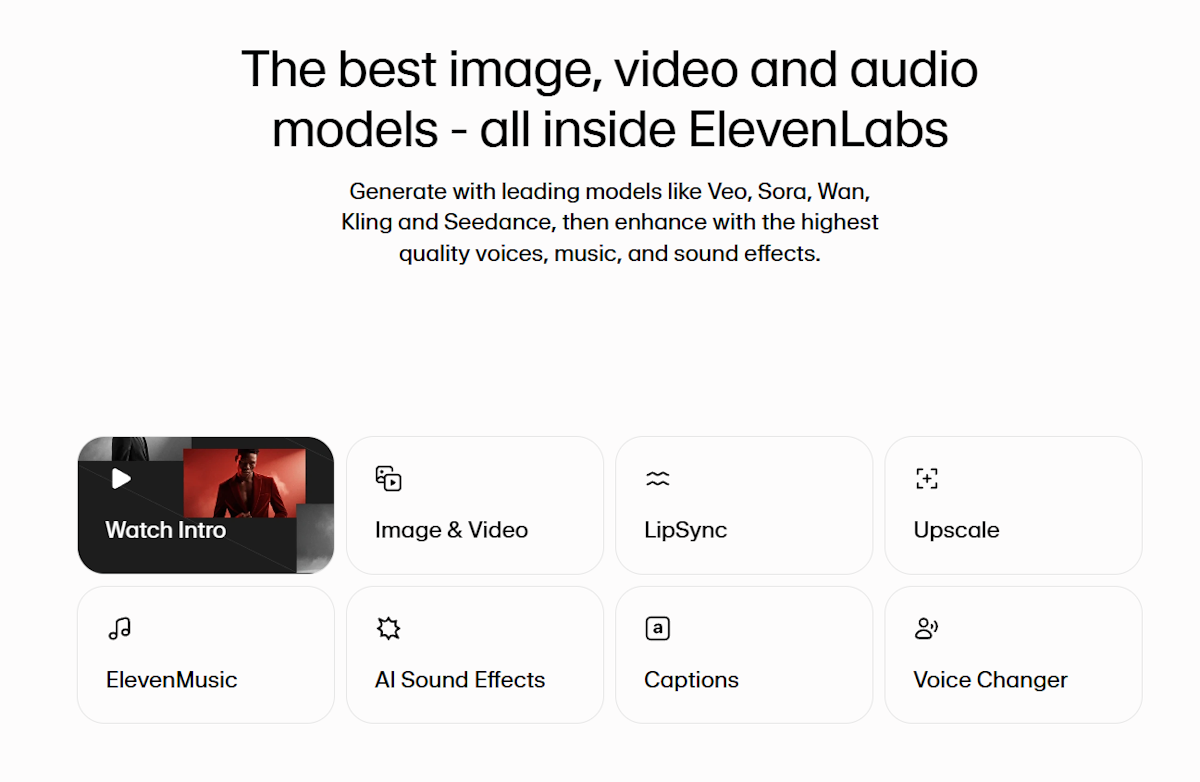
Strengths: Best-in-class voice quality; voice cloning; multilingual support
Weaknesses: Not designed for real-time or system-wide use; costs climb with volume
Price: Free tier (10k chars/month). Paid plans from $5/month.
3. Speechify — Best for Students
Speechify markets itself hard to students, and the pitch is legitimate. You can import PDFs, textbooks, web pages, and Google Docs, then listen at speeds up to 4.5× while following a word-highlighting overlay. For powering through assigned reading before an exam, that's a real time advantage.
The AI voices are solid — not ElevenLabs-level, but natural enough that you stop noticing them after a few minutes. The Chrome extension makes it easy to read any web page aloud without copy-pasting.
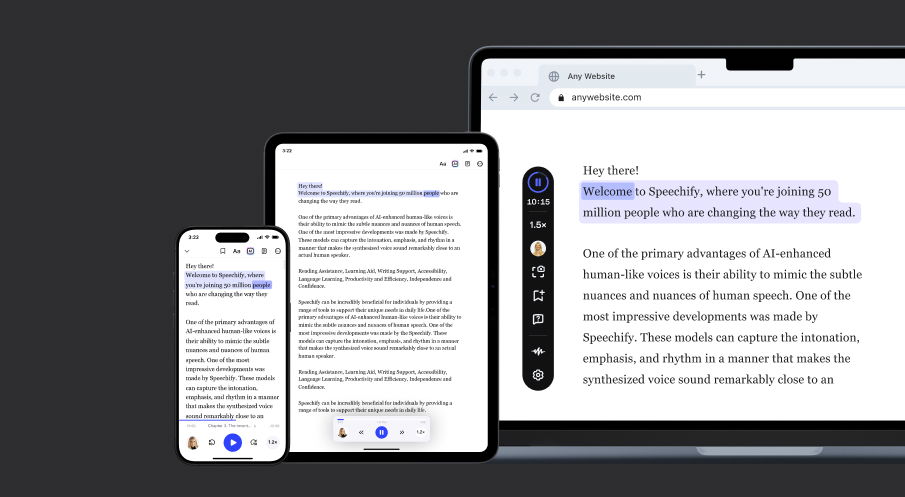
Strengths: Speed-reading mode; word highlighting; Chrome extension; wide import formats
Weaknesses: Premium is expensive ($139/year); some voices sound robotic at higher speeds
Price: Free tier with limited voices. Premium ~$139/year.
4. Murf — Best for Professional Narration
Murf is built for professional voiceover work — explainer videos, e-learning courses, product demos, corporate presentations. The interface looks like a proper audio production tool, with timeline editing, pitch and speed controls, and background music layering.
The voice library covers 120+ voices across 20 languages, all neural. You won't confuse them with ElevenLabs, but they're consistently professional and appropriate for commercial use.
Strengths: Production-quality interface; 120+ voices; team collaboration features
Weaknesses: Overkill for personal use; subscription only; no dictation capability
Price: Free (limited); paid plans from $19/month.
5. Microsoft Edge Read Aloud — Best Free Option
Already built into Microsoft Edge, this feature asks nothing of you — no account, no download, no subscription. Open any web page or PDF, right-click, and choose "Read aloud." The neural voices Microsoft has added in recent years are genuinely good, particularly the English options.
The catch: it's browser-bound. You can't use it outside Edge, and it won't read text from your desktop apps or clipboard. For quick web reading though, it's unbeatable at the price of zero dollars.
Strengths: Completely free; no setup; surprisingly natural voice quality
Weaknesses: Edge browser only; no system-wide capability; no export
Price: Free (built into Microsoft Edge).
6. Google Text-to-Speech — Best for Android
On Android, Google TTS is the backbone of most accessibility and read-aloud features. Google Assistant, TalkBack, and third-party apps all tap into it. The voices have improved steadily — WaveNet voices (Google's neural engine) sound noticeably more human than the older synthesized ones.
The limitation is that Google TTS operates as an under-the-hood service rather than a standalone app. You benefit from it without directly controlling it, which makes it great for accessibility settings but not a go-to for intentional listening sessions.
Strengths: Seamless Android integration; free; good language coverage
Weaknesses: Not a standalone app; limited user control; iOS doesn't have equivalent
Price: Free.
How NaturalReader Compares (Quick Comparison Table)
| Tool | Voice Quality | Price | Platforms | Offline | Dictation |
|---|---|---|---|---|---|
| NaturalReader | Good (mixed tiers) | Free / $9.99+/mo | Web, Mac, iOS, Android | Partial | No |
| AI Dictation | Very good (Whisper) | Free / ~$8/mo | Mac | Yes | Yes |
| ElevenLabs | Excellent | Free / $5+/mo | Web, API | No | No |
| Speechify | Good | Free / $11.58/mo | Web, iOS, Android, Chrome | No | No |
| Murf | Very good | Free / $19+/mo | Web | No | No |
| Edge Read Aloud | Good | Free | Edge browser | No | No |
| Google TTS | Good | Free | Android | Yes | No |
Which NaturalReader Alternative Is Right for You?
The honest answer depends on what NaturalReader is failing you on.
Student grinding through assigned reading? Speechify's speed mode and word highlighting are built specifically for that workflow. It's pricey year-over-year, but students who actually use it swear by it come exam season.
Accessibility user who needs voice support throughout the day? AI Dictation's system-wide reach means you're not stuck in one app. It also handles the other direction — when typing is hard, you can dictate instead. That bidirectional workflow is something NaturalReader can't touch.
Creating professional audio content? ElevenLabs for voice quality, Murf if you need a full production interface. Both leave NaturalReader's audio output sounding dated by comparison.
Just want free? Microsoft Edge's Read Aloud costs nothing and works better than most people expect. If you're only reading web content, you might not need anything else.
On Android? Google TTS is already there, powering accessibility features you might not have explored yet.
For most people looking to replace NaturalReader, the choice comes down to AI Dictation (if you want a complete voice workflow beyond just read-aloud) or Speechify (if listening is the only thing you need). Check out our deeper comparison of text-to-speech on Mac and read aloud browser extensions if you want to dig further into specific use cases.
If you're also thinking about the dictation side of the equation, our guide to best dictation software covers the full landscape.
Frequently Asked Questions
Is NaturalReader free?
NaturalReader has a free tier with limited characters per day and basic voices. Paid plans unlock neural AI voices and higher character limits — the "Plus" plan runs around $9.99/month. The free tier is fine for occasional use but frustrating for anyone reading regularly.
What is the best free alternative to NaturalReader?
Microsoft Edge's built-in Read Aloud is the best completely free option — no account, no install, decent voice quality. For more features including voice dictation, AI Dictation offers a free tier with system-wide voice input and output.
Does NaturalReader work offline?
NaturalReader's desktop app supports limited offline use, but the neural AI voices require an internet connection. If offline TTS is critical to you, check what your target app offers for local voice synthesis — some tools (including AI Dictation in certain modes) support offline operation.
Can I use AI Dictation instead of NaturalReader?
Yes — AI Dictation works system-wide across any app on Mac and supports both voice input (dictation) and text-to-speech output, making it a more complete voice workflow tool than NaturalReader. If you need read-aloud for long documents or PDFs, pair it with Speechify for the best of both.
What is the most realistic text-to-speech voice in 2026?
ElevenLabs and OpenAI TTS are in a different league right now — nothing else is close. For everyday productivity use, Speechify and AI Dictation are solid too; you won't be gritting your teeth through a robotic drone after ten minutes.
If you've been putting up with NaturalReader's limitations, most of the tools here are a clear step up. Download AI Dictation free and see whether having voice input and output in one place changes how you work.
Frequently Asked Questions
Is NaturalReader free?
NaturalReader has a free tier with limited characters per day and basic voices. Paid plans unlock neural AI voices and higher limits.
What is the best free alternative to NaturalReader?
Microsoft Edge's built-in Read Aloud is the best completely free option. For more features, AI Dictation offers a free tier with system-wide voice input and output.
Does NaturalReader work offline?
NaturalReader's desktop app supports some offline use, but neural voices require an internet connection. Tools like AI Dictation also support offline modes depending on your plan.
Can I use AI Dictation instead of NaturalReader?
Yes — AI Dictation works system-wide across any app and supports both voice input (dictation) and text-to-speech output, making it a more complete voice workflow tool than NaturalReader.
What is the most realistic text-to-speech voice in 2026?
ElevenLabs and OpenAI TTS produce the most natural-sounding AI voices currently available. For everyday use, Speechify and AI Dictation also offer high-quality neural voices.
Ready to try AI Dictation?
Experience fast voice-to-text on your device. Free to download.
Download FreeRelated Posts
7 Dyslexia Examples of Writing You Need to See
Explore 7 common dyslexia examples of writing, from letter reversals to phonetic spelling. Understand the signs and discover helpful accommodations.
Bullet Point Formatting: Master Your Lists
Master bullet point formatting. Learn parallel structure, punctuation, and accessibility for Markdown, HTML, and Word. Create clear, effective lists.
Text to Speech on Android: Built-In Tools, Apps & AI Voices (2026)
How to use text to speech on Android: Google's built-in Select to Speak, the best free and paid TTS apps, AI voices, and how to fine-tune speed and voices.