AI Transcription for Meetings: A Practical Guide
A client call ends, and the useful details start disappearing almost immediately. You remember the broad decision, but not the exact wording, the person who volunteered to handle the follow-up, or where someone mentioned a critical technical constraint. By the time you open your notebook, the page contains fragments rather than a reliable record.
AI transcription for meetings addresses that gap by turning spoken discussion into searchable text, then organizing it into a record people can use. The important decision isn't which tool has the longest feature list. It's where the audio is processed, how much accuracy the workflow requires, and what happens to the data after the meeting.
Table of Contents
- What AI Meeting Transcription Actually Does
- How the Audio Pipeline Turns Talk into Text
- On-Device vs Cloud Transcription
- Accuracy, WER, and Where Transcripts Break
- Core Features Worth Expecting
- Privacy, Consent, and Data Governance
- Adoption Workflow and Best Practices
What AI Meeting Transcription Actually Does
At its simplest, an AI meeting transcription tool listens to a conversation and produces a written record. That record usually includes timestamps, punctuation, paragraph breaks, and speaker labels. Many tools also create summaries, decisions, action items, and keyword indexes from the transcript.
The result is different from traditional voice dictation. Dictation usually serves one person speaking alone into a microphone. Meeting transcription must handle several voices, interruptions, room microphones, video-call compression, background noise, and people joining from different locations. The software isn't only converting words into text. It's trying to reconstruct the shape of a conversation.
The three jobs behind the transcript
A useful way to understand the category is to separate its work into three jobs:
- Capture: The system receives audio from a meeting platform, recording, laptop microphone, phone, or conference-room device.
- Structure: It turns an unbroken audio stream into sentences, paragraphs, timestamps, speaker turns, summaries, and tasks.
- Retrieval: It lets people search past discussions instead of relying on memory or asking someone to replay an entire recording.
That makes transcription a workflow layer, not merely a recording app. A recording preserves sound. A transcript makes the content easier to scan, quote, search, review, and share. A summary may reduce the reading burden further, but it still depends on the transcript being good enough to support the conclusion.
If you need guidance on capturing a Webex call before processing the audio, this resource on Webex recording for professionals provides useful background on the recording step.
The buyer's questions should follow the workflow. Does the audio stay on the device or travel to a cloud service? Does the system perform well with your microphones, accents, terminology, and number of speakers? Can administrators control retention, deletion, access, and consent? Those questions matter more than whether a product can generate a visually polished summary.
How the Audio Pipeline Turns Talk into Text
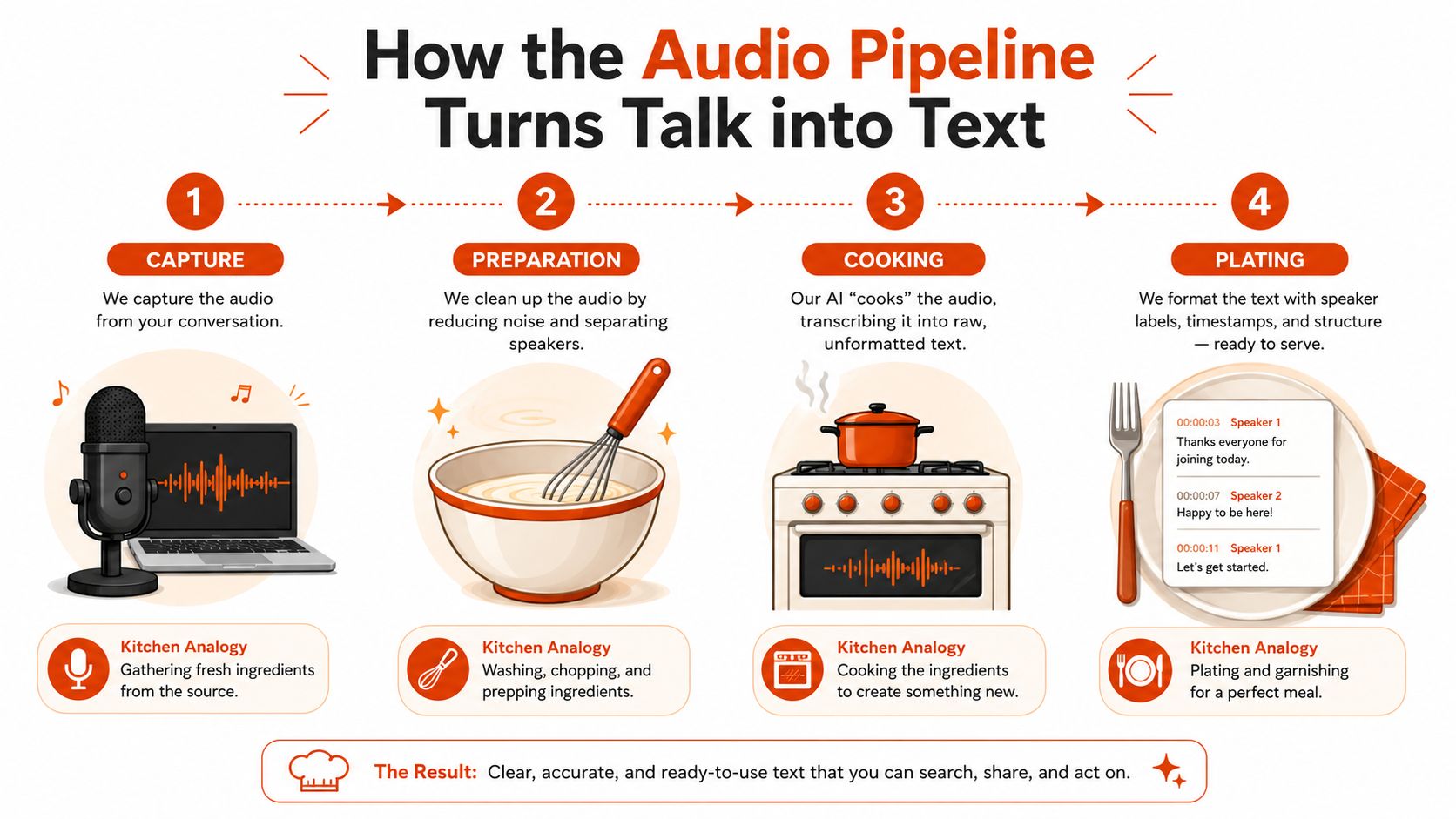
Think of transcription as a kitchen rather than a single magic button. Raw ingredients enter at one end, several preparation stages follow, and the final dish is only as good as the weakest step.
From raw audio to usable words
Capture is the first stage. A meeting application or room microphone creates an audio stream. The system needs enough signal to distinguish voices from the room, which is why microphone placement often matters as much as the transcription model.
Preparation follows. Noise suppression reduces hum and background sounds. Automatic gain control helps balance quiet and loud speakers. Beamforming can focus on sound arriving from a particular direction, while echo cancellation reduces the chance that loudspeaker output gets transcribed as another voice.
Cooking is the recognition stage. An acoustic model maps sound patterns to small language units, then a language model chooses likely words and punctuation. Context helps distinguish an ordinary word from a technical term, product name, acronym, or phrase that sounds similar. A meeting about software may contain terms such as kubectl or “Q3 ARR,” and a general model can struggle if it hasn't learned the organization's vocabulary.
Diarization runs alongside recognition. It estimates who spoke when, separating one participant's turn from another's. This process can fail even when the words themselves are mostly correct. A transcript that assigns a decision to the wrong person may be more damaging than one that contains a spelling mistake.

Serving the finished record
The final stage is presentation. Software attaches speaker labels, anchors passages to timestamps, creates a searchable document, and may derive a summary or action-item list. Some tools also connect the output to a calendar event, project workspace, customer record, or note-taking system.
Each stage introduces a possible failure point. A distant microphone can weaken the signal before recognition starts. Crosstalk can confuse both word recognition and speaker separation. Poor punctuation can change the apparent meaning of a sentence. That's why two tools can produce noticeably different transcripts from the same meeting, and why testing your actual meeting conditions is more useful than trusting a generic product demo.
On-Device vs Cloud Transcription
The central deployment choice is straightforward. On-device transcription processes audio on a laptop, phone, or conference appliance, while cloud transcription uploads the audio to a vendor's servers and returns the resulting text.
Neither approach wins every workflow. A cloud service may offer larger models, broader integrations, and easier administration. Local processing may offer stronger control over confidential audio and continued operation when a network connection isn't available.
| Dimension | On-Device | Cloud |
|---|---|---|
| Privacy | Audio can remain on the local device or controlled network | Audio is sent to the vendor's infrastructure |
| Latency | Can return text quickly and may work offline | Depends on upload speed, service availability, and processing |
| Accuracy | Depends heavily on local hardware and model design | Larger hosted models often handle difficult language more effectively |
| Cost | Shifts spending toward hardware, deployment, and local licenses | Commonly uses subscription, seat, usage, or processing fees |
| Integration reach | May offer fewer direct hooks into meeting platforms | Usually provides broader connections to Zoom, Meet, Teams, and business systems |
Where each model fits
On-device processing deserves serious consideration for legal discussions, healthcare conversations, executive meetings, and sensitive internal reviews. It can reduce the number of parties handling the audio, although local processing doesn't remove the need for consent, access controls, or a retention policy. A file saved on a laptop is still business data that someone must protect.
Cloud transcription tends to suit high-volume sales, recruiting, customer-success, and distributed meeting workflows where integrations matter. A service that joins a scheduled call, transcribes it automatically, and sends the result to a CRM can remove manual steps that local tools may leave to the user.
Accuracy also requires nuance. Hosted systems often have access to larger models and extensive training resources, so they may perform better on accents, overlapping speech, and uncommon terminology. Local models can still be practical when privacy, offline operation, predictable control, or data locality carries more weight than maximum recognition quality.
Decision rule: Choose the deployment model that matches the risk and repetition of the workflow, not the model that looks most impressive in a feature comparison.
Accuracy, WER, and Where Transcripts Break
A transcript needs a measurement that separates “sounds good in a demo” from “safe to use in a real process.” Word Error Rate, or WER, measures recognition mistakes against a reference transcript. Lower WER means fewer substitutions, deletions, and insertions, but the number alone doesn't tell you whether the wrong word affects a harmless aside or a binding commitment.
The microphone environment has a direct effect. Benchmarks report roughly 11% to 14% WER with close-talking microphones, compared with about 19% to 25% WER when one distant room microphone captures the discussion, according to research on on-device and cloud transcription in meeting conditions. Uncontrolled overlapping speech can exceed 35% WER in the same source, which makes a crowded conversation unsuitable for unreviewed verbatim use.
Speaker labeling has its own measure, Diarization Error Rate, or DER. Independent research materials cite diarization error rates of 11% to 13%, while also noting that performance falls in real-time, multi-speaker settings and with background noise, accents, multilingual discussion, and overlapping speech. The discussion of speech recognition in noisy environments is useful for understanding why the room, not only the model, shapes the result.
Conditions that deserve extra review
| Condition | Typical WER | Typical DER | Risk for Business Use |
|---|---|---|---|
| Close-talking microphone and clear speech | 11% to 14% | 11% to 13% cited in independent materials | Useful for retrieval, with important passages reviewed |
| Single distant room microphone | 19% to 25% | 11% to 13% cited in independent materials | Speaker attribution and exact wording need review |
| Uncontrolled overlapping speech | Can exceed 35% | Can increase as speakers overlap | Unsafe for unreviewed quotations, decisions, or billing |
Treat open offices, soft voices, code-switching, technical jargon, and cross-talk as test conditions, not edge cases. Run a short vendor trial using a representative recording, several participants, and your own company terms. Compare names, numbers, decisions, and speaker labels manually. Confidence scores can help you find passages to inspect, but they aren't proof that the text is correct.
The practical rule is simple: use the transcript for retrieval, navigation, and draft summaries. Verify the original audio before quoting someone, recording a formal decision, assigning responsibility, or billing time.
Core Features Worth Expecting
A useful meeting transcription tool should reduce work after the call, not just display text. Start with the features that support the full path from live conversation to reliable follow-up.
Features that support participation and review
Live captions display speech during the meeting. They can help participants follow a fast discussion, support accessibility, and give people a text reference when audio quality varies. Captions still need the same caution as a transcript, especially when speakers talk over one another.
Post-meeting transcripts should include timestamps that take you directly to the relevant audio. A paragraph without a time marker forces a reviewer to search manually. Speaker labels should be editable because automated diarization can confuse participants with similar voices or poor microphone separation.
Search turns an archive into institutional memory. A product manager can find every discussion of a feature name, a recruiter can locate a candidate's stated preference, and an engineer can revisit the exact meeting where a design constraint was discussed. Search is often more valuable than a visually impressive summary because it lets the reader inspect the surrounding context.
Summaries and action items can speed up handoffs, but they're drafts. An extracted task may omit a deadline, assign responsibility to the wrong person, or turn a suggestion into a commitment. Keep a human review step for consequential work.

Features that determine adoption
Integrations with calendars, Zoom, Microsoft Teams, Google Meet, Notion, Obsidian, CRMs, and task systems can make transcription nearly invisible to users. The strongest integration is the one that removes an extra upload, copy, or reminder while preserving access and retention controls.
Sentiment analysis often looks compelling in a product tour, but meeting tone is difficult to interpret reliably across cultures, roles, sarcasm, and disagreement. Automatic action-item extraction has a similar limitation. It can provide a helpful first draft, but it shouldn't become the system of record without review.
Teams comparing products for management workflows may also find this guide to the best AI note taker for managers useful. For a broader software comparison, see meeting transcription software options.
Buying heuristic: If a feature doesn't save a real person meaningful weekly work, improve access, or reduce a known error, treat it as decoration rather than a reason to subscribe.
Privacy, Consent, and Data Governance
A transcript is a durable record of what people said. That makes privacy and governance part of the product decision, not a policy note added after procurement. Recording or transcribing a meeting captures every participant's voice, and people may not realize that a bot, browser extension, or conference-room appliance is creating a copy.
Consent requirements vary by jurisdiction. Some places permit recording with one participant's consent, while others require consent from everyone involved. A company should ask for permission clearly before transcription begins, explain what will be captured, and provide a practical alternative for participants who don't agree.
Cloud processing adds more questions. Ask whether the provider uses customer audio or transcripts for model training, whether human reviewers can access samples, which subprocessors handle the data, and where cross-border transfers occur. On-device processing can keep audio off vendor servers, but it doesn't automatically solve local access, endpoint security, accidental sharing, or retention.
A self-audit before approval
Use these questions with every vendor and internal owner:
- Location: Where is the audio processed and stored?
- Access: Which employees, administrators, subprocessors, or reviewers can see it?
- Retention: How long do recordings, transcripts, summaries, and backups remain available?
- Deletion: Can the organization delete data on request, including derived outputs?
- Training: Is customer content used to train or improve models?
- Exit: What happens to the data when the contract ends?
- Sector controls: Can the configuration support legal privilege, healthcare confidentiality, or financial-services obligations?
Legal teams should consider privilege and discovery implications. Healthcare teams need to assess whether conversations contain protected information. Financial-services teams may need controls for records, access, and regulated communications. Guidance from Littler on AI transcription and note-taking technologies highlights risks involving privacy law, privilege, retention, access, and inconsistent records.
Governance principle: Pick the privacy boundary first. Then decide whether the available accuracy and integrations meet the workflow.
Adoption Workflow and Best Practices
A controlled rollout gives teams time to discover problems before transcripts become part of formal operations. Start with one team and a narrow set of meeting types rather than enabling every calendar automatically.
A four-phase rollout
Pilot phase: Run a two-week trial with one team. Select meetings that represent ordinary working conditions, document microphone setups, and collect feedback on recognition, speaker labels, summaries, search, and consent.
Define success: Create an accuracy baseline using representative recordings. Track practical outcomes such as whether participants can find decisions, confirm owners, and prepare follow-ups without replaying the entire meeting. Include a privacy review before expanding access.
Expansion: Add two more teams with different meeting styles. A sales call, an engineering review, and an executive discussion expose different weaknesses. Use an integration checklist for calendars, meeting platforms, storage, permissions, and deletion.
Standardization: Publish a written policy covering approved tools, consent language, retention, access, review responsibilities, and prohibited meeting types. Train users to treat generated summaries and action items as drafts, not unquestionable records.
For Zoom-specific workflows, this guide to Zoom meeting transcription can help teams think through capture and follow-up requirements.

The Monday morning checklist
- Choose the boundary: Decide which meetings may be transcribed and which must remain unrecorded.
- Choose the processing model: Compare on-device and cloud handling against the sensitivity of each meeting type.
- Announce clearly: Tell participants before capture starts and ask for verbal consent.
- Assign ownership: Name a note-taker or meeting owner who verifies decisions and action items.
- Set retention: Define how long audio, transcripts, summaries, and exports remain available.
- Review regularly: Recheck accuracy, permissions, vendor terms, and deletion behavior during the pilot and after rollout.
- Keep an alternative: Provide a manual note-taking path when someone declines or the meeting is too sensitive.
AIDictation offers meeting recording and transcription from uploaded audio or video, along with local and cloud processing modes for different privacy and editing needs. Visit AIDictation to evaluate whether its workflow fits your meeting capture, transcript review, and follow-up process.
Frequently Asked Questions
What does AI Transcription for Meetings: A Practical Guide cover?
A client call ends, and the useful details start disappearing almost immediately. You remember the broad decision, but not the exact wording, the person who volunteered to handle the follow-up, or where someone mentioned a critical technical constraint.
Who should read AI Transcription for Meetings: A Practical Guide?
AI Transcription for Meetings: A Practical Guide is most useful for readers who want clear, practical guidance and a faster path to the main takeaways without guessing what matters most.
What are the main takeaways from AI Transcription for Meetings: A Practical Guide?
Key topics include Table of Contents, What AI Meeting Transcription Actually Does, The three jobs behind the transcript.
Ready to try AI Dictation?
Experience fast voice-to-text on your device. Free to download.
Download FreeRelated Posts
10 Team Collaboration Tools for Every Workflow
Compare 10 team collaboration tools by team size, workflow, integrations, security, pricing, and use case—including AIDictation for meeting notes.
Meeting Transcription and Summary Workflow That Works
A practical meeting transcription and summary workflow covering capture, cleanup, action items, templates, and privacy settings.
Audio & Video Transcription Powered by AI: A Practical Guide
Learn how audio & video transcription powered by AI works, what affects accuracy, and how to pick the right workflow for interviews, lectures, and meetings.