Meeting Recording and Transcription Guide
A clean, close-talk recording can still produce a word error rate near 12%, while far-field audio from a single room microphone can exceed 35% in the AMI meeting corpus. The figures show why a powerful speech model cannot compensate for poor capture. Microphone placement, overlapping voices, speaker identification, and human review all affect whether meeting transcripts are reliable.
A transcript is a working record, not proof of what each person said or agreed to. Set up recording and consent procedures before the meeting. Then verify names, decisions, and action items before using machine-generated text as minutes or instructions. A consent notice should account for the jurisdictions and participants involved.
Table of Contents
- Why Meeting Recording and Transcription Accuracy Varies So Much
- Setting Up Audio Capture for Reliable Transcripts
- Building the Transcription Pipeline from Audio to Reviewed Notes
- Measuring Transcript Quality Instead of Trusting a Single Accuracy Claim
- Handling Consent, Privacy, and HIPAA Requirements
- Choosing the Right Recording and Transcription Tool
- Your Next Steps for Better Meeting Records
Why Meeting Recording and Transcription Accuracy Varies So Much
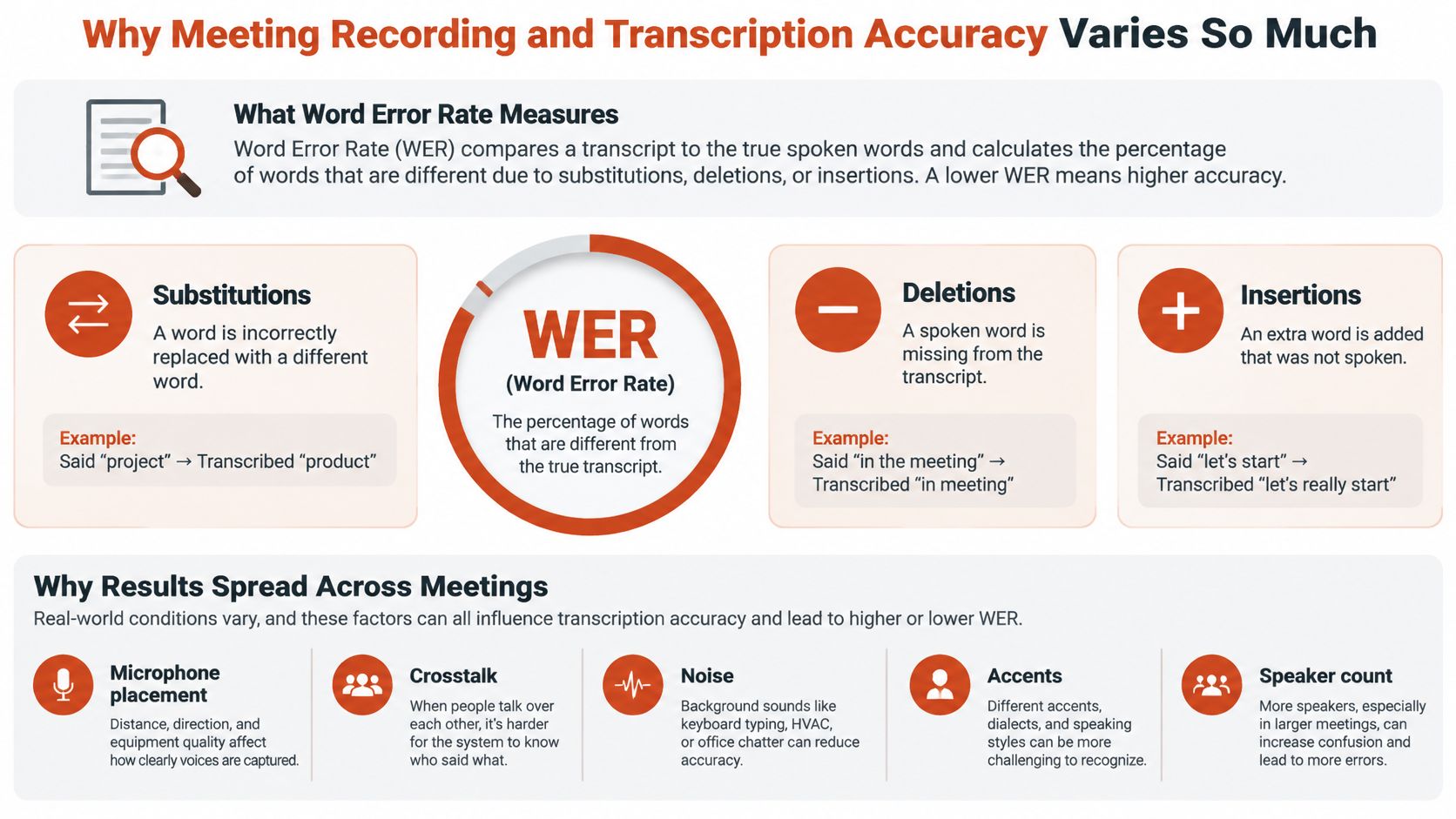
Word error rate (WER) counts words that a transcription system substitutes, deletes, or inserts. A lower score is better, but WER alone cannot show whether a system handles interruptions, distant speakers, unfamiliar names, or technical language. Those conditions shape how useful the transcript is in practice.
A 2023 peer-reviewed pilot study across 65 recorded interviews reported median WERs of 8.9% for Amazon Transcribe, 14.8% for OpenAI Whisper, and 19.2% for Zoom's Otter-based live transcription. Professional human transcription had a median WER of 7.6% in the same comparison. These figures show that automated transcription can approach human performance under some conditions. They do not predict results for every meeting.
The room changes the result
The AMI meeting corpus shows a substantial gap between close-talk and far-field recordings: close-talk audio sits near 12% WER, while audio from a single room microphone exceeds 35% WER, as noted earlier. A microphone near the speaker captures clearer speech. Distance adds reverberation, background noise, and competing voices, which can obscure words even for a capable recognizer.
Crosstalk, accents, speaker changes, and interruptions create other failure points. A system might produce a fluent sentence while dropping a negation, altering a name, or merging two speakers' words. The result can sound convincing yet misstate a decision or attribute it to the wrong person.
Practical rule: Accuracy depends on the recording setup and the task, not on a permanent score attached to a tool.
Treat recording architecture and review as linked controls. Better models cannot repair every problem in captured audio, and a clean-looking transcript still needs human checks where a mistaken word or speaker attribution could change what someone does next.
Setting Up Audio Capture for Reliable Transcripts
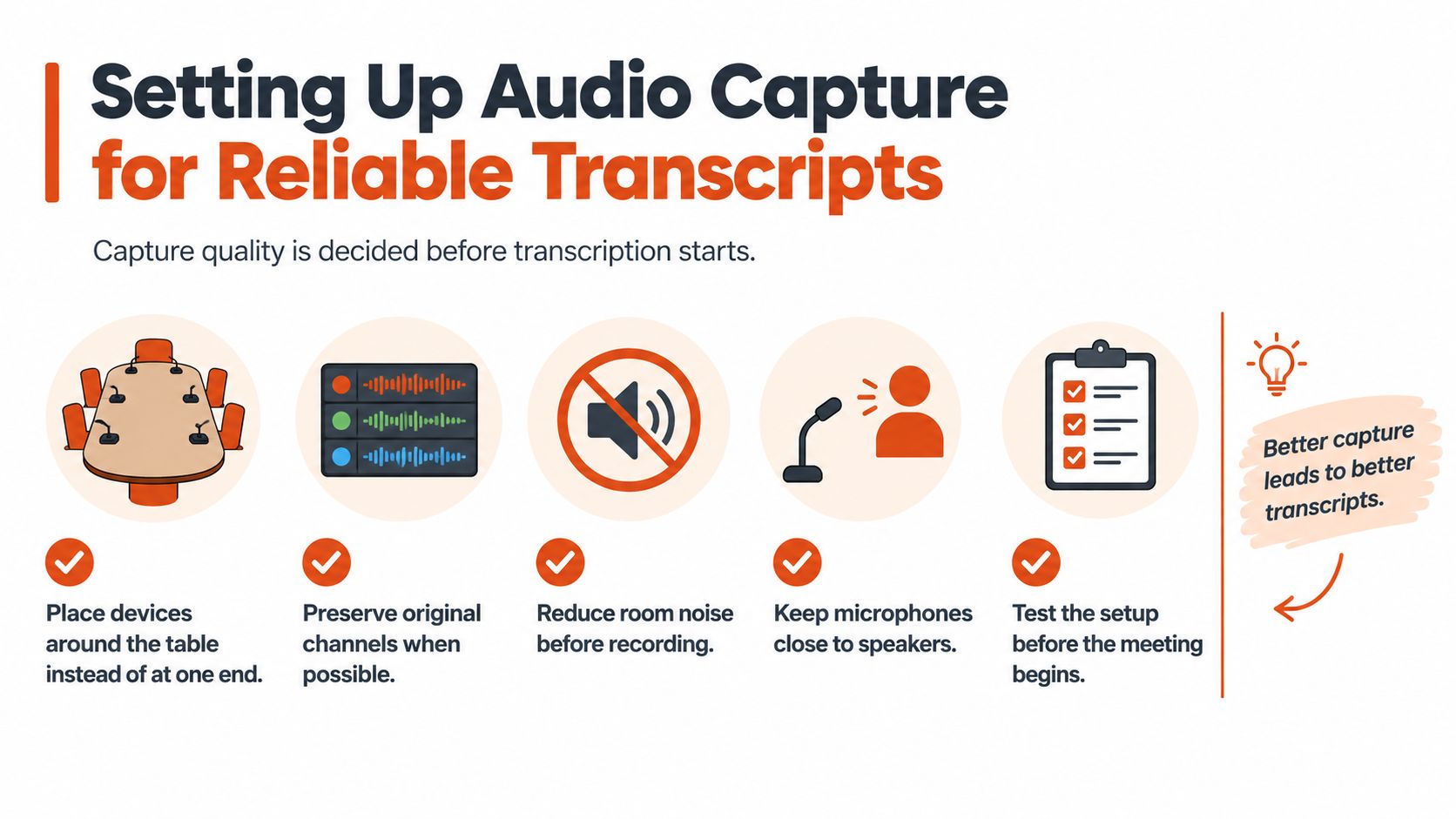
Transcription quality starts before a model processes the recording. A single device at one end of a table often captures some speakers clearly and others as distant, reverberant voices. Put recording devices around the table where practical, and keep microphones close to the people speaking instead of relying on a laptop microphone from across the room.
Capture clean, aligned audio
When a meeting uses more than one recording device, preserve the original channels where possible. Separate recordings can retain spatial and speaker information that may be lost when audio is mixed down. Keep timestamps aligned, use consistent microphone gain, and avoid placing a microphone behind a laptop display, where the screen can obstruct sound.
A meeting-transcription experiment using seven asynchronous laptop and mobile-phone streams reported 22.3% WER and 26.7% speaker-attributed WER with a staged pipeline. Relative to a single-device baseline, adding microphones improved speaker-attributed accuracy by 14.8% with three devices, 20.3% with five, and 22.4% with seven. The results are specific to that experiment, but they illustrate why better capture and synchronization can matter as much as model choice. (Multi-device meeting transcription experiment)
If you're choosing equipment or improving a setup, this guide to microphones for speech can help you think through the trade-offs between proximity, placement, and the room you need to record.
Make the setup repeatable
Before recording, do a quick check rather than discovering a dead battery, blocked microphone, or noisy room in the transcript. Reduce avoidable background noise, listen to a short test recording, and confirm that each device is capturing the intended speakers.
- Place devices around the table: Don't leave everyone's voices to one distant microphone.
- Preserve the original channels: Keep separate audio tracks when the setup supports them.
- Reduce room noise: Close nearby doors or pause noisy equipment where practical.
- Check distance and obstruction: Keep microphones near speakers and clear of screens or other barriers.
- Test before the meeting: Confirm sound levels and that recordings have usable timestamps.
Better microphones can't remove every interruption or fix a badly placed device after the fact. But a reliable capture routine gives the transcription pipeline better material to work with.
Building the Transcription Pipeline from Audio to Reviewed Notes
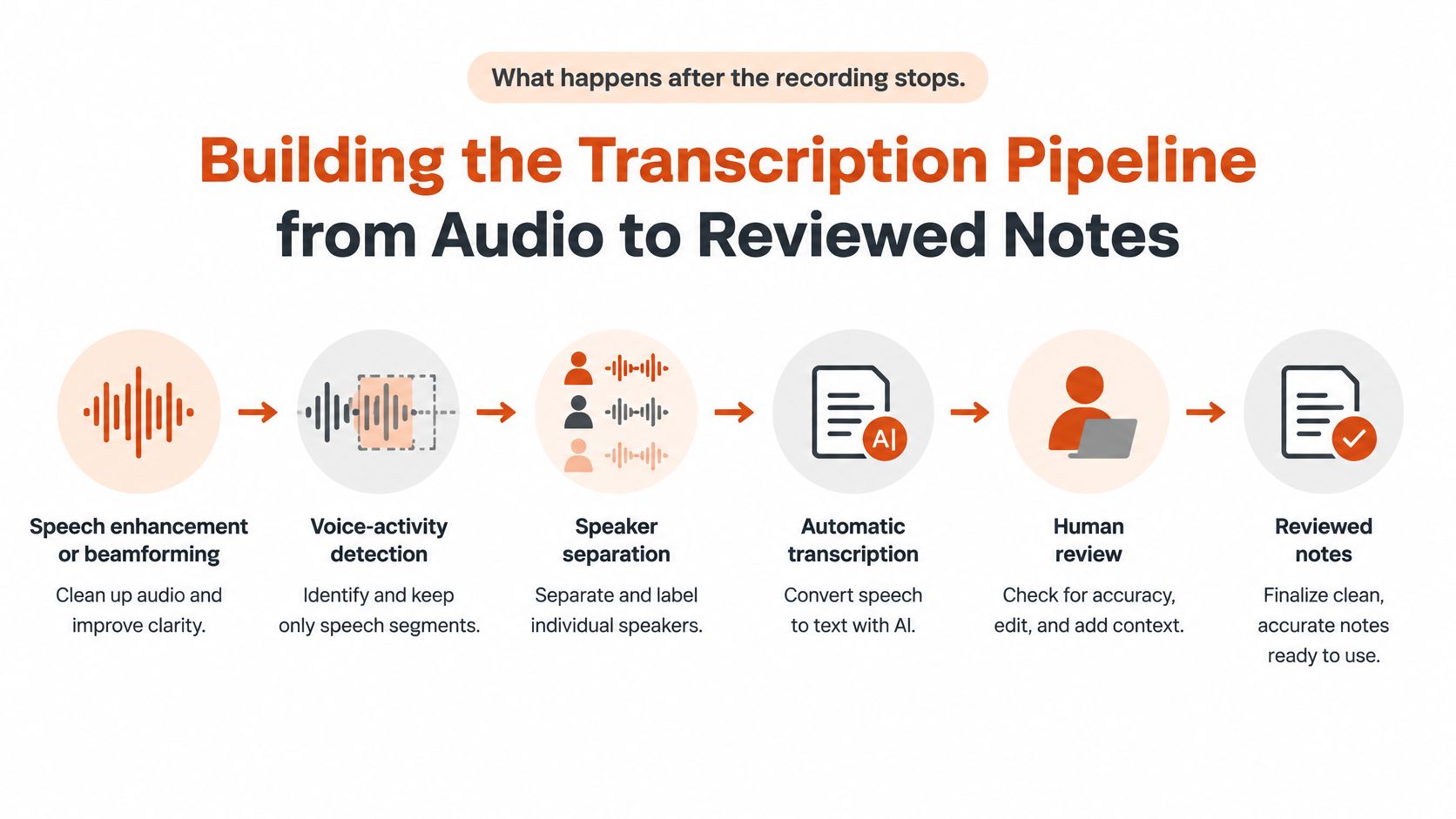
A reliable transcript comes from a sequence of stages, not one speech-to-text pass. Each stage addresses a different problem. If a system confuses room noise with speech or merges two people into one speaker, later steps inherit those errors.
Process audio before assigning words
Start with speech enhancement or beamforming when the recording setup supports it. These techniques aim to make speech clearer against competing sound. Voice-activity detection then identifies speech segments, which helps avoid treating silence or background noise as spoken words.
Next, estimate how many speakers are present and perform diarization, the process of dividing speech into speaker turns. Automatic speech recognition can then transcribe those turns and attribute text to speakers. This order matters: a system can recognize the words reasonably well and still make the record misleading if it assigns a decision to the wrong participant.
A speaker-attributed ASR approach evaluated on the AMI and LibriCSS meeting corpora reported an average diarization error rate (DER) of 8.4% when it estimated the number of speakers. Several alternative diarization systems reported 16.0%–22.6% DER, while the approach reached 7.9% DER when the speaker count was known. These are benchmark results, not guarantees for an office meeting with crosstalk, accents, remote participants, or short interruptions. (Speaker-attributed ASR and diarization results)
Review what can change an outcome
Ask participants to identify themselves early, especially if the system needs examples to anchor speaker labels. Then review the transcript where a mistake could affect follow-up or responsibility: names, numbers, negations, action owners, deadlines, and decisions. Don't assume a clean-looking label proves who spoke when people interrupt or talk at the same time.
The review doesn't need to turn into a complete manual retyping job. Focus on high-impact passages and listen to the corresponding audio when wording or attribution is unclear. A practical transcription-editing workflow can help structure cleanup around the transcript's intended use.
The output should distinguish machine-generated text from human-verified notes. That makes it easier for someone reading later to tell which details were checked and which still need confirmation.
Measuring Transcript Quality Instead of Trusting a Single Accuracy Claim
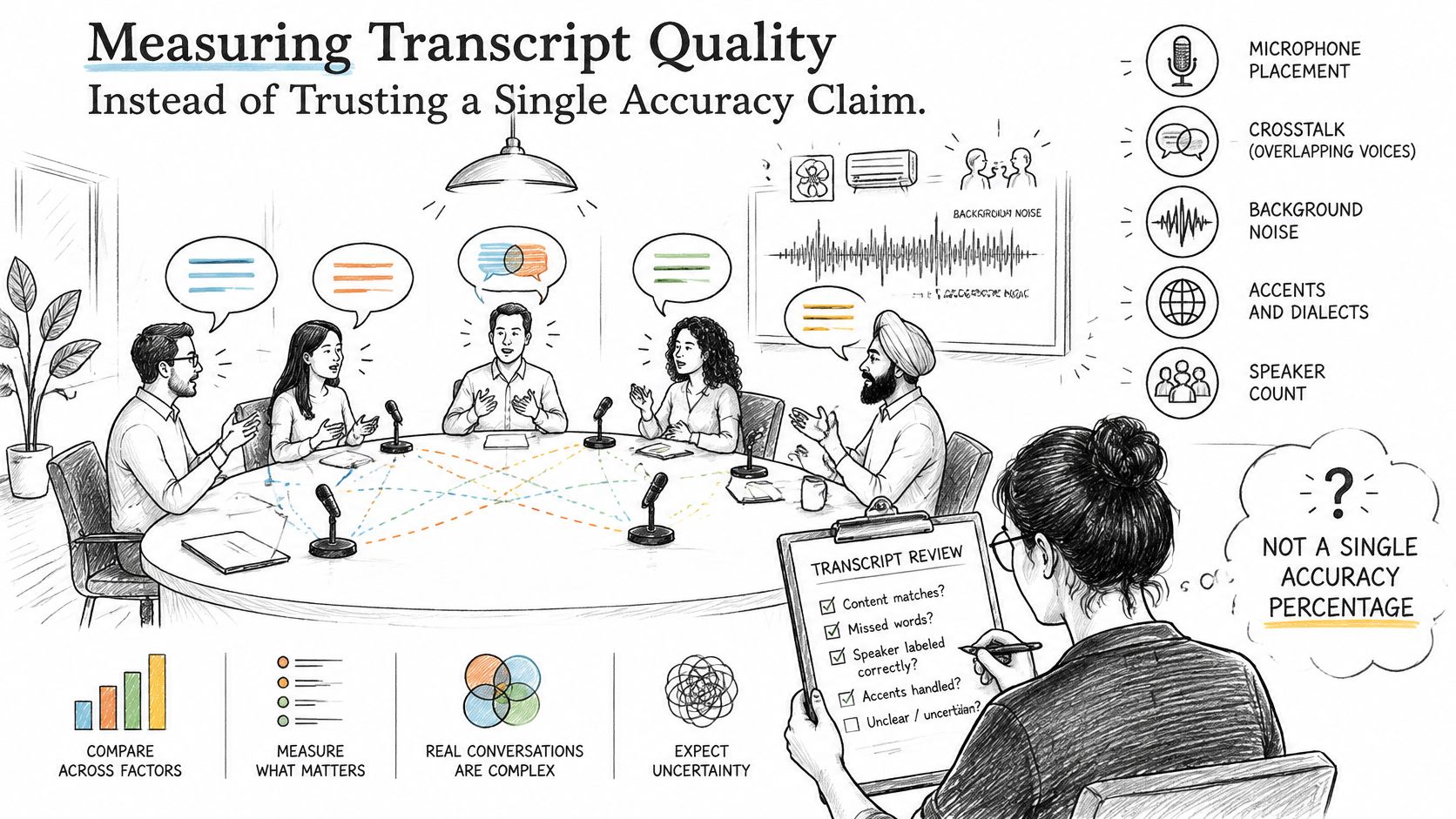
A single accuracy percentage doesn't describe how a system performs in every room or with every kind of meeting. Microphone placement, noise, crosstalk, accents, and speaker count can all change the result. Research summarized in a 2025 conference paper identifies heavy background noise, overlapping speech, diverse accents, and multi-speaker organizational meetings as challenges for neural transcription models. (Conference-paper discussion of real-world transcription challenges)
Track words and speaker attribution separately
WER measures lexical errors: substituted, deleted, or inserted words. DER measures speaker-diarization errors, including missed speech, false alarms, and speech assigned to the wrong person. These metrics answer different questions. A transcript can have readable text but still attribute an important commitment to the wrong participant.
Test tools using representative recordings, not only clean speech from one person. Include the conditions that matter for your meetings, such as a hybrid room, unfamiliar names, interruptions, or background noise. Use the results to set expectations for each meeting type instead of applying one overall score to every situation.
Make uncertainty visible
When the system is unsure, don't turn uncertain text into a confident record. Mark unclear passages, preserve a way to jump back to the relevant audio, and prioritize review of information that could change care, implementation, ownership, or timing.
- Verify specialized terms: Check medication names, code identifiers, technical vocabulary, and unfamiliar proper nouns.
- Check figures and negations: Confirm numbers and words such as “not” against the audio when the meaning matters.
- Inspect speaker labels: Treat diarization as a useful signal, not proof of authorship during interruptions or overlap.
- Keep a review trail: Distinguish passages checked by a person from text that remains machine-generated.
Better models help, but they can't repair sound that never reached the microphone clearly. Recording architecture, placement, and noise control can matter as much as the recognizer, so measure both the words and the speaker assignments.
Handling Consent, Privacy, and HIPAA Requirements
Before recording, determine who may be captured, what the transcript will be used for, and which rules apply to each participant's location. Consent is part of the recording architecture, not a setting to check after the meeting. A technically accurate transcript can still be inappropriate to retain or share.
In the United States, federal law generally permits one-party consent, while some states require consent from all parties for certain private conversations. California, Florida, Illinois, Maryland, Massachusetts, Pennsylvania, and Washington are among the jurisdictions commonly identified in that category. Voice recordings and transcripts may also count as personal data under the GDPR and CCPA/CPRA, bringing requirements related to notice, purpose, access, and retention. (Recording, consent, and privacy considerations)
Match the workflow to the meeting
A routine team discussion, a clinical encounter, and a public-sector meeting may require different access and retention controls. In healthcare, tell participants when recording may occur. Recordings containing identifiable protected health information need appropriate authorization and controls when used outside treatment, payment, or healthcare operations.
For public-sector meetings, machine-generated notes may still fall under public-records disclosure rules and retention and disposal schedules. Maryland government guidance specifically warns that AI-generated meeting records can be subject to those requirements. (Maryland public-records guidance)
| Context | Consent requirement | Key obligation |
|---|---|---|
| Internal team meeting | Follow the rules that apply to participants and location | Explain recording, restrict access, and set a retention period |
| Meeting with people in multiple jurisdictions | Account for applicable local consent rules | Plan for late joiners, notice, and opt-outs |
| Healthcare meeting involving identifiable protected health information | Inform participants; use appropriate authorization and controls when required | Limit access and handle recordings according to the meeting's permitted purpose |
| Public-sector meeting | Apply applicable recording and disclosure rules | Follow public-records retention and disposal schedules |
| Meeting involving personal data under GDPR or CCPA/CPRA | Provide relevant notice and meet applicable requirements | Define purpose, access, and retention |
Build a notice and deletion routine
Set the notice before the call: identify who is recording, why, who can access the record, and how long it will be kept. Include the information in the invitation, announce it verbally, and use a visible recording indicator where available. Repeat the notice when late joiners arrive. Give participants a clear way to raise concerns or opt out where appropriate.
Then document any sensitive-topic exclusions, restrict access to audio and transcripts, and define deletion steps. Verify that deletion occurs when the retention period ends. State whether audio may be used for model training, and record only when there is a clear purpose. Use data security practices for handling sensitive information to shape internal controls.
Choosing the Right Recording and Transcription Tool
Pick the tool category based on the meeting and the data, not on a single headline accuracy claim. Browser speech-to-text is convenient for short, straightforward capture, but it may offer less control over room audio and later cleanup. Cloud meeting assistants can connect transcription to meeting workflows, but their cloud processing and storage arrangements need to fit your organization's privacy and retention requirements. On-device dictation reduces network dependence, though it doesn't automatically solve speaker separation in a room full of people.
| Tool category | Often useful for | Main trade-off |
|---|---|---|
| Browser speech-to-text | Short dictation and quick text entry | Convenient, but less suited to complex multi-speaker recordings |
| Cloud meeting assistant | Online meetings and integrated notes | Convenient processing and workflow features, with cloud data handling to assess |
| On-device dictation app | Private or offline speech capture | Lower network dependence, but meeting audio still needs suitable capture and review |
Match the processing to the risk
For one-on-one dictation, proximity and a focused speaker can make a lightweight workflow practical. For hybrid meetings, test how the tool handles the mix of room and remote audio. For multilingual interviews or clinical conversations, plan for human verification of names, specialized vocabulary, speaker labels, and consequential details.
AIDictation offers meeting recording and transcription alongside tools for voice memos and podcasts. Its Local Mode runs transcription on-device, supporting offline dictation and keeping sensitive audio on the user's machine; Cloud Mode adds AI cleanup, formatting, and context-aware writing help. That gives users a choice between lower network dependence and cloud-assisted cleanup, but neither option removes the need to review important meeting content.
For call workflows that involve a broader platform decision, this comparison of Aircall alternatives for call workflows offers related context. Treat call recording and meeting transcription as connected but distinct decisions: the right choice depends on the audio being captured, the sensitivity of the content, and what the finished record will be used for.
Your Next Steps for Better Meeting Records
Use a routine you can repeat. Before your next meeting, make these checks part of the invitation, room setup, and follow-up process:
- Place devices deliberately. Put microphones near the people speaking and around the table when practical.
- Confirm notice and consent. Check the rules that apply, notify participants before recording, and address late joiners.
- Anchor speaker labels. Ask participants to identify themselves early, especially in meetings with unfamiliar voices.
- Run the transcript pipeline. Preserve useful audio channels and use speech processing, diarization, and transcription where available.
- Review consequential details. Verify names, numbers, negations, decisions, deadlines, and action owners before sharing notes.
The principles are straightforward: capture quality has a greater effect than a model name alone, and consequential records need human review. Don't publish a transcript as settled minutes, clinical documentation, or an implementation decision until someone has checked the details that matter.
AIDictation's free trial includes meeting recording and transcription, unlimited use of small voice models, custom prompt control, and email support from a person within 24 hours. Its Pro plan costs $84.99 per year, billed annually, and includes unlimited dictation, translation to English, transcription of audio and video files, and priority support.
Test one real meeting against your own notes. The objective isn't a perfect transcript. It's a reliable record that makes follow-up clearer and helps people act on what was agreed.
Try AIDictation to record and transcribe a meeting, then review the resulting text against the audio before sharing decisions or action items. Its meeting transcription and local processing options can help you build a workflow that balances useful cleanup with control over where sensitive audio is handled.
Frequently Asked Questions
What does Meeting Recording and Transcription Guide cover?
A clean, close-talk recording can still produce a word error rate near 12%, while far-field audio from a single room microphone can exceed 35% in the AMI meeting corpus. The figures show why a powerful speech model cannot compensate for poor capture.
Who should read Meeting Recording and Transcription Guide?
Meeting Recording and Transcription Guide is most useful for readers who want clear, practical guidance and a faster path to the main takeaways without guessing what matters most.
What are the main takeaways from Meeting Recording and Transcription Guide?
Key topics include Table of Contents, Why Meeting Recording and Transcription Accuracy Varies So Much, The room changes the result.
Ready to try AI Dictation?
Experience fast voice-to-text on your device. Free to download.
Download FreeRelated Posts
10 Team Collaboration Tools for Every Workflow
Compare 10 team collaboration tools by team size, workflow, integrations, security, pricing, and use case—including AIDictation for meeting notes.
Meeting Transcription and Summary Workflow That Works
A practical meeting transcription and summary workflow covering capture, cleanup, action items, templates, and privacy settings.
Transcribing Audio Files: A Practical Workflow That Works
Learn a practical workflow for transcribing audio files, from prep and engine choice to cleanup, timestamps, and HIPAA-ready privacy.