Verbal Ink Transcription Workflows Today
The popular advice is simple: dictate faster, let software clean up the words, and move on. That advice confuses speech capture with finished documentation. In clinical, legal, technical, and multilingual work, the expensive part often begins after the draft appears, when someone must verify names, medications, measurements, speaker attribution, formatting, and missing context.
Modern verbal ink transcription works best as an assisted pipeline, not an autonomous text generator. The practical question isn't only how quickly a system produces words. It's whether the workflow makes uncertainty visible, preserves the source audio, supports domain vocabulary, and gives a qualified person enough control to approve the final record.
Table of Contents
- The Evolution of Verbal Ink Transcription
- Understanding Real-World Accuracy Benchmarks
- Comparing AI Dictation to Traditional Workflows
- Building a Reliable Verification Pipeline
- When Hands-Free Transcription Is Inappropriate
- Choosing the Right Processing Environment
The Evolution of Verbal Ink Transcription
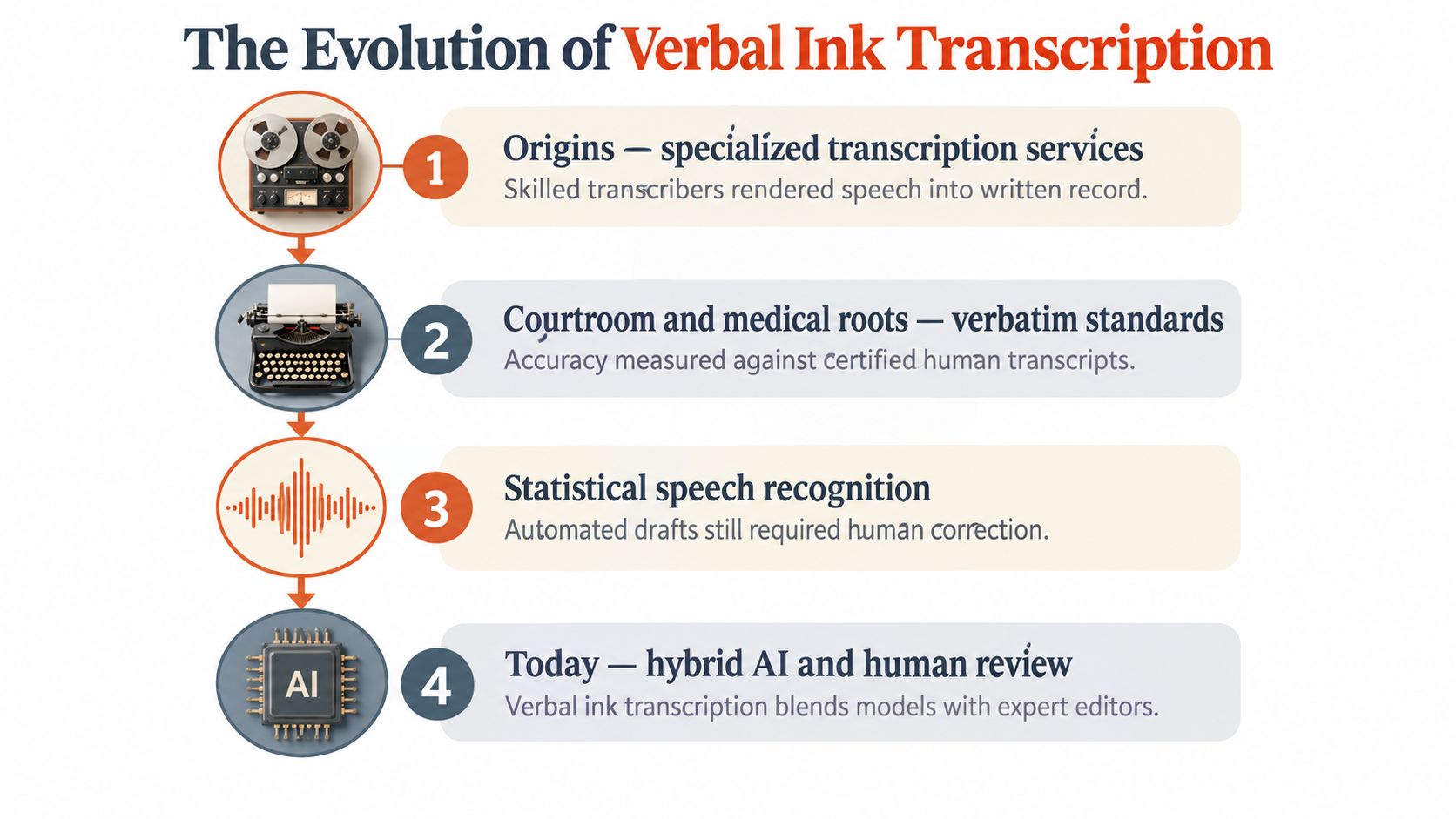
Before speech-recognition engines became ordinary software features, transcription was a specialized human service. Verbal Ink began in 2003 under the name Escriptionist and later became Verbal Ink. In December 2016, Ubiqus acquired the company, connecting a focused transcription brand with an international language-services provider. The history is documented in this account of Verbal Ink's origins and acquisition.
That timeline matters because “verbal ink transcription” originally described a service model, not a single recognition engine. A recorded interview, courtroom proceeding, medical dictation, or meeting went to skilled transcribers who listened, typed, formatted, and resolved ambiguity through context or client instructions. The output was searchable text, but the value came from the complete workflow, including judgment.
From human rendering to machine drafts
Today, automatic speech recognition can create a first draft almost immediately. That changes the economics of capture, but it doesn't remove the difficult questions. Was a speaker saying a drug name, a dosage, or a similar-sounding ordinary word? Did two people overlap? Should a hesitation remain in a legal transcript, or should it be removed from a polished internal note?
The old service model and the modern AI model therefore share a core requirement: someone must determine whether the written record reflects the source accurately enough for its purpose. AI shifts where the work happens. Instead of typing every word, a reviewer may correct selected passages, inspect low-confidence segments, restore punctuation, identify speakers, and approve sensitive entities.
For small healthcare teams, a practical overview of transcription support for small practices can help clarify where outsourced review still fits alongside dictation software. The right choice depends on volume, privacy requirements, turnaround expectations, and the consequences of an error.
Teams evaluating the category should also distinguish audio transcription from live text entry. A useful explanation of what audio transcription involves provides that conceptual foundation. Whether the input arrives from a microphone, a meeting recording, or a legacy audio file, the reliable unit is not “audio in, perfect text out.” It's capture, recognition, correction, formatting, and release.
Understanding Real-World Accuracy Benchmarks
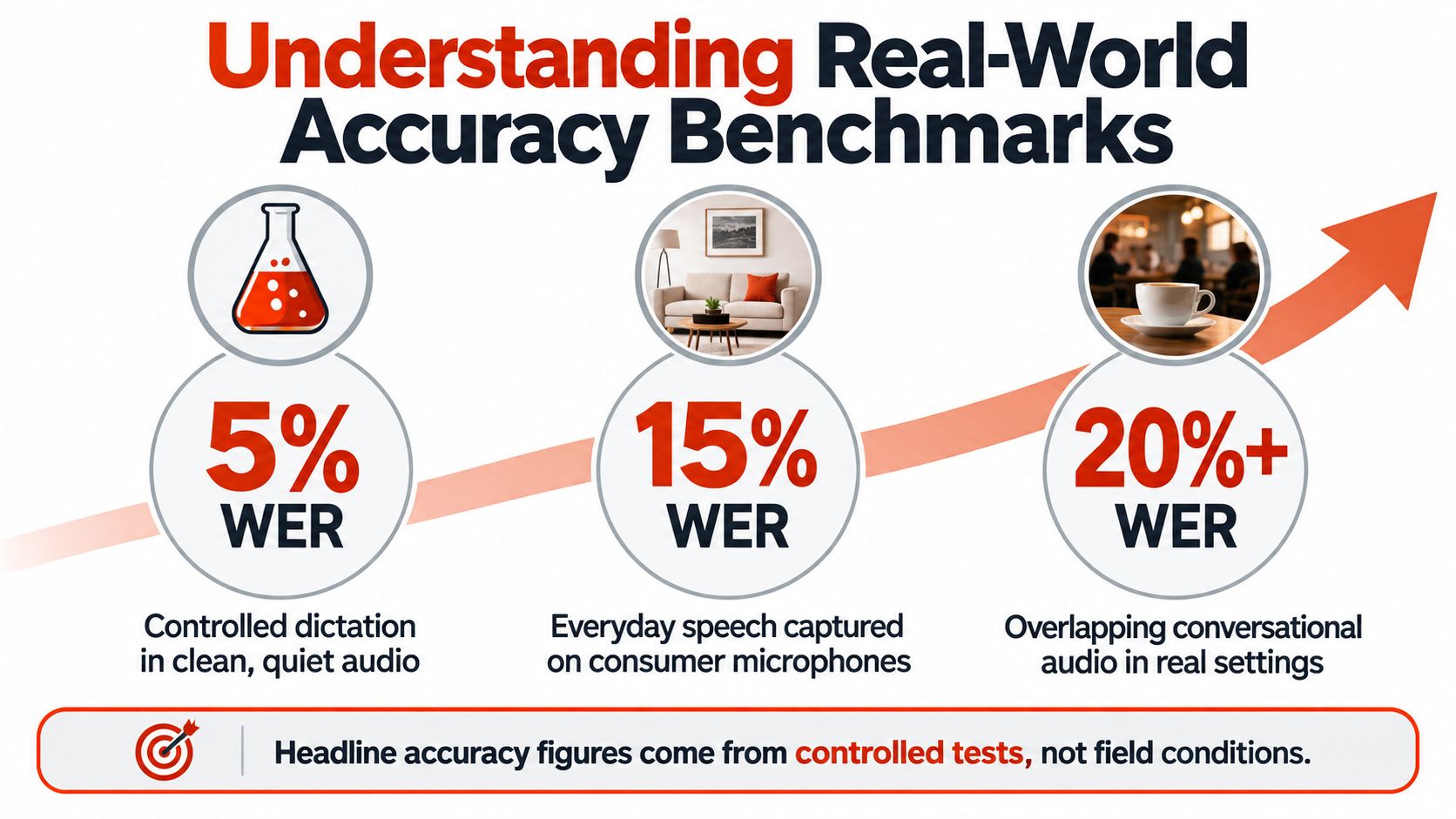
A single accuracy number is rarely enough to choose a transcription system. Controlled speech, clean microphones, familiar vocabulary, and one speaker can produce results that don't represent a ward round, an interview with interruptions, or a multilingual support call.
A historical Microsoft benchmark reached a 5.1% word-error rate on the Switchboard telephone-speech benchmark in 2017, matching professional transcribers on those calls. In practical terms, that rate means roughly five incorrect words in every one hundred. It's a meaningful benchmark, but it describes a defined test condition, not every deployment.
Why language changes the result
A University of Hawaiʻi study of English-language learners found that transcription accuracy across applications and tasks was generally about 50% to 70%. Windows Speech Recognition reached 53.50% accuracy for free speech and 74.44% for sentence reading, while Google Docs Voice Typing reached 63.00% and Windows 10 Dictation reached 66.96% in the reported tests. These results show why clear reading exercises shouldn't stand in for spontaneous conversation.
Language coverage creates another fault line. In a 14-language evaluation, Chinese, Portuguese, Filipino, English, German, Bahasa, and Turkish recorded WER below 10%, while Malagasy, Tamil, and Burmese exceeded 40% WER. The evaluation links that gap to lower-resource conditions, acoustic coverage, morphology, and pronunciation patterns. The detailed findings are available in the multilingual transcription evaluation.
Practical rule: Measure the workflow you actually have, not the language and microphone conditions used in a headline benchmark.
A useful pilot separates results by language, accent, recording environment, speaker count, and speech style. It should also track more than WER. A transcript with many harmless filler-word errors may be less dangerous than one with a single incorrect medication, measurement, name, or code identifier. For global teams, aggregate accuracy can hide exactly the populations that need the most review.
Comparing AI Dictation to Traditional Workflows
Dictation can make composition much faster, but faster composition isn't the same as less documentation work. A 2025 multi-country study reported median clinician typing speed of 21.4 words per minute, compared with 93 words per minute for dictation. Dictated notes also contained 1.8 times more clinical detail on average. Those figures come from the study of clinician typing and dictation.
The operational benefit is clear: speaking lets a clinician get structure and detail onto the page without manually constructing every sentence. The hidden cost is verification. A dictated note can require review for medication names, abbreviations, numbers, punctuation, omitted words, and statements that sound fluent but don't match the encounter.
The comparison that buyers should make
| Metric | Manual Typing | AI Dictation |
|---|---|---|
| Composition speed | Slower manual entry | Faster spoken capture |
| Detail capture | Often constrained by typing effort | Can support fuller spoken notes |
| Primary review task | Check the typed content | Check recognition, meaning, entities, and formatting |
| Main failure mode | Omission through slow composition | Plausible transcription error |
| Best fit | Precise direct editing | Fast drafting followed by structured verification |
The important shift is from slow composition to faster review, not from work to no work. Non-native English speakers may not receive consistent time savings, and medication-name errors can create patient-safety risks. A polished paragraph may demand more attention because its fluency can make mistakes harder to notice.
A practical test should record raw dictation time, editing time, clinically significant errors, and after-hours work. Don't judge a tool solely by words per minute. If your team uses a product such as a Dragon dictation app, compare its recognition behavior and correction workflow with the tasks your staff perform every day.
Building a Reliable Verification Pipeline
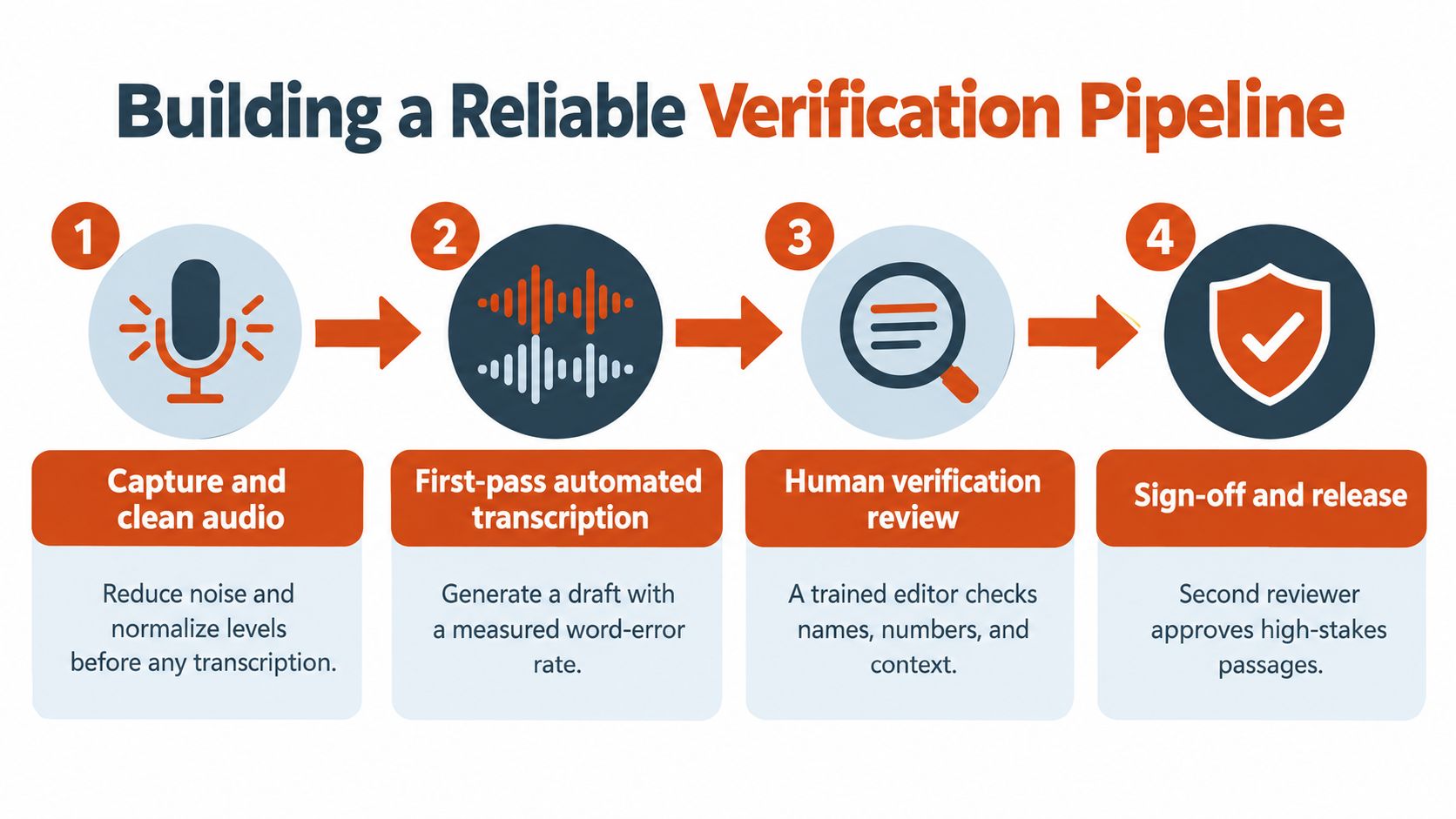
A production transcript should have a clear boundary between capture and finalization. The original audio remains the source record. The automated transcript is a working draft. A reviewer approves the version that enters the clinical, legal, regulatory, or operational system.
A clinical evidence review reported WERs from approximately 0.1% in controlled dictation to more than 50% in conversational, multi-speaker scenarios. The review also described a hospital study with a 7.4% raw error rate in dictated notes using a leading medical speech-recognition system. The evidence is summarized in the clinical review of speech-recognition performance.
A workflow that withstands scrutiny
-
Capture and preserve the source. Record clean audio where permitted, retain the original file, and document who created it and for what purpose. Noise reduction can help recognition, but it mustn't overwrite the source needed for later review.
-
Generate a measured draft. Run the first pass with the relevant language and domain settings. Store confidence indicators or uncertainty markers when available. A reviewer should see where the system is guessing rather than receiving an equally formatted block of text.
-
Review critical entities first. Search specifically for names, medications, diagnoses, measurements, dates, identifiers, and technical terms. A custom vocabulary helps, but it doesn't replace listening to the audio when the surrounding context is uncertain.
-
Approve before release. Require human sign-off for high-stakes records. The approver should confirm that the transcript reflects the audio, that formatting hasn't changed meaning, and that unresolved passages are either corrected or explicitly marked.
A domain dictionary should include local names, product terminology, abbreviations, and specialty vocabulary. For clinical work, entity-level checks deserve their own queue. For technical documentation, check code identifiers, version labels, commands, and proper nouns separately from ordinary prose.
Teams that need a deeper explanation of the final editing stage can consult this guide to transcription editing. The central principle is simple: automation can prioritize attention, but a reviewer remains responsible for meaning.
When Hands-Free Transcription Is Inappropriate
Hands-free input sounds ideal in every clinical setting until the clinician needs to examine a patient, listen carefully, coordinate with colleagues, or protect a sensitive conversation. Speech-recognition quality is only one part of the decision. Social context, consent, attention, and recording reliability can matter just as much.
A 2026 pilot study found that voice input captured 40% to 100% of events during preoperative and intraoperative phases, but only 0% to 12% during postoperative documentation. Researchers identified unreliable recording and conflict with care interactions as major barriers in the pilot study of voice input in clinical work.
Choose the mode before choosing the engine
Dictating privately into a controlled microphone is different from speaking while a patient and several staff members are present. A clinician may begin a sentence, stop to respond to a question, and later resume without stating what changed. The resulting transcript can read smoothly while omitting the surrounding decision-making.
Use a decision framework like this:
- Dictate privately when the content is routine, the environment is quiet, consent and privacy are clear, and the speaker can complete the thought without interruption.
- Record for later transcription when the event contains useful detail but the clinician can't safely narrate during care. Confirm permission, preserve the recording, and review it in a controlled setting.
- Use structured templates when the information consists of discrete fields, measurements, checkboxes, or mandatory clinical elements. A template can expose missing data more reliably than free speech.
- Don't speak or record when bystander privacy, patient preference, sensitive diagnoses, or active care makes voice capture inappropriate.
The same caution applies to meetings and customer calls. Multiple speakers, overlapping speech, and background conversations can make attribution uncertain. If the transcript will influence treatment, payment, compliance, or a formal decision, a polished output shouldn't conceal missing context.
Voice input should reduce the burden of documentation, not compete with the human interaction that documentation is supposed to represent.
Choosing the Right Processing Environment
The processing environment should match the risk of disclosure, the need for language and formatting support, and the amount of review your team can provide. Local processing keeps audio on the device and can offer fast, private dictation. Cloud processing can provide larger models, stronger cleanup, context-aware formatting, and broader transcription capabilities, but sending audio away from the device introduces compliance questions.
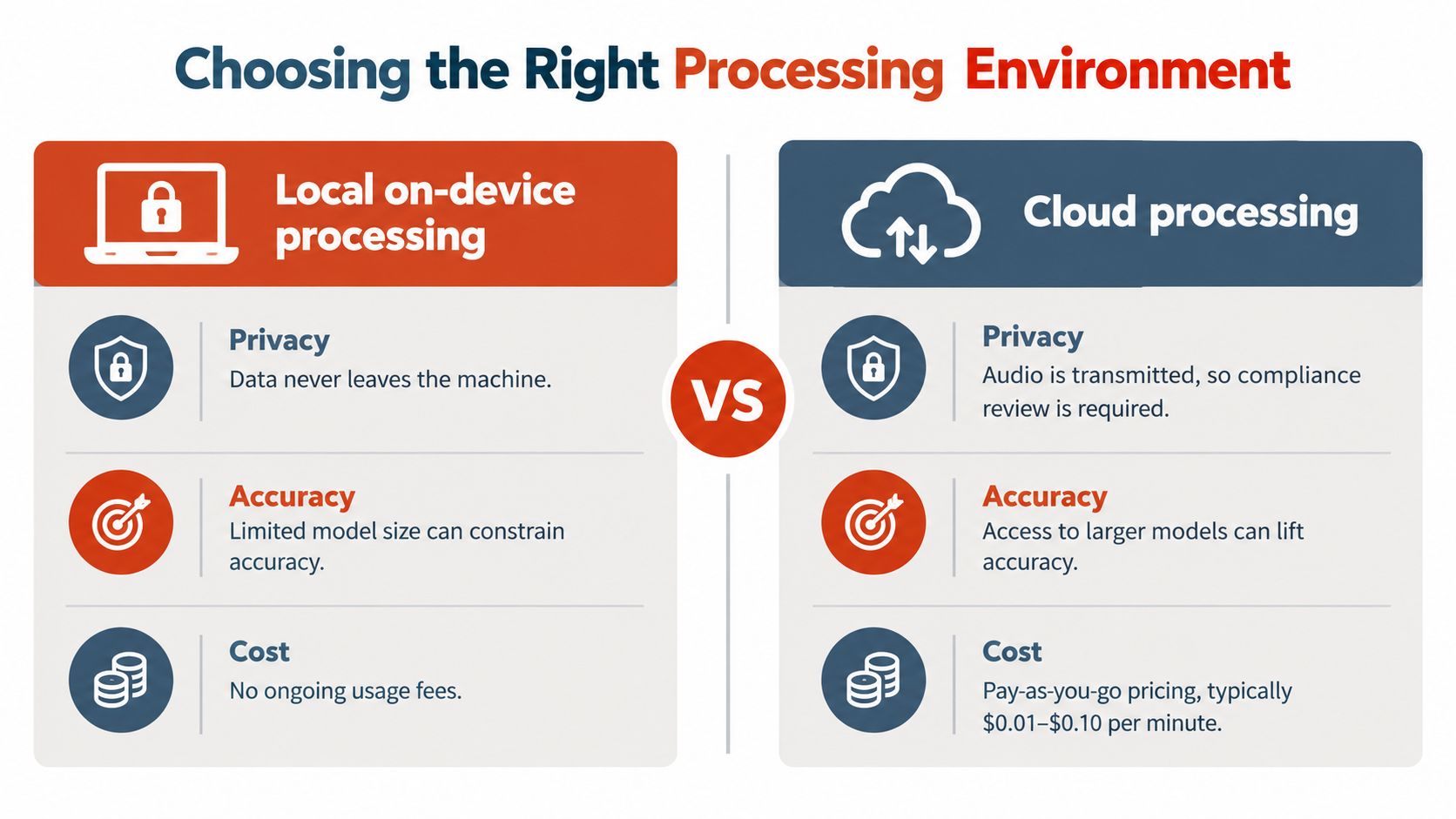
Local processing
Local mode suits sensitive material, unreliable connectivity, and teams that need audio to remain on the machine. Its trade-off is that device constraints and model size can limit recognition quality, language coverage, or formatting sophistication. It still needs a correction path, especially for specialized vocabulary and noisy recordings.
Cloud processing
Cloud mode can apply richer cleanup, remove filler words, handle self-corrections, and format speech for a specific application. Those features are useful when the desired output is a ready-to-send email, a structured note, or technical prose rather than a verbatim record. Before use, verify retention, access controls, contractual terms, and whether the workflow is appropriate for regulated information.
Custom dictionaries and app-specific rules often matter more than a generic “AI” label. A medical team needs one vocabulary and review policy. A developer needs another. A journalist transcribing interviews may prioritize speaker labels and source preservation. Real-time services, including tools designed for real-time call answers, require an additional assessment of latency, consent, and how partial transcripts are handled before a speaker finishes.
AIDictation is one example of a hybrid macOS approach. Its Auto Mode switches between on-device recognition and a cloud service, while Local Mode uses Parakeet v3 on Apple Silicon without an internet connection. Connected Cloud Mode adds cleanup, context-aware formatting, filler-word removal, and handling for self-corrections, with custom vocabulary and per-app context rules available for different writing tasks.
The strongest deployment model is usually hybrid: local processing for sensitive or offline capture, cloud assistance when policy permits and richer formatting is valuable, and human review when the record carries material consequences. Select the environment by asking where the audio may travel, which errors are unacceptable, and who will approve the final text.
Use AIDictation to test a practical hybrid workflow for private local dictation, cloud-assisted cleanup, and audio or video transcription. Visit AIDictation to compare those modes against your own verification requirements, then pilot the result with real terminology and representative recordings before moving high-stakes work into production.
Frequently Asked Questions
What does Verbal Ink Transcription Workflows Today cover?
The popular advice is simple: dictate faster, let software clean up the words, and move on. That advice confuses speech capture with finished documentation.
Who should read Verbal Ink Transcription Workflows Today?
Verbal Ink Transcription Workflows Today is most useful for readers who want clear, practical guidance and a faster path to the main takeaways without guessing what matters most.
What are the main takeaways from Verbal Ink Transcription Workflows Today?
Key topics include Table of Contents, The Evolution of Verbal Ink Transcription, From human rendering to machine drafts.
Ready to try AI Dictation?
Experience fast voice-to-text on your device. Free to download.
Download FreeRelated Posts
Apple Voice Recognition Software: Key Pros and Cons
Learn how Apple voice recognition software turns speech into text on your device, where it excels, and what tasks still challenge it in 2026.
Dictation on macOS: Setup, Apps, and Pro Tips
Master dictation on macOS with clear setup steps, app comparisons, privacy settings, and accuracy tips to turn your voice into clean text fast.
Medical Transcription AI: A Clinical Guide
Explore how medical transcription AI works in clinical workflows. Learn about accuracy, HIPAA compliance, hallucination risks, and vendor selection.