Apple Voice Recognition Software: Key Pros and Cons
Apple's built-in voice recognition includes Siri and Dictation, but true privacy requires using Local Mode on supported Apple Silicon devices rather than the default cloud-connected setting. Apple's Speech framework can keep audio on the device when on-device recognition is supported, although Apple warns that local recognition may be less accurate than network-backed processing.
That makes the popular advice, “Just use Apple Dictation because it's private,” incomplete. Privacy and accuracy depend on the feature, device, language, settings, and processing path, and those details matter if you're dictating clinical notes, legal work, source-code comments, or confidential business plans.
Apple voice recognition software is powerful because it's built into the operating system, not because every spoken word follows the same route. Siri, Dictation, and the speech-recognition services beneath them overlap, but they solve different problems. Before trusting any voice workflow, you need to know which layer you're using and whether your audio stays local.
Table of Contents
- Understanding the Apple Voice Ecosystem
- From Standalone App to Integrated Service
- The Privacy and Accuracy Trade-off
- Third-Party Solutions and Professional Workflows
- How to Choose the Right Voice Tool
- Final Verdict - Maximizing Voice Productivity
Understanding the Apple Voice Ecosystem
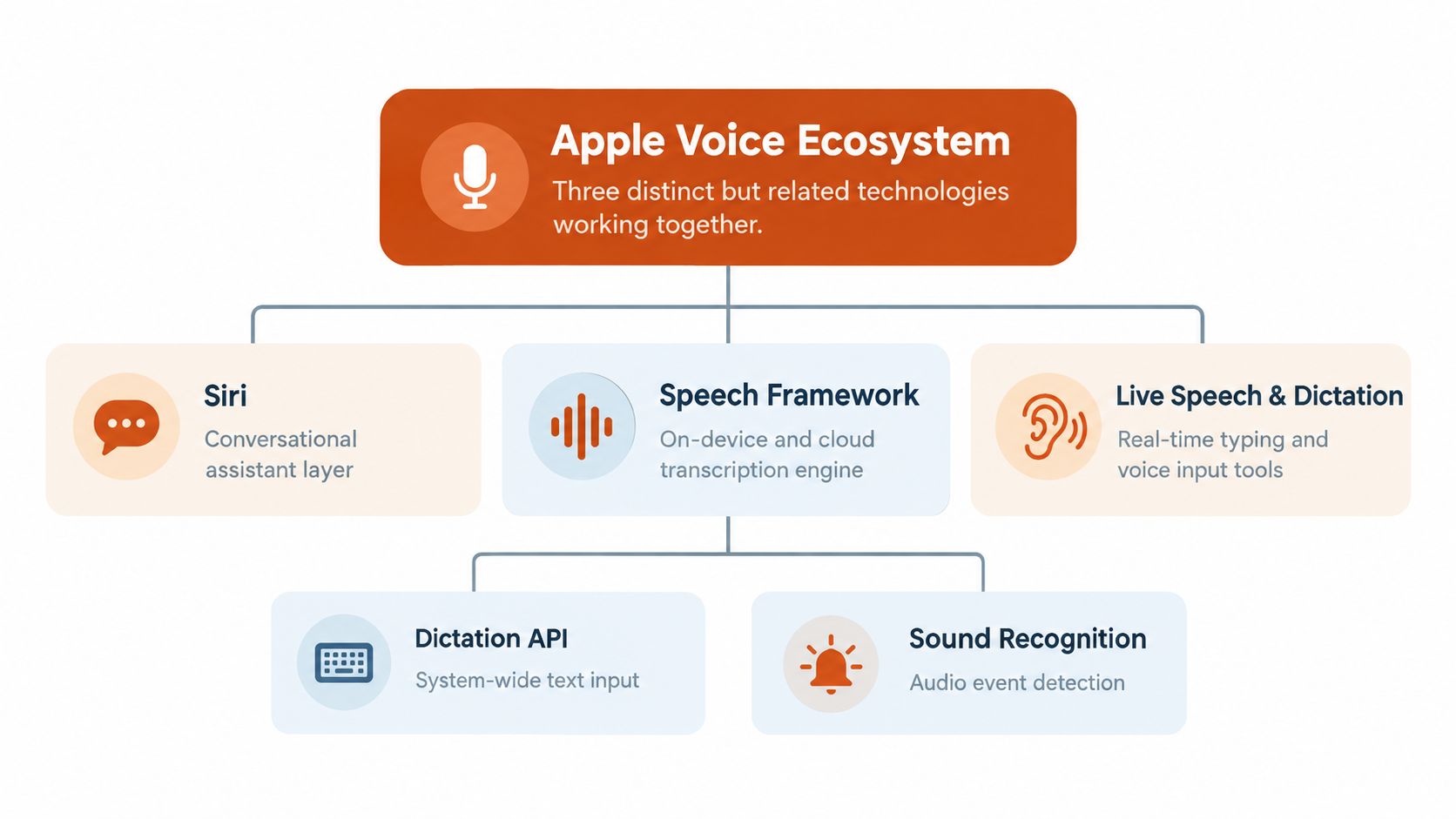
A user writing an email on a Mac might press a microphone key and see words appear in Mail. Another user might ask Siri to create a reminder. A third might use a developer's Speech framework to transcribe a recorded interview. All three experiences involve Apple voice technology, but they aren't the same product.
The first layer is Siri, Apple's conversational assistant. Siri interprets requests, answers questions, and performs actions across supported services. It's designed for intent, conversation, and device control rather than just placing a transcript inside the text field you're using.
The second layer is Dictation, the operating-system input tool. Dictation turns spoken language into text wherever a text-entry field is available, such as Notes, Mail, Messages, or a document editor. It's the feature users typically mean when they search for apple voice recognition software for writing.
The third layer is the speech-recognition infrastructure that supports both experiences. Apple's Speech framework accepts live microphone input and prerecorded audio, then can return transcripts, alternative interpretations, and confidence levels for recognized segments. Developers can use those signals to decide when to accept text automatically and when to request human review through Apple's Speech framework documentation.
Why the distinction matters
Siri might need to understand that “remind me to call the clinic tomorrow” is an instruction. Dictation needs to capture the same speaker's words as written language. A custom app might need to identify uncertainty in a medical term rather than silently choosing a plausible substitute.
That difference affects privacy decisions. A Siri request, a Dictation session, and a third-party transcription request can have different permissions, processing behavior, and retention implications. The operating system also provides accessibility features and other audio-input services, so a basic introduction to system software operating systems revision can help clarify how system utilities differ from standalone applications.
For a deeper technical explanation of how microphones, acoustic models, language models, and post-processing work together, see how voice recognition software works. The practical lesson is simple: don't treat “Apple voice recognition” as one switch. Identify the feature first, then investigate where recognition happens.
From Standalone App to Integrated Service
Apple's current voice architecture makes more sense when you follow Siri's product history. Siri was released as a standalone iOS application in December 2010, then Apple acquired the technology approximately two months later before integrating it into the iPhone 4S. Siri became available with the iPhone 4S and iOS 5 on October 14, 2011, initially supporting U.S., U.K., and Australian English, as documented in this history of Siri.
That transition changed the role of speech recognition. A user no longer needed to seek out a specialist application. Conversational input became part of a mass-market smartphone operating system, alongside the microphone, keyboard, contacts, reminders, and other personal services.
Apple later expanded hands-free access. The “Hey Siri” wake phrase arrived in September 2014, and individualized voice recognition followed in September 2015, helping the system distinguish the owner's voice from other speakers. These additions moved voice from an action users deliberately started toward an interface that could remain available in the background under defined conditions.
Scale changed the engineering problem
By 2018, Apple said Siri was used by more than 375 million devices each month across more countries and languages than any other voice assistant at that time. Apple also reported that Siri had become 40% faster at listening and responding and 40% more accurate than its previous version, claims reported in Computerworld's account of Siri's evolution.
Apple had earlier reported approximately 2 billion non-accidental Siri requests per week in 2017, a historical company-reported estimate rather than a current usage figure. The importance of these figures isn't merely popularity. At that scale, voice recognition becomes a platform service that must coordinate hardware, operating-system permissions, language support, personal context, and analytics.
Historical lesson: Siri began as an app, but Apple's product direction turned speech into a system capability.
That history also explains why privacy can't be evaluated by looking at one Dictation button. Siri and Dictation belong to a wider speech-input infrastructure. Apple's later platform documentation says analytics reporting can cover Dictation and Siri requests on a per-application basis, with available history beginning in iOS 17.4 and iPadOS 17.4. The architecture is integrated by design, so users need feature-level clarity rather than broad assurances about “Apple dictation.”
The Privacy and Accuracy Trade-off
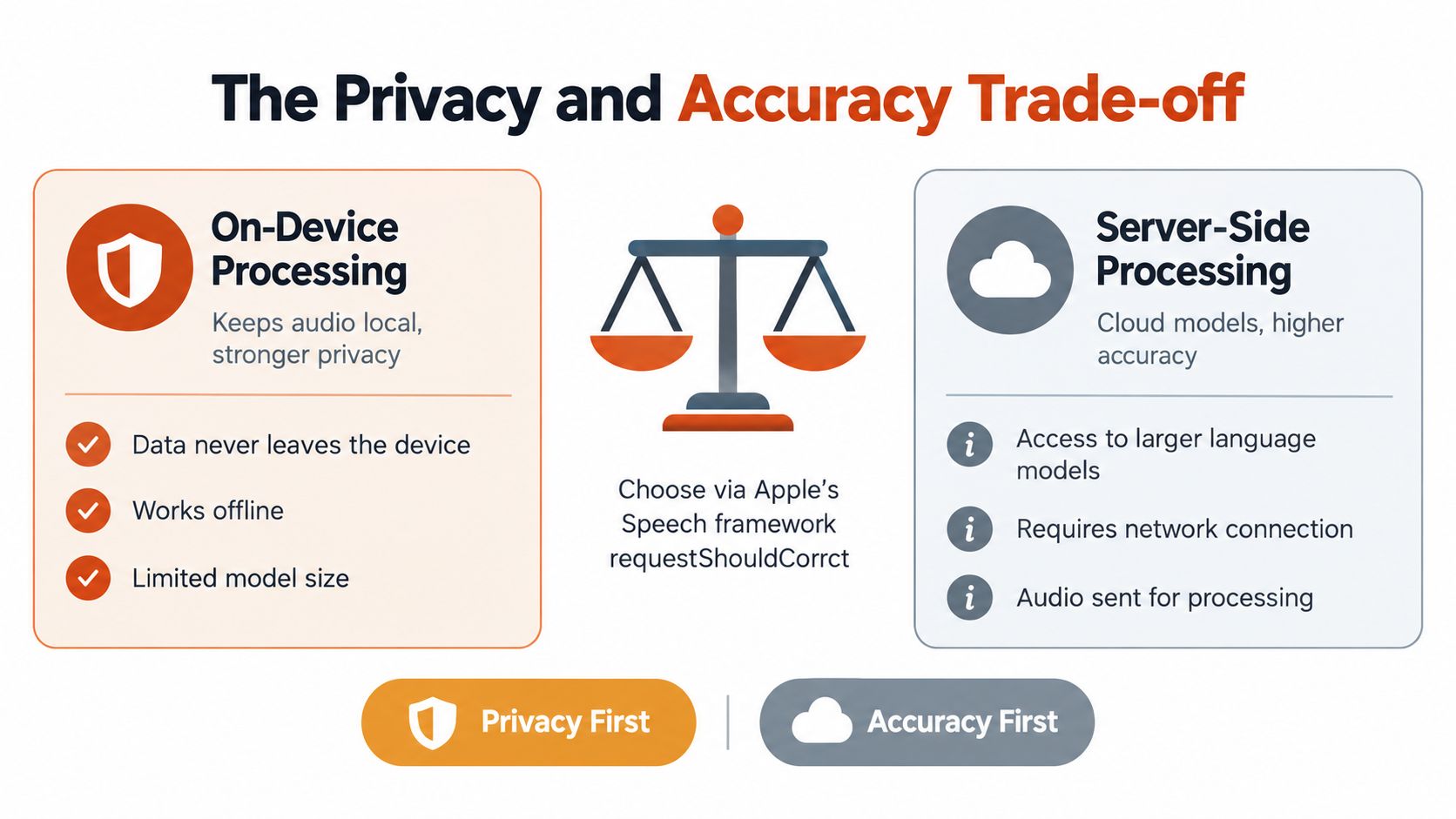
The most important technical control for developers is requiresOnDeviceRecognition. When an application enables it, and the recognizer confirms that local recognition is supported, the request prevents audio from being sent over the network. Apple's documentation also warns that on-device requests may be less accurate than network-backed recognition, creating a direct trade-off between keeping audio local and using server-side processing.
That trade-off isn't theoretical. A local model may be appropriate for a short private note, while a cloud-backed recognizer may produce a better result for an unfamiliar accent, specialized vocabulary, or a long technical passage. The right choice depends on the cost of an error and the sensitivity of the recording.
What local processing protects
On-device recognition reduces the risk created by transmitting raw audio to a remote service. It can also reduce dependence on an internet connection and help a workflow continue when network access is restricted. For confidential source-code comments, private research notes, or sensitive clinical material, that reduction in transmission can be more important than a perfectly polished first draft.
But local availability isn't universal. Apple provides a capability check so an application can determine whether a particular language or device supports on-device recognition. A responsible application shouldn't assume that offline behavior is identical across locales and hardware. It should check support and define a fallback, such as cloud recognition or user review.
For a practical comparison with privacy-focused offline workflows, this scientist's voice note tool offers useful context. The broader engineering principle is the same: decide where audio can go before recording sensitive material.
What server processing can improve
Network-backed recognition can provide access to larger or more capable models. That may help with unusual names, domain terminology, accents, or speech recorded in difficult conditions. The cost is that audio must be sent for processing, and the organization using the tool must understand its permissions, policies, and retention behavior.
Apple's privacy documentation adds another distinction that users often miss. Dictation can be processed on-device or on Apple's servers depending on device settings and capability. Server processing isn't stored unless the user opts into “Improve Siri and Dictation,” while opted-in request history may include audio, transcripts, and metadata and can be retained for up to two years. These details are described in Apple's documentation for requiresOnDeviceRecognition.
Practical rule: If an error is inconvenient, choose for accuracy. If disclosure could cause harm, choose local processing whenever the device and language support it.
The best workflow may therefore include two paths. Use local recognition for private capture, then review the text manually. Use cloud assistance only for material that your policy allows to leave the device and where improved recognition or cleanup justifies the exposure.
Third-Party Solutions and Professional Workflows
Apple's built-in Dictation is convenient because it appears wherever the operating system provides text input. Convenience becomes a limitation when a professional workflow needs more than a raw transcript. Healthcare staff may need consistent terminology, developers may need code-aware formatting, and multilingual writers may want spoken ideas converted into polished English rather than pasted as an unedited stream.
The important distinction is between recognition and writing transformation. Recognition answers, “What words did the speaker say?” A professional tool may then remove filler words, repair punctuation, format a list, preserve a self-correction, or apply a custom dictionary. Those later operations can make the difference between a transcript and usable copy.
Apple Dictation versus professional tools
| Feature | Apple Built-in | Professional Tool, for example AIDictation |
|---|---|---|
| Basic speech-to-text | System-wide Dictation turns speech into text in supported input fields | Converts speech into text across macOS applications |
| Processing choice | Behavior depends on device, language, settings, and recognition support | Can offer a local path and a cloud path, with the user choosing according to privacy and output needs |
| Offline use | Available where Apple supports on-device recognition | Local Mode runs on supported Apple Silicon Macs without internet |
| Cleanup | Basic transcription and operating-system editing commands | Cloud Mode can add punctuation, grammar cleanup, filler-word removal, and context-aware formatting |
| Specialized vocabulary | Limited control compared with dedicated professional workflows | Custom dictionary support for names and technical terms |
| Output style | Text appears in the active field | Context rules can adapt tone and formatting for apps such as email, chat, or code editors |
AIDictation is one example of this hybrid approach. It provides Local Mode on Apple Silicon Macs for offline dictation, while Cloud Mode can add cleanup and formatting when the user permits network processing. That model doesn't eliminate the privacy decision. It makes the decision more visible by separating private capture from cloud-enhanced rewriting.
Where professional tools earn their place
A developer documenting an API may want technical terms preserved and paragraphs formatted for a code editor. A product manager dictating a specification may want headings and lists instead of a raw stream. A researcher recording an interview may need transcription first, followed by a review step for names and uncertain phrases.
Apple's Speech framework supports confidence levels and alternative interpretations, which is particularly useful for software that can flag uncertain words instead of pretending every transcript is equally reliable. A professional workflow should still include human review for high-stakes content, regardless of whether recognition happens locally or remotely.
For a broader look at options beyond Apple's default feature, Apple Dictation alternatives can help you compare specialized workflows. The key question isn't whether a third-party tool adds AI. Ask which processing mode it uses, what it sends away, what it retains, and whether its editing features match the work you produce.
How to Choose the Right Voice Tool
Choose a voice tool by evaluating the data, the accuracy requirement, and the finished output. Don't begin with a brand or a feature list. Begin with the consequence of a mistake and the consequence of disclosure.
Start with data sensitivity
Classify the material before you speak. A shopping reminder and a patient note shouldn't follow the same policy. The same applies to unreleased product plans, source-code comments, legal strategy, and interview recordings.
Use this first decision:
- Private and sensitive: Prefer supported on-device recognition. Confirm that local recognition is available for your device and language, and review the resulting text manually.
- Routine and low-risk: Cloud-assisted processing may be acceptable if the service's retention and permission terms fit your requirements.
- Mixed sessions: Separate confidential passages from general drafting instead of assuming one setting protects the entire recording.
Apple's support guidance explains that Dictation can work on-device without an internet connection in many languages, but availability varies. It also explains why “on-device” and “no retention” aren't interchangeable ideas. Local processing can reduce transmission, while broader Siri and Dictation settings may still govern interaction data.
Then measure the cost of inaccuracy
A wrong word in a private brainstorm may be easy to fix. A wrong medication name, variable name, contract term, or client name deserves a review flag. Apple's Speech framework can expose confidence information and alternative interpretations, so applications can build review workflows around uncertainty instead of presenting every output as certain.
Ask yourself:
- Can a human review every transcript? If yes, local recognition may be sufficient for sensitive work.
- Does the text need to be publication-ready immediately? If yes, a tool with cleanup and formatting may save editing time, provided its data handling is acceptable.
- Does your vocabulary change by app? If yes, custom dictionaries or context rules may matter more than basic transcription.
- Will you work without a network? If yes, confirm local support before relying on the workflow.
Privacy check: “On-device” describes where recognition happens. It doesn't automatically describe every form of data retention associated with Siri or Dictation.
Match the tool to the deliverable
For casual notes, Apple Dictation may be enough. For a private technical memo, local recognition plus manual editing offers a defensible balance. For public-facing writing, a cloud-enabled tool may be useful for cleanup, but only after you confirm that the content is permitted to leave the device.
Finally, test the actual language, microphone, environment, and terminology you'll use. A tool that performs well for short general notes may behave differently with long passages, code, accents, background noise, or specialist names. Treat the first sessions as validation, not proof that the workflow is safe or accurate for every future task.
Final Verdict - Maximizing Voice Productivity
Apple voice recognition software is a capable foundation, especially for people who want Dictation integrated into macOS, iOS, or iPadOS without installing a separate application. Siri handles conversational commands, Dictation handles system-wide text input, and the Speech framework gives developers deeper control over recognition sources, alternatives, confidence, and local availability.
Its weakness is not a lack of usefulness. It's the assumption that one default behavior fits every situation. Apple's own documentation establishes a real tension between local privacy and network-backed accuracy. Local recognition can keep supported audio on the device, but Apple warns it may be less accurate. Cloud processing may produce better results for demanding language tasks, but it requires a clear decision about transmission, permissions, and retention.
Choose Apple's built-in tools when you need quick notes, ordinary messages, or private capture that you can review. Choose a specialized workflow when you need custom vocabulary, automatic cleanup, context-aware formatting, professional documents, or structured transcription. In either case, check the processing path before you dictate sensitive information.
The most practical approach is usually deliberate hybrid use. Keep sensitive speech local when the device and language support it. Allow cloud assistance for approved material when accuracy and polished output matter more. That isn't a contradiction. It's a way to align the tool with the risk and the result.
AIDictation offers macOS dictation with Local Mode for private offline capture on supported Apple Silicon Macs and Cloud Mode for cleanup, grammar, punctuation, filler-word removal, and context-aware formatting. Visit AIDictation to evaluate whether that local and cloud workflow fits the way you handle professional voice data.
Frequently Asked Questions
What does Apple Voice Recognition Software: Key Pros and Cons cover?
Apple's built-in voice recognition includes Siri and Dictation, but true privacy requires using Local Mode on supported Apple Silicon devices rather than the default cloud-connected setting. Apple's Speech framework can keep audio on the device when on-device recognition is supported, although Apple warns that local recognition may be less accurate than network-backed processing.
Who should read Apple Voice Recognition Software: Key Pros and Cons?
Apple Voice Recognition Software: Key Pros and Cons is most useful for readers who want clear, practical guidance and a faster path to the main takeaways without guessing what matters most.
What are the main takeaways from Apple Voice Recognition Software: Key Pros and Cons?
Key topics include Table of Contents, Understanding the Apple Voice Ecosystem, Why the distinction matters.
Ready to try AI Dictation?
Experience fast voice-to-text on your device. Free to download.
Download FreeRelated Posts
Dictation on macOS: Setup, Apps, and Pro Tips
Master dictation on macOS with clear setup steps, app comparisons, privacy settings, and accuracy tips to turn your voice into clean text fast.
Is There a Speech to Text App for Mac? a Practical Guide
Is There a Speech to Text App for Mac. Wondering if there is a speech to text app for Mac? Compare built-in Dictation, on-device engines, and AI tools like
Dictation Software for Medical Professionals Compared
Compare dictation software for medical professionals. Evaluate accuracy, HIPAA privacy, ambient AI tradeoffs, and on-device tools like AIDictation.