What Is Audio Transcription and How It Works in 2026
Audio transcription is the process of converting spoken audio into written text. Modern systems combine automatic speech recognition with cleanup, formatting, and routing decisions that shape the final output, and real-world accuracy can range from 35% to 65% word error rate in difficult clinical conversational speech, while some matched benchmark tests report below 5% WER. Clinical ASR research and Speechmatics' benchmarking guidance show why those figures can coexist.
You may be sitting in a back-to-back meeting block, watching a voice memo app fill with recordings you'll never replay. A doctor may be finishing a patient note on a phone, or a developer may be trying to capture a hallway argument about a design decision before the details disappear. In each case, the need is the same: turn speech into text that people can search, edit, review, and share.
That sounds simple, but audio transcription isn't one feature or one model. It's a voice-data pipeline. A microphone captures sound, software cleans and interprets it, an ASR model predicts words, and later systems may identify speakers, add punctuation, remove filler words, create timestamps, or send the result into a document or workflow.
This guide explains what happens inside that pipeline, why benchmark accuracy can disappoint in real recordings, and how human versus automated and cloud versus on-device choices affect cost, speed, privacy, and control.
Table of Contents
- The Moment You Realize You Need It Transcribed
- How Audio Transcription Got From Edison to Modern ASR
- How Speech to Text Actually Works Step by Step
- Human Versus Automated and On Device Versus Cloud
- Why Benchmark Accuracy Rarely Matches Real World Accuracy
- Where Audio Transcription Quietly Runs Your Day
- Privacy and Compliance as a Core Transcription Feature
- How AIDictation Puts These Pieces Together
The Moment You Realize You Need It Transcribed
The need often appears after the recording, not before it. You remember that a meeting contained a key decision, but searching the audio means scrubbing through an hour of conversation. You have a useful interview quote, but no timestamp. A colleague needs a handoff, yet listening to the entire voice memo would take longer than reading a clean transcript.
Audio transcription converts spoken audio into written text, but useful transcription adds more than a word sequence. It can make a recording searchable, create an editable draft, expose timestamps, and give people who couldn't attend a meeting a way to follow the discussion. Captions also support accessibility, although captions and a polished transcript may require different formatting and timing decisions.
The everyday reasons people transcribe
- Searchability: Text lets you find a phrase, name, or decision without replaying the entire recording.
- Handoffs: A transcript gives teammates a written record they can review asynchronously.
- Accessibility: People can read content when listening isn't practical or possible.
- Language support: Transcription can create a first draft for translation or help multilingual teams work from the same source.
- Documentation: Dictation can become a note, email, specification, or patient record after review.
The phrase “record and transcribe” hides important choices. Was the audio captured close to the speaker or across a room? Did several people talk at once? Will a third-party server process the voice? Does the final text need to preserve every filler word, or should it become a readable paragraph?
Practical rule: Treat the transcript as an output of a pipeline, not as a perfect copy of the recording.
The sections that follow separate those decisions so you can judge transcription tools by the work you need done, rather than by an attractive accuracy headline.
How Audio Transcription Got From Edison to Modern ASR
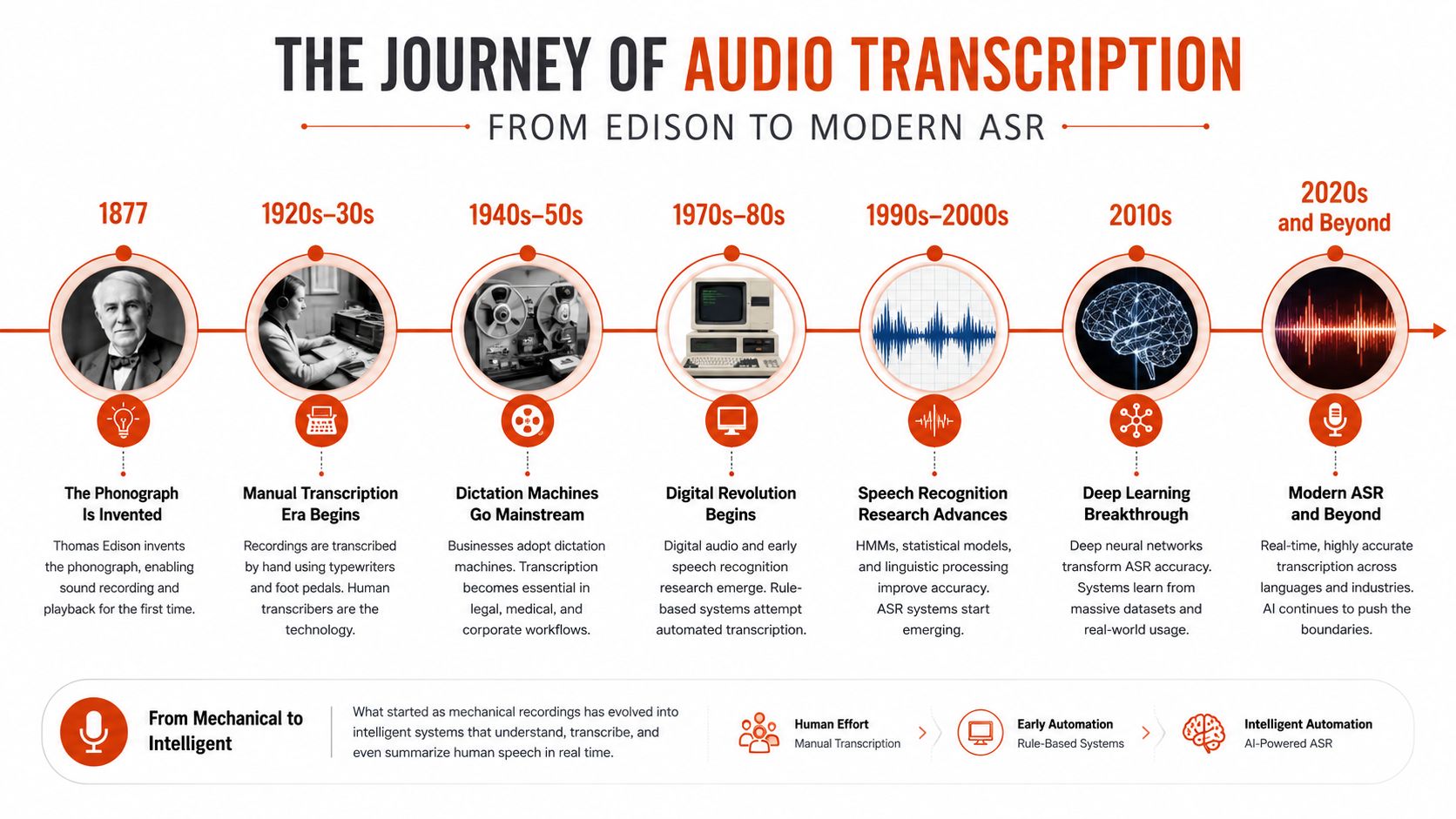
Audio transcription began with a more basic problem than speech recognition: how to preserve speech so someone could hear it again. Thomas Edison's phonograph, demonstrated in 1877, made recording and playback possible. His dictation machine, developed in 1879, connected recorded speech more directly to office work. A history of transcription technology places these inventions on the path from replayable sound to machine-readable language.
The next capability was command recognition. In 1962, IBM demonstrated Shoebox, an early speech-recognition system that could understand up to 16 spoken English words. That vocabulary was tiny compared with modern dictation, but it established a distinction: a machine could respond to spoken language instead of merely replaying it.

DARPA's speech-understanding program, launched in 1971, targeted systems capable of understanding at least 1,000 words. That effort helped move the field toward broader speech understanding rather than isolated digits or commands. Later statistical approaches used acoustic models and language models to estimate which word sequences best fit the sound and the surrounding context.
The capability unlocks
Each phase solved a different limitation:
- Recording: Edison made speech replayable.
- Small vocabularies: Shoebox showed that machines could recognize spoken words.
- Broader language understanding: DARPA programs pushed research beyond fixed command sets.
- Statistical recognition: Models learned probabilities for sounds and word sequences instead of relying only on rigid templates.
- Neural systems: Deep learning improved the ability to learn acoustic and linguistic patterns from large collections of speech.
- End-to-end and transformer architectures: Newer systems increasingly map audio to text through unified neural networks and can incorporate context more flexibly.
The result is a set of capabilities people now treat as ordinary: continuous dictation, automatic captions, searchable interviews, and speech recognition that works across more than one speaker or accent. None of those abilities arrived as a single invention. They grew from improvements in recording, computing, modeling, data, and decoding.
How Speech to Text Actually Works Step by Step
A speech-to-text system starts with sound, not words. The microphone captures a waveform, and preprocessing may adjust levels, convert channels, reduce unwanted noise, or split a long recording into manageable segments. Sample rate and channel layout matter because the model needs enough acoustic detail to distinguish speech, while unnecessary audio complexity can increase processing demands.
The system then transforms the waveform into representations a neural network can analyze. Mel spectrograms are a common example. They show how energy is distributed across frequencies over time, giving the model a structured view of speech rather than asking it to interpret a raw stream directly.

The recognition stages
- Capture: The microphone records speech and surrounding sound.
- Preprocess: Software may normalize levels, detect speech, or apply filtering.
- Extract features: The waveform becomes acoustic representations used by the model.
- Predict tokens: An acoustic model, or an end-to-end model, estimates likely characters, subwords, or words.
- Use context: A language model helps choose plausible sequences, especially when several words sound alike.
- Decode: Search methods such as beam search compare candidate sequences and select a likely result.
- Format: Punctuation, capitalization, timestamps, speaker labels, and cleanup turn raw output into usable text.
Traditional ASR separates acoustic and language models. Many current systems combine more of that work in a single network, but the underlying problem remains the same: map uncertain sound to a plausible written sequence. Decoding matters because the model often has several reasonable candidates, particularly with names, jargon, accents, or overlapping speech.
The standard quality metric is word error rate, or WER. It counts substitutions, deletions, and insertions, then divides that total by the number of words in a human reference transcript. A 5% WER therefore corresponds to roughly 95% transcript accuracy, although that summary can hide which words were wrong and whether the mistakes affected critical terms. Speechmatics' accuracy documentation explains both the formula and the need for matched audio and human-verified ground truth.
Watch the process in motion before testing a workflow such as iScribe for transcribing recordings. For a deeper technical discussion of the models behind recognition, see this guide to artificial intelligence in speech recognition.
The transcript you read is usually not the raw model output. Diarization estimates who spoke when, punctuation models restore sentence boundaries, and post-processing may convert dates, lists, or technical terms into a preferred format. A transcription product is therefore partly a recognition system and partly an editing and delivery system.
Human Versus Automated and On Device Versus Cloud
Transcription decisions have two separate axes. First, who performs the work, a human transcriptionist or an automated speech-recognition system? Second, where does processing happen, on your device or in the cloud? Mixing these axes leads to poor comparisons. A cloud service can be automated or human-reviewed, while an on-device system can produce a draft that you later edit yourself.
Automated transcription is fast, repeatable, and easy to apply to large volumes of audio. It can produce a draft while you're still working, but it may misread overlapping speakers, uncommon names, and specialized vocabulary. Human transcriptionists can use broader context and resolve ambiguous speech, though the process takes longer and requires a larger budget. For people exploring the profession itself, resources on how to find legal transcription jobs in 2026 illustrate the human-work side of the field.
A practical comparison
| Model | Typical Cost | Turnaround | Privacy Posture | Best Fit |
|---|---|---|---|---|
| Automated cloud transcription | Often low relative to human review | Fast | Audio leaves the device and depends on vendor policies | Large volumes, searchable drafts, general meetings |
| Human transcription | Typically higher than automated processing | Slower | Depends on contracts, access controls, and the service | Sensitive or high-consequence material requiring contextual review |
| Automated on-device transcription | May be included in the application or hardware | Fast when the model is available locally | Audio can remain on the device | Offline work, confidential dictation, low-latency input |
| Machine draft with human review | Combines automated processing and review costs | Faster than fully manual work | Depends on where the draft is generated and who reviews it | Legal, medical, research, and publishing workflows |
Cloud processing can provide access to larger or more frequently updated models. That can help with difficult audio, multilingual input, and technical vocabulary, but the trade-off is that voice data travels beyond the recording device. On-device processing reduces network dependence and can improve control over sensitive audio, yet local models may consume storage, memory, battery, or computing capacity.
Choose the delivery model by the consequences of an error and the sensitivity of the audio, not by the label “AI-powered.”
A hybrid workflow often makes sense. A local model can handle short, private dictation, while a cloud model processes a difficult recording after the user approves the transfer. This kind of offline speech recognition is especially relevant when connectivity or data handling matters more than maximum model size.
Why Benchmark Accuracy Rarely Matches Real World Accuracy
A vendor may publish a low WER on a carefully matched test set, while a user corrects a large portion of a real meeting transcript. Those outcomes aren't contradictory. WER measures substitutions, deletions, and insertions against a reference transcript, and the result changes with the speakers, microphones, vocabulary, noise, and evaluation method.
A benchmark can use clean audio, known speakers, and a reference transcript prepared for comparison. Your recording may contain a distant microphone, room echo, side conversations, compressed audio, interruptions, accents, or proper nouns the model hasn't seen in context. A headline number is meaningful only when the test conditions resemble your work.
The acoustic conditions matter
Research on adverse speech-recognition conditions shows how sharply distance and noise can change performance. One study reported average word recognition falling from 77.8% at 11 meters to 35.9% at 33 meters. The research on speech recognition in adverse conditions makes the practical point clear: microphone placement isn't a minor setup detail.
Noise can also interact badly with preprocessing. Speech enhancement may remove useful cues along with unwanted sound, so denoising isn't guaranteed to improve recognition. A thesis on difficult acoustic conditions reported accuracy falling from 91.7% at 6 dB SNR to 75.6% at 0 dB and 48.4% at -3 dB, while enhanced audio underperformed the original noisy audio in all 40 tested configurations, with semWER degradation ranging from 1.1% to 46.6%. The thesis evidence is a useful warning against assuming that every filter helps.
Questions to ask before buying
- Request matched tests: Send vendors a representative sample from your microphones, speakers, accents, and vocabulary.
- Separate headline averages: Ask for results by noise level, speaker type, language, and domain.
- Inspect critical errors: A misspelled drug name or legal term may matter more than several harmless punctuation errors.
- Clarify the reference transcript: Find out whether humans verified the ground truth and how names, fillers, and interruptions were treated.
- Test the final workflow: Evaluate speaker labels, timestamps, formatting, exports, and review time, not just raw WER.
A transcription system doesn't have one permanent accuracy level. It has performance under conditions, and your conditions are the test that matters.
Where Audio Transcription Quietly Runs Your Day
Transcription is already embedded in ordinary work. The same technology produces very different results depending on what the text must accomplish. A readable meeting summary, a verbatim interview record, and a clinical note don't share the same quality bar.
Medical dictation
A clinician may dictate observations while moving between patients, but medical speech contains drug names, abbreviations, anatomy, and sensitive personal information. Good output requires more than fluent sentences. It needs careful handling of clinical vocabulary, reliable speaker separation, and a review process that catches consequential errors before text enters a patient record.
Healthcare teams should judge a system by its handling of critical terminology and its data governance, not by how polished a general-purpose demo sounds.
Developer documentation
Developers dictate code comments, issue descriptions, tutorials, and design notes while an idea is fresh. The system must preserve identifiers, technical terms, punctuation, and formatting conventions. A fluent paragraph that changes a function name can be less useful than a rough transcript that preserves the exact token.
Custom dictionaries and context-aware formatting can help, but the output still needs a technical review when it describes executable code or system behavior.
Meetings
A meeting transcript becomes a searchable archive and an accessibility record. Speaker diarization, timestamps, and overlap handling matter because “someone suggested this” isn't enough when a team needs to know who made a decision or what action was assigned.
For a long call, good transcription means dependable attribution across the conversation, clear time references, and a review path for moments when participants talked over one another.

Journalism and research interviews
Journalists and qualitative researchers often need verbatim capture, searchable phrases, and timestamps. Filler words may be noise in a polished article but meaningful evidence in an interview analysis. The right workflow preserves the source audio and makes it easy to compare the written text against the recording.
Multilingual writing
A multilingual speaker may switch languages inside a sentence, use a regional accent, or dictate an English draft with names from another language. Monolingual systems can produce text that looks grammatical while changing the meaning. Mixed-language recognition, vocabulary support, and translation should be tested on the actual speech pattern rather than assumed from a language list.
Privacy and Compliance as a Core Transcription Feature
A transcript can carry the same sensitive meaning as the recording, and the voice itself may be personal data when it can identify a person. The Spanish data protection authority's 2026 analysis of AI voice transcription highlights that voice, message content, and service metadata can all require protection. That makes privacy a product feature, not a preference buried below punctuation settings.
Consider a clinical workflow in which an incorrectly classified transcript becomes part of a disputed record. The risk isn't limited to an inaccurate word. The system may also retain the voice, expose audio to a vendor, transfer data across borders, or use samples for model development under terms the organization didn't understand.
The questions buyers should ask
- Where is processing performed? Determine whether audio stays on the device or travels to a remote service.
- What does the vendor retain? Ask about recordings, transcripts, logs, backups, and deletion timing.
- Is training separate? Confirm whether customer audio or transcripts are used to improve models.
- Who can access content? Review employee access, contractors, support processes, and legal disclosure procedures.
- Where is data stored? Check processors, regions, transfers, and applicable contractual protections.
- What must users be told? Explain recording, transcription, additional processing, retention, and rights before collection.
On-device processing can prevent raw audio from leaving the computer, but it doesn't automatically secure the resulting transcript. Encryption protects data in transit and storage, while a zero-retention agreement limits what a provider keeps. Neither replaces access controls, clear user notice, appropriate legal review, or a process for correcting and deleting records.
For a broader implementation framework, review privacy by design. Organizations should document why transcription is necessary, choose a suitable legal basis, minimize metadata, and verify whether any separate processing, such as retraining or voice identification, occurs.
How AIDictation Puts These Pieces Together
AIDictation offers a useful example of the two-axis model described earlier. Its Auto Mode can route short dictation to on-device recognition and longer input to a cloud service, while Local Mode runs Parakeet v3 on Apple Silicon without sending audio over the internet. Cloud Mode supports cloud-based processing with cleanup, context-aware formatting, filler-word removal, and handling for self-corrections when a connected workflow is appropriate.
These modes don't eliminate the trade-offs. They make the choice visible. A healthcare professional handling sensitive dictation may prioritize local processing and review. A developer dictating technical material may accept cloud processing when difficult vocabulary and polished formatting matter more. Someone writing a quick message may prefer automatic routing to avoid choosing every time.
Match the mode to the work
| Mode | Processing Location | Best For | Privacy Posture | Typical WER |
|---|---|---|---|---|
| Auto | A mix of device and cloud processing | Users who want routing based on the input | Depends on which engine handles the audio | Must be measured on the user's recordings |
| Local | On the Mac | Private, offline, or network-independent dictation | Audio remains on the device | Must be measured against the local model and use case |
| Cloud | Remote service when connected | Difficult, noisy, multilingual, or technical audio | Requires review of transfer, retention, and training policies | Must be measured on matched cloud tests |
The “Typical WER” column has no universal value because WER depends on recording conditions, vocabulary, speakers, and reference transcripts. A vendor's benchmark isn't a substitute for testing your own audio. For a wider view of how automation can fit into business workflows, you can also examine Ekipa AI's automation approach, while keeping transcription-specific privacy and accuracy requirements separate from general automation claims.
Use four questions to choose:
- Is the audio sensitive? If yes, start by evaluating local processing, retention, access, and deletion.
- Is real-time output required? If yes, compare latency and streaming behavior with final transcript quality.
- Does accuracy matter more than speed? High-consequence content may need a human review step.
- Do you need speaker labels? If yes, test diarization on overlapping, multi-speaker recordings.
AIDictation brings Auto, Local, and Cloud processing into a macOS voice-to-text workflow, with options for private on-device dictation, cloud cleanup, custom vocabulary, and audio or video transcription. Visit AIDictation to test the mode that fits your audio, privacy requirements, and need for polished written output.
Frequently Asked Questions
What does What Is Audio Transcription and How It Works in 2026 cover?
Audio transcription is the process of converting spoken audio into written text. Modern systems combine automatic speech recognition with cleanup, formatting, and routing decisions that shape the final output, and real-world accuracy can range from 35% to 65% word error rate in difficult clinical conversational speech, while some matched benchmark tests report below 5% WER.
Who should read What Is Audio Transcription and How It Works in 2026?
What Is Audio Transcription and How It Works in 2026 is most useful for readers who want clear, practical guidance and a faster path to the main takeaways without guessing what matters most.
What are the main takeaways from What Is Audio Transcription and How It Works in 2026?
Key topics include Table of Contents, The Moment You Realize You Need It Transcribed, The everyday reasons people transcribe.
Ready to try AI Dictation?
Experience fast voice-to-text on your device. Free to download.
Download FreeRelated Posts
Free Audio to Text Tools: 10 Options Compared for 2026
Compare 10 free audio to text tools: built-in recorders, free apps, offline models, and cloud APIs, with privacy and accuracy trade-offs.
Verbal Ink Transcription Workflows Today
Explore verbal ink transcription workflows, accuracy benchmarks, and how modern AI dictation tools compare to traditional human transcription services.
8 Best Bilingual Dictation Apps: 5 Tested + 3 Baselines
We tested five bilingual dictation apps on Russian-English code-switching, plus three common baselines. Compare WER, language recall, script, and workflow.