Transcribing Audio Files: A Practical Workflow That Works
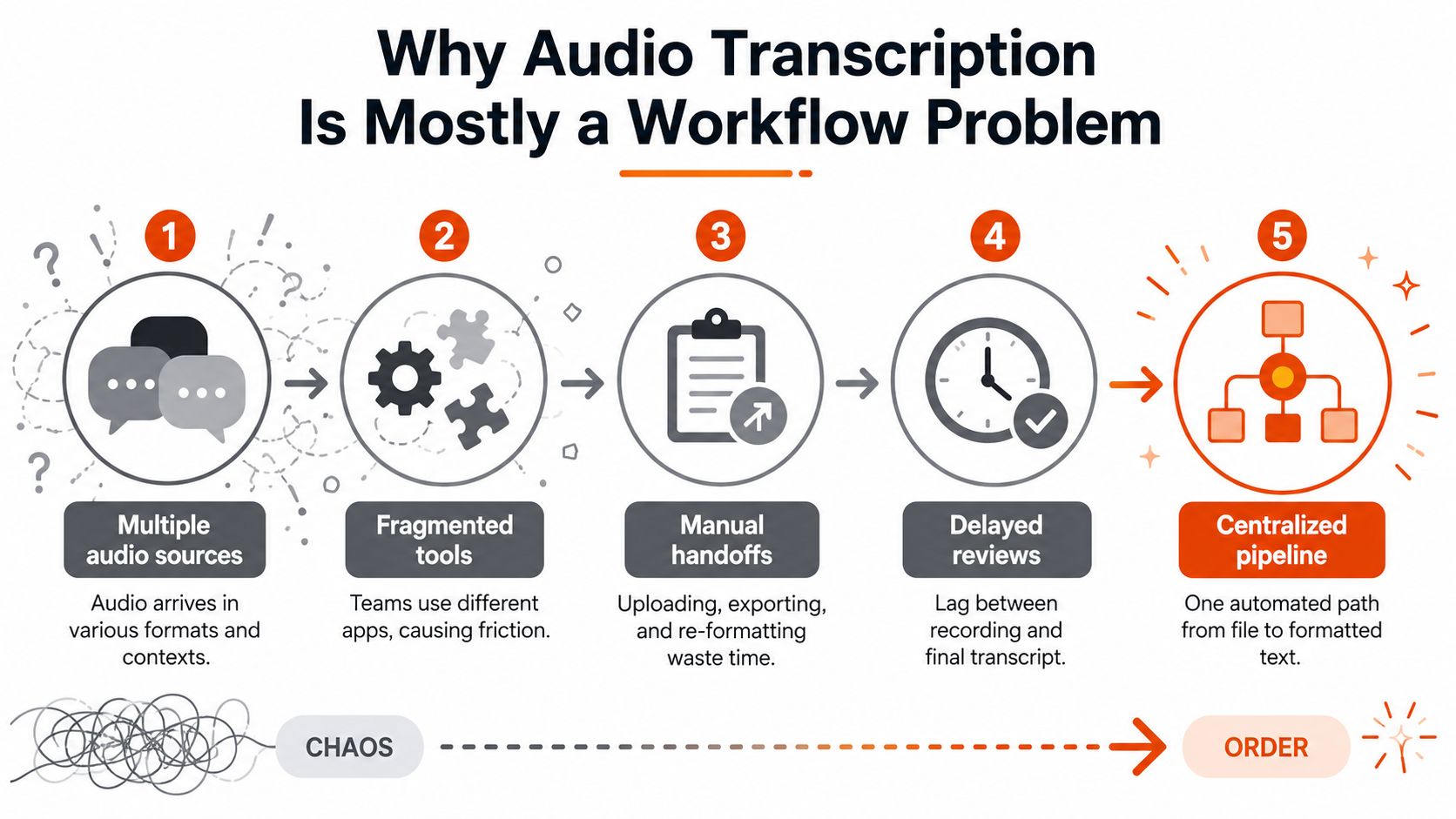
The most popular advice about transcribing audio files is to choose the transcription engine with the lowest published word error rate. That advice is incomplete. A strong model can't recover speech that was clipped at capture, separate voices that overlap throughout a meeting, or identify a drug name that never appears in its vocabulary. In production, the transcript users receive is the result of a pipeline, not a model in isolation.
The practical sequence is straightforward: prepare the audio, select where inference should run, process files and speakers deliberately, clean the output without changing meaning, measure performance on representative recordings, and control privacy at every handoff. The engineering decision that matters most is often not whether you use a local model or a cloud API. It's whether the surrounding workflow gives that model a fair chance to succeed.
Table of Contents
- Why Audio Transcription Is Mostly a Workflow Problem
- Preparing Your Audio for the Best Possible Results
- Choosing Between Local and Cloud Transcription Models
- Batch Processing, Speaker Labels, and Timestamps
- Editing, AI Cleanup, and Output Formatting
- Measuring Accuracy on Your Own Audio
- Privacy, Compliance, and HIPAA-Ready Transcription
Why Audio Transcription Is Mostly a Workflow Problem
Teams often compare Whisper, AssemblyAI, Deepgram, and Google as though the vendor choice determines the entire outcome. Those systems may perform competitively on clean benchmarks, but benchmark conditions rarely resemble a clinic visit, a laptop-recorded meeting, or a phone call with crosstalk. The gap between engines matters, but recording quality, speaker separation, vocabulary handling, and human review frequently matter more.
The history of speech recognition supports this gradual view. Bell Labs built the first known machine for recognizing spoken digits in 1952, IBM demonstrated its 16-word Shoebox system at the 1962 World's Fair, and DARPA launched a five-year Speech Understanding Research program in 1971 with a target of connected-speech recognition using about 1,000 words. Microsoft researchers reported human parity on the Switchboard conversational speech benchmark by 2017. That progression, documented in the timeline of speech and voice recognition, reflects successive improvements from small-vocabulary prototypes to statistical models and deep neural networks, not one magic breakthrough.

The six decisions that shape the transcript
A reliable implementation treats transcription as six connected decisions:
- Audio preparation: Capture speech clearly, preserve useful signal, and avoid unnecessary compression.
- Engine and deployment: Balance privacy, latency, throughput, cost, and expected accuracy.
- Batch and diarization: Queue work consistently, split long recordings intelligently, and assign speaker labels.
- Editing and cleanup: Separate mechanical normalization from language rewriting.
- Measurement: Test on your own recordings with a human-verified reference.
- Privacy controls: Track where audio and text travel, how long they're stored, and who can access them.
The market's scale also shows why this deserves systems thinking. One industry roundup valued global transcription services at $3.2 billion in 2022 and projected a 7.8% compound annual growth rate from 2023 through 2030, while another summary used a broader definition and valued the market at $21.6 billion in 2022, with projected annual growth of 5.8% from 2023 through 2030. The differing definitions make the figures unsuitable for direct comparison, but both estimates point to a substantial workflow category rather than a minor administrative task. The same roundup cites a professional benchmark of about four hours to transcribe one hour of audio on average (industry market and productivity figures).
Practical rule: Don't spend your first engineering sprint chasing a tiny benchmark gain. Fix the microphone, speaker overlap, vocabulary, review path, and output format first.
Preparing Your Audio for the Best Possible Results
Transcription accuracy is often decided before the audio reaches a model. A recognizer can infer some missing words, but it cannot reliably separate a quiet speaker from room reverberation, keyboard noise, or an HVAC system sharing the same frequency range.
Start with a lossless or high-quality source, such as WAV or high-bitrate M4A, and keep capture settings consistent across the project. Research on acoustic interference shows why volume alone is a poor guide: at a fixed noise level, recognition can vary from 0% to 100% depending on the spectro-temporal structure of background sound, not just its loudness (research on noise structure and speech recognition). Clipping, aggressive compression, and poor microphone geometry produce substitutions, insertions, and deletions that later processing may not repair.
Improve the signal before you improve the model
Mic placement usually matters more than microphone prestige. Place the microphone close enough to capture direct speech, aim it consistently, and keep the speaker's mouth within the pickup pattern. A modest microphone near the speaker in a controlled room will often outperform an expensive microphone across a reflective table.
Room treatment protects consonants from being blurred by reflections. Move away from bare walls, reduce HVAC and fan noise, silence nearby notifications, and keep a laptop microphone away from the keyboard. In remote meetings, separate local tracks for each participant are preferable to asking one room microphone to distinguish several voices.
Apply preprocessing with restraint:
- Preserve speech detail: Avoid repeated lossy exports and extreme noise gates.
- Control levels: Prevent clipping while keeping quiet speakers audible.
- Test denoising: Compare processed audio with the original. An aggressive filter can remove speech characteristics.
- Keep originals: Store the untouched recording separately so you can rerun inference when the pipeline improves.
For practical background-noise techniques, the background noise reduction guide offers useful guidance. The goal is not artificially clean audio. It is speech that remains distinct without losing cues the recognizer needs.
Long recordings also need deliberate segmentation. Voice-activity detection can split speech at natural pauses, while fixed windows may cut through names, numbers, or sentences. Keep enough surrounding context for the engine to interpret each phrase, and retain offsets so the transcript can point back to the original audio.
Practical rule: Record the cleanest signal you can, then remove predictable interference carefully. Post-processing cannot reconstruct information the microphone never captured.
Choosing Between Local and Cloud Transcription Models
The local-versus-cloud decision isn't ideological. It depends on latency, privacy, accuracy ceiling, throughput, and operating cost for a specific workload.
Local inference keeps audio on the device or within infrastructure you control. Tools such as Whisper.cpp, faster-whisper, NVIDIA Parakeet, and Vosk can support offline workflows, which is valuable for sensitive dictation and environments with unreliable connectivity. The trade-off is operational: model size, CPU or GPU availability, thermal limits, updates, and diarization support all become your responsibility. Smaller local models may be fast and private, but they can struggle with difficult accents, jargon, or multi-speaker recordings.
Cloud APIs remove much of that infrastructure burden. They can provide larger models, managed scaling, diarization features, and ongoing model updates, but they introduce network latency, usage billing, retention questions, and contractual exposure of the audio or transcript. A cloud service may be the right choice for long-form, non-sensitive processing, but convenience doesn't eliminate the need to review data handling terms.
| Dimension | Local, Whisper.cpp or Parakeet | Cloud, AssemblyAI, Deepgram, or Google |
|---|---|---|
| Privacy | Audio can remain on the device or private infrastructure | Audio leaves your environment and is governed by vendor terms |
| Latency | Strong fit for offline or interactive dictation when hardware is adequate | Strong fit when managed throughput and larger hosted models matter |
| Accuracy ceiling | Constrained by the model and hardware you can run | Access to hosted models and vendor-managed improvements |
| Diarization | Requires compatible local components and additional setup | Often available as a managed feature, but must be validated on your audio |
| Operations | You manage models, acceleration, updates, and failures | Vendor manages infrastructure, while you manage integration and contracts |
| Cost profile | Hardware and maintenance are front-loaded | Usage usually follows service billing and retention terms |
A hybrid policy is often easier to defend
For regulated audio, route processing locally by default unless a cloud provider has completed the required contractual and security review. For non-sensitive archives, cloud batch processing can make sense when throughput and managed diarization outweigh data-egress concerns. Keep the same post-processing schema on both paths, including speaker IDs, timestamps, confidence fields, and raw text, so changing engines doesn't force a rewrite of your editing tools.
A phone-call workflow deserves separate treatment because capture quality and consent rules can differ from file-based dictation. The BubblyPhone call transcription guide provides useful context for thinking about recorded calls, call handling, and transcript workflows rather than treating every audio source as equivalent.
For Mac users weighing privacy against cleanup features, on-device speech recognition explains the practical distinction between local recognition and cloud-assisted processing. The right architecture may use local inference for immediate dictation and a separately governed cloud step for permitted cleanup.
Batch Processing, Speaker Labels, and Timestamps
A production transcription system shouldn't depend on someone uploading files one at a time and hoping the browser doesn't time out. Treat recordings as jobs with validation, queueing, structured outputs, and a manifest that records what happened to each file.
Begin with a pre-flight check. Confirm the file format, sample rate, channel count, duration, language, and expected speaker count. Reject or quarantine files that fail basic validation instead of sending them into inference and discovering the problem after an empty transcript appears.
Build a repeatable processing sequence
A dependable batch flow looks like this:
- Queue the source files: Assign each recording a stable job ID and preserve the original filename as metadata.
- Run voice-activity chunking: Split long recordings around speech pauses while retaining source offsets.
- Transcribe each chunk: Store raw text, confidence information where available, and timing data.
- Run diarization: Identify speaker turns before merging chunks, then reconcile labels across boundaries.
- Align and assemble: Reconstruct the transcript in source order and write a per-file result.
- Update the manifest: Record success, failure, duration, model version, and output locations.

Diarization is not the same as transcription. Transcription answers what was said, while diarization estimates who said it. If speakers interrupt one another or share a microphone, diarization can fail even when the words themselves are recognizable. Enrolled speaker embeddings can help with recurring participants, but the system still needs a fallback for unknown voices and ambiguous turns.
Choose timestamps for the product, not the model
Use sentence-level timestamps for readable notes and meeting summaries. Use word-level timestamps for subtitles, search interfaces, and jump-to-audio controls. Use segment-level timestamps when clinical or legal users need paragraph-sized units that remain stable during review.
A reusable checklist should confirm:
- Formats: Validate audio type, channels, sample rate, and duration.
- Chunking: Use voice activity and preserve offsets.
- Diarization: Enable speaker separation when more than one voice matters.
- Granularity: Select sentence, word, or segment timestamps based on the output.
- Exports: Write per-speaker segments and retain raw machine output.
- Manifest: Verify every queued file has a terminal status.
- Archive: Store source audio separately from editable transcript data.
The following walkthrough shows how a file-based workflow can be exposed to users without hiding these pipeline decisions.
Editing, AI Cleanup, and Output Formatting
A transcript is an evidence layer, not automatically finished prose. Keep the recognizer's output intact, then create cleaner versions for the people and systems that will use it. Sending the only copy through a language model makes errors harder to trace and reversals difficult.
Begin with mechanical edits that have predictable behavior. Remove repeated filler words only for polished prose, normalize number and date formats, correct capitalization, and standardize punctuation. Use rules where possible. They are easier to test against real files and safer to undo than broad rewriting.
AI cleanup has a narrower role. Give the model explicit limits: preserve facts, uncertainty, speaker attribution, technical vocabulary, and the intended meaning of corrections. If a speaker says, “Tuesday, no, Wednesday,” the output should record a Wednesday appointment without inventing context. A model that makes text smoother can still change what the speaker meant.
Keep the original audio available for any disputed edit. The AI audio cleanup guide can help separate edits suitable for automation from changes that require review. Medical terms, medication names, legal language, code identifiers, and proper nouns should be checked against a glossary or by a human reviewer, rather than selected because a model finds them natural.
A practical versioning scheme uses three layers:
- Raw transcript: Recognizer output with original timestamps and machine fields.
- Normalized transcript: Rule-based corrections and consistent formatting.
- Reviewed transcript: Human-approved prose, notes, or structured data.
The reviewed layer should retain a path back to the raw text. Stop polishing when a checked sample no longer improves. Further rewriting may produce cleaner sentences while changing meaning, particularly when the cleanup model cannot consult the audio.
| Use case | Format | Timestamp granularity | Cleanup level |
|---|---|---|---|
| Video captions | SRT or VTT | Word or short segment | Readable, tightly timed, speaker treatment as needed |
| Product integration | JSON with word timings | Word-level | Minimal normalization, preserve machine fields |
| Clinical review | DOCX with speaker tags | Segment or sentence | Conservative cleanup, glossary enforcement, human sign-off |
| Archival text | Plain text | Segment or sentence | Remove distracting disfluencies while retaining meaning |
Choose segment-level cleanup when timing and speaker boundaries must remain stable. For a memo, article, or email, document-level cleanup can produce coherent prose while keeping the raw transcript as the review record.
Measuring Accuracy on Your Own Audio
Benchmark tables answer a narrow question: how a system performed on a defined test set. They cannot predict performance with your microphones, product names, accents, room acoustics, or speaker overlap. Transcription quality is therefore a workflow measurement, not just a model score.
Use word error rate as a baseline: (substitutions + insertions + deletions) / total words. The Artificial Analysis speech-to-text leaderboard shows why test design matters. Its comparison uses about eight hours of audio across three datasets, including diverse accents and difficult channel conditions. The same source reports roughly 95% to 98% accuracy on clean studio audio, while meeting and phone recordings often reach only 80% to 92%, with noisy or accented speech performing worse.
Build a production-shaped test
Pull representative clips from the workflow you ship, then create human-verified reference transcripts. Include dictation, meetings, phone recordings, overlapping speakers, proper nouns, numbers, and technical vocabulary. Run competing engines on identical clips with identical preprocessing and cleanup rules. Otherwise, you are measuring pipeline differences rather than model quality.
Keep the scorecard broader than WER:
- WER: Overall substitutions, insertions, and deletions.
- Character error rate: Useful for spelling, identifiers, and code tokens.
- Diarization error: Measures speaker attribution when identity affects the decision.
- Entity accuracy: Checks names, medications, numbers, and domain terms.
- Confidence behavior: Shows whether uncertain passages are surfaced for review.
Error patterns usually point to the next engineering change:
| Observed error | Likely cause | First intervention |
|---|---|---|
| Proper nouns are wrong | Missing glossary, enrollment, or context | Add vocabulary and test speaker or domain enrollment |
| Many inserted words appear | Noise, false voice activity, or room interference | Improve capture and tune voice-activity detection |
| Numbers are consistently substituted | Acoustic mismatch or domain formatting issue | Test pronunciation, telephony conditions, and normalization rules |
| Speaker labels drift | Overlap or weak cross-chunk identity matching | Improve track separation and diarization reconciliation |

Noise can overwhelm a strong recognizer. Research on transcription under background noise and accents found median accuracy falling from 91.7% at 6 dB SNR to 75.6% at 0 dB and 48.4% at -3 dB (research on transcription under background noise and accents). Test the recording conditions, speaker mix, and post-processing rules you will deploy.
Privacy, Compliance, and HIPAA-Ready Transcription
Privacy isn't a policy paragraph added after implementation. It's a property of the capture, transport, inference, storage, access, and deletion decisions that surround the transcript.
For clinical audio, start by identifying every system that touches the recording. A mobile recorder, browser extension, upload service, transcription API, cleanup model, document store, and analytics tool may all create separate exposure points. If a consumer application automatically uploads audio, the privacy decision has already been made before your transcription engine runs.
Audit the pipeline layer by layer
- Capture: Encrypt recordings and disable automatic uploads to consumer applications.
- Transport: Protect data in transit with current encrypted connections, and document how clients validate the service endpoint.
- Processing: Decide whether inference runs on-device, in your controlled environment, or through a vendor cloud.
- Storage: Encrypt audio and transcripts at rest, restrict regions where required, and apply a defined retention period.
- Access: Use role-based permissions, single sign-on where appropriate, and audit logs that show who accessed or changed a transcript.
- Output: Redact protected health information when the downstream task doesn't need it, and prevent sensitive text from entering unrelated training or analytics flows.
For HIPAA-related workloads, require a signed Business Associate Agreement from any cloud provider that handles protected health information or derived transcripts. Confirm the agreement covers relevant subcontractors, understand retention and deletion behavior, and verify that customer data isn't used for model training by default. A compliance label on a product page isn't a substitute for reviewing the actual contract and configuration.
Security check: If you can't name where the audio is stored, who can retrieve it, and when it will be deleted, the workflow isn't ready for sensitive production use.
Common red flags include free consumer tiers, browser extensions that capture audio without clear controls, and “summarization” features that pass transcript text to an undisclosed third-party language model. Cloud processing can be appropriate, but only when the organization has established the required contractual, technical, and operational safeguards.
Run a short self-audit:
- Trace data flow: Draw every hop from microphone to final document.
- Check vendors: Confirm contracts, subprocessors, retention, and training settings.
- Test deletion: Verify that deleting a job removes the expected audio and derivative text.
- Review permissions: Ensure a transcription reviewer doesn't automatically receive broad clinical-system access.
- Protect exports: Treat DOCX, JSON, captions, and copied text as sensitive outputs.
- Record exceptions: Document when a permitted cloud route is used instead of local inference.
AIDictation offers local Parakeet v3 dictation on Apple Silicon, cloud-assisted cleanup and formatting, audio and video transcription, custom vocabulary, and meeting transcription, giving teams a way to choose between on-device recognition and connected processing according to the workload. Visit AIDictation to evaluate its local and cloud modes against your own recordings, then validate the resulting accuracy, cleanup behavior, and privacy controls before adopting it for clinical or professional workflows.
Frequently Asked Questions
What does Transcribing Audio Files: A Practical Workflow That Works cover?
The most popular advice about transcribing audio files is to choose the transcription engine with the lowest published word error rate. That advice is incomplete.
Who should read Transcribing Audio Files: A Practical Workflow That Works?
Transcribing Audio Files: A Practical Workflow That Works is most useful for readers who want clear, practical guidance and a faster path to the main takeaways without guessing what matters most.
What are the main takeaways from Transcribing Audio Files: A Practical Workflow That Works?
Key topics include Table of Contents, Why Audio Transcription Is Mostly a Workflow Problem, The six decisions that shape the transcript.
Ready to try AI Dictation?
Experience fast voice-to-text on your device. Free to download.
Download FreeRelated Posts
Email Dictation Software: What It Is and How to Choose
Learn what email dictation software is, how it works, and how to pick the right one. Covers accuracy, privacy, HIPAA, accents, and real buyer checklists.
Understanding Paragraph Structure That Actually Works
A practical guide to understanding paragraph structure, with components, examples, editing steps, and dictation tips for cleaner writing.
Choosing a Medical Dictation App for Clinical Work
Compare medical dictation apps on HIPAA compliance, on-device vs cloud, medical vocabulary accuracy, EHR integration, and pricing to find the right fit.