AI Audio Cleanup: A Guide to Clearer Sound in 2026
You finish an interview, meeting recap, or voice memo, hit play, and realize the recording is fighting you. The guest sounds fine, but there's HVAC rumble under every sentence. The room adds a hard slap echo. Someone at the next table contributed half the soundtrack. The words are there, but the recording doesn't sound trustworthy.
That's where AI audio cleanup has become useful in a very practical way. Not as a magic button that fixes anything, but as a fast, increasingly capable layer between a rough recording and something people can listen to. For podcasters, interviewers, founders, students, and anyone dictating notes on a laptop, it has changed what counts as salvageable audio.
If you're trying to improve spoken recordings, a lot still comes down to fundamentals like mic choice, distance, and room sound. Flexwork's guide for pro podcasters is a good companion read because it stays grounded in the recording decisions that matter before software touches the file. If you're still sorting out capture hardware, this guide to choosing a microphone for speech helps narrow the field without turning it into a gear obsession.
Table of Contents
- From Frustration to Flawless Audio
- How AI Audio Cleanup Actually Works
- The Evolution from Manual Repair to AI Enhancement
- Key Considerations and Practical Tradeoffs
- Best Practices for Preparing Your Audio
- A Practical Workflow Using AI Dictation
- How to Evaluate Quality and Choose the Right Tool
From Frustration to Flawless Audio
A common failure pattern looks like this: the content is good, the delivery is fine, and the sound makes the whole thing feel amateur. That's frustrating because most spoken-word recordings don't fail for dramatic reasons. They fail in small, persistent ways. Air conditioner hum. Laptop fan noise. Office reflections. Traffic wash. A slightly distant mic that makes every repair harder.
AI audio cleanup is useful because it targets exactly those ugly but ordinary problems. Instead of building a repair chain from scratch in a DAW, many newer tools aim to detect speech, suppress the junk around it, and push the result closer to what people expect from a quiet, controlled recording. In practice, that means less time drawing automation, hunting resonances, and stacking plugins just to make a call recording usable.
The key shift is accessibility. You no longer need to know how to tune a noise profile, dial a de-esser, or set compression by ear before you can get a decent result. That doesn't mean engineering judgment stopped mattering. It means the starting point got much better.
Clean audio isn't just about sounding polished. It affects whether people trust what they're hearing and whether they stay with the content long enough to absorb it.
What makes this category worth taking seriously is that it now serves several kinds of work at once:
- Interviews and podcasts: Dialogue has to sound clear, but still human.
- Meetings and dictation: Intelligibility matters more than sonic beauty.
- Remote recordings: Cleanup often has to compensate for weak rooms and weak mic technique.
- Customer-facing content: Slightly imperfect but believable usually beats aggressively “fixed.”
That last point matters. A flawless result isn't always the right result. Sometimes the best cleanup is the one nobody notices.
How AI Audio Cleanup Actually Works
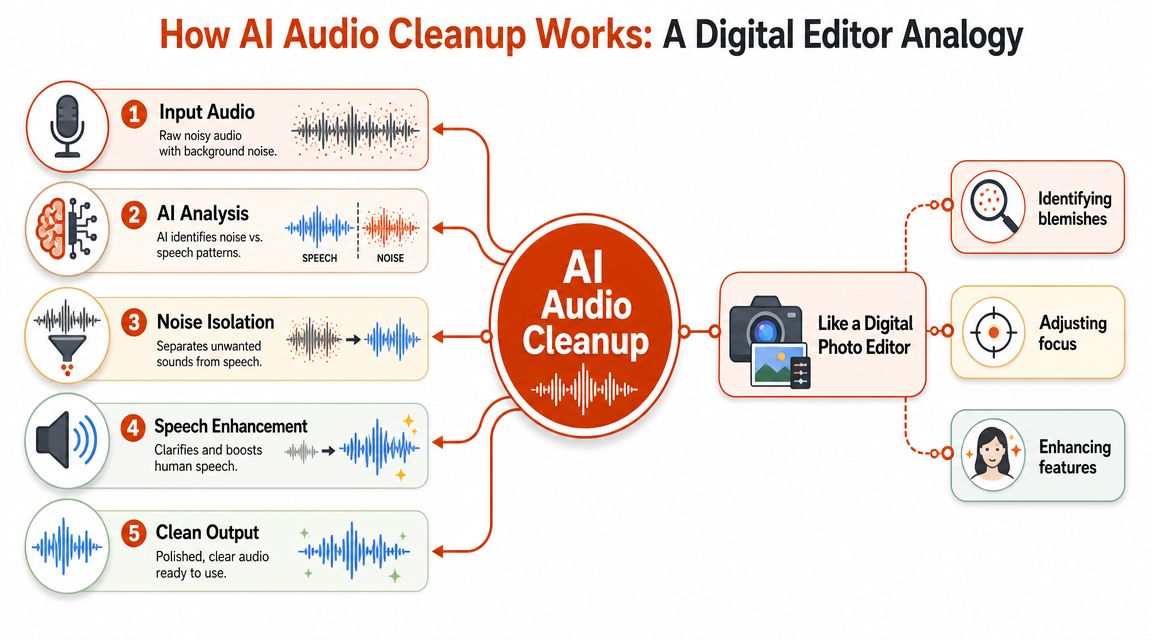
Modern AI audio cleanup works less like a traditional gate and more like a smart editor that tries to separate the thing you want from everything else. If a photo editor can identify a face against a messy background, the audio equivalent tries to identify speech inside a cluttered sound field.
It starts with separation, not simple filtering
The core idea is speech separation. According to Opus's overview of AI denoise and echo removal tools, these systems work by separating target speech from interference in the time-frequency spectrum, then suppressing noise, echo, and artifacts while preserving intelligibility. Modern denoise models are typically trained on large audio corpora, which is why they can automatically distinguish speech from background noise, reverb, and interference patterns better than manual EQ and compression alone on messy dialogue.
That time-frequency phrase sounds technical, but the mental model is simple. Audio isn't just volume over time. It's energy spread across frequencies over time. A cleanup model analyzes that map and asks: which parts behave like a human voice, and which parts behave like room reflections, hum, hiss, keyboard clicks, or crowd wash?
Once the model has a decent answer, it can do several things at once:
- Suppress steady noise like fans, traffic beds, or HVAC rumble
- Reduce room effects such as echo or reverb
- Preserve consonants so speech remains understandable
- Avoid over-cutting during quiet words and sentence tails
That's a big difference from older cleanup approaches that mostly reacted to level.
Why it beats older one-knob fixes
Classic tools often treated unwanted sound as one broad problem. A gate closed when the signal got quiet. EQ cut a frequency range. Compression reshaped dynamics. Those tools still matter, but they lack a specific understanding of speech.
AI models are more speech-aware. They're trying to classify patterns, not just reduce a band or clamp a threshold. That's why they often hold onto intelligibility in rough recordings that would fall apart under aggressive manual processing.
For anyone working with transcription too, this matters twice. Better cleanup doesn't just help listeners. It often helps recognition quality downstream. If you're curious about that side of the pipeline, this breakdown of Whisper AI speech recognition is useful background because it shows how audio quality and speech recognition accuracy interact.
A good cleanup model doesn't make speech louder by brute force. It makes competing sounds less relevant.
Still, there's no mystery here. AI audio cleanup works because it has been trained to identify recurring structures in speech and interference, then apply targeted suppression and enhancement much faster than a human can build from scratch.
The Evolution from Manual Repair to AI Enhancement
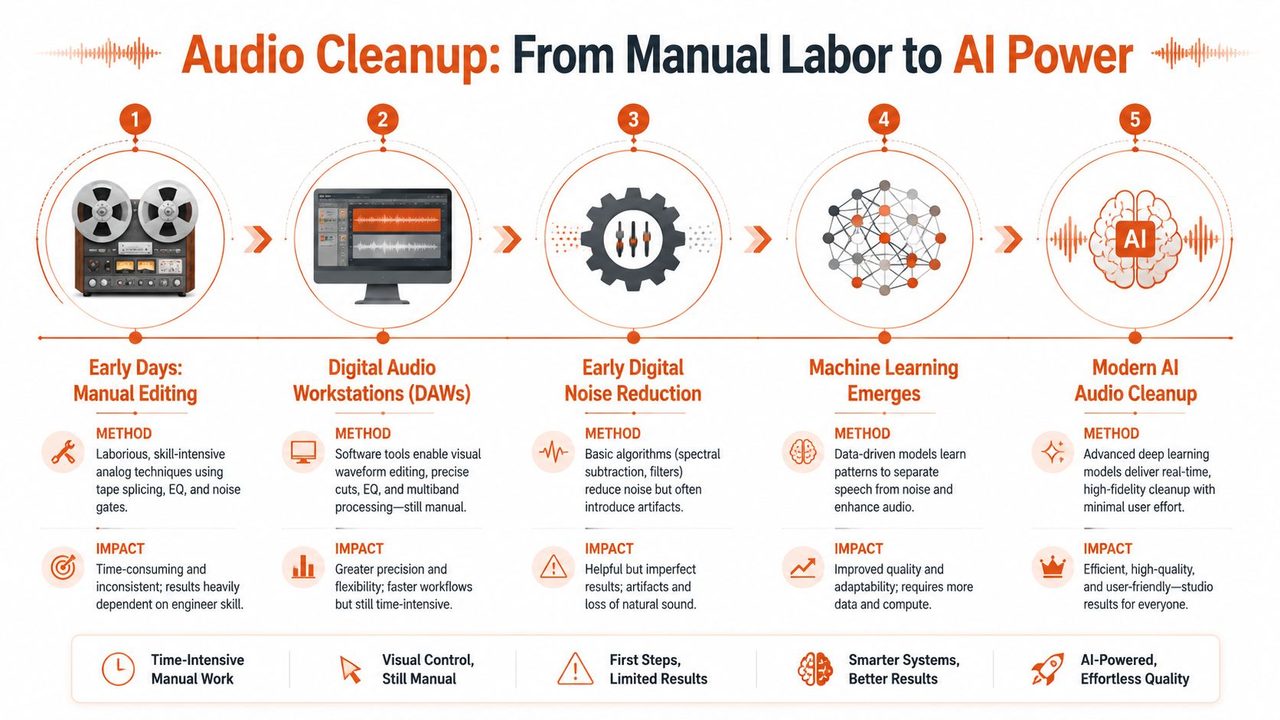
Before one-click cleanup became normal, dialogue repair was mostly a matter of patience, judgment, and plugin discipline. You opened a DAW, listened for the main problems, and built a chain around them. Sometimes that meant good results. Sometimes it meant chasing one artifact only to create another.
What manual repair used to involve
A typical spoken-word repair pass in a DAW might include:
- Noise reduction: Capture a noise profile and hope the background stays consistent enough for it to work.
- EQ cleanup: Cut low-end rumble, shape mids, tame harshness.
- Compression: Control level swings without raising room noise too much.
- De-essing and gain riding: Smooth sibilance and keep speech present.
- Spot repair: Manually remove clicks, bumps, breaths, or lip noise where needed.
That workflow can still be the right answer when you need maximum control. It's also slow, and it rewards experienced ears. Less experienced editors often overdo the reduction, flatten the voice, or introduce swirling artifacts while trying to “fix” the file.
What changed with machine learning tools
The current shift is that AI audio cleanup has moved from manual, DAW-based repair toward one-click machine-learning enhancement. A 2024 roundup of mainstream AI audio cleanup tools listed Adobe Podcast Enhance Speech, Descript Studio Sound, Riverside Magic Audio, ElevenLabs Voice Isolator, and DaVinci Resolve Voice Isolator as mainstream options that automate processing such as de-hum, de-reverb, normalization, de-essing, and compression. The same roundup notes that in a 2024 listening test, Production Expert reported AI and machine-learning tools outperformed a human audio professional across all four dialogue-cleanup tests, with Descript winning 3 of 4 tests and Adobe Speech Enhance winning the remaining test.
That result matters because it changes the default assumption. For dialogue cleanup, you can no longer assume that a careful manual chain will beat an AI pass. On messy speech, the opposite can happen.
The practical takeaway isn't that manual engineering is obsolete. It's that the job changed. Engineers now spend less time doing first-pass rescue and more time deciding when to trust the model, when to dial it back, and when to switch to a different tool entirely.
Here's the before-and-after:
| Approach | Strength | Weakness |
|---|---|---|
| Manual DAW repair | Fine control and surgical edits | Slow, skill-heavy, easy to over-process |
| One-click AI enhancement | Fast, consistent, accessible | Less transparent, can sound synthetic if pushed |
| Hybrid workflow | Best balance for hard material | Requires judgment about when each stage helps |
For most spoken content, hybrid wins. Let AI handle the broad cleanup. Let a human decide what still sounds wrong.
Key Considerations and Practical Tradeoffs
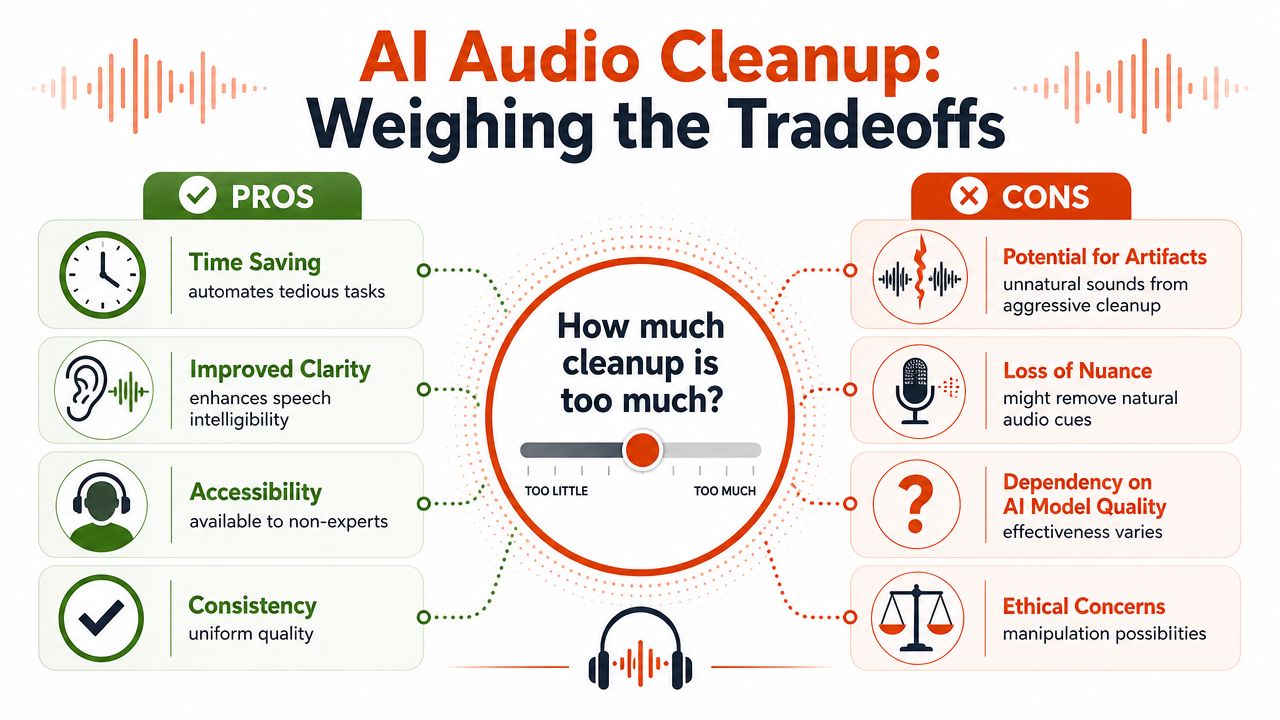
The usual marketing promise is simple: remove noise, get clear speech, move on. Real use is less tidy. The hardest decisions in AI audio cleanup aren't about whether cleanup works. They're about how far to push it and what constraints matter besides sound.
When cleanup helps and when it hurts
One of the most useful warnings in this category is also the least glamorous. As noted in a hands-on discussion of AI speech enhancement tradeoffs, many tools now remove not only noise but also breaths, pauses, filler words, and reverb, and pushing those settings too high can strip away natural atmosphere and make speech sound processed rather than authentic.
That's not a side issue. It's a core production choice.
For a podcast host recording in a reflective room, removing some reverb is usually helpful. Removing all trace of room sound can make edits feel detached from reality. For a founder sending internal voice notes, filler-word removal may improve readability in transcripts. For a documentary interview, taking every breath out of the waveform can make the speaker feel oddly artificial.
Practical rule: If the listener starts noticing the cleanup itself, you've gone too far.
A few signs that a tool is overworking the material:
- Speech turns watery: Consonants smear or shimmer unnaturally.
- Pauses feel machine-cut: The rhythm stops sounding like a person thinking.
- Breathing disappears completely: The voice becomes unnervingly dry.
- Room tone collapses: The space around the speaker vanishes between phrases.
Workflow constraints matter more than demos
The best-sounding demo isn't always the best tool for the job. Recent comparative coverage has highlighted a split between tools optimized for one-click speech enhancement, tools that offer finer control over speech, music, and background separation, and tools that fit larger post-production workflows with loudness handling, stem separation, or integrated transcription.
That matters because teams often choose under constraints such as:
| Constraint | What to prioritize |
|---|---|
| Privacy-sensitive audio | Local processing, minimal upload requirements |
| Fast turnaround | Short processing time, simple batch handling |
| Podcast delivery | Loudness control, consistent episode-to-episode output |
| Video post | Tooling that fits editing timelines and exports |
| Transcript-first workflows | Cleanup tied closely to speech recognition and text editing |
Cloud tools often offer stronger convenience and broader feature sets. Local tools usually make more sense when recordings are sensitive, internet access is unreliable, or you need predictable handling inside a closed workflow. Neither is universally better.
The wrong buying question is “Which tool sounds best in a before-and-after clip?” The better question is “Which tool solves the actual bottleneck without creating a new one?”
Best Practices for Preparing Your Audio
AI cleanup is powerful, but it still depends on the recording you hand it. If the voice is distorted, buried, or badly captured, the model has to guess too much. That's where results start sounding brittle.
Capture decisions that give AI a fighting chance
The easiest improvements usually happen before recording, not after.
- Get the mic closer: Distance is the fastest way to add room sound. Even a basic mic sounds better when it's used close enough.
- Aim away from reflective surfaces: Hard walls, bare desks, and glass all make speech harder to clean naturally.
- Pick the quietest available spot: A smaller, softer room usually beats a larger “professional-looking” one.
- Watch your input level: Clipping is much harder to repair than steady background noise.
- Stay consistent: Turning your head away from the mic mid-sentence gives cleanup tools a moving target.
For lightweight capture setups, even a laptop or phone can work surprisingly well if the position is sensible and the room is calm. If you regularly record quick notes or interviews on Apple hardware, this walkthrough on using Voice Memos on Mac is a practical starting point for capturing cleaner source material with tools you already have.
What not to expect from cleanup
Cleanup can reduce noise, improve intelligibility, and make rough speech more usable. It can't fully undo every recording mistake.
It usually won't rescue:
- Hard clipping
- Severe mic rubbing or handling noise
- Speech masked by a louder competing speaker
- A voice recorded from too far away in a very live room
Good source audio gives AI room to enhance. Bad source audio forces AI to invent.
A simple field checklist helps more than expensive gear in many cases:
- Listen to the room first. If you can hear the fan clearly, the mic can too.
- Record a short test. Headphones will reveal issues faster than waveform views.
- Adjust position before pressing record. Moving the mic or the chair often solves more than software will.
- Leave a moment of silence at the start. It helps you hear the noise floor and makes quality checks easier later.
That prep work is boring, but it saves time. It also makes AI cleanup sound less like repair and more like polish.
A Practical Workflow Using AI Dictation
A lot of modern audio workflows don't end at audio. They end at usable text. That changes what “good cleanup” means.
From rough spoken notes to usable text
Take a product manager wrapping a call. She opens her Mac and dictates the meeting summary while the details are still fresh. The recording isn't terrible, but it isn't polished either. There's some office noise underneath, her pacing is uneven, and she drops the usual spoken fillers while sorting out her thoughts.
In that kind of workflow, the job isn't to produce a podcast-ready master. The job is to convert rough speech into something another person can read immediately. That means the cleanup stage has to serve transcription and formatting, not just listening.
A practical chain looks like this:
- Capture the memo quickly: Don't wait until the details fade.
- Apply speech-focused cleanup: Reduce the office bed and keep the voice legible.
- Transcribe the result: Turn the recording into text while the speech is still distinct.
- Remove spoken clutter: Fillers and self-corrections are useful in speech, not in a written summary.
- Format for the destination: Bullets for action items, paragraphs for context, cleaner punctuation for handoff.
That's where AI audio cleanup becomes part of a broader productivity pipeline rather than a standalone effect.
Where cleanup fits in the chain
When cleanup is embedded in dictation, you notice different tradeoffs. A very aggressive voice enhancement setting may sound impressive in isolation, but if it distorts key consonants, it can hurt downstream text quality. A lighter pass may sound less dramatic and still produce a better final document.
The same goes for filler removal. If the system removes every pause and hesitation too aggressively, the transcript may lose the speaker's intended structure. If it handles those moments in context, the output reads more like a deliberate summary than a raw speech dump.
Here's a short demo that shows how that kind of workflow can look in practice:
For technical users, the useful mental model is this: cleanup sits upstream of recognition, but downstream of capture. If capture is weak, cleanup compensates. If cleanup is balanced, recognition and formatting get easier. If cleanup is too aggressive, the text layer can inherit the damage.
That's why the best systems aren't just “denoise” tools. They're coordinated speech pipelines.
How to Evaluate Quality and Choose the Right Tool
The easiest mistake when comparing AI audio cleanup tools is to judge them only by dramatic before-and-after clips. Those clips reward aggressive processing. Real work rewards outputs that hold up over time, across files, and inside your workflow.
What to listen for
Start with your ears. A useful cleanup pass should make speech easier to follow without making the voice feel disconnected from reality.
Listen for these failure modes:
- Wateriness: A swirly texture around consonants or room tails
- Flattened vocal tone: The voice loses body and starts sounding hollow
- Unnatural gating: Background sound ducks in and out in a distracting way
- Over-stripped delivery: Breaths, pauses, and room cues vanish so completely that the result feels synthetic
A strong tool doesn't have to sound glamorous. It has to sound stable.
The best cleanup often sounds almost boring. That's a compliment.
What to measure in real workflows
Evaluation gets better when you combine listening with workflow checks. Effective cleanup often works best alongside source-aware processing and level normalization, and podcast-oriented systems commonly normalize output to around -19 LUFS for consistent perceived loudness across platforms, as explained in Swell AI's practical guide to cleaning up sound.
That gives you a concrete way to assess more than denoising alone. Ask:
| Question | Why it matters |
|---|---|
| Does the voice remain believable? | Authenticity usually matters more than hyper-clean output |
| Does the tool normalize consistently? | Level consistency matters for podcasts and repeated publishing |
| Does it fit privacy requirements? | Some teams can't send recordings to cloud services |
| Can it batch or integrate well? | Cleanup that breaks the rest of the workflow isn't efficient |
| Do you get enough control? | One-click is great until one click is wrong |
If you're comparing broader editing environments rather than just cleanup modules, Contesimal's podcast software guide is a useful reference because it looks at software choices in the context of actual production workflows, not just isolated features.
The right tool is the one that solves your bottleneck with the fewest side effects. Sometimes that's the smartest AI enhancer on the market. Sometimes it's the one that keeps your audio private, exports predictably, and doesn't make every speaker sound like the same person.
If your real goal isn't just cleaner audio but cleaner writing from speech, AIDictation is built for that workflow on macOS. It combines local and cloud dictation modes, adds AI cleanup when connected, removes filler words, handles self-corrections, and formats spoken input into ready-to-send text for notes, emails, and documentation.
Frequently Asked Questions
What does AI Audio Cleanup: A Guide to Clearer Sound in 2026 cover?
You finish an interview, meeting recap, or voice memo, hit play, and realize the recording is fighting you. The guest sounds fine, but there's HVAC rumble under every sentence.
Who should read AI Audio Cleanup: A Guide to Clearer Sound in 2026?
AI Audio Cleanup: A Guide to Clearer Sound in 2026 is most useful for readers who want clear, practical guidance and a faster path to the main takeaways without guessing what matters most.
What are the main takeaways from AI Audio Cleanup: A Guide to Clearer Sound in 2026?
Key topics include Table of Contents, From Frustration to Flawless Audio, How AI Audio Cleanup Actually Works.
Ready to try AI Dictation?
Experience fast voice-to-text on your device. Free to download.
Download FreeRelated Posts
Voice to Text on Mac: Built-in Dictation vs the Best Apps (2026)
How to use voice to text on a Mac or MacBook: turn on built-in dictation, see where it falls short, and compare the best Mac voice to text apps for 2026.
Speech Recognition in Noisy Environments: A Practical Guide
How speech recognition in noisy environments really works, why accuracy drops, and the techniques, tools, and tradeoffs that make it usable in the real world.
AI Grammar Correction Explained from Rules to LLMs
Learn how AI grammar correction works, from rule-based engines to large language models, and what it means for privacy, accuracy, and real-world workflows.