Choosing a Medical Dictation App for Clinical Work
U.S. physicians reported spending an average of 1.77 hours each day documenting outside regular office hours, rising to 1.84 hours among EHR users. Researchers estimated that physicians spent roughly 125 million hours on after-hours documentation in 2019, while only 64.5% of respondents considered documentation easy. The nationally representative study makes the procurement question clear: a medical dictation app isn't merely a convenience tool. It changes how clinical work enters the patient record, so buyers must evaluate accuracy, privacy, workflow fit, and review burden together.
The difficult part is that vendor comparisons often reduce performance to one word-error-rate headline. That number can hide errors in medications, negations, dosages, laterality, proper names, and specialty terminology. It also says little about whether an accented clinician can use the system safely in a noisy room, or whether cleaner-looking output is often longer and more time-consuming to review.
| Evaluation area | What a serious buyer should test | Why the headline feature isn't enough |
|---|---|---|
| Security and compliance | BAA, encryption, retention, deletion, access logs | Encrypted processing can still involve a HIPAA business associate |
| Recognition accuracy | Overall WER, medical WER, specialty terms, high-risk substitutions | Aggregate accuracy can conceal clinically consequential errors |
| Equity | Accents, languages, code-switching, clinician backgrounds | Average performance may not represent every speaker |
| Noise robustness | Microphones, suppression, exam-room conditions | Ambient noise can create safety-relevant transcription errors |
| Workflow fit | EHR destination, correction method, templates, review time | Fast dictation can still create more work downstream |
| Architecture and cost | Local processing, cloud cleanup, licensing, implementation | Privacy, polish, connectivity, and operating costs trade off against one another |
Table of Contents
- Why Clinicians Are Searching for a Medical Dictation App
- How Medical Dictation Apps Work
- HIPAA Compliance and Security Requirements
- Accuracy With Medical Vocabulary and Why Headline Numbers Mislead
- EHR Integrations and Clinical Workflow Fit
- The Questions Most Comparisons Skip
- Recommendations by Practice Type and Budget
Why Clinicians Are Searching for a Medical Dictation App
After-hours charting creates the strongest case for evaluating a medical dictation app. The U.S. documentation burden documented in the physician survey affects hundreds of thousands of office-based physicians, and EHR users reported more after-hours documentation than physicians who didn't use EHRs. The result is a measurable operational problem, not a vague complaint about typing.
That burden also explains why convenience-led comparisons are incomplete. A tool that transcribes quickly but mishandles a medication or forces clinicians to correct every paragraph may move work rather than remove it. A procurement committee should ask five questions:
- Can the system protect patient information in the chosen deployment mode?
- How does it perform on the vocabulary and specialties used in this organization?
- Does it remain reliable with accents, multiple speakers, and clinical noise?
- Does its output reach the EHR without adding avoidable clicks or review steps?
- Does it reduce total documentation work after correction, or only accelerate raw speech input?
The five tests that matter
Compliance comes first because clinical audio and transcripts can become protected health information. The buyer needs evidence of contractual safeguards, retention controls, access logging, and the vendor's handling of data, not just a “HIPAA-ready” badge.
Architecture determines where speech is processed. Local recognition can reduce exposure and improve offline resilience, while cloud processing may provide more extensive cleanup and formatting. Neither mode should be accepted without testing the workflow it creates.
Accuracy must be measured at the medical-word level. Drug names, diagnoses, procedures, abbreviations, and dosages deserve separate review because a low overall error rate can still conceal a dangerous substitution.
Workflow fit includes microphones, correction commands, custom dictionaries, templates, and EHR insertion. A technically accurate transcript that requires repeated copy-paste may perform poorly in practice.
Net burden is the final measure. Track time spent dictating, correcting, reviewing, signing, and finishing notes after hours. Raw transcription speed is only one component of that total.
Procurement rule: Buy the workflow you can verify, not the accuracy number you can quote.
How Medical Dictation Apps Work
A medical dictation app usually uses one of two architectures. On-device recognition processes audio locally, keeping speech away from a third-party server and supporting use when connectivity is limited. Cloud recognition sends audio or text to a remote service, where larger processing pipelines may provide cleanup, formatting, context handling, and other post-processing.
The trade-off is operational. Local processing can support a privacy-focused workflow and reduce dependence on network availability, but buyers must test its performance across their specialties, accents, microphones, and devices. Cloud processing may produce more polished text, yet the organization must establish where patient information travels, how long it remains available, and which contractual safeguards apply.
A peer-reviewed comparison found that dictated notes averaged 320.6 words, compared with 180.8 words for typed notes. Dictated notes also contained 170.9 unique words, compared with 120.4, received higher average quality scores, 7.7 versus 6.6, and contained fewer uncorrected errors, 1.5 versus 2.9 per note. The study comparing physician dictation with typing supports dictation as a way to capture fuller narratives. It does not show that longer notes are always better. More words may improve completeness, or shift additional review and copy-forward risk to the clinician.
Earlier continuous speech-recognition systems were reported to process up to 160 words per minute with approximately 98% accuracy, while reducing report turnaround time from four days to 24 to 48 hours. These results explain the category's development beyond basic transcription, but they do not remove the need for human review before clinical content becomes final. Procurement teams should also ask whether accuracy holds for medical terms, accents, specialties, and noisy environments, rather than relying on an overall headline figure.
The distinction between dictation, transcription, and review affects staffing. Organizations comparing software with traditional workflows may benefit from medical transcriptionist duties explained, particularly when assigning correction and quality-assurance responsibilities between clinicians and support staff.
HIPAA Compliance and Security Requirements
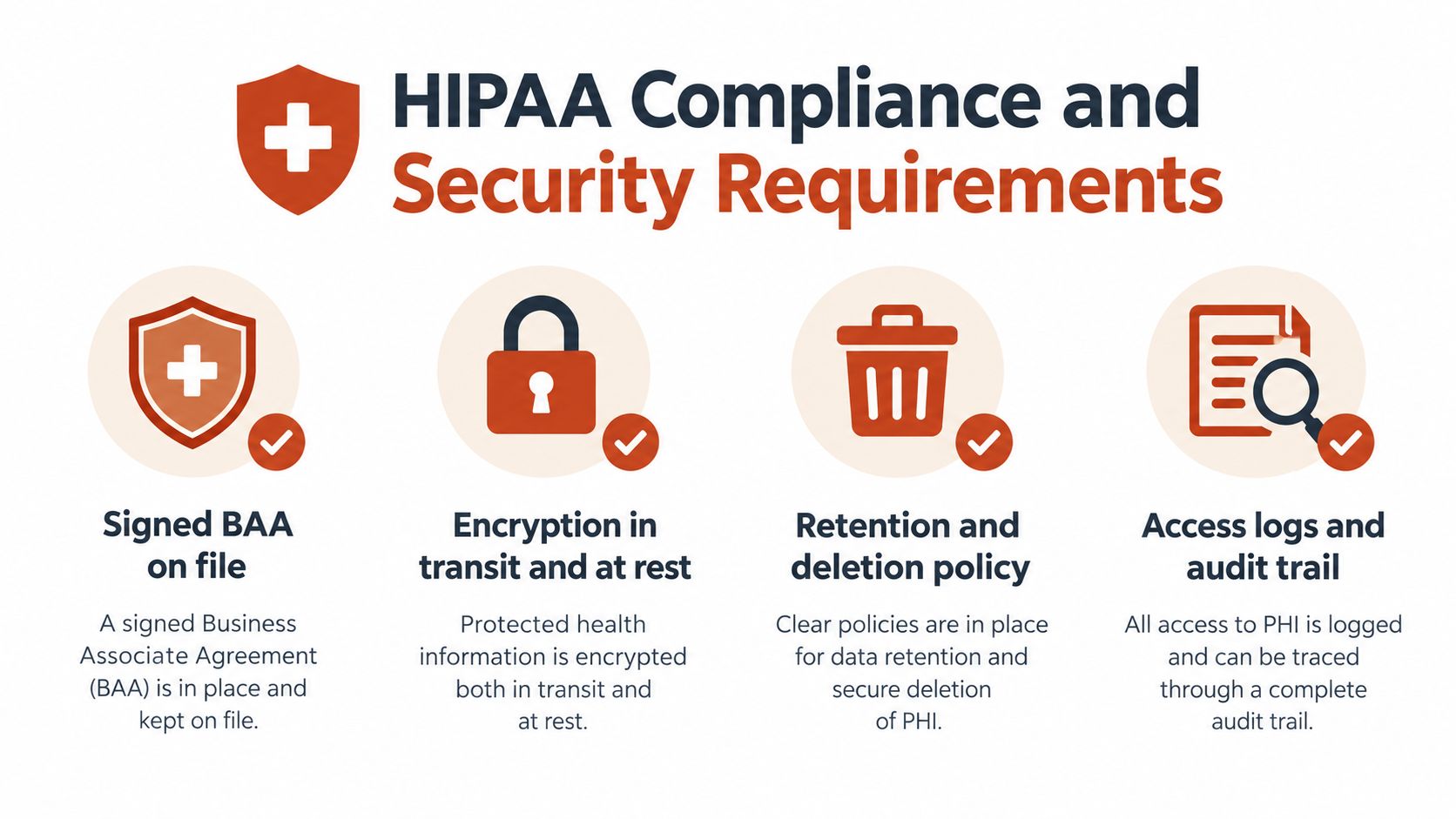
“Encrypted” isn't a complete compliance answer. HHS states that a cloud service processing electronic protected health information can qualify as a HIPAA business associate even when the data are encrypted and the provider cannot decrypt them. A covered entity therefore needs an appropriate business associate agreement and safeguards before sending patient audio or transcripts to that service. The HHS guidance and related noise evaluation should be part of any cloud-dictation review.
Ask for evidence, not assurances
Start with the contract. Request the vendor's BAA and confirm which services, subprocessors, storage locations, and support functions it covers. A vendor's inability to decrypt data doesn't eliminate the business-associate question when the vendor still processes electronic protected health information.
Then examine the technical controls:
- Encryption details: Ask how audio and transcripts are protected in transit and at rest, and request documentation describing the relevant controls.
- Retention and deletion: Establish whether recordings are stored, how deletion requests work, and whether temporary files remain in backups or logs.
- Access and auditability: Request access-control descriptions and audit-log capabilities showing who accessed patient data and when.
- Model-use policy: Ask whether customer audio or transcripts are used for training, product improvement, or third-party processing.
- Incident response: Review notification procedures, breach handling, service availability commitments, and the vendor's responsibilities under the BAA.
Noise belongs in the same checklist because it affects clinical safety, not just comfort. In one orthodontic-records evaluation, clinically significant errors ranged from 2% to 66%, depending on the system and acoustic condition. The study also identified unidirectional microphones and noise suppression as practical mitigations. A quiet demo room doesn't establish performance in an examination room, hallway, shared workstation, or telehealth setting.
Vendor Security Due-Diligence Checklist
| Requirement | What to Ask the Vendor | Evidence to Request |
|---|---|---|
| Signed BAA | Will the vendor sign a BAA covering audio, transcripts, support, and subprocessors? | Executed BAA and subprocessor list |
| Encryption | How are data protected during transfer and storage? | Security documentation and control descriptions |
| Retention and deletion | How long are recordings and transcripts retained, and how are they deleted? | Retention schedule and deletion policy |
| Access logging | Can the organization review access to patient data? | Sample audit logs and access-control policy |
| Noise performance | Has the system been tested with clinical noise and the intended microphone? | Test results and recommended hardware |
| Local fallback | Can audio remain on the device when cloud processing isn't approved? | Architecture documentation and configuration guide |
Hospitals can also consult this secure medical transcription guidance while turning the checklist into a repeatable vendor questionnaire. For high-sensitivity workflows, on-device-only processing may be the safer default, but only after local accuracy and correction performance pass the organization's clinical acceptance test.
Accuracy With Medical Vocabulary and Why Headline Numbers Mislead
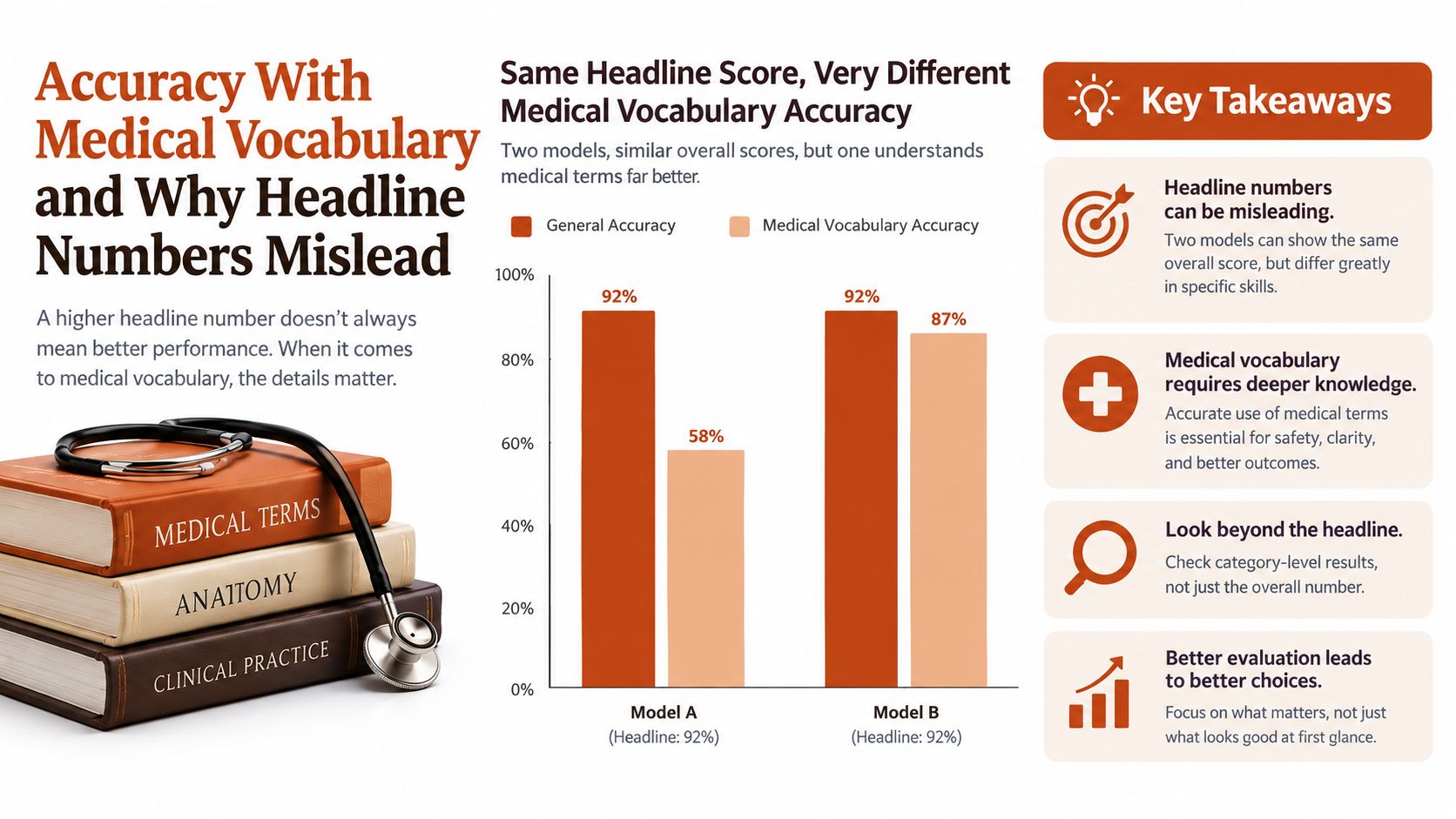
A generic accuracy percentage can look reassuring while saying very little about clinical safety. The important question isn't only how often the system recognizes ordinary words. It's whether the system distinguishes terms that change treatment, diagnosis, anatomy, or clinical intent.
One clinical-question benchmark illustrates the problem. General-purpose and medical systems produced word-error rates of 68.1% and 67.4%, respectively. A system adapted with a clinical language model improved from 41.5% to 26.7% WER, a 36% relative reduction. The clinical speech-recognition benchmark indicates that domain adaptation can matter more than the label attached to an engine.
Measure the errors that can change care
A procurement team should calculate overall WER, but it shouldn't stop there. Create a medical word error rate, or mWER, that isolates the terms most likely to affect clinical decisions. Include:
- Medication names and dosages, including similar-sounding drugs and units.
- Diagnoses and procedures, especially specialty-specific terminology.
- Laterality, such as left, right, bilateral, and anatomical location.
- Negations and uncertainty, including “no,” “not,” “rule out,” and “possible.”
- Abbreviations and proper names, including clinicians, facilities, and patient names.
Use representative recordings from the intended department rather than generic sample sentences. A cardiology set won't adequately test orthopedics, radiology, emergency medicine, or behavioral health. Include different microphones, speaking rates, accents, and realistic background conditions.
The review process should compare three outputs: raw recognition, automated cleanup, and the final clinician-approved note. Formatting and grammar correction can improve readability, but rewriting must not alter uncertainty, negation, dosage, or intent without being made explicit. A system that produces attractive paragraphs but obscures the original wording can increase rather than reduce clinical risk.
A custom vocabulary can help, but it isn't a substitute for acceptance testing. Buyers should ask how clinicians add terms, correct recurring mistakes, and remove incorrect entries. For practical context on tailoring recognition to specialist language, see this guide to specialized medical vocabulary.
EHR Integrations and Clinical Workflow Fit
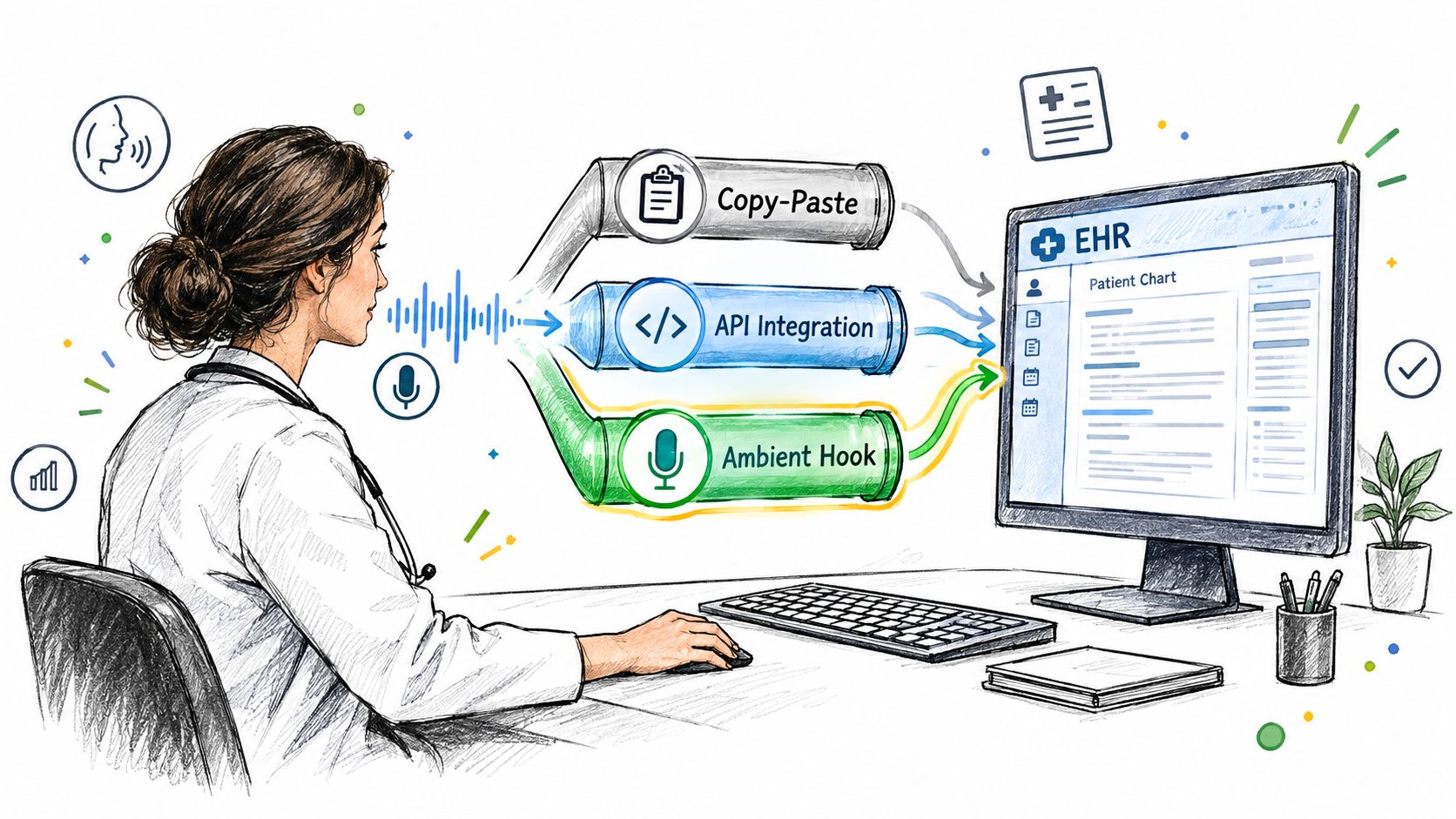
A transcript saves time only when it reaches the chart with minimal friction. The integration path determines who controls the note, where corrections happen, and whether the clinician must move text between applications.
Copy-paste is the simplest route. It can work for clinicians who dictate short addenda, referrals, messages, or narrative notes, especially when the EHR offers a reliable text field. Its weakness is operational: every transfer creates another opportunity for the wrong chart, incomplete formatting, or omitted review.
Direct EHR integration can place content into designated fields or templates. That may reduce manual movement, but it demands more technical validation. The buyer should test authentication, patient-context matching, field mapping, permissions, downtime behavior, and what happens when a clinician rejects or edits a draft.
Ambient capture introduces a different workflow. Instead of dictating a finished note, the system listens to the encounter and generates a draft. That can reduce composition effort, but it increases the importance of speaker separation, consent, acoustic quality, and careful review of what the system inferred rather than what the clinician explicitly dictated.
Match the tool to the work pattern
A clinician who dictates at a workstation needs responsive insertion, cursor control, punctuation commands, and quick correction. A mobile clinician needs reliable microphone behavior and a clear handoff from audio to draft. A department using structured templates needs field-aware formatting rather than a single block of prose.
The correction model deserves its own test. Can the user fix a word without restarting the passage? Can the clinician add a pronunciation or technical term without retraining the entire system? Does the app preserve the correction for that user, or does it apply a risky global change?
Per-app context rules can also reduce friction. A clinical note may need formal headings and dense terminology, while a patient message may require plainer language. Tools that distinguish those contexts should be tested on the actual applications clinicians use, not only in a standalone editor.
Review the broader role of speech recognition in healthcare, then ask vendors to demonstrate a complete encounter from patient selection through final sign-off. The demonstration should include an intentional recognition error, a correction, a changed medication, and a system interruption. A smooth happy-path demo doesn't reveal how the workflow behaves when clinical work becomes messy.
The Questions Most Comparisons Skip
The first overlooked question is who gets measured. A 2025 multi-country study involving 726 clinicians and 1,053 paired typing-and-dictation tasks reported a median transcription-accuracy rating of 80%. Yet some accent groups had accuracy at roughly the 60th percentile, while performance exceeded 80% for several African languages and language communities. The multi-country clinician study shows why one pooled result can't represent every clinician.
Accent isn't the only variable. Geography, code-switching, pronunciation, microphone technique, noise, specialty vocabulary, and the clinician's ability to spot errors all influence the safety of the final note. A multilingual or accented clinician shouldn't have to infer suitability from a vendor's average benchmark.
The second overlooked question is whether dictation reduces net burden. A 2025 study found reduced note-writing time after ambient AI implementation, but note length increased. Surveys also reported lower cognitive demand and documentation effort. That combination is promising, but it creates a procurement risk: the system may shorten composition while expanding review, editing, and sign-off work.
A safer validation protocol
Run a local pilot using real workflow conditions, with appropriate privacy controls and governance.
- Build specialty-specific sets: Include representative notes from each participating service, not only vendor-provided examples.
- Stratify the speakers: Record performance by accent, language, pronunciation pattern, microphone, and clinical environment.
- Mark high-risk terms: Review medications, dosages, laterality, negations, procedures, abbreviations, and proper names separately.
- Measure the whole task: Track dictation time, correction time, review time, note length, after-hours work, and sign-off delay.
- Inspect the final note: Compare raw speech, generated output, clinician edits, and signed content for silent changes in intent.
- Ask clinicians directly: Record whether the tool improves patient attention, cognitive load, and confidence in the record.
The result should be a subgroup-level safety profile, not a single pass or fail score. If one group needs substantially more correction, the organization should address that gap through microphone changes, vocabulary support, workflow adjustments, or a different tool.
Recommendations by Practice Type and Budget
A single “best medical dictation app” doesn't exist because the safest choice depends on the practice's data policy, specialty vocabulary, connectivity, and review capacity.
Privacy-first environments should begin with local processing. An on-device workflow keeps audio on the approved machine and can remain available when network access is restricted. The committee still needs to test recognition quality, hardware compatibility, local storage behavior, and whether clinicians can correct errors efficiently.
Organizations seeking polished drafts may accept cloud processing when the vendor provides a signed BAA, clear retention controls, access logs, and documented safeguards. Cloud cleanup can be useful for punctuation, formatting, filler removal, and self-correction handling, but those transformations should be compared with the original dictation before approval.
Multilingual, accented, or specialty-heavy teams should prioritize transparent subgroup evaluation. The vendor should support custom dictionaries and a lightweight correction workflow that lets clinicians fix recurring terms without waiting for a model-wide update.
A practical hybrid example
AIDictation illustrates a hybrid approach without making the architecture decision for the buyer. Its Auto Mode can switch between local recognition and a cloud service. Local Mode runs Parakeet v3 on Apple Silicon for offline dictation, while Cloud Mode adds AI cleanup, context-aware formatting, filler-word removal, and handling of self-corrections. It also provides a custom dictionary and per-app context rules.
The product offers 2,000 words per month free without an account, with Pro options available monthly, annually, or as a lifetime purchase. Those published options can make a pilot easier to structure, but healthcare organizations still need to verify their own privacy, contractual, and clinical-safety requirements before using patient information.
Pilot before scaling
Start with a limited group that represents the intended specialties and speaker profiles. Establish a baseline for after-hours documentation, correction time, note length, and clinician experience before enabling the tool.
Then run the same test set through the proposed configurations, including local and cloud modes where available. Review high-risk substitutions manually, document downtime behavior, and require clinicians to sign every note only after verification.
Scale only when the tool reduces total work without weakening documentation quality or privacy controls. A low purchase price isn't a saving if review time rises, and a polished draft isn't a benefit if the organization can't govern the data path.
AIDictation provides local and cloud dictation modes, medical vocabulary customization, context-aware formatting, and a free monthly usage tier for structured evaluation. Visit AIDictation to test whether its workflow fits your clinicians' privacy requirements, specialty terminology, and correction process before wider deployment.
Frequently Asked Questions
What does Choosing a Medical Dictation App for Clinical Work cover?
U.S. physicians reported spending an average of 1.77 hours each day documenting outside regular office hours, rising to 1.84 hours among EHR users.
Who should read Choosing a Medical Dictation App for Clinical Work?
Choosing a Medical Dictation App for Clinical Work is most useful for readers who want clear, practical guidance and a faster path to the main takeaways without guessing what matters most.
What are the main takeaways from Choosing a Medical Dictation App for Clinical Work?
Key topics include Table of Contents, Why Clinicians Are Searching for a Medical Dictation App, The five tests that matter.
Ready to try AI Dictation?
Experience fast voice-to-text on your device. Free to download.
Download FreeRelated Posts
Free Audio to Text Tools: 10 Options Compared for 2026
Compare 10 free audio to text tools: built-in recorders, free apps, offline models, and cloud APIs, with privacy and accuracy trade-offs.
Verbal Ink Transcription Workflows Today
Explore verbal ink transcription workflows, accuracy benchmarks, and how modern AI dictation tools compare to traditional human transcription services.
Medical Transcription AI: A Clinical Guide
Explore how medical transcription AI works in clinical workflows. Learn about accuracy, HIPAA compliance, hallucination risks, and vendor selection.