Speech to Text for Dyslexia: What Works and What Doesn't
In an exploratory study published in 2000, Michael McTear, Norma Conn and Nicola Phillips found that dictating and correcting cut writing errors by roughly 50% for writers with severe dyslexia compared with writing by hand. It still didn't teach anyone to spell. That's the honest verdict on speech to text for dyslexia: it lifts the spelling and handwriting load, often dramatically, but every word the software mishears turns into editing work you have to do yourself.
The advice you'll hear most often is simpler than that. "Just let them talk instead of write." It tends to land the same way: a parent relaxes, a teacher ticks a box, and six weeks later the student is spending more time hunting for missing words than they ever spent on spelling. The tool wasn't wrong. The assumption was.
Dictation isn't a switch you flip. It's a trade. You swap the effort of forming letters and retrieving spellings for the effort of checking what the machine heard. A cleaner page of text is not the same thing as stronger literacy, so the deciding question is whether the editing the software hands back to you costs less than the writing it replaced. That answer depends on the writer in front of you, and you can find out in about five minutes with a stopwatch.
Table of Contents
- Does Speech to Text Help Dyslexic Writers?
- What Speech to Text Improves and What It Cannot Replace
- Choose and Test a Tool for Dyslexia
- How to Dictate Your First Draft Step by Step
- Recognition Errors to Expect and How to Fix Them
- Where Speech to Text Falls Short
Does Speech to Text Help Dyslexic Writers?
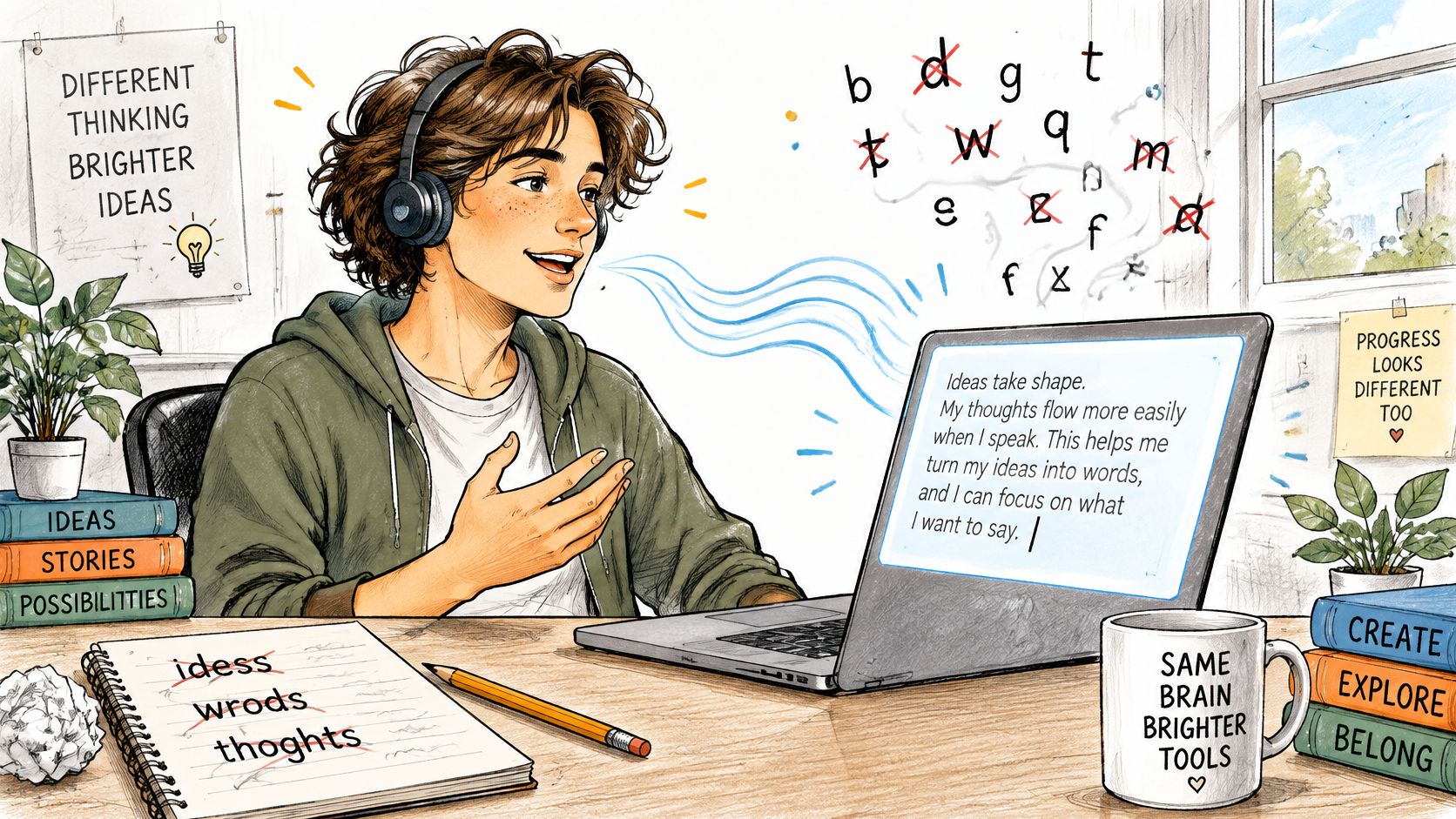
For many dyslexic writers, yes, and the gain is biggest where spelling and handwriting are the main bottleneck. The benefit shrinks as those barriers shrink, and it can flip negative when recognition is poor.
An exploratory study published in 2000 by Michael McTear, Norma Conn and Nicola Phillips, presented at the ICSLP conference, compared commercial speech-recognition software with handwriting and measured both production time and errors in the finished text. Participants with severe dyslexia dictated and corrected faster than they handwrote, with the error rate reduced by approximately 50%. Participants with mild dyslexia gained less speed, and their error rate went up.
That split is the whole lesson. Dictation moves the bottleneck from the hand to the editing desk. If spelling costs you enormous effort, the move is a clear win. If spelling costs you a little effort and the software mishears your subject vocabulary, you've traded a small problem for a bigger one.
Who benefits from speech to text and what to watch for
| Situation | Likely benefit | Watch for |
|---|---|---|
| Severe spelling and handwriting barriers | Faster drafting and about half as many errors in the 2000 study | Still proofread every final draft |
| Mild dyslexia | Smaller speed gain | Error rate can rise, so check output closely |
| Long first drafts | Ideas captured faster than handwriting | Editing time can grow with long texts |
| Names, technical terms and mixed vocabulary | Fewer spelling barriers once terms are added | Frequent misrecognition of unfamiliar words |
| Students still learning spelling | Immediate support for written output | Pair with literacy instruction; dictation alone doesn't teach spelling |
Find your row before you commit to anything. If you're a parent trying to work out whether the struggle is spelling, handwriting, or organising ideas in the first place, the explanation of help for kids who struggle writing from Children Psych is a useful place to sort those apart, because the right support differs for each.
Practical rule: trial dictation on drafts only for the first two weeks. Nothing submitted, nothing graded, until you've seen how much cleanup your own voice produces.
If you want a concrete picture of what the underlying writing difficulties look like on the page, these dyslexia examples of writing show the patterns dictation sidesteps and the ones it leaves untouched.
What Speech to Text Improves and What It Cannot Replace
A tidy paragraph and a stronger speller are different outcomes. Speech to text can help a student produce more words and make that particular draft look more accurate. The question of whether the student's own spelling improves after the software is closed needs separate evidence. That distinction matters because the editing cost of recognition errors often decides whether dictation helps in practice.
Two controlled projects show why the difference is easy to miss. One found better dictated texts without a measurable change in underlying writing skill. The other found literacy gains under a structured weekly practice arrangement, which is a very different thing from giving a child a microphone.
What the two studies measured
| Outcome | Swiss intervention | Speech-recognition study |
|---|---|---|
| Design and dose | 118 fifth-year students, 18 weeks (Zurich University of Teacher Education project) | Students with learning disabilities used speech recognition for a fixed weekly period, compared with a group receiving general computer instruction |
| Writing output length | Longer dictated texts in 36-student subgroup only | Not reported |
| Text correctness | More correct dictated texts in 36-student subgroup only | Not reported |
| Writing skills overall | No statistically significant difference | Not reported |
| Writing motivation | No statistically significant difference | Not reported |
| Word recognition | Not reported | Larger gains than the comparison group |
| Spelling | Not reported | Larger gains than the comparison group |
| Reading comprehension | Not reported | Larger gains than the comparison group |
Read the rows, not the headlines. In the Swiss project, dictated texts were longer and more correct in one experimental subgroup, while writing skills and writing motivation across the whole intervention showed no statistically significant difference from the control group. The second study's comparison group received general computer instruction, and the speech-recognition group practised on a regular schedule. That structure may explain why literacy measures moved there, while the Swiss project mainly changed the quality of the dictated product.
A wheelchair gets someone across the room. It does not build leg strength. That is not an argument against the wheelchair, it is an argument for measuring the right thing. Dictation works in a similar way. It can carry ideas past spelling and handwriting barriers, while the learner still needs direct teaching for the skill underneath.
That is why a polished final draft should not be treated as proof of literacy gain. A student may dictate a strong paragraph, correct the recogniser's mistakes, and still need the same spelling support the next day. The useful question is how much cleanup the tool creates. If every session turns into long error hunting, the accommodation can cost more effort than it saves.
Track four outcomes separately, on paper, over a term:
- Output length: how many words the student produces in a fixed time, dictated versus handwritten.
- Errors after review: what remains in the text once the student has finished checking, not before.
- Motivation: whether they start writing tasks with less resistance, which is its own goal.
- Transferable spelling: performance on a spelling task with no software running.
If the first three move and the fourth doesn't, the tool is doing its job as an accommodation. Keep it, and keep the spelling instruction too.
Choose and Test a Tool for Dyslexia
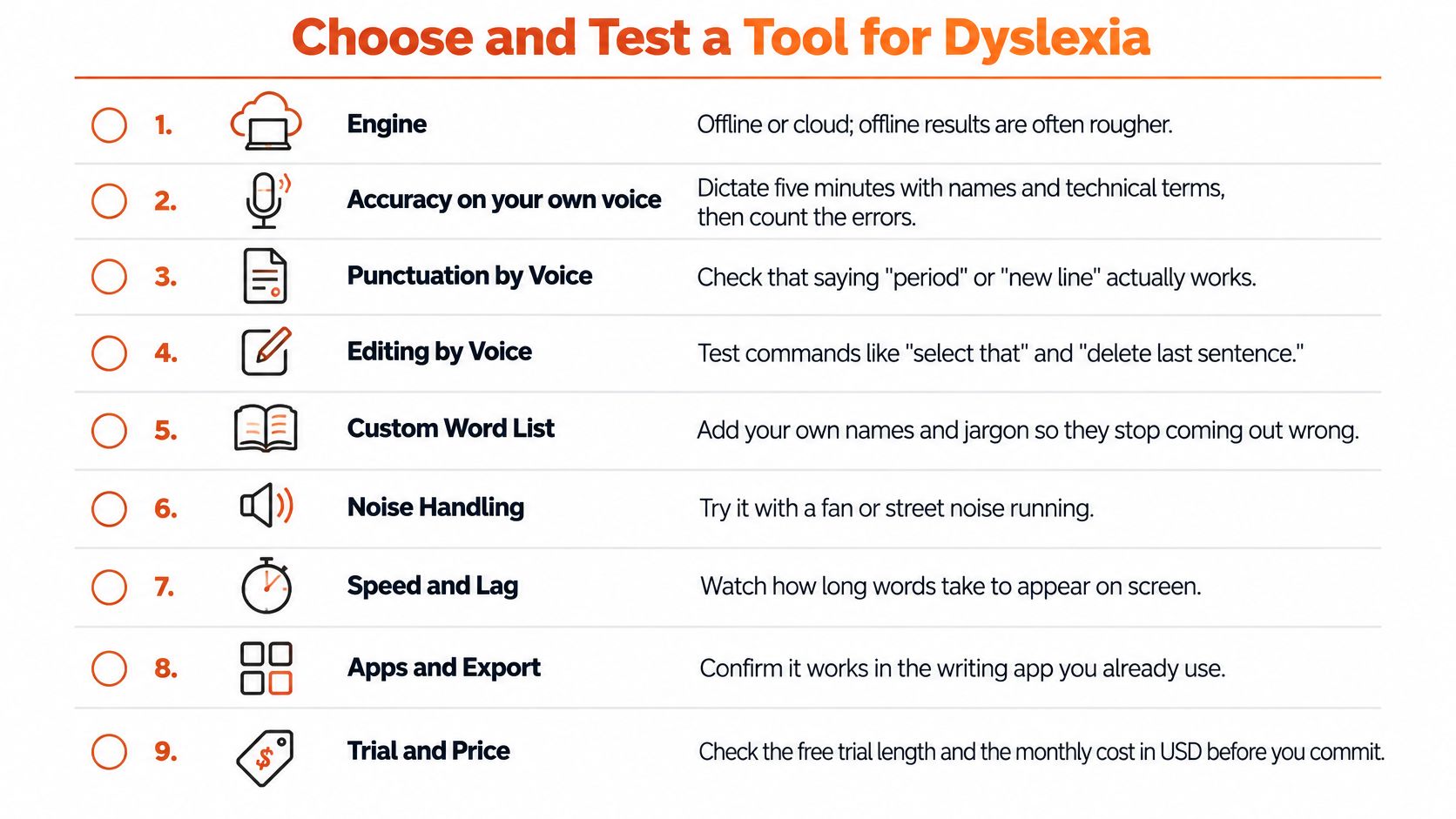
Ignore feature lists. Nine things decide whether a dictation tool leaves a dyslexic writer with less work or more, and you can check all of them in one sitting.
Nine criteria worth checking
- Engine, offline or cloud. Ask which one runs by default. Offline recognition keeps audio on the device but usually produces rougher text, so you'll edit more.
- Accuracy on your own voice. Not a demo voice. Yours, with your accent, at your speed, saying the names and terms you use.
- Custom vocabulary. Confirm you can add words. A tool that can't learn your surname or your subject terminology will keep producing the same mistake forever.
- Visible, editable output. Text should appear where you can see and fix it immediately, not arrive as a finished block you have to re-read from scratch.
- Read-back. Text-to-speech playback of the dictated draft is the cheapest way to catch a missing word your eye slides straight past.
- Dictation into any app. A hotkey that drops text at the cursor beats a separate window you copy out of, because copying is where drafts get lost. Our guide to choosing a dictation app for students walks through the school-workflow side of this.
- Privacy specifics. Where is audio processed, how is it encrypted, how long is it kept? For clinical notes or student records, "we take privacy seriously" isn't an answer. We use 256-bit SSL encryption, and our local mode keeps recognition on the device.
- A trial long enough to test properly. A two-minute demo tells you nothing about editing load.
- Language and accent coverage. Test the languages you speak, including the ones you mix mid-sentence.
The five-minute test
Take one paragraph of real work, something with names and technical terms in it. Read it aloud once so you know what it should say. Then dictate it with the hotkey into the app you'd normally write in, and start a timer.
Score two things only: time to acceptable text (dictation plus all your corrections) and errors remaining after review. Count errors per hundred words so short and long tests compare fairly. Then run read-back over the result and tally what the audio caught that your eyes missed. If the tool offers an offline mode, repeat the same paragraph there.
We offer a free audio-to-text tool, and our hotkey works in any text field: hold it, talk, and punctuated text lands at the cursor. Our offline mode runs on the device, with rougher results and weaker handling of mixed languages, which is exactly the tradeoff the test above will expose.
Three decisions come out of that session. Keep the tool if editing per hundred words is lower than your handwriting or typing baseline. Add terms and retest if most errors were names and jargon. Pair dictation with explicit spelling and proofreading support if the errors were spread across ordinary words, because that's a literacy need, not a software setting.
How to Dictate Your First Draft Step by Step
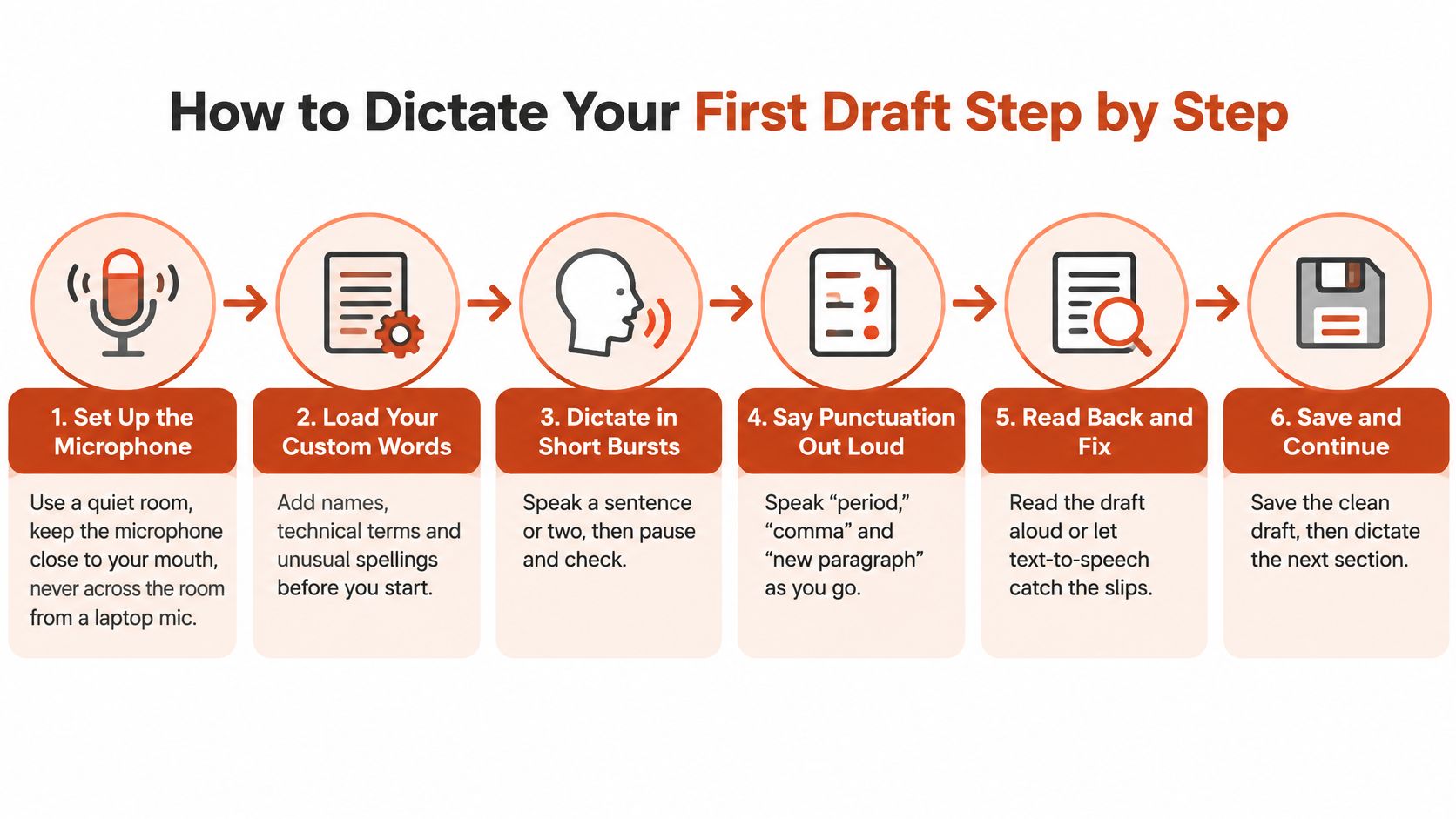
Setup decides most of the outcome. The steps below are ordered so that each one prevents a specific failure in the next.
-
Set up the microphone and the room. Use a headset or a mic close to your mouth in a quiet space, because background noise is what turns a clean sentence into a garbled one. The common slip is dictating to a laptop microphone from across the desk, then blaming the software.
-
Load your custom words first. Add names, technical terms and recurring phrases to the dictionary before you speak a word, since unfamiliar vocabulary produces the most visible errors. Waiting until you're halfway through the draft means rewriting the first half.
-
Dictate in short bursts. Speak a sentence or two, pause, glance at the screen. Pauses give the recogniser clean boundaries to work with, and they give you a chance to catch a mistake while you still remember what you meant. Rushing a whole paragraph in one breath is where sentences get swallowed.
-
Say punctuation and corrections out loud. "Comma", "period", "new paragraph". Don't assume the tool infers them from your rhythm. If you change your mind mid-sentence, say the correction plainly and delete the abandoned phrase during review rather than trying to unpick it live.
Watch the workflow in action before you try it on a real assignment:
-
Read the draft back with audio. Use text-to-speech or a screen reader and listen to the whole thing. Your ears catch omitted words and sentences that your eyes skip, because you already know what you intended to say. Skipping this step because the text "looks fine" is the single most common cause of an embarrassing submission.
-
Check the suspicious words specifically. Homophones, names, and word endings. Look at each one deliberately instead of scanning for anything that looks misspelled, since a wrongly recognised word is usually spelled perfectly.
-
Proofread manually after a break. Make tea, walk outside, come back. Fresh eyes catch the gaps that familiarity hides, and proofreading straight after dictating means reading your memory rather than the page.
A clean dictated draft has four properties: punctuation complete, no omitted sentences, names and terms correct, endings checked. Anything less isn't finished, it's transcribed.
Recognition Errors to Expect and How to Fix Them
Accuracy isn't one number, and the average hides the errors that hurt most. A qualitative study of four students aged 10 to 12 with severe dyslexia, following a seven-week speech-to-text instructional program, found that conventional spelling errors were absent from the observed output while technology-mediated errors remained, with single-word misrecognitions and omissions of words or sentence segments the most frequent, according to the Wiley study in Dyslexia. Homophonic substitutions, incorrect suffix or morpheme forms and compound-word errors also appeared.
The omissions are the expensive ones. A wrong word looks wrong. A missing clause looks like a paragraph that ends, and the writer who dictated it knows what was supposed to be there, so they read straight over the hole.
Every repair also costs attention. You stop composing, hunt for the error, fix it, then rebuild the sentence you were holding in your head. Do that eight times in a paragraph and the working memory dictation was supposed to free up has been spent on proofreading instead. That's why a tool with slightly lower raw accuracy but predictable, easily spotted errors can beat a more accurate one that drops words.
Recognition errors, likely causes and fixes
| Symptom | Likely cause | Fix |
|---|---|---|
| Homophones swapped, such as their and there | Recogniser picks the wrong spelling for the sound | Dictate in short phrases with context words and check homophones in review |
| Words or sentence segments missing | Omissions during fast or quiet speech | Slow down, speak in full clauses and read the draft back to catch gaps |
| Wrong suffixes or verb endings | Morphology errors in inflected words | Speak tense clearly and check endings during the review pass |
| Compound words split or joined wrongly | Compound-word recognition errors | Add the compound terms to the custom vocabulary |
| Names and technical terms wrong | Words outside the recogniser's vocabulary | Add them to the custom dictionary before dictating |
| Whole sentences garbled | Background noise or poor microphone input | Use a close microphone in a quiet room |
| Self-corrections transcribed literally | Corrections not handled as edits | Say the correction clearly, then delete the wrong phrase during review |
Two practical notes on making fixes stick. Keep a running list of every word the software gets wrong twice, and add the whole list to your dictionary in one batch at the start of the week rather than one word at a time mid-draft. And if the app itself keeps stalling or losing audio, treat that as a device problem before you conclude dictation doesn't suit you. This troubleshooting guide on why phone apps crash repeatedly covers the storage, memory and permission causes worth ruling out first.
For the cleanup pass itself, our guide to cleaning up spelling in dictated text covers the review order that catches the most errors in the least time.
Pick your single most frequent error type from the table and apply its fix before your next session. One change, one session, then compare.
Where Speech to Text Falls Short
Six failures are worth naming plainly, because each one has a different remedy, and the remedy is what decides whether dictation saves you time or just moves the work somewhere else.
Mixed-language speech breaks recognition. Say a sentence in one language with English technical terms inside it and many engines will translate, transliterate or mangle the switch. A prototype tested on 42 Malay words and phrases achieved 75% accuracy, as reported in the Wiley paper on speech-to-text and severe dyslexia, a reminder that advice validated on English speakers doesn't automatically travel. Test your own language mix, and keep custom vocabulary for the terms you switch into.
Code, abbreviations and foreign names come out wrong. These sit outside any general vocabulary. Add them to the dictionary or expect to type them, and count the typing as part of the cost.
Noisy rooms and quiet speakers produce text that needs full rereading. Not a scan, a reread. If you can't control the room, don't schedule your important writing there.
Dictated text can look finished while hiding a missing sentence. That's the failure mode with the highest cost and the lowest visibility, and audio read-back is the only reliable check before you submit.
Classrooms and exams have rules. Confirm the accommodation in writing before you use a tool in assessed work, and use only what's permitted. A brilliant draft produced with an unapproved tool is still an unapproved draft.
Offline engines ask for more repair. If you work across several languages, expect noticeably more editing when recognition runs locally, and plan the tradeoff deliberately rather than discovering it mid-deadline.
None of these mean dictation fails you. They mean the editing bill arrives in different places depending on your voice, your vocabulary and your setting, so the honest test is whether the total cost, speaking plus fixing, beats what typing cost you. And separate that question from a second one: cleaner output is not the same thing as stronger literacy. Dictation can produce the first while the second still needs its own instruction.
Name the limit that applies to you, then choose the pairing: manual revision for omitted content, explicit spelling practice for transferable skills, and a conversation with the teacher or disability office for anything assessed.
AIDictation was built around the parts of this that software can fix: a hotkey that drops punctuated text into any app on your Mac, a custom dictionary for the names and terms that keep coming out wrong, AI cleanup that handles filler words and self-corrections, and a local mode when audio needs to stay on the device. Run the five-minute test in this article on your own voice and your own vocabulary, then judge the tool on the editing time left over. Start with the free tools and the free trial at AIDictation, and keep the spelling instruction running alongside it.
Frequently Asked Questions
What does Speech to Text for Dyslexia: What Works and What Doesn't cover?
In an exploratory study published in 2000, Michael McTear, Norma Conn and Nicola Phillips found that dictating and correcting cut writing errors by roughly 50% for writers with severe dyslexia compared with writing by hand. It still didn't teach anyone to spell.
Who should read Speech to Text for Dyslexia: What Works and What Doesn't?
Speech to Text for Dyslexia: What Works and What Doesn't is most useful for readers who want clear, practical guidance and a faster path to the main takeaways without guessing what matters most.
What are the main takeaways from Speech to Text for Dyslexia: What Works and What Doesn't?
Key topics include Table of Contents, Does Speech to Text Help Dyslexic Writers?, Who benefits from speech to text and what to watch for.
Ready to try AI Dictation?
Experience fast voice-to-text on your device. Free to download.
Download FreeRelated Posts
Audio Transcription Tool: How It Works and What to Choose
An audio transcription tool turns recordings into text. Learn how the technology works, where accuracy fails, and what to check for privacy and editing.
Transcribe MP4 to Text: A Practical Guide for 2026
Learn to transcribe MP4 to text with AIDictation, covering Local and Cloud modes, timestamps, speakers, accuracy checks and privacy.
Audio Transcription App Free Guide for 2026
An audio transcription app free comparison for 2026: limits, privacy, offline use, accuracy tests, and which tier fits your work.