Research Documentation: A Guide for Accurate Work
A project feels healthy until one small question stops everything.
Why did the team trust this dataset? Which version of the script produced this chart? Who decided to merge those interview themes? Why is this demographic field coded that way? If the person who knows the answer is on leave, switched teams, or left the company, the work doesn't just slow down. People start guessing.
That's the problem research documentation solves. Not paperwork for its own sake. Not academic ceremony. Research documentation is the living memory of a project. It preserves how you got from a question to a conclusion, so someone else can review it, challenge it, reuse it, or build on it without starting over.
Fast-moving teams often know this in theory and still struggle in practice. Product teams move from interviews to roadmap calls in hours. developers jump between tickets, benchmarks, and bug reports. Clinical staff document under time pressure while balancing care, privacy, and follow-up. The issue usually isn't laziness. It's that most guidance tells you what to document, but not how to make it workable for busy teams. Practical gaps around detail level, data transformations, and reuse traceability are still common in day-to-day work, as discussed in this piece on operational gaps in documenting data work.
Table of Contents
- The Hidden Cost of Unrecorded Knowledge
- Understanding Core Research Documentation Concepts
- Why Meticulous Documentation Is a Superpower
- Actionable Best Practices for Documentation
- Research Documentation in Practice Across Roles
- Streamlining Your Workflow with Modern Tools
- Building a Lasting Culture of Documentation
The Hidden Cost of Unrecorded Knowledge
A team ships a feature based on user research. Six months later, complaints come in, and someone asks a simple question: what did users say in the interviews? The summary doc exists, but the raw notes are scattered, the coding logic is missing, and nobody can tell whether the insight came from five strong signals or one memorable anecdote. The team now has a decision problem and a memory problem.
That pattern shows up everywhere. A developer can't reproduce a benchmark because the environment wasn't recorded. A clinical analyst can't explain why one variable was grouped differently from another. A product manager inherits a backlog full of “validated” ideas with no trail showing how they were validated. People then recreate work that was already done, or worse, they rely on conclusions they can't inspect.
Practical rule: If a result matters enough to influence a decision, it matters enough to document how it was produced.
Poor research documentation creates hidden costs that don't show up on a sprint board:
- Time loss: Teams spend hours searching chat threads, inboxes, and old folders.
- Decision drift: People reinterpret findings because the original reasoning isn't visible.
- Quality risk: Data gets reused without enough context to judge fit or uncertainty.
- Dependency risk: One person becomes the keeper of “how this really works.”
The common failure isn't that people record nothing. It's that they record fragments. A result without method. A chart without source data. A transcript without consent handling notes. A conclusion without version history.
Good research documentation fixes that by turning scattered fragments into a usable record. In practical terms, that means a team can answer basic operational questions: what changed, why it changed, where the data came from, what assumptions shaped the analysis, and what confidence people should place in the outcome.
Understanding Core Research Documentation Concepts
Think Like a Builder
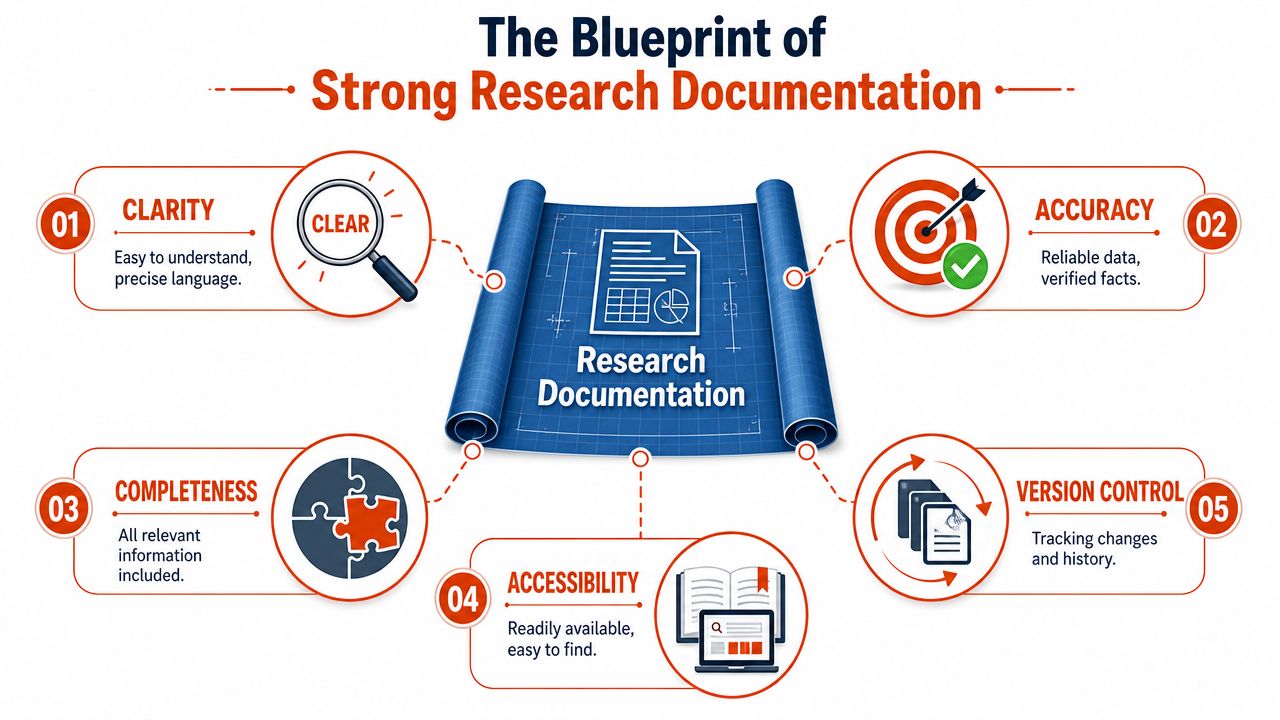
Strong research documentation works like the paperwork behind a complex build. You need the blueprint, the materials list, the assembly steps, and the revision history. If one part is missing, the final product may still exist, but nobody can confidently inspect or reproduce it.
That's why solid documentation goes beyond listing outcomes. Guidance for presenting statistical information in research emphasizes that records should include study design, variables, statistical tests, and assumptions, and that researchers should clearly distinguish summary measures such as the mean, median, and mode because descriptive statistics summarize data while inferential statistics support generalization from a sample to a population, as explained in this guide to presenting data and statistics in research.
For tech and clinical teams, the translation is simple. If you report a result, you also need the conditions around that result. A dashboard number without query logic, a model output without feature definitions, or a patient note without context can look complete while still being hard to trust.
The Core Parts of a Useful Record
A practical documentation set usually has a few core parts.
- Provenance: This is the origin story of the work. Where did the data come from? Who collected it? When was it extracted? What version are you using?
- Methodology: This is the recipe. What procedure did you follow, and what choices did you make along the way?
- Data dictionary or codebook: This is the legend. It explains what each field means, how values are coded, and what terms could confuse a new reader.
- Analysis trail: This shows how raw material became findings. It includes transformations, exclusions, assumptions, and interpretation steps.
- Version history: This answers the question teams ask constantly: what changed since the last draft?
A lot of confusion comes from mixing these together. People often store methods in slide decks, data definitions in someone's head, and version notes inside filenames that only one person understands. The fix is not more complexity. It's clearer separation.
A document is useful when a new teammate can tell what was done, with what inputs, under which assumptions, and where to find the next layer of detail.
If your team is formalizing this across functions, it can help to discover KMS governance models that show how ownership, review rules, and knowledge structure can be assigned without turning every document into a bureaucratic event.
Why Meticulous Documentation Is a Superpower
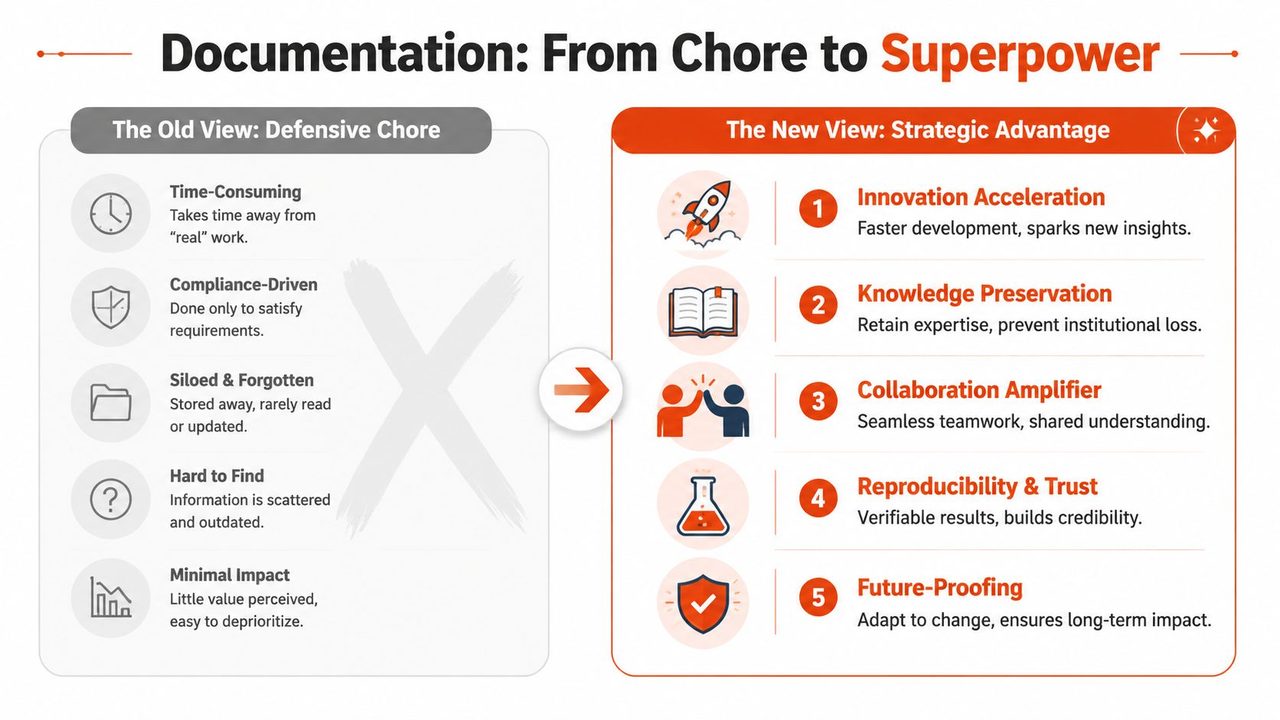
Teams often treat documentation like cleanup work. That framing misses what good records do. They let a team move faster later without lowering trust now.
Trust Comes From Traceability
The first advantage is reproducibility. If a finding shaped a roadmap, a deployment choice, or a clinical workflow, someone should be able to inspect how that finding was produced. That doesn't mean every colleague has to rerun every analysis. It means they could.
This matters even more in qualitative work, where interpretation plays a visible role. Guidance on qualitative data documentation stresses the importance of preserving a chain of custody through records such as consent handling, transcription methods, coding structures, and data transformations so teams can judge whether findings are trustworthy and reusable, as outlined in this practical overview of qualitative research documentation.
A short example makes the difference clear:
- Without documentation, a team sees “users were confused by onboarding.”
- With documentation, the team can inspect which interviews supported that theme, how the notes were transcribed, how codes were grouped, and whether missing data or unusual cases changed the interpretation.
The second version is slower to create in the moment. It is much faster to defend, refine, and reuse.
Speed Improves When Teams Stop Reconstructing History
Good documentation also protects team velocity. New hires can ramp on prior work instead of asking five people for context. A developer can compare current behavior against a previous benchmark setup. A clinical operations lead can review why a protocol changed and whether the change affected downstream reporting.
That's why strong documentation doesn't interrupt flow. It supports it. Teams that want lighter-weight capture methods sometimes pair templates with dictation or rapid drafting so people can record context while it's fresh, then edit later. A practical example of reducing friction in drafting is this guide on writing in flow, which focuses on getting ideas out quickly before refining structure and wording.
Documentation also reduces “hero dependency.” When only one person knows the assumptions behind a metric or the nuance behind a research theme, the organization becomes fragile. Shared records turn private memory into team infrastructure.
Actionable Best Practices for Documentation
Build a System People Will Actually Use
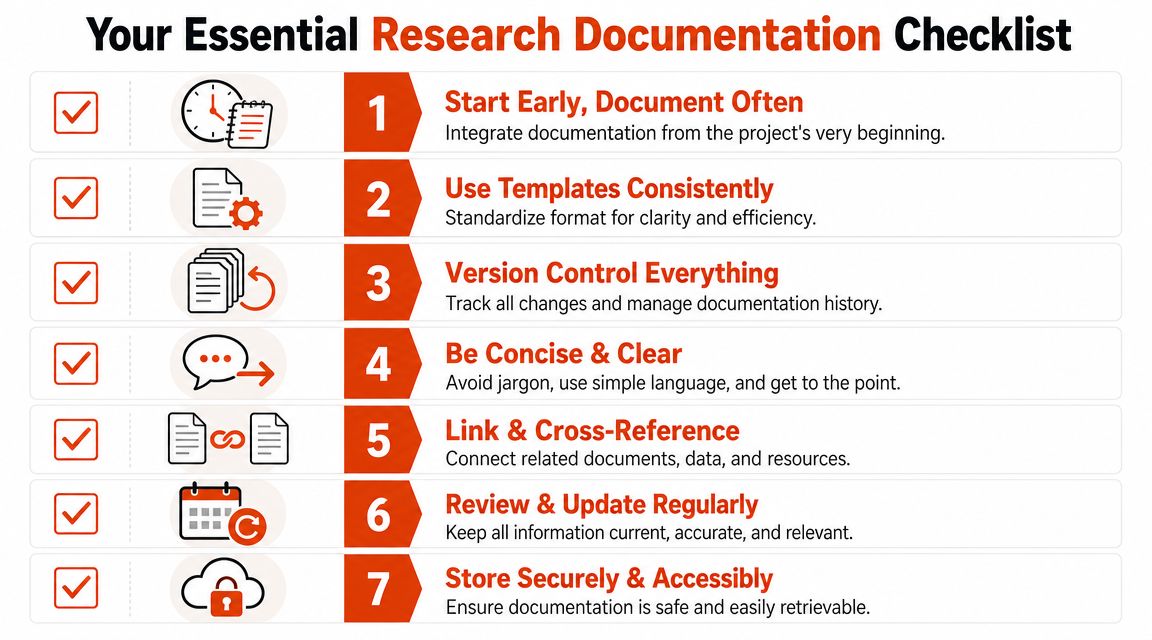
The best research documentation process is rarely the most elaborate one. It's the one a busy team can follow on a rushed Tuesday without needing a training session.
Brown University's data management guidance points to a high-value practice that translates well outside academia: capture the full provenance of data and methods by recording research questions, procedures, data sources, date-stamped entries, and analysis steps. It also recommends ISO-style dates in YYYYMMDD format and using codebooks or README files to explain variables and context, as described in Brown's guidance on documenting research data.
That advice is useful because it's operational. It tells teams what to preserve so the work remains reproducible and auditable.
Use Simple Habits That Preserve Context
Start with a handful of habits that make later interpretation easier.
-
Name files for retrieval, not creativity.
Use a pattern like20250601_user-interviews_round2_summary_v03. A teammate should know the date, content, and version at a glance. -
Write the question at the top.
Every note, benchmark, interview summary, or analysis doc should begin with the question it is trying to answer. This prevents orphaned findings. -
Keep a README close to the work.
A folder with transcripts, exports, scripts, or charts should include a plain-language file explaining what's inside, where it came from, and how the pieces relate. -
Record transformations explicitly.
If you merged categories, removed records, normalized text, or recoded fields, write that down. Don't assume the script alone is enough explanation. -
Use dates that won't confuse global teams.
YYYYMMDDis boring and that's why it works. It sorts cleanly and avoids cross-region ambiguity. -
Separate observation from interpretation.
In a user interview note, “participant paused before answering pricing question” is different from “participant was price-sensitive.” One is an observation. The other is a conclusion. -
Review live documents on a schedule.
A template nobody updates becomes false reassurance. Assign owners for documents that affect decisions.
A useful way to test your system is to hand a document set to someone outside the project and ask them to answer three questions: what happened, how do you know, and what remains uncertain?
Field note: Clear documentation isn't longer by default. It's more legible, more traceable, and easier to audit.
Templates also help when the work carries operational or regulatory consequences. Teams in care settings, for example, often need practical structure for note quality and handoff clarity. For a domain-specific perspective, this resource on improving clinician documentation for patient care shows how standardized formats support consistent records under pressure.
If you're documenting technical work such as experiment plans, requirements, or implementation logic, it also helps to borrow from engineering discipline. This guide to specification writing is useful because it pushes teams to define scope, assumptions, and acceptance details before memory fills in the gaps later.
Research Documentation in Practice Across Roles
The principles stay consistent across fields, but the documents look different depending on the job. The easiest way to understand research documentation is to see what “good enough to trust” looks like in everyday work.
Product Managers
A product manager runs customer interviews about a confusing onboarding flow. Weak documentation would be a slide saying “users want fewer steps.” Better documentation includes interview dates, recruitment criteria, consent status, note links, transcript locations, repeated themes, contradictory signals, and the exact product version participants saw.
That record helps the next PM answer practical questions. Were these new users or returning ones? Did participants struggle with terminology, sequencing, or motivation? Were findings based on direct observation, self-report, or a post-task summary?
A useful PM research packet often includes:
- Interview guide: The questions asked and any changes made during the study.
- Participant log: Who was recruited and what segment each person represented.
- Theme summary: Patterns, exceptions, and unresolved questions.
- Evidence links: References to recordings, notes, and screenshots.
Software Developers
A developer investigates a performance regression. Weak documentation says, “cache update improved response times.” Strong documentation shows the test environment, branch or commit reference, dataset used, benchmark procedure, raw output location, known limitations, and what changed between runs.
That lets another developer reproduce the benchmark instead of arguing about it from memory. It also protects against a common mistake: assuming a result will hold under different infrastructure or workloads when the original conditions were narrow.
Clinicians
A clinician or clinical analyst documents observations from care delivery that may later inform quality improvement or research. Weak documentation leaves out context around collection conditions, variable definitions, or handling of incomplete information. Strong documentation makes those choices visible.
In health-related work, demographic and identity fields need particular care. If race or ethnicity is recorded, teams should be able to explain who classified it, why it was collected, which categories were used, how “other” was defined if used, and why any demographic information is missing when it is not reported, consistent with JAMA's guidance on reporting race and ethnicity in medical and science journals.
Here's a simple comparison:
| Role | Example Document | Primary Goal | Critical Standard |
|---|---|---|---|
| Product manager | User interview synthesis | Support product decisions with traceable customer evidence | Clear link between themes and raw notes or transcripts |
| Software developer | Benchmark report or experiment log | Make technical findings reproducible | Environment, inputs, procedure, and version history are recorded |
| Clinician | Structured case note or de-identified research record | Preserve care context and support valid downstream interpretation | Context, classification choices, and handling of incomplete data are explicit |
Across all three roles, the same test applies. Can a skilled colleague inspect the record, understand what happened, and judge whether the conclusion deserves confidence?
Streamlining Your Workflow with Modern Tools
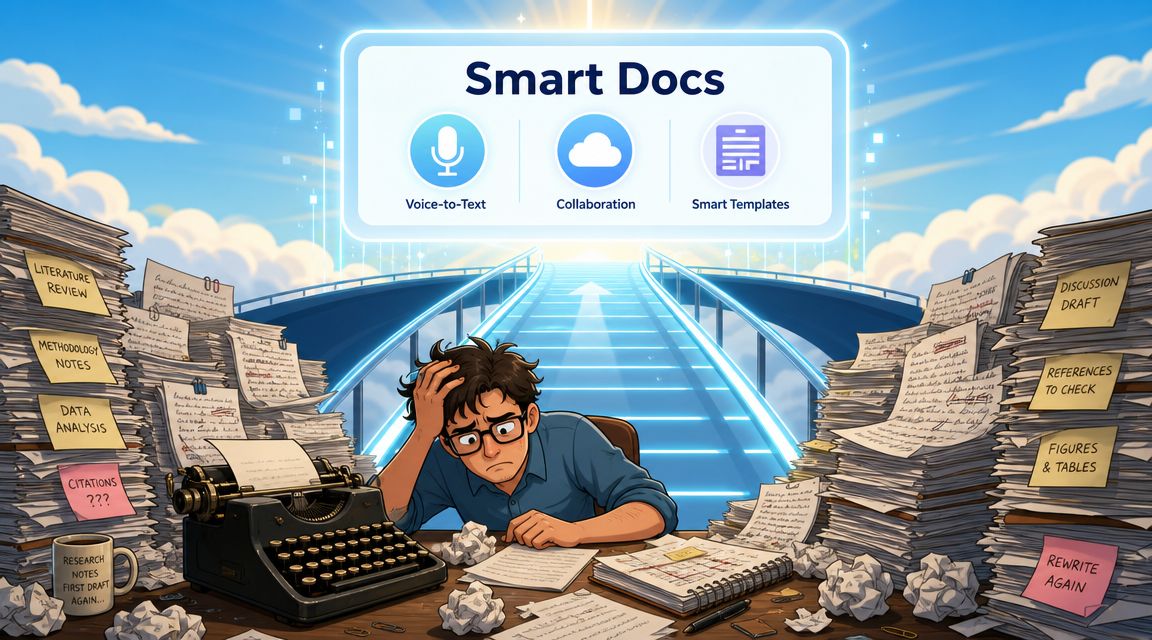
Capture First, Clean Up Second
A rushed interview ends. A developer finishes a benchmark before lunch. A clinician steps out of a review with three details still fresh and ten already starting to blur.
That is the moment documentation usually breaks down.
The fix is simple in principle. Separate capture from cleanup. Record the raw observation fast, in the format that is easiest to produce, then return while the context is still warm and shape it into the team's standard template. Academic research has long treated field notes, lab notebooks, and transcripts this way. Fast-moving product and clinical teams can use the same principle without inheriting academic overhead.
Voice input is often the fastest capture layer. It works well for first-pass notes after interviews, standups, test runs, or chart reviews, especially when speed matters more than polish in the first minute. If your team wants to test that approach on macOS, this guide on using speech to text on Mac offers a practical starting point.
Scanned intake forms and handwritten annotations create a similar bottleneck. In those cases, it helps to understand how modern OCR works so teams can decide which records can be converted into searchable text and which still need manual review.
Choose Tools That Fit the Work
A good documentation tool works like a well-labeled lab bench. It does not make the science better by magic. It makes the correct next step easier.
That is why tool selection should follow the work itself. Product teams often need quick capture and consistent formatting. Developers may need support for technical vocabulary, versioned notes, and system names that generic transcription tools mangle. Clinical teams often need tighter privacy controls, local processing options, and a clear boundary between draft capture and the official record.
AIDictation is one example of a macOS voice-to-text app used for spoken drafts. For documentation workflows, the relevant details are practical ones: support for custom dictionaries, options for on-device or cloud-based recognition, and cleanup features that help turn rough speech into usable text. Those features matter because teams tend to skip steps that feel slow or repetitive.
Tools do not repair a weak process. They do reduce the effort required to follow a good one. That matters most when work speeds up, because that is usually when note quality slips first.
Building a Lasting Culture of Documentation
Treat Records as Team Infrastructure
A familiar scene plays out in fast teams. A product decision made three weeks ago needs to be revisited, a model output looks odd, or a clinical note raises a follow-up question. The work itself may have been sound, but the reasoning, inputs, and constraints are scattered across chat threads, half-finished notes, and someone's memory.
That is the fundamental gap between academic standards and day-to-day practice. Academic research asks for enough detail that another person can inspect, question, and reuse the work. Tech and clinical teams need the same thing for a different reason. They are shipping features, maintaining systems, and supporting patient care under time pressure. Good records keep speed from turning into rework.
Formal reporting standards make that point clearly. Best practices for statistical reporting call for documenting study design, data collection, software used, model parameter estimates, effect sizes, variances, confidence intervals, and related metadata because p-values alone are insufficient and research depends on a record that others can interpret correctly, as described in these best practices for presenting statistical information in a research article.
Outside journals, the same principle still holds. A result without context can get through a meeting. A result with clear provenance can survive handoffs, audits, debugging, and future reuse.
Start Small and Raise the Floor
Documentation culture does not appear because a team declares it important. It grows when the expected minimum becomes easy to follow and hard to skip.
Start with a short template people will use. Add a README to active projects. Standardize file names. Assign one owner to each live research artifact so open questions and version history do not drift. If your team works with scans, paper forms, or legacy records, it may also help to understand how modern OCR works so those materials can move into a searchable workflow instead of staying trapped in static files.
The goal is not longer notes. The goal is better traceability.
Good documentation works like labeled wiring behind a wall. Nobody praises it during installation, but everyone is relieved when something breaks and the path is visible. Teams that document assumptions, decisions, and source material in plain language make it safer for the next researcher, engineer, analyst, or clinician to build on the work without guessing.
If spoken notes are part of how your team captures work in progress, AIDictation can help Mac users turn rough verbal drafts into cleaner written notes for specs, research summaries, developer logs, or clinical documentation. Used well, that kind of tool supports the habit that matters most: recording context while it is still fresh enough to be accurate.
Frequently Asked Questions
What does Research Documentation: A Guide for Accurate Work cover?
A project feels healthy until one small question stops everything. Why did the team trust this dataset?
Who should read Research Documentation: A Guide for Accurate Work?
Research Documentation: A Guide for Accurate Work is most useful for readers who want clear, practical guidance and a faster path to the main takeaways without guessing what matters most.
What are the main takeaways from Research Documentation: A Guide for Accurate Work?
Key topics include Table of Contents, The Hidden Cost of Unrecorded Knowledge, Understanding Core Research Documentation Concepts.
Ready to try AI Dictation?
Experience fast voice-to-text on your device. Free to download.
Download FreeRelated Posts
Verbal Ink Transcription Workflows Today
Explore verbal ink transcription workflows, accuracy benchmarks, and how modern AI dictation tools compare to traditional human transcription services.
Apple Voice Recognition Software: Key Pros and Cons
Learn how Apple voice recognition software turns speech into text on your device, where it excels, and what tasks still challenge it in 2026.
Dictation on macOS: Setup, Apps, and Pro Tips
Master dictation on macOS with clear setup steps, app comparisons, privacy settings, and accuracy tips to turn your voice into clean text fast.