Writing in Flow: A Guide to Unlocking Deep Focus
You sit down to write, open the document, and feel ready for ten seconds. Then Slack pings. An email needs a reply. You fix one sentence, second-guess the headline, check a tab you forgot to close, and suddenly half an hour is gone with nothing meaningful on the page.
That’s the daily writing problem for a lot of smart people. It isn’t a lack of ideas. It’s friction. Mechanical friction from typing, editing, formatting, and switching apps. Mental friction from trying to hold a thought while your attention gets pulled in three directions.
Writing in flow feels completely different. The words connect, the structure appears while you’re still thinking, and time stops feeling like an enemy. This isn’t mystical talent. It’s a working condition you can set up on purpose if you treat focus, input method, and recovery as part of the craft.
Table of Contents
- The Grind of Distraction vs The Ease of Flow
- Prepare Your Mind and Space for Deep Work
- Bypass Friction with Time Sprints and Voice Dictation
- Structure Your Thoughts with Templates and Prompts
- Real-World Flow Workflows for Professionals
- How to Recover and Sustain Your Writing Flow
The Grind of Distraction vs The Ease of Flow
You sit down to write a page. Ten minutes later, you have renamed the document, checked a message, rewritten the first sentence three times, and opened a tab for “quick research” you did not need yet. The draft has not moved, but your attention is already scattered.
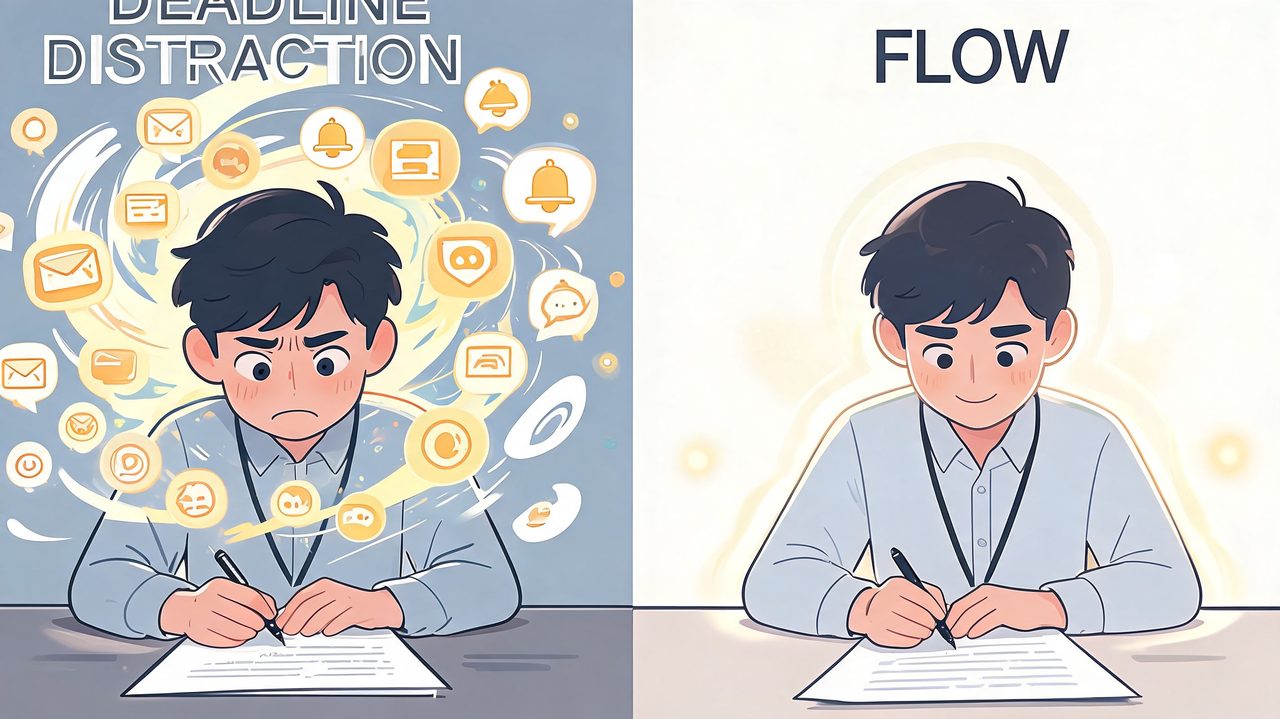
That pattern is the grind of writing. It is not the effort of thinking. It is the constant switching. Every small choice pulls you out of the sentence and into task management. Should you draft or edit? Research or keep going? Type the next line or fix the last one? Writers often blame themselves for a lack of discipline, but the bigger problem is friction inside the session.
Flow feels different because attention stays on meaning, not mechanics. Mihaly Csikszentmihalyi described flow as an optimal state where challenge and skill are well matched. In writing, that usually means the assignment is specific, the next step is obvious, and the tool in front of you does not interrupt the thought. The work still asks something of you. It just stops making you fight your process every thirty seconds.
I see one mistake over and over. Writers treat flow as a mood they have to wait for. In practice, flow is a working condition. It depends on how many restarts your setup demands.
Typing is part of that problem more often than people admit. Hands are slower than thought for many professionals, especially when they are drafting from expertise they already have in their head. If every idea has to squeeze through the keyboard while you also monitor spelling, formatting, and sentence polish, the draft stalls. AI dictation changes that equation. Speaking a rough first pass lets the idea arrive at conversational speed, which keeps the brain on content instead of keystrokes. Traditional advice on flow usually focuses on mindset and environment. Those matter, but they do not remove mechanical drag. Voice input does.
That distinction matters even more for people whose attention breaks easily. The right goal and a quiet room help, but they will not solve friction from constant self-interruption. For readers who deal with attention volatility, these methods for managing ADHD attention are useful because they focus on practical control, not guilt. If procrastination is tangled up with start resistance, this guide on how to stop procrastinating with ADHD using concrete writing supports adds a useful layer.
The point is simple. Distracted writing burns energy on switching. Flow protects energy for thinking. Writers who want more of it need fewer decisions, fewer interruptions, and a faster path from idea to draft.
Prepare Your Mind and Space for Deep Work
Most failed writing sessions fail before the first sentence. The problem starts in setup. A vague goal, an overstuffed desktop, five open chats, and no clear start cue will keep your mind in reactive mode.
Choose one target before you begin
The cleanest entry into writing in flow starts with a narrow target. Flow research identifies clarity of goals as the primary individual flow trigger, and people who establish explicit output context before starting experience 40 to 50% longer sustained dictation sessions, according to this flow trigger article.
That means “work on article” is too fuzzy. “Draft the opening and the section on customer objections” is usable. “Write a stakeholder update in a direct tone for email” is even better because it sets content and format at the same time.
A good pre-session target usually answers three things:
- What am I producing: a draft, notes, a memo, an email, a report
- Who is it for: your manager, a client, a patient chart, a product team
- What part am I finishing: opening, rough draft, summary, bullets, revision pass
When writers skip this step, they don’t enter flow. They wander.
Build a repeatable startup ritual
You don’t need a complicated routine. You need a short sequence that tells your brain, “reactive mode is over.” That sequence should be boring enough to repeat and strong enough to create a pattern.
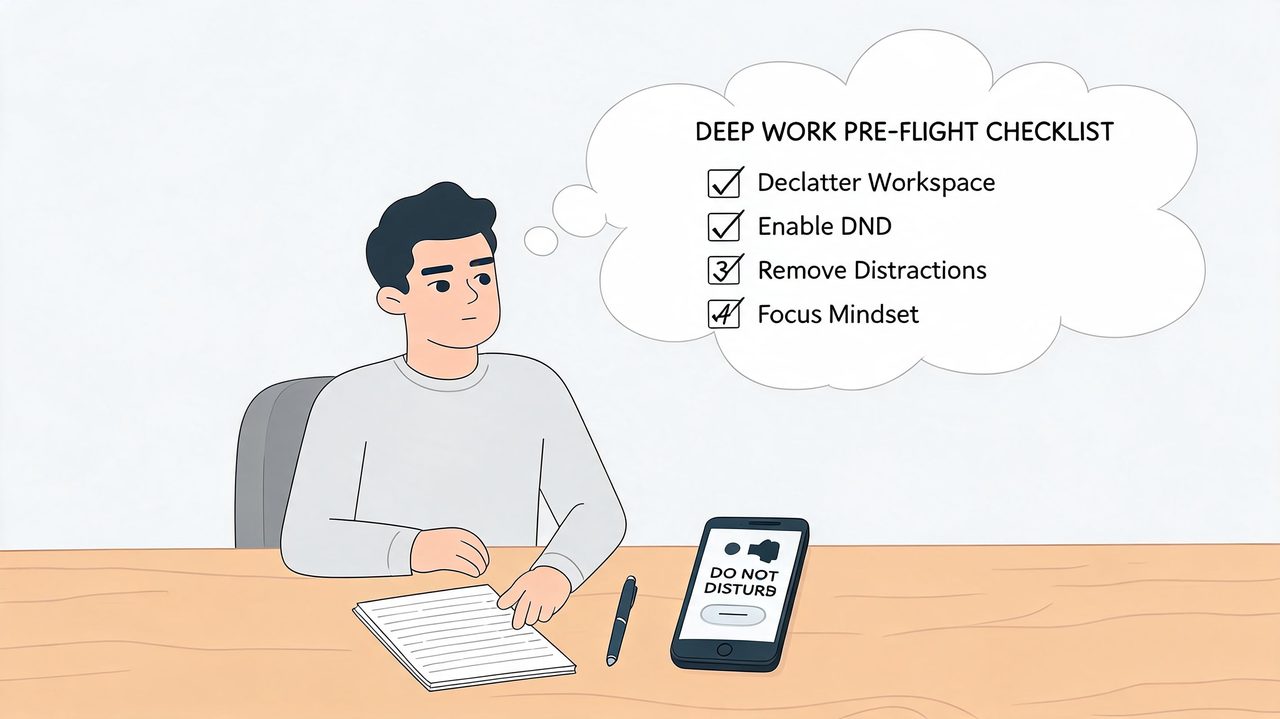
Mine is simple, and versions of this work well for clients:
- Close the visible distractions. Browser tabs that aren’t needed. Chat windows. Email.
- Silence the devices. If your phone stays face-up, it owns part of your attention.
- Open only the writing tools. Draft, notes, timer, and nothing else.
- Leave a visible next step. One line at the top of the page telling you what you’re about to write.
Practical rule: Your writing space should answer fewer questions, not create more of them.
Physical cues help too. A specific desk lamp, a pair of headphones, a glass of water in the same spot, even the same chair position. None of that is magic. It’s conditioning. The brain learns the pattern.
If you want a broader framework for protecting focus blocks, these strategies for deep work are worth reading because they connect environment design with real scheduling behavior.
Bypass Friction with Time Sprints and Voice Dictation
Typing isn’t the enemy. Friction is. Many people can think faster than they can type, and they can certainly think faster than they can type while editing themselves, fixing punctuation, and rearranging structure in real time. That mismatch is where promising sessions go to die.
A sprint solves part of the problem. Dictation solves another part.
Why typing often breaks momentum
When you type, you’re often doing at least four jobs at once. You’re generating ideas, choosing wording, correcting mistakes, and managing visual layout. That stack is manageable when the material is simple. It gets punishing when the material is dense, technical, emotional, or time-sensitive.
Voice changes the sequence. You externalize thought first, then shape it. For many professionals, that removes the dead time between idea and expression. If you’re curious about the mechanics behind speech recognition, this explanation of how ASR models work is a useful primer.
How to run a sprint that keeps ideas moving
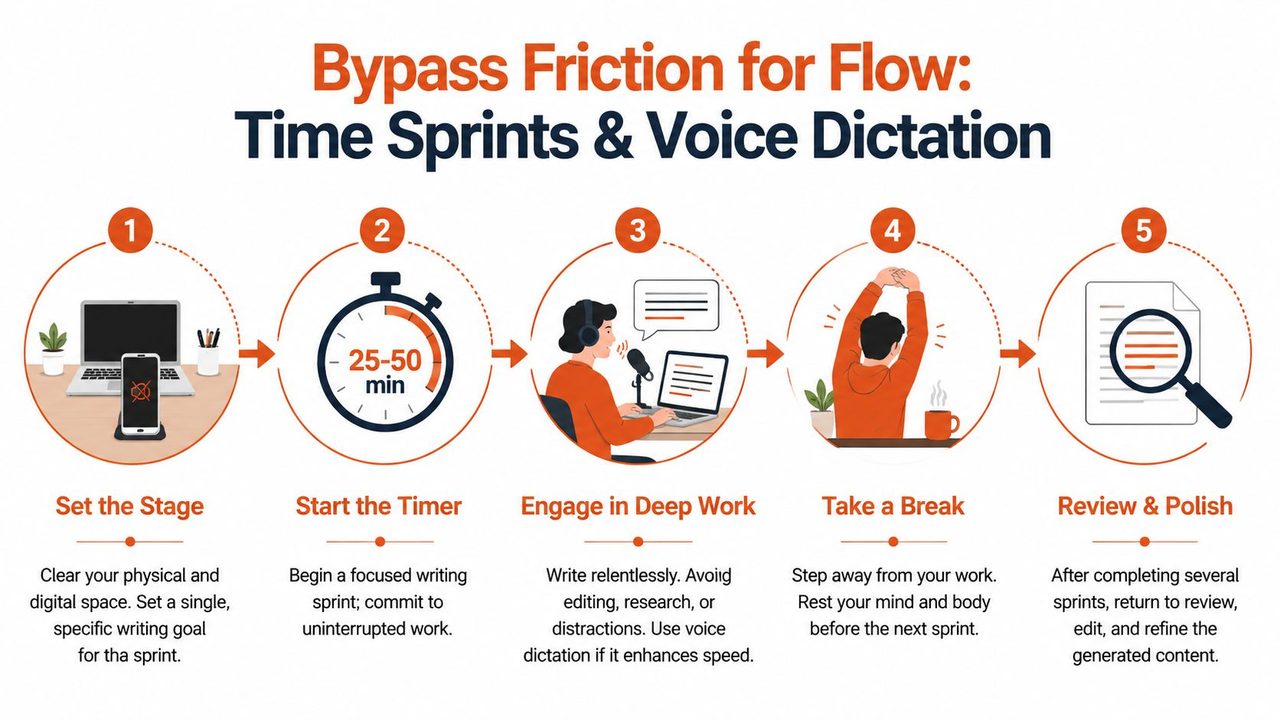
A sprint works because it creates urgency without panic. You give yourself a bounded period and one job only: produce raw material.
Use this pattern:
- Set a specific sprint outcome. “Draft the argument,” not “make progress.”
- Start a timer. Use a period that feels demanding but realistic.
- Ban live editing. If a sentence is clumsy, keep going.
- Mark gaps fast. Say “add example here” or “verify term later” and continue.
- Stop when the timer ends. Don’t drift into unfocused cleanup.
Many people get the wrong idea about flow. They think flow means effortless perfection. It doesn’t. It means reduced internal resistance while you perform one cognitive task at a time.
Here’s a practical demo to pair with the sprint method:
Where AI dictation fits
Modern dictation matters because it doesn’t just capture words. It can reduce cleanup, preserve momentum, and let you stay focused on meaning instead of mechanics. Optimal flow occurs when task difficulty matches user skill, and for dictation workflows, handling the small mechanical tasks in software can keep the challenge at the right level. In that context, AI cleanup features can reduce post-dictation friction by 60 to 70% compared to manual editing, and when feedback latency goes beyond 1.5 seconds, up to 75% of users experience a cognitive interruption, based on this discussion of challenge-skill balance in writing flow.
That trade-off matters. If recognition is slow, you stall. If cleanup is too aggressive, you stop trusting the text. The tool has to help without hijacking the sentence.
One option in this category is AIDictation, a macOS voice-to-text app that can run on-device for private dictation and, when connected, apply cleanup and formatting so the draft lands closer to ready-to-use text. If you want the practical setup details, start with this guide on getting started with voice dictation.
Don’t use dictation for every sentence. Use it where speed of thought matters more than perfect phrasing on the first pass.
I usually recommend dictation for rough drafts, meeting summaries, outlines, problem-solving notes, and emotionally loaded sections where speed helps bypass overthinking. I don’t recommend it for line editing or when you need to compare clauses word by word. Different stages need different tools.
Structure Your Thoughts with Templates and Prompts
You open the document, know the subject, and still lose ten minutes deciding how to begin. That stall is rarely a knowledge problem. It is a sequencing problem.
Writers fall out of flow when they ask the brain to generate ideas and design the container at the same time. Templates solve that by fixing the container first. The result is less hesitation, fewer restarts, and a cleaner handoff between drafting and editing.
Use scaffolding to reduce decisions
A useful template removes choices that do not deserve fresh attention. Headings, order, and expected level of detail should already be set before the session starts.
That is why strong templates are plain. They tell you what belongs where.
A product update template might use five headings: what changed, why it matters, risks, decisions needed, next steps. A clinical note might follow the documentation standard your team already uses. A blog draft might start with problem, mechanism, trade-off, example, takeaway. Once the frame is visible, the writer can focus on meaning instead of format.
Voice workflows benefit even more from this structure. Dictation is fast, but speed without shape creates a transcript you have to rescue later. Give yourself a fixed set of prompts first, then speak into that frame. The draft arrives closer to usable copy. If you want examples, these voice dictation workflows for structured writing show how professionals pair templates with speaking-first drafting.
A simple scaffold can be enough:
| Document type | Starting scaffold |
|---|---|
| Meeting notes | Decisions, blockers, owners, next steps |
| Blog draft | Hook, problem, method, example, close |
| Status update | What changed, why it matters, risks, ask |
| Essay draft | Claim, support, counterpoint, conclusion |
Prompt the next sentence, not the whole piece
Prompts work when they trigger language you can say or type immediately. Broad prompts create analysis. Specific prompts create momentum.
Use prompts that pull concrete material to the surface:
- For a rough draft: “What do I need the reader to understand before anything else?”
- For a report: “Which three points would I mention if I had one minute?”
- For a difficult section: “How would I explain this out loud to a colleague?”
- For a stuck paragraph: “What question is this paragraph supposed to answer?”
Short prompts are easier to use mid-session. They also pair well with AI dictation, because spoken answers tend to come out in complete thoughts when the question is narrow.
One caution. Do not turn templates into paperwork. If the structure has too many fields, the writer starts serving the template instead of serving the draft. Good scaffolding gives direction without slowing recall.
Start with a light frame, speak or write through it, then tighten the language on the second pass. That order preserves flow and keeps the structure useful instead of restrictive.
Real-World Flow Workflows for Professionals
Advice about flow often stays abstract. Real work doesn’t. It happens between meetings, deadlines, handoffs, and interruptions. The strongest writing systems are the ones people can use inside those conditions.
Product managers and developers
A product manager usually doesn’t need help having ideas. They need help capturing them before context switches erase the useful phrasing. A workable flow setup is direct. Right after a meeting, they dictate a stakeholder update while the details are still live, then move the cleaned draft into Asana, Notion, or email for final review. The key is not waiting until the end of the day when recall gets flatter and more generic.
For developers, flow breaks when documentation becomes a separate chore instead of part of the build. The smoother workflow is to dictate implementation notes, code comments, or handoff explanations while the logic is still warm. A custom dictionary for technical terms can help preserve naming accuracy, but the larger win is that the explanation gets captured before the developer mentally exits the problem.
Clinicians and students
Clinicians face a different pressure. Their writing has to be fast, accurate, and usable. A secure on-device dictation workflow makes sense between appointments because it reduces the burden of manual entry while keeping attention on the note itself. Short, repeatable templates help here because the format is stable even when the day isn’t.
Students can use flow more strategically than they often realize. A lecture transcript or rough notes become much more useful when the student immediately dictates a first-pass explanation in their own words. That’s where curiosity matters. Heightened curiosity serves as a gateway trigger into flow state, and work produced in flow was rated as substantially more creative by third-party evaluators in this article on curiosity and flow in writing.
That point matters across roles. Curiosity isn’t fluff. It’s functional. The product manager asks, “What is the risk hidden in this update?” The developer asks, “What would confuse the next person reading this?” The clinician asks, “What belongs in this note that will matter later?” The student asks, “Can I explain this without looking at the source?”
If you want more role-based examples, these voice dictation workflows show how people adapt the same core method to different types of work.
How to Recover and Sustain Your Writing Flow
Flow is fragile. Someone messages you, a meeting starts early, the dog barks, you remember an unrelated task, and the mental thread snaps. It is common to handle this badly, either by forcing a restart at full speed or by giving up on the session entirely.
Existing advice on flow often misses the reality of fragmented professional work. That gap matters because AI-assisted cleanup can help people re-enter flow after interruption, as discussed in this video on maintaining flow in messy real-world work. The practical lesson is simple. Recovery needs a system, not a mood.
A practical recovery sequence
Use a short reset that gets you back into the sentence, not back into self-judgment.
- Reread the last paragraph aloud. That reconnects thought and language quickly.
- Write or dictate one bridge sentence. Don’t restart the whole section.
- Remove one fresh distraction. Close the app, mute the thread, clear the tab.
- Return with a smaller target. Finish the example. Summarize the point. Tighten one subsection.
A broken session doesn’t need a heroic comeback. It needs a clean re-entry.
Stop while you still have momentum
One of the best ways to sustain writing in flow is to stop before you’re drained. Leave the next sentence half-formed. Leave yourself a note about what comes next. That unfinished edge makes tomorrow’s restart easier because you aren’t facing an empty threshold again.
The durable practice is straightforward. Prepare the space. Narrow the goal. Use sprints. Reduce mechanical friction. Give yourself structure. Recover fast when the day interrupts you. Writers who do this consistently don’t wait around for inspiration. They build conditions that let good work happen more often.
If you want a writing setup that helps reduce mechanical friction, AIDictation is worth a look for macOS workflows that rely on fast voice-to-text, private on-device dictation, and cleaned-up drafts that are easier to keep moving with.
Frequently Asked Questions
What does Writing in Flow: A Guide to Unlocking Deep Focus cover?
You sit down to write, open the document, and feel ready for ten seconds. Then Slack pings.
Who should read Writing in Flow: A Guide to Unlocking Deep Focus?
Writing in Flow: A Guide to Unlocking Deep Focus is most useful for readers who want clear, practical guidance and a faster path to the main takeaways without guessing what matters most.
What are the main takeaways from Writing in Flow: A Guide to Unlocking Deep Focus?
Key topics include Table of Contents, The Grind of Distraction vs The Ease of Flow, Prepare Your Mind and Space for Deep Work.
Ready to try AI Dictation?
Experience fast voice-to-text on your device. Free to download.
Download FreeRelated Posts
10 Best Dictate Software for Mac in 2026
Compare the best dictate software for mac in 2026 by accuracy, privacy, pricing, features, and use case—from Apple Dictation to AIDictation.
10 Technical Writing Best Practices for 2026
Master technical writing best practices with actionable guidance on clarity, structure, code, reviews, accessibility, localization, metrics, and dictation.
Voice Message to Email: A Practical How-To Guide
Turn any voice message to email with this practical how-to guide. Platform methods, transcription tools, formatting tips, and privacy fixes included.