Offline Speech Recognition: A Complete Guide for 2026
You're probably in one of two situations right now. You need to dictate something sensitive, like client notes, medical observations, or a draft performance review, and you don't want raw audio leaving your Mac. Or you're trying to work somewhere with bad connectivity, like an airport lounge, a train, or a plane, and your voice workflow falls apart the moment the network does.
That's where offline speech recognition stops being a niche feature and starts feeling like infrastructure. If a dictation tool only works when servers are reachable, it's not really dependable. It's a convenience layer.
What changed is the hardware. On-device transcription used to feel like the stripped-down version of “real” speech recognition. On modern Macs, especially Apple Silicon systems, that assumption doesn't hold up as cleanly anymore. The local path is now fast enough to feel immediate, private enough for serious work, and reliable enough to deserve a place in real product decisions.
Table of Contents
- The Private and Instant Future of Voice Dictation
- How Your Voice Becomes Text Without the Cloud
- Cloud vs Offline ASR The Core Trade-Offs
- The Technology Behind On-Device Performance
- Tuning for Real World Accents and Noise
- Putting Offline Speech Recognition to Work on macOS
- Conclusion Is Offline ASR Right for You
The Private and Instant Future of Voice Dictation
You finish a customer call, open your Mac, and start dictating follow-up notes. Halfway through the first sentence, you hit the real question: where does this audio go? If those notes include pricing, roadmap details, customer names, or medical information, the answer matters more than the microphone icon.
The second question shows up the moment the network disappears. On a flight, in a hotel with unstable Wi-Fi, or behind a locked-down corporate connection, cloud dictation often turns from convenient to unavailable.

Offline speech recognition changes the trust model because the transcription path stays on the device. That does not make the problem simple. It makes the trade-off visible. You get lower latency, local processing, and speech input that still works without a network. You also have to fit recognition into the CPU, memory, and thermal limits of a consumer machine.
On macOS, that trade-off is more practical than many guides suggest. A product manager dictating a spec wants text to appear fast enough to stay in flow. An engineer adding implementation notes wants the same thing, plus confidence that internal terms and code-adjacent language will not be mangled. If the app pauses, overheats the laptop, or misses too many domain-specific words, people stop trusting it.
That is the part products have to earn.
A good local dictation app is selling three things at once: privacy, responsiveness, and reliability on everyday hardware. Those goals pull against each other. Larger models often recognize speech better, but they cost more RAM and increase latency. Smaller models feel quick, but they can struggle with accents, noisy rooms, and specialized vocabulary. The product work is deciding where to spend that budget on a MacBook that is also running Slack, a browser, and an IDE.
That is why implementation details matter. Teams building for macOS are not choosing an abstract ASR philosophy. They are choosing model size, inference speed, battery impact, wake-word behavior, microphone permissions, and how much post-processing to do before text hits the screen. If you want a concrete view of what local voice stacks look like in practice, this guide to voice recognition in Python is a useful reference point for the engineering side.
Products like AIDictation live in that reality. The hard part is not making offline ASR work once in a demo. The hard part is making it feel dependable on a consumer laptop, day after day, for people who expect both privacy and instant feedback.
How Your Voice Becomes Text Without the Cloud
The easiest mental model is this: cloud ASR is like calling a remote translation service every time you speak. Offline speech recognition is like having that translator sitting inside your Mac, ready to work the moment audio arrives.
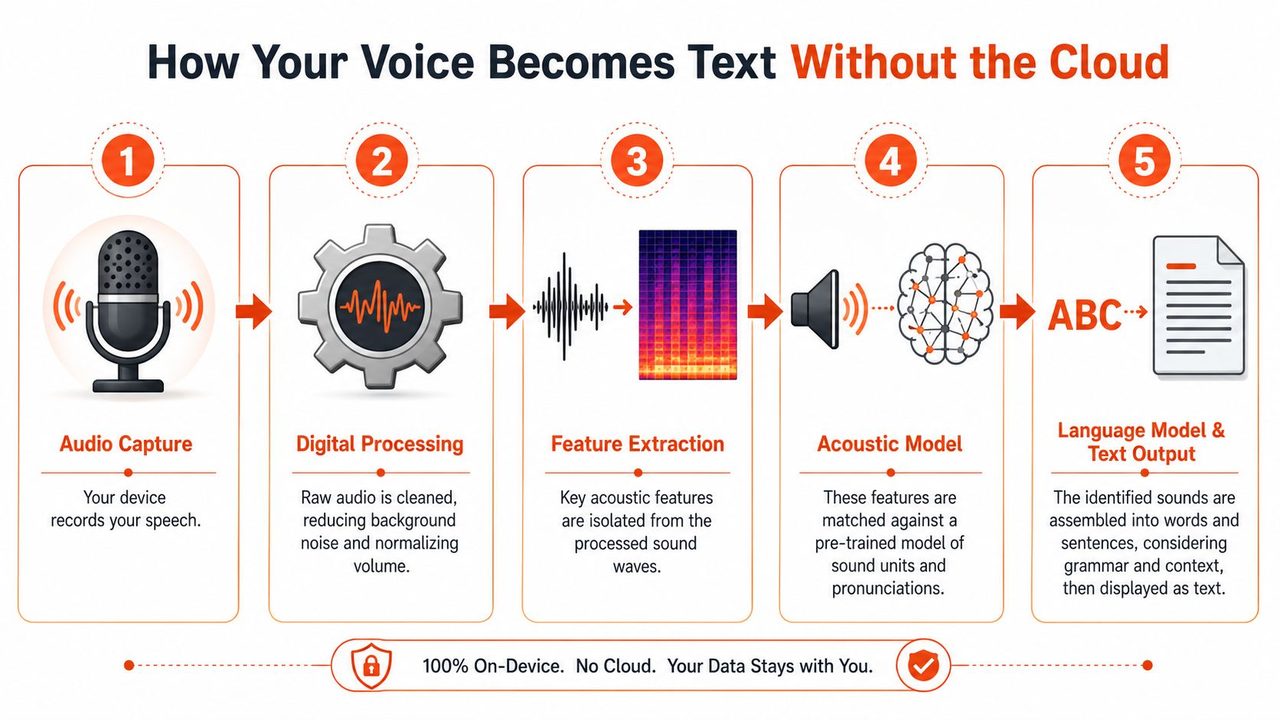
That local translator still needs a process. It doesn't “hear” language the way a person does. It turns pressure waves into data, strips away some mess, extracts useful patterns, runs those patterns through a model, and then assembles text.
Why local feels faster
The biggest practical difference is distance. When audio stays on your Mac, there's no upload step, no server queue, and no round trip before text appears. The Aiola overview of offline speech recognition describes a five-stage local pipeline and notes that it delivers significantly lower latency, often milliseconds, compared with online services that require remote server round-trips.
That's why a good local dictation experience feels less like “send and wait” and more like typing with your voice. For product teams, that lower latency changes behavior. Users correct themselves sooner, speak more naturally, and trust the tool in short bursts instead of only for long-form transcription.
If you want to see the developer side of voice pipelines in code, this guide to voice recognition in Python is a useful companion.
A short visual walkthrough helps make the pipeline concrete:
The five stages on your Mac
Here's what happens under the hood.
-
Audio capture
Your microphone records speech as an analog signal. The device samples that signal so software can work with it. -
Digital processing
The system cleans the incoming audio. That usually means some amount of noise reduction and normalization so the next stages see a more stable signal. -
Feature extraction
The software doesn't feed raw sound directly into language output. It pulls out acoustic features that help distinguish phonemes and speech patterns. -
Local model processing
A machine learning model stored on the device maps those features to likely sounds, words, and sequences. -
Output generation
The system emits text that the app can display, insert into a text field, or pass into a post-processing layer.
A good offline recognizer is less like a tape recorder and more like a compact, specialized interpreter trained to work under tight resource limits.
That last part matters. The model lives on the machine, so it has to fit the machine. Every design choice, from vocabulary coverage to inference speed, reflects that constraint.
Cloud vs Offline ASR The Core Trade-Offs
For a macOS dictation product, the practical question is which trade-offs are acceptable for your use case. The answer changes depending on whether the app is transcribing legal notes on a flight, drafting email at a desk with stable Wi-Fi, or handling messy speech from a built-in laptop mic in a noisy room.
Cloud ASR and offline ASR fail in different ways. Cloud systems usually get more compute, larger models, and faster model updates. Offline systems keep audio on the machine and remove the network from the critical path. That sounds simple, but on a consumer platform like macOS it affects product design, support load, and user trust.
A practical comparison
As noted earlier, offline recognition keeps processing on-device, which usually improves privacy, responsiveness, and availability without internet access. The trade-off is model scope. Local systems have less room for very large vocabularies, broad acoustic coverage, and constant server-side updates, so edge cases show up sooner.
| Attribute | Cloud ASR (e.g., Google, AWS) | Offline ASR (e.g., AIDictation Local Mode) |
|---|---|---|
| Privacy | Audio typically leaves the device for processing | Audio stays on the device |
| Latency | Depends on upload, server processing, and network conditions | Usually feels more immediate because there's no server round-trip |
| Accuracy | Often stronger on difficult accents, noisy audio, and broad vocabulary | Often strong in controlled conditions, but more sensitive to edge cases |
| Cost | Usually tied to provider usage and service architecture | Usually shifts cost toward local compute and model packaging |
| Connectivity | Needs dependable internet for normal operation | Works without internet |
Privacy is the cleanest distinction. If users are dictating customer records, internal strategy notes, or health information, local processing changes the risk profile. It does not remove every privacy concern, because transcripts still have to be stored, synced, or exported somewhere, but it avoids sending raw audio to a third-party service by default.
Latency is the one users notice first.
Even a short server round-trip can make dictation feel hesitant. On-device ASR often feels better not because every recognition result is more accurate, but because the feedback loop is shorter. Speech goes in, text appears, and the user stays in flow. For a product like AIDictation on macOS, that difference matters more than benchmark wins users never see.
Accuracy is where the trade gets expensive. Cloud providers can use larger models and update them centrally, which helps with uncommon names, heavy background noise, and speakers far outside the training sweet spot. Offline ASR can still be very good, especially for focused dictation, but it benefits from tighter constraints: decent microphones, a known language mix, and realistic expectations about accents, jargon, and noisy rooms.
Cost also behaves differently than teams expect. Cloud ASR turns speech into an ongoing operating expense. Every minute transcribed can carry API cost, networking overhead, and service dependency. Offline ASR shifts more cost into engineering work up front: model selection, packaging, CPU and memory budgets, local testing across Macs, and support for machines that are a few hardware generations behind.
That last point matters on macOS. A model that feels fast on an M3 MacBook Pro may feel sluggish on an older Intel machine. Offline deployment means the product team owns that performance spread.
What usually works best
For macOS products, three patterns show up repeatedly:
- Choose offline first when privacy requirements are strict, internet access is inconsistent, or the product has to feel immediate during everyday dictation.
- Choose cloud first when users speak in highly variable conditions, rely on broad domain vocabulary, or expect one recognizer to handle almost any audio without local tuning.
- Choose hybrid when the product needs local speed for routine use but still needs a fallback path for harder audio or specialized transcription cases.
A hybrid setup is often the most practical compromise on consumer hardware. The local model handles the common path quickly and privately. The cloud path handles the exceptions. The hard part is not the architecture diagram. The hard part is deciding when to switch, how to explain that choice to users, and how to keep the experience consistent when two recognizers produce different output.
Decision shortcut: If the app must work on a plane, inside a locked-down enterprise environment, or with sensitive notes, local ASR should be part of the architecture.
Good products do not ask one recognizer to be perfect at everything. They choose where to be fast, where to be private, and where to spend complexity.
The Technology Behind On-Device Performance
People sometimes assume local ASR is just a smaller, weaker copy of the cloud stack. That's not quite right. The better way to think about it is targeted optimization. You aren't trying to run a data center on a Mac. You're trying to package the most useful speech model the hardware can execute quickly and consistently.
Why optimized models matter
One of the clearest signs that this category has matured is the rise of optimized runtime formats like ONNX. The OpenVoiceOS post on ONNX-powered offline ASR says modern ONNX-based runtime engines achieve real-time or near-real-time performance, with accuracy rates exceeding 97% and response times under 0.2 seconds, even on modest hardware.
Those gains don't happen because the problem got simpler. They happen because the stack got leaner.
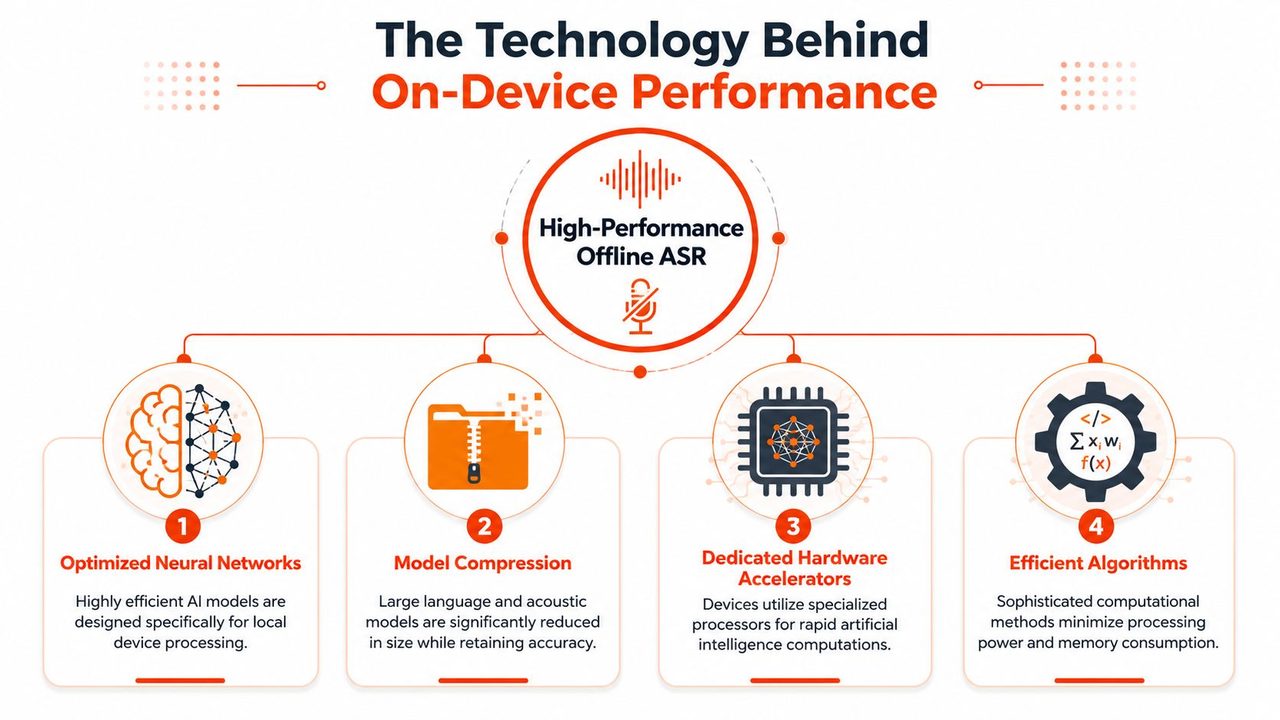
A practical on-device ASR stack usually depends on several engineering choices:
- Model compression: Large models are reduced so they fit local memory and storage constraints more comfortably.
- Quantization: Weights and computations are represented more efficiently, which can speed inference and reduce resource use.
- Efficient runtimes: Formats like ONNX let teams deploy optimized inference paths instead of dragging along heavy training frameworks.
- Hardware acceleration: Local engines can take advantage of available CPU, GPU, or platform-specific acceleration on the device.
What your Mac is really doing
On a Mac, especially one with Apple Silicon, the local speech path works because the whole system is cooperating. The model is smaller and better packed. The runtime is optimized for inference rather than experimentation. The hardware is good at repeated matrix operations. And the app can control the environment more tightly than a general cloud endpoint can.
That's why “offline” no longer means “toy.” It means constrained, optimized, and purpose-built.
Local ASR feels magical when it's fast. It becomes understandable when you realize the magic is mostly careful engineering around memory, latency, and inference efficiency.
There is still a ceiling. A local model can't assume infinite memory, endless server updates, or arbitrary scaling. But if your product goal is rapid dictation on a known consumer platform like macOS, those constraints are often acceptable. Sometimes they're the reason the experience is better.
Tuning for Real World Accents and Noise
The hard part of offline speech recognition isn't getting words onto the screen in a quiet room. The hard part is making it hold up when someone has a regional accent, swallows half a sentence, or speaks through laptop fan noise and coffee shop clatter.
That's where local systems hit the wall faster than cloud systems. The VoiceControl analysis of offline speech recognition trade-offs states that an on-device ASR pipeline improves latency and privacy, but model size and compute limits reduce accuracy on accents, noisy audio, and long-tail vocabulary compared with cloud systems.
Where offline models struggle
Three categories tend to cause trouble:
- Accent variation: A compact on-device model may not generalize as broadly as a larger cloud model.
- Acoustic messiness: Echo, static, keyboard noise, and poor mic placement corrupt the signal before the recognizer even starts.
- Domain vocabulary: Names, acronyms, product terms, and specialized jargon often fall outside the model's strongest defaults.
Users often assume local dictation should be plug-and-play in every situation. In practice, it's closer to tuning a musical instrument. The base capability can be strong, but the last mile depends on the input quality and the vocabulary you expect it to handle.
If your setup has persistent hiss or interference, this guide on how to fix static on audio gear is worth reviewing before you blame the recognizer. Bad audio in means bad transcripts out.
What actually improves results
The good news is that offline ASR usually responds well to targeted fixes.
- Clean the signal first: Noise suppression and audio preprocessing can make a local model much more stable.
- Add vocabulary support: Custom dictionaries help with names, brands, technical terms, and repeated jargon.
- Use fallback logic: If local mode detects poor conditions, a hybrid path can route harder utterances elsewhere.
- Tune for the domain: Medical, legal, and developer workflows benefit when the product is biased toward the language users say.
A practical audio workflow often needs preprocessing before recognition. For teams building or evaluating that path, this piece on AI audio cleanup is a solid reference.
The broader research picture supports this need for tuning. Microsoft reported a 5.1 percent word error rate on the Switchboard conversational speech task and described that result as human parity, while also noting that recognition still struggles in noisy environments, with accented speech, and in data-limited settings in their speech recognition milestone write-up. That's the right takeaway for product teams. Excellent benchmark performance doesn't remove the need for environment-specific tuning.
Putting Offline Speech Recognition to Work on macOS
macOS is a good home for offline ASR because the platform has three things going for it: strong local hardware, mature audio APIs, and a user base that values privacy. That combination makes dictation feel less like a novelty and more like a serious input method.
The best local use cases share one trait. The user can't afford for dictation to become unavailable just because the network is flaky or policy restrictions are strict.
Where local dictation fits best
A few examples stand out on Mac:
- Healthcare documentation: Clinicians and support staff often need fast drafting without sending raw voice externally.
- Developer workflows: Engineers can dictate comments, commit notes, or rough documentation without leaving the editor.
- Product and operations work: PMs can capture meeting summaries, follow-ups, and draft specs while keeping sensitive details local.

The benchmark ceiling for speech recognition is already high. Microsoft's research notes that current state-of-the-art STT models can reach as low as 5 percent WER on adults in real-world settings, while also stressing that performance degrades in noisy environments and with accented speech. That's why the practical question on macOS isn't “can speech recognition work?” It's “can this particular local implementation work for this user, on this hardware, in this environment?”
The macOS implementation reality
If you're building software, Apple's own speech stack gives you an entry point for basic platform-native transcription tasks. That's useful for prototypes, product validation, and narrow features where deep customization isn't required.
But production-grade dictation usually asks for more than raw transcription. Teams quickly want better handling for specialized vocabulary, more predictable formatting, stronger behavior in imperfect audio, and a smoother experience across apps. That's where basic platform support can feel too generic.
For a practical view of the Mac ecosystem around speech tooling, this guide to macOS speech to text is worth reading.
From a deployment standpoint, the product decision usually comes down to this checklist:
| macOS question | Why it matters |
|---|---|
| Does it work fully offline? | Availability changes whether users trust it in travel, secure, or low-connectivity settings |
| Does it feel immediate? | Latency determines whether dictation becomes habitual |
| Can users teach it terms? | Names and jargon are where default models often fail |
| Does it recover from messy input? | Real users mumble, self-correct, and speak in noisy spaces |
If your product targets everyday knowledge work on Mac, offline speech recognition is now good enough to be a default option in many flows. Not the only option. But no longer the fallback.
Conclusion Is Offline ASR Right for You
Offline speech recognition is the right choice when you care most about privacy, instant response, and working without the internet. It's especially strong on macOS, where modern local hardware can support a responsive dictation experience for writing, notes, documentation, and other daily tasks.
Cloud ASR still has a real advantage when the audio is unpredictable, the speaker population is broad, or the vocabulary surface is huge. If your users move between quiet offices, loud cafés, accented speech, and specialized jargon all day, a cloud or hybrid approach will usually be more forgiving.
The optimal approach isn't ideological; it's contextual. Use local recognition when privacy and speed are the priority. Use cloud when broader language coverage matters more. Use a hybrid system when you want both and can route each utterance to the right engine.
The strongest products don't force users to choose between control and capability every time they click the mic.
If you want a macOS dictation tool built around that hybrid idea, AIDictation is worth a look. It can use on-device recognition for private, instant dictation and switch to cloud processing when the job needs stronger cleanup, formatting, or handling for harder audio. That makes it a practical fit for people who want local-first behavior without giving up flexibility.
Frequently Asked Questions
What does Offline Speech Recognition: A Complete Guide for 2026 cover?
You're probably in one of two situations right now. You need to dictate something sensitive, like client notes, medical observations, or a draft performance review, and you don't want raw audio leaving your Mac.
Who should read Offline Speech Recognition: A Complete Guide for 2026?
Offline Speech Recognition: A Complete Guide for 2026 is most useful for readers who want clear, practical guidance and a faster path to the main takeaways without guessing what matters most.
What are the main takeaways from Offline Speech Recognition: A Complete Guide for 2026?
Key topics include Table of Contents, The Private and Instant Future of Voice Dictation, How Your Voice Becomes Text Without the Cloud.
Ready to try AI Dictation?
Experience fast voice-to-text on your device. Free to download.
Download FreeRelated Posts
Is There a Speech to Text App for Mac? a Practical Guide
Is There a Speech to Text App for Mac. Wondering if there is a speech to text app for Mac? Compare built-in Dictation, on-device engines, and AI tools like
Dictation Software for Medical Professionals Compared
Compare dictation software for medical professionals. Evaluate accuracy, HIPAA privacy, ambient AI tradeoffs, and on-device tools like AIDictation.
How to Use Voice Dictation on Mac
Use Voice Dictation on Mac. Master voice dictation on your Mac — from built-in Apple features to third-party tools like AIDictation