Punctuation in Speech: A Guide to Flawless Transcription
You say a sentence out loud, and it sounds perfectly clear in your head. Then the transcript appears as one long slab of words with no stops, no structure, and no clue where one idea ends and the next begins. A quick update turns into something that looks rushed, even when your thinking wasn't.
That gap frustrates a lot of people because speech and writing don't organize meaning the same way. When we talk, we use pauses, pitch, stress, timing, and little repairs like “no, wait” to guide the listener. When we write, we need symbols to do that job. That's what punctuation in speech really means. It's not that commas float through the air while we talk. It's that spoken cues have to be translated into written marks.
If you use dictation for notes, specs, emails, meeting summaries, or coursework, that translation matters. The difference between a rough transcript and clean prose often comes down to knowing what your voice is already signaling, then helping software or your own editing process turn those signals into readable text.
Table of Contents
- Why Does My Dictation Look Like a Mess
- Understanding Transcription vs Creative Punctuation
- How Pauses and Tone Become Commas and Periods
- From Raw Transcript to Polished Text
- How to Use AIDictation for Perfect Punctuation
- Speak Naturally Write Clearly
Why Does My Dictation Look Like a Mess
A product manager dictates, “We should ship the onboarding fix this week, but only if support signs off.” The transcript comes back like this:
we should ship the onboarding fix this week but only if support signs off also I want legal to review the updated copy because the pricing language changed
Nothing is technically wrong with the words. The problem is that the reader can't see the shape of the thought.
Spoken language is forgiving. Your listener hears your breath, the slight pause before “but,” the change in tone before “also,” and the emphasis on “legal.” Writing loses those cues unless punctuation puts them back. That's why dictation often feels worse on screen than it felt in your mouth. The software captured the words, but not enough of the structure.
What the transcript missed
The spoken version probably contained several signals:
- A short pause before “but,” which suggests a comma.
- A stronger stop before “also,” which suggests a period or semicolon.
- A shift in topic from shipping to legal review, which suggests a new sentence.
- Stress on key words, which helps listeners parse meaning without needing visible marks.
If you're working on a Chromebook, it's worth learning a few platform-specific habits before blaming your microphone. Practical Chromebook dictation techniques can help you speak in ways that make sentence boundaries easier for transcription tools to catch.
Punctuation in speech is a translation problem
That phrase confuses people because it sounds as if punctuation belongs to talking itself. It doesn't. Punctuation belongs to writing, but it often comes from speech cues.
A raw transcript tries to capture what was said. A readable transcript has to answer a different question. What did the speaker mean, and how should a reader move through it?
That's why your dictation may look messy even when your thinking is orderly. Your voice supplied the map. The page still needs the symbols.
Understanding Transcription vs Creative Punctuation
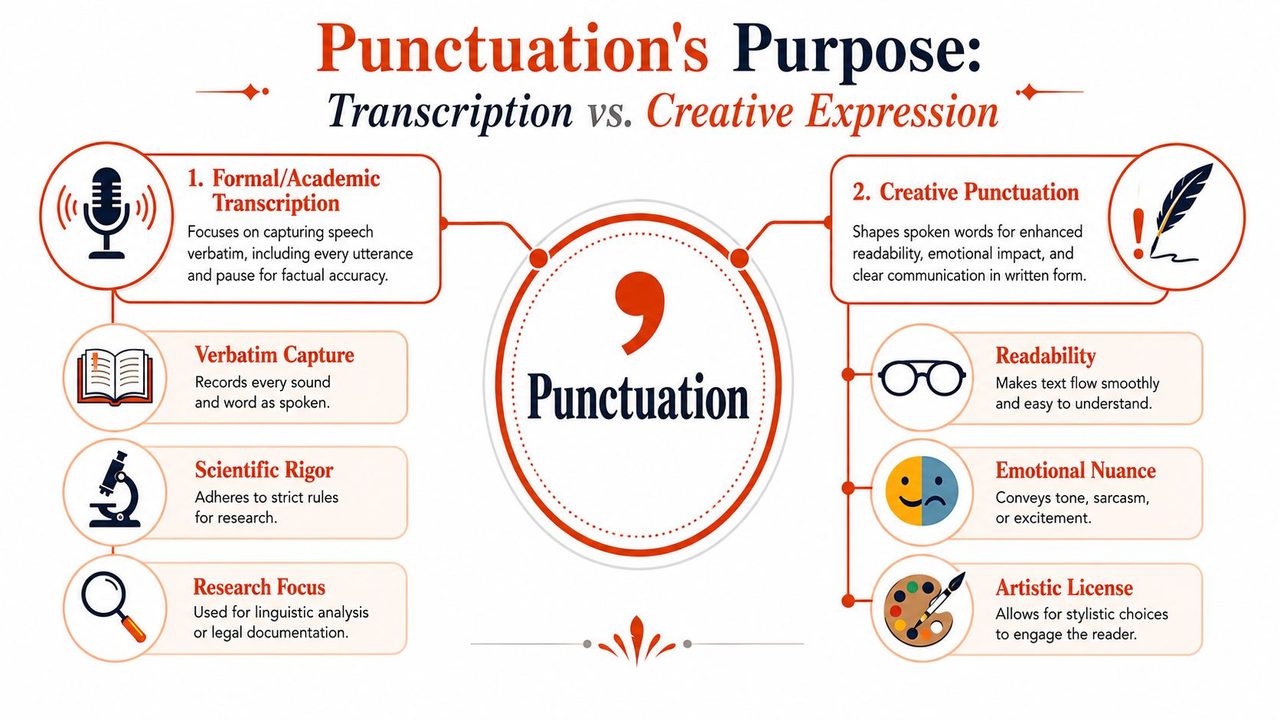
Not every transcript has the same job. Some transcripts aim to preserve speech exactly as it happened. Others aim to turn speech into writing that reads well. Those are different tasks, and they require different punctuation choices.
Two valid goals
Consider photography as an analogy. A raw image preserves what the camera captured. An edited image adjusts contrast, color, and framing so a human viewer sees the point more clearly. Speech works the same way.
| Goal | What it preserves | What punctuation does |
|---|---|---|
| Formal transcription | The spoken event itself | Marks pauses, interruptions, hesitation, overlap, and exact wording |
| Practical writing | The speaker's meaning | Shapes the words into sentences a reader can follow easily |
A researcher studying conversation may want every restart, every “um,” and every half-finished clause. A manager sending meeting notes doesn't. That person wants the transcript to read like clean prose.
Why modern readers expect grammar, not breath marks
Historically, punctuation was tied much more closely to oral delivery. Early systems helped readers know when to pause while speaking aloud. That changed over time. As noted in this history of punctuation, in the 7th century, Isidore of Seville connected punctuation to meaning rather than just pauses, helping shift reading from oral rhythm toward grammatical understanding.
That history explains a modern frustration. Many dictation users assume punctuation should mirror how long they paused. Sometimes it does. Often it doesn't. A written sentence is organized by syntax and meaning, not just by breath.
Practical rule: If your goal is readable prose, don't ask, “Where did I pause?” Ask, “Where does this idea divide for a reader?”
When readability matters more than literalness
Suppose you said:
“I think we should, um, probably delay the launch, no sorry not delay, move the public announcement.”
A formal transcript might preserve the whole sequence because the false start matters. A polished version would likely become:
“I think we should move the public announcement.”
That isn't dishonest editing. It's editing for reader usefulness.
The same principle applies to lists. Spoken lists often come out flat, especially in fast dictation. Cleaning them up is partly a punctuation task and partly a formatting task. This guide to punctuating lists in sentences is useful when your spoken items need to become readable written series instead of run-on fragments.
How Pauses and Tone Become Commas and Periods
When people ask about punctuation in speech, they usually want a conversion chart. That's reasonable, but the chart only works if you remember that spoken cues are clues, not commands. A pause suggests punctuation. Meaning decides which mark fits.
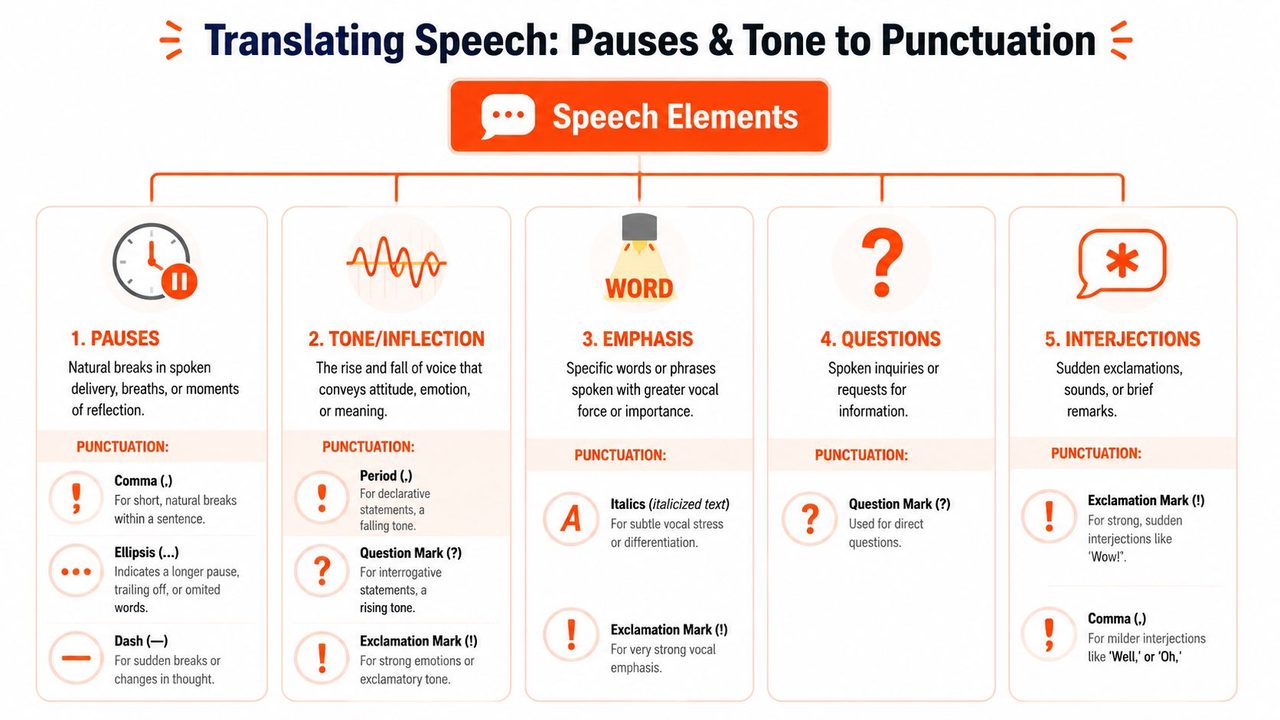
One technical detail is especially helpful here. In speech-to-text conversion, a comma can correspond to about 1 second of pause, a semicolon to 2 seconds, and a period to 4 seconds, which helps NLP systems segment clauses and phrases accurately, according to this explanation from BCcampus Pressbooks. That doesn't mean every pause should be timed with a stopwatch. It means dictation systems often treat timing as one signal among several.
Pauses
A short pause inside a thought often becomes a comma.
Spoken: “If legal approves it tomorrow we can send the draft”
Written: “If legal approves it tomorrow, we can send the draft.”
A longer pause may suggest a full stop, especially if your voice resets and the next phrase begins a new idea.
Spoken: “The draft is ready. We still need sign-off from finance.”
Sometimes a pause shouldn't become punctuation at all. Speakers pause to think, breathe, or search for a word. If the sentence reads better without a mark, leave it out.
For people who also work from recorded media, tools that generate text from video content can be helpful because they expose the same core issue. Audio gives you timing. Good text still requires sentence judgment.
Intonation
Your voice rises and falls in patterned ways. Writing converts some of that pattern into marks.
- Falling tone: usually a period.
- Rising tone in a direct question: usually a question mark.
- Strong emotional force: sometimes an exclamation mark, though good professional writing uses it sparingly.
Spoken: “Can you send that today”
Written: “Can you send that today?”
A common confusion appears with polite requests that sound flat. If the sentence is still a direct question, it usually takes a question mark.
Written: “Could you review this by noon?”
If your tone asks for information, the sentence usually needs a question mark, even if you said it calmly.
Interruptions
Speech breaks in the middle more often than writing does. We interrupt ourselves, change course, or insert side comments.
Spoken: “The rollout plan, if support agrees, should go live Monday.”
That side comment is often best handled with commas. If the interruption is sharper or more abrupt, many writers prefer a dash in polished prose, but only when the break itself matters stylistically. In routine business writing, commas and periods usually do the job more cleanly.
Filler Words
Fillers help speakers hold the floor. They rarely help readers.
Words like “um,” “uh,” “you know,” and “like” often need deletion, not punctuation.
Spoken: “Um I think we should like update the FAQ first”
Written: “I think we should update the FAQ first.”
This is one of the biggest differences between transcribing speech and producing readable writing. A filler can be meaningful in a linguistic study. In daily work, it's usually clutter.
Self-Corrections
People repair their speech constantly.
Spoken: “Send it to Maya, sorry, send it to Priya.”
You have two choices. If the correction matters as a spoken event, preserve it. If your goal is clean writing, use the corrected version only:
Written: “Send it to Priya.”
When the correction itself matters, a comma can work:
Written: “Send it to Maya, sorry, send it to Priya.”
A fast editing habit helps here. Ask whether the reader needs the detour or only the final destination. Most of the time, they need the destination.
From Raw Transcript to Polished Text
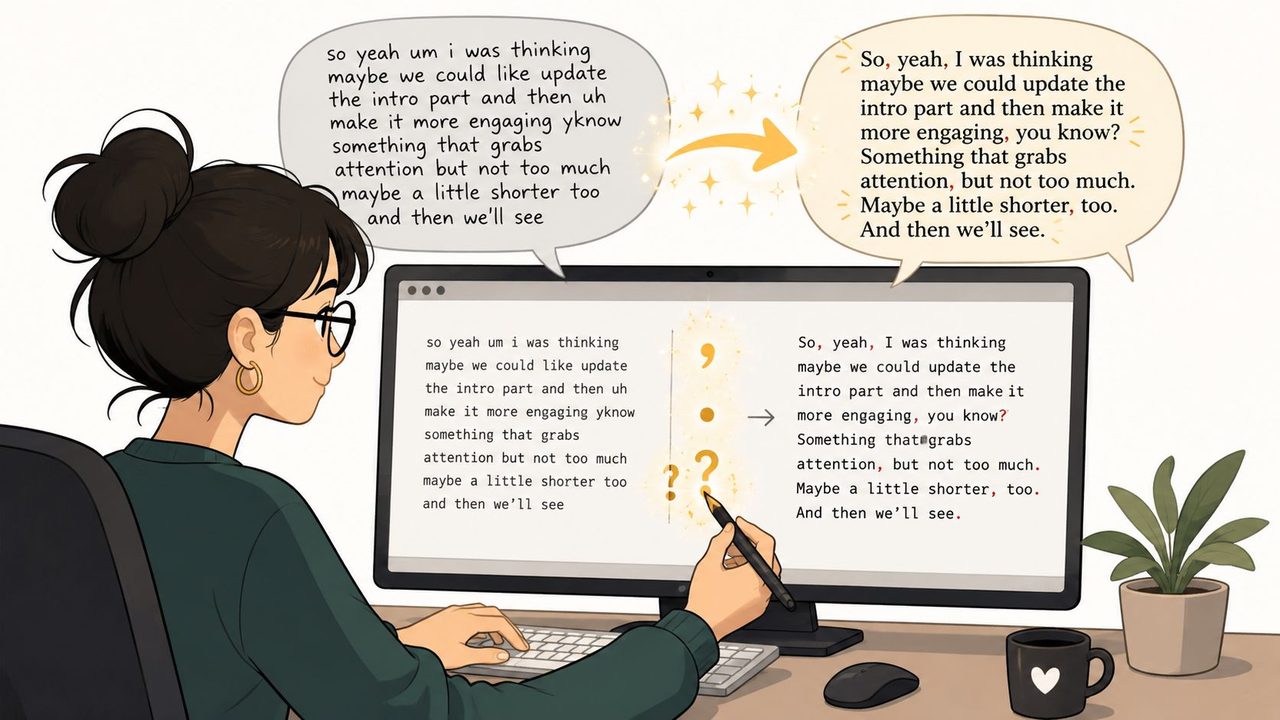
Editing a transcript is easier when you stop trying to fix everything at once. Treat it as three passes, each with a different purpose. That keeps you from fussing over commas before you've even decided where the sentences are.
Pass one for sentence boundaries
Start with the largest units. Ignore perfection. Just decide where one sentence ends and the next begins.
Read the transcript aloud if needed. Your ear will often catch boundaries faster than your eye.
- Look for completed thoughts: If a clause could stand alone and the next clause starts a new point, add a period.
- Mark direct questions: If the speaker is asking for information, use a question mark.
- Use commas lightly: Add them where they prevent misreading, not everywhere the speaker inhaled.
A quick reference for the marks themselves can help during this pass. This list of punctuation is useful when you're deciding among commas, periods, semicolons, and quotation marks.
Pass two for clarity and cleanup
Now remove what belongs to speech but not to finished prose.
A raw line might read like this:
so I think we should um send the revised onboarding copy no wait use the earlier version for legal first
A clarity pass turns that into:
I think we should send the earlier onboarding version to legal first.
This pass usually includes three actions:
- Delete fillers that don't change meaning.
- Resolve false starts so only the intended wording remains.
- Merge fragments when the transcript split one thought into several choppy pieces.
Pass three for formatting and flow
The last pass isn't about punctuation alone. It's about how readers move through the page.
Short paragraphs help in notes, emails, and documentation. Lists help when speech contains multiple action items, options, or steps. Labels help when the speaker moved through categories but never announced them explicitly.
Editing habit: If a transcript feels exhausting, the problem may be layout as much as punctuation.
A polished transcript should feel as if it was written for the page, not dumped onto it from a microphone. That's the standard to aim for.
How to Use AIDictation for Perfect Punctuation
If you dictate often, the question isn't whether punctuation matters. It's where you want the work to happen. You can do it after the fact, line by line, or you can let the software handle much of the structural cleanup while you speak.
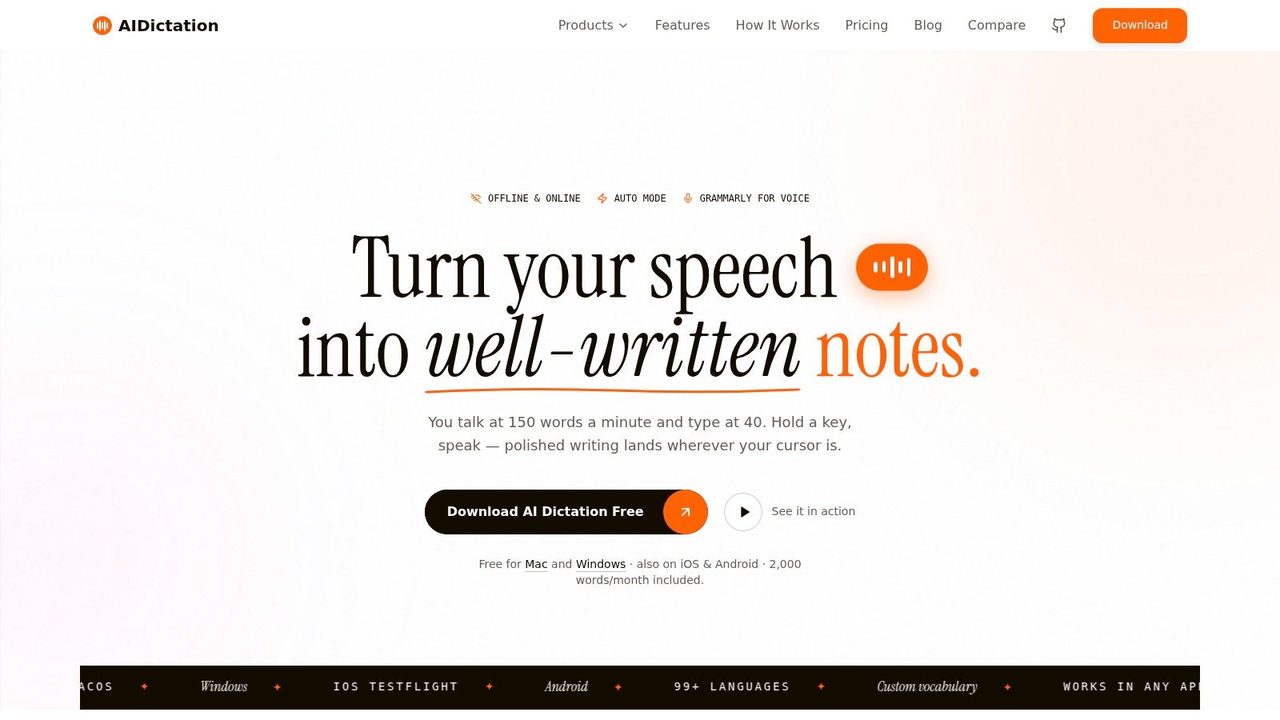
AIDictation is built for the second path on macOS. It focuses on turning spoken input into text that's closer to ready-to-send writing rather than raw capture.
When to say the punctuation out loud
Some situations still benefit from explicit commands.
If you're dictating something structured, saying “period,” “comma,” or “new paragraph” can be the fastest way to lock in your intent. This is especially true when you're handling:
- Legal or compliance-sensitive wording, where sentence boundaries matter exactly as spoken
- Bulleted notes or numbered steps, where layout is part of the meaning
- Dense technical material, where a wrong break can make a procedure harder to follow
Direct commands are also helpful when you're dictating in noisy spaces or speaking unusually short fragments.
When to let the software infer it
In many everyday workflows, inference works better than command-heavy speech. Constantly saying punctuation can make your delivery robotic, and that often hurts clarity.
AIDictation's Cloud Mode is designed for this style. It can clean up filler words, handle self-corrections, and format output based on context. That's useful for natural drafting, where you want to speak in full thoughts rather than dictate symbols one by one.
For people comparing voice workflows across Mac apps, this overview of a voice type app gives broader context on how these tools fit into daily writing.
Speak for meaning first. Use spoken punctuation commands when structure is unusually important or when the software needs extra guidance.
AIDictation also uses an Auto Mode that switches between recognition approaches depending on your situation, and a Local Mode for on-device dictation on Apple Silicon when privacy or offline use matters. That division is practical. Some tasks need speed and privacy. Others need heavier cleanup.
How to improve results for technical and professional writing
The best dictation output usually comes from a few small habits rather than one magic setting.
- Use full clauses: “Please update the release notes before lunch” is easier to punctuate than “update release notes before lunch.”
- Pause at idea boundaries: Natural spacing helps software detect where a sentence may end.
- Name technical terms consistently: A custom dictionary is especially helpful for product names, internal jargon, and people names.
- Match speech to format: An email sounds different from chat. Context-aware rules help when the software can adapt style to the app you're using.
Here's a closer look at the workflow in action:
The deeper point is simple. Good dictation software doesn't just hear words. It helps convert spoken structure into written structure. That's the core challenge behind punctuation in speech.
Speak Naturally Write Clearly
Clean dictation doesn't begin with memorizing punctuation rules. It begins with understanding that speech and writing are different systems. Your voice carries meaning through pause, pitch, emphasis, and repair. Writing has to rebuild that meaning with marks, sentence boundaries, and layout.
That's why punctuation in speech is best understood as translation. Sometimes the translation is almost mechanical. A direct question gets a question mark. A brief internal break gets a comma. More often, it requires judgment. A filler disappears. A false start is resolved. A breath pause becomes nothing at all because the sentence reads better without it.
For people working across recordings, meetings, and voice notes, it helps to compare tools and workflows rather than relying on one method for everything. If you also need AI help with recorded audio, Meowtxt for audio transcription is another useful reference point for understanding how spoken material becomes readable text.
The good news is that you don't need to sound like a machine to get polished writing from your voice. You need a better mental model. Speak in clear thoughts. Notice where meaning shifts. Then either edit in structured passes or use software that can handle much of that translation for you.
If you want your spoken notes, emails, and drafts to arrive already shaped into clean writing, try AIDictation. It gives Mac users a practical way to turn natural speech into polished text with smart formatting, punctuation cleanup, and flexible local or cloud-based dictation.
Frequently Asked Questions
What does Punctuation in Speech: A Guide to Flawless Transcription cover?
You say a sentence out loud, and it sounds perfectly clear in your head. Then the transcript appears as one long slab of words with no stops, no structure, and no clue where one idea ends and the next begins.
Who should read Punctuation in Speech: A Guide to Flawless Transcription?
Punctuation in Speech: A Guide to Flawless Transcription is most useful for readers who want clear, practical guidance and a faster path to the main takeaways without guessing what matters most.
What are the main takeaways from Punctuation in Speech: A Guide to Flawless Transcription?
Key topics include Table of Contents, Why Does My Dictation Look Like a Mess, What the transcript missed.
Ready to try AI Dictation?
Experience fast voice-to-text on your device. Free to download.
Download FreeRelated Posts
8 Best Bilingual Dictation Apps: 5 Tested + 3 Baselines
We tested five bilingual dictation apps on Russian-English code-switching, plus three common baselines. Compare WER, language recall, script, and workflow.
AI Dictation vs Diktuy: Russian-English Accuracy Test
We tested AI Dictation vs Diktuy on the same Russian-English recording. Compare WER, English-word preservation, full transcripts, and errors.
AI Dictation vs Oravo: Bilingual Accuracy Test
We tested AI Dictation vs Oravo on the same Russian-English clip. Compare WER, English-word preservation, AI enhancement, and transcript fidelity.