Punctuating Lists in Sentences: A Clear Guide for 2026
You're probably looking at a sentence right now that ends like this: “Please review the timeline, dependencies, owners, and risks” and wondering whether that comma before “and” stays, goes, or turns into something else entirely. Or maybe you're dictating meeting notes, a product spec, or a clinical summary and hitting pause every time a list appears because you're not sure whether you need commas, semicolons, or a colon.
That hesitation is normal. List punctuation feels small, but it affects how quickly people understand what you wrote. In specs, notes, reports, and updates, a badly punctuated list can make the structure fuzzy. A clear one helps the reader scan, group, and trust the information.
If you like brushing up on fundamentals before getting specific, Kingdom of English grammar tips is a useful general refresher. If your bigger goal is getting words onto the page faster before you clean them up, this guide to getting started with voice dictation is a practical companion.
Table of Contents
- Why Punctuating Lists Can Be So Tricky
- The Comma's Role in Simple Lists
- Using Semicolons for Complex List Items
- How to Introduce Lists with Colons
- Navigating Punctuation Rules Across Style Guides
- How AI Can Automate List Punctuation
Why Punctuating Lists Can Be So Tricky
A product manager writes, “This release improves onboarding, reporting, user permissions and billing alerts.” A nurse dictates a note with findings, medications, and follow-up steps. A developer lists environments, owners, and deployment windows. All three are doing the same thing. They're trying to package several related ideas into one clean structure.
The trouble is that lists work in two different ways at once. They are grammatical and visual. Grammatically, each item has to fit the sentence. Visually, the reader expects the items to look parallel and feel balanced. When those two expectations pull in different directions, punctuation starts to feel slippery.
Why your brain hesitates
Writers don't struggle because they “don't know grammar.” They struggle because list punctuation depends on a few hidden questions:
- Are the items simple or complex?
- Do the bullets complete the lead-in, or stand alone as sentences?
- Are you following a house style, or just trying to sound natural?
- Will someone skim this quickly on a screen?
Those questions matter in professional writing because lists aren't decoration. They organize tasks, requirements, risks, findings, and action items.
A list is a tiny structure with a big job. It tells the reader what belongs together.
Why this isn't just a grammar quiz
Modern editorial guidance doesn't treat list punctuation as one universal law. It treats it as a style decision applied consistently. Monash University's editorial guidance notes that a colon is commonly used to introduce a list and explains that the Oxford comma is the comma after the penultimate item, while also noting that in lists of several one-word items, an Oxford comma is not needed (Monash editorial punctuation guidance).
That explains why two smart writers can punctuate the same list differently and both still be defensible. The primary goal isn't to chase one mythical correct answer. The goal is to make the list easy to read and internally consistent.
The Comma's Role in Simple Lists
The comma is the everyday tool for punctuating lists in sentences. If your items are short and clean, commas do the job with very little fuss.
Write it like this:
- We need design, testing, and approval.
- The note included symptoms, medications, and allergies.
- The sprint covers search, filters, and exports.
In each case, the comma separates one item from the next. It acts like a light divider. It tells the reader, “one item ends here, and the next one begins.”
The Oxford comma question
The biggest comma debate in lists is the Oxford comma, also called the serial comma. That's the comma before the final “and” in a list.
Compare these:
- We invited the designers, the engineers and the support team.
- We invited the designers, the engineers, and the support team.
Both appear in real writing. The difference is style and clarity. Some teams always include that final comma because it can prevent ambiguity. Others leave it out in simple lists because their house style prefers a lighter look.
When the Oxford comma helps
The Oxford comma is most helpful when the last two items might seem glued together.
Consider this sentence:
- I'd like to thank my managers, Taylor and Jordan.
That could mean either:
- my managers are Taylor and Jordan, or
- I'm thanking my managers, plus Taylor, plus Jordan.
Now compare:
- I'd like to thank my managers, Taylor, and Jordan.
That version separates the items more clearly.
Practical rule: If leaving out the final comma creates even a small chance of confusion, keep it.
Why the rule feels inconsistent
Writers often get frustrated. You learned one rule in school, then your workplace uses another. That's not because one side understands grammar and the other doesn't. It's because list punctuation often follows editorial convention, not pure grammar logic.
When you're punctuating lists in sentences, the safest move is simple:
- Choose a style for the document or team.
- Use commas for straightforward items.
- Keep the list parallel, so all items have the same grammatical shape.
- Apply the Oxford comma consistently unless clarity forces an exception.
A bad list often isn't bad because of one comma. It's bad because the items don't match. For example:
- The release includes bug fixes, improving login speed, and documentation.
That list feels uneven because the items don't follow the same pattern. Better versions would be:
- The release includes bug fixes, login speed improvements, and documentation updates.
- The release fixes bugs, improves login speed, and updates documentation.
The punctuation works because the structure works.
Using Semicolons for Complex List Items
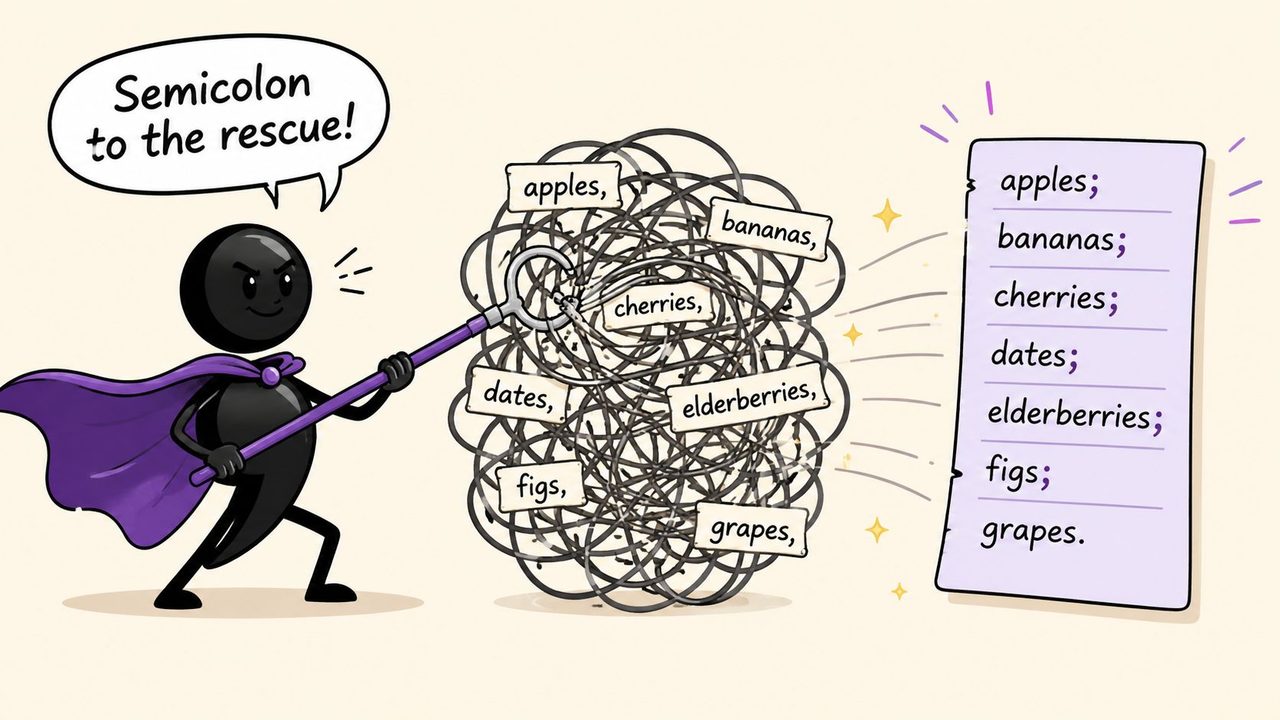
Semicolons help when commas start doing too many jobs at once. If commas are the local street signs inside a list item, semicolons are the highway dividers between whole items.
Take this sentence:
- The launch team includes Maya from Austin, Texas, Daniel from Portland, Oregon, and Priya from Boston, Massachusetts.
You can read it, but your eye has to work. Some commas separate city and state. Others separate the list items. Everything blends together.
Now look at the same sentence with semicolons:
- The launch team includes Maya from Austin, Texas; Daniel from Portland, Oregon; and Priya from Boston, Massachusetts.
That's cleaner. Each semicolon marks the boundary between major units.
When semicolons are the right tool
Use semicolons when list items already contain commas, especially in cases like these:
- Places: Paris, France; Austin, Texas; Tokyo, Japan
- Names with titles: Ana Lopez, Product Lead; Ben Carter, Engineering Manager; Rina Shah, Clinical Reviewer
- Items with parenthetical detail: onboarding updates (email, in-app, and help center); reporting changes (filters, exports, and saved views); access controls (roles, permissions, and approval chains)
The semicolon gives each item room to breathe.
A quick test
If you can circle commas inside the items themselves, ask whether the reader needs a stronger separator between items. If the answer is yes, reach for semicolons.
Here's a useful contrast:
| Version | Effect |
|---|---|
| Commas only | Fine for short, simple items |
| Semicolons between complex items | Better when each item has internal detail |
What about parentheses or dashes
Sometimes writers avoid semicolons by moving extra detail into parentheses. That can work:
- The launch team includes Maya (Austin, Texas), Daniel (Portland, Oregon), and Priya (Boston, Massachusetts).
That version feels lighter and slightly less formal. Parentheses are helpful when the location or aside is secondary.
A related option is to rewrite the sentence entirely:
- The launch team includes Maya in Austin, Daniel in Portland, and Priya in Boston.
That's often the best editorial fix. Punctuation can solve structure problems, but rewriting can solve them faster.
If the sentence looks crowded, don't just add stronger punctuation. Ask whether the sentence wants a simpler shape.
How to Introduce Lists with Colons
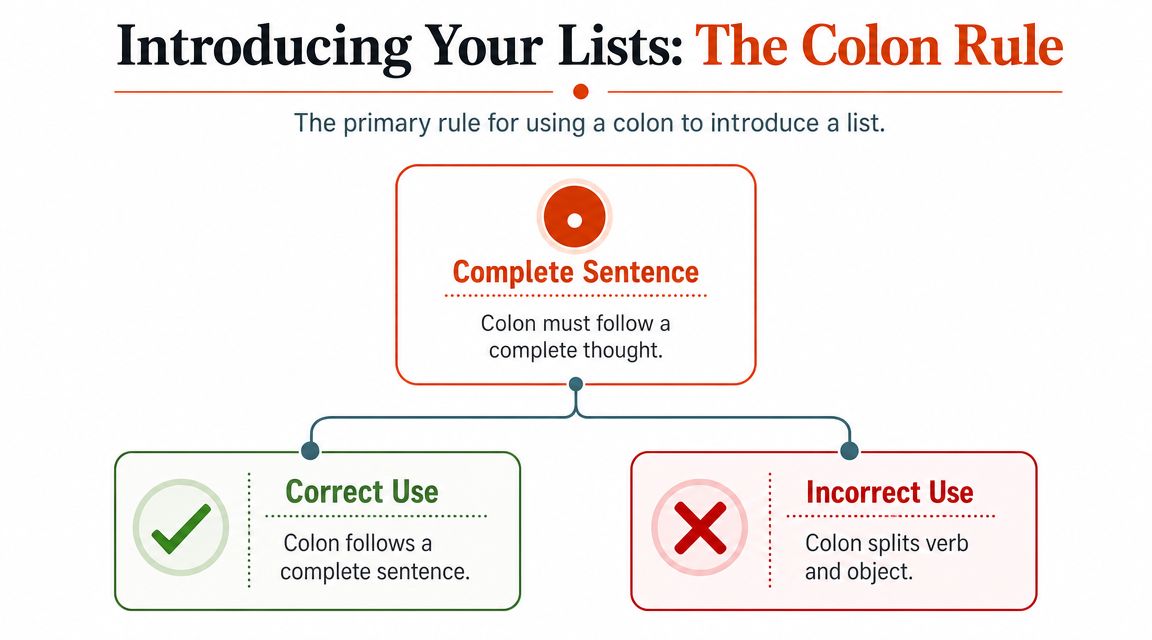
A colon is a gateway. It tells the reader that something is about to follow, usually an explanation, an example, or a list. In list writing, it signals, “the promised items begin now.”
The key question is what comes before the colon.
The gateway rule
Use a colon when the lead-in clearly opens the list. Major style guidance converges on that point. The Australian Government Style Manual says fragment lists should have a lead-in phrase or sentence followed by a colon, with each fragment starting lowercase unless it's a proper noun, and only the last item taking a full stop in fragment lists. The same guidance also distinguishes between fragment lists and complete-sentence lists, which should be punctuated differently (Australian Government Style Manual on lists).
That matters because the colon isn't decorative. It acts as a reader cue. It shows that the lead-in and the list belong together.
Correct and awkward versions
These feel natural:
- The report highlighted three risks: scope drift, delayed approvals, and unclear ownership.
- Please bring the following items: your ID, your laptop, and the signed form.
These feel clumsy:
- The report highlighted: scope drift, delayed approvals, and unclear ownership.
- Please bring: your ID, your laptop, and the signed form.
Why? Because in those awkward versions, the colon splits the sentence too early. The verb is already carrying the sentence forward. The colon interrupts instead of introducing.
Capital letters after a colon
Writers also get stuck on capitalization after a colon. The answer depends on what comes next.
If the colon introduces fragments or short list items, lowercase usually works:
- We reviewed three themes: clarity, consistency, and timing.
If the colon introduces complete sentences, capitalize each item and punctuate each one as a sentence:
- The team agreed on three actions:
- We will revise the onboarding flow.
- We will shorten the approval path.
- We will update the help content.
Keep the grammar parallel
A list introduced by a colon should feel like one clean unit. If the lead-in says “the team needs,” each bullet or item should complete that expectation in a matching way.
For example:
- The team needs:
- clearer success metrics
- a shorter review cycle
- better stakeholder notes
That works because all three items are noun phrases. But this doesn't:
- The team needs:
- clearer success metrics
- shorten the review cycle
- stakeholder notes were late
The punctuation isn't the fundamental problem there. The structure is.
Navigating Punctuation Rules Across Style Guides
Writers often ask which guide is correct. The better question is which guide your context expects. A classroom assignment, a newsroom brief, an academic paper, and an internal product spec may all handle list punctuation a little differently.
That's why punctuation becomes easier once you stop hunting for one universal rule and start thinking in terms of house style plus consistency.
What stays stable across styles
One point matters almost everywhere. Lists should behave as units. The VA.gov Design System says that if any item in a bulleted list contains two or more sentences, use ending periods for all items in that list, including fragments, and decide punctuation by list rather than by page (VA.gov guidance on bulleted lists). That's a useful editorial principle even outside web content because readers scan a list as one pattern.
In plain terms, don't make the reader guess the grammar of each bullet separately. Normalize the whole list.
Mixed punctuation inside one list makes readers slow down for the wrong reason.
If you write for tests or student assignments, AP English Language tips for a 5 can help you notice how audience and rubric shape style choices. If your day job involves fast drafting and cleanup, this guide on how to write faster and neater speaks directly to that workflow.
A quick comparison
| Style Guide | Serial (Oxford) Comma Rule | Semicolon Rule for Complex Lists |
|---|---|---|
| Chicago | Often prefers the Oxford comma | Useful when list items contain internal commas |
| APA | Commonly uses the Oxford comma in clear, formal prose | Useful for separating complex series cleanly |
| AP | Often omits the Oxford comma unless clarity requires it | Useful when commas alone would confuse the reader |
That table is a working summary, not a substitute for your required guide. The bigger lesson is this: punctuation choices make sense inside a system.
How to choose in professional documents
For specs, notes, and operations documents, these habits usually keep things clean:
- Pick one list style early: Decide whether your document favors fragment lists or sentence lists.
- Use the same ending punctuation throughout a list: Don't make one bullet a full sentence and the next a bare fragment unless you deliberately revise them all.
- Prefer readability over ritual: If a semicolon or Oxford comma removes ambiguity, use it.
- Match the context: Academic, journalistic, governmental, and internal company writing often have different expectations.
If you're the person editing a team's shared docs, this is less about grammar policing and more about reducing friction. Consistent list punctuation makes review faster.
How AI Can Automate List Punctuation
Remembering the rules is one task. Applying them while you're speaking, drafting fast, or cleaning up rough notes is another. That gap is where automation becomes useful.
A tool that turns speech into formatted writing can help by recognizing when you're dictating a simple series, a complex list with internal commas, or a sentence that wants a colon before the items. Scheduler.social's AI tool guide is a useful broader look at how AI tools fit into content workflows, especially when drafting speed and cleanup matter.

Real documents often contain mixed or nested lists, which is exactly where people stumble. Guidance summarized by PerfectIt notes that some authorities allow a comma or no punctuation for lists without a main verb, a full stop for sentence-heavy lists, and a semicolon otherwise, while the Australian Style Manual says fragment lists and sentence lists follow different end-punctuation rules and should not be mixed (PerfectIt summary of list punctuation guidance). That's why AI-assisted drafting can either help or create mess. It depends on whether the tool normalizes the structure.
What automation looks like in practice
A developer might dictate:
- release notes include login fixes analytics cleanup and updated API comments
A cleanup system can turn that into:
- Release notes include login fixes, analytics cleanup, and updated API comments.
A product manager might say:
- key dependencies include design sign-off legal review and vendor access
That naturally becomes:
- Key dependencies include design sign-off, legal review, and vendor access.
A clinician might dictate:
- findings include tenderness in the left shoulder reduced range of motion and mild swelling
That can be cleaned into:
- Findings include tenderness in the left shoulder, reduced range of motion, and mild swelling.
Later in the workflow, transcription also matters. If you're working from recorded meetings, interviews, or notes before turning them into polished lists, AI transcription for recorded speech is part of the same cleanup chain.
A short walkthrough helps make that more concrete:
One option in this space is AIDictation, a macOS voice-to-text app that converts speech into ready-to-send writing and can apply formatting and cleanup to lists, notes, and paragraphs. For punctuating lists in sentences, that matters because the software can reduce the stop-start editing loop that happens when you know what you want to say but don't want to manually rebuild every comma, colon, and sentence ending.
The ultimate benefit isn't that automation replaces judgment. It's that it handles the routine patterns so you can spend your attention on meaning, emphasis, and accuracy.
If you draft specs, notes, emails, or reports by voice, AIDictation is worth a look. It turns spoken text into clean writing, helps format lists, and can reduce the manual cleanup that usually follows fast dictation.
Frequently Asked Questions
What does Punctuating Lists in Sentences: A Clear Guide for 2026 cover?
You're probably looking at a sentence right now that ends like this: “Please review the timeline, dependencies, owners, and risks” and wondering whether that comma before “and” stays, goes, or turns into something else entirely. Or maybe you're dictating meeting notes, a product spec, or a clinical summary and hitting pause every time a list appears because you're not sure whether you need commas, semicolons, or a colon.
Who should read Punctuating Lists in Sentences: A Clear Guide for 2026?
Punctuating Lists in Sentences: A Clear Guide for 2026 is most useful for readers who want clear, practical guidance and a faster path to the main takeaways without guessing what matters most.
What are the main takeaways from Punctuating Lists in Sentences: A Clear Guide for 2026?
Key topics include Table of Contents, Why Punctuating Lists Can Be So Tricky, Why your brain hesitates.
Ready to try AI Dictation?
Experience fast voice-to-text on your device. Free to download.
Download FreeRelated Posts
Punctuation in Speech: A Guide to Flawless Transcription
Learn what punctuation in speech means and how to translate pauses, intonation, and fillers into correct punctuation for clean, readable transcripts.
A Complete List of Punctuation: The Ultimate Guide
Master your writing with our complete list of punctuation marks. Learn rules, see examples, and get dictation tips for macOS to use punctuation like a pro.
Writing in Flow: A Guide to Unlocking Deep Focus
Struggling to focus? Learn practical strategies for writing in flow, from environment setup to AI dictation workflows, and get your best work done faster.