Project Status Updates: How to Write Them Fast and Right
Friday afternoon arrives, and the project team has already moved on to the next sprint. You still have to collect updates from engineering, design, operations, finance, and an external partner, reconcile conflicting dates, decide whether the project is green or amber, and turn the result into an email someone can understand. By the time the report reaches stakeholders, some of the information is already stale.
That routine explains why project status updates often consume far more effort than their apparent value suggests. A useful update isn't a diary of everything that happened. It's a compact decision tool that tells the right people what changed, what matters, what could derail delivery, and what action is needed next.
Table of Contents
- Why Most Project Status Updates Fail Before They Are Sent
- Defining Your Audience and Reporting Cadence
- Choosing the Right Format for Each Audience
- Structuring Updates That Get Read and Acted On
- Metrics and Honesty in Status Reporting
- Communicating Uncertainty When Projects Are Under Pressure
Why Most Project Status Updates Fail Before They Are Sent
The familiar Friday scramble usually starts with good intentions. A project manager opens the task tracker, searches through chat messages, checks meeting notes, asks three people whether a milestone is still on track, and copies the answers into a template. One team says testing is complete. Another says testing is waiting on an environment fix. The report writer has to interpret both statements before a stakeholder ever sees them.
The hidden problem is time lag. Manual consolidation creates a gap between the moment work changes and the moment the organization reports that change. Independent guidance on status reporting identifies manual data entry, rigid formats, and poor scalability as recurring weaknesses, especially when projects change quickly (guidance on effective project status reporting). A report can be accurate when drafted and misleading when read.
A historical benchmark shows how serious the administrative load can become. In the 2019 PMO Insights Report, 55% of PMOs said compiling, consolidating, and publishing portfolio, programme, and project status reports consumed the bulk of monthly resource time (the PMO reporting benchmark). That finding doesn't mean reporting lacks value. It shows that gathering and reconciling information can overwhelm the analysis stakeholders need.
The report isn't the work
The worst updates confuse completeness with usefulness. They include every completed task, every meeting, and every minor change, then bury the one issue that requires an approval. Executives skim the first paragraph, delivery leads search for blockers, and everyone else assumes silence means progress.
A better test is simple:
- Decision: What decision might the reader need to make?
- Variance: What differs from the approved plan?
- Impact: What does that difference affect?
- Action: Who needs to do what, and by when?
Practical rule: If a detail doesn't help someone understand variance, impact, or action, it probably belongs in the project record, not the headline update.
The documentation system matters, too. Teams that centralize source material and maintain clear ownership can spend less time hunting through scattered notes. Guidance on managing project docs with GitDocAI is useful when your status update depends on information spread across specifications, decisions, and working files.
The target isn't a shorter report at any cost. It's a report with a deliberate information hierarchy. Put the decision-relevant facts first, preserve supporting detail in a linked source, and make the next action impossible to miss.
Defining Your Audience and Reporting Cadence
A sponsor deciding whether to approve scope reads for a different decision horizon than an engineering lead resolving a dependency. Sending both the same report creates predictable problems: executives get buried in operational detail, while delivery leads receive too little business context to act. Define the audience before selecting a template.
Use three practical tiers:
- Executive sponsors need project health, major variance, business impact, and decisions required. Task-by-task narrative adds little value.
- Functional leads need dependencies, emerging risks, milestone movement, and cross-team actions. Their role is to resolve constraints.
- Delivery teams need concrete blockers, handoffs, ownership, and near-term commitments. Give them enough detail to act without searching several systems.
Weekly reporting suits active projects because it creates a reliable checkpoint without requiring daily formal reporting. Stable portfolios can use a monthly summary when conditions and priorities change slowly. Fast-moving delivery work may need shorter operational updates. Set the cadence according to how quickly decisions change and how quickly risks can become expensive.
A simple audience matrix
| Stakeholder Tier | Cadence | Preferred Format | Content Depth |
|---|---|---|---|
| Executive sponsor | Weekly or at major decisions | Brief email or dashboard | Headline health, variance, risks, decisions |
| Functional lead | Weekly, with event-driven escalation | Structured update or channel post | Dependencies, milestone movement, mitigation |
| Delivery team | Frequent operational check-ins plus a weekly roll-up | Chat post, tracker, or concise note | Blockers, handoffs, immediate next actions |
Each weekly report should answer the questions readers ask repeatedly: Is the project healthy? What changed? What is at risk? Are finances or resources becoming a concern? What do you need from me? That matches the five-point status update approach, which centers status, critical issues, significant risks, financial health, and stakeholder actions.
Adjust depth without duplicating work
Rather than writing three separate reports, create one structured source update and adapt its presentation layer. The sponsor receives the summary and decision requests. Functional leads receive dependency and mitigation detail. The team receives owner-level actions and links to the working record.
Voice-to-text can reduce the hidden time cost of this source update. After a meeting or delivery review, dictate the changed facts, open risks, owners, and decisions while they are still clear, then place them into the template. A consistent structure makes the resulting update easier to review and less vulnerable to selective reporting.
For stakeholder communication, this guide to stakeholder communication helps match message depth to the reader's role. Keep the reporting day consistent, and escalate immediately when a material issue appears. A fixed cadence prevents surprises without delaying action.
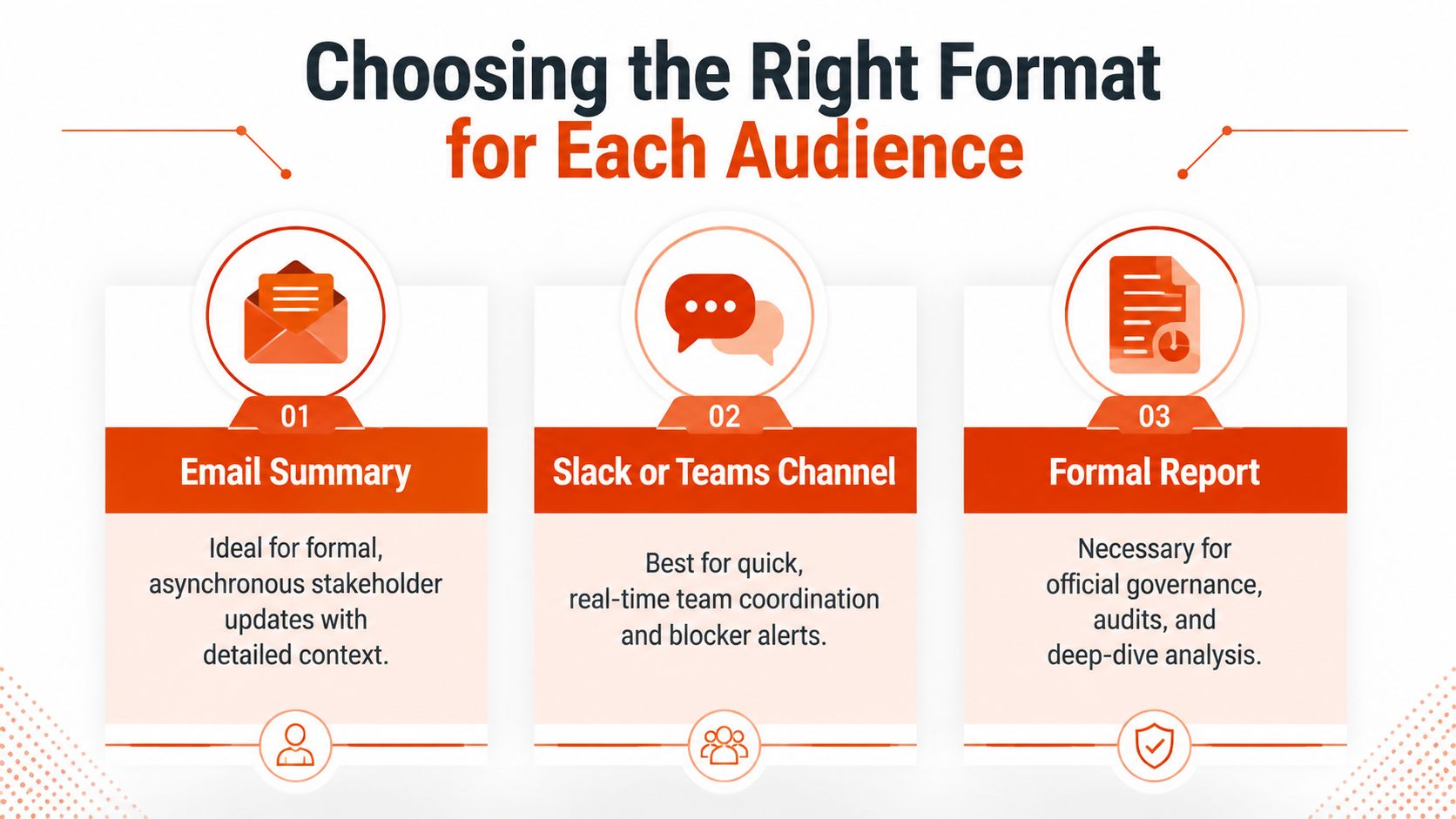
Choosing the Right Format for Each Audience
Format determines what gets noticed. Email gives a message a clear subject line and a durable record. Slack or Teams gives the delivery group speed and conversational context. A formal report or dashboard supports governance, recurring review, and deeper analysis. None is universally superior.

Email summaries
Email works when the audience needs an asynchronous decision record. Use a subject line that carries the headline, such as “Project Atlas, amber, vendor approval needed for launch path.” The opening should state current health and the specific response required. Bullets can then cover progress, risks, and next steps.
Email fails when the writer treats it as a document dump. Long background paragraphs force the recipient to search for the point, while a vague subject line makes an important update look routine. Put the request near the top and link to supporting material rather than reproducing every detail.
Slack and Teams posts
A channel post is effective for quick coordination, blocker alerts, and information that the delivery team already understands. A useful post might say:
Status: Integration testing is waiting on the revised interface definition.
Impact: The test sequence can't start until the definition is approved.
Action: API owner to confirm the version in the project channel before the next build.
Chat becomes unreliable when it carries formal approvals, sensitive context, or a risk that needs a durable audit trail. Messages disappear beneath later conversation, and readers may interpret a short fragment differently from the author. Link the post to the canonical project record and escalate material decisions into email, a dashboard, or the formal report.
Formal reports and dashboards
Use a structured report when governance, audits, milestone history, or portfolio comparison matters. A dashboard can show current indicators efficiently, but it still needs narrative interpretation. A red marker without an explanation doesn't tell a sponsor whether the issue is recoverable, what support is required, or whether the forecast has changed.
Layering is usually the most efficient approach. Publish a concise channel or email summary, then connect it to the detailed report. That gives executives a quick read and gives delivery specialists the evidence behind it without making the project manager rewrite the same information for each channel.
Structuring Updates That Get Read and Acted On
A repeatable structure removes the blank-page problem and cuts the hidden time cost of weekly reporting. I use four sections because they move the reader from meaning to evidence to action, while giving a voice-to-text workflow a clear frame.
-
Executive summary. State overall health, the most important change, and the decision or attention required. “Delivery remains on track for the approved scope, but external approval is now the controlling dependency” is more useful than “Good progress this week.”
-
Progress against milestones. Report outcomes and milestone movement, but rather a report of outcomes and milestone movement. “The design system passed review and the release candidate entered validation” tells the reader where the project stands. A task list makes the reader perform that interpretation.
-
Risks and blockers. Name the condition, impact, owner, and mitigation. “Risk: test data approval is pending. Impact: validation cannot begin on the affected workflow. Mitigation: the team is preparing a masked dataset so testing can start on unaffected paths.”
-
Next steps and owners. End with actions that have a named owner and a clear due point. “Product to approve the revised acceptance criteria, engineering to publish the dependency decision, and the PM to update the forecast” gives the report somewhere to go.
Use the five-question filter
A strong update should cover the questions that support intervention:
- Overall status: Is the project on plan, and why?
- Critical issue: What already requires attention?
- Significant risk: What could change the outcome?
- Financial or resource health: Is the delivery model still viable?
- Stakeholder action: What approval, decision, or support is needed?
Keep the language objective and focused on delivery conditions rather than personalities. PMI guidance recommends verifying uncertain project details against more than one source, which helps when a status depends on conflicting team reports (PMI-aligned status reporting guidance).
Dictate the raw material, then edit the decision
The fastest workflow starts with verified facts, not a tool inventing the status. Gather the facts, then speak them in the order stakeholders need. A voice-to-text workflow can capture what changed, what is blocked, why it matters, and what happens next. Human review remains necessary for dates, owners, assumptions, and sensitive wording.
A practical pass looks like this:
- Open the template and review the latest milestone and risk information.
- Dictate the four sections in plain language.
- Remove speculation and resolve contradictions against the source systems.
- Convert vague statements into impact, mitigation, and action.
- Paste the edited version into the audience-appropriate channel.
Tools such as AIDictation can turn spoken notes into formatted paragraphs, lists, or emails, with options for filler-word removal and context-aware cleanup. The workflow is described further in this guide to content structure. Reserve judgment for the parts that require it instead of spending the session typing connective prose.

A short demonstration can help teams adopt the workflow without turning it into another process lecture.
Metrics and Honesty in Status Reporting
Red, amber, and green labels save space, but they can conceal the work needed to interpret them. Green labels signal stability or hide uncomfortable dependencies. Readers should not assume the first without evidence. A portfolio that stays green while dependencies remain uncertain deserves a closer review.
Research has examined how project managers may present status more favorably than reality, and risk-focused guidance recommends scrutiny of persistently green reporting on higher-risk work (research on project status misrepresentation). The pressure is familiar. Teams fear appearing unsuccessful, sponsors prefer reassuring news, and a traffic light compresses a complicated situation into a symbol that can later be defended.

Replace color with evidence
Keep the indicator if governance requires it, but never let it stand alone. Add the condition, its direction of travel, and the threshold that triggers intervention. A useful status line might read:
Amber, schedule confidence is weakening because the external review date remains unconfirmed. The team has prepared an alternate sequencing plan, and sponsor escalation is needed if confirmation doesn't arrive by the next reporting point.
This wording separates the current condition from future exposure. It also keeps the report focused on evidence, activity, and decisions rather than the project manager's character. Honest reporting gives sponsors something specific to resolve.
Track movement over time
Milestone trend analysis adds historical context by comparing milestone dates with planned data across reporting dates. It makes deviations visible and helps teams recognize recurring movement quickly. Preserve earlier snapshots alongside the latest forecast, then show whether a date is stable, slipping, or repeatedly re-baselined.
Pair the trend with a small set of bias-aware measures:
- Forecast movement: Show whether the expected milestone date changed since the previous report.
- Evidence quality: Identify whether the status rests on a delivery artifact, a confirmed dependency, or an unverified assumption.
- Risk aging: Flag risks that remain open without completed mitigation.
- Escalation threshold: Define the condition that changes the status or requires sponsor action.
A structured workflow can reduce the time spent assembling these fields while keeping judgment with the reviewer. See these project management workflow practices for ways to connect repeatable notes with delivery routines. Audit the metrics quarterly. If a score has not influenced a decision across two reporting cycles, remove it from the template.
Communicating Uncertainty When Projects Are Under Pressure
A project can remain viable while its future path becomes unstable. A supplier changes its commitment, a regulator extends a review, funding pauses, or a dependency leaves the team's control. Calling the project green hides the uncertainty. Calling it red suggests a confirmed failure that has not occurred.
Recent U.S. energy data shows why one label can be inadequate. The share of planned solar capacity reporting delays fell from about 25% in Q3 2024 to about 20% in Q3 2025 (the reported solar project delay trend). The same analysis reported that a separate 2025 project stress index reached 135.7 in June, its highest reading of that year, driven by increased abandonment and on-hold activity. These figures support a reporting distinction, not a universal conclusion. Stakeholders need to separate a recoverable delay from an active pause or a probable cancellation.
Use three states instead of one vague warning
Temporary delay means the project remains authorized and the team has a credible recovery path. Report the cause, affected milestone, recovery assumption, and date when that assumption will be tested.
Active pause means work has stopped or materially reduced while a decision, funding condition, or external event is resolved. State what continues, what is frozen, which costs or commitments remain, and what decision would restart delivery.
Probable cancellation means the approved path no longer has a credible basis, even though the formal decision is pending. Separate operational facts from the recommendation, then state what must be preserved or closed.
Report scenarios, not false precision
When the timeline depends on someone outside the project, do not publish one date as though the team controls it. Use a base case and an alternative path, then identify the trigger that moves the project between them:
Current position: Delivery remains viable, but the launch date depends on external certification.
Base case: Certification arrives within the agreed review window.
Pressure case: Certification slips, so the team releases the unaffected scope first and moves the dependent feature.
Decision needed: Sponsor to approve the sequencing option if confirmation is not received by the next governance review.
This format gives stakeholders a decision to discuss without pretending uncertainty has disappeared. It also protects trust. A candid report can say, “We do not yet know,” when it immediately explains what is known, what is being monitored, and what action follows.
A voice-first workflow can turn the next status update into a 10-minute decision tool. Try AIDictation to test whether dictated updates fit your process. Dictate the first draft, verify facts against source systems, apply one evidence-based template, and send readers only the detail they need to decide.
Frequently Asked Questions
What does Project Status Updates: How to Write Them Fast and Right cover?
Friday afternoon arrives, and the project team has already moved on to the next sprint. You still have to collect updates from engineering, design, operations, finance, and an external partner, reconcile conflicting dates, decide whether the project is green or amber, and turn the result into an email someone can understand.
Who should read Project Status Updates: How to Write Them Fast and Right?
Project Status Updates: How to Write Them Fast and Right is most useful for readers who want clear, practical guidance and a faster path to the main takeaways without guessing what matters most.
What are the main takeaways from Project Status Updates: How to Write Them Fast and Right?
Key topics include Table of Contents, Why Most Project Status Updates Fail Before They Are Sent, The report isn't the work.
Ready to try AI Dictation?
Experience fast voice-to-text on your device. Free to download.
Download FreeRelated Posts
Master Stakeholder Communication: Project Success
Master stakeholder communication in 2026. Use mapping, templates, measurement, & AIDictation tips for aligned, on-track projects.
Project Documentation: Your Guide to Success in 2026
Stop ignored, outdated project documentation. Learn to create, manage, and maintain effective documentation your team will actually use & value.
How to Improve Team Collaboration: A 2026 Guide
Discover how to improve team collaboration. Our framework helps you diagnose issues, build clear processes, and use the right tools for an effective team.