How to Improve Team Collaboration: A 2026 Guide
The project isn't late because people are lazy. It's late because three people left the same meeting with three different interpretations of what was decided, nobody wrote down the trade-offs, and the follow-up lives in a chat thread nobody can find.
That's what broken collaboration looks like in real teams. The symptoms are familiar. Meetings multiply, but decisions don't stick. Handoffs get sloppy. New people need too much context. Stakeholders ask for status, and the team scrambles to reconstruct what happened.
Most advice on how to improve team collaboration is too soft to help. “Communicate better” sounds nice, but it doesn't tell you what channel to use, who owns the decision, or how to stop the same issue from being debated every week. Strong collaboration comes from design. Teams need clear rules, visible information, and habits that hold up under pressure.
Table of Contents
- Great Collaboration Is Designed Not Accidental
- First Diagnose Your Team's Collaboration Gaps
- Build Your Collaboration Operating System
- Clarify Roles and Foster Psychological Safety
- Equip Your Team with the Right Tools and Templates
- Measure Success and Iterate Your Process
- Frequently Asked Questions About Team Collaboration
Great Collaboration Is Designed Not Accidental
A team can have smart people, a good product, and solid intentions, then still work in a way that creates drag every day. One product launch I watched unravel had all the classic signs. Design thought engineering owned the final UX call. Engineering thought product had approved a reduced scope. Sales promised a date based on an old update. Nobody was reckless. The system was.
That's why collaboration shouldn't be treated like chemistry. It's not something you hope appears when you hire talented people. It's something you build with explicit agreements about communication, decisions, documentation, and follow-through.
The difference shows up in small moments. On functional teams, people know where to ask questions, where decisions are recorded, and how to disagree without derailing momentum. On dysfunctional teams, every interaction becomes a negotiation about process. That hidden tax wears people down fast.
If you're trying to improve cross-functional work, it helps to think in terms of systems, not vibes. Good teams usually have effective internal communications practices that make expectations visible before work gets messy, and this practical guide to effective internal communications is a useful example of that mindset.
Great collaboration looks natural from the outside because the team already did the hard design work in advance.
The most reliable way to improve team collaboration is to work through three moves in order:
- Diagnose the actual failure points.
- Implement a lightweight operating system for how the team works.
- Measure whether behavior changed, not just whether people liked the workshop.
Skip the first move, and you'll prescribe generic fixes. Skip the second, and insights die in a retrospective doc. Skip the third, and old habits come back the first time the team gets busy.
First Diagnose Your Team's Collaboration Gaps
Teams usually misdiagnose collaboration problems. They blame personalities when the issue is unclear ownership. They blame remote work when the issue is poor documentation. They blame too many meetings when the core issue is that nobody knows which meetings are for decisions and which are for updates.
A recent study found that 86% of employees and executives cite a lack of collaboration or ineffective communication for workplace failures, which is exactly why diagnosis matters before intervention, according to Salesforce's workplace collaboration statistics.
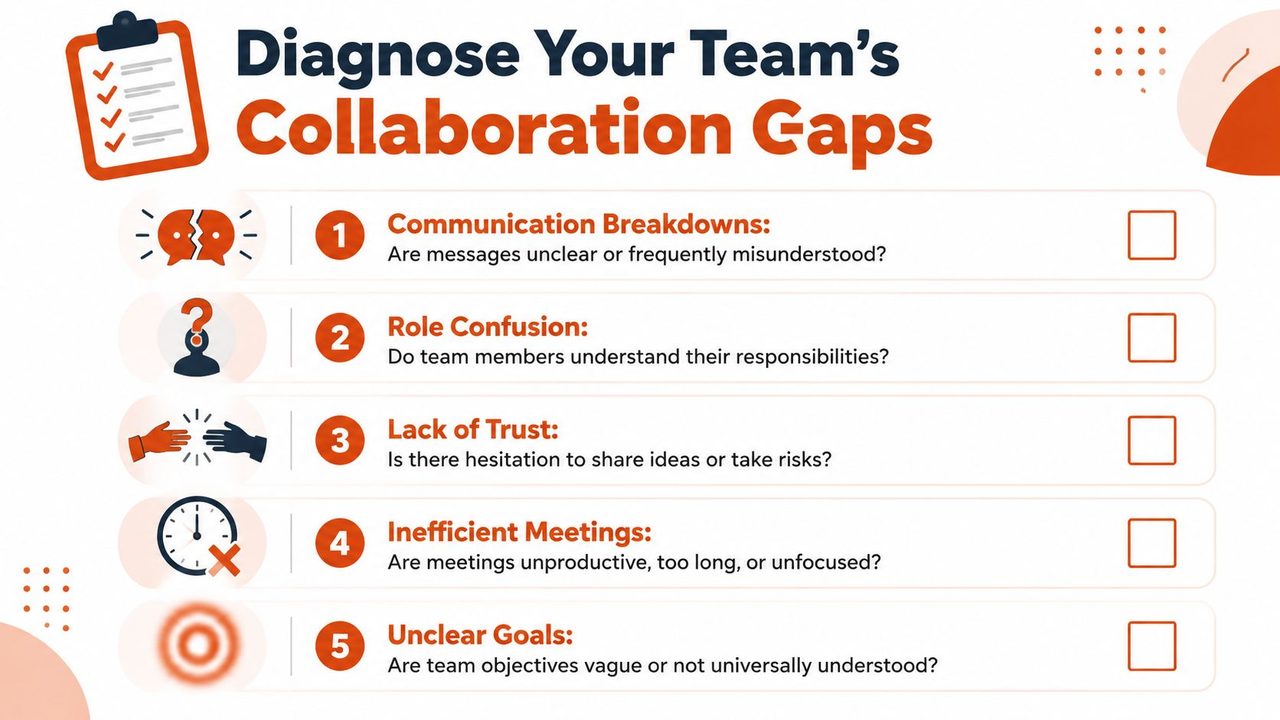
Look for recurring symptoms
Don't ask, “Do we collaborate well?” Ask what keeps happening.
Use this checklist in a leadership meeting or retro:
- Decisions keep getting reopened: The team leaves meetings without a named owner, a written decision, or a record of trade-offs.
- Status is hard to reconstruct: Stakeholders ask for updates and people have to search chat, email, and task boards to piece together reality.
- New team members ramp slowly: Important context lives in people's heads, not in accessible docs.
- Work gets duplicated or dropped: Two people think they own the same task, or each assumes the other owns it.
- Meetings feel expensive: The right people aren't there, the wrong people are, or the conversation wanders without an outcome.
- People hesitate to speak plainly: Risks, blockers, and bad news surface too late.
- Goals sound broad but not actionable: Everyone supports the objective, but nobody can describe what success looks like in day-to-day decisions.
Diagnose across four layers
A simple way to assess the team is to review collaboration at four levels.
| Area | What to examine | Common red flag |
|---|---|---|
| Communication | Where information lives and how updates travel | Important details are buried in chat |
| Coordination | How work moves between people | Handoffs depend on memory |
| Decision-making | Who decides and how decisions are logged | Old debates keep coming back |
| Context sharing | How people access history and rationale | New joiners need oral history to function |
Many managers often move too fast. They buy a new tool, create another weekly sync, or write a values statement. None of that fixes a team that can't answer basic questions like “who owns this?” or “where should I look for the latest version?”
Practical rule: Diagnose from evidence, not impressions. Pull up the last missed deadline, the last painful meeting, and the last confusing handoff. The pattern is usually obvious.
Run a short collaboration audit
You can do this in under an hour.
Ask each team member to answer these prompts privately:
- What information do you struggle to find?
- Which meeting would you cancel first, and why?
- Where do decisions get lost?
- What do you wish people would write down more consistently?
- What topic feels unsafe or awkward to raise?
Then compare answers. If half the team gives different versions of the same workflow, you've found the gap. If everyone names the same pain point, start there. Don't try to fix five things at once. Collaboration improves fastest when one obvious source of friction gets removed and people feel the difference immediately.
Build Your Collaboration Operating System
Once you know where the friction is, put rules around how work happens. I call this a collaboration operating system because it functions like one. It handles routing, permissions, defaults, and recovery when things go sideways. Without it, people invent their own methods under deadline pressure.
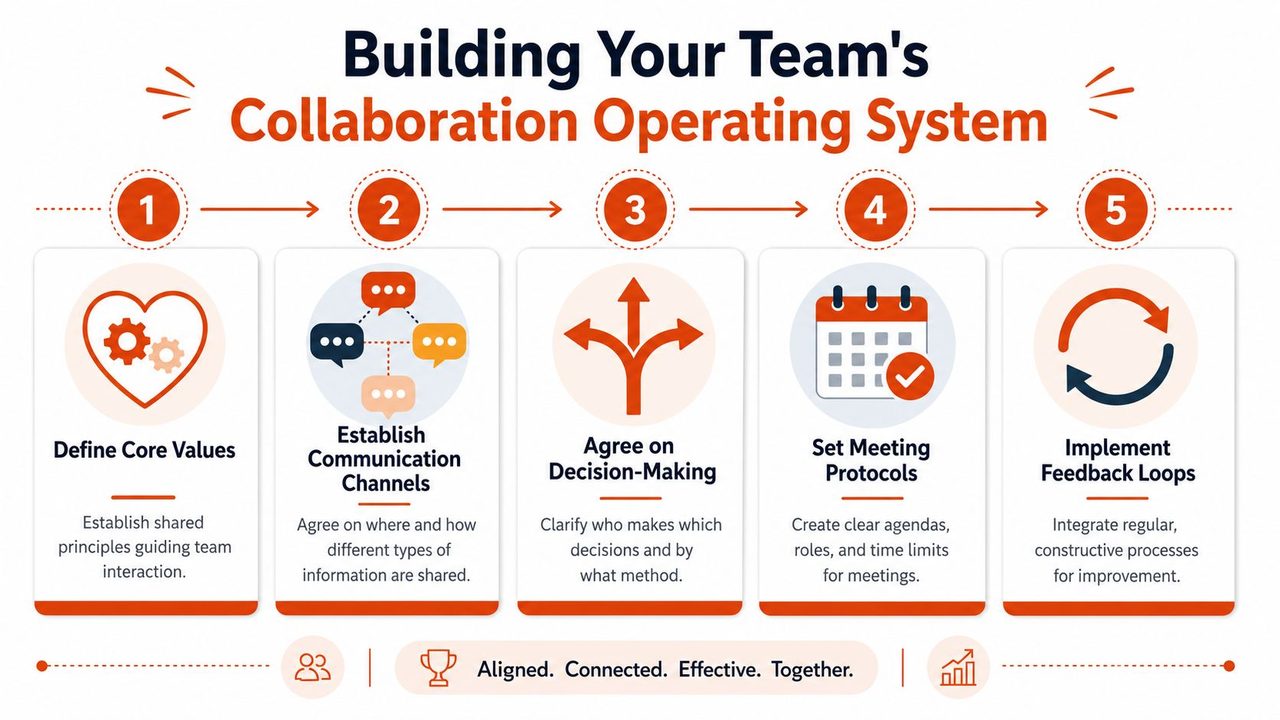
If you want a second perspective on the mechanics, this guide on how to improve team collaboration is useful because it frames collaboration as a practice built through repeatable habits, not slogans.
Set channel rules people can follow
The problem isn't communication. It's routing. Too many channels try to do the same job.
Make the channels distinct. For example:
Slack is for quick questions, urgent coordination, and short updates.
Email is for external communication, formal approvals, and durable summaries.
Shared docs are for thinking, planning, and decisions that need history.
The project board is the source of truth for task status.
That kind of rule seems boring, but it removes constant uncertainty. People stop wondering where to post. They stop missing critical context because someone chose the wrong format.
A few norms work especially well:
- Default to written context: If a topic needs more than a few back-and-forth messages, move it into a doc.
- Link don't restate: Reference the decision record or task instead of rewriting the same context in five places.
- Separate urgent from important: A “reply fast” channel should stay small, or everything starts to feel urgent.
Fix meetings before you add more tools
Bad meetings create more bad collaboration than most managers admit. They consume time, blur responsibility, and leave everyone with the illusion of alignment.
A healthy meeting system usually includes these distinctions:
- Decision meetings: A specific choice must be made.
- Working sessions: People solve a problem together in real time.
- Status reviews: Updates are reviewed, often asynchronously first.
- 1:1s: Sensitive issues, coaching, and unblocking.
If a meeting doesn't fit one of those types, it probably doesn't need to happen.
Use a simple meeting rule set:
Every meeting needs an owner, an agenda, and a stated outcome.
If no decision or output is expected, send an update instead.
End with owners, deadlines, and where the notes will live.
For teams that struggle with note quality, a dedicated meeting note taking app can help standardize summaries and action-item capture so decisions don't disappear the moment the call ends.
Protect async work so focus survives
Many leaders say they support asynchronous work, then expect instant responses all day. That contradiction destroys focus and implicitly teaches people to optimize for visibility instead of progress.
Async collaboration works when you define what belongs there. Good candidates include project updates, proposal reviews, design comments, and decision pre-reads. Real-time discussion is still useful, but it should happen after the team has seen the same material.
A lightweight async standard might look like this:
- Before a meeting: Share the doc early. Add questions in comments.
- During focus blocks: Don't expect immediate replies unless it's marked urgent.
- After a decision: Record the outcome in one durable place.
Here's what doesn't work. Telling people to “be more async” without changing incentives. If promotions and praise go to the fastest repliers, people will keep living in chat.
A collaboration operating system only sticks if leaders model it. When managers document decisions, decline agenda-less meetings, and write clear updates, everyone else starts to follow. When leaders ignore the rules, nobody believes the system is real.
Clarify Roles and Foster Psychological Safety
Process can reduce friction, but it can't compensate for unresolved human ambiguity. Teams stall when people don't know who owns what, and they stay quiet when speaking up feels risky. Those two problems amplify each other. Unclear roles create hesitation. Low safety makes people hide that hesitation.
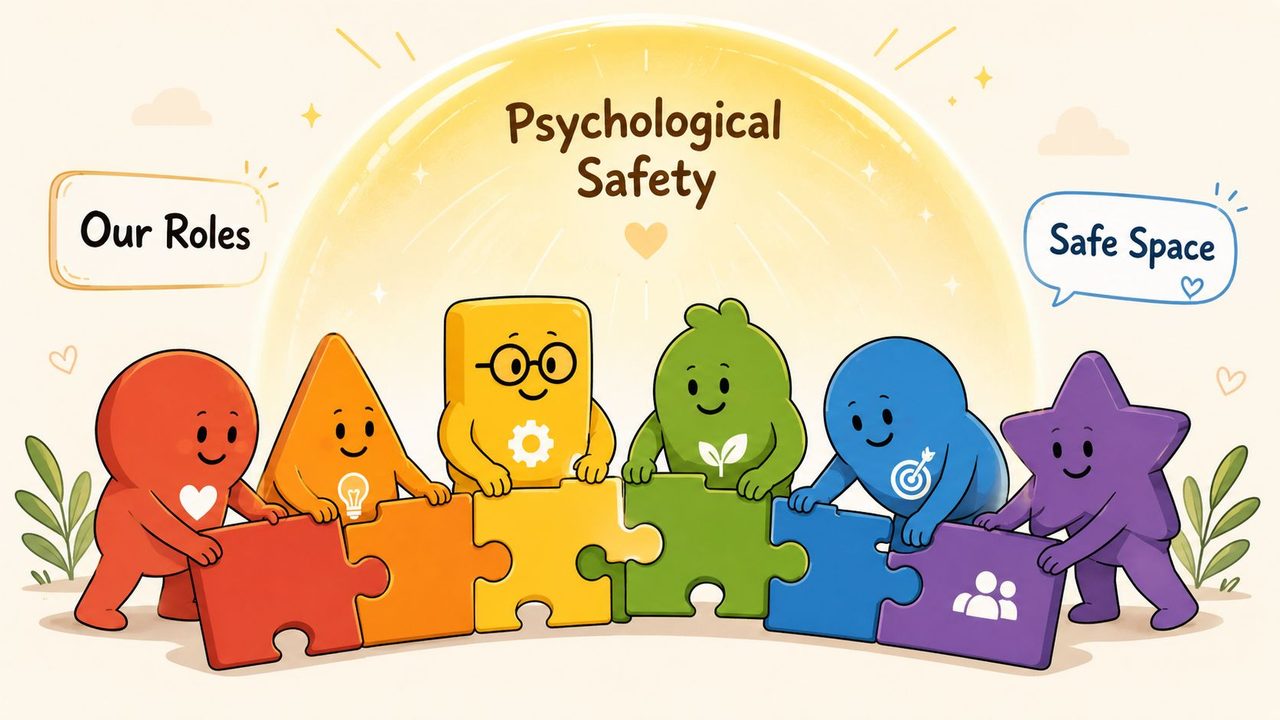
Role clarity removes invisible friction
When work slips, leaders often say, “We need more accountability.” Usually they need more clarity first. Accountability without clarity feels like blame.
A simple RACI can solve a surprising amount of confusion:
| Role | Meaning | What it prevents |
|---|---|---|
| Responsible | The person doing the work | Diffused execution |
| Accountable | The single owner of the outcome | Split ownership |
| Consulted | People whose input is required | Late objections |
| Informed | People who need visibility | Surprise updates |
The mistake is turning RACI into bureaucracy. Keep it for work that crosses functions, has meaningful dependencies, or tends to trigger confusion. You don't need it for every tiny task.
Use language this direct in planning docs:
Product is accountable for scope.
Design is responsible for the approved flows.
Engineering is responsible for technical implementation choices.
Sales is informed when dates or scope change.
Support is consulted before release on likely customer issues.
That level of precision stops a lot of passive conflict before it starts.
Psychological safety changes what people say out loud
Now the harder part. Even with clear roles, collaboration breaks if people are afraid to admit confusion, challenge assumptions, or surface mistakes early.
Psychological safety doesn't mean lowering standards. It means people can tell the truth before the problem grows teeth. On teams without it, concerns emerge in private after the meeting. On teams with it, people say, “I think we're making a risky assumption,” while there's still time to adjust.
Leaders shape this more than policy ever will. Small behaviors matter:
- Ask for dissent explicitly: “What are we missing?” works better than “Any questions?”
- Reward early risk signals: Thank people for raising issues before they become failures.
- Own your misses in public: If leaders hide mistakes, everyone else will too.
- Respond to bad news with curiosity first: Start with “walk me through what happened.”
One sentence I've seen change meeting quality is this:
If you disagree, say it now. Silence will be treated as uncertainty, not agreement.
That line gives quieter team members permission to speak without sounding combative. It also reminds the group that alignment isn't the same as politeness.
What doesn't work is fake safety. Saying “all ideas are welcome” means nothing if the first rough suggestion gets shut down with sarcasm or impatience. Teams watch reactions more than they read values statements.
If you want to improve team collaboration for real, role clarity and psychological safety are not optional. One tells people where they stand. The other tells them whether it's safe to act from that position openly.
Equip Your Team with the Right Tools and Templates
Tools should remove friction from an agreed way of working. They shouldn't become the way of working. If the process is unclear, software only makes the confusion faster.
The best stack is usually boring and specific. One system for project tracking. One place for durable docs. One chat tool for quick coordination. One whiteboard for collaborative thinking. Then use templates so people don't have to reinvent structure every week.
Match the tool to the bottleneck
Start with the pain point, not the software category.
If tasks disappear between teams, use a project management tool like Asana, Trello, or Jira to assign owners and make handoffs visible. If brainstorming is messy across locations, tools like Miro help teams sketch ideas asynchronously before a live session. If updates live in too many places, centralize written planning in one doc workspace.
Documentation deserves special attention because it's where many teams often fall short. A meeting can be sharp, fast, and productive, then still create no lasting value if nobody captures the outcome well. AI dictation and transcription tools are useful here because they reduce the effort required to turn spoken discussion into usable notes, summaries, and action items. That's especially helpful for managers, product teams, and technical leads who already spend too much time rewriting what they just said.
If you're designing a more async team, this roundup of asynchronous communication tools is a good starting point for evaluating which tools support written collaboration instead of creating more notification noise.
A practical way to evaluate software is to ask:
- Does it reduce ambiguity or just relocate it?
- Will the team use it during busy weeks, not just during rollout?
- Does it create a searchable history?
- Can a new person understand the work by reading it?
For a broader market view, TimeTackle's analysis of collaboration tools is helpful because it compares categories rather than pretending one tool solves every collaboration problem.
A meeting agenda template that teams actually use
Keep the template short enough that people won't avoid it.
Meeting title
Purpose: decision, working session, or review
Desired outcome: what will be different by the end
Inputs: linked docs or pre-reads
Discussion points: ranked by importance
Decisions to make: explicit list
Action items: owner and due point
Notes location: where the summary will live
That format forces clarity without becoming ceremonial. If the owner can't fill this out, the meeting probably isn't ready.
A short demo makes this easier to picture:
A kickoff script for cleaner alignment
Project kickoff meetings often fail because they start with solutions before the team agrees on the frame. Use a script like this instead:
- What problem are we solving?
- What constraints are real?
- Who is accountable for the outcome?
- What decisions are already fixed, and what is still open?
- How will we communicate updates and changes?
- What risks do we already see?
Then close with plain language:
Before we leave, I want one owner for each workstream, one place for status, and one written summary of today's decisions. If anything here feels unclear, say it now.
That kind of script does more for collaboration than another abstract discussion about teamwork. It turns expectations into visible agreements.
Measure Success and Iterate Your Process
Teams often declare victory too early. They run a workshop, publish norms, and assume collaboration is fixed. It isn't. What matters is whether behavior changed after the next stressful sprint, leadership change, or missed deadline.
Watch for behavior changes not vanity metrics
You don't need a complicated scorecard. Watch for signals that show the team is working with less friction.
Good qualitative signals include:
- Fewer repeated debates: Decisions stay decided unless new information appears.
- Clearer handoffs: People know when work is ready and who picks it up next.
- Better meeting exits: Owners, next steps, and rationale are visible afterward.
- Earlier escalation: Risks surface while they're still manageable.
A simple quarterly retrospective works well if you keep it honest. Ask three questions:
- What helped collaboration recently?
- Where did our system break down?
- What one rule should we add, change, or remove?
You can also look at internal artifacts. Review a sample of meeting notes, project boards, and written updates. If documentation is vague, incomplete, or inconsistent, the team probably still lacks shared operating habits. This guide to documentation quality is useful if you want a sharper lens for evaluating whether written records are effectively helping collaboration.
Collaboration gets better through maintenance, not declarations.
The strongest teams treat process as adjustable. They don't cling to a rule that no longer fits. They test, review, and simplify. If you want to know how to improve team collaboration over the long term, that's the ultimate answer. Build a system, observe how people use it, then refine it before the cracks widen again.
Frequently Asked Questions About Team Collaboration
Can I improve collaboration if I'm not the team leader
Yes. Start smaller. Clean up your own communication, document decisions clearly, and introduce lightweight habits in the work you touch. A well-run project often becomes the example other teams copy.
How do I introduce this to a skeptical team
Don't pitch a transformation. Pick one costly friction point and solve that first. “We keep leaving meetings without decisions” is easier to rally around than “we need a new culture.”
What changes for remote or hybrid teams
Written clarity matters more. Remote teams can't rely on hallway recovery when communication is sloppy. Make decisions, updates, and ownership visible in shared tools so location doesn't determine access to context.
What if my team already has too many tools
Then don't add another one yet. Remove overlap first. Consolidation often improves collaboration faster than expansion.
How long does it take to see improvement
You'll usually feel the first improvements quickly when you fix an obvious bottleneck, especially around meetings, ownership, or documentation. Deeper trust and stronger habits take repetition. Teams don't change because they agreed once. They change because the new system becomes normal.
If your team loses decisions in meetings or wastes time turning spoken updates into usable notes, AIDictation is worth a look. It helps turn speech into clean, ready-to-send writing, which makes follow-ups, summaries, and documentation much easier to keep consistent.
Frequently Asked Questions
What does How to Improve Team Collaboration: A 2026 Guide cover?
The project isn't late because people are lazy. It's late because three people left the same meeting with three different interpretations of what was decided, nobody wrote down the trade-offs, and the follow-up lives in a chat thread nobody can find.
Who should read How to Improve Team Collaboration: A 2026 Guide?
How to Improve Team Collaboration: A 2026 Guide is most useful for readers who want clear, practical guidance and a faster path to the main takeaways without guessing what matters most.
What are the main takeaways from How to Improve Team Collaboration: A 2026 Guide?
Key topics include Table of Contents, Great Collaboration Is Designed Not Accidental, First Diagnose Your Team's Collaboration Gaps.
Ready to try AI Dictation?
Experience fast voice-to-text on your device. Free to download.
Download FreeRelated Posts
Project Status Updates: How to Write Them Fast and Right
Master project status updates with practical workflows, templates, and automation tips. Learn to structure clear reports for every stakeholder using modern
Knowledge Worker Productivity: A Practical Playbook
Boost knowledge worker productivity with a practical playbook covering measurement, frameworks, async workflows, and tools that actually move the needle.
Project Documentation: Your Guide to Success in 2026
Stop ignored, outdated project documentation. Learn to create, manage, and maintain effective documentation your team will actually use & value.