Project Management Workflows: Patterns, Metrics & Real
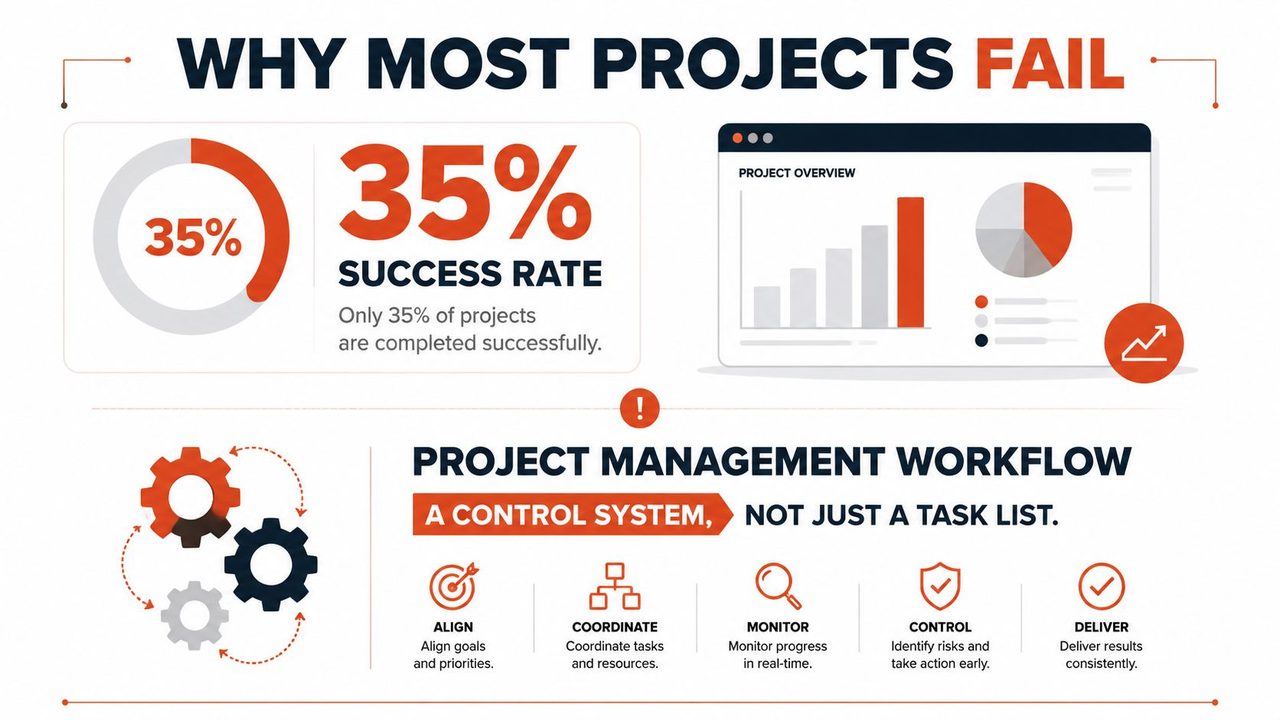
Only 35% of projects worldwide finish successfully according to PMI-reported data cited in industry roundups, and that's the primary reason project management workflows matter. The problem usually isn't that teams are lazy or inexperienced, it's that work moves through too many handoffs, approvals, and partial updates before anyone notices the damage. A workflow is the control system that keeps scope, priority, ownership, and quality aligned while the project is still movable.
Teams often talk about “better project tracking,” but tracking alone doesn't fix broken coordination. A project can look busy and still be drifting, because the failure point is usually inside the handoffs, not the task list. That's why structured project management workflows have become baseline infrastructure for complex work, especially when 58% of organizations mostly or always use a defined methodology, yet success rates still lag, and 81% of project professionals say complexity has increased project management statistics.
Table of Contents
- Why Most Projects Fail and How Workflows Prevent It
- Comparing the Five Core Workflow Patterns
- Designing Your Workflow from First Principles
- The Four Metrics That Expose Workflow Bottlenecks
- Seven Anti-Patterns That Derail Workflows
- Adapting Workflows for AI-Assisted Work
- Domain-Specific Workflow Adaptations
Why Most Projects Fail and How Workflows Prevent It
The hard truth is that 35% of projects worldwide finish successfully, even though many organizations already use a defined methodology project management statistics. That gap points to a practical failure mode, methodology by itself does not rescue execution. It has to be translated into a working system with clear ownership, explicit gates, and a way to stop bad work from moving forward.
A project management workflow goes beyond a to-do list by defining the sequence of stages, dependencies, decisions, and approvals that controls how work advances, what evidence is required, and who can move it to the next state. In practice, it governs scope changes, prioritization rules, and execution quality, which is why it matters more as work gets more cross-functional and harder to coordinate.
What the workflow controls
The control points are usually simple, but teams leave them implicit. A workflow defines who owns the next action, what needs to be true before a handoff, and which status change initiates the next person's work. When those rules stay fuzzy, people duplicate work, chase missing context, and start tasks that were never fully ready.
The historical shift matters. Teams used to rely on ad hoc coordination, messages, and memory. Modern project environments cannot afford that anymore, because project work now depends on more handoffs, more approvals, and more context switching. That is one reason knowledge worker productivity becomes a workflow issue, not just a personal performance issue.
Practical rule: if your workflow cannot answer “who owns this next,” “what blocks it,” and “what proves it's done,” it is not a workflow yet, it is just a shared wish.
The difference shows up in everyday execution. A project roadmap might say what should happen over the quarter, but a workflow makes the weekly movement possible. The roadmap link belongs with the planning layer, while execution depends on the operational handoffs that deliver it.
Comparing the Five Core Workflow Patterns
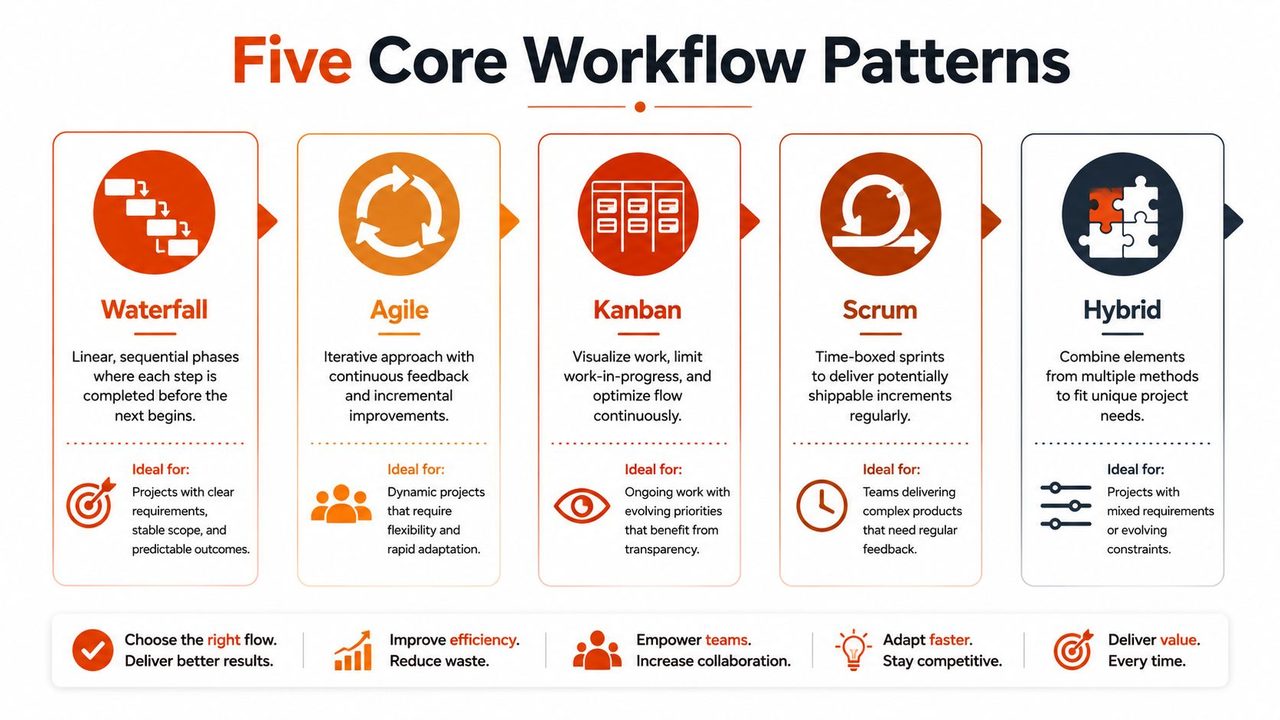
No single pattern wins everywhere. The right choice depends on how stable the scope is, how often requirements change, how much approval overhead you carry, and whether the work is flowing through one team or several. In real organizations, the method fails most often when people import a workflow because it's popular, not because it matches the work.
Waterfall and Agile
Waterfall works when the sequence is fixed, such as a healthcare compliance initiative with documented sign-offs, controlled documentation, and a hard requirement to finish one phase before the next starts. It fails when teams pretend the scope is stable but the stakeholders keep changing their minds. Then the schedule becomes a polite fiction.
Agile fits work with evolving requirements, frequent feedback, and a team that can re-rank priorities without waiting on a committee. It breaks down when leadership wants iteration speed but still demands rigid milestone certainty from the outside. That mismatch creates constant rework and frustrated reporting.
Kanban, Scrum, and hybrid
Kanban is strongest when work arrives continuously, like support or operations queues, because it exposes flow and makes bottlenecks visible. It loses power when teams refuse to cap work in progress, because the board turns into a wall of stalled items. A clean Kanban board is honest, a crowded one is usually a warning sign.
Scrum works for product teams that can commit to time-boxed planning, sprint review, and a stable cadence of inspection. It struggles when the team is constantly interrupted by urgent work, because the sprint boundary starts to dissolve. If the team can't protect its cadence, Scrum becomes ceremony without control.
Hybrid is the default for cross-functional initiatives, and that's not a weakness. It's often the only realistic answer when one team needs structured approvals, another needs iterative delivery, and a third needs a lightweight intake flow. The mistake is not using hybrid, it's using hybrid without clear rules for where each method begins and ends.
For a practical comparison of tooling and workflow fit, the examples in workflow optimization examples help show how one method can solve one bottleneck while creating another.
A workflow pattern should match the uncertainty profile of the work, not the ego of the manager choosing it.
Designing Your Workflow from First Principles
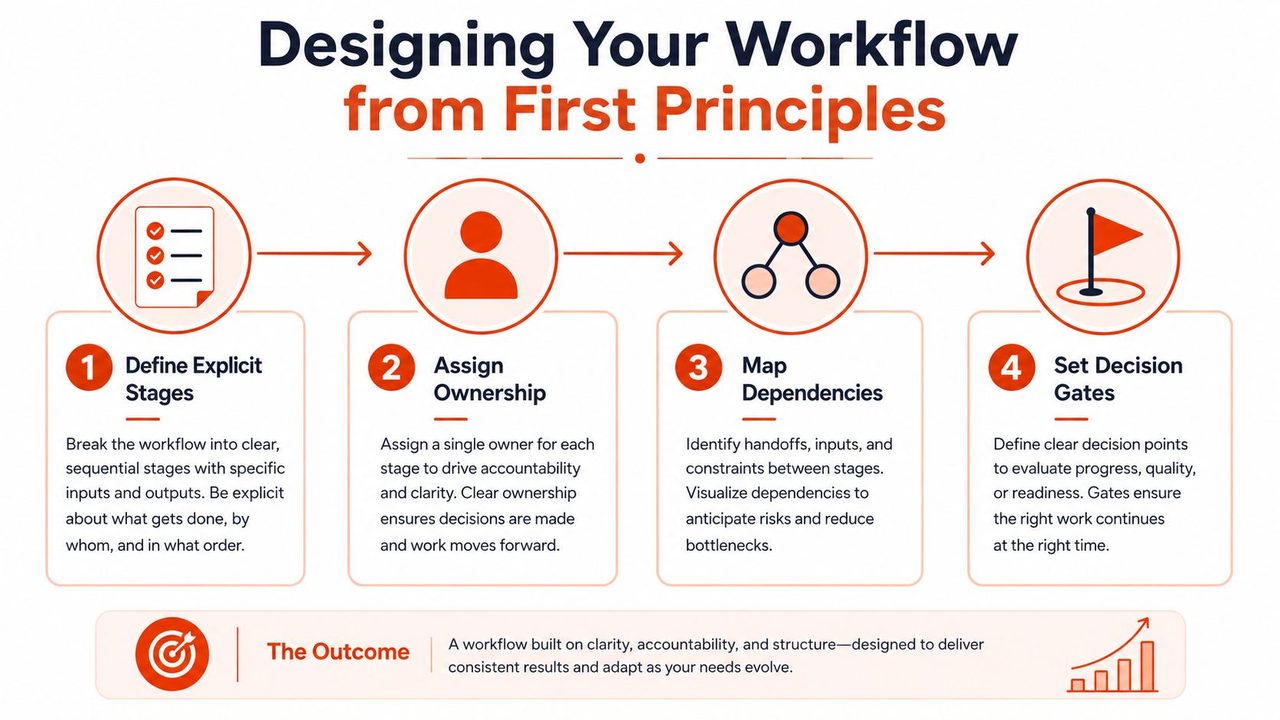
Good workflow design starts with the actual movement of work, not the org chart. The best systems I've seen make prerequisites visible, assign ownership at every stage, and remove ambiguity before it turns into rework. That means defining what happens first, who is responsible, what evidence is required, and what condition meets the criteria for the next step.
Build stages people can follow
Start with explicit stages, not broad buckets. “In progress” is a holding pattern rather than a defined stage. Strong stages describe a real transition, such as intake, draft, review, approval, delivery, or closeout, so the team knows what changed and what is supposed to happen next.
Next, assign ownership at each stage. If multiple people can “sort of” own the same step, nobody really owns it. That's where stalled work hides, because everyone assumes someone else already chased the blocker.
A workflow map also needs a realistic view of coordination cost. The moment you write down who waits on whom, you expose the hidden handoffs that slow delivery, and you can choose whether to simplify the path or automate part of it. When teams skip that step, they usually build a process that looks tidy on paper and leaks time in execution.
Make dependencies and gates machine-readable
Dependency mapping is where coordination costs become visible. Once a prerequisite is written down, the workflow can route work more intelligently, trigger the next status automatically, and stop parallel work on incomplete artifacts. That shortens coordination latency, the time between “ready to move” and “moved.”
Approval gates need discipline too. A gate should confirm completion evidence, not recreate the whole review from scratch. If every gate becomes a fresh debate, the workflow is broken.
Practical rule: every gate should answer one question, “is this ready to advance,” not “does everyone want to reopen scope.”
If you're building this in software or operations, a custom system can help formalize ownership and routing. Teams often use job management software for enterprises when they need the workflow logic, the approvals, and the reporting to stay aligned across multiple departments.
For teams mapping the work before they automate it, how to create a project roadmap is a useful companion reference, because the roadmap defines direction while the workflow defines movement.
The Four Metrics That Expose Workflow Bottlenecks
Status reports tell you what people think is happening. Operational metrics tell you where the system is slowing down. If you want to catch workflow decay early, track the numbers that reveal handoff friction, queue buildup, and overworked approvers instead of relying on anecdotal updates.
The metrics that matter
Schedule variance shows whether work is moving according to plan, but it doesn't tell you why it slipped. Treat it as a symptom, not a diagnosis. If schedule variance keeps widening, look for the stage where time is being lost.
Cycle time measures how long work takes from start to finish. When cycle time grows, the workflow is usually waiting on something, approval, clarification, or a dependency that wasn't visible early enough.
Throughput shows how much work is completed in a given period. Stable throughput with shrinking cycle time is a strong sign that automation or queue management is improving flow efficiency. That's one of the clearest indicators that the system is getting healthier.
Task aging exposes items sitting too long in a stage. High task aging usually points to overloaded approvers, unclear dependencies, or too much work in progress. If a stage keeps aging items, that stage is the bottleneck.
| Workflow Diagnostic Metrics | Warning Sign | Likely Root Cause | Corrective Action |
|---|---|---|---|
| Schedule variance | Deadlines slip repeatedly | Hidden dependencies or delayed approvals | Rebuild the dependency map and tighten gates |
| Cycle time | Work takes longer even when scope stays steady | Waiting between handoffs | Reduce handoff count and automate routing |
| Throughput | Output stays flat while intake grows | Work in progress is too high | Cap WIP and clear stalled items first |
| Task aging | Items sit in one stage for too long | Overloaded owner or unclear acceptance criteria | Reassign ownership or define completion evidence |
Dashboards should connect process changes to those metrics, not just decorate a status meeting. If you simplify an approval path, cycle time should improve. If it doesn't, the fix was cosmetic, not structural.
Seven Anti-Patterns That Derail Workflows
Most workflow problems are predictable once you learn the smell of them. They don't look dramatic at first, they look like “just one more review,” or “we're waiting on a quick answer,” until the queue backs up and the whole project starts slipping. The trick is to diagnose the pattern before it becomes normalized.
The patterns to watch
Approval bottleneck. If every decision needs three signatures, the workflow is built for delay. Diagnostic question, which approval changes the risk profile, and which one is just habit? Fix, remove duplicate approvers and reserve sign-off for true exceptions.
Phantom dependency. Work is blocked on input that no one can name. Ask who owns the dependency and when it will arrive. If nobody can answer, the block is imaginary, or the intake process is broken.
Status theater. Daily meetings happen, but blockers stay hidden. If the team reports motion without escalation, the meeting is a ritual, not a control mechanism. Fix it by requiring one visible blocker and one decision request in the update.
Scope creep cascade. Small changes accumulate until the timeline is unrecognizable. The diagnostic question is whether each change was approved against the current impact, not the original plan. Fix it by tying scope changes to explicit re-baselining.
Handoff black hole. Work disappears between teams and reappears days later with missing context. That usually means the acceptance criteria are undefined. Fix it with a required handoff checklist and a named receiver.
Automation trap. Broken work gets automated before it's understood. The diagnostic question is whether the process works manually first. If not, automation just makes the failure faster.
Metric vanity. Teams count activity instead of outcomes. If you measure messages sent, meetings held, or tickets touched, you can fool yourself into thinking throughput is healthy. Fix it by tying dashboards to cycle time, aging, and delivery quality.
Adapting Workflows for AI-Assisted Work
AI changes the workflow question because the output is no longer always finished work. Sometimes it's a draft, a suggested decision, or a machine-generated summary that still needs human judgment before it can move forward. That means the design problem is governance, not just speed.
Human judgment still has to define completion
The best AI-assisted workflows make completion evidence explicit. A draft isn't complete just because it exists, and a generated summary isn't final just because it's readable. Teams need rules for which steps stay human, which steps can be automated, and what proof is required before the work advances.
Modern systems are moving away from static task lists and toward state-driven workflows with conditional approvals and rule-based routing. That shift matters because it lets teams preserve accountability while removing repetitive coordination from the critical path. In my view, that's the only sustainable way to scale AI-era productivity without sacrificing auditability.
For teams evaluating tools that connect analytics and automation, self-serve analytics for founders is a useful lens because it frames workflow optimization as a measurable system, not a pile of disconnected tasks.
Practical rule: if AI can draft it, a human still needs to own whether it's acceptable to ship.
AIDictation fits naturally here as one option for turning spoken updates, meeting notes, or technical drafts into cleaned text that can enter a workflow without extra retyping. The workflow still needs review and approval, but the input arrives in a cleaner state, which reduces friction in the first handoff.
Domain-Specific Workflow Adaptations
The core logic stays the same across industries, but the constraints change the shape of the workflow. Healthcare teams usually need approval chains that protect clinical documentation quality and compliance. Software teams add code review and deployment gates. Product managers run stakeholder review cycles for PRDs and specs. Support teams build escalation paths that balance speed with accuracy.
How the workflow changes by domain
In healthcare, the workflow often has stricter evidence requirements before a document moves forward. That slows some steps down, but it protects the organization from shipping incomplete or unsupported records.
In software delivery, the handoff is rarely complete until code review and deployment checks are done. Shortcut's 2026 engineering tool roundup describes how teams value cycle time, progress visibility, and GitHub-linked planning in workflows that need both speed and structure Best Project Management Tools for Engineering Teams in 2026.
In product management, the review loop is usually about alignment. PRDs and specs need stakeholder input before execution starts, or the team ends up building the wrong thing efficiently.
Support workflows are different again. A support platform with project coordination, like support platform with project management, can help teams route escalations, preserve context, and keep urgent work from disappearing into a generic queue.
The principle stays consistent. Each domain sets its own gates, but the workflow only works when the gates are visible, the owner is clear, and the handoff proves readiness instead of assuming it.
If your team is still managing projects through scattered updates, unclear handoffs, and too many manual status checks, AIDictation can help turn meetings, updates, and rough notes into cleaner text that's easier to route through a workflow. Visit AIDictation to see how voice-to-text and cleanup features can reduce friction at the point where work first enters the system.
Frequently Asked Questions
What does Project Management Workflows: Patterns, Metrics & Real cover?
Only 35% of projects worldwide finish successfully according to PMI-reported data cited in industry roundups, and that's the primary reason project management workflows matter. The problem usually isn't that teams are lazy or inexperienced, it's that work moves through too many handoffs, approvals, and partial updates before anyone notices the damage.
Who should read Project Management Workflows: Patterns, Metrics & Real?
Project Management Workflows: Patterns, Metrics & Real is most useful for readers who want clear, practical guidance and a faster path to the main takeaways without guessing what matters most.
What are the main takeaways from Project Management Workflows: Patterns, Metrics & Real?
Key topics include Table of Contents, Why Most Projects Fail and How Workflows Prevent It, What the workflow controls.
Ready to try AI Dictation?
Experience fast voice-to-text on your device. Free to download.
Download FreeRelated Posts
10 Best Productivity Tools for Teams in 2026
Boost your output with the best productivity tools for teams. Explore our 2026 list of project management, communication, and AI tools to work smarter.
How to Write Effective User Stories That Actually Ship
Learn how to write effective user stories with INVEST, acceptance criteria, and ready templates. Practical tips for PMs, devs, QA, and healthcare teams.
10 AI Tools for Product Managers in 2026
Discover the top 10 AI tools for product managers. Our guide covers AI for roadmapping, feedback, and specs to boost your workflow in 2026.