Content Structure Done Right: A Practical Guide
Most advice about content structure starts in the wrong place. It tells you how to format a finished draft for readability, search visibility, or neat presentation. That's useful, but it skips the harder problem busy professionals face every day: how to create structure while ideas are still messy.
If you're a product manager dictating a spec after a meeting, a developer explaining a bug fix out loud, or a clinician capturing notes between tasks, your problem usually isn't a lack of headings. It's friction. You have raw thought in one form and a usable document in another, and the gap between them eats time.
Good content structure closes that gap. It gives spoken ideas a shape that other people can follow, review, and act on without forcing you to slow down and become your own stenographer, editor, and organizer at the same time.
Table of Contents
- Why Most Content Structure Advice Fails You
- Understanding Content Structure Beyond Headings
- The Core Principles of Effective Structure
- Common Content Structure Patterns and Templates
- Implementing Structure From Unstructured Speech
- A Practical Workflow for Structured Dictation
- Structure Your Thoughts Not Just Your Text
Why Most Content Structure Advice Fails You
Most content structure advice assumes you're sitting calmly with a keyboard, a clean outline, and enough time to polish every paragraph. That's not how a lot of work happens.
A doctor often speaks notes between patient interactions. A PM captures decisions right after a call. A developer explains implementation details while the logic is still fresh. In those moments, the critical challenge isn't arranging H2s. It's getting useful information out of your head before it disappears.
The hidden cost of organizing while speaking
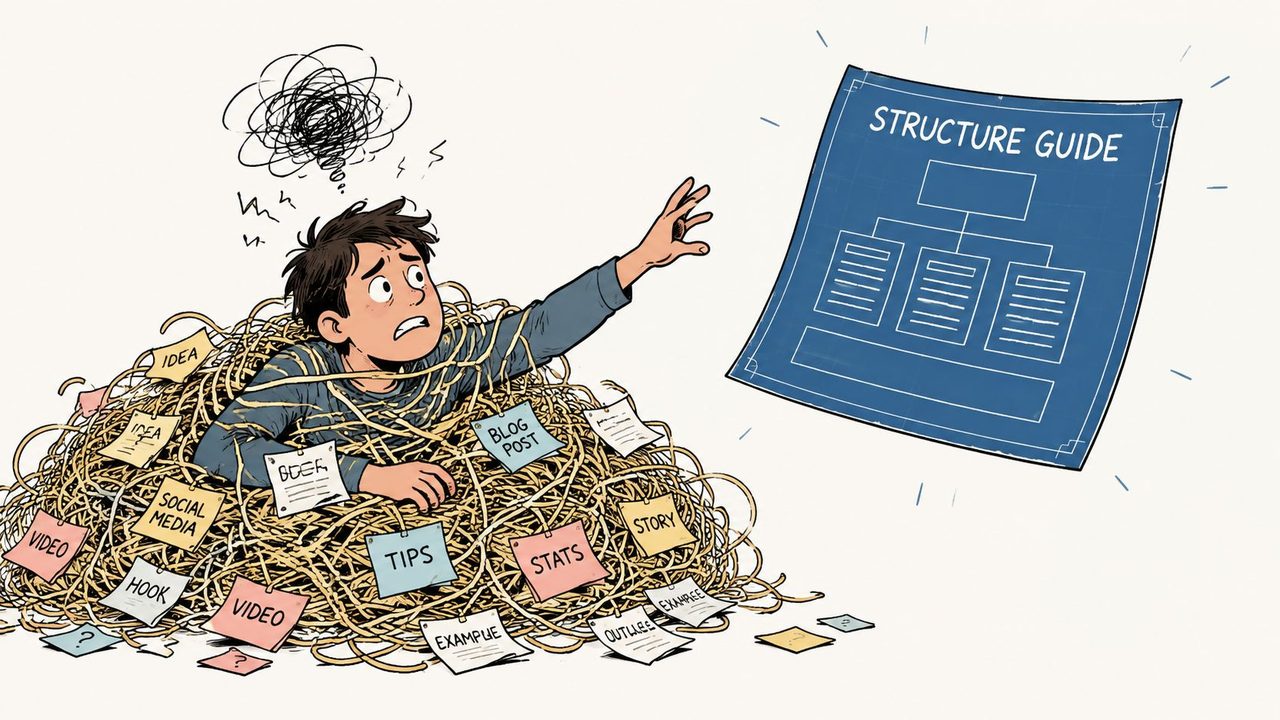
Traditional advice expects you to do two jobs at once. First, generate the idea. Second, package it in a clean structure as you go.
That sounds efficient, but it usually isn't. Users who try to mentally organize content while dictating show 40% higher error rates and 2.3x slower output speeds compared with free-flow dictation followed by AI auto-structuring, according to the cited analysis of 2025 eye-tracking findings in AskCruit's piece on unique content angles.
Practical rule: Don't force your brain to be a speaker, editor, formatter, and organizer at the same time.
Why common advice feels frustrating in real work
A lot of articles talk about scannability. They tell you to use clear headings, shorter paragraphs, and bullet points. None of that is wrong. The problem is timing.
Those recommendations help once text already exists. They don't help much when your input is a fast, linear stream of speech with interruptions, self-corrections, and unfinished thoughts. Spoken language arrives in sequence. Structured writing usually needs grouping, prioritizing, and cleanup.
That's why many people feel they're “bad at structure” when the underlying issue is workflow mismatch. They're using methods designed for polished drafting on work that begins as live speech.
Understanding Content Structure Beyond Headings
Content structure isn't the same thing as formatting. Formatting is how text looks. Content structure is how information is arranged so a reader can understand what matters, what supports it, and what to do next.
If formatting is paint, structure is the frame of the house.

Structure is shape not decoration
A document with bold text, bullets, and nice spacing can still be badly structured. You've probably seen this before: a meeting summary that looks tidy but hides the decision, an email with clean paragraphs but no clear ask, or a technical note that mixes goals, assumptions, and implementation details into one block.
Structure answers a few simple questions:
- What comes first: The core point or context the reader needs before details
- What belongs together: Related facts, actions, and supporting material
- What can stand alone: Sections that still make sense when read quickly
- What the reader should do next: Review, approve, implement, respond, or reference
Good structure lets a reader find the right layer of detail without rereading the whole document.
Macro and micro structure
It helps to think on two levels.
Macro structure is the big layout of the document. It's the order of major sections. In a status update, that might be summary, blockers, progress, and next steps. In a spec, it might be overview, goals, requirements, and evaluation.
Micro structure is the local arrangement inside those sections. It includes paragraph order, list design, labels, examples, and transitions. A section can be in the right place and still fail if its internal flow is muddy.
Here's a simple way to tell the difference:
| Level | What it controls | Example |
|---|---|---|
| Macro structure | Overall sequence | Opening with the problem before listing solutions |
| Micro structure | Internal clarity inside each part | Using bullets for acceptance criteria instead of a dense paragraph |
Why this matters for spoken work
When people dictate, they often produce decent raw material for micro structure. They naturally say things like “first,” “also,” “the issue is,” or “next step.” What they usually don't produce by default is stable macro structure.
That's why spoken notes often feel useful but messy. The information is there. The order isn't.
Once you see content structure as a system for arranging meaning, not just adding headings, a lot of confusion disappears. The goal isn't to make text look organized. The goal is to make ideas easy to retrieve, evaluate, and reuse.
The Core Principles of Effective Structure
A good structure doesn't need to be fancy. It needs to reduce effort for the person reading and the person creating the document.
Hierarchy makes thinking traceable
Hierarchy means moving from broad context to specific detail. In technical specification writing, a hierarchical flow from general to specific improves requirement validation accuracy by 27% compared to unstructured or linear formats, and benchmarks also show a 40% reduction in specification review time when the document uses clear organization and cross-references, as described in Lumen Learning's technical specifications guide.
That matters because readers don't all need the same level of detail. A manager may need the goal. An engineer may need the requirement. A tester may need the evaluation criteria. Hierarchy lets each person drop to the right layer quickly.
Modularity keeps sections useful on their own
A modular section has one job. It doesn't try to carry context, decision history, implementation detail, and open questions all at once.
For example, instead of one paragraph that says:
- the bug appeared in production
- the API timeout caused retries
- support received complaints
- engineering changed the retry logic
- QA still needs to test edge cases
Split those into blocks such as issue, cause, fix, and open items. That makes the document easier to skim, quote, and reuse in another channel.
If you want a practical example of how smaller units improve readability, this guide to bullet point formatting is useful because it shows how list structure can separate ideas that would otherwise blur together in paragraph form.
Consistency lowers reader effort
If one section uses “Action items,” another uses “Tasks,” and a third uses “Next,” readers waste time decoding labels instead of absorbing meaning. Consistency creates pattern memory.
Use the same section names for the same kinds of information. Keep similar documents in similar shapes. If every meeting note ends with owners and deadlines, your team learns where to look without thinking.
A repeatable structure turns reading into retrieval instead of detective work.
Specificity turns vague ideas into working documents
Structure fails when categories are too broad. “Details” is weak. “Risks” is stronger. “Data validation rules” is stronger still.
Specific labels force clearer thinking. They also make dictation easier because you can speak in chunks. Saying “Open questions” gives your next few sentences a container. Saying “More stuff” doesn't.
When people struggle to organize speech, the fix usually isn't more discipline. It's better containers. Clear sections give rough thoughts somewhere to land.
Common Content Structure Patterns and Templates
Different jobs need different structures. The trick isn't to memorize dozens of formats. It's to recognize the pattern that matches the document's purpose.
A quick comparison by document type
| Document Type | Structural Components | Key Benefit |
|---|---|---|
| Technical spec | Introduction and overview, goals, product requirements, methods of evaluation | Helps teams trace goals to testable criteria |
| Clinical SOAP note | Subjective, objective, assessment, plan | Separates patient report from clinician judgment and next actions |
| Meeting minutes | Purpose, decisions, discussion points, action items | Makes follow-up fast and reduces ambiguity |
| Persuasive email | Context, key point, supporting details, clear ask | Improves response quality by making the next step obvious |
Technical specs
Technical specs benefit most from explicit hierarchy. The strongest pattern starts broad, then narrows.
A clean template looks like this:
-
Introduction and overview
Define the problem, project scope, and context. -
Goals
State what success looks like in business or product terms. -
Product requirements
Document behaviors, constraints, inputs, outputs, and dependencies. -
Methods of evaluation
Define how the team will verify the work.
That order matters. It helps engineers connect high-level intent to implementation detail. It also makes reviews faster because people can locate the right category of information without guessing.
For teams drafting supporting prose around these sections, an AI paragraph writer can be a practical helper when you need to turn rough notes into complete sentences before final editing. It's most useful after the structure already exists.
Another useful reference is this guide to project documentation, especially if you need a broader documentation system around specs, notes, and updates.
Clinical SOAP notes
SOAP works because it separates kinds of information that often get mixed together in speech.
- Subjective: What the patient reports
- Objective: What was observed or measured
- Assessment: The clinician's interpretation
- Plan: What happens next
That separation matters in dictation. Someone speaking quickly may jump from a symptom to a conclusion and back again. A SOAP framework gives each statement a clear home.
Meeting minutes
Most meeting notes fail for one reason. They preserve conversation instead of extracting outcomes.
A better pattern is short and operational:
- Purpose: Why the meeting happened
- Decisions: What was agreed
- Discussion points: What shaped the decision
- Action items: Who does what next
This structure works well because most readers only need two things after a meeting: what changed and what they now own.
Preserve decisions, not dialogue. Raw transcript energy is rarely what colleagues need.
Persuasive emails
Email structure should match a reader's limited attention. Long introductions often bury the point.
A practical layout is:
- Context: One or two lines
- Main point: The request, recommendation, or update
- Support: Only the details needed to act
- Clear ask: Reply, approve, review, or confirm by a certain point
That shape works for internal updates, client follow-ups, and stakeholder asks because it respects how people scan.
Implementing Structure From Unstructured Speech
The hardest part of content structure isn't choosing a template. It's getting from spoken thought to usable written output without creating extra cleanup work.
Why voice first work breaks old structure advice
Most guidance on content structure still centers on heading logic and scannability for finished text. It rarely addresses what happens when the input arrives as dictation. That gap matters because 68% of voice-to-text users report frustration with tools that force manual reorganization after dictation, according to Kitful's analysis of content gaps in existing guidance.
That frustration makes sense. Speech is linear. Work documents usually aren't. When you talk, you backtrack, revise, add side notes, and remember missing details late. A transcript captures sequence. A useful document needs grouping.
What an adaptive structuring workflow looks like
A better workflow treats speech as raw material, not as final layout. That means the system should help with a few specific jobs after or during dictation:
- Segmenting ideas: Turning a long stream into paragraphs or list items
- Interpreting cues: Recognizing phrases like “next point,” “the issue is,” or self-corrections
- Cleaning speech artifacts: Removing fillers and false starts when they don't add meaning
- Applying context: Formatting a note differently in email, documentation, or clinical software
Tools designed for dictation can change the writing process. For example, AIDictation on macOS can switch between local and cloud recognition, then apply AI cleanup, context-aware formatting, filler-word removal, and app-specific context rules so spoken drafts can come out as cleaner paragraphs, lists, or emails rather than raw transcripts.
That kind of workflow is useful because it preserves natural speech while reducing the manual sorting that normally happens afterward.
If your spoken content also feeds distribution channels, this guide to building a workflow to grow LinkedIn audience is a good example of how one spoken source can become multiple structured outputs. The same principle applies inside teams: one dictation session can become notes, updates, and documentation if the structure layer is handled well.
The real productivity gain doesn't come from transcription alone. It comes from reducing the rewrite between capture and send.
A Practical Workflow for Structured Dictation
You don't need a perfect outline before you start speaking. You need just enough direction to keep your thoughts from scattering.
Five steps that reduce cognitive friction
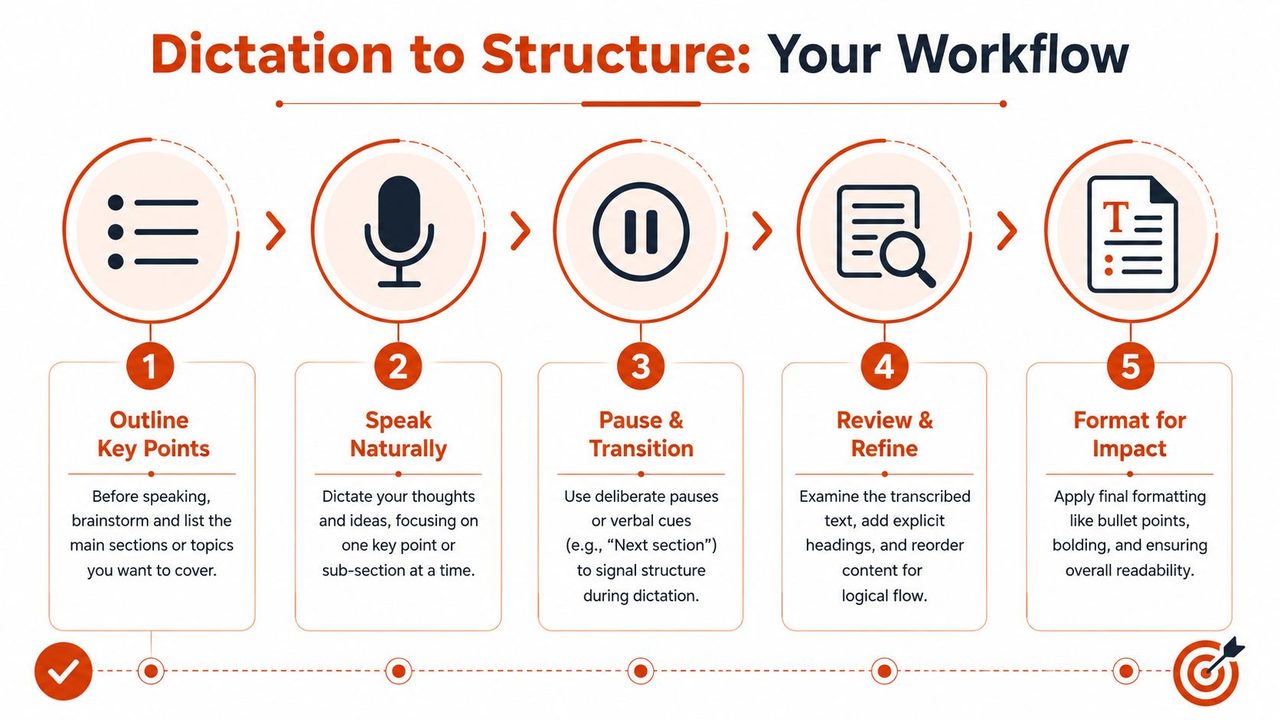
1. Name the destination before you dictate
Don't write a full outline. Just decide the document type. Is this a status update, a SOAP note, a spec, or an email? One label gives your brain a container.
2. Pick three to five anchor points
Say them to yourself before you start. For a meeting note, that might be purpose, decisions, blockers, next steps. For a bug report, it might be issue, impact, suspected cause, fix.
3. Speak in full thought chunks
Try to finish one idea before moving to the next. Short verbal cues help. Phrases like “first issue,” “separate point,” or “action item” create natural signals a tool or editor can use later.
Here's a helpful walkthrough to see this process in action:
4. Let the system handle cleanup before you start editing
If you jump into manual edits too early, you often end up reorganizing text that would have been grouped automatically. Wait until the first pass has already formed paragraphs or lists.
5. Do a short structural review
Read only for shape. Ask:
- Is the main point visible early
- Are related ideas grouped together
- Does every section have one job
- Is the next action obvious
This final pass should be quick. You're checking alignment, not rewriting from scratch.
What readers often get wrong
Many people think structured dictation means speaking like a robot. It doesn't. You don't need to say every punctuation mark or narrate every heading.
What helps is light signaling, not rigid scripting. Natural speech plus a few verbal landmarks usually produces better raw material than trying to sound like a formatted document.
Structure Your Thoughts Not Just Your Text
Content structure isn't a cosmetic layer you add at the end. It's the method that turns loose thinking into something another person can use.
That's why old advice often feels incomplete. It focuses on what readers see after the work is finished. Busy professionals need help earlier, when ideas are still arriving as fragments, explanations, corrections, and spoken shorthand.
The most useful shift is simple. Stop treating structure as a formatting task. Treat it as a way to lower friction between capture and clarity. If you do that, your notes get easier to review, your emails get easier to answer, and your documentation gets easier to trust.
If you want to deepen that habit, this guide to structured note-taking is a practical next step because it shows how consistent containers improve recall and follow-through across everyday work.
If you want a faster way to turn spoken drafts into clean, usable writing, try AIDictation. It's a macOS voice-to-text app built for ready-to-send output, with options for local dictation, cloud cleanup, context-aware formatting, and app-specific rules that help spoken ideas land in a clearer structure with less manual rework.
Frequently Asked Questions
What does Content Structure Done Right: A Practical Guide cover?
Most advice about content structure starts in the wrong place. It tells you how to format a finished draft for readability, search visibility, or neat presentation.
Who should read Content Structure Done Right: A Practical Guide?
Content Structure Done Right: A Practical Guide is most useful for readers who want clear, practical guidance and a faster path to the main takeaways without guessing what matters most.
What are the main takeaways from Content Structure Done Right: A Practical Guide?
Key topics include Table of Contents, Why Most Content Structure Advice Fails You, The hidden cost of organizing while speaking.
Ready to try AI Dictation?
Experience fast voice-to-text on your device. Free to download.
Download FreeRelated Posts
Free Audio to Text Tools: 10 Options Compared for 2026
Compare 10 free audio to text tools: built-in recorders, free apps, offline models, and cloud APIs, with privacy and accuracy trade-offs.
Software Code Documentation: The Practical Developer Guide
Master software code documentation with expert best practices for API docs, inline comments, and READMEs. Boost team velocity with proven workflows.
Onboarding Documentation: Types, Examples, and Tools
Learn what effective onboarding documentation looks like with real examples, types, and tools to streamline employee training and retention.