Mastering Voice Recognition in Python
You’ve probably hit this point already. The prototype works, product wants dictation or voice commands in the app, and the first demo looked great in a quiet room. Then real users show up with laptop fans, bad microphones, overlapping speech, and accents your quick test never covered.
That’s where most voice recognition in python projects either mature or stall. The hard part usually isn’t getting a transcript once. It’s choosing the right engine, handling noisy input, deciding what stays on-device, and shipping something that behaves well on modern hardware, especially on macOS and Apple Silicon.
Table of Contents
- Why Python Is Perfect for Voice Recognition
- Choosing Your Python Voice Recognition Engine
- Setup and Capturing Your First Transcription
- Handling Batch Files vs Real-Time Streams
- Advanced Techniques for Production-Ready Results
- The Privacy and Performance Trade-Off Cloud vs Local
Why Python Is Perfect for Voice Recognition
Python is a strong fit for speech work because it lets you move from experiment to feature without changing languages or rebuilding your tooling stack. You can capture microphone input, preprocess audio, call a cloud API, run an offline model, and post-process text in the same codebase.
That matters because voice features are rarely just ASR. A production workflow usually includes audio capture, buffering, retries, silence trimming, transcript cleanup, and app-specific formatting. Python handles that whole chain well.
From research-heavy systems to practical developer tooling
A lot of older speech systems were built around Hidden Markov Models, which pushed the field forward by modeling probabilities instead of relying on simple pattern matching. In practice, that meant speech recognition stopped being purely academic and became much more usable as vocabularies expanded. The modern stack has moved further, but that earlier shift still explains why speech tooling became viable for mainstream developers.
A major accessibility jump for Python developers came later. The SpeechRecognition library, released around 2014, gave developers a unified wrapper over multiple engines and made basic transcription possible in under 20 lines of code, as described in GeeksforGeeks’ overview of the Python SpeechRecognition module.
Practical rule: If a feature can be prototyped in a few lines, teams actually test it with users. That’s why Python keeps winning early speech projects.
Python fits the full lifecycle
For voice recognition in python, the language isn’t just convenient. It maps well to the actual build sequence:
- Prototype quickly: Start with
SpeechRecognitionand a microphone. - Swap engines later: Keep your capture and post-processing code while changing the backend.
- Run local or cloud: Use offline models for privacy-sensitive workflows, or managed APIs when you need richer features.
- Deploy incrementally: Build a CLI tool first, then move the same logic into a desktop app, web service, or internal automation job.
A mid-level developer can get a proof of concept working fast. A senior developer can also keep that prototype from becoming a dead end. That’s a key reason Python works here. It lowers the barrier at the start without locking you into toy architecture.
Choosing Your Python Voice Recognition Engine
The first serious decision isn’t your UI. It’s the recognition engine. Pick the wrong one, and you’ll spend weeks compensating for missing features, poor latency, or privacy problems that were obvious from day one.
The three buckets that matter
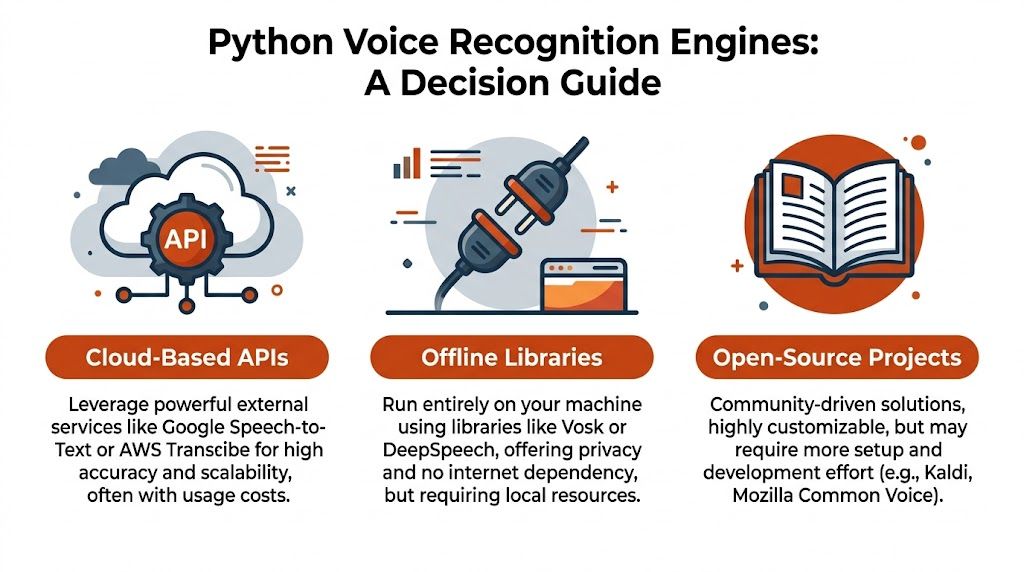
Typically, teams end up choosing from three categories.
| Category | Best for | Main trade-off |
|---|---|---|
| Wrapper libraries | Fast prototyping and simple integrations | You still depend on an underlying engine |
| Offline models | Privacy, offline use, local control | You own performance constraints on the device |
| Cloud APIs | Accuracy, language coverage, advanced features | Audio leaves the device and depends on network quality |
Wrapper libraries like SpeechRecognition are useful when you want one interface over different backends. They’re not the engine themselves. They’re glue, and that’s valuable.
Offline options such as Whisper and Vosk are the right fit when the device should handle transcription directly. Cloud APIs are better when you need streaming, diarization, language detection, or less infrastructure burden.
Use WER, latency, and privacy as your filter
The cleanest way to compare engines is to use Word Error Rate (WER), latency, and privacy constraints. WER is the standard metric for transcription accuracy, and lower is better. The AWS evaluation guide notes that modern benchmarks focus on WER, that AssemblyAI supports 99 languages, and that real-time results can arrive in hundreds of milliseconds. The same source also references historical progress where Google claimed a 4.8% error rate in benchmark context, which sets a high bar for accuracy in speech systems, as summarized in AWS’s guide to evaluating an automatic speech recognition service.
Here’s the practical read on the main options:
- SpeechRecognition: Great for demos, internal tools, and wrappers over multiple backends. Easy to start with. Limited if you need fine-grained control over streaming behavior.
- Whisper: Strong choice for on-device or offline transcription. Good when privacy matters and you can afford local compute.
- Vosk: Useful for edge deployments where dependencies and footprint matter more than top-end transcript polish.
- AssemblyAI or similar cloud APIs: Better when you want live streaming, diarization, language handling, and fewer infrastructure decisions.
- Google Cloud Speech-to-Text and similar managed services: Often solid for broad language support and managed scaling, but still a cloud dependency.
A useful way to frame the decision is this: if your feature is “voice input as a convenience,” local might be enough. If your feature is “transcription as a core workflow,” the cloud often buys you faster iteration on quality.
For developers building dictation-heavy workflows, this breakdown aligns closely with the trade-offs discussed in this guide to voice dictation for developers.
Don’t choose an engine because the demo sounds good. Choose it based on failure mode. Ask what happens with noise, no internet, long audio, and domain-specific words.
A simple selection heuristic
Use this if you want a quick answer:
- Choose SpeechRecognition if you need a fast proof of concept.
- Choose Whisper if privacy and offline use are essential.
- Choose Vosk if you want a lightweight local deployment.
- Choose a cloud API if product requirements include speaker separation, multi-language support, or live meeting transcription.
That decision usually shapes the rest of the implementation more than any code snippet does.
Setup and Capturing Your First Transcription
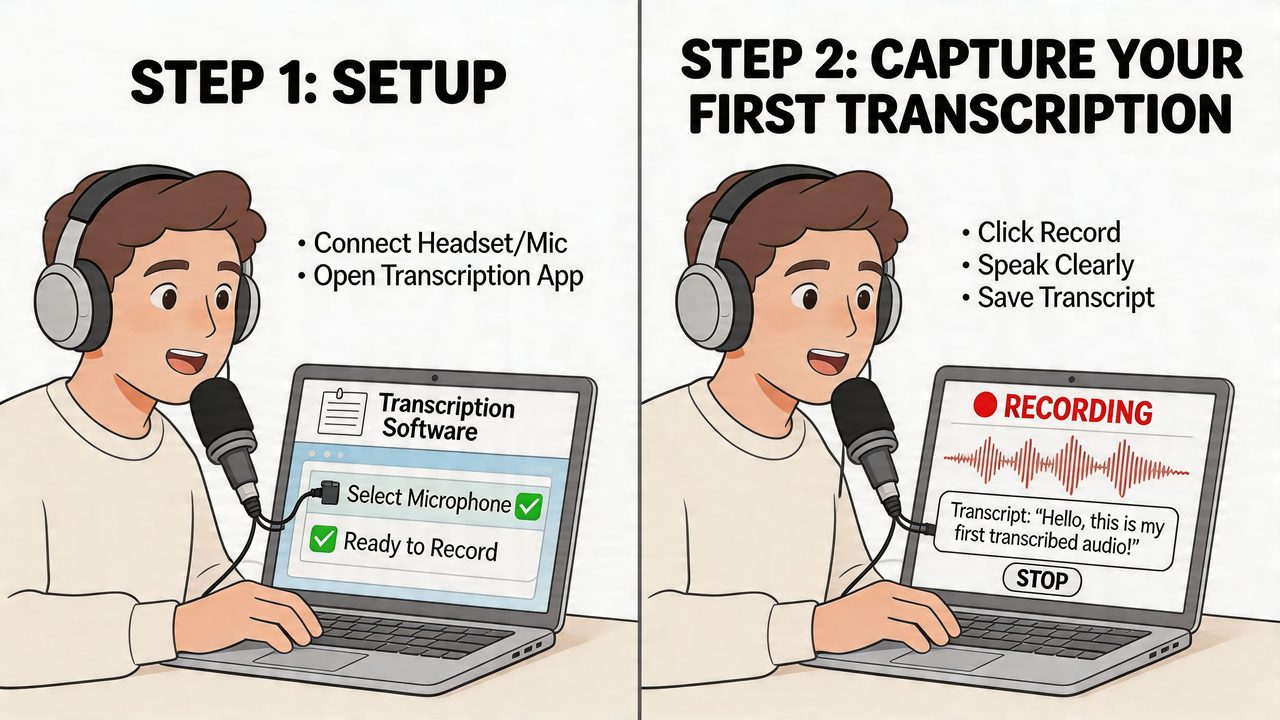
Start simple. Use SpeechRecognition to capture microphone input and route it to a backend. That gives you a clean baseline before you add local models, streaming, or transcript cleanup.
Install the basic dependencies
A minimal setup usually looks like this:
- Install SpeechRecognition:
pip install SpeechRecognition - Install PyAudio: needed for live microphone input
- Check microphone permissions on macOS: Terminal, your IDE, or the app host may need explicit access
- Expect Apple Silicon friction: native builds and audio dependencies can be the first place your “simple” setup breaks
On macOS, especially Apple Silicon, audio capture issues are often less about Python and more about system permissions or native dependency mismatches. If the mic isn’t available, verify that your terminal or editor has microphone access in System Settings before debugging your Python code.
Use ambient noise calibration or expect bad demos
The most important beginner mistake to avoid is skipping ambient calibration. adjust_for_ambient_noise() should run for at least 0.5-1 second so the recognizer can adapt to background sound. That guidance, along with the common response structure using 'success', 'error', and 'transcription', is explained in Real Python’s speech recognition tutorial.
Here’s a practical baseline script:
import speech_recognition as sr

def transcribe_from_mic():
    recognizer = sr.Recognizer()

    with sr.Microphone() as source:
        print("Calibrating for background noise...")
        recognizer.adjust_for_ambient_noise(source, duration=1)

        print("Speak now.")
        audio = recognizer.listen(source)

    response = {
        "success": True,
        "error": None,
        "transcription": None
    }

    try:
        response["transcription"] = recognizer.recognize_google(audio)
    except sr.UnknownValueError:
        response["success"] = False
        response["error"] = "Speech was unintelligible"
    except sr.RequestError as e:
        response["success"] = False
        response["error"] = f"API unavailable: {e}"

    return response

if __name__ == "__main__":
    result = transcribe_from_mic()
    print(result)
This script is intentionally boring. That’s good. Boring code is easier to stabilize.
A related walkthrough for dictation-first setups is this getting started guide to voice dictation.
What usually fails first
The first working transcript is easy. The first reliable transcript takes more care.
Common failure points:
-
No noise calibration
The recognizer hears HVAC noise or keyboard clicks as part of speech. -
Overlong listening windows
Your app waits too long to decide the user stopped talking. -
Weak error handling
Network-backed recognition can fail even when the audio is fine. -
Missing retries
Temporary backend failures should not look like user input failures.
Here’s a useful reference if you want to see another implementation before you harden your own flow:
If your test script only works in a silent room, it doesn’t work yet.
Apple Silicon notes that save time
For local and hybrid speech apps on modern Macs, keep these habits:
- Prefer isolated Python environments: dependency mismatches are easier to unwind.
- Test microphone capture separately from transcription: isolate whether audio input or recognition is failing.
- Design for backend swapability: on Apple Silicon, local inference may be attractive for privacy, but cloud fallback still helps when accuracy drops.
That architecture choice matters later, but it starts here with how you structure the first script.
Handling Batch Files vs Real-Time Streams
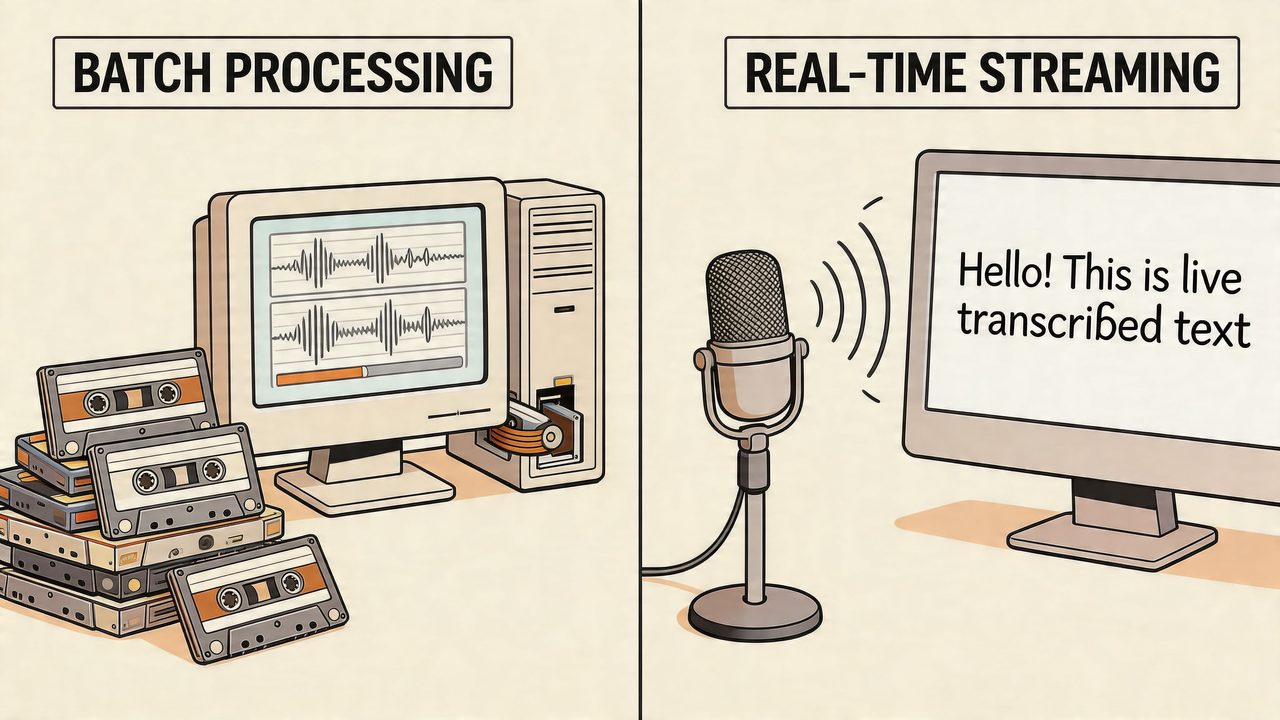
Speech features usually split into two modes. Either you already have an audio file and want a full transcript, or you want words to appear while the user is speaking. Those are different engineering problems, even when they share some code.
Batch transcription fits meetings and uploads
Batch mode is simpler because the audio already exists. You can load the file, process it once, and return a final transcript without worrying about live timing.
import speech_recognition as sr

recognizer = sr.Recognizer()

with sr.AudioFile("meeting.wav") as source:
    audio = recognizer.record(source)

try:
    text = recognizer.recognize_google(audio)
    print(text)
except sr.UnknownValueError:
    print("Could not understand the audio.")
except sr.RequestError as e:
    print(f"Recognition service failed: {e}")
This works well for uploaded meeting clips, support call recordings, or voice notes. It’s also easier to queue and retry because the source audio is stable.
Streaming is about responsiveness, not just transcription
Real-time recognition adds a new concern. The user now cares when text appears, not only whether it’s correct.
import speech_recognition as sr

recognizer = sr.Recognizer()

with sr.Microphone() as source:
    recognizer.adjust_for_ambient_noise(source, duration=1)
    print("Listening continuously... Press Ctrl+C to stop.")

    try:
        while True:
            audio = recognizer.listen(source)
            try:
                text = recognizer.recognize_google(audio)
                print("You said:", text)
            except sr.UnknownValueError:
                print("Didn't catch that.")
            except sr.RequestError as e:
                print(f"Service error: {e}")
    except KeyboardInterrupt:
        print("Stopped.")
That loop is enough for a command interface or internal tool. It’s not enough for polished dictation. For production streaming, you’ll want chunking, better pause detection, partial result handling, and UI logic that doesn’t freeze while recognition runs.
Batch jobs optimize for completeness. Streaming systems optimize for responsiveness. Treat them differently in code and in product expectations.
The choice affects architecture
Use this distinction when planning your pipeline:
- Batch mode works best when you can process after recording finishes.
- Streaming mode works best when instant feedback changes user behavior.
- Hybrid mode is common in real apps. Show live text first, then run a cleaner pass after the utterance ends.
That hybrid model is often the sweet spot. Users get immediate feedback, and your system still gets one more chance to improve formatting and catch obvious transcript errors.
Advanced Techniques for Production-Ready Results
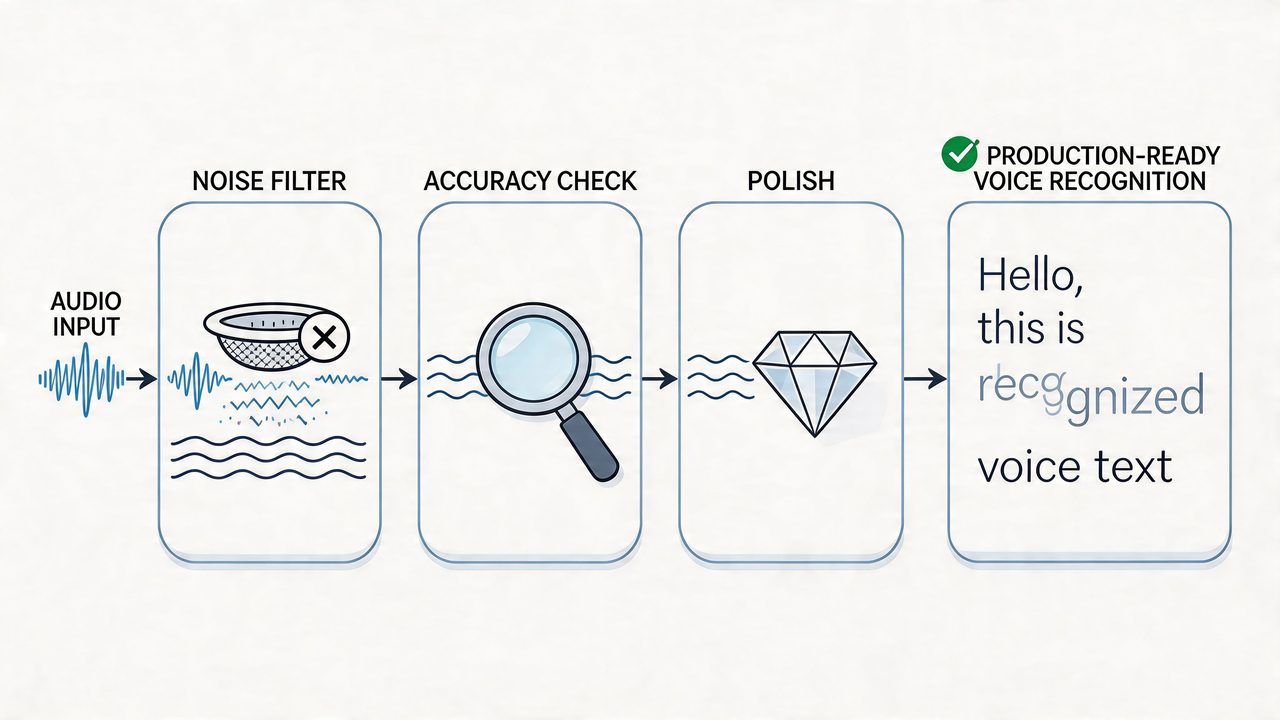
A raw transcript is only the midpoint. Production quality comes from what you do before and after recognition. That includes filtering, domain adaptation, speaker separation, and text cleanup.
Start with audio hygiene
You’ll get better results if you reduce junk before the recognizer sees it. Silence, keyboard taps, and room noise all waste compute and create false boundaries.
A few practical upgrades matter a lot:
- Use voice activity detection: tools like Silero or WebRTC VAD can filter silence before transcription.
- Normalize your input path: keep sample rates and formats consistent through the pipeline.
- Separate capture from inference: buffer audio cleanly so UI timing and transcription timing don’t fight each other.
This isn’t glamorous work, but it’s where many quality gains come from.
Add domain knowledge where it matters
General-purpose speech systems struggle with names, product terms, acronyms, and technical vocabulary. If your app is used by developers, clinicians, or support teams, custom vocabulary support quickly becomes worth it.
According to AssemblyAI’s overview of the state of Python speech recognition, speaker diarization can separate voices with over 90% accuracy, and custom vocabularies can improve Word Error Rate by 15-25% in technical dictations. Those features are especially useful in professional workflows where the final transcript needs to be directly usable, not just roughly correct.
A few examples of when to add vocabulary support:
- Developer tools: library names, package names, acronyms, repo conventions
- Healthcare workflows: clinician names, medications, specialty terms
- Customer support: product SKUs, account terminology, recurring issue labels
Post-processing is part of the product
The recognizer gives you text. Your app needs writing.
That means cleaning up:
| Raw transcript issue | Useful post-processing step |
|---|---|
| Missing punctuation | Sentence segmentation and punctuation restoration |
| Lowercase everything | Capitalization rules |
| Repeated starts | Self-correction cleanup |
| Fillers like “um” | Filler-word removal |
| Multi-speaker confusion | Diarization-aware formatting |
“Speech-to-text” and “ready-to-send writing” aren’t the same deliverable.
A simple cleanup layer can do a lot even without another model. You can normalize whitespace, collapse duplicate fragments, title-case known names, and apply app-specific formatting rules. If the destination is email, turn fragments into paragraphs. If it’s a command field, be conservative and preserve literal phrasing.
Treat the transcript as structured data
One of the most useful mindset shifts is to stop thinking of the transcript as one string. Treat it as structured output with metadata:
- speaker labels
- timestamps
- confidence-related heuristics
- original raw text
- cleaned text
- destination context
That makes debugging easier. It also lets you reprocess old transcripts when you improve your cleanup logic without forcing users to rerecord audio.
The Privacy and Performance Trade-Off Cloud vs Local
This choice should happen early because it changes user trust, device requirements, and failure handling.
Cloud recognition usually wins when you need broad language support, advanced features, and less infrastructure complexity on the client. Local recognition wins when the app must work offline, respond instantly, or keep sensitive audio on the device.
Cloud is easier to enrich
Cloud APIs are strong when your product depends on features beyond plain transcription. Speaker-aware meeting notes, language detection, and centralized model updates all fit naturally there. You also avoid shipping heavy inference stacks to every user machine.
The downside is obvious. Audio leaves the device, and network quality becomes part of the user experience. Even if the transcription is excellent, a stalled connection can make the feature feel broken.
Local is easier to trust
On-device recognition is often the better product choice for privacy-sensitive workflows or environments with unreliable internet. It also gives you more predictable interaction because the app doesn’t need to wait on a round trip before starting to process speech.
On Apple Silicon, that trade-off gets more interesting. Modern Macs are good targets for local speech workloads because they give desktop users enough compute to run serious models without the old laptop penalty. That doesn’t mean every local model is equally practical. It means local deployment is now realistic for more teams than it used to be.
Use a product lens, not just a benchmark lens
A useful decision framework looks like this:
- Choose cloud-first when collaboration features, centralized updates, and richer speech metadata matter most.
- Choose local-first when privacy, offline use, or immediate response matters more than feature breadth.
- Choose hybrid when you want private default behavior with optional cloud enhancement when available.
Hybrid often fits best on macOS. Let the device handle the first pass. Use the cloud selectively for cleanup or richer analysis when the user allows it and the connection is available.
The best architecture is usually the one that fails gracefully. Local systems fail into lower accuracy. Cloud systems fail into no service.
If you’re building for Apple Silicon specifically, lean into that hardware. Keep audio capture and local inference close to the user, avoid unnecessary transfers, and design cloud use as an enhancement rather than a dependency when privacy is part of the value proposition. A good overview of that local-first mindset appears in this piece on offline voice-to-text.
If you want a macOS app that already solves the practical mess around dictation quality, engine switching, local privacy, and polished output, take a look at AIDictation. It runs with an on-device mode on Apple Silicon for private offline dictation, uses cloud processing when you want richer cleanup, and is built for the practical workflows people use, from technical writing to meeting notes and professional messages.
Frequently Asked Questions
What does Mastering Voice Recognition in Python cover?
You’ve probably hit this point already. The prototype works, product wants dictation or voice commands in the app, and the first demo looked great in a quiet room.
Who should read Mastering Voice Recognition in Python?
Mastering Voice Recognition in Python is most useful for readers who want clear, practical guidance and a faster path to the main takeaways without guessing what matters most.
What are the main takeaways from Mastering Voice Recognition in Python?
Key topics include Table of Contents, Why Python Is Perfect for Voice Recognition, From research-heavy systems to practical developer tooling.
Ready to try AI Dictation?
Experience fast voice-to-text on your device. Free to download.
Download Free