Secure Medical Transcription: A Practical Guide for 2026
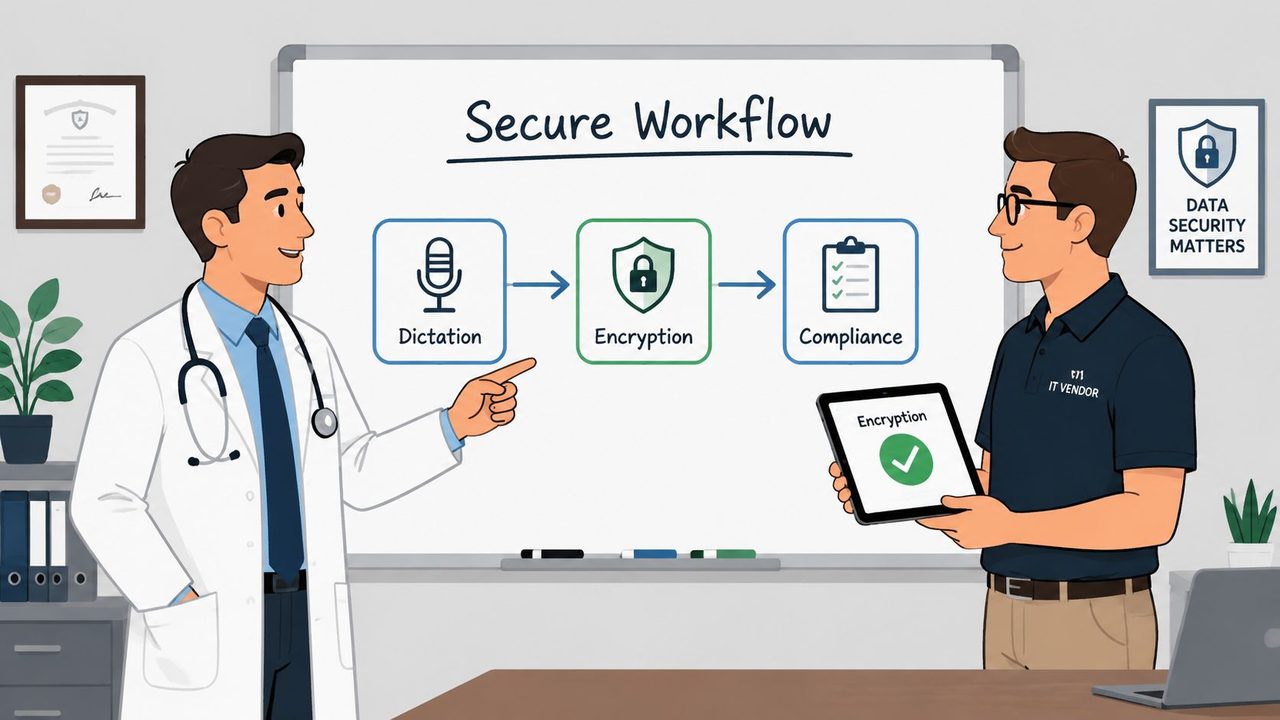
Most buyers still ask the wrong first question about secure medical transcription. They ask whether the file is encrypted, as if encryption alone makes a transcription workflow safe. It doesn't. In real clinics, PHI leaks through shared logins, cached audio, email handoffs, weak review queues, and sloppy EHR exports, which is why secure medical transcription has to be treated as a workflow design problem, not a storage problem.
That matters because the human review layer is still doing the heavy lifting. In a JAMA Network Open study of 217 clinical notes, raw speech-recognition drafts had a 7.4% error rate, but that fell to 0.4% after transcriptionist review and 0.3% in the final physician-signed version, with 96.3% of the original speech-recognition notes containing at least one error and 6.4% of those errors judged clinically significant (JAMA Network Open study). Secure transcription is really about controlling every place PHI can persist, move, or be copied, because that's where the primary exposure lives.
Table of Contents
- Why Encryption Alone Is Not Enough for Medical Transcription
- What Secure Medical Transcription Actually Means
- The Regulatory Stack Behind Secure Medical Transcription
- Technical Controls That Actually Reduce Risk
- Choosing the Right Architecture for Clinical Workflows
- Implementing Secure Medical Transcription Step by Step
- A Vendor Evaluation Rubric You Can Use Today
Why Encryption Alone Is Not Enough for Medical Transcription
Encryption is necessary. It is not the finish line. A clinic can buy a reputable cloud vendor, check the encryption box, and still leak PHI because staff share accounts, reviewers download drafts to personal devices, or someone forwards an audio file by email. The engine can be secure while the workflow around it is careless.
The real risk sits around the engine
A secure transcription stack has five places where PHI can sit, and each needs its own control. First is audio capture, where a dictation app can cache recordings locally. Second is the recognition layer, where speech gets converted into text and temporary artifacts can persist. Third is storage, which includes the transcript, metadata, and backups. Fourth is the review queue, where staff correct notes and may expose records through shared logins. Fifth is the EHR handoff, where a finalized note gets exported, copied, or synced.
That's why I don't trust vendor demos that only show a lock icon and an MFA prompt. Those are table stakes, not proof of workflow security. A transcription platform can be encrypted end to end and still leave old audio files in an unmonitored cache, or let a user forward drafts into a general inbox where PHI is no longer controlled.
Practical rule: if a vendor can't tell you where temporary audio lives, how long it persists, and who can export the transcript, the product isn't ready for clinical use.
Workflow controls matter more than marketing claims
The buyer mistake is to treat “encrypted transcription” like a product category. It isn't. It's a collection of checkpoints. If the capture layer is local but the handoff layer auto-syncs to a shared cloud folder, your risk didn't disappear, it moved.
I'd rather evaluate a vendor that is honest about workflow boundaries than one that promises invisible safety. Ask where the audio exists at each moment, who can touch it, and what gets deleted automatically. A system built for secure medical transcription should make those answers easy, not evasive. If the vendor can't describe those details clearly, the product isn't secure enough for patient data.
What Secure Medical Transcription Actually Means
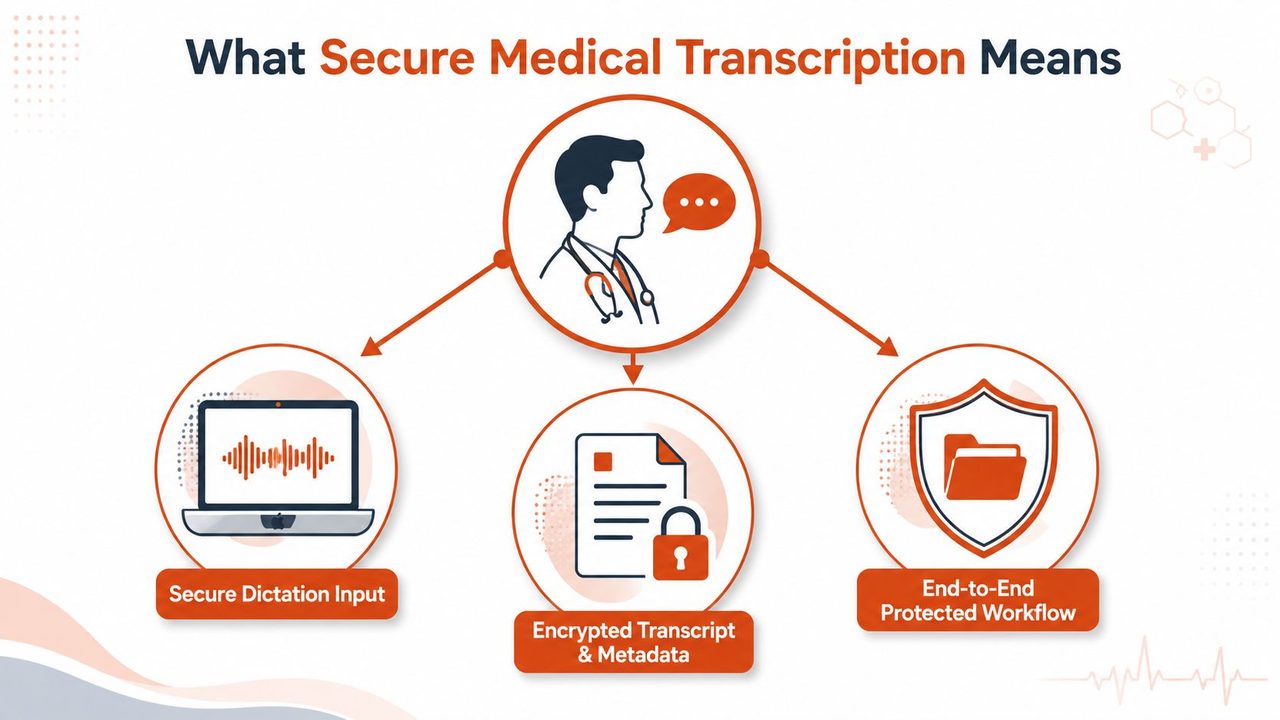
Secure medical transcription means a dictated clinical note can move from the physician's voice to the chart without losing confidentiality, integrity, or traceability. It's not just “text conversion.” It's controlled handling of PHI from the moment the clinician starts speaking to the moment the signed note lands in the EHR.
Think in three clinical safeguards
Confidentiality means only authorized people can read the note. Integrity means nobody can alter it without detection. Traceability means every access, edit, export, or transfer leaves a usable record. Those three properties line up with the way HIPAA-aligned workflows are enforced, through access controls, transmission safeguards, and audit evidence.
A good mental model is a sealed envelope moving through a postal chain. Encryption protects the envelope in transit, but that's only one step. You still need to know who handled it, who opened it, who copied the contents, and whether anything was left behind in a sorting bin. Secure transcription works the same way.
A physician dictation workflow should be controlled end to end
Take a post-op note dictated on a Mac. The secure version of that workflow does a few things at once. The audio capture app limits who can start recording, the transcript is encrypted in storage, the review step is tied to an identifiable user, and the export to the EHR is logged. If any one of those layers is sloppy, the whole chain is compromised.
That's why I treat secure medical transcription as a combined behavior of the capture device, the recognition engine, the storage backend, the review workflow, and the destination system. The product can look polished and still be weak if it fails at any one of those handoffs.
Bottom line: a transcript is secure only when the file, the people, and the path between systems are all controlled.
The phrase should mean evidence, not reassurance
If a vendor says their transcription is secure, ask for proof of how that security behaves in practice. Can they show who accessed a draft, when it was edited, and whether the final note was transferred intact? Can they explain how metadata, not just text, is protected?
That's the standard. Secure medical transcription should create a defensible record of who did what, when, and where PHI existed along the way. If it doesn't do that, it's a convenience feature, not a compliance-ready system.
The Regulatory Stack Behind Secure Medical Transcription
The HIPAA Security Rule sets the floor, but it does not tell a practice how to keep transcription safe in day-to-day use. Buyers need administrative safeguards, physical safeguards, and technical safeguards working as one system, because a policy binder does nothing if the workflow leaks PHI at every handoff. A Business Associate Agreement matters, but it cannot repair a broken process.
HIPAA, BAAs, and state overlays
Medical transcription vendors act as business associates when they handle PHI for a covered entity, so a Business Associate Agreement is required. It defines the permitted use of PHI and the vendor's obligations to protect it. A signed BAA still does not prove the workflow is safe. I have seen vendors with clean paperwork and weak controls around retention, training, and file handling.
State rules raise the bar in a few places. California CMIA and Texas HB 300 can add expectations above the federal baseline, especially for handling sensitive clinical data. Buyers working across state lines should verify the stricter rule set, not just the easiest one. If you want a practical companion checklist for broader healthcare security, the guide on healthcare data security is worth keeping close.
Documentation has to match operations
A vendor contract should say more than “we protect PHI.” It should spell out access rules, employee training obligations, incident response, and deletion behavior. If the paperwork says one thing and the help desk, onboarding flow, or admin console does another, the buyer carries the risk.
Disposal is where many teams get sloppy. Old devices, drives, and backups can hold PHI long after a transcription project ends, and secure deletion does not stop at the app layer. If your organization also needs to clear out retired hardware, HIPAA compliant electronics recycling belongs in the workflow plan, because disposal failures are still data exposure.
Compliance rule: if a policy cannot be demonstrated in an actual workflow, it is not a control, it is a document.
Audits need usable evidence
Audit logs only matter if they answer practical questions. Who opened the note? Who exported it? Did anyone move a transcript outside the approved workflow? Those records are what compliance teams use during reviews and what investigators need after an incident.
I value vendors that can show signed logs, role-based access histories, and clear retention rules. If a platform cannot produce evidence quickly, it is hard to defend. A vendor may still be usable, but not for a practice that wants secure medical transcription with real auditability.
The risk sits around the engine
Most secure transcription advice stops at the app itself. The bigger exposure is in the workflow around it, cached audio on endpoints, shared logins in review queues, email handoffs, and exports into the EHR. That is the part buyer checklists usually miss, and it is where the audit trail gets weak first.
A secure setup has to control where PHI lives before transcription, while it is being reviewed, and after it is handed off. If those transitions are not governed, the engine can be compliant on paper and still leak in practice.
Technical Controls That Actually Reduce Risk
The technical controls that matter are the ones that stop the cheapest, most likely leaks. That means encryption in transit, encryption at rest, controlled access, strong authentication, and logs that can survive scrutiny. Everything else is secondary if PHI can still be reached by the wrong person or left behind in the wrong place.
Compare the controls against the leak they stop
| Control | What it prevents | Common implementation gap |
|---|---|---|
| TLS 1.2 / 1.3 in transit | Interception during upload, sync, and return delivery | One weak endpoint or a legacy integration that bypasses the secure path |
| AES-256 at rest | Exposure from storage, backups, and recovered disks | Encryption enabled for primary storage but not for backups or temp stores |
| Role-based access control | Staff seeing transcripts they don't need | Roles exist on paper, but admin accounts are too broad |
| Unique user IDs | Anonymous access and poor accountability | Shared logins in review queues or night coverage |
| Multi-factor authentication | Password-only account takeover | MFA on the dashboard, but not on every admin or export path |
| Tamper-resistant audit logs | Undetected edits and unauthorized exports | Logs exist, but they're easy to alter or hard to export |
| Minimum-necessary handling | Oversharing PHI inside the workflow | Everyone gets full access because it's simpler |
The control that gets skipped most often
Backup and key management are where a lot of vendors get vague. If the app is encrypted but the backup process is messy, the practical risk is still high. If keys are not handled cleanly, the encryption story looks better in a slide deck than it does in a breach review.
The same goes for de-identification. It helps when you can keep unnecessary identifiers out of a workflow, but it's not a substitute for access control. If a platform can't keep temporary artifacts under control, de-identification only reduces damage, it doesn't fix the design.
For a practical product-side lens on local processing, the internal guide on on-device speech recognition is useful because local execution changes where PHI sits in the first place.
Recommendation: score vendors on the failure mode they prevent, not on the feature name they use.
Choosing the Right Architecture for Clinical Workflows
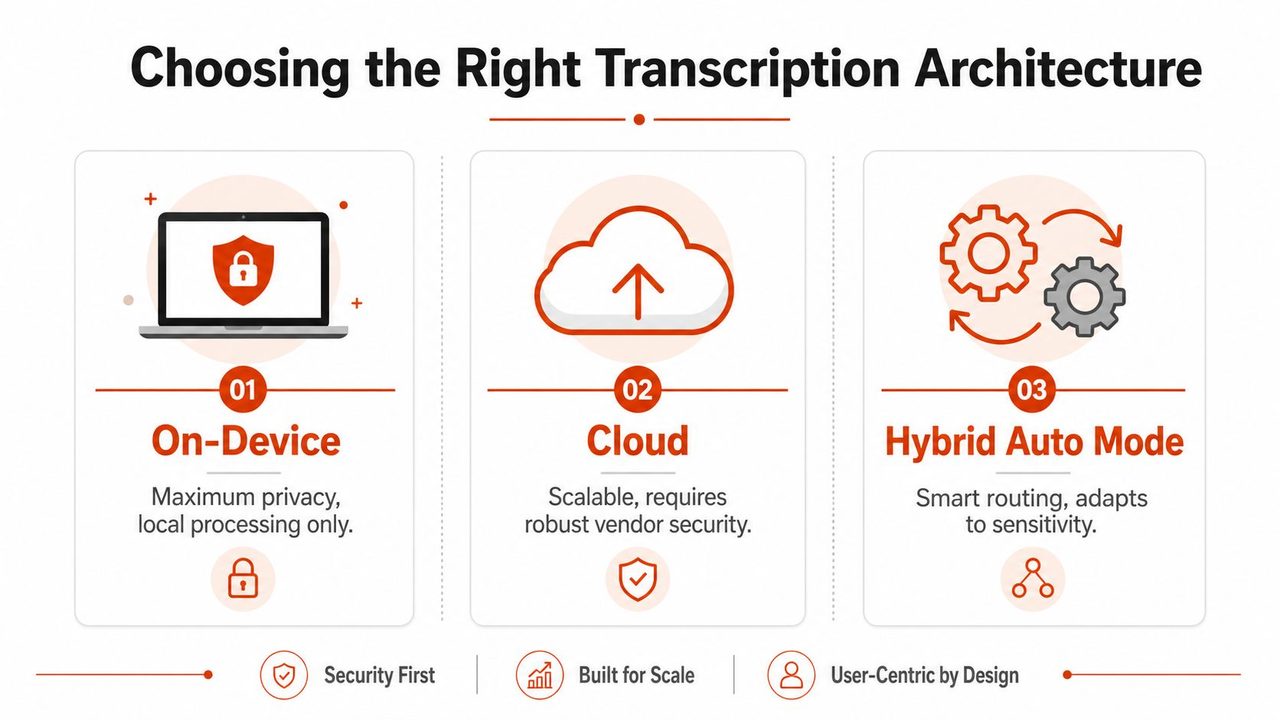
The right architecture depends on where your clinic can tolerate exposure. On-device processing, cloud ASR, and hybrid Auto Mode each shift the PHI footprint in a different way. The wrong answer is pretending they're equivalent.
On-device, cloud, and hybrid are not the same risk profile
On-device transcription keeps the audio and most processing local, which is the cleanest answer when privacy and offline availability matter most. It also reduces dependence on network connectivity, which is useful in clinics with noisy rooms or inconsistent internet. The tradeoff is that cleanup and formatting may be more limited than in cloud-heavy systems.
Cloud ASR is strong when you want broader cleanup, faster iteration, and easier centralized administration. But it expands the exposure surface because more data has to travel, land, and be managed outside the device. If the vendor's downstream workflow is weak, the cloud advantage becomes a security liability.
Hybrid Auto Mode is the practical middle path for many practices. It routes the task based on sensitivity, so a local path can handle the most privacy-sensitive dictation while cloud processing can be used for formatting-heavy work when that's appropriate. That's the architecture I'd want in a mixed clinical workflow, because it acknowledges that not every note deserves the same processing path.
Match the architecture to the job
Solo clinicians with tight privacy needs usually do better with local-first dictation. Clinic-wide rollouts, especially where staff share templates and need standardized formatting, can justify a hybrid model if the vendor can show where each artifact lives and how it's deleted. Cloud-only makes sense only if the vendor's access controls, logging, and retention rules are extremely disciplined.
AIDictation is one example of a tool that offers a local-first path through Local Mode and a cloud path for cleanup through Cloud Mode, with an Auto Mode that switches between them based on the task. That combination matters in medical transcription because it lets a team reduce exposure for sensitive dictation without giving up formatting support when it's needed. For a broader workflow-oriented comparison, the internal guide on speech-to-text medical is worth reading alongside this one.
Don't buy architecture by slogan
If a vendor says “secure” but can't explain the actual data path, keep looking. Ask where audio is processed, where transcripts are stored, and whether the system can operate without sending everything to the cloud. If they hesitate, that tells you more than the brochure does.
Implementing Secure Medical Transcription Step by Step
Start by mapping every PHI touchpoint in the current dictation flow. Don't begin with software selection. Begin with the path the audio takes today, who can hear it, where it gets stored, and how it reaches the EHR.
Lock the workflow before the rollout
The first move is to define who can dictate, who can review, and who can export. Then require a BAA before any PHI is exchanged, configure MFA and unique logins, and set retention and deletion windows that match the practice's legal and clinical needs. In many environments, deletion windows are set somewhere in the 30 to 90 days range unless retention rules require longer, but the actual policy should be written and approved by counsel and compliance.
Next, make the audit trail usable. Export logs into the SIEM or the security review process you already use, so access, edits, and transfers are visible in one place. If the vendor can't show who touched the transcript and when, the workflow isn't mature enough.
Test the ugly scenarios
Run a tabletop exercise for a lost device, a misdirected email, and an admin leaving the practice. Those are the moments that expose whether the workflow is designed for reality or for vendor marketing. A cardiology clinic I'd trust more is one that forces sensitive impressions into a local path and only syncs finalized notes after review, because that keeps the most sensitive content out of the cloud until it's ready.
Operational rule: if a step depends on staff remembering not to do the wrong thing, redesign the step.
Finish by watching the first month in production closely. Look for shared logins, accidental downloads, unmanaged exports, and stale temp files. If those show up, fix the workflow, not just the user.
A Vendor Evaluation Rubric You Can Use Today
Score each vendor on eight items, using 0 for missing, 1 for partial, and 2 for solid and documented. The point is to compare actual risk, not marketing polish.
The eight criteria that matter
- BAA in place, because PHI handling without it is a nonstarter.
- Encryption in transit and at rest verified, not just claimed.
- On-device or local-mode option, for workflows that should avoid cloud exposure.
- Audit-log export, so access and edits can be reviewed outside the app.
- Configurable retention, especially for cached audio and temporary files.
- MFA and SSO support, because shared passwords are a predictable failure.
- SOC 2 evidence, when the vendor can provide it for due diligence.
- Documented PHI handling, including temp storage, downloads, and deletion.
A generic cloud platform may check the compliance boxes and still leave you exposed if it gives you no local processing path and no clear answer on cached audio. A workflow like AIDictation, by contrast, combines local-first dictation with cloud cleanup when needed, which gives a clinic a tighter control story if sensitive notes need to stay local longer. The right score isn't the one with the most features, it's the one with the fewest unresolved PHI paths.
Ask these three questions before you sign
- Where do cached audio files live, and when are they deleted?
- Who can export transcripts, and how is that action logged?
- What happens to temporary files during review, sync, and EHR handoff?
If a vendor stumbles on those questions, you already know enough. A secure medical transcription platform should answer them clearly, in writing, without hand-waving.
If you want a transcription workflow that respects how PHI moves through a clinic, visit AIDictation and see how its local-first and cloud-assisted modes handle dictation, cleanup, and review in one macOS workflow. It's a practical fit for teams that need secure medical transcription without pretending every note has the same risk profile.
Frequently Asked Questions
What does Secure Medical Transcription: A Practical Guide for 2026 cover?
Most buyers still ask the wrong first question about secure medical transcription. They ask whether the file is encrypted, as if encryption alone makes a transcription workflow safe.
Who should read Secure Medical Transcription: A Practical Guide for 2026?
Secure Medical Transcription: A Practical Guide for 2026 is most useful for readers who want clear, practical guidance and a faster path to the main takeaways without guessing what matters most.
What are the main takeaways from Secure Medical Transcription: A Practical Guide for 2026?
Key topics include Table of Contents, Why Encryption Alone Is Not Enough for Medical Transcription, The real risk sits around the engine.
Ready to try AI Dictation?
Experience fast voice-to-text on your device. Free to download.
Download FreeRelated Posts
Best Clinical Note Taking Software: 2026 Guide & Tips
Find the best clinical note taking software for 2026. Discover key features, selection tips, & workflow strategies to reduce burnout & boost documentation.
Healthcare Data Security: HIPAA Compliance & Tech in 2026
Protect patient data with our 2026 guide to healthcare data security. Learn about HIPAA, technical controls & secure dictation apps to prevent breaches.
Voice Recognition Medical Software: A 2026 Buyer's Guide
Explore voice recognition medical software. This 2026 guide covers features, accuracy, HIPAA compliance, cloud vs. on-device options, and ROI for clinicians.