Specialized Vocabulary: Master AI & NLP in 2026
You're likely dealing with this already. A clinician dictates a note and gets back nonsense. A developer says a method name out loud and the transcript turns it into plain English mush. A product manager asks for “context-aware formatting,” but engineering hears “change the tone a bit” while design hears “rewrite everything.”
That friction usually gets blamed on speech recognition. Often, the actual problem sits one layer deeper. The system doesn't understand the specialized vocabulary your team uses to think, decide, document, and ship work.
This matters to people and to machines. Humans need shared language to move quickly without repeating themselves. AI tools need that same language to convert speech into something accurate, useful, and safe. If your vocabulary isn't explicit, managed, and maintained, even a strong AI workflow can break at the exact point where precision matters most.
Table of Contents
- The High Cost of Misunderstanding
- Decoding Your Professional Language
- The Impact on AI and Team Communication
- Specialized Vocabulary in Action
- A Practical Workflow to Capture Your Terms
- Integrating Vocabulary with Your Dictation Tools
- Make Your Vocabulary a Living Asset
The High Cost of Misunderstanding
A doctor dictates “myocardial infarction,” but the transcript comes back sounding like casual conversation. A lawyer says a term of art and gets a near-match that changes the meaning. A developer names a function, and the tool outputs a sentence instead of the exact string.
Those mistakes feel small until they pile up. One correction is annoying. Twenty corrections in a day change how people work. They slow reviews, create distrust, and push teams back to manual typing when speech should have saved time.
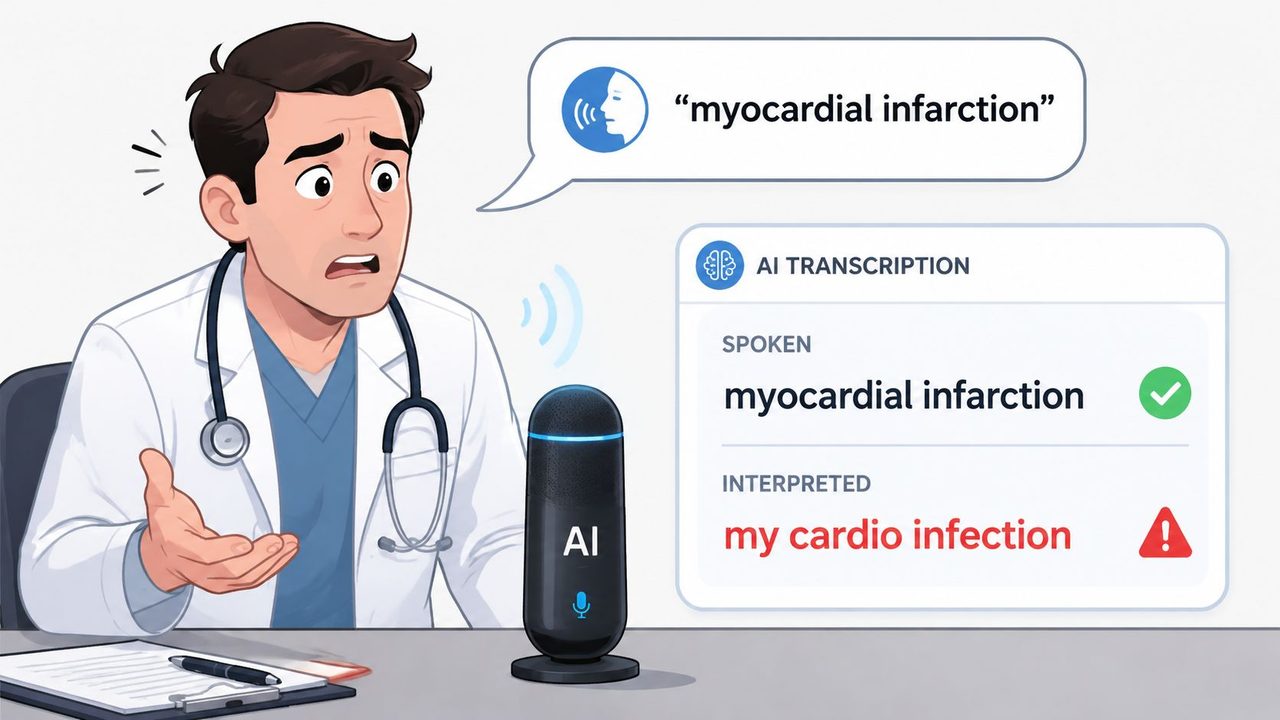
The hardest part is that the failure often isn't obvious in the product brief. People ask for “better dictation,” “cleaner formatting,” or “smarter AI.” Those requests sound reasonable, but they don't tell the system what language must be recognized exactly, what can be rewritten, and what must never be normalized into simpler words.
That gap shows up before a tool even launches. Data from the 2025 Gartner AI in Enterprise Survey shows 68% of product managers struggle to articulate requirements for “context-aware AI” due to vocabulary gaps, yet no industry-standard glossary exists. The same finding notes that this weakens communication across teams, especially in healthcare and legal settings where HIPAA and SOC 2 requirements depend on precise language.
Precision failures are design failures
When a tool misses a critical term, users often blame themselves first. They think they spoke too quickly, mumbled, or forgot punctuation. Sometimes that's true. Often it isn't.
A system can transcribe everyday language well and still fail at professional work because professional work depends on a compact set of terms with narrow meanings.
Practical rule: If a word carries legal, clinical, technical, or workflow meaning, treat it as a product requirement, not a spelling preference.
That shift matters. Once you treat specialized vocabulary as an operational asset, you stop asking only whether the model is “good.” You start asking whether your team has told the model what good must include.
Decoding Your Professional Language
People often hear “specialized vocabulary” and think of textbooks, exams, or dry glossaries. In practice, it's simpler than that. It's the set of words your field uses to be exact.
It's like a toolbox. A general vocabulary gives you a hammer and screwdriver. A professional vocabulary adds the oddly shaped tools that make your actual job possible. Without them, you can still talk. You just can't work precisely.
What specialized vocabulary really is
Specialized vocabulary is the language a profession uses to name concepts, actions, artifacts, and standards with minimal ambiguity. That includes formal terms, informal shorthand, and abbreviations that make sense inside a team but not always outside it.
The idea isn't new. The vocabulary of statistics was formally codified in 1928 by E. U. Condon in Science in the paper Statistics of Vocabulary (paper reference). That milestone matters because it established a shared set of terms that analysts could use consistently across settings and languages. Terms like mean, standard deviation, correlation, p-value, and confidence interval work because people in the field agree on what they mean.
That same principle applies across modern work. In healthcare, “ischemia” isn't just a difficult word. It points to a specific concept. In software, “API endpoint” names a precise interface location, not a vague feature. In product work, “MRR” compresses a recurring business concept into three letters.
Three common forms you hear at work
Not all specialized vocabulary sounds equally formal. That's where many teams get confused. They document official terms, then forget the shorthand people say in meetings.
| Type | Definition | Example |
|---|---|---|
| Technical terms | Formal words or phrases with a precise meaning in a field | API endpoint, ischemia, regression analysis |
| Jargon | Team or industry shorthand used in day-to-day work | push to prod, close the loop, chart review |
| Acronyms | Abbreviations that speed up communication when everyone knows them | SaaS, HIPAA, MRR |
A few examples make the difference clearer:
- Technical term: “Stratified sampling” has a defined statistical meaning.
- Jargon: “Push to prod” is fast and efficient inside engineering, but unclear outside it.
- Acronym: “SOC 2” saves time, but only if everyone knows what standards it refers to.
A useful test is simple. If a newcomer would pause and ask what a word means, it probably belongs in your vocabulary list.
The confusion point for many teams is this: specialized vocabulary is not only the most formal language. It includes the exact terms people say under pressure, on calls, in notes, and during reviews. If your AI workflow ignores that spoken layer, accuracy drops where the work gets real.
The Impact on AI and Team Communication
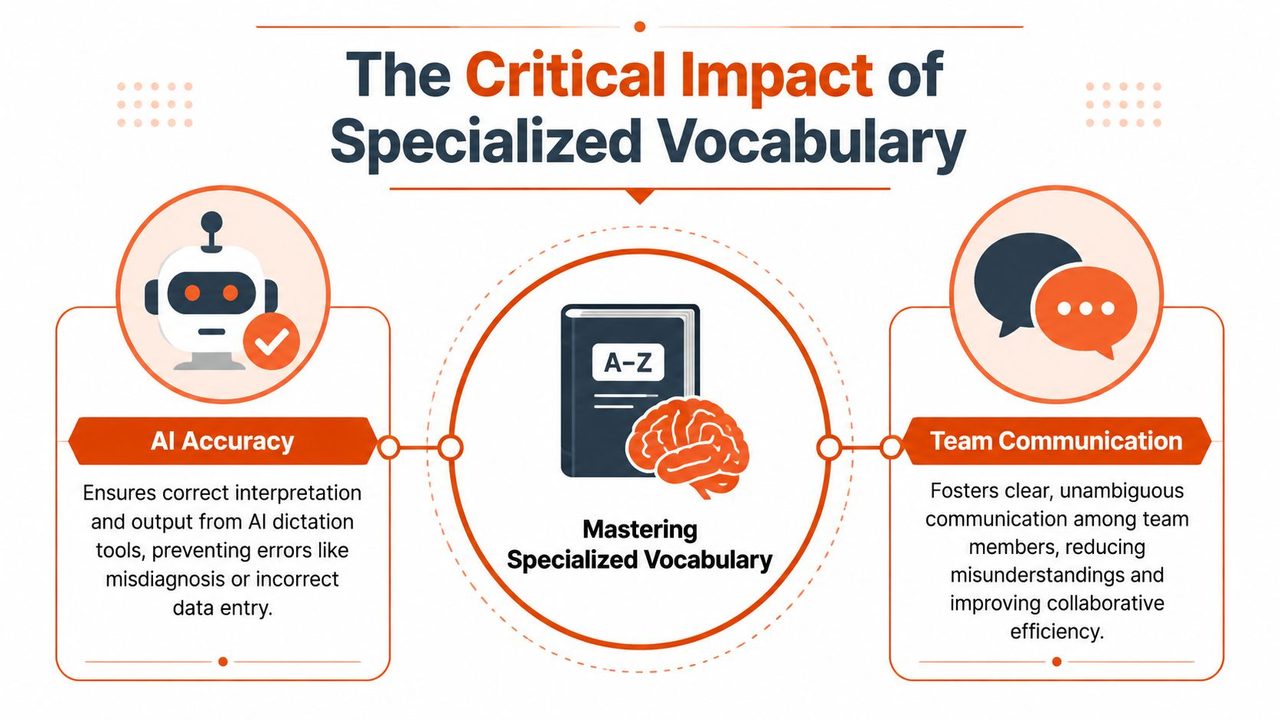
A shared vocabulary does two jobs at once. It helps people coordinate faster, and it helps AI systems avoid expensive mistakes.
That combination is why vocabulary management belongs in operations, not just training material.
Why teams move faster with shared terms
Inside a strong team, specialized vocabulary acts like data compression. Instead of spending three sentences defining a problem, a clinician says “edema,” a developer says “singleton pattern,” or a PM says “user story,” and the group instantly understands the frame.
That speed has practical value:
- Fewer clarifying questions: People don't need to unpack the same idea every meeting.
- Cleaner handoffs: Specs, notes, and tickets stay closer to the speaker's intent.
- Better alignment: Engineering, design, compliance, and operations can refer to the same concept in the same way.
This is one reason structured language matters in AI-heavy teams too. If you're comparing vendors or building internal workflows with tools like BuddyPro's AI platform, vocabulary discipline becomes part of evaluation. You're not only asking whether a system can generate text. You're asking whether it can preserve the terms your work depends on.
The shift to spoken AI workflows makes this even more visible. The essay on how talking to AI changes everything captures the larger pattern well. Once voice becomes a primary input, the quality of your working vocabulary matters more because speech is faster, messier, and more context-dependent than typing.
Why general AI models stumble on expert language
A general AI model is like a translator who knows everyday conversation but not your field manual. It can handle common phrases, but it struggles when a term has a narrow range of use.
That's not just a feeling. Specialized vocabulary in domain-specific contexts exhibits a cause-effect relationship: words with a narrow range of use are statistically 3.5x more likely to be misclassified by general NLP models, leading to entity extraction errors in 28% of clinical note digitization tasks.
That single pattern explains a lot of transcript weirdness. The model hears an unfamiliar term and tries to map it to the closest common-language phrase. The output may look fluent while being wrong.
A few failure modes show up repeatedly:
- Near-sounding substitutions: A technical term becomes a common phrase.
- Broken entities: Product names, medication names, and function names split into ordinary words.
- Over-normalization: The system rewrites exact language into something more conversational but less correct.
General language models are optimized to sound plausible. Professional tools need them to sound precise.
For product managers and developers, that distinction matters. Fluency is a user experience feature. Precision is a system requirement.
Specialized Vocabulary in Action
The easiest way to understand vocabulary management is to compare what happens before and after a team treats key terms as first-class inputs.
Healthcare note dictation
A clinician says: “Patient presents with tachycardia and bilateral edema. Recommend follow-up after chart review.”
A generic workflow might return something like: “Patient presents with tacky cardia and bilateral enema. Recommend follow up after charge review.”
The errors aren't random. Each wrong term is close to a familiar word or phrase. The output looks readable, which makes it dangerous. A reviewer has to slow down and inspect every line.
A vocabulary-aware workflow is more likely to preserve the intended clinical terms and keep the note closer to what the speaker meant.
Developer documentation and code language
A developer says: “Use .FindGameObjectWithTag inside the singleton pattern initialization path.”
Without term awareness, the transcript can collapse into prose. The method name may get split, punctuation may disappear, and “singleton pattern” may become a vague paraphrase.
With a managed vocabulary, the tool has a better chance of recognizing that some speech should remain exact, even if it looks unnatural to a general model.
The rule for code-adjacent dictation is different from email dictation. Natural language can be polished. Exact strings must be preserved.
Product specs and stakeholder updates
A PM says: “This user story affects sprint velocity and could change MRR assumptions.”
A generic tool may get the sentence mostly right while still flattening the meaning. “User story” might become “user's story.” “MRR” might be expanded incorrectly, ignored, or punctuated in a way that breaks the sentence for finance and leadership readers.
A stronger workflow doesn't just transcribe. It distinguishes between terms that should stay untouched and phrases that can be cleaned up for readability.
Here's the broad pattern:
| Context | Generic output risk | Vocabulary-aware benefit |
|---|---|---|
| Healthcare | Clinical terms drift into common language | Safer, more faithful note wording |
| Development | Method names and technical phrases lose structure | Better preservation of exact strings |
| Product | Acronyms and process terms become ambiguous | Cleaner specs with shared team meaning |
The practical lesson is straightforward. Don't think of specialized vocabulary as a glossary for onboarding. Think of it as a control layer for live work.
A Practical Workflow to Capture Your Terms
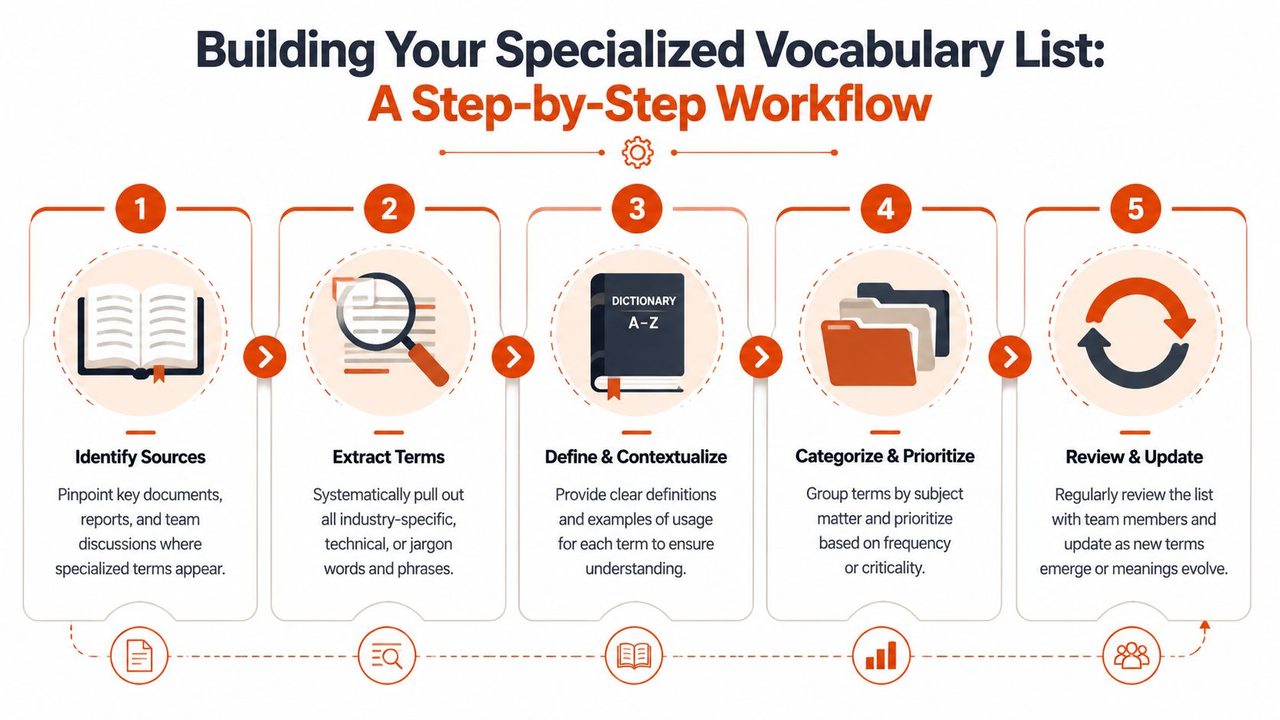
Teams often already have the vocabulary they need. It's spread across documents, tickets, notes, pull requests, call transcripts, and habitual phrases people say without thinking.
The challenge isn't invention. It's capture.
Start with the language you already produce
Begin with artifacts your team trusts. Don't start from a blank spreadsheet.
Pull terms from:
- Recent documents: Specs, reports, release notes, clinical templates, and standard emails.
- Meeting language: Recurring phrases from standups, reviews, handoffs, and stakeholder calls.
- System language: Product names, feature labels, colleague names, code identifiers, and approved acronyms.
This approach lines up with the research base. Research confirms that statistical measures are highly effective tools for identifying multi-level specialized vocabulary, and a 2006 study found these measures can accurately pinpoint vocabulary relevant to specific educational levels. In plain language, repeated terms in real material usually tell you what your field relies on.
If you want a practical setup pattern, the guide on setting up a dictionary for better voice recognition is a useful example of how to move from loose term collection to a structured list.
Turn scattered terms into a usable list
A long dump of words won't help much. You need enough structure to make the list usable by people and by tools.
A lightweight format works best:
-
Term
Write the exact spelling you want preserved. -
Meaning
Add a plain-language definition. Keep it short. -
Context
Note where the term appears. Clinical note, sprint planning, code review, billing update. -
Variants
Capture spoken forms, plural versions, abbreviations, or common confusions.
For example, a PM team might log “MRR,” note its meaning, list common spoken phrasing, and mark that it appears in board updates and forecasting calls. A developer team might do the same for a framework class name or internal service label.
Field note: Your spoken vocabulary and your written vocabulary are not identical. Build for what people say, not just what appears in polished documents.
Review on a schedule, not by accident
Vocabulary shifts with products, regulations, hiring, and customer language. If you only update the list when someone complains, it will always lag behind reality.
A better pattern is simple:
- After launches: Add new feature names and terms introduced in release work.
- After hiring waves: Capture team shorthand that new people don't yet know.
- After transcript reviews: Add words that repeatedly fail or get rewritten incorrectly.
You don't need a giant governance process. You need a shared owner, a lightweight format, and regular review. The goal is steady maintenance, not perfection.
Integrating Vocabulary with Your Dictation Tools
Once you've captured your terms, the next step is operational. You need to put that vocabulary where your tools can use it.
That usually means two layers. First, a custom dictionary or vocabulary list that protects exact terms. Second, context rules that tell the system what kind of output belongs in each app or workflow.
What to load into a custom dictionary
Start with the terms that create the most damage when they fail. Not every word deserves equal attention.
Prioritize items like these:
- Names that must be exact: Colleagues, clients, products, medications, internal tools.
- Domain terms: Technical language with narrow meanings.
- Structured strings: Method names, feature flags, acronyms, and branded spellings.
- Frequent confusions: Words the system consistently turns into similar-sounding common language.
This effort pays off because models incorporating domain-specific lexicons reduce transcription error rates by 35% in high-noise environments. The same verified data notes that 95% of users in medical and developer use cases require extensive technical term recognition, which is why product teams should treat robust custom dictionary support as a core requirement rather than a premium extra.
If you want examples of how teams shape these commands and vocabulary rules in practice, the walkthrough on custom voice commands and vocabulary workflows offers a helpful model.
Why context rules need vocabulary, not just tone
Many teams think “context-aware” means choosing between formal and casual writing. That's only part of it.
Real context awareness also decides how language should behave in different destinations:
- In email, the tool may smooth grammar and add conventional punctuation.
- In a code editor, it should preserve literals, technical phrases, and exact names.
- In a clinical note, it should favor structured terminology and avoid casual rewrites.
That's why vocabulary and formatting rules need to work together. A system can't make a good context decision if it doesn't know which terms are sacred.
The demonstration below shows the broader idea in motion.
Test with real speech, not ideal speech
A lot of vocabulary setups fail because teams test with slow, careful dictation. That's not how people speak during actual work.
Use realistic conditions:
- Interruptions: Mid-sentence corrections and restarts.
- Background noise: Office chatter, hallway movement, fans, and keyboard sounds.
- Natural speed: Fast phrases, clipped pronunciation, and shorthand.
Review the outputs with the same seriousness you'd apply to a UI bug or a broken integration. Ask:
| Question | Why it matters |
|---|---|
| Did the tool preserve exact terms? | Precision beats fluency for domain language |
| Did it rewrite anything that should remain literal? | Over-cleaning can corrupt meaning |
| Did context improve formatting without damaging terminology? | Good cleanup should not flatten expert language |
The practical standard is clear. A dictation workflow isn't ready when it looks impressive in a demo. It's ready when your real vocabulary survives real speech.
Make Your Vocabulary a Living Asset
Specialized vocabulary isn't just something professionals know. It's something teams need to manage.
When you treat it casually, you get the same pattern over and over. People speak precisely, tools generalize, reviewers clean up the mess, and trust drops. When you treat vocabulary as a maintained asset, communication sharpens and AI outputs become more dependable.
Keep the process simple. Capture the terms your team uses. Define them in plain language. Load them into your workflow. Review them whenever your product, domain, or team changes.
The best AI writing workflow doesn't replace professional language. It protects it.
That mindset is what turns dictation from a convenience feature into serious work infrastructure.
If you want a practical place to apply this approach, AIDictation gives teams a way to turn spoken work into cleaner writing while supporting custom dictionaries, technical terms, and context-aware output. Start with your highest-risk vocabulary first, then expand the list as your workflows evolve.
Frequently Asked Questions
What does Specialized Vocabulary: Master AI & NLP in 2026 cover?
You're likely dealing with this already. A clinician dictates a note and gets back nonsense.
Who should read Specialized Vocabulary: Master AI & NLP in 2026?
Specialized Vocabulary: Master AI & NLP in 2026 is most useful for readers who want clear, practical guidance and a faster path to the main takeaways without guessing what matters most.
What are the main takeaways from Specialized Vocabulary: Master AI & NLP in 2026?
Key topics include Table of Contents, The High Cost of Misunderstanding, Precision failures are design failures.
Ready to try AI Dictation?
Experience fast voice-to-text on your device. Free to download.
Download FreeRelated Posts
AI Dictation vs Diktuy: Russian-English Accuracy Test
We tested AI Dictation vs Diktuy on the same Russian-English recording. Compare WER, English-word preservation, full transcripts, and errors.
AI Dictation vs Oravo: Bilingual Accuracy Test
We tested AI Dictation vs Oravo on the same Russian-English clip. Compare WER, English-word preservation, AI enhancement, and transcript fidelity.
AI Dictation vs Soniox App: Bilingual Accuracy and Mac UX
We tested AI Dictation vs Soniox App on Russian-English speech. Compare WER, English-word preservation, product pipelines, and Mac app design.