Master How to Manage Multiple Projects in 2026
Your week probably looks like this right now. One project is waiting on a stakeholder decision. Another has a deadline that suddenly moved up. A third seems quiet until someone Slacks you asking why nothing has shipped yet. Meanwhile, your calendar is full, your notes are scattered across tools, and you end most days feeling busy without being sure you moved the right work forward.
That situation doesn't mean you're bad at your job. It usually means you're trying to manage a portfolio with habits built for a single project. The discipline changed when organizations started treating work as a set of connected initiatives instead of isolated schedules. PMI describes that shift as a move toward portfolio-level coordination, where managers define clear priorities for shared resources and track burn rate across projects so problems show up early instead of after drift has already set in, in its guidance on managing multiple concurrent projects.
The practical answer is a system. Not more hustle. Not a prettier task list. A system that helps you decide what matters, see all active work in one place, run communication on a cadence, and keep yourself from becoming the bottleneck.
Table of Contents
- From Overwhelmed to In Control A Unified System
- Strategic Planning and Centralized Tracking
- Effective Execution and Communication Routines
- Delegating Work and Mitigating Project Risks
- Building Your Personal Project Management OS
From Overwhelmed to In Control A Unified System
When people ask how to manage multiple projects, they usually ask for a trick. A better app. A sharper to-do list. A way to work faster without dropping anything. In practice, those fixes don't hold if the underlying system is weak.
The pattern is usually the same. Work enters from too many channels. Priorities shift without a common rule. Shared people get booked by several projects at once. Nobody notices the conflict until delivery slips or quality drops. That isn't a personal productivity problem. It's an operating model problem.
I use the term Personal Project OS for the lightweight system that keeps this under control. It has five parts:
- Prioritization rules so urgent noise doesn't outrank meaningful work.
- One master view for all active projects, owners, deadlines, and blockers.
- Execution routines that reduce context switching and stop status chasing.
- Delegation habits that create clear ownership.
- Review loops that catch conflicts early.
Practical rule: If you manage multiple projects without one visible system, your portfolio is being run by inbox order, meeting pressure, and the last person who asked.
Many capable professionals find themselves stuck. Product managers try to protect roadmap work while handling launch issues. Developers bounce between feature delivery, bug triage, and internal requests. Clinicians juggle patient follow-up, documentation, quality initiatives, and operational tasks. The surface work differs. The coordination problem is the same.
A reliable system also gives you language for trade-offs. Instead of saying "I'm overloaded," you can say, "These two initiatives require the same reviewer this week," or "This request is urgent but doesn't outrank the milestone already committed." That changes the conversation.
If you want a useful external reference for sorting those trade-offs, this roundup of effective project prioritization methods is worth reviewing alongside your own workflow. The value isn't the framework alone. It's choosing one and applying it consistently.
Use Eisenhower for daily triage
The Eisenhower Matrix is simple because it should be. Daily triage breaks when the method is too complicated. You sort incoming work into four buckets based on urgency and importance.
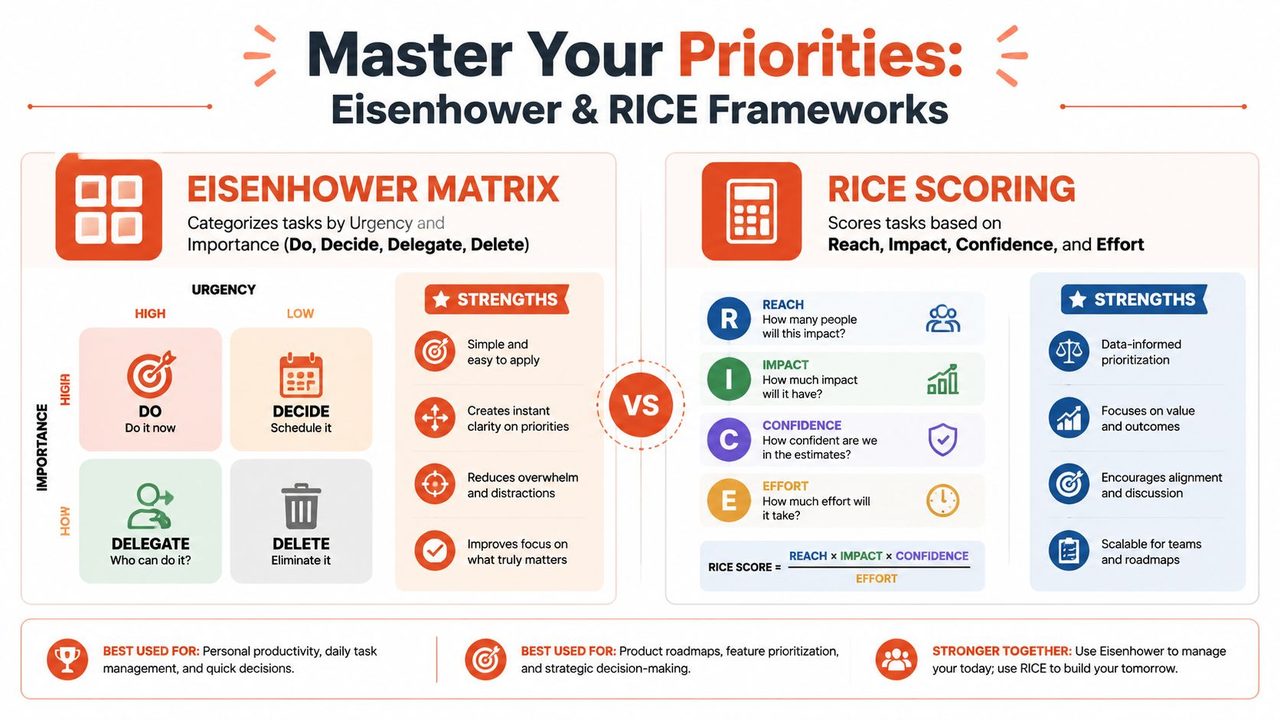
The four decisions are straightforward:
- Do when the task is urgent and important. Production issue. Patient escalation. Contract approval blocking a launch.
- Decide when it matters but doesn't need action today. Architecture review. Hiring plan. Workflow redesign.
- Delegate when it needs doing but not by you. Data pull. Meeting notes. Routine follow-up.
- Delete when it creates motion without value. Redundant status requests. Optional meetings with no decisions. Low-impact admin work.
For a developer, a high-severity bug affecting users goes in Do. Refactoring a useful but non-blocking component might sit in Decide. A request to clean up a slide deck probably belongs in Delegate or Delete.
For a clinician or healthcare operations lead, an urgent patient callback goes in Do. Updating a longer-term care pathway lives in Decide. Chasing noncritical formatting changes to a shared document probably doesn't deserve the same attention as clinical or operational risk.
Most bad prioritization isn't choosing the wrong top task. It's treating too many tasks as top tasks.
The Eisenhower Matrix works best at the task level. It helps you survive the day without letting interruption dictate your schedule.
A short explainer can help if you want a visual walk-through before applying it in your own queue.
Use RICE for portfolio choices
RICE is better for bigger decisions. It helps when you're choosing between initiatives, features, or improvement efforts that all sound reasonable but can't all happen now.
RICE stands for Reach, Impact, Confidence, Effort. It forces a useful conversation:
- Who does this affect?
- How much does it matter if we do it?
- How confident are we in what we know?
- What will it cost in team time and attention?
A product manager might use RICE to compare a new feature request, a user onboarding fix, and an internal tooling improvement. A healthcare administrator might use it to compare an intake redesign, a reporting automation effort, and a documentation cleanup project. A developer lead might use it to compare technical debt reduction against work tied directly to customer delivery.
RICE is especially helpful when stakeholders are all arguing from importance. Most projects feel important to someone. RICE doesn't eliminate judgment, but it makes the judgment visible.
Prioritization Frameworks Eisenhower vs RICE
| Criterion | Eisenhower Matrix | RICE Scoring |
|---|---|---|
| Best use | Daily task triage | Comparing initiatives and larger bets |
| Main inputs | Urgency and importance | Reach, impact, confidence, effort |
| Time horizon | Today to this week | This quarter or roadmap cycle |
| Strength | Fast decision-making under pressure | More structured trade-off decisions |
| Weakness | Can oversimplify strategic work | Takes more discussion and setup |
| Good fit for PMs | Inbox, meetings, blockers, approvals | Roadmap items, launches, internal initiatives |
| Good fit for developers | Bugs, interrupts, support requests | Feature trade-offs, tech debt, tooling |
| Good fit for clinicians | Patient calls, urgent admin, follow-ups | Process improvement and operational projects |
Use Eisenhower when your day is noisy. Use RICE when your portfolio is crowded. Both are often needed.
Strategic Planning and Centralized Tracking
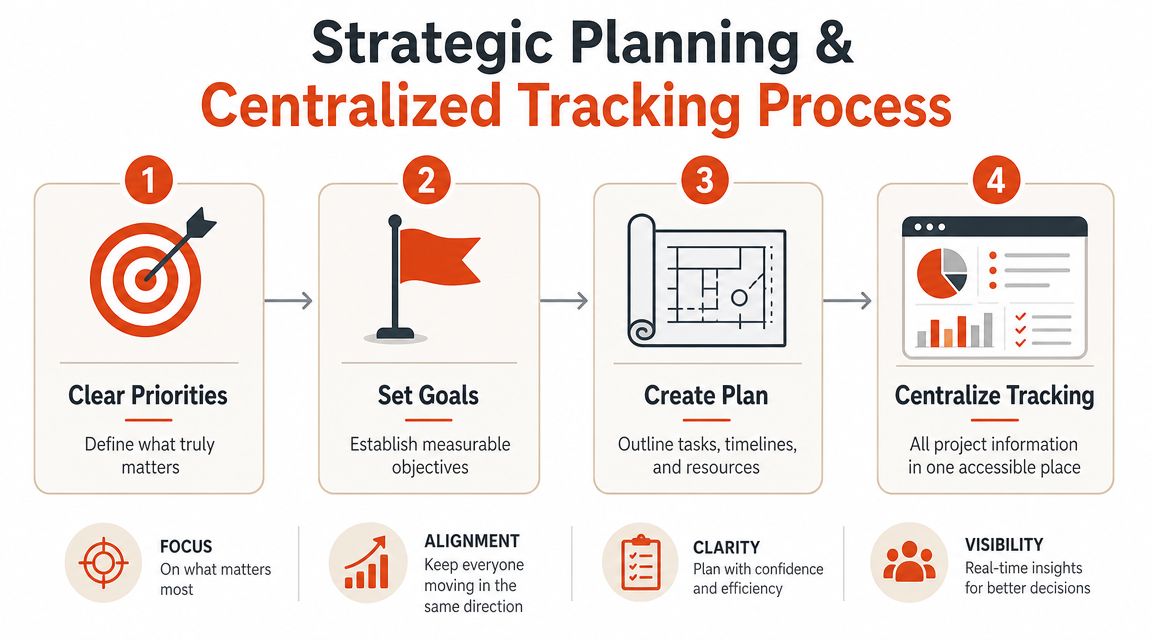
Priorities only help if your plan reflects reality. The mistake I see most often is maintaining separate plans for each project with no reliable portfolio view. That setup hides overload until someone misses a handoff or a shared contributor gets booked twice.
Independent project-management guidance consistently emphasizes keeping work in one place with standardized tracking. Monday.com points to standardized board layouts as a way to improve cross-project coordination, and the same guidance highlights workload balancing and resource allocation as controls that keep one project from consuming capacity needed elsewhere in its article on how to manage multiple projects.
Build one master project view
Your master view can live in Asana, Jira, Monday, Notion, Airtable, or a spreadsheet if that's what your team will maintain. The tool matters less than the structure. Every project should show the same basic fields.
Include these columns:
- Project name
- Owner
- Current phase
- Next milestone
- Deadline
- Status
- Top blocker
- Shared resource dependencies
- Last updated date
Don't create a dashboard that only leadership can decode. If a developer, analyst, or clinic manager can't scan it and know what matters, it's too abstract.
A planning template helps here. If you want a starting point for quarterly alignment, SpecStory planning templates are useful for turning broad goals into a repeatable planning rhythm. For teams doing editorial, campaign, or multi-stream work, a structured planning model similar to this guide on what a content calendar is and how teams use one can also sharpen ownership and sequencing.
Protect focus with calendar design
A centralized tracker gives visibility. It doesn't create focus on its own. You still need calendar rules.
I prefer a mix of timeboxing and themed work blocks. Not rigid hour-by-hour fantasy scheduling. Just enough structure to protect deep work.
A practical week might look like this:
- Monday morning for portfolio review and risk scan
- Monday afternoon for Project A strategy work
- Tuesday for delivery work and approvals on Project B
- Wednesday morning for stakeholder meetings
- Wednesday afternoon for documentation and follow-up
- Thursday for Project C execution
- Friday morning for loose ends, reporting, and next-week planning
This works because it reduces re-entry cost. You aren't rediscovering context every hour.
A shared resource isn't overcommitted because they lack discipline. They're overcommitted because the portfolio never made the conflict visible.
Run a standing review rhythm
The central tracker only stays useful if you revisit it on a fixed cadence. A standing review session prevents silent drift.
Keep the meeting tight and decision-focused:
- Review milestone changes.
- Scan blocked items.
- Check shared people across active projects.
- Rebalance deadlines, scope, or staffing if something is slipping.
- Confirm what changed before the next review.
This isn't the place for detailed problem-solving. It's where you spot which projects need intervention and which can proceed without noise.
Effective Execution and Communication Routines
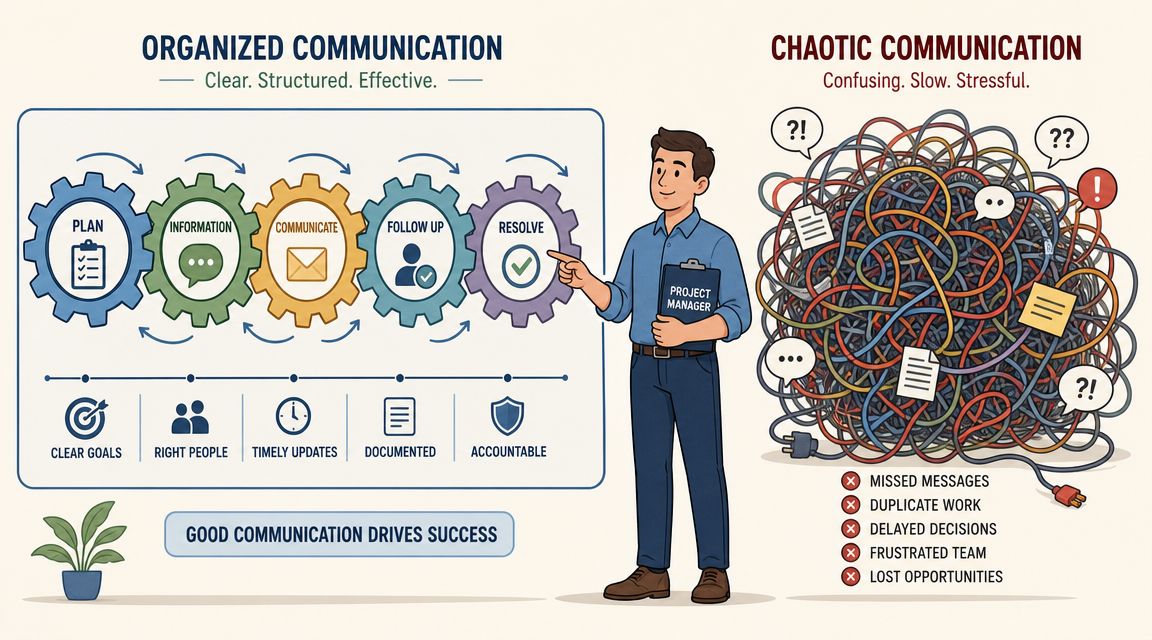
Most portfolios don't fall apart in planning. They fall apart in the handoffs. Updates live in chat threads, meetings duplicate each other, and every stakeholder asks for status in a different format.
Research on managing multiple projects found that nearly 30% of project managers didn't combine meetings when it would have made sense to do so, and the same research identified planning as the top skill for managing multiple projects, followed by communication, in this summary on multi-project management research. That tracks with what I've seen. Teams rarely need more meetings. They need cleaner communication design.
Replace chatter with a cadence
Here's the before state. Project A has a weekly sync. Project B has a separate status meeting with half the same people. Project C sends ad hoc pings all week because nobody trusts the latest tracker. Everyone spends time talking about work instead of moving it.
The after state is calmer:
- One portfolio review for cross-project conflicts
- Project-specific working sessions only when real decisions are needed
- Asynchronous updates for routine status
- Clear escalation path for items that can't wait
For example, a PM running product, compliance, and integration work doesn't need three broad status calls with the same leads. A single cross-project review can surface dependency conflicts, then smaller decision meetings can handle only the projects that need discussion.
A developer manager can do the same by replacing scattered standups with one shared dependency review plus focused engineering sessions. A clinical operations lead can consolidate patient-flow, staffing, and documentation updates into a common operating review rather than repeating the same context to three groups.
Use a status update that people can scan
Status reports fail when they're too long, too vague, or too inconsistent. Use a template that fits in a message or one screen.
Try this:
Project:
Overall status:
What moved since last update:
Current blocker:
Decision needed:
Next milestone:
Owner:
Help needed from:
That format works because people know where to look. Executives scan blockers and decisions. Team leads scan milestones and owners. Individual contributors can update it quickly without writing a memo.
If you want to improve the clarity and speed of these updates, the habits in this guide on writing in flow are useful for reducing friction when you're turning rough notes into readable status messages.
Capture updates faster
Execution gets easier when you reduce the clerical overhead around meetings and documentation. Voice capture can help, especially for people who spend the day switching contexts.
One practical option is AIDictation, a macOS voice-to-text app that can turn spoken notes into clean written updates and meeting summaries. In portfolio work, that can be useful for capturing action items right after a review, drafting code comments after an engineering discussion, or creating clinical documentation while details are still fresh.
The point isn't the app itself. The point is removing lag between discussion and documentation. The longer that gap gets, the more your system depends on memory, and memory is unreliable under load.
Delegating Work and Mitigating Project Risks
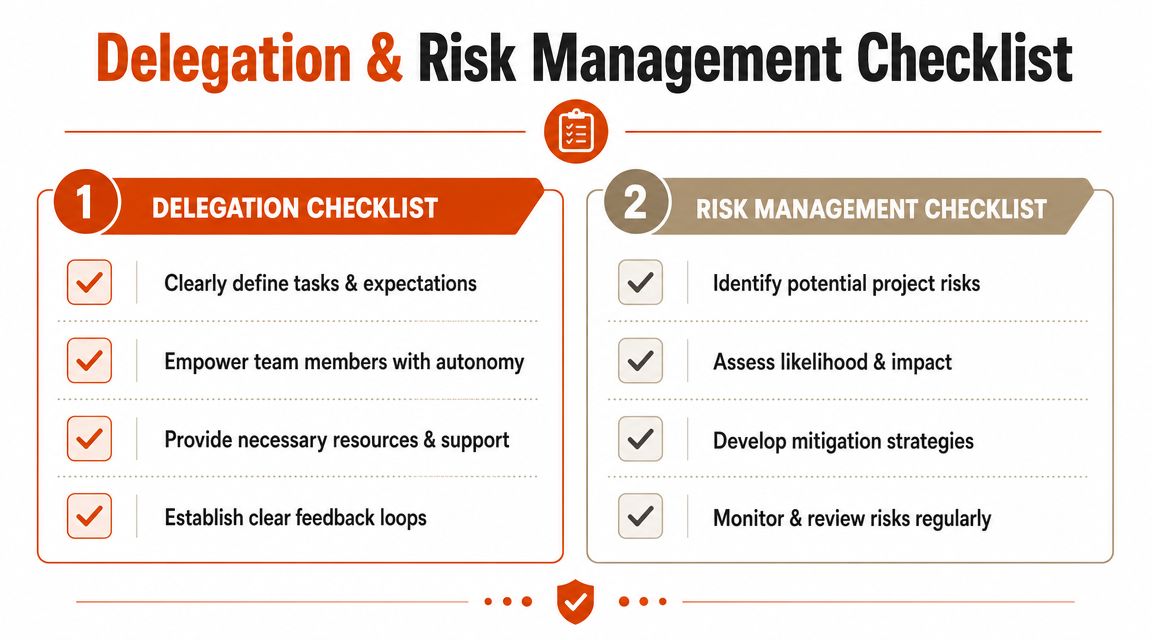
If every important thread routes through you, you aren't coordinating a portfolio. You're throttling it. People often treat delegation as task dumping, then wonder why quality falls and follow-up grows. Good delegation does the opposite. It expands capacity because ownership becomes clearer, not looser.
Delegate outcomes not errands
The wrong way to delegate is assigning fragments. "Can you take care of this?" "Can you handle the stakeholder piece?" "Can you start the draft?" That creates partial ownership and constant check-backs.
The better move is to delegate an outcome with boundaries. For example:
- A product analyst owns the launch readiness checklist for one feature.
- A senior engineer owns the integration workstream and flags dependencies early.
- A clinic coordinator owns follow-up scheduling for a process improvement pilot.
That doesn't mean zero oversight. It means the owner is responsible for movement, clarity, and escalation.
Decision test: If the person doing the work can't explain what done looks like, you haven't delegated. You've only reassigned activity.
If your team needs a practical outside reference, this practical guide to delegating tasks is a solid complement to internal operating rules because it reinforces clarity, autonomy, and feedback loops.
Use a simple delegation template
You don't need a complicated handoff form. You need enough detail to eliminate ambiguity.
Use this template:
- Task or outcome
- Why it matters
- Definition of done
- Deadline or checkpoint
- Decision rights
- Dependencies
- Risks to flag early
- Where updates should live
A PM might delegate customer interview synthesis but keep final roadmap prioritization. A developer lead might delegate implementation planning while keeping approval over architectural changes. A healthcare manager might delegate workflow rollout while retaining responsibility for compliance review.
Track cross-project risk before it spreads
Risk management becomes more valuable when you look across projects instead of inside them one at a time. A shared contractor, an approval bottleneck, a single subject-matter expert, or a budget conflict can affect several initiatives at once.
Keep a lightweight cross-project risk register with fields like:
| Risk | Affected projects | Likelihood | Impact | Mitigation | Owner |
|---|---|---|---|---|---|
| Key person dependency | Integration, reporting | Medium | High | Cross-train backup reviewer | Program lead |
| Approval bottleneck | Launch, policy update | Medium | Medium | Pre-schedule review window | Department head |
| Shared vendor delay | Clinical ops, analytics | Medium | High | Prepare fallback sequence | Operations manager |
The discipline matters more than the format. Review the register regularly and retire risks that no longer matter. Add new ones before they become incidents.
Building Your Personal Project Management OS
A workable system for how to manage multiple projects isn't complicated. It is disciplined. Most of the value comes from doing a few things the same way every week so work doesn't depend on memory, heroics, or constant firefighting.
The operating system in one view
The pieces fit together like this:
- Prioritize with Eisenhower for daily triage and RICE for larger bets.
- Plan in one centralized view with common fields across all projects.
- Execute through fixed communication cadences and short status formats.
- Delegate complete outcomes with clear decision rights.
- Review the portfolio often enough to catch conflicts while they're still cheap to fix.
Each part supports the others. Prioritization fails without visibility. Delegation fails without a clear plan. Reviews fail when updates are inconsistent. The system works because each habit reduces a specific kind of chaos.
There's also a documentation layer that many teams ignore until things get messy. A lightweight practice for meeting notes, decision logs, and rationale makes handoffs easier and protects continuity when priorities change. This overview of research documentation habits that keep knowledge usable is a practical reminder that not every project failure starts with execution. Many start with missing context.
A weekly checklist you can start today
If you want a reset, start here:
- Monday review: Scan all active projects in one view.
- Priority pass: Identify what is urgent, what is important, and what can wait.
- Capacity check: Look for shared people or approvals booked in too many places.
- Meeting cleanup: Combine updates where audiences overlap.
- Owner check: Make sure every important deliverable has one clear accountable person.
- Risk scan: Note the few issues that could affect more than one project.
- Friday closeout: Update status, log decisions, and set next-week priorities before you sign off.
You don't need a perfect system on day one. You need one reliable operating rhythm. Once that exists, managing multiple projects starts feeling less like survival and more like control.
AIDictation can support that rhythm by turning spoken notes into usable project updates, meeting summaries, and documentation without adding another heavy workflow. If you work on a Mac and spend your day moving between stakeholder calls, technical work, and written follow-up, AIDictation is worth a look.
Frequently Asked Questions
What does Master How to Manage Multiple Projects in 2026 cover?
Your week probably looks like this right now. One project is waiting on a stakeholder decision.
Who should read Master How to Manage Multiple Projects in 2026?
Master How to Manage Multiple Projects in 2026 is most useful for readers who want clear, practical guidance and a faster path to the main takeaways without guessing what matters most.
What are the main takeaways from Master How to Manage Multiple Projects in 2026?
Key topics include Table of Contents, From Overwhelmed to In Control A Unified System, Use Eisenhower for daily triage.
Ready to try AI Dictation?
Experience fast voice-to-text on your device. Free to download.
Download FreeRelated Posts
Project Status Updates: How to Write Them Fast and Right
Master project status updates with practical workflows, templates, and automation tips. Learn to structure clear reports for every stakeholder using modern
Project Management Workflows: Patterns, Metrics & Real
Discover project management workflows with proven patterns, key metrics, and real-world examples to streamline your team's success.
10 Best Productivity Tools for Teams in 2026
Boost your output with the best productivity tools for teams. Explore our 2026 list of project management, communication, and AI tools to work smarter.