What Is Technical Documentation? Types and Examples
Technical documentation is structured technical communication that explains how a product, system, or process works and how people should use, maintain, troubleshoot, or evaluate it. It's an operational tool, not just a record of technical facts.
You're installing an application, connecting software systems, or checking an equipment procedure. Something doesn't match what you expected, so you search for help. The answer might be available, but an unclear heading, outdated instruction, or inaccessible page can leave you stuck.
That distinction matters: having documentation isn't the same as making knowledge usable.
Table of Contents
- What Technical Documentation Means in Practice
- The Core Principle That Makes Documentation Work
- The Main Types of Technical Documentation
- Who Writes Documentation and Who Depends on It
- What Separates Good Documentation From Ignored Pages
- Comparing Ways to Create Documentation Today
- Key Takeaways and Your Next Step
What Technical Documentation Means in Practice
A setup guide earns its place when you can follow it and reach a working result. A troubleshooting page earns its place when you can identify a problem and choose an appropriate next action. Technical detail matters because someone needs to do something with it.
Consider a hypothetical engineer connecting an application to a scheduling service. They need to know what information to send, which permissions are required, and what a successful response looks like. A paragraph describing the service's architecture might be accurate, but it won't answer those immediate questions.
Start with the reader's task
The practical answer to “What is technical documentation?” depends on the task in front of the reader. For that engineer, it might be an integration guide. For a clinician preparing equipment, it might be an approved operating procedure.
Technical documentation turns knowledge about a system into information someone else can use.
That doesn't mean every document must contain instructions. A reference page can explain available settings, while a specification can describe required behavior. Both support decisions and actions, even when the reader isn't following a sequence of steps.
Useful starting questions include:
- Who's reading? Identify their role and what they already know.
- What are they trying to accomplish? Name a concrete outcome, such as configuring access.
- What could stop them? Include prerequisites, limitations, and relevant warnings.
- How will they recognize success? Describe an observable result.
Distinguish explanation from persuasion
Marketing copy generally helps someone decide whether a product suits their needs. An academic paper typically develops or evaluates an argument or finding. Technical documentation has a different immediate job: support a person's interaction with a particular technology or process.
For example, a product description might emphasize flexible configuration. The documentation should explain which settings exist, what they change, and when not to change them.
You don't need elaborate language to accomplish that. You need enough verified detail for the intended reader to proceed without guessing.
The Core Principle That Makes Documentation Work
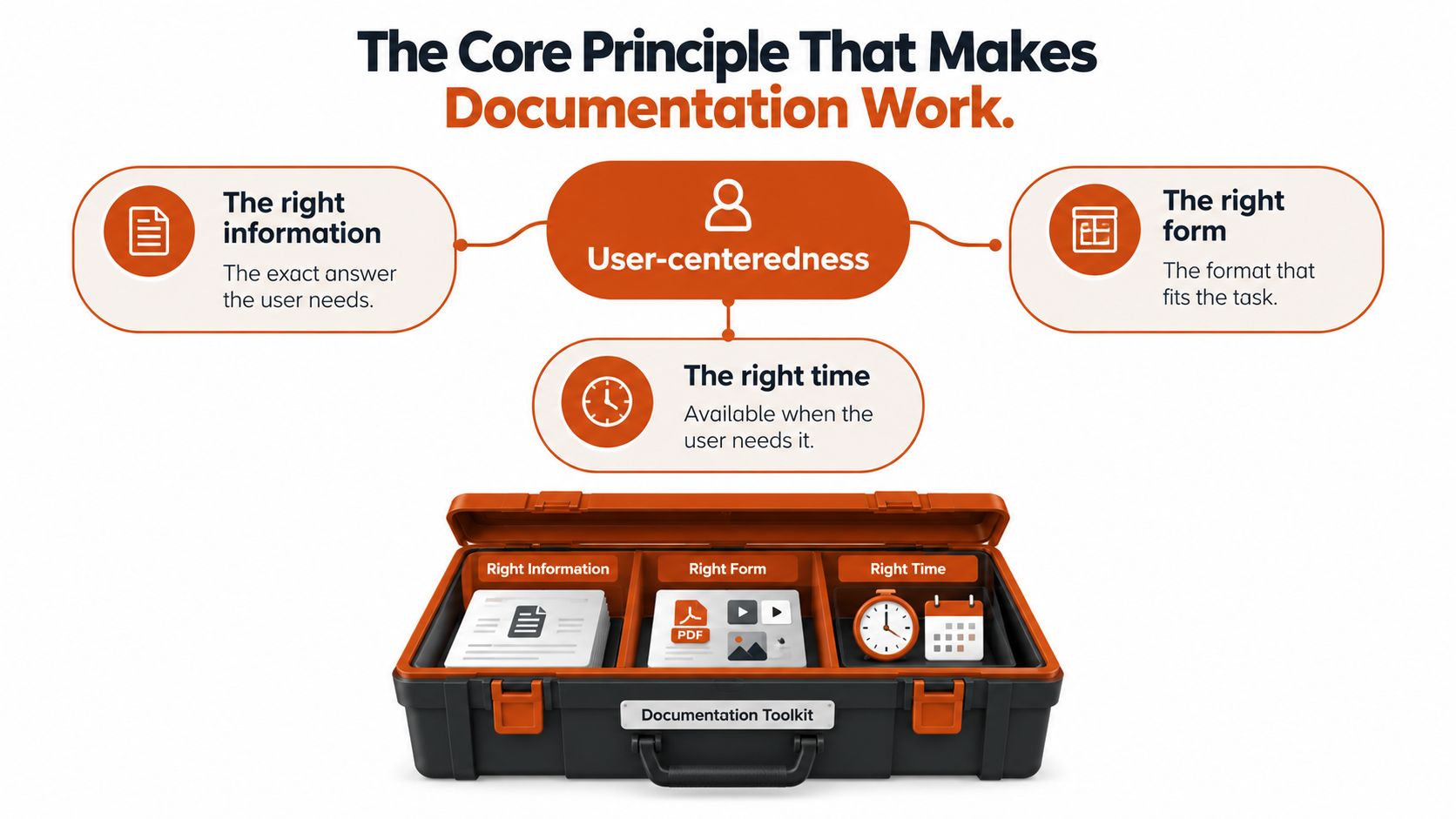
User-centeredness means organizing information around the person who needs it, rather than the person who created the system. The defining principle is the right information, in the right form, at the right time. Research on technical communication also treats installation and maintenance guidance as part of the broader user experience of technical systems.
Think of a well-labeled control panel beside an engineer's private notebook. Both might contain accurate facts about the same machine. Only the control panel is deliberately arranged so an unfamiliar operator can act.
The diagram connects that principle to practical information design.
Match the explanation to the situation
Start by separating what the author knows from what the reader needs now. Someone investigating a failed connection needs diagnostic guidance before a detailed history of the system's design.
The format should also fit the work:
- Use a procedure for a sequence. Put actions in the order the reader must perform them.
- Use a table for a comparison. Help readers distinguish settings or error conditions.
- Use a reference for exact details. Make names, accepted values, and constraints easy to locate.
- Use a conceptual explanation for understanding. Explain why components behave as they do.
The right time means the guidance is available at the point of need. A relevant error message can direct someone to a specific troubleshooting page instead of a general help homepage.
Help readers recover, not merely proceed
Consider a hypothetical troubleshooting page for a failed software connection. Rather than instructing everyone to restart, it could help readers distinguish missing credentials, insufficient permissions, and an unavailable service.
Each branch should identify what to check, what the result means, and when to stop or escalate. A clinician-facing procedure needs the same care around uncertainty, although its content must follow the organization's approved clinical process.
The principle is simple: don't require readers to infer the safe next action from scattered technical facts. Put the decision support beside the task.
The Main Types of Technical Documentation
Documentation types differ because readers ask different questions. “How do I begin?” needs a guided path. “What values does this setting accept?” needs a precise reference.
User-facing documentation supports people using or integrating a product. Internal process documentation supports the people designing, testing, operating, or maintaining it. Internal doesn't necessarily mean informal, and external doesn't necessarily mean beginner-friendly.
Common types of technical documentation at a glance
The examples below are illustrative document topics, not instructions for a particular product or clinical setting.
| Type | Primary Audience | Main Purpose | Everyday Example |
|---|---|---|---|
| API references and developer guides | Developers and integration teams | Explain software interfaces and how to use them | A scheduling service's request fields and sample responses |
| User manuals and how-to guides | End users | Support product tasks | Exporting a report from an application |
| Installation and setup guides | Administrators, installers, new users | Establish a working starting configuration | Installing an application and checking access |
| Troubleshooting and FAQs | Users and support staff | Diagnose problems and answer recurring questions | Explaining why a connection fails |
| Standard operating procedures | Clinical, laboratory, or industrial staff | Define an approved, repeatable process | A locally approved equipment preparation procedure |
| Specifications and requirements | Engineers, product teams, testers | Describe required behavior and constraints | A requirement describing access permissions |
| Maintenance and service guides | Technicians and operational teams | Support inspection, servicing, and upkeep | A manufacturer-approved inspection procedure |
| Release notes and changelogs | Users, developers, support teams | Explain changes between versions | A notice that a configuration option has changed |
An API, or application programming interface, defines how software components communicate. An API reference describes details such as an endpoint, the location where a request is sent, and parameters, the values supplied with that request. A developer guide adds explanation and examples around those details.
A standard operating procedure, often shortened to SOP, describes an approved way to perform a recurring activity. It's different from a general educational explanation because staff need to know which process their organization has authorized.
Connect documents across the system's lifetime
These aren't isolated files. A requirement should connect to the implementation that fulfills it and the test that checks it.
This is lifecycle management: maintaining information from development through operation, maintenance, and eventual replacement. Systems and software documentation standards include ISO/IEC/IEEE 15289:2019 for lifecycle information items and ISO/IEC/IEEE 26514:2022 for user-facing information designed around user needs.
For software teams, software code documentation belongs within that connected structure. A code comment can explain a local decision, but it shouldn't substitute for an integration guide or an operational procedure.
The useful question isn't which format looks most professional. It's which combination gives readers the explanation, instructions, and exact details their work requires.
Who Writes Documentation and Who Depends on It
Writing responsibility and technical authority aren't always held by the same person. A technical writer may organize a procedure, while an engineer verifies its behavior and an operational owner approves its use.
For a new team member, it helps to distinguish contributing knowledge, writing usable content, and approving the result. Treating those as separate responsibilities makes review expectations clearer.
Match people to their information needs
| Stakeholder | Contribution or Need |
|---|---|
| Technical writer | Structures explanations, procedures, and navigation around readers' tasks |
| Developer or engineer | Supplies implementation details, constraints, and testable examples |
| Subject-matter expert | Verifies specialized facts and limitations |
| Product manager | Clarifies intended behavior, scope, and requirements |
| End user or integrator | Needs usable instructions and recognizable outcomes |
| Support agent | Needs diagnostic paths and escalation guidance |
| Clinician | Needs an unambiguous, approved procedure within their role |
| Auditor or regulator | Needs traceability, applicable versions, and approval evidence |
A subject-matter expert is someone with detailed knowledge of the relevant domain. Traceability means being able to follow a documented statement back to its source, requirement, review, or change history.
The original author also becomes a reader later. Record the reason for a non-obvious decision rather than assuming you'll remember it.
Recognize the shared retrieval problem
In a 2025 survey of 3,500 developers across six countries, finding information was the leading source of friction and wasted time; a separate technical-writer study found that nearly one-third of user questions were already answered somewhere in existing documentation, as described in the developer-experience and documentation findings.
Those findings point to a practical distinction: missing answers and hidden answers need different fixes. Writing another page won't resolve an access restriction or an unfamiliar heading.
Before creating a new answer, check whether readers can reach and recognize the answer you already have.
Ask a support agent which terms people use in questions. Ask a new employee where they expected to find the procedure. Then assign someone responsibility for correcting misleading labels, broken navigation, duplicate pages, and permissions barriers.
What Separates Good Documentation From Ignored Pages
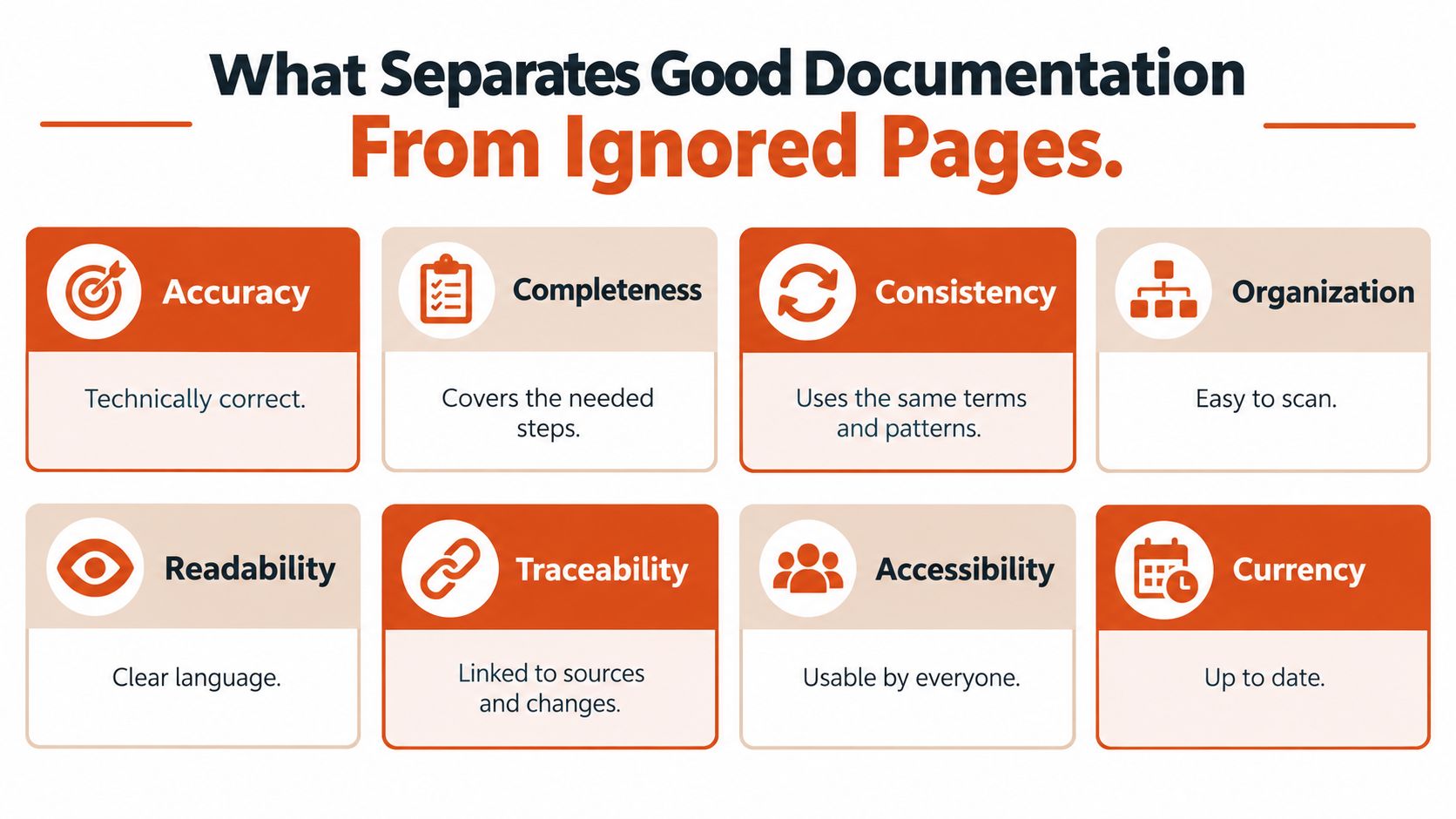
Good documentation requires more than clean sentences. Empirical work identifies distinct quality attributes, including accuracy, completeness, consistency, organization, readability, traceability, accessibility, and currency.
An analysis of 878 documentation-related artifacts categorized 162 issue types across content, presentation, process, and tool support; research also places up-to-date-ness, accuracy, and completeness among important influences on perceived quality in evaluations of technical software documentation.
The infographic summarizes the qualities to inspect.
Turn quality into checks
Currency means the information is up to date. Accessibility means people can perceive, move through, and use it, including those who use assistive technology.
A practical review should test the document rather than approve how it sounds.
- Verify behavior. Check that instructions match the applicable product version.
- Run examples. Execute sample code in the stated environment.
- Check coverage. Include necessary prerequisites, supported interfaces, and relevant error conditions.
- Inspect terminology. Use the same name for the same thing throughout.
- Test navigation. Ask a representative reader to locate a task-relevant answer.
- Confirm evidence. Connect important claims to authoritative requirements, tests, or approved procedures.
For sentence-level improvements, STE Guide's practical techniques for clearer writing offer a useful complement to technical review. Clear wording matters, but it can't compensate for an incorrect instruction.
The following video offers another resource alongside the review checklist.
Measure application, not output
Page count tells you how much content exists. It doesn't tell you whether readers succeeded.
Track search success, whether users locate a relevant answer; task completion, whether they apply it correctly; and unresolved questions, where they still need help. Also inspect outdated content and access problems. These are suggested operational measures, not universal performance benchmarks.
Keep those checks active through version control, which records changes over time, automated link and example checks, and a named owner for each document. A changelog, the record of product changes, can trigger a review when behavior changes.
A broader documentation quality review should combine technical verification with observation of real readers. An expert can confirm correctness while still overlooking a step that a newcomer needs explained.
Comparing Ways to Create Documentation Today
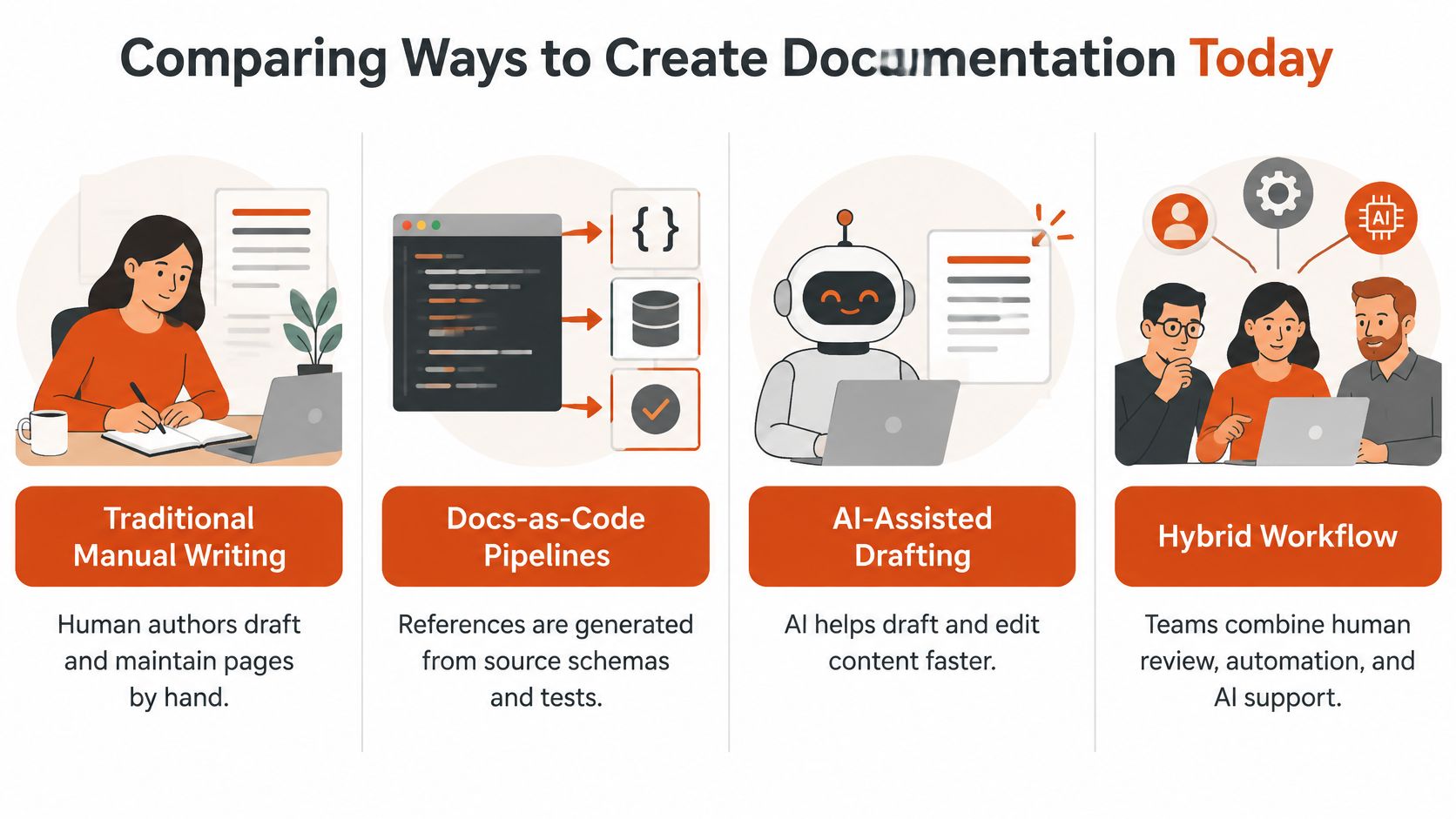
Choose a production method by considering where the knowledge comes from and how you'll verify it. A generated reference, a spoken first draft, and a manually written explanation solve different parts of the work.
The stakes are practical: in the 2025 Stack Overflow survey of more than 49,000 developers from 177 countries, 68% reported using technical documentation to learn to code, making it the leading resource in that category, according to the developer learning-resource results.
The comparison shows how human authorship, automation, and drafting assistance can fit together.
Compare the work each method performs
| Approach | Useful For | Main Trade-off |
|---|---|---|
| Manual writing | Explanations, rationale, nuanced procedures | Authors must draft and maintain the material themselves |
| Docs-as-code pipelines | Reference details tied to software definitions | Generated facts still need explanation and review |
| AI-assisted drafting | Restructuring notes, suggesting wording, preparing drafts | Fluent output can contain unsupported assumptions |
| Voice dictation | Capturing an expert's explanation as a first draft | Spoken content still needs organization and verification |
Docs-as-code means managing documentation using software-development practices, such as version control, review, and automated checks. A pipeline is an automated sequence of processing steps. It can generate reference material from a schema, a structured definition of data or interfaces.
Generation is useful for details that can be derived directly from authoritative definitions. It's less suited to explaining why a design was chosen or when a documented limitation matters.
Supply context and preserve accountability
For AI-assisted drafting, supply the audience, applicable version, verified source material, terminology, and project conventions. Distinguish confirmed behavior from inferred rationale, and assign a human reviewer.
Voice dictation serves a different purpose: capturing what the author already knows. A developer might speak through a code comment, a clinician might draft a procedure for approval, or a product manager might capture a product requirements document, which describes what a product should do.
A macOS dictation option can support this workflow with automatic engine selection, private on-device transcription, cloud cleanup for filler words and grammar, a custom technical dictionary, and application-specific formatting rules. These features help capture text; they don't verify technical or clinical correctness.
When comparing technical writing tools, separate capture, generation, review, and publication. You may use different tools for each, but someone must remain responsible for the finished document. For sensitive material, confirm your organization's privacy and approval requirements before recording or transmitting it.
Key Takeaways and Your Next Step
The most useful change is to stop treating a published page as the end of the job. Treat it as a candidate solution to a reader's problem, then test whether it works.
Your next improvement doesn't have to be a documentation overhaul. Choose a document your team already relies on and observe someone using it for a realistic task.
Run a small retrieval test
Use a colleague who understands the role but hasn't memorized the document. Start them where an ordinary reader would begin, not on the exact paragraph containing the answer.
- Choose a real question. Use a recurring support request, setup problem, or procedural uncertainty.
- Observe the search. Note their search terms, navigation choices, and access barriers.
- Check understanding. Ask them to explain what they would do next and what result they expect.
- Identify the blocker. Distinguish a missing fact from an unclear label, outdated step, or permission problem.
- Assign the fix. Name a responsible person and agree on how to verify the correction.
For clinical or safety-sensitive content, use an appropriate training or review setting. Don't turn a documentation test into an unsupervised live procedure.
Practical rule: Improve the point where the reader gets stuck, not merely the paragraph the author finds least elegant.
Let the result determine the next change
If the reader finds the answer but misunderstands it, revise the explanation. If they understand it but can't perform the task, inspect prerequisites and missing actions. If they never reach it, improve navigation before adding more prose.
Record what you changed and repeat the task with a suitable reader. That gives your team a concrete reason for the edit and a way to judge whether it helped.
For your next first draft, try speaking through the procedure while its details are fresh. Then edit the sequence, verify the terminology, and send it through the same approval process you'd use for typed content.
AIDictation offers voice-to-text drafting on macOS, with local transcription and cloud-assisted cleanup for turning spoken explanations into editable documentation. Visit AIDictation to try the free tier without an account, then dictate a procedure or troubleshooting draft and check it against your authoritative sources before publishing.
Frequently Asked Questions
What does What Is Technical Documentation? Types and Examples cover?
Technical documentation is structured technical communication that explains how a product, system, or process works and how people should use, maintain, troubleshoot, or evaluate it. It's an operational tool, not just a record of technical facts.
Who should read What Is Technical Documentation? Types and Examples?
What Is Technical Documentation? Types and Examples is most useful for readers who want clear, practical guidance and a faster path to the main takeaways without guessing what matters most.
What are the main takeaways from What Is Technical Documentation? Types and Examples?
Key topics include Table of Contents, What Technical Documentation Means in Practice, Start with the reader's task.
Ready to try AI Dictation?
Experience fast voice-to-text on your device. Free to download.
Download FreeRelated Posts
Writing Technical Documentation for Software: A Guide
Learn writing technical documentation for software with practical tips on structure, clarity, and user focus to create guides that developers actually use.
10 Technical Writing Tools for Faster Documentation
Compare 10 technical writing tools for authoring, review, diagrams, localization, proofreading, and dictation with practical pros, cons, and pricing cues.
Mastering System Design Documentation: Your 2026 Guide
Create effective system design documentation engineers will use. Our 2026 guide covers templates, tooling, and how to avoid pitfalls.