Technical Documentation for Developers: A Practical Guide
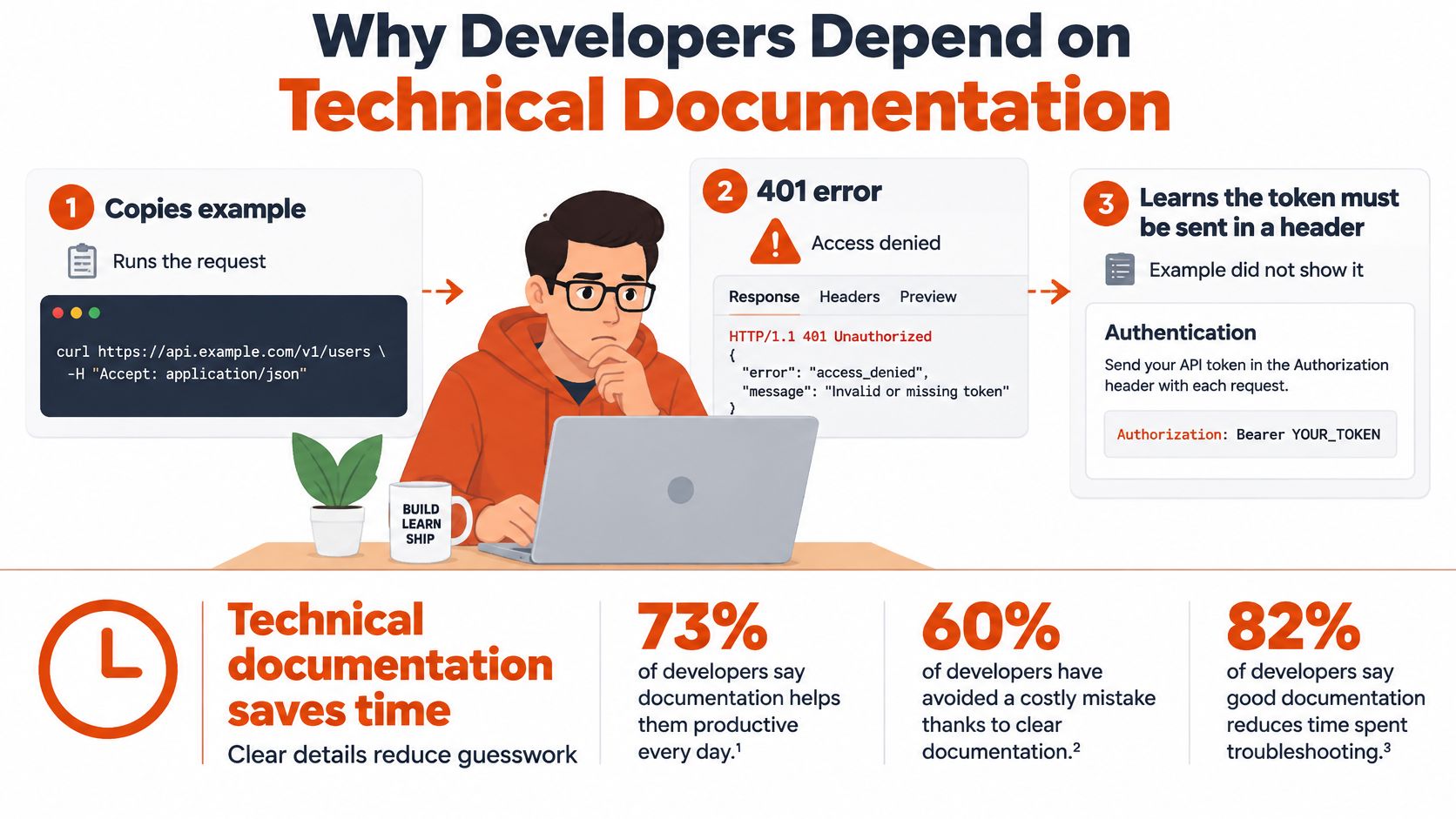
You copy an API example, run the request, and get a 401 error. An hour later, you discover that the token belongs in an authentication header the example never included. The code may be working perfectly, but the documentation has failed its caller.
Table of Contents
- Why Developers Depend on Technical Documentation
- Documentation Types and the Question Each One Answers
- How to Write a Reference Entry Developers Can Trust
- Examples That Work on the First Attempt
- Structure and Style That Keep Readers Moving
- Keeping Docs Accurate as Code Changes
- Confirm Your Next Documentation Page Today
Why Developers Depend on Technical Documentation
Technical documentation for developers is the written layer that lets someone use, integrate, operate, or change software without asking its author. It includes public API references, internal runbooks, setup instructions, architectural explanations, and migration guides. Their shared purpose is to make necessary knowledge available at the moment someone needs it.
Think of the code as a building. Documentation is the floor plan, circuit schedule, and labels on the doors that let the next electrician work safely. Reading the implementation can reveal what happens, but it doesn't necessarily explain which behavior is intentional, supported, or safe to depend on.
In Stack Overflow's 2024 Developer Survey, 90% of developers identified API and SDK documentation as their preferred documentation source for learning to code. That makes documentation a primary learning interface, not an accessory to the product.
The page is part of the interface
A developer often arrives through a search result, not your documentation homepage. They might land directly on an error explanation without knowing your terminology or having completed your tutorial. Each page therefore needs enough context to establish what it applies to, what the reader needs, and what successful execution looks like.
The authentication failure illustrates why that matters.
Internal pages deserve the same care. In Stack Overflow's 2026 Developer Survey, 60.1% of respondents, or 8,687 people, turned to internal documentation, wikis, or knowledge bases for work-related questions, compared with 30.5% who used official external documentation.
For the engineer diagnosing an incident, an internal runbook is the working interface to the system. Missing permissions, an outdated command, or an unexplained recovery condition can make it unusable regardless of how polished it looks.
Answer the questions developers actually bring
Every project's documentation should answer these questions:
- What is this? Explain the problem it solves, its boundaries, and when someone should use it.
- How do I start? Provide a supported route from installation to a visible result.
- How does it behave? Specify inputs, outputs, constraints, errors, and operational consequences.
- What changed? Identify compatibility changes and the actions existing users must take.
Treat the answers as verifiable claims. If a page says an operation is safe to retry, a reviewer should be able to identify the implementation guarantee or test that makes that statement true.
Documentation Types and the Question Each One Answers
A tutorial and an API reference serve different readers, even when they describe the same endpoint. The tutorial guides someone toward a result. The reference lets someone inspect a particular behavior without following a lesson.
Mix those jobs indiscriminately and both become harder. A reader checking a parameter default shouldn't need to work through installation instructions, while a beginner shouldn't need to assemble a working procedure from scattered reference entries.
Choose the document before drafting
Use this table as a drafting decision tool. The lengths are working scope guidelines, not publication targets.
Documentation types, the question each answers and what each must include
| Type | Reader question | Typical length | Must include |
|---|---|---|---|
| README | What is this and how do I start? | One to two pages | Purpose, install command, minimal working example, license, links |
| Quickstart tutorial | How do I get a first result? | One short path | Prerequisites, numbered steps, expected output at each step |
| How-to guide | How do I accomplish this one task? | One page per task | Goal, steps for one task, how to verify success |
| API reference | What does this accept and return? | One entry per function or endpoint | Parameters with types, defaults, return values, errors, side effects |
| Concept explanation | Why does it work this way? | Scaled to the concept's scope | Mental model, diagram, trade-offs, when to use it |
| Troubleshooting page | Why did this error happen? | One entry per error | Symptom, cause, fix, how to confirm the fix worked |
| Changelog and migration guide | What changed and what breaks? | One entry per release | Version, breaking changes, upgrade steps |
For a new developer-facing project, start with the README and public interface reference. If the project doesn't expose an API, document its commands, configuration, or extension points instead. Those pages establish what exists and what its supported behavior is.
Then build the quickstart around the smallest useful outcome. Add how-to guides when support tickets and team questions reveal recurring tasks. Write concept explanations where readers repeatedly ask why a behavior exists, such as why a successful write isn't immediately visible in a read replica.
Keep the question narrow
Give each page one dominant purpose. A quickstart can link to authentication reference material without embedding the entire authentication specification.
A reusable technical documentation template can help enforce those boundaries before prose expands. When choosing where those pages will live, the Awesome Tools knowledge base picks offer a starting point for comparing publishing options against your needs for navigation, review, and versioning.
Drafting rule: Write the reader's question before writing the page. If it contains separate tasks, split the page.
For example, installing an SDK and diagnosing production timeouts require different prerequisites and different evidence of success. Linking those pages is useful. Combining them makes both harder to scan and maintain.
How to Write a Reference Entry Developers Can Trust
A reference entry is a contract a caller can inspect. It should distinguish supported behavior from implementation details that might change without notice.
An empirical study of Java API documentation found that 66.5% of more than 6,000 documentation elements contained at least one directive, such as a constraint, usage condition, or developer obligation. These aren't decorative details. They determine whether a call is valid.
Specify behavior in a repeatable order
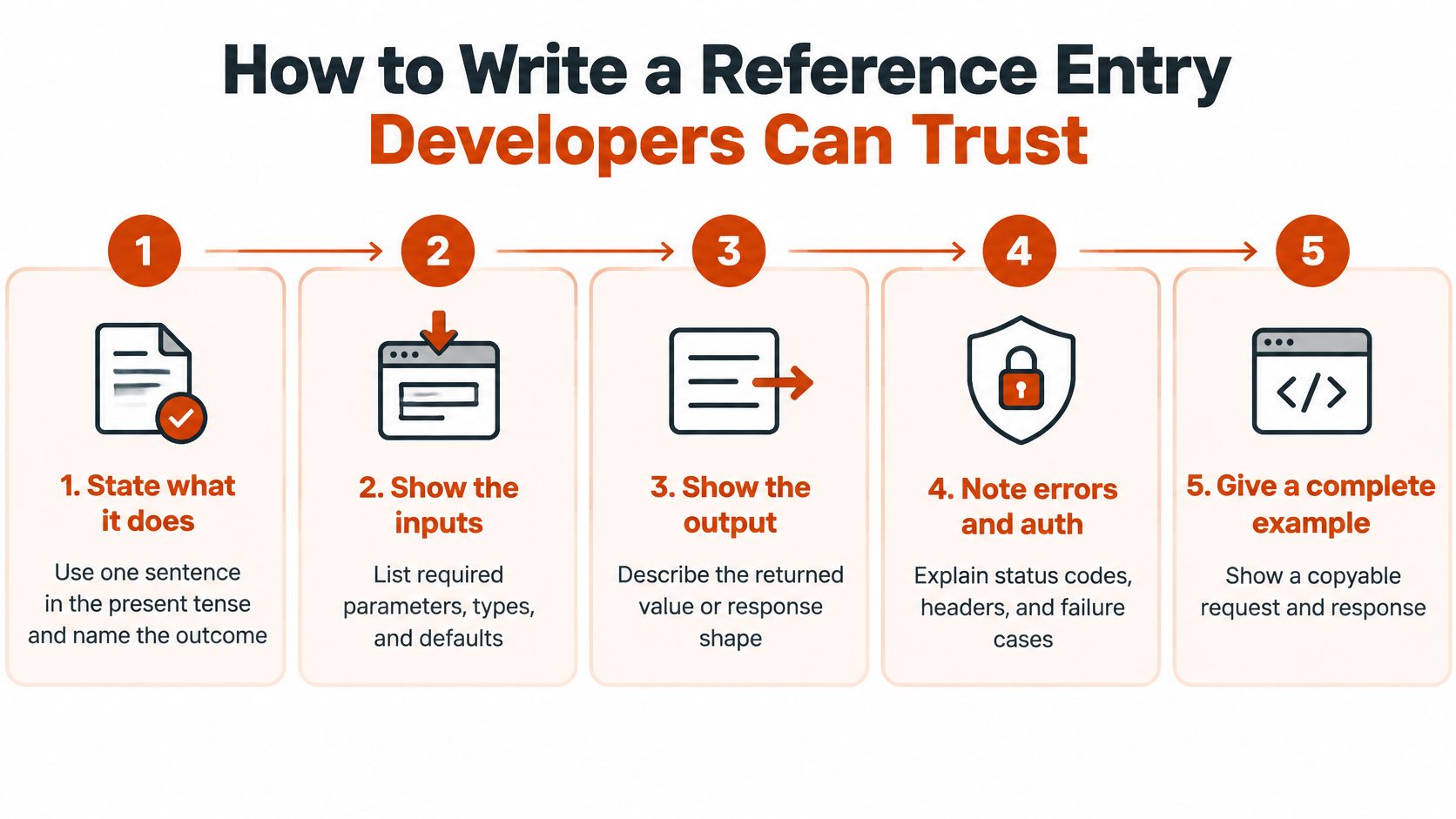
Use this sequence for each public function, class, command, or endpoint.
-
State what it does. Write a present-tense sentence naming the outcome:
refreshSessionreturns a replacement access token for an active session. Avoid describing internal helpers unless callers need that information to use the interface correctly. -
List every input precisely. Include type, unit, accepted range, default, and whether omission is allowed. For a hypothetical
timeoutMsparameter, distinguish milliseconds from seconds and explain whether an omitted value behaves differently from an explicit zero. -
Describe the complete return value. Identify its type or response shape, nullable fields, fields that may be absent, and the empty-result representation. Don't treat a missing property,
null, and an empty array as interchangeable unless the implementation does. -
Name the failure modes. For each documented exception or error response, explain the triggering condition and the caller's next action. Distinguish invalid credentials from insufficient permissions, and state whether retrying without changing the request can help.
-
Record preconditions and ordering. Say whether initialization must finish before a call, whether authentication must happen first, and whether a resource must remain open. A valid argument list doesn't make a call valid at every lifecycle stage.
-
Expose side effects and execution constraints. Record writes, emitted events, network calls, thread restrictions, and resource ownership. Include the release or commit against which a maintainer verified the entry, so a reviewer can locate its evidence.
-
Provide a runnable example and a task link. Show the interface in a supported context rather than an isolated fragment with unexplained variables. Link to the relevant how-to guide when the surrounding workflow requires decisions beyond the reference entry's scope.
The visual checklist captures the main checks at a glance.
Review the boundaries, not just the wording
Inputs and errors come early because that's where a caller needs precise decisions. Optional background can wait until the developer knows whether their request is valid and what happens when it isn't.
For each claim, identify an appropriate check. A type declaration can confirm that an argument accepts a string, but not that the string must contain a supported timezone name. That second claim needs validation logic, a specification, or a behavior test.
Likewise, a test showing that a function succeeds doesn't prove that it has no side effects. Inspect the implementation and relevant dependencies before making a negative guarantee.
A compiler can reject an invalid type. Your documentation must explain the valid value that still produces the wrong outcome.
Finally, hand the entry to a developer who didn't write it. Ask them to call the interface using only the page and record every clarification they need. Each question identifies a missing statement, an ambiguous term, or an assumption that belongs in the contract.
Examples That Work on the First Attempt
Saying an endpoint accepts JSON doesn't reveal field casing, authentication placement, or response structure. A complete request makes those decisions visible.
The contrast is between describing an operation and giving someone enough information to execute it.
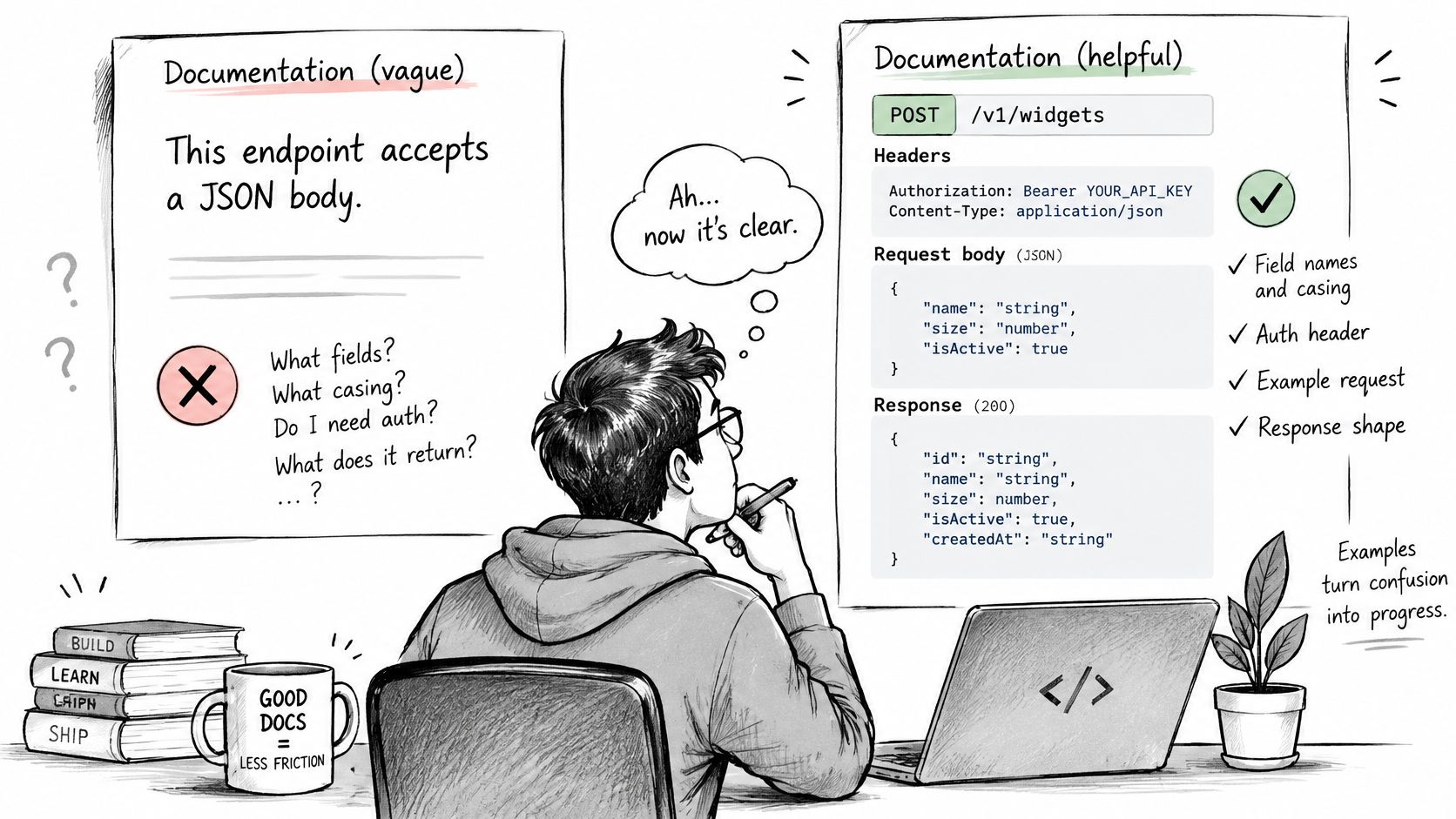
For a hypothetical API, a request example could specify POST /sessions/check, the headers Authorization: Bearer YOUR_SANDBOX_TOKEN and Content-Type: application/json, and the body {"workspaceId":"demo_workspace"}. State that the reader must replace the token placeholder with a sandbox credential.
Pair it with an illustrative successful response, 200 OK and {"authenticated":true}, plus an expired-token response, 401 Unauthorized and {"error":"token_expired"}. For real documentation, replace every illustrative detail with the actual contract.
A study of REST API usability found that missing examples caused problems with data types, formats, required headers, and request bodies; examples improved task success, completion time, and satisfaction.
Prioritize coverage in this order:
- Authentication: Establish a valid credential and request.
- Smallest workflow: Produce a useful result.
- Pagination: Retrieve subsequent results correctly.
- Validation failures: Repair rejected input.
- Retries: Handle temporary failures safely.
- Common integration: Connect the operation to a realistic caller.
If you're evaluating coding assistance for example drafting, AI Tool Seekers on GitHub Copilot provides a tool-specific starting point. Generated or dictated examples still require direct checks of identifiers, JSON punctuation, version strings, headers, and status codes.
A video can supplement the written execution path, not replace it.
Structure and Style That Keep Readers Moving
Start the page with the answer or first action, not the history of the feature. Put its applicable software version, audience, and necessary prerequisites near the top. A developer should know whether the page fits their environment before executing anything.
For a key-rotation guide, that opening should identify the required permission and whether existing connections will continue working. An explanation of your credential architecture can follow through a link. It shouldn't delay the action the reader came to perform.
Put the basic path before the exceptions
Use progressive disclosure: present the supported route first, then separate optional configurations and edge cases under descriptive headings. Don't interrupt each instruction with every possible deployment variation.
Make headings match tasks and questions. Rotate an API key is easier to recognize than Credential management, while Why does pagination return an empty page? gives a troubleshooting reader a concrete destination.
Keep paragraphs short enough to scan, with one idea per paragraph. In your publishing system, use fenced code blocks with the correct language identifier so syntax highlighting works, and keep commands separate from their output. Readers shouldn't accidentally paste a prompt marker or a response into their terminal.
Useful layout patterns are covered in this guide to technical documentation design. Apply them consistently, especially to prerequisite panels, warnings, and expected-output examples.
Make warnings and terminology deliberate
Reserve blockquotes or warning components for rules whose violation creates a meaningful problem. If every note looks urgent, readers can't distinguish a security requirement from a convenience suggestion.
Never log an access token, including in copied debugging output or documentation test artifacts.
Define domain-specific terms when readers first need them, then link to a glossary entry. Distinguish terms that sound similar but imply different actions, such as account, organization, and workspace.
Replace simply and just with the missing instruction. Instead of saying to just configure credentials, identify the configuration setting, where it belongs, and how to confirm the application loaded it. If the step requires permissions the reader might lack, name those permissions before the step.
Finally, distinguish obligations from advice. Use must for a requirement, should for a recommendation, and may for an allowed option. A sentence saying callers should initialize the client is dangerously weak if calls always fail before initialization.
Keeping Docs Accurate as Code Changes
Documentation isn't finished when the feature launches. Assign a named owner to each documentation area, and keep behavior changes and their documentation updates in the same repository and pull request wherever practical. If publishing happens elsewhere, require a linked documentation change before merging.
The productivity stakes aren't limited to editorial quality. The 2024 State of Developer Experience report by DX and Atlassian found that 69% of developers reported losing at least eight hours per week to workplace inefficiencies, with insufficient documentation among the leading sources of lost time.
That doesn't mean documentation alone caused all those lost hours. It does justify treating outdated instructions as engineering maintenance rather than optional cleanup.
Build checks at different levels
Use linting for broken links, malformed markup, and missing required sections. A tool such as Vale can enforce terminology, while a Markdown linter can catch structural inconsistencies. Neither proves that a behavioral statement is true.
Use example tests to execute documented requests and validate responses against a disposable environment. Supply test credentials through your CI secret store, reset fixtures between runs, and assert stable fields rather than timestamps or generated identifiers.
Use an API diff to identify changed public schemas and signatures. For an OpenAPI-described service, a tool such as oasdiff can flag interface changes that require a documentation decision.
Code changes, the documentation to update and the check that catches a miss
| Code change | Documentation to update | Automated check |
|---|---|---|
| New optional parameter | Parameter list, default value, changelog | API diff reports the added field; existing examples still pass |
| Renamed endpoint or field | Every reference entry, example, and migration guide | Link checker for affected page links; example tests for the old API name |
| Changed default value | Reference entry and quickstart output | Snapshot test compares the documented default with the code |
| Removed feature | Reference, how-to guides, and README | CI search flags the old identifier across docs before merge |
| New error code | Troubleshooting page and each affected reference entry's error section | Contract tests exercise documented errors; schema comparison flags undocumented additions |
| Behavior change in a release | Changelog, migration guide, and version notes | Release check compares documentation version metadata with the package version |
Know what automation cannot prove
A passing link check doesn't prove that an endpoint still exists. Matching version strings doesn't prove that release notes explain a behavioral change. Those checks provide signals, not complete semantic validation.
Turn the table into explicit technical documentation requirements, with an owner and a required check for each applicable change. Preserve deliberately versioned historical references through scoped exceptions rather than deleting every old identifier.
Before approving a pull request, ask: Does this change make any sentence in the documentation false, and is that sentence updated in this change? Require human review for guarantees such as retry safety, ordering, and compatibility that a schema diff can't establish.
Confirm Your Next Documentation Page Today
Rewrite the page that generates the most repeat questions in support tickets or team chat this week. Choose a bounded task, such as creating a credential or recovering from a failed import, rather than attempting to rebuild the entire documentation site.
Audit the page's inputs, outputs, errors, prerequisites, and examples. Mark each gap missing, incomplete, or unverified so uncertainty doesn't disappear into polished prose.
Use a short delivery plan
- Monday: Audit the page and identify the code or test that supports each disputed claim.
- Tuesday and Wednesday: Draft the replacement and execute every example in a clean environment.
- Thursday: Give the draft to a developer who didn't write it and ask them to complete the task using only the page.
- Friday: Publish the reviewed update and turn remaining questions into the next gap list.
For the first draft, try explaining the task aloud as though you're pairing with a colleague. Include what must happen first, how failure looks, and how you know the operation succeeded. Then organize the transcript into the chosen document type, with task headings and appropriate code-language tags.
Review technical tokens by hand after dictation or cleanup. Pay particular attention to casing, negation, units, JSON, header names, and version strings.
The acceptance test isn't whether the page sounds authoritative. It's whether another developer can complete the task and whether a maintainer can verify the claims they'll depend on.
AIDictation can turn spoken explanations and sparse bullet points into readable documentation that teammates can review and comment on. Visit AIDictation to draft your next reference entry or troubleshooting guide, then verify its technical claims and run its examples before publishing.
Frequently Asked Questions
What does Technical Documentation for Developers: A Practical Guide cover?
You copy an API example, run the request, and get a error. An hour later, you discover that the token belongs in an authentication header the example never included.
Who should read Technical Documentation for Developers: A Practical Guide?
Technical Documentation for Developers: A Practical Guide is most useful for readers who want clear, practical guidance and a faster path to the main takeaways without guessing what matters most.
What are the main takeaways from Technical Documentation for Developers: A Practical Guide?
Key topics include Table of Contents, Why Developers Depend on Technical Documentation, The page is part of the interface.
Ready to try AI Dictation?
Experience fast voice-to-text on your device. Free to download.
Download FreeRelated Posts
10 Technical Documentation Templates Compared for 2026
Compare 10 technical documentation templates for APIs, guides, and architecture docs. See when to use each and their honest limitations.
What Is Technical Documentation? Types and Examples
What is technical documentation? Get a clear definition, the main types like API docs and user manuals, who writes it, and what makes it effective.
Writing Technical Documentation for Software: A Guide
Learn writing technical documentation for software with practical tips on structure, clarity, and user focus to create guides that developers actually use.