Technical Documentation Requirements Checklist
A full set of manuals, API references, READMEs, release notes, and FAQs can still be unreleasable. The popular advice to create every document type misses the harder question: can the team prove that the instructions are correct for the product it's about to ship?
A thick manual can fail an audit just as easily as a thin one. What matters is whether critical instructions have accountable owners, approved sources, version-specific tests, approval records, and a defined retirement point.
Table of Contents
- What Technical Documentation Requirements Mean
- Release Checklist by Requirement Category
- Content Scope and Testable Wording
- Formatting Metadata and Version Control
- Localized and Translated Documentation Requirements
- Accessibility and Compatibility Instructions
- Reviewers Traceability and Acceptance Evidence
- Retention Rules and Standard Cross References
- Apply the Checklist Before You Publish
What Technical Documentation Requirements Mean
A technical documentation requirement is a testable condition the documentation must meet for a named product version before that version is approved. It isn't a request to write a guide.
For example, “provide installation documentation” leaves too much unresolved. “A user with the stated prerequisites can install the current release using the published procedure, and the test record identifies the build” gives the release manager something to accept or reject.
Define conditions rather than deliverables
The working framework has eight families: content scope, wording, formatting, metadata, versioning, accessibility, compliance and retention, and reviewer evidence. Traceability connects those families to the artifacts that prove they passed.
A document inventory remains useful for planning effort. But it doesn't identify which files are mandatory for this release, who can approve them, which build they describe, or what proves the instructions work.
Release principle: A document's existence is an inventory fact. Its accuracy is a claim that needs evidence.
For a software release, an integration guide might exist while its authentication example still uses a removed configuration option. For a regulated product, an operating procedure might be readable but omit a limitation associated with an approved risk control. Both fail the same practical gate: the released instructions don't match the supported product.
Make ownership survive team boundaries
Distributed development makes this distinction especially important. If you're using HireDevelopers.com to hire developers in brazil, include documentation responsibilities in the engineering handoff: who supplies implementation evidence, who verifies examples, and who approves publication.
A contractor can author the procedure without becoming its permanent owner. Assign ongoing accountability to a role that remains responsible after the engagement ends.
Start with the release checklist, recording evidence rather than impressions. Use the detailed criteria only where a failed row exposes a gap. That keeps documentation review focused on release risk instead of turning every update into a rewrite of the entire manual.
Release Checklist by Requirement Category
For the version about to ship, mark each row Pass, Fail, or Not applicable. Record the mark and an evidence link beside the checklist in your release record.
Technical documentation requirements release checklist
| Category | Mandatory contents | Pass test | Owner |
|---|---|---|---|
| Content scope | Intended use, audience, tasks, environment, limitations, error recovery | A new user completes the primary task from the doc alone | Product owner |
| Wording | Performance requirements and objective acceptance criteria | Each must-statement is testable without freezing the design | Tech writer |
| Formatting | Headings, consistent terms, units, and tables for specs | A peer finds a selected requirement within the team's declared lookup limit | Tech writer |
| Metadata | Doc ID, title, owner, status, review date, product version | Every controlled page shows ID, version, and date | Doc control |
| Versioning | Change history tied to the release | History lists version, date, and change summary | Release manager |
| Accessibility | Assistive tech, keyboard path, captions, known limits | Named assistive-tech steps were tried and match the UI | Accessibility owner |
| Compliance | Applicable rules, bounded claims, retention start | No compliance claim appears without a cited control | Regulatory owner |
| Reviewers | Author, reviewer, approver, and dates | Independent review and approval are recorded before publication | Approver |
| Traceability | Link from instruction to source, test, and risk control | A matrix row exists for each critical instruction | Quality owner |
Assign the marks consistently
Pass means someone ran the stated test against the current build and retained the evidence. An approval comment saying “looks fine” doesn't substitute for the task result, compatibility check, or claim review.
Fail means the row blocks release. The accountable owner must resolve it before shipping; assigning a ticket without correcting the published instructions doesn't change the mark.
Not applicable requires a written reason tied to the product's users, markets, and claims. It isn't a way to defer an uncomfortable test or avoid finding an owner.
Say a desktop dictation product has no clinical users. The team may mark regulated-clinical obligations within the compliance row Not applicable only after checking that marketing makes no regulated claim and that no other applicable obligation requires those controls. Record that claim check, not just the conclusion.
Keep the evidence usable
Store the completed checklist with the release record, not in a writer's private notes. Evidence links should open the relevant artifact directly, with enough context to identify the environment, tester, result, and build.
The traceability row points to the documentation evidence matrix under reviewer evidence. The accessibility row uses the assistive-technology procedures under accessibility and compatibility instructions.
Owners can delegate execution, but not accountability. A support engineer may run an error-recovery test while the product owner remains responsible for accepting the documented behavior.
A release is gated when every applicable row is Pass with evidence. Page count, polished layout, and a complete navigation tree aren't substitutes.
Content Scope and Testable Wording
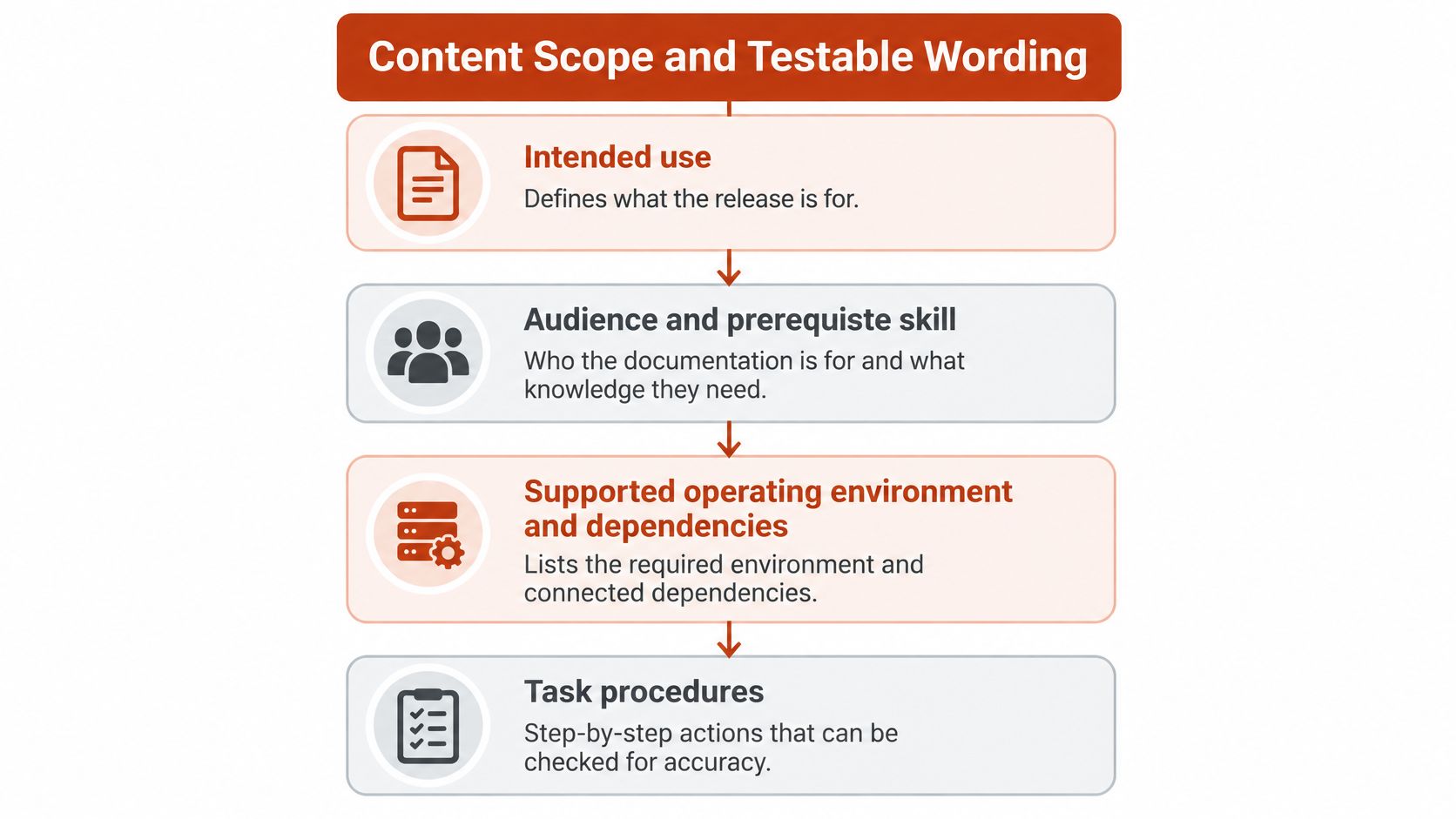
Write for a specific release and task, not for an abstract average user. A usable scope statement establishes what the release is for, who can operate it, and which conditions must hold before the procedure begins.
Use this hierarchy to organize the content before drafting individual steps.
Establish the minimum content
User and reference documentation should identify:
- Purpose and audience: Intended use, prerequisite knowledge, and what the product doesn't do.
- Operating conditions: Supported environments, integrations, permissions, configuration dependencies, and connectivity.
- Task behavior: Actions in execution order, accepted inputs, expected outputs, and confirmation states.
- Failure boundaries: Error messages, recovery procedures, limitations, and conditions that invalidate the instructions.
For a voice-to-text application, separate local processing from cloud processing. Explain connectivity prerequisites, engine-selection behavior, and what happens when the preferred engine becomes unavailable.
Document custom-dictionary and context-rule precedence explicitly. If an application rule conflicts with a dictionary entry, the reader needs the approved behavior, not a guess based on the feature names.
Quality limitations need the same treatment. Record how accents, mumbling, and background noise affect the supported workflow, using test conditions rather than an unqualified promise of accuracy.
Replace descriptions with observable outcomes
The ISO/IEC Directives, Part 2 call for requirements to use performance terms wherever possible and support tables when they communicate information more efficiently and understandably.
That doesn't mean every design detail is forbidden. Specify an implementation when compatibility or a controlled interface requires it; otherwise, describe the outcome and leave engineers room to choose the mechanism.
Weak statements rewritten as testable requirements
| Weak statement | Testable requirement | Failure check |
|---|---|---|
| The app uses a cloud model | When the network is unavailable, dictation continues on device and the document lists absent features | Disconnect the network and dictate a test passage |
| Quality is good | Accuracy limits for accents, mumbling, and noise are recorded with test conditions | Run reference passages in each condition and compare to the stated limit |
| Startup works | Cold start completes within the stated time on the minimum supported environment | Time a cold start on that environment against the stated limit |
These are example requirements, not assertions that every dictation application supports offline operation. If the product can't continue offline, document its actual failure behavior instead of promising a fallback.
For more detailed requirement construction, use the specification-writing guide. Any safety, security, startup, shutdown, or quality claim needs objective acceptance criteria, including the environment in which the criterion applies.
The accompanying video offers another way to approach the drafting work.
Paste this acceptance check into the review request:
- Task completable: The intended reader can finish without undocumented assistance.
- Limitation visible: The relevant boundary appears before the reader depends on the behavior.
- Requirement falsifiable: Every must-statement has a check that could fail it.
Formatting Metadata and Version Control
Formatting should shorten lookup time, not decorate the page. Put prerequisites before actions, use numbered procedures for sequences, and keep each heading focused on a single topic.
Use one term for one concept. If the interface calls an object a workspace, don't alternate between workspace, project, and account unless those are different objects.
Make controlled topics identifiable
State units and tolerances beside values. Use tables for specifications readers compare, but keep sequential actions in steps rather than squeezing them into dense cells.
Every controlled topic should carry this copyable metadata pattern:
Document identifier:
Title:
Document type:
Product and supported product version:
Document version:
Status: Draft / In review / Approved / Retired
Owner:
Last review date:
Next review date:
Classification: Public / Internal / Confidential
The document version and product version serve different purposes. A wording correction may change the document without changing the software; a product patch may require no instruction changes but still require an explicit compatibility review.
Don't hide that relationship in a repository branch name. A reader arriving from search, a saved PDF, or a support ticket should be able to establish applicability from the topic itself.
Record meaningful changes
Use a change-history row that preserves the decision, not just the editing activity.
| Document version | Date | Author | Change summary |
|---|---|---|---|
| Assigned revision identifier | Approval date | Named author | Changed behavior, affected product release, and any retired procedure |
“Updated documentation” isn't a useful summary. “Replaced the removed import menu path and retired the legacy dictionary conversion procedure” lets reviewers identify what needs testing.
If you use Convot's changelog tool, treat the changelog as a release communication artifact rather than a substitute for controlled topic history. Readers need an understandable summary; reviewers also need the exact revision and approval trail.
The ISO/IEC/IEEE user-information standard treats determining user needs, preparing information, making it available, and maintaining it as lifecycle work across on-screen and printed materials, independently of the authoring tool.
A Docusaurus site, GitBook space, or MadCap Flare project can support that work. None makes a page controlled merely because it was published through the tool.
Catch mismatches before publication
Check for concrete mismatches:
- Old screenshot: Compare visible controls with the release candidate, including labels and disabled states.
- Removed menu: Execute the procedure rather than searching the source text for familiar terminology.
- Expired support article: Assign a retirement or replacement action when the supported release changes.
Keep printable output legible without relying on hover text, collapsed panels, or navigation controls. Conversely, don't force screen readers and mobile users through a print-oriented layout.
The pass condition is straightforward: from the page alone, a reader can tell whether the instructions match the installed version and who must update them after a change.
Localized and Translated Documentation Requirements
A translation can be fluent and still be wrong for the release. The most damaging mismatch is often a correct translation of instructions the source team has already replaced.
Each translated page needs the source document identifier, supported product version, language code, translation date, and the source revision it was checked against. Keep these fields visible in the controlled metadata rather than burying them in a translation vendor's delivery email.
Approve the release-specific meaning
A translated page passes only when it matches the approved source for the same product version. If it lags the source, mark it Fail and prevent readers from mistaking it for current guidance.
Record a native-speaker reviewer separately from the source approver. Language review needs someone who can detect unnatural instructions, ambiguous warnings, and terminology that doesn't match how the intended audience works.
| Review situation | Required decision |
|---|---|
| Source changed after translation approval | Return the translation to review for the same release |
| Translated UI label differs from the shipped interface | Correct the procedure or identify the interface-language limitation |
| Product leaves a string untranslated | Preserve the actual string and explain it in the reader's language |
| Procedure reads naturally but fails during execution | Reject it until the task test passes |
Test actions rather than fluency alone
Have a reader using the target language complete the primary task from the page alone on the current build. Check menu labels, date and number formats, file examples, warnings, and recovery instructions in their actual context.
An interface that remains in English may require English control names inside otherwise translated instructions. Translating a button name that the software never displays makes the procedure harder to follow, even when the translation sounds better.
Maintain an approved glossary for recurring product concepts and warnings. Let reviewers flag a term that no longer fits rather than forcing consistency with an outdated translation.
When the source changes, mark affected translations out of review during the release workflow, not after publication. The release owner must decide whether to delay the language edition, retain a clearly identified older edition, or remove an unsupported page. Silent lag isn't an acceptable decision.
Accessibility and Compatibility Instructions
A page can pass an accessibility check while its instructions still leave users unable to complete a task. Documentation is release evidence: each supported path needs an owner, a product version, a test, an approval, and a retirement trigger.
Document the usable path
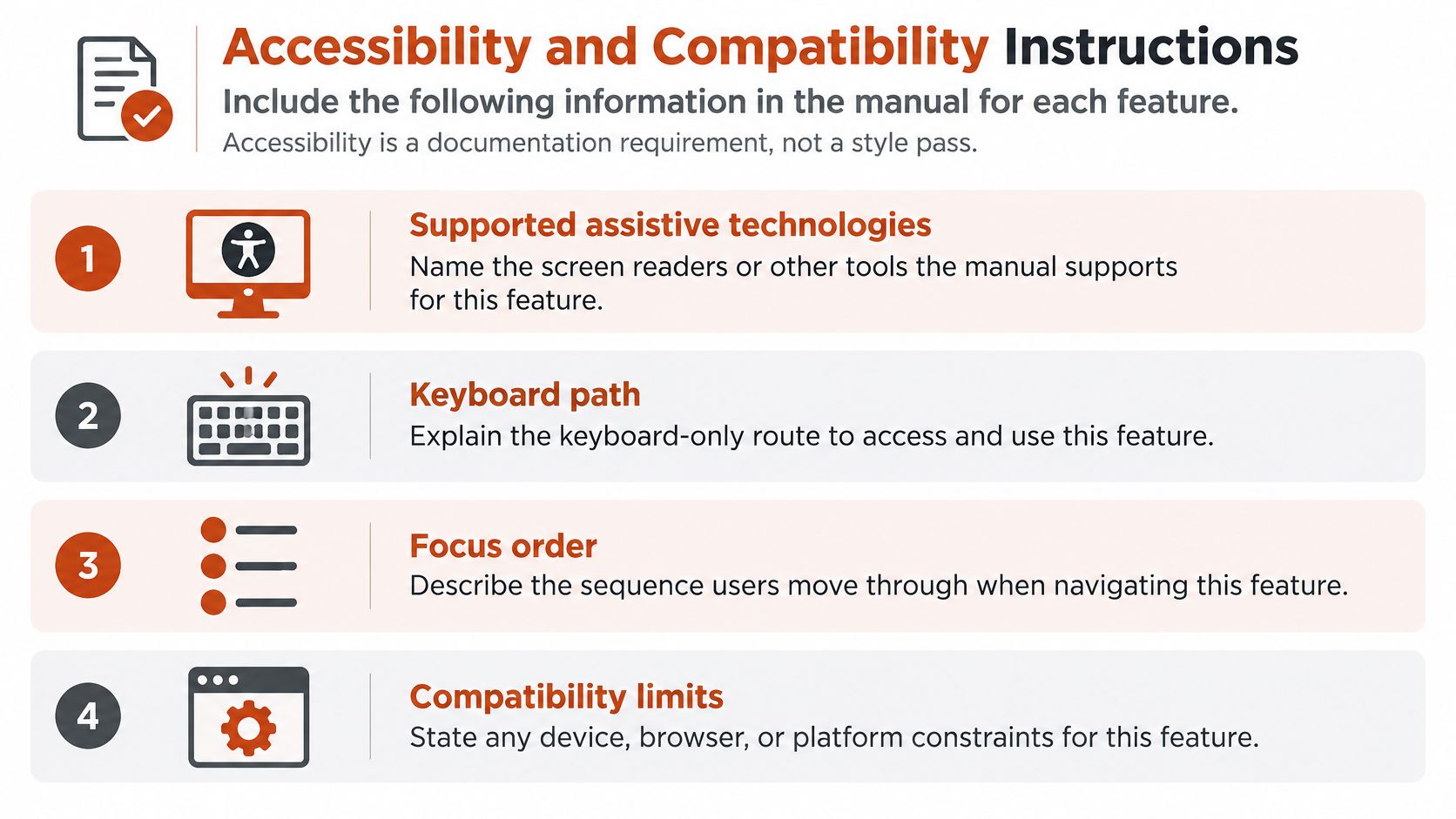
For each relevant feature, specify the assistive technologies and configurations covered, the keyboard route, and expected focus behavior, including dialogs and error states. Add captions or transcripts when a task depends on audiovisual instructions. State compatibility limits, required settings, known conflicts, and any release-specific workarounds.
Use the checklist below to distinguish a feature that exists from a workflow a reader can follow.
Public-sector accessibility obligations depend on the organization and deployment. Identify the applicable requirements before making claims about a product or its documentation. A VPAT describes a product's accessibility conformance; it is not, by itself, evidence of legal deadlines or a guarantee that every user can complete a task.
Run the instructions with the named technology
Acceptance requires a person using the documented assistive technology to locate the feature, enable it, and complete the task from the written steps. Record the product version, test environment, result, and remaining limitations. A mouse-driven demonstration does not establish that keyboard instructions work. Check focus after errors, cancellation from modal dialogs, and return to the original task.
A support claim should describe the tested path, not imply that every device, browser, and assistive-technology combination works.
Speech, keyboard, screen-reader, and privacy-constrained workflows may need separate procedures. If a cloud-dependent feature is unavailable under a privacy restriction, explain how that changes the task. The technical documentation design guide can help organize these paths without hiding prerequisites in visual styling. Layout supports the test; it does not replace it.
Reviewers Traceability and Acceptance Evidence
Assign an author, an independent reviewer, and an approver, with dated records attached to the controlled topic. The reviewer checks correctness against evidence; the approver accepts publication responsibility.
For critical instructions, the documentation evidence matrix is the working artifact. It replaces vague requests to keep documentation updated with explicit relationships someone can inspect.
Connect instructions to proof
Documentation evidence matrix
| Requirement | Source artifact | Product version | Test evidence | Approval | Retirement |
|---|---|---|---|---|---|
| Primary task procedure | Approved user-requirements spec | Current release | Passing task test on that build | Approver and date | Next breaking change |
| Error recovery steps | Support defect or design note | Current release | Reproduced and resolved test | Reviewer and date | When the error code is removed |
| Safety or data limitation | Hazard or risk-control record | Current release | Control verified | Quality approver and date | When the control changes |
| Accessibility path | Accessibility test notes | Current release | Assistive-tech run recorded | Accessibility owner | When the UI control moves |
Attach the accountable instruction owner and the user-facing limitation to each row's record. When retirement is event-based, the owner must convert the trigger into a scheduled retirement date once the relevant change is planned.
Say a dictionary-import procedure points to an approved user requirement. Its evidence records a successful import on the release candidate, the resulting confirmation state, and the approver's decision. A screenshot without the tested build identifier wouldn't establish the same relationship.
For a data-handling limitation, link the instruction to the approved data-flow or risk-control record. If the workflow requires human review before clinical use, preserve that limitation in the released text rather than allowing an editor to remove it as repetitive.
A web-delivery team might use PinDrop to get client approval on staging sites. Treat that signoff as evidence only when it identifies the reviewed state and scope; acceptance of the page layout doesn't establish that technical claims were validated.
Apply the validation pattern proportionately
The FDA software-validation guidance identifies a documented user-requirements specification covering intended use, environment, performance, quality, error handling, startup and shutdown, security, safety-related functions, and objective acceptance criteria, supported by validation protocols, cases, results, and a summary.
For device-software documentation, preserve the connected design, implementation, testing, hazard-analysis, and tested-revision records. Revision history needs dates, version identifiers, and meaningful change summaries, not merely a list of edited filenames.
This isn't a reason to turn an ordinary help site into a regulatory submission. It's a useful discipline for deciding how much proof a consequential instruction needs.
Control machine-assisted changes
Drafts from speech, tickets, code changes, and meeting transcripts remain unapproved material. A human must resolve conflicting statements, check terminology, and reject claims that have no approved source.
Restrict machine-assisted tools to the information and actions appropriate for the task. Preserve the proposed change, the reviewer's disposition, and the approved revision so the team can explain or reverse the edit.
The final test is bidirectional. From a released instruction, reach its supporting evidence; from a failed test or changed control, find every affected page. If either direction requires someone's memory, the release record is incomplete.
Retention Rules and Standard Cross References
Archive design changes when the retention clock begins after market placement rather than document creation. Deleting an old release folder because a newer manual exists can destroy evidence the manufacturer still needs.
Under the European Commission's MDR documentation guidance, Regulation (EU) 2017/745 requires manufacturers to prepare technical documentation before the EU Declaration of Conformity, demonstrate applicable conformity under Annexes II and III, include clinical evaluation, and retain the documentation, declaration, and relevant certificates, including amendments and supplements, for at least 10 years after the last covered device is placed on the market.
Preserve retrievable release records
The record set must be clear, organized, readily searchable, and unambiguous. Operationally, that means stable formats, searchable archives, controlled updates, and a named records owner.
Keep approved historical packages separate from the current working documents. Correcting a live topic shouldn't overwrite the evidence of what users received with an earlier release.
The archive relationships below show why retention belongs in release planning rather than a later storage cleanup.
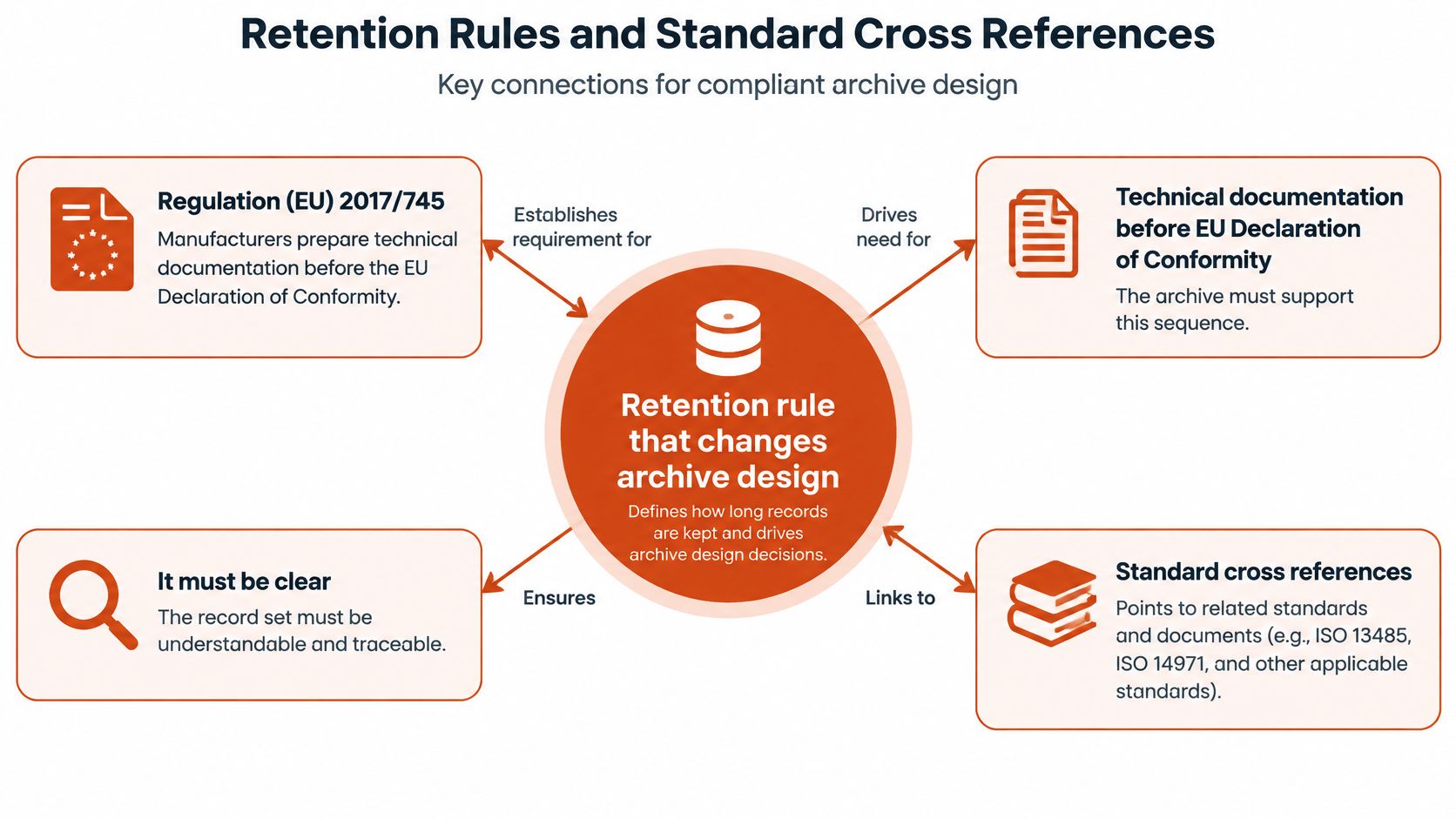
Preserve the declared release, its approved instructions, referenced evidence, and approval history as a connected package. Test retrieval without relying on the original author's account or a local workstation.
A documentation retirement date doesn't automatically authorize destruction. Retirement removes instructions from active use; the applicable retention rule governs how long the historical record remains available.
Healthcare software used around clinical work must not imply MDR or other regulatory compliance unless that status is established. Clinical context alone doesn't prove a product's classification, validation, or conformity.
Open the standard that matches the job
Use this lookup to locate the relevant standard, not to assume every listed standard applies to every product.
Standards to open for each documentation job
| Documentation job | Standard to open | Owning section |
|---|---|---|
| Performance wording and when to use a table | ISO/IEC Directives Part 2 | Content Scope and Testable Wording |
| Representation of technical product documentation | ISO 128 | Formatting Metadata and Version Control |
| Dimensions and tolerances | ISO 129 | Formatting Metadata and Version Control |
| Lettering and part references | ISO 3098 and ISO 6433 | Formatting Metadata and Version Control |
| Electrotechnical documents | IEC 61082-1 | Formatting Metadata and Version Control |
| User information needs and lifecycle maintenance | ISO/IEC/IEEE 26514:2021 | Release Checklist by Requirement Category |
| Retention of technical documentation | Regulation (EU) 2017/745 Annexes II and III, with applicable retention provisions | Retention Rules and Standard Cross References |
The table assigns a documentation job, not a blanket compliance obligation. Your regulatory or quality owner determines applicability and preserves that decision with the release record.
For the operational details of disposal, access, and retention triggers, use the data retention policy guide. Keep the archive decision tied to the applicable obligation rather than applying a convenient storage-expiry setting to every file.
Apply the Checklist Before You Publish
Copy a task procedure rather than a blank page
Template B for a controlled procedure
- Purpose: State the task and the outcome the reader needs.
- Prerequisites: Identify permissions, configuration, files, and required product state.
- Numbered steps: Write the actions in execution order using the interface's actual labels.
- Expected result: Describe the observable confirmation or output.
- Errors and recovery: Explain recognized failures and the supported recovery action.
- Limitations: State conditions in which the procedure won't work or needs another workflow.
Say you're documenting custom-dictionary import for a product that requires a signed-in account. Put that requirement before the steps, along with the supported file format and the release's documented size limit.
The numbered procedure would direct the reader to open dictionary settings, choose the import control, select the supported file, and confirm the operation. Replace those descriptions with the actual shipped control labels before approval.
State the exact confirmation message in the finished procedure. Explain that files above the documented limit fail, including whether the reader should reduce the file, split it, or use another supported recovery path.
Don't invent a file-size limit or confirmation string to make a draft look finished. Missing implementation evidence is a review issue, not an invitation to supply plausible wording.
Make the publication decision explicit
AIDictation can build outlines for operating procedures and research summaries, then expand sparse bullet points into readable documentation teammates can review and comment on. That helps produce a reviewable draft; it doesn't establish that an instruction passed its release test.
Publish only when every applicable checklist row is Pass, the metadata matches the user's build, and every critical instruction has an evidence-matrix row. If a row is Fail, assign a single accountable owner and withhold the affected topic.
If that topic is necessary to install, operate, or safely use the release, withholding it also blocks the release. Don't publish an incomplete operating path because the remaining pages passed.
Pick the release going out next. Fill the metadata headers on its highest-risk topics, assign the missing approvals, and block publication wherever there's no approver or supported version.
AIDictation offers PRD-specific templates and technical vocabulary support to turn spoken requirements into structured drafts. Visit AIDictation to prepare documentation for teammate review, then apply the same source, version, test, and approval gates before publishing.
Frequently Asked Questions
What does Technical Documentation Requirements Checklist cover?
A full set of manuals, API references, READMEs, release notes, and FAQs can still be unreleasable. The popular advice to create every document type misses the harder question: can the team prove that the instructions are correct for the product it's about to ship?
Who should read Technical Documentation Requirements Checklist?
Technical Documentation Requirements Checklist is most useful for readers who want clear, practical guidance and a faster path to the main takeaways without guessing what matters most.
What are the main takeaways from Technical Documentation Requirements Checklist?
Key topics include Table of Contents, What Technical Documentation Requirements Mean, Define conditions rather than deliverables.
Ready to try AI Dictation?
Experience fast voice-to-text on your device. Free to download.
Download Free