How to Master Proper Name Pronunciation at Work
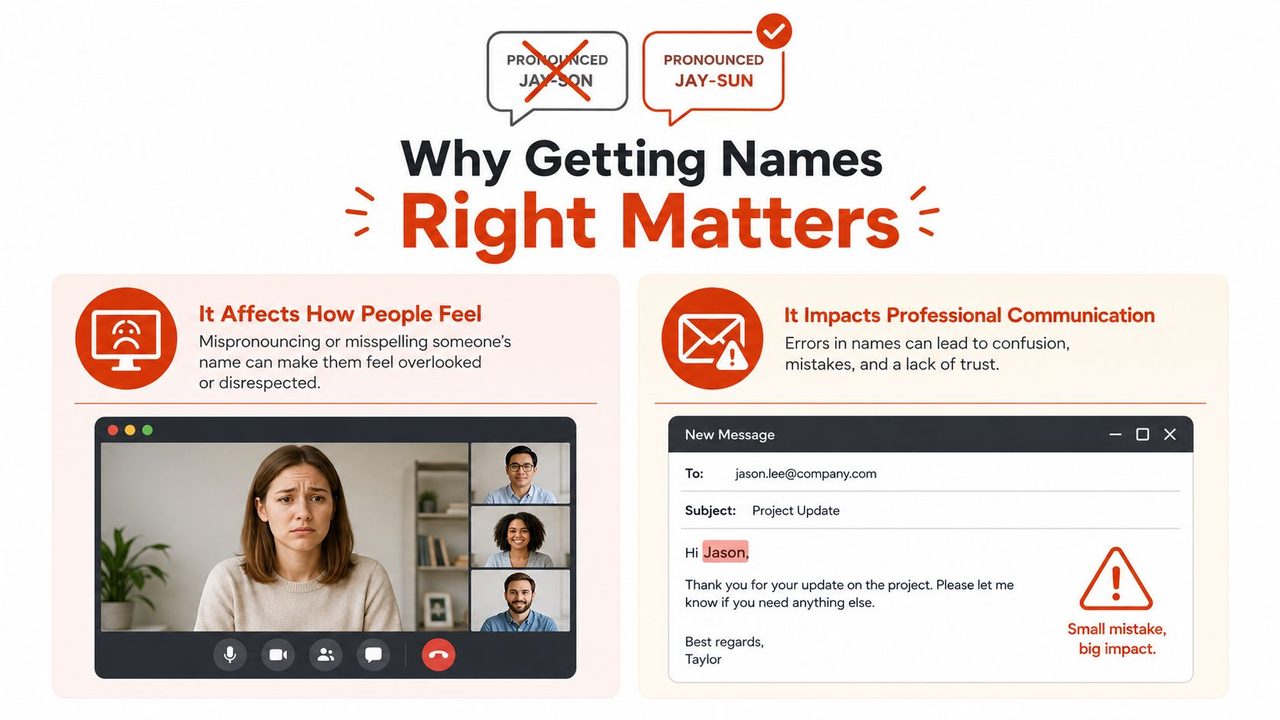
You've probably had the moment already. Someone joins a video call, the room goes quiet, and you realize you're about to say a name you've only read once. Or you open a customer email and see that a person's name is spelled right but still feels awkward on your tongue, so you sidestep it with “Hi there” and hope nobody notices.
That's not a small etiquette issue. In workplace-focused data cited by MIT Sloan Management Review, 38% of respondents said their name had been mispronounced at work, and 74% said they had struggled to pronounce coworkers' names well enough that it affected how they interacted with them. The same piece notes that some employees avoid introducing, talking to, or calling on colleagues when they're unsure how to say a name correctly. A separate pronunciation tool from Race Equality Matters reports that 73% of people have had their name mispronounced, which makes the problem look less like a rare social slip and more like a routine workflow failure.
The fix isn't charisma. It's process.
Table of Contents
- Why Getting Names Right Matters More Than You Think
- A Four-Stage Workflow for Learning Any Name
- Writing Phonetic Notes You'll Use
- Choosing Tools That Fit How You Work
- Adding Names to Your Dictation App
- Handling Multiple Legitimate Pronunciations
- Your One-Page Personal Pronunciation Habit
Why Getting Names Right Matters More Than You Think
The awkward part usually isn't the first mistake. It's the second one, after you've already realized the first was wrong. You hesitate before speaking up in the meeting, and that hesitation changes the rest of the conversation. In some teams, that turns into avoidance, where people stop using the name at all.
The more practical reading is better than the moral reading. Proper name pronunciation isn't just about being thoughtful, it affects whether people get introduced cleanly, whether support calls feel personal, and whether interviews move with confidence instead of friction. If a name is hard to say quickly, the friction shows up in real work, not just in manners.
The cost is behavioral, not just emotional
The MIT Sloan Management Review piece matters because it connects pronunciation difficulty to behavior. People don't only feel embarrassed, they act differently. They introduce less, call on people less, and sometimes avoid interaction altogether when they're unsure.
That's why this belongs in the same bucket as message templates, CRM hygiene, or meeting prep. A name you can say smoothly changes the shape of a conversation. A name you keep dodging forces extra effort into every exchange.
Practical rule: If you're hesitating on a name, don't improvise around it. Ask once, write it down, and make sure the correction survives beyond the current meeting.
If you want a reminder that names carry identity, not just spelling, browse Celtic girl names for 2026 and notice how quickly pronunciation depends on origin, dialect, and convention rather than letters alone.
The skill gets easier with repetition
The encouraging part is that pronunciation is learnable. The issue is usually not that people “aren't good with names.” It's that they're trying to rely on memory alone, which is a weak system for anything you hear once in a noisy meeting or fast-moving call.
Treat each new name as a small onboarding task. The payoff shows up almost immediately, because the next interaction sounds calmer, and the other person can tell you made room for them instead of their name becoming a speed bump. That's a simple professional advantage, and it compounds fast.
A Four-Stage Workflow for Learning Any Name
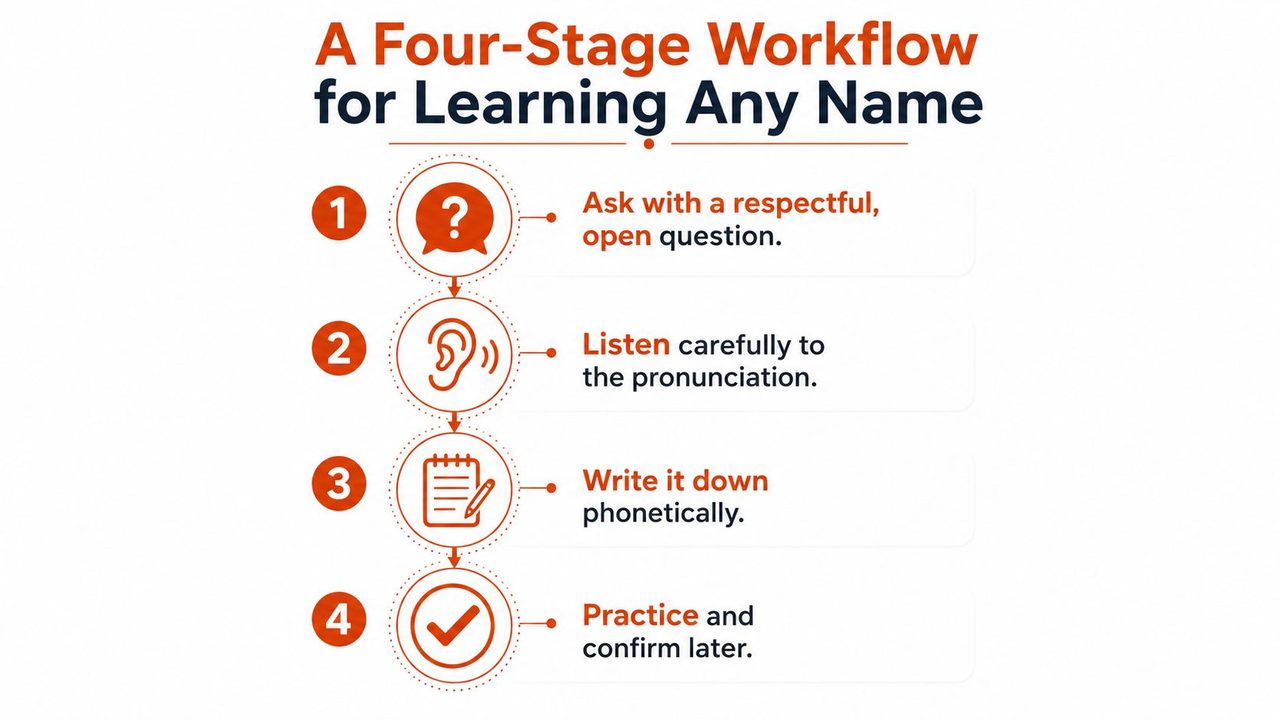
The most reliable way to handle a new name is to stop treating it like a one-time listen and start treating it like a mini workflow. The pattern is simple enough to use on the fly, and it scales from a one-off introduction to a whole client team.
Ask, then listen like it matters
Start with a direct request. “Could you say your name for me once?” works because it's short, respectful, and doesn't make the other person perform for you. If you need to soften it, say, “I want to make sure I get your name right, could you say it once for me?”
Avoid the apologetic spiral. “I'm terrible at names” sounds humble, but it shifts attention onto you and can make the moment heavier than it needs to be. A better version is simple and specific.
“Could you say your name one more time? I want to make sure I've got it right.”
If the person answers quickly, don't pretend you heard more than you did. Ask again if needed, and say, “Thanks, I'm going to write that down exactly.” That sentence buys you time and signals that you're taking it seriously.
Record it where you'll actually see it
Don't trust memory as the storage system. Put the name in a note, a contact record, a CRM field, or your dictation app's custom dictionary, whichever one you revisit during the week. If the note lives only in your head, you'll be back at square one the next time the meeting starts.
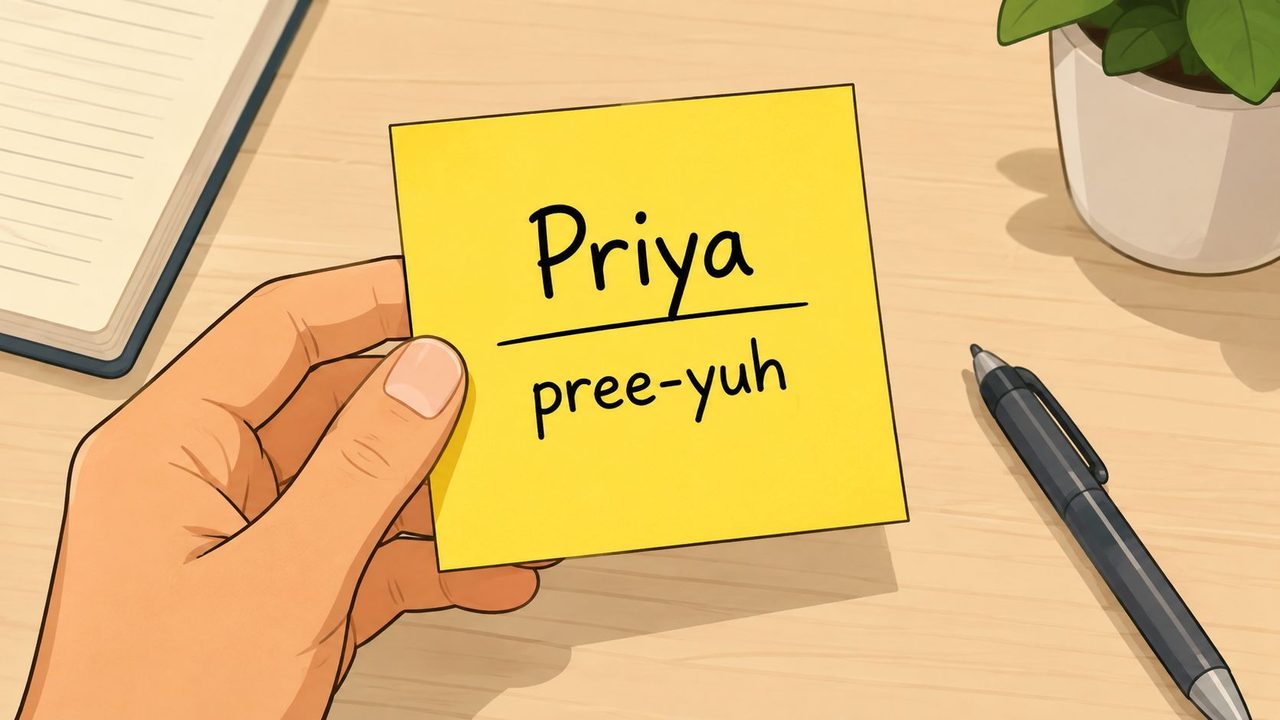
The easiest habit is to pair the pronunciation with a usage cue. Write, “Priya, PREE-yuh, account review,” not just “Priya.” A reminder that includes context is much easier to recover under pressure.
Repeat it out loud before the next interaction
Silent recognition isn't enough. Say the name twice before you need it again. One repetition is for the ear, the second is for the mouth. If you can say it cleanly before the meeting, you're far less likely to freeze in the room.
Reinforce it in the follow-up
Use the name naturally in the next message or call. “Great meeting you, Priya” is better than overexplaining the correction or making a production out of it. The goal is to make the correct version familiar enough that it sticks.
If your team works with named entities, structured records, or repeated references, the same discipline shows up in clinical NLP with OMOPHub, where consistency across names and terms matters just as much as it does in live conversation.
Writing Phonetic Notes You'll Use
The best pronunciation note is the one you can read in half a second while someone is walking into the room. That means it should stay short, clear, and written in the way you hear and say words, not in a perfect phonetics system you will never open again.
Use a simple template
A workable note can be this:
Spelling. Your phonetic version. Stressed syllable in caps. One anchor word if needed.
So a note might look like:
Siobhan, shih-VAHN, second syllable stressed, “sha-VON”
That gives you enough structure to help your mouth remember the shape of the word without turning the note into homework. Skip extra symbols unless you already know how to read them fast.
Make the note match your own dialect
The goal is repeatable speech, not linguistic purity. If your version of “e” sounds different from mine, use the version that helps you say the name correctly in your accent.
A few useful examples:
- Aoife becomes something like EE-fa, with the first syllable carrying the stress.
- Nguyen often needs a clipped reminder, like WIN or ngwin, depending on what helps you move from letters to sound without overthinking.
- Siobhan can become shih-VAHN, which is easier to recover than a raw spelling alone.
The job of the note is to trigger the right mouth shape. It does not need to impress a linguist.
Practical rule: If your note takes longer to read than the name takes to say, it is too complicated.
Put the note where the name lives
Add the pronunciation to the contact card, CRM record, meeting prep doc, or whatever system already holds the person's details. That way, the note travels with the relationship. A sticky note is fine for the first day, but it should not be the final storage layer.
For people who already dictate heavily, keeping specialized names in one place helps a lot. AIDictation's specialized vocabulary guide covers the same practical problem for names, technical terms, and anything your default speech engine tends to flatten.
Choosing Tools That Fit How You Work
Different jobs need different support. A recruiter doesn't need the same setup as a clinician, and a support lead doesn't need the same workflow as a product manager. The right choice depends on whether you need a one-time lookup, repeated dictation, or shared team continuity.
| Tool Type | Best For | Limits |
|---|---|---|
| Pronunciation websites and audio databases | One-off lookups before a call or event | Good for quick confirmation, but they're often static and don't travel into your daily tools |
| Dictation apps with custom dictionaries | Repeated use in email, notes, and documentation | They help with entry and recall, but only if you keep the dictionary maintained |
| CRM or contact-card pronunciation fields | Team visibility and handoff across departments | Useful only if people actually check the record before speaking |
A simple way to think about it is this. Lookup tools answer, “How do I say this once?” Dictation dictionaries answer, “How do I keep saying this correctly?” Contact records answer, “How do I make sure everyone else says it the same way?”
The biggest mistake is using only one layer. A pronunciation site might help you today, but if you don't record the result anywhere, you'll search again next month. A CRM note helps the team, but not if your speech engine still mangles the name in your draft. That's why the stack matters.
If you're trying to understand the mechanics behind speech tools before you choose one, the how voice recognition software works explainer is a good companion, especially when you're deciding where a pronunciation fix should live.
For teams, the practical standard is to keep the lookup, the note, and the shared record aligned. That way, the person who speaks the name, the person who types it, and the person who inherits the relationship all see the same pronunciation cue.
Adding Names to Your Dictation App
If you dictate every day, a custom dictionary keeps a small naming mistake from slowing down the whole routine. The app can understand the rest of your sentence and still stumble on the one name that matters most. A named entry fixes that once, then keeps doing the work in the background.
AIDictation handles this by letting you add names to a custom dictionary once, then recognizing them automatically in context. Its custom dictionary for names and technical terms and context rules help the app adapt to the way you write in email, chat, and documentation, without forcing you to correct the same person's name over and over. It is a practical example because the setup is simple enough to finish in one sitting, and it matches the same habit you want across daily dictation.
Set the entry once, then test it in context
Open the dictionary in your app, add the name exactly as you want it to appear, then add a phonetic hint if the interface allows it. Use the hint to steer recognition toward the shape of the word, not to build a second puzzle for yourself later.
After that, dictate a sentence that uses the name in a real context. “I'll send Priya the revised draft” gives you more signal than dictating the name by itself. Context shows whether the engine handles the name naturally inside the kind of sentence you write.
If the app supports app-specific formatting, pair the name with the tone you usually use in that environment. A support reply and a Slack message do not need the same register, even when the name stays the same. The goal is not just correct recognition, it is correct handling where the name appears.
Keep the setup light
Do not build a giant list of every person you have ever met. Start with the names you use repeatedly, the clients you reply to often, and the terms that keep getting misrecognized. That gives you the biggest return with the least friction.
A few practical habits help:
- Add the person immediately after the first correct pronunciation. Waiting until later is how the detail gets lost.
- Test with a full sentence, not a single word. Speech engines behave differently in context.
- Review names during weekly cleanup. If a name still trips the system, fix the entry instead of tolerating the error.
For a concrete setup path, the set up dictionary guide gives you a clear starting point. If you are comparing apps because privacy or offline use matters, a practical offline voice to text app can be worth evaluating alongside your dictation workflow.
Handling Multiple Legitimate Pronunciations
A single correct answer feels tidy. Names do not always stay tidy. Family usage, regional patterns, and language-of-origin conventions can all produce more than one legitimate pronunciation, and treating that as a problem adds pressure where none is needed.
The more useful question is simple, which pronunciation should I use here? That is a context decision, not a purity test.
Ask for preference without making it heavy
A direct script works well, “What pronunciation do you prefer?” If you want to be more specific, say, “How do you say your name, and is there a version you prefer in meetings?”
That wording gives the person room to mention a family or regional variant without turning the exchange into a lesson. Some people are comfortable with more than one version. Others have a clear preference because one form is what they use at work, while another is what relatives say at home.
Default in a sensible order
If you do not know which version to use, start with the person's stated preference. If they have not given one, use the origin-language or family convention you were told. If that still is not clear, use the local majority usage you hear in that setting.
That may not be perfect, but it is practical. It keeps you from freezing over a false idea of correctness, and it respects how names travel across regions and communities.
If someone corrects you, update the note immediately and move on.
That part matters. Do not leave the correction floating in conversation only. Fold it into your contact record, your dictation dictionary, or your prep notes so the next interaction starts cleaner than the last one.
The goal is straightforward: make sure the person in front of you hears their name used with care, and used consistently.
Your One-Page Personal Pronunciation Habit
A durable habit doesn't need to be fancy. It needs to be small enough that you'll do it on a busy Tuesday. Keep one page, one note card, or one contact template with the same four fields every time: name, pronunciation, context, and source of confirmation.
For the first week, use this checklist:
- Ask once. Get the person's preferred pronunciation in their own words.
- Write it immediately. Use a phonetic version you can read at a glance.
- Practice twice. Say it out loud before the next meeting or reply.
- Reinforce it once. Use the name naturally in follow-up communication.
A sample note card can be as plain as this:
Priya
PREE-yuh
Work calls, email
Confirmed in intro meeting
If you've been avoiding a few names, pull them into this same system this week. The habit is simple, but it changes how you show up in meetings, support calls, interviews, and every place where a name has to land cleanly.
AIDictation helps turn that habit into something you can keep. Its custom dictionary and context rules give names a place to live inside your everyday dictation workflow, instead of forcing you to rely on memory. If you want cleaner drafts and fewer name slips in the same tool, visit AIDictation and see how it fits into your setup.
Frequently Asked Questions
What does How to Master Proper Name Pronunciation at Work cover?
You've probably had the moment already. Someone joins a video call, the room goes quiet, and you realize you're about to say a name you've only read once.
Who should read How to Master Proper Name Pronunciation at Work?
How to Master Proper Name Pronunciation at Work is most useful for readers who want clear, practical guidance and a faster path to the main takeaways without guessing what matters most.
What are the main takeaways from How to Master Proper Name Pronunciation at Work?
Key topics include Table of Contents, Why Getting Names Right Matters More Than You Think, The cost is behavioral, not just emotional.
Ready to try AI Dictation?
Experience fast voice-to-text on your device. Free to download.
Download FreeRelated Posts
Email Dictation Software: What It Is and How to Choose
Learn what email dictation software is, how it works, and how to pick the right one. Covers accuracy, privacy, HIPAA, accents, and real buyer checklists.
Free Audio to Text Tools: 10 Options Compared for 2026
Compare 10 free audio to text tools: built-in recorders, free apps, offline models, and cloud APIs, with privacy and accuracy trade-offs.
Verbal Ink Transcription Workflows Today
Explore verbal ink transcription workflows, accuracy benchmarks, and how modern AI dictation tools compare to traditional human transcription services.