How Does Voice Recognition Software Work?
You're probably using voice recognition already. You tap the mic in a notes app, dictate a Slack reply while walking, or speak a rough draft of an email and expect clean text to appear. When it works, it feels effortless. When it doesn't, the mistakes feel strangely human. The software heard something, guessed something else, and left you to clean up the mess.
That gap matters more than generally assumed. If you understand how voice recognition software works, you make better product decisions, choose better tools, and set better expectations for accuracy, privacy, and editing effort. A PM writing specs, a clinician dictating notes, and a developer talking through documentation all hit the same question eventually: why does the transcript look the way it does?
A lot of modern tools combine transcription with translation and post-processing, which is why devices like a smart recorder with translation can feel much more useful than a plain recorder. The interesting part isn't just that they capture speech. It's how they turn sound into something readable and usable.
Table of Contents
- From Spoken Words to Digital Text
- Step 1 Capturing and Preparing Your Voice
- Step 2 The Two Brains of Speech Recognition
- Step 3 Finding the Right Words in a Sea of Possibilities
- Step 4 From Raw Transcript to Polished Text
- The Tradeoff Local vs Cloud Processing
- Conclusion How Modern Dictation Is More Than Just Words
From Spoken Words to Digital Text
Say you dictate, “Can you send the roadmap update after lunch?” and the sentence appears on screen almost immediately. It looks simple from the outside. Under the hood, the software is doing several different jobs in sequence, and each one maps to a product feature you can evaluate.
First, it captures pressure waves from your voice through a microphone. Then it converts those waves into digital data. After that, the system turns the sound into a form a model can analyze, guesses which sounds you made, uses language context to decide which words make sense, and finally cleans up the output so it reads like writing instead of raw speech.
That's why two dictation products can feel very different even if both claim to do speech-to-text. One might be good at hearing words but poor at punctuation. Another might transcribe quickly but struggle with names, accents, or spoken corrections. A more complete system adds cleanup, formatting, and app-specific behavior so the final result needs less editing.
Practical rule: Don't judge voice recognition only by whether it “hears” you. Judge it by how much work you still have to do after the transcript appears.
For product teams, this is the useful frame. Voice recognition isn't a single feature. It's a pipeline. If one stage is weak, users experience the whole thing as inaccurate, even when the actual issue is formatting, context, or cleanup rather than sound detection itself.
Step 1 Capturing and Preparing Your Voice
Your microphone is only the starting point
A good mental model is a photographer setting up a shot. The camera doesn't just point at a scene and hope for the best. It deals with lighting, focus, framing, and noise before you ever look at the final image. Voice recognition starts the same way.
Your speech begins as analog sound waves moving through the air. The microphone captures those waves and converts them into an electrical signal. Then an analog-to-digital converter turns that signal into numbers a computer can work with.
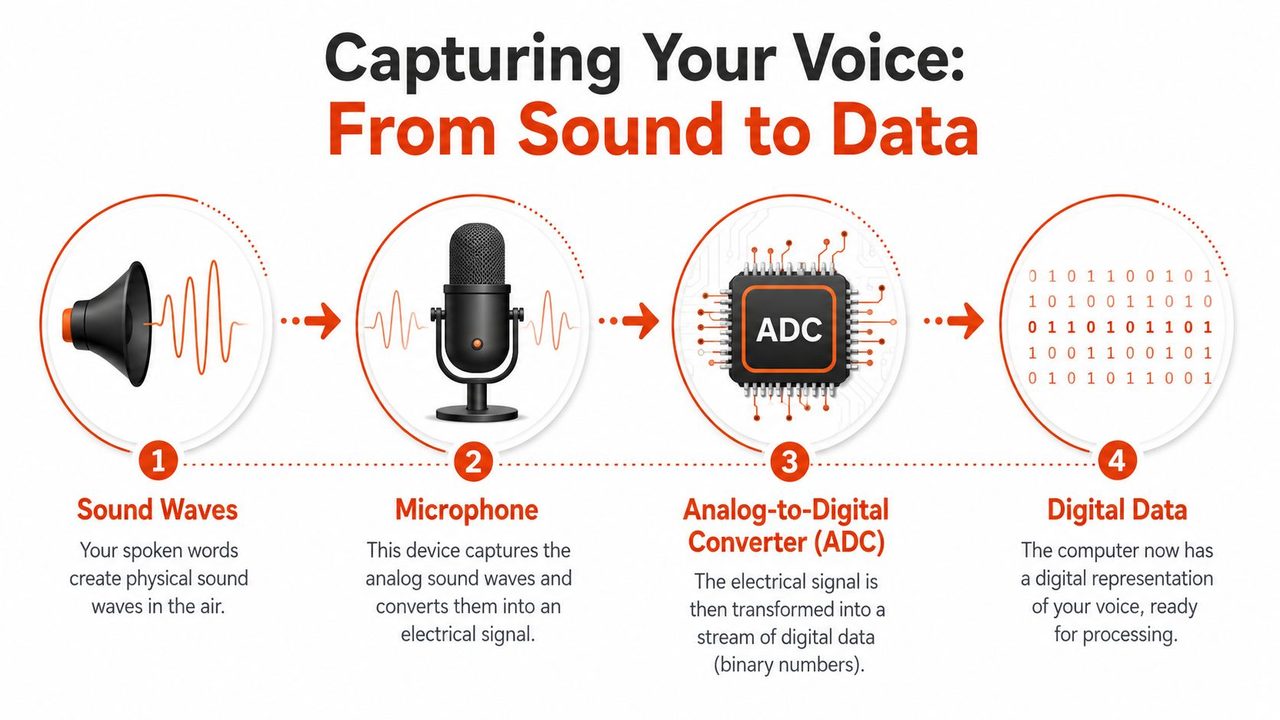
Before any AI model tries to recognize words, the system usually has to make the audio easier to interpret. That can include reducing steady background noise, handling volume differences, and isolating the parts of the signal that carry speech. If your source audio is messy, cleanup at this stage matters a lot. If you want a product-focused look at that part of the workflow, AIDictation's post on AI audio cleanup is a useful reference.
What feature extraction actually means
This is the part many readers find fuzzy, because “feature extraction” sounds abstract. In plain English, the software stops treating your voice like a continuous stream and starts slicing it into tiny overlapping pieces so it can inspect them one at a time.
Modern systems process audio in 25-millisecond windows and convert the result into a log-Mel spectrogram, a visual map of which frequencies are strong at each moment, before a neural network predicts the most likely word sequence. The same process is described as breaking speech into overlapping acoustic frames lasting 1/25 to 1/50 of a second, analyzing them with Fast Fourier Transform, and generating spectrograms that show changing frequency intensity over time. The system then adds punctuation, capitalization, and speaker labels after the raw prediction stage, with reported speech recognition accuracy of 90-95% and voice recognition tools reaching up to 98% in some cases, according to Deepgram's voice recognition overview.
If you've never seen a spectrogram, think of sheet music for sound. It doesn't contain the meaning of the sentence. It contains the patterns the model can read. Vowels, consonants, pauses, and emphasis leave different shapes. The model learns to associate those patterns with likely speech units.
A short way to think about it:
- Raw audio is the live performance.
- Digital samples are the recording saved as numbers.
- Features are the notes the software highlights for analysis.
- Spectrograms are the visual summary the model can “read.”
Clean recognition starts before word prediction. If the software builds a poor acoustic snapshot, every later step has less to work with.
Step 2 The Two Brains of Speech Recognition
The listener and the writer
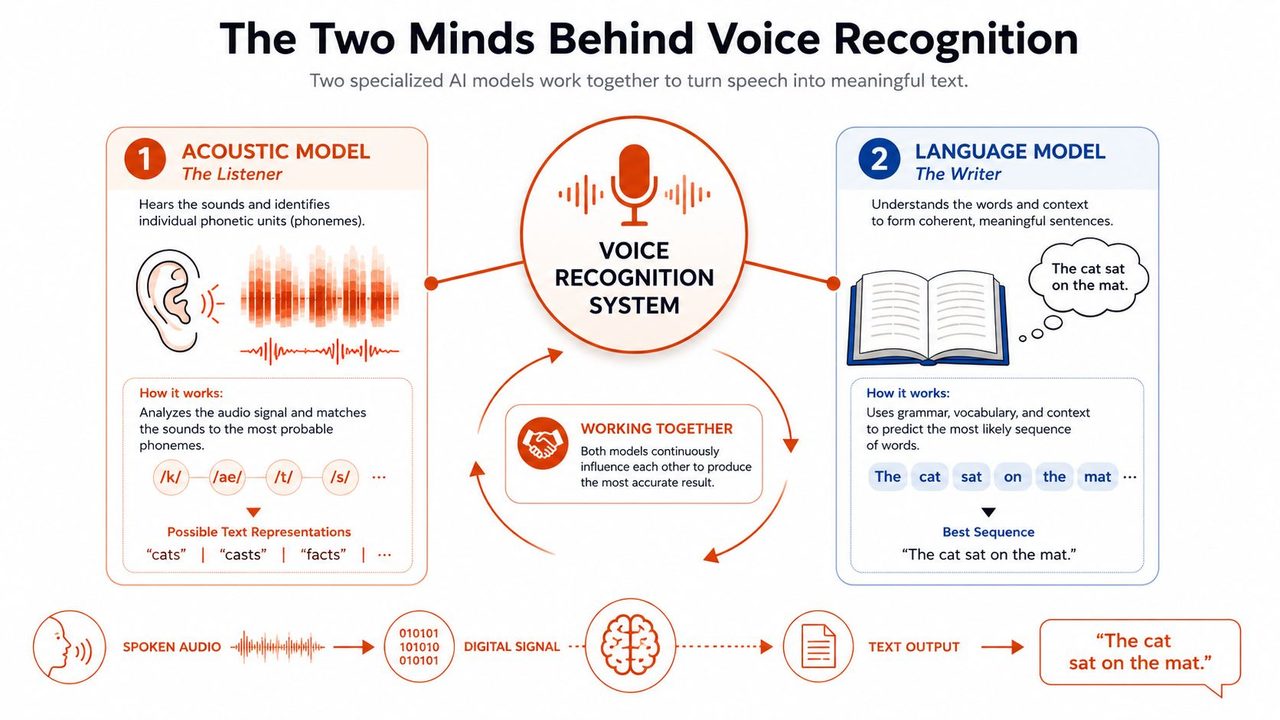
The easiest way to understand how does voice recognition software work is to stop thinking of it as one giant brain. It's closer to a two-person translation team.
One person is the listener. This is the acoustic model. It focuses on the sound itself and breaks the audio into phonemes, the small speech sound units that distinguish words. The other person is the writer. This is the language model. It looks at context and decides which word sequence is most likely to make sense.
According to Explain that Stuff's voice recognition explanation, voice recognition relies on these two core models: acoustic modeling, which decomposes audio signals into phonemes, and language modeling, which uses statistical probability to determine the most likely word sequences based on context.
That division is why a system can recover from imperfect audio. If the acoustic model hears something ambiguous, the language model can still rescue the sentence. Consider a classic example: a phrase that sounds like “wreck a nice beach.” The acoustic side may find several sound-compatible options. The language side notices that “recognize speech” is much more plausible in context.
Here's a simple comparison:
| Model | Main job | Human analogy | Failure mode |
|---|---|---|---|
| Acoustic model | Detects likely speech sounds | A careful phonetician | Hears the wrong sound in noisy audio |
| Language model | Chooses likely word sequences | A skilled editor | Picks words that sound right but miss user intent |
Why modern systems feel smarter
Older systems often depended more heavily on handcrafted rules and narrower matching strategies. Modern systems use deep learning and neural networks to handle a wider variety of accents, speaking styles, and noisy environments. That doesn't make them magical. It makes them better at combining weak signals into a strong guess.
The phonetic dictionary idea is useful here too. The acoustic side compares extracted features to known sound fragments associated with words, while the language side estimates what usually follows what. That pair works much better than either model alone.
A short video can help make that collaboration more concrete:
The acoustic model asks, “What sounds were spoken?” The language model asks, “What sentence would a person probably mean here?”
That's also where product choices show up. If your users dictate technical terms, names, or domain-specific phrases, the language side needs help from vocabulary controls and context. If they work in loud environments, the acoustic side needs stronger input handling. A strong voice product balances both.
Step 3 Finding the Right Words in a Sea of Possibilities
Why one sound can map to many sentences
After the two models do their work, the system still doesn't have a single guaranteed answer. It has a set of possibilities with different confidence levels. That's the hidden complexity behind transcripts that appear almost instantly.
Think of the software standing in front of a maze with thousands of branching paths. Every moment of audio opens several options. Some branches represent different phoneme interpretations. Others represent different word boundaries or sentence completions. The challenge isn't only hearing the audio. It's choosing the best overall sentence without testing every possible path to the end.
That's why the phrase-level result matters more than the word-level guess. A transcript can contain words that each seemed reasonable on their own but form a sentence no one would say.
For teams thinking beyond transcription, this is also where adjacent language systems become relevant. If you want a broader view of how text gets interpreted after recognition, this guide to understanding NLP for mid-sized organizations is helpful because it separates speech-to-text from later language understanding tasks.
How the search stays fast
Modern recognizers use decoding strategies that keep only the most promising paths as they go. You'll often hear this described as a search problem, and that's the right mental model. The system continuously scores candidate sequences and drops the weak ones early so it can respond in near real time.
A simple way to picture it:
- The acoustic side proposes sound-level candidates.
- The language side re-scores them using context.
- The decoder keeps the strongest options alive.
- The system outputs the highest-probability sequence it can justify.
This is also where specialized vocabulary can make a visible difference. If your users say product names, client names, medical terms, or internal acronyms, the search space gets easier to manage when the system knows those terms are valid. A practical example is a custom dictionary or domain adaptation layer such as the ideas discussed in AIDictation's guide to specialized vocabulary.
The key takeaway is simple. Speech recognition doesn't “hear one sentence.” It evaluates many candidate sentences and selects the one that best fits both sound and context.
Step 4 From Raw Transcript to Polished Text
Raw output is not finished writing
A raw transcript is often closer to notes from a hurried meeting than to something you'd send to a customer or add to a medical chart. It may contain missing punctuation, uneven capitalization, repeated phrases, filler words, and awkward sentence boundaries.
That's why post-processing matters so much. In many products, post-processing enables the transcript to become usable writing. The system adds punctuation and capitalization, restores sentence structure, labels speakers when needed, and sometimes reformats the content based on intent. “Bullet one,” “next point,” and “follow-up action” can become an actual list instead of a literal transcript of spoken cues.
This is the point where a modern dictation app can feel less like a recorder and more like a writing layer. For example, AIDictation combines on-device recognition with cloud-based cleanup options that can remove filler words, improve grammar and punctuation, and format spoken content into cleaner paragraphs, lists, or email-ready text. That's not a different problem from speech recognition. It's the part users experience directly when they copy the result into their workflow.
Why spoken self-corrections are so hard
People don't speak in clean final drafts. They revise in place. They say, “Send it Thursday, rather Friday morning,” or “The issue is in billing, sorry, in onboarding.” A lot of articles about voice recognition skip this, but professional users run into it constantly.
That matters because spoken self-corrections are common in high-stakes workflows. DeepScribe notes that 68% of medical dictations include verbal self-corrections, while only 12% of commercial ASR engines explicitly model these patterns, which helps explain why these edits often create transcription errors in clinical notes, as described in its medical voice recognition analysis.
Here's what post-processing often needs to handle:
- Filler removal like “um,” “uh,” and false starts.
- Intent cleanup when users restart a sentence midway through.
- Formatting decisions such as turning spoken structure into readable structure.
- Correction handling when the speaker verbally replaces an earlier phrase.
A transcript that preserves every spoken stumble may be accurate to the audio, but inaccurate to the user's intent.
That's an important product distinction. Some systems optimize for verbatim output. Others optimize for final usable text. Neither is always right. It depends on whether your user needs an evidentiary record, a draft document, or a clean message ready to send.
The Tradeoff Local vs Cloud Processing
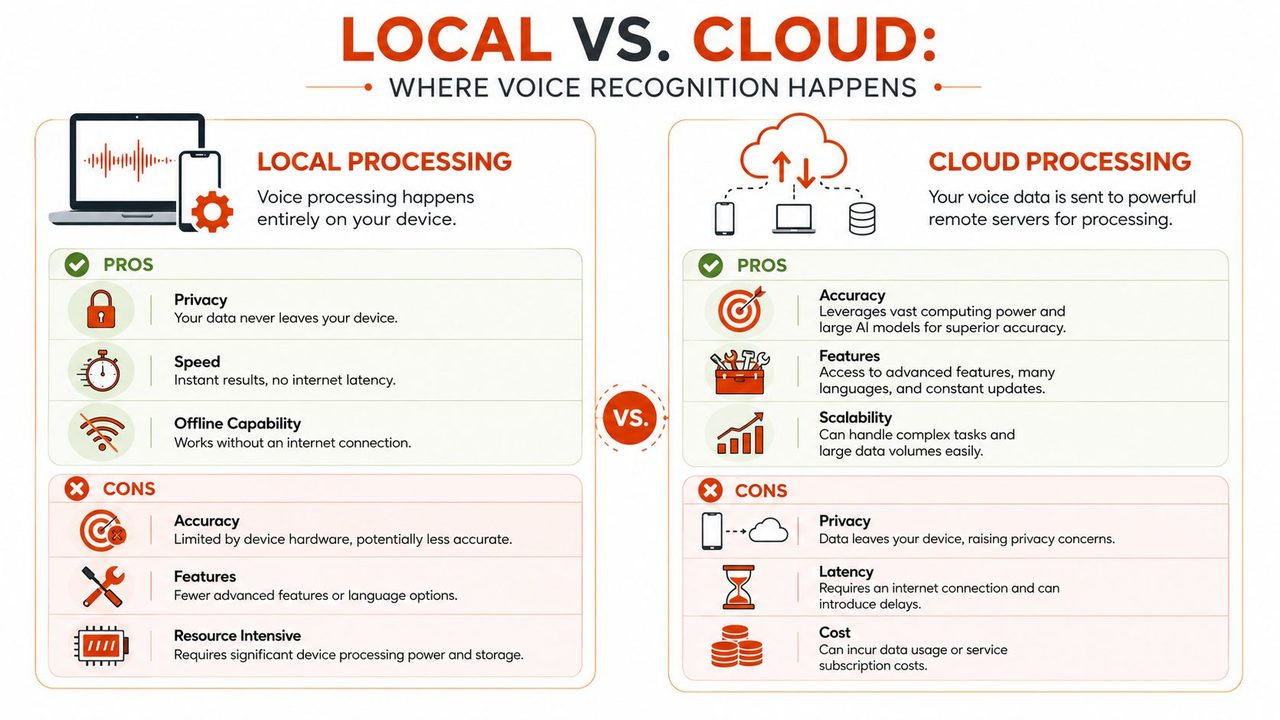
What happens on your device
When processing happens locally, your device does the recognition work itself. That usually means lower latency, offline access, and tighter privacy because the audio doesn't need to leave your machine.
For someone dictating in a hospital, on a flight, or in a workspace with strict confidentiality rules, that tradeoff can be the deciding factor. Local processing also feels immediate. You speak, and the text appears without waiting on network conditions.
Local mode is often a good fit when these priorities are highest:
- Privacy first because sensitive speech shouldn't leave the device.
- Offline reliability when internet access is poor or unavailable.
- Fast interaction for short commands, notes, and drafts.
If you want a deeper product-level discussion of that setup, AIDictation has a useful article on offline speech recognition.
What happens in the cloud
Cloud processing sends audio to remote servers, where larger models can do more advanced recognition and cleanup. That can enable richer formatting, stronger language understanding, and broader support for demanding use cases.
The tradeoff is straightforward. You gain model capacity and advanced features, but you also depend on connectivity and accept that audio leaves the device for processing. For some teams, that's fine. For others, it's a policy issue, not just a preference.
A quick side-by-side view helps:
| Option | Strengths | Tradeoffs |
|---|---|---|
| Local processing | Privacy, speed, offline use | Fewer advanced features on some devices |
| Cloud processing | More powerful models, richer cleanup, ongoing improvements | Requires internet, raises data handling questions |
Why hybrid systems exist
A hybrid model exists because users want both. They want local privacy when needed and stronger cloud cleanup when available. Product-wise, that's the most practical response to the tradeoff.
In a hybrid design, the app can use on-device recognition for immediate transcription and switch to cloud services for heavier cleanup or formatting when the user permits it. Some products package that as local, cloud, and automatic modes so the user doesn't have to think about infrastructure every time they dictate.
Choose local when the primary risk is data exposure. Choose cloud when the primary cost is editing time.
That framing is usually more useful than abstract discussions of architecture. Users don't buy “edge inference” or “server-side decoding.” They buy privacy, speed, readability, and less cleanup work.
Conclusion How Modern Dictation Is More Than Just Words
Voice recognition starts with sound waves and ends, ideally, with writing you can use. In between, the system captures audio, converts it into digital data, extracts acoustic features, predicts likely sounds, uses language context to choose words, and then cleans the result into something readable.
That's why the answer to “how does voice recognition software work” isn't just “it turns speech into text.” Good systems do more than transcription. They handle ambiguity, formatting, corrections, and the messy reality of how people speak. The user experience depends on the whole chain, not just the recognition engine.
For PMs and teams evaluating dictation tools, that's the practical lens. Ask where the processing happens. Ask how the product handles domain vocabulary. Ask whether it gives you verbatim transcripts or polished writing. Ask what happens when the speaker changes their mind halfway through a sentence.
If you're also looking at where speech interfaces go next, this overview of conversational AI is a useful companion because it shows what happens after voice becomes text and starts driving interaction.
The strongest modern dictation tools don't just hear words. They help finish the writing job.
If you want to try a macOS dictation app built around that full pipeline, AIDictation offers local, cloud, and automatic modes for turning spoken input into cleaner, ready-to-use text.
Frequently Asked Questions
What does How Does Voice Recognition Software Work? cover?
You're probably using voice recognition already. You tap the mic in a notes app, dictate a Slack reply while walking, or speak a rough draft of an email and expect clean text to appear.
Who should read How Does Voice Recognition Software Work??
How Does Voice Recognition Software Work? is most useful for readers who want clear, practical guidance and a faster path to the main takeaways without guessing what matters most.
What are the main takeaways from How Does Voice Recognition Software Work??
Key topics include Table of Contents, From Spoken Words to Digital Text, Step 1 Capturing and Preparing Your Voice.
Ready to try AI Dictation?
Experience fast voice-to-text on your device. Free to download.
Download FreeRelated Posts
Free Audio to Text Tools: 10 Options Compared for 2026
Compare 10 free audio to text tools: built-in recorders, free apps, offline models, and cloud APIs, with privacy and accuracy trade-offs.
Verbal Ink Transcription Workflows Today
Explore verbal ink transcription workflows, accuracy benchmarks, and how modern AI dictation tools compare to traditional human transcription services.
Apple Voice Recognition Software: Key Pros and Cons
Learn how Apple voice recognition software turns speech into text on your device, where it excels, and what tasks still challenge it in 2026.