Knowledge Worker Productivity: A Practical Playbook
Average knowledge workers spend only 30 of a 40-hour week on productive work, according to APQC. The rest gets chewed up by internal communication, searching for information, and unnecessary meetings, which tells you the problem is not laziness. It's work design.
That's the blunt truth behind knowledge worker productivity. Many teams keep telling people to focus harder while the calendar, the tool stack, and the approval chain keep grinding output down. If you want more shipped work, you don't start with motivational posters or another time-management seminar. You start by cutting friction.
Table of Contents
- What Knowledge Worker Productivity Actually Means
- How to Measure Productivity Without Lying to Yourself
- Identifying Where the Lost Hours Go
- Redesigning Work Before Redesigning People
- Async Communication That Actually Saves Time
- Habit Design for Sustainable Output
- Using AI Dictation to Reclaim Writing Hours
- Change Management That Sticks
What Knowledge Worker Productivity Actually Means
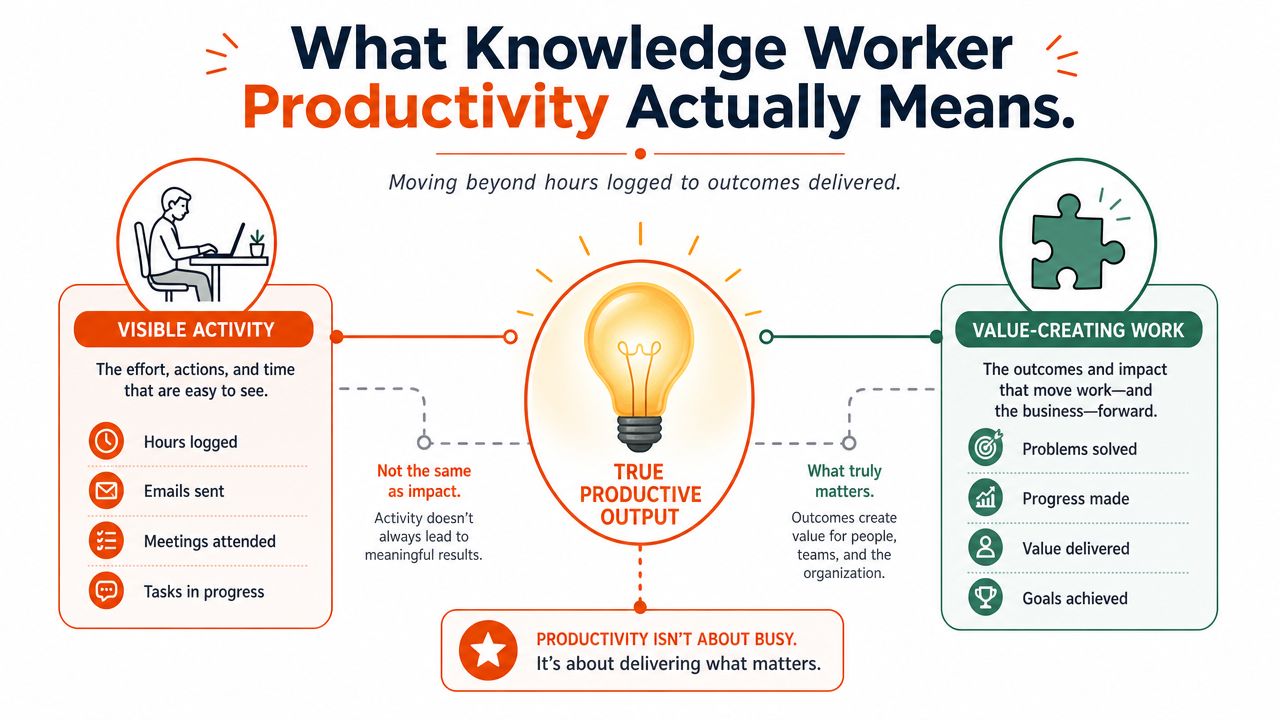
A productive knowledge worker is not the person who looks busiest. It is the person whose judgment becomes something useful, gets written down, shipped, and reused without creating more cleanup for everyone else. APQC's survey puts the stakes in plain view, only 30 of 40 weekly hours are productive on average, which means a big slice of the week is being burned on overhead instead of output.
The wrong way to define productivity is by visible motion. Messages sent, tabs open, meetings attended, and hours logged all create the illusion of activity while hiding the essential question: did anything valuable move forward? Knowledge work resists industrial-era measurement because the output is often a decision, a plan, a diagnosis, a document, or a resolved problem, not a unit off a line.
What a good day looks like
A productive day usually has a few traits in common. The important work gets finished, the handoffs are clear, and the next person does not have to decode a mess of half-finished notes. A busy day can still fail on every one of those counts.
Practical rule: if the day created more clarification work than finished work, it was not productive.
That is why I define knowledge worker productivity as the ratio of high-judgment output shipped to organizational friction absorbed. The output side includes decisions, docs, fixes, and follow-through. The friction side includes interruptions, searches, rework, and meeting sprawl. Once you use that lens, the rest of the playbook gets a lot less fuzzy.
How to Measure Productivity Without Lying to Yourself
Many teams fool themselves with shallow metrics. They count emails, meeting attendance, or task volume, then act surprised when the numbers rise while actual throughput stays flat. A review of more than 800 research papers and 35 meta-analyses found no standard or universally accepted KPI for knowledge-worker productivity, which is exactly what you should expect in work that is too varied and too intangible for one universal scoreboard Global Workspace review PDF.
Pick outcomes, then add leading indicators
The honest move is to track a small set of outcome metrics and a small set of leading indicators. Outcome metrics show whether work got done. Leading indicators show whether the system is getting easier or harder to use. Skip the leading indicators and you will miss the warning signs until the quarter is already blown.
A practical template looks like this:
- Outcome metrics: decisions shipped, docs published, tickets resolved, code merged, cases closed, patients seen.
- Leading indicators: focus-block length, meeting-to-deep-work ratio, rework rate.
- Soft signals: trust, information sharing, supervisory support, and clarity of goals.
Those softer signals matter because the literature points to social cohesion, supervisory support, information sharing, vision and goal clarity, external communication, and trust as the strongest associations with productivity in knowledge work. It's more effective to measure those indirectly through team health and review cadence than to pretend a dashboard can catch everything.
Use system data where possible
Do not build the whole measurement stack on self-reported time logs unless you have to. Use the systems that already hold the work, ticketing, document publishing, code review, and case management. Then use brief self-reports only for the part systems cannot see, like deep-work interruptions or rework caused by missing context. That balance keeps you honest without turning measurement into another job.
The loudest person on the team is not your productivity benchmark. The clearest completed work is.
Identifying Where the Lost Hours Go
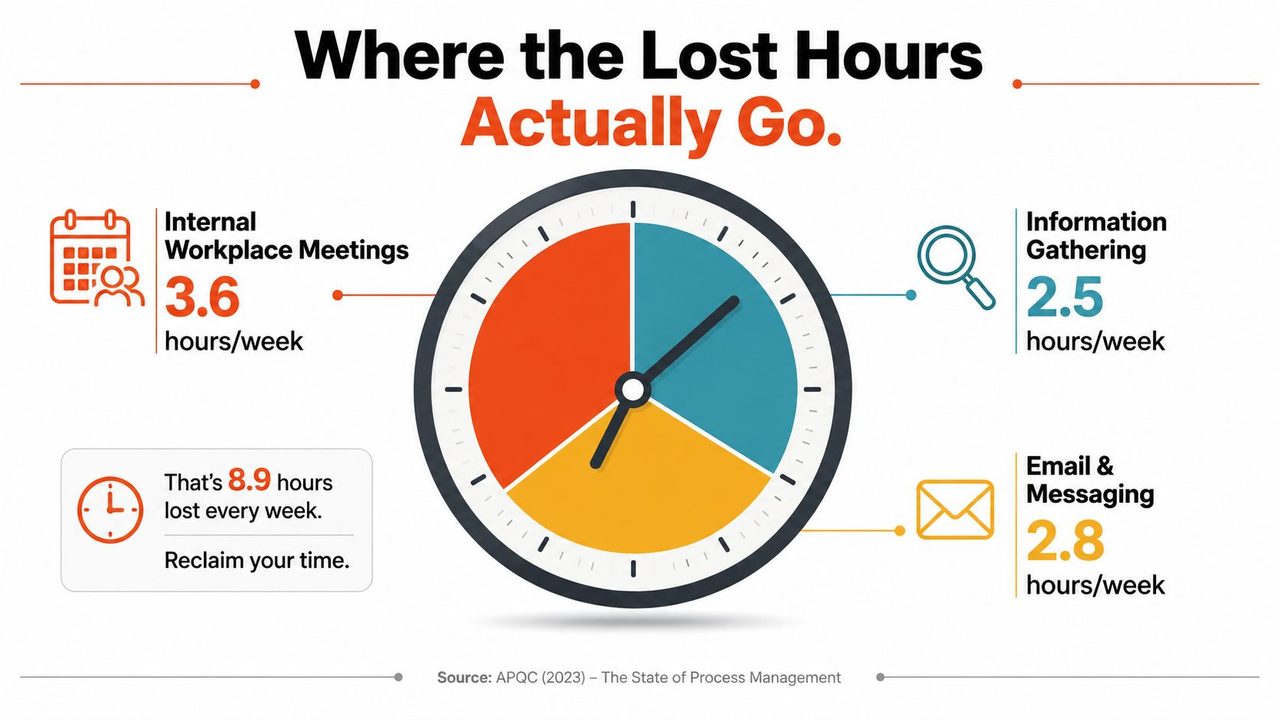
The waste is easy to name once you stop blaming individual focus and start looking at the work design. APQC found that knowledge workers lose 3.6 hours to internal workplace communication, 2.8 hours looking for or requesting information, and 2.2 hours to unnecessary or unproductive meetings. APQC survey press release That is before you count context switching, which Asana's work on “work about work” puts at 60% of the time spent on coordination-heavy activity Asana productivity summary. The pattern is clear. Teams are paying a tax to move information around instead of producing output.
The biggest drain is not one thing
The calendar usually exposes the problem first. Too many recurring meetings turn people into spectators. Too many Slack threads force constant triage. Too many scattered docs make everyone search for each other's bad habits instead of doing the work.
Microsoft's 2025 Work Trend Index says interruptions arrive every 2 minutes during core hours, about 275 interruptions per day Microsoft Work Trend Index summary. That matters because the primary loss is not only time, it is concentration. Deep work does not survive a workflow that treats every ping as urgent.
Run a one-week waste audit
For one week, tag every recurring meeting, search request, and status update. Group each item into one of three buckets, coordination, information retrieval, or interruption recovery. Then ask one question, which of these could disappear without harming the work?
A simple elimination ranking usually surfaces the easiest cuts first:
- Recurring meetings with no decision output.
- Repeated requests for the same information.
- Status updates that nobody acts on.
That is the point. Stop pretending coordination is free. If a team spends half its week managing the work instead of doing the work, the process is the product problem. For teams that want a cleaner way to strip out friction, this guide on process improvement techniques is a useful place to start.
Redesigning Work Before Redesigning People
McKinsey's research says knowledge workers spend about half their time on interactions, and about half of those interactions are blocked by physical, technical, social, contextual, or temporal barriers McKinsey on knowledge-worker productivity. That's a design failure. You don't fix it by telling people to be more disciplined.
Cut the interaction load first
The first move is brutal and effective. Cut recurring meetings by a third, and replace the weakest ones with written updates. If the meeting exists mainly to inform people, the meeting is the problem. If it exists to decide something, make the decision criteria explicit and keep the attendee list tight.
Rule: if the meeting doesn't change a decision, a draft, or a commitment, it should probably be a memo.
Next, default new projects to async-first with a written kickoff doc. That means the team gets context before the meeting, not during it. It also means people can comment when they're fresh instead of sitting in another discussion they didn't need.
For teams trying to formalize the workflow, this internal guide on process improvement techniques is a useful companion. It fits the same logic, reduce friction first, then automate what's left.
Protect focus like it's a shared asset
Give every person two protected focus blocks per day, and stop treating them as optional. Ninety minutes is enough to get past the shallow-work threshold, but only if managers stop raiding the calendar for “quick syncs.” Protecting focus isn't soft. It's how you stop paying the interruption tax over and over.
Consolidate the tool stack too. Every app switch creates drag, and every extra workspace fragments memory. If project context lives in five places, the team isn't organized, it's diluted.
A practical before-and-after looks like this. Before, a manager has four status meetings, a scattered inbox, and a task list hidden across three tools. After, the same manager runs one decision meeting, one written update thread, and two protected blocks for deep work. Same person. Better system. Better output.
Async Communication That Actually Saves Time
Async communication only works when people agree on what kind of response is expected. Otherwise, “async” becomes a polite way to dump urgency into someone else's lap. I use three modes.
Pick the mode before you start typing
Synchronous is for decisions that need live debate. Async-but-fast is for chat threads where you expect a response within a couple of hours. Async-deep is for long-form docs where a thoughtful response can wait until the next day.
That simple split prevents a lot of noise. It also keeps people from acting shocked when a message doesn't get an instant answer. If the team didn't define the mode, the sender will assume priority and the receiver will assume flexibility.
Make async readable
Write one idea per message. Put the summary first. End with the specific action you want. If you're leaving a decision trail, capture it in a decision log so no one has to reconstruct the thread later.
A real work platform helps more than another chat channel. A central Work OS for teams can keep tasks, updates, and ownership in one visible place instead of scattering them across inboxes and side conversations. That's not magic, it's just less hunting.
If your team is choosing tools for async workflows, this guide to asynchronous communication tools is a practical reference point.
Stop async from turning into delayed interruption
Async fails when people use it as permission to interrupt later. Solve that with explicit do-not-disturb windows and a real emergency norm. If something is urgent, the team should know exactly what counts as urgent and who is allowed to escalate it.
The habit loop here is simple, cue, capture, clean, commit. A message arrives, you capture the request, clean up the wording, and commit to either action or a clear handoff. That's how async becomes a system instead of a pile of unread notifications.
Habit Design for Sustainable Output
Individual habits matter, but only after the workflow stops fighting them. The best knowledge workers I've managed don't rely on motivation. They rely on a repeatable loop that makes the right action easier than the lazy one.
Compare the dictation modes before you pick a habit
A lot of people want a note-taking habit but hate typing. Dictation helps, but the mode matters. On-device dictation is the right call when privacy and speed matter most. Cloud cleanup is better when the draft needs punctuation, formatting, and cleanup. Auto-switching is the practical middle ground because it chooses the best engine without making you think about it.
That's the same logic I want in the rest of the habit system. The habit should reduce effort, not add ceremony. If the habit needs a motivational speech to survive, it's too brittle.
Three habits that actually hold
A 10-minute shutdown ritual works because it clears loose threads before they spill into tomorrow. A single most-important-task choice each morning prevents the day from turning into a reactive blur. A weekly review resets priorities before the calendar hardens around stale commitments.
Keep the ritual small enough that you'll do it on a bad day.
The failure modes are predictable. If you stack too many habits into the morning, you turn the first hour into a performance. If you depend on manager praise as the reward, the habit dies the moment nobody notices. Reward the visible artifact, the clean backlog, or the shipped draft. Those are real.
For executives or operators who want a broader menu of systems, this roundup of top workflow tools for executives is worth scanning, but only after the habit loop is clear.
Using AI Dictation to Reclaim Writing Hours
Writing is where knowledge work leaks time fastest. Specs, emails, meeting notes, documentation, and follow-up summaries all eat hours because people are translating thought into text the slowest possible way, one keypress at a time. That's exactly where voice-to-text earns its keep.
Use dictation for output, not novelty
AIDictation is a macOS voice-to-text app that turns speech into clean writing. Its Local Mode runs Parakeet v3 on Apple Silicon for private dictation with no internet, Cloud Mode adds cleanup, filler-word removal, and context-aware formatting, and Auto Mode switches between them automatically. It also supports a custom dictionary for names and technical terms, plus context rules that change tone by app.
The workflow is straightforward. A product manager can dictate a rough spec, let the app clean the structure, then paste a sharper draft into the doc. A developer can speak code comments and README sections without getting dragged down by formatting. A clinician can capture patient notes faster while keeping the text readable enough to refine afterward.
For a deeper look at the writing use case, this guide to dictation software for writers is a useful companion.
Handle the objections directly
People worry about accents, privacy, and learning curve. Those concerns are real, and they're why a tool needs both on-device and cloud options. AIDictation's 256-bit SSL and SOC 2 pending status address the security conversation, while the on-device mode answers the privacy question without forcing a tradeoff on every session.
The point is not to replace judgment. It's to remove transcription as a bottleneck. If your team spends too much time turning spoken ideas into usable text, dictation is a workflow fix, not a gimmick.
Good test: if the tool gets you from rough thought to shareable draft faster, it's doing its job.
Change Management That Sticks
Most productivity programs fail because leaders treat them like training, not change. Training days are easy to schedule and easy to forget. Operational change is harder, because it requires baseline numbers, manager behavior, and visible follow-through.
Start with the baseline
Publish the waste audit. Show the team how much time is being lost to meetings, searching, and coordination. If people can't see the cost of the current state, they'll treat every change as inconvenience instead of relief. Visibility changes politics fast.
Then run a 30-day pilot with one team and named metrics. Don't pilot the vibe. Pilot the workflow. Give the team a narrow set of outcome KPIs and leading indicators, then review them weekly so you can tell the difference between real progress and noisy adoption pain.
Roll out the changes in sequence
The order matters. First, cut the worst meetings and ship one dictation workflow. Then, introduce async-first defaults and protected focus blocks. Only after that should you lock in the habit loop and compare the before-and-after metrics.
Senior leaders will resist giving up meetings because meetings feel like control. ICs will game the new metrics if the outcome definitions are sloppy. Managers will slip back under pressure unless the new operating rhythm is written down and reviewed. Those are management problems, not employee motivation problems.
Use a 30-60-90 day plan
Days 1 to 30: run the time audit, cut the lowest-value recurring meetings, ship one AIDictation workflow, and publish baseline metrics. Success looks like fewer meeting hours and clearer ownership. The red flag is silence, because silence usually means nobody believes the change is real.
Days 31 to 60: roll out async-first defaults, protected focus blocks, and the habit loop. Hold weekly check-ins on the leading indicators. Success looks like cleaner handoffs and fewer context switches. The red flag is when people keep “helpfully” adding meetings back in.
Days 61 to 90: review outcome KPIs, retire the experiments that didn't move them, and document the playbook for the next team. Success looks like repeatable output with less friction. The red flag is when the team says the new system is good, but no one can explain why.
That's the whole game. Measure the friction, redesign the workflow, and use tools that shrink writing time without adding another meeting to justify them.
If you want a cleaner way to turn spoken ideas into finished writing, visit AIDictation and test it on the work that's currently clogging your week. Use it for specs, notes, follow-ups, and documentation, then compare that output to your current process. If the draft gets done faster without another meeting, you've found a clear advantage.
Frequently Asked Questions
What does Knowledge Worker Productivity: A Practical Playbook cover?
Average knowledge workers spend only 30 of a 40-hour week on productive work, according to APQC. The rest gets chewed up by internal communication, searching for information, and unnecessary meetings, which tells you the problem is not laziness.
Who should read Knowledge Worker Productivity: A Practical Playbook?
Knowledge Worker Productivity: A Practical Playbook is most useful for readers who want clear, practical guidance and a faster path to the main takeaways without guessing what matters most.
What are the main takeaways from Knowledge Worker Productivity: A Practical Playbook?
Key topics include Table of Contents, What Knowledge Worker Productivity Actually Means, What a good day looks like.
Ready to try AI Dictation?
Experience fast voice-to-text on your device. Free to download.
Download FreeRelated Posts
8 Best Bilingual Dictation Apps: 5 Tested + 3 Baselines
We tested five bilingual dictation apps on Russian-English code-switching, plus three common baselines. Compare WER, language recall, script, and workflow.
AI Dictation vs Diktuy: Russian-English Accuracy Test
We tested AI Dictation vs Diktuy on the same Russian-English recording. Compare WER, English-word preservation, full transcripts, and errors.
AI Dictation vs Oravo: Bilingual Accuracy Test
We tested AI Dictation vs Oravo on the same Russian-English clip. Compare WER, English-word preservation, AI enhancement, and transcript fidelity.