Meaning of STT: Your Guide to Speech-to-Text Technology
Most advice about the meaning of STT gets the first step wrong. It assumes there's only one answer.
That's why search results often feel mismatched. You type meaning of STT, and one page talks about Indian stock-market taxes, another jumps into hardware memory, and a third assumes you meant speech software. The problem isn't your search. The problem is that STT is an overloaded acronym.
For many professionals, the meaning they need is Speech-to-Text: software that turns spoken words into written text. That's the version behind dictation apps, meeting transcription, voice interfaces, and a lot of modern workflow automation. But if you don't clear up the acronym confusion first, every later explanation feels fuzzy.
Table of Contents
- Why Is Searching for STT So Confusing
- Unpacking the Many Meanings of STT
- What Is Speech-to-Text Technology
- On-Device vs Cloud STT How They Differ
- Real-World STT Applications for Professionals
- How to Choose the Right STT Solution
- Frequently Asked Questions About STT
Why Is Searching for STT So Confusing
If you searched for the meaning of STT and landed on finance pages, you're not imagining things. A major underserved angle is that STT most often means Securities Transaction Tax in India, while many people searching the phrase want a context-specific answer in finance, telecom, healthcare, or software. Existing results are heavily India-stock-market focused and often don't disambiguate the acronym well, as noted in this explanation of Securities Transaction Tax in India.
That creates a simple but frustrating problem. Two people can type the same query and mean completely different things.
One trader may want tax treatment. One chip engineer may want memory technology. One security researcher may want a Spectre mitigation. One product manager may just want to know whether STT means the same thing as voice dictation software.
Practical rule: When an acronym appears across unrelated fields, the right question isn't “What does it mean?” It's “What does it mean in my context?”
For most non-specialists working with software, meetings, content, support, or documentation, the most useful tech meaning is Speech-to-Text. That's the system that listens to spoken audio and produces text you can edit, search, store, or send.
The confusion matters because choosing a speech tool is not just about definitions. It affects privacy, workflow, cost, internet dependence, and whether the transcript is usable without heavy cleanup. If you only get a dictionary-style definition, you miss the part that is critical for decisions.
Unpacking the Many Meanings of STT
Why search results feel off
Acronyms spread fast because they're efficient. The downside is that they lose precision. STT is a good example. It shows up in finance, hardware, security research, and everyday software conversations.
If you're trying to pin down the meaning of STT, the fastest way is to map the field first, then the term. A tax article and a speech-recognition article can both be correct while answering different questions.
The quick translation guide
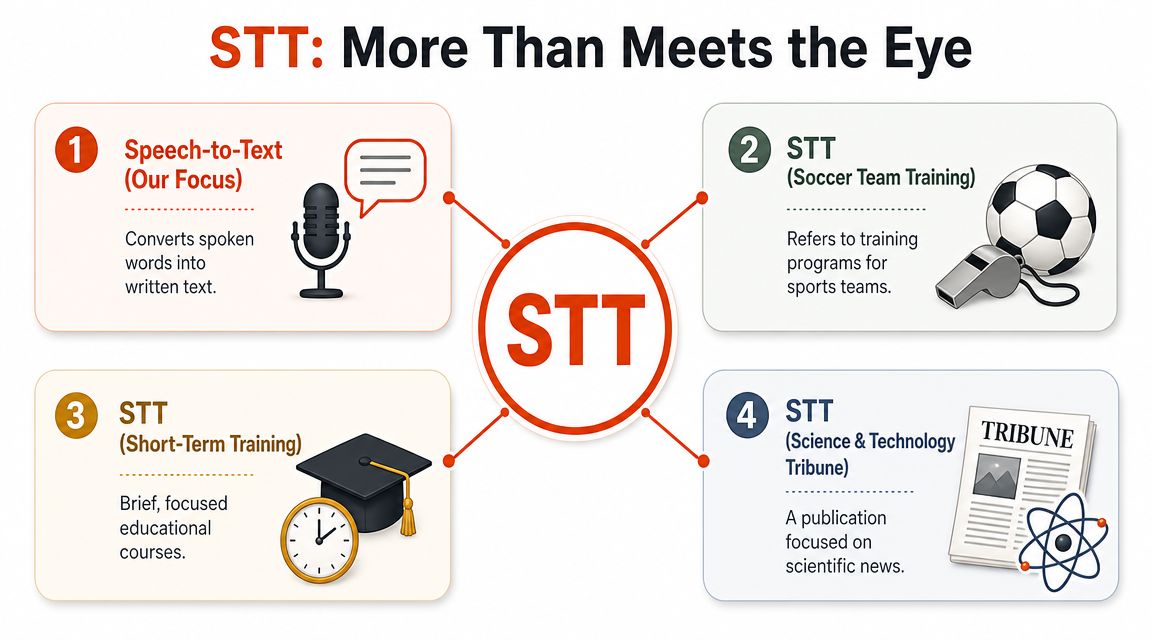
Here are the main meanings you're likely to encounter.
-
Securities Transaction Tax: In Indian finance, STT refers to a direct tax on eligible securities transactions, collected at the time of trade and charged even if the trade is unprofitable. That's why so many search results lead with stock-market content.
-
Speech-to-Text: In software, STT usually means systems that convert spoken words into text. This is the primary meaning considered when comparing dictation apps, meeting transcription tools, call analytics, or accessibility software.
-
Spin-Transfer Torque: In memory technology, STT refers to the write mechanism behind STT-MRAM. It uses current-driven angular-momentum transfer in a magnetic tunnel junction to store data, and the technical overview describes STT-MRAM as able to scale below 10 nm with lower power and cost than toggle MRAM in that context, according to the STT-MRAM technical overview.
-
Speculative Taint Tracking: In computer security, STT can mean Speculative Taint Tracking, a defense against Spectre-style transient-execution attacks. The MICRO'19 paper describes it as a “complete protection” that “completely defeats the worst Spectre attacks” in that threat model, as explained in the Speculative Taint Tracking paper.
There's also a common side confusion. Some readers see “stt” and think of statistics or the t-statistic. That isn't the same acronym use, but the mix-up is understandable because the t-test introduced by William Sealy Gosset under the name “Student” in 1908 is so widely taught, and a rough industry rule in finance sometimes treats a t-statistic of 2 or higher as a useful indicator in benchmarking returns, as summarized in this t-statistics overview.
For the rest of this guide, STT means Speech-to-Text.
What Is Speech-to-Text Technology
Think of STT as a translator for sound
Speech-to-Text is software that converts spoken audio into written language. Another name you'll often see is automatic speech recognition, or ASR. If you want a deeper technical comparison of that term, this overview of automatic speech recognition is a useful companion.
A simple way to think about STT is this: it's a translator, but not between English and Spanish. It translates between sound and text.
Humans do this almost instantly. You hear a sentence, separate words from noise, use context to resolve ambiguity, and understand what was said. STT systems try to do a machine version of that same process.
The basic process in plain English
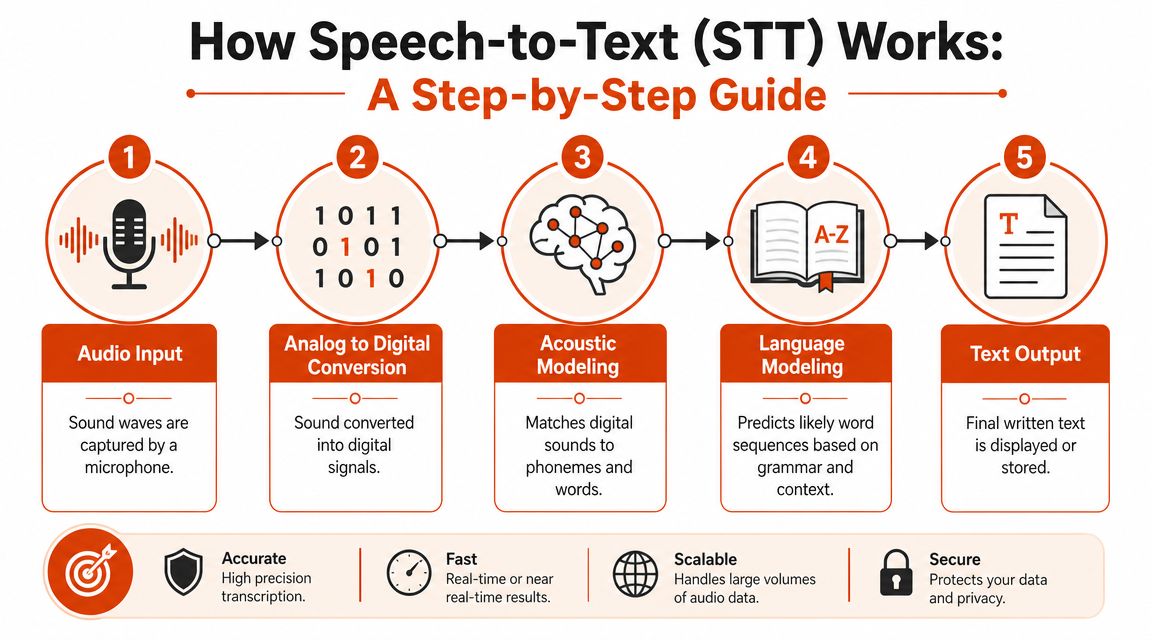
Most speech-to-text systems follow a sequence like this:
- They capture audio. A microphone picks up your voice as sound waves.
- They convert it into digital signals. The computer turns changing sound into machine-readable data.
- They match patterns. The system compares audio features against learned patterns for speech sounds, words, and phrasing.
- They predict likely wording. If the audio is fuzzy, the model uses context to choose the most probable sequence of words.
- They output text. The result appears as a transcript, note, draft, caption, or command.
That fourth step is where many people underestimate the technology. STT doesn't just “hear words.” It also makes probability-based judgments about what you most likely said.
Good speech recognition feels like a listener who can use context, not just a typist who copies noise.
That's also why tool choice matters. Some systems are tuned for raw transcription. Others try to deliver polished writing with punctuation, paragraphing, and cleanup. If you're comparing options for recorded media, Taja's review of video transcription options is a practical way to see how different tools handle that workflow.
The output quality depends on more than the model. Your microphone, room noise, accent, speaking pace, domain jargon, and whether the app can apply formatting rules all affect the final text. A transcript that is technically correct but poorly formatted can still create extra work.
On-Device vs Cloud STT How They Differ
The main trade-off
The biggest decision in modern speech-to-text isn't just which brand you use. It's where the speech gets processed.
With on-device STT, your computer or phone does the recognition locally. With cloud STT, audio goes to a remote server, gets processed there, and comes back as text. That sounds like a technical distinction, but it changes the user experience in very practical ways.
On-device tools usually appeal to people who care about privacy, offline use, and fast response without network lag. Cloud tools usually appeal to teams that want stronger language handling, shared infrastructure, and richer post-processing.
A helpful way to think about cloud models is probability ranking. In modern hypothesis testing, statistical significance is commonly judged with a p-value threshold of 0.05, treating results below that cutoff as unlikely to be due to chance. The U.S. National Library of Medicine describes this as a standard significance level of 5%, and the idea is to separate probable signal from random noise in a formal way, as discussed in this article on statistical significance and the 0.05 threshold. Speech systems do something analogous when they rank candidate word sequences and choose the most likely transcription.
On-Device vs. Cloud STT at a Glance
| Feature | On-Device STT | Cloud STT |
|---|---|---|
| Privacy | Audio can stay on your device | Audio is typically sent to a server for processing |
| Internet dependence | Can work offline | Usually needs a connection |
| Speed feel | Often feels immediate because there's no network round trip | Can feel smooth, but depends on connection quality |
| Recognition depth | May be more limited for difficult audio or complex formatting | Often supports richer processing and text cleanup |
| Use case fit | Good for private notes, travel, field work, secure environments | Good for shared workflows, long files, and advanced transcript handling |
That table hides an important nuance. “Better” depends on the moment.
- Choose on-device if you dictate sensitive notes, work on flights, or need a transcript in places with unreliable internet.
- Choose cloud if you handle recorded interviews, mixed speakers, or text that benefits from formatting and cleanup.
- Choose hybrid if your day changes often and you don't want to think about engine selection each time.
If privacy is your first filter, this guide to secure voice notes for research gives a grounded look at offline workflows. For a broader breakdown of local-first dictation, this article on offline voice-to-text is also useful.
If you switch between confidential dictation and polished document drafting, a single-mode STT setup often becomes the bottleneck.
Real-World STT Applications for Professionals
Where STT saves time
Speech-to-text becomes valuable when it removes friction from work you already do. The most useful cases are not flashy. They're repetitive, time-sensitive, and mentally expensive when typed from scratch.
A product manager can dictate meeting summaries right after a stakeholder call, while decisions are still fresh. That usually produces better notes than waiting an hour and reconstructing the discussion from memory.
A software developer can use STT to draft documentation, explain a pull request, or capture architecture thoughts before translating them into cleaner written form. Spoken first drafts are often easier when the goal is to preserve technical thinking, not polish every sentence on the first pass.
What good workflow design looks like
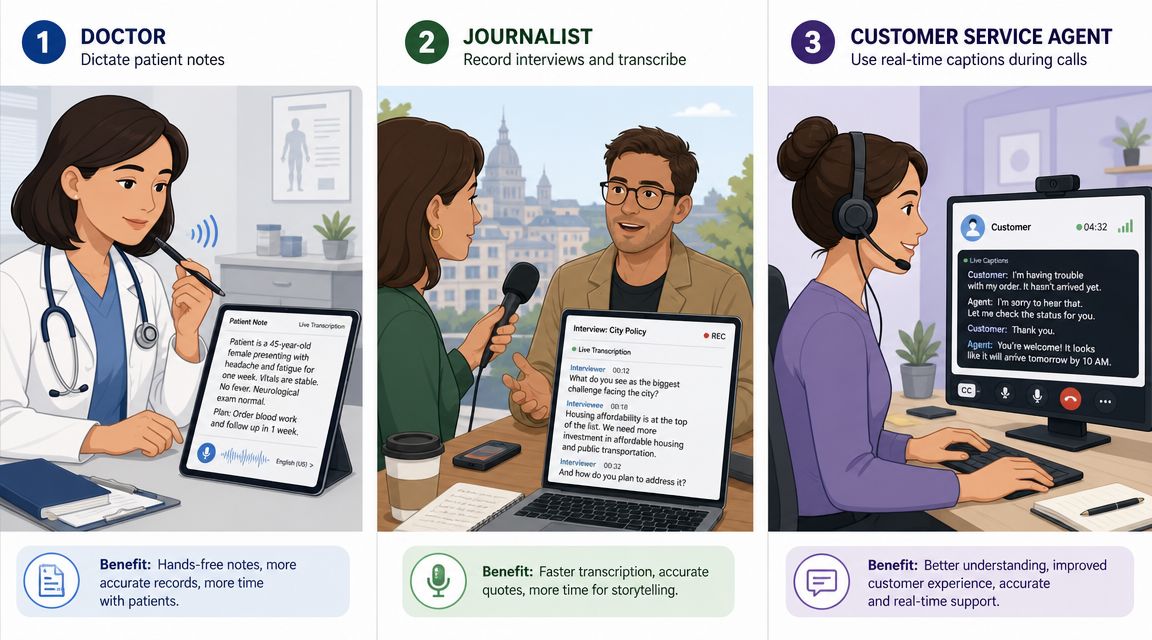
A healthcare professional may use speech recognition for visit notes, summaries, or structured documentation. The key requirement there isn't novelty. It's whether the output can fit a serious workflow with terminology, privacy expectations, and review steps. If that's your use case, this guide to medical speech-to-text software shows the kinds of features that matter.
Other strong fits include:
- Customer support teams: Agents can dictate follow-up messages, summarize calls, and log ticket details without switching mental gears from listening to typing.
- Marketing teams: Writers can capture campaign ideas, ad variations, and script drafts while walking or reviewing source material.
- Journalists and researchers: Interviews and field notes move faster when audio can be transcribed and searched later.
- Students and knowledge workers: Voice can be a better input method for rough drafts, reflections, and long-form note capture.
The best STT workflow usually starts before formatting. First capture the thought. Then clean the text.
There's another practical benefit people notice quickly. STT changes the moment when ideas get recorded. Instead of waiting until you're back at a keyboard, you can capture the useful version immediately. That reduces the number of half-remembered tasks, vague meeting notes, and one-line placeholders that never become real documentation.
How to Choose the Right STT Solution
Choosing an STT tool gets easier once you stop asking, “Which one is the smartest?” and start asking, “Which one fits the way I work?” That shift matters because Speech-to-Text is rarely a single-feature decision. For professionals, it is usually a trade-off between privacy, accuracy, editing effort, and where the transcription happens.
A quick demo can be misleading. A tool may transcribe one clean sentence perfectly and still slow you down all week in meetings, notes, or draft writing. The better test is simple. Use your real voice, your real terminology, and your real work conditions.
Four questions to ask before you pick a tool
Start with these four checks:
-
Does it recognize the way you speak? Accent, pace, filler words, names, and technical terms all affect results. Generic dictation quality does not always carry over to legal language, medical vocabulary, product names, or engineering jargon.
-
Where is your audio processed? This is often the first practical decision, not a technical footnote. If you handle sensitive material, on-device transcription may be the safer fit. If you need stronger formatting or cleanup, cloud processing may give you more flexibility.
-
Does it fit into your existing workflow? A good STT engine should feel like adding a faster keyboard, not adding another app you have to manage. Check whether it works smoothly with your documents, email, notes, chat tools, or editor.
-
Can you shape the output? Custom vocabulary, formatting rules, and context settings matter more than they seem to at first. Many transcription “mistakes” happen because the system does not know your domain.
A practical example of a hybrid approach
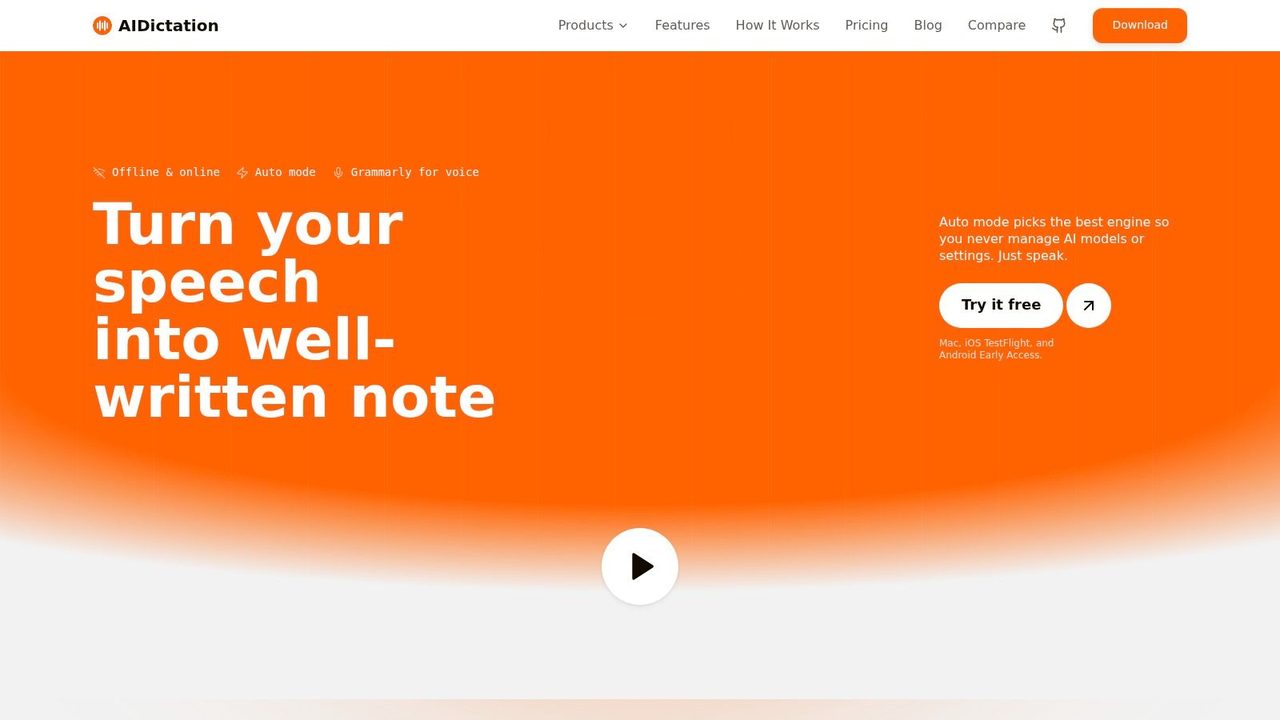
AIDictation is one example of a tool built around those trade-offs. It is a macOS voice-to-text app with an Auto Mode that switches between on-device recognition and cloud processing, plus a Local Mode for private offline dictation and cloud features for cleanup, formatting, and handling self-corrections. It also includes custom dictionary support and context rules. Those controls matter if your work depends on names, specialized terminology, or a specific writing style.
A hybrid setup is useful for a common professional pattern. You may want private transcription for sensitive notes in the morning, then cleaner formatting and polishing for outward-facing writing later in the day. One tool does not need to do everything the same way if your tasks do not all carry the same risk or quality bar.
A strong selection process is usually straightforward:
- Test with real recordings or live dictation, not scripted sample phrases.
- Try one privacy-sensitive task and one task where polished output matters more.
- Measure editing time after transcription, because raw accuracy is only part of the experience.
- Check for controls you will use, especially custom vocabulary and formatting behavior.
If a tool only works well in quiet rooms with perfect wording, it is not ready for daily professional use.
Frequently Asked Questions About STT
Is STT the same as speech recognition
Usually, yes in everyday use. People often use Speech-to-Text and automatic speech recognition to mean the same general function. Some teams use “speech recognition” as the broader category and “speech-to-text” for the text output use case.
Can STT work on recorded files, or only live speech
Both. Many tools support live dictation and pre-recorded audio or video transcription. The better choice depends on whether you need immediate output or post-processing for longer files.
Why does STT struggle with some accents or noisy rooms
Speech systems rely on pattern matching and context. Accents, overlapping voices, weak microphones, and background noise make those patterns less clear, so the model has to guess more often.
Does STT add punctuation automatically
Many modern tools do. Some only produce basic text, while others also clean grammar, break text into paragraphs, and format lists or emails.
Is on-device STT always more private
It can be, because audio may stay on your device. But privacy still depends on the app's actual design, settings, and what happens after transcription.
If you want to try speech-to-text in a real writing workflow, AIDictation is a straightforward place to start on macOS. It's built for dictation that turns spoken drafts into usable text, with local and cloud modes depending on whether you need privacy, offline use, or cleaner formatted output.
Frequently Asked Questions
What does Meaning of STT: Your Guide to Speech-to-Text Technology cover?
Most advice about the meaning of STT gets the first step wrong. It assumes there's only one answer.
Who should read Meaning of STT: Your Guide to Speech-to-Text Technology?
Meaning of STT: Your Guide to Speech-to-Text Technology is most useful for readers who want clear, practical guidance and a faster path to the main takeaways without guessing what matters most.
What are the main takeaways from Meaning of STT: Your Guide to Speech-to-Text Technology?
Key topics include Table of Contents, Why Is Searching for STT So Confusing, Unpacking the Many Meanings of STT.
Ready to try AI Dictation?
Experience fast voice-to-text on your device. Free to download.
Download FreeRelated Posts
Email Dictation Software: What It Is and How to Choose
Learn what email dictation software is, how it works, and how to pick the right one. Covers accuracy, privacy, HIPAA, accents, and real buyer checklists.
Choosing a Medical Dictation App for Clinical Work
Compare medical dictation apps on HIPAA compliance, on-device vs cloud, medical vocabulary accuracy, EHR integration, and pricing to find the right fit.
Free Audio to Text Tools: 10 Options Compared for 2026
Compare 10 free audio to text tools: built-in recorders, free apps, offline models, and cloud APIs, with privacy and accuracy trade-offs.