Video Transcription Software: Your 2026 Buyer's Guide
You've probably done this the hard way at least once. A stakeholder sends over a customer interview, a recorded sprint review, or a webinar replay and asks for “quick notes.” An hour later, you're still toggling between pause, rewind, and type, trying to catch one sentence that sounded obvious in real time and impossible on the second listen.
Manual transcription breaks down fast in real work. Product teams need searchable interview notes, developers need technical walkthroughs turned into usable documentation, and healthcare staff need records that can be reviewed and finalized without spending their day re-listening to audio. Once video becomes part of how a team works, the spoken content inside it stops being disposable. It becomes operational knowledge.
That's why video transcription software has moved out of the nice-to-have category. The broader AI transcription market was valued at USD 4.5 billion in 2024 and is projected to reach USD 19.2 billion by 2034, with a 15.6% CAGR, according to Market.us research on the AI transcription market. That scale matters because it reflects a shift in buying behavior. Teams now expect transcription to be part of their daily workflow, not a specialist service reserved for a few recordings.
Table of Contents
- Why Manual Transcription Is No Longer an Option
- How Video Transcription Software Actually Works
- Evaluating Software A Guide to Key Features
- Transcription Workflows for Modern Teams
- Your Buyer's Checklist for Choosing a Tool
- From Purchase to Productivity Implementation Tips
- Conclusion The Future Is Transcribed
Why Manual Transcription Is No Longer an Option
The old workflow was simple and miserable. Someone recorded a meeting, downloaded the file, opened a document, and typed while scrubbing through the timeline. Then they cleaned up filler words, guessed at speaker changes, and sent around notes everyone half-trusted because nobody wanted to verify the whole recording.
That process fails for one reason more than any other. It asks skilled people to spend focused time on low-value mechanical work. A PM shouldn't spend an afternoon typing up discovery calls. A developer shouldn't have to transcribe a systems walkthrough before writing internal docs. A clinician shouldn't burn review time reconstructing spoken observations from memory and fragmented notes.
The bottleneck isn't typing
Manual transcription also creates hidden delays:
- Meetings become less reusable: If nobody transcribes them, useful decisions stay trapped in video files.
- Research gets harder to analyze: You can't search patterns across interviews if the content only exists as audio.
- Knowledge transfer slows down: New team members can't skim a transcript the way they can scan a written brief.
Practical rule: If a recording contains information someone will need again, it should become searchable text as early as possible.
The category has matured because the need is no longer occasional. Teams record more calls, more demos, more remote sessions, and more training than they did a few years ago. Video transcription software sits in the middle of all of that. Done well, it turns unstructured speech into something a team can edit, quote, search, tag, and reuse.
What works now isn't just “speech to text.” The useful tools fit into real workflows. They let a PM jump to the exact moment a user described a pain point, help an engineer pull action items from an architecture review, and give healthcare staff a starting draft they can review instead of writing from scratch.
How Video Transcription Software Actually Works
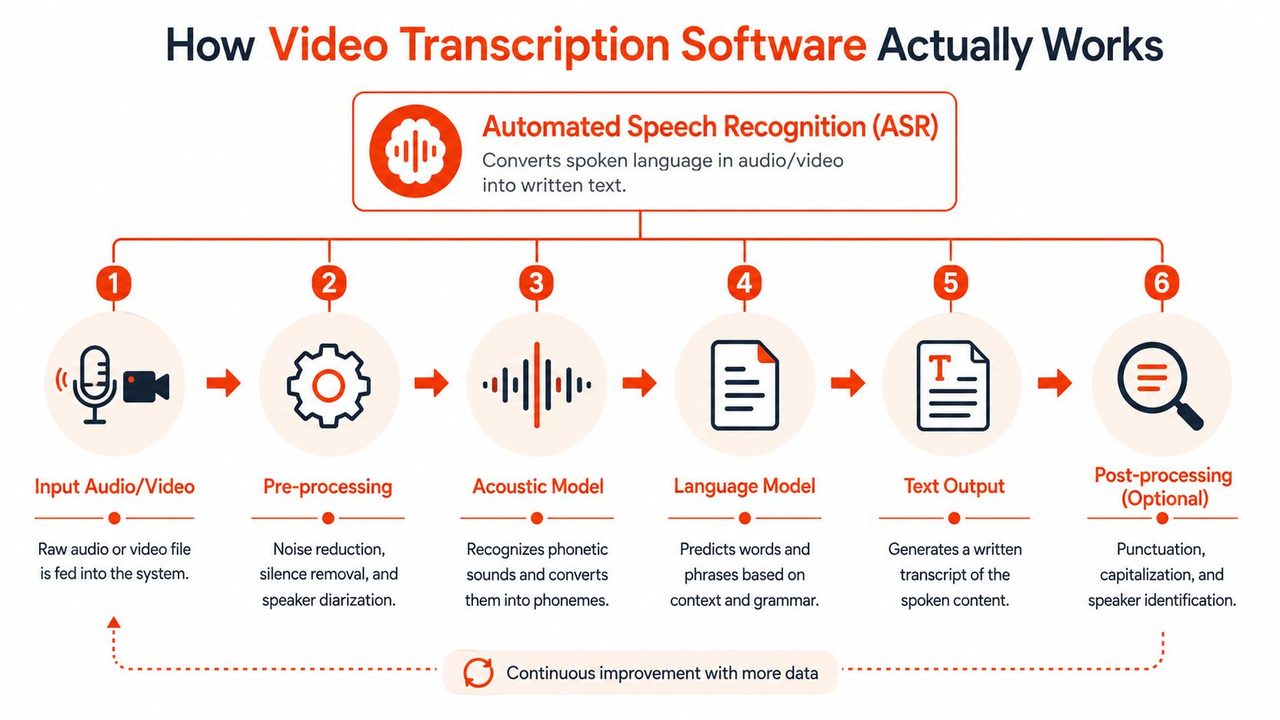
At the core, video transcription software listens to speech and predicts the words being spoken. The easiest way to think about it is as a layered translation process. One part of the system identifies sounds. Another part uses language context to decide which words those sounds most likely represent. Then another layer cleans the output so it reads like writing instead of raw phonetic guesses.
What the software does behind the scenes
A typical pipeline looks like this:
- It ingests the file. Usually that's a video or audio recording pulled from a local drive, meeting app, or cloud folder.
- It preprocesses the sound. Good systems try to separate speech from noise and identify likely speaker turns.
- It runs speech recognition. The engine maps audio patterns to words.
- It applies language cleanup, introducing punctuation, capitalization, and sentence breaks.
- It sends the transcript to an editor. That editor is where most real work happens, because nobody should treat the first pass as final in a professional setting.
If you want a hands-on example of turning recorded media into text, this video and audio transcription tool shows the workflow in a very direct way.
Local versus cloud is the first serious decision
The biggest architectural choice isn't the editor or even the file importer. It's where the transcription happens.
Harvard's guidance notes that local tools such as Whisper are useful when sensitive audio should remain on-device, while cloud-based transcription can make cross-device access and managed processing easier, including support for formats like .wav, .mp4, .m4a, and .mp3, as described in Harvard Kennedy School's note on local versus cloud transcription.
That trade-off is practical, not theoretical.
| Processing model | Best fit | Common upside | Common limitation |
|---|---|---|---|
| Local | Sensitive internal meetings, healthcare, regulated environments | Audio stays on-device | Setup and device constraints can matter more |
| Cloud | Distributed teams, shared review, multi-device access | Easier collaboration and managed storage | Uploading audio may not fit strict privacy requirements |
A lot of teams make the wrong choice because they start with convenience. Start with data sensitivity and review workflow instead. If legal, compliance, or internal policy makes cloud upload difficult, that answer narrows the market quickly.
Local transcription is often the right default when the recording contains sensitive customer, employee, or patient information.
Cleanup is where the raw transcript becomes usable
The best tools don't stop at word recognition. They also help normalize spoken language into readable text. That means fixing obvious punctuation gaps, handling self-corrections, and making the output easier to review.
For YouTube-specific workflows, Rooy Development's guide is a practical reference because it shows how transcription fits into a broader content reuse process rather than treating the transcript as an end product.
Raw transcripts are rarely the final asset. Edited transcripts are.
Evaluating Software A Guide to Key Features
Most product pages make the same promises. Fast. Accurate. Simple. Secure. Those claims don't help much when you're comparing tools for real work. What matters is how the software behaves on your actual recordings, with your speakers, your terminology, and your editing workload.
A short demo video can hide most of the hard parts. A real evaluation exposes them.
Accuracy Sets the Ceiling
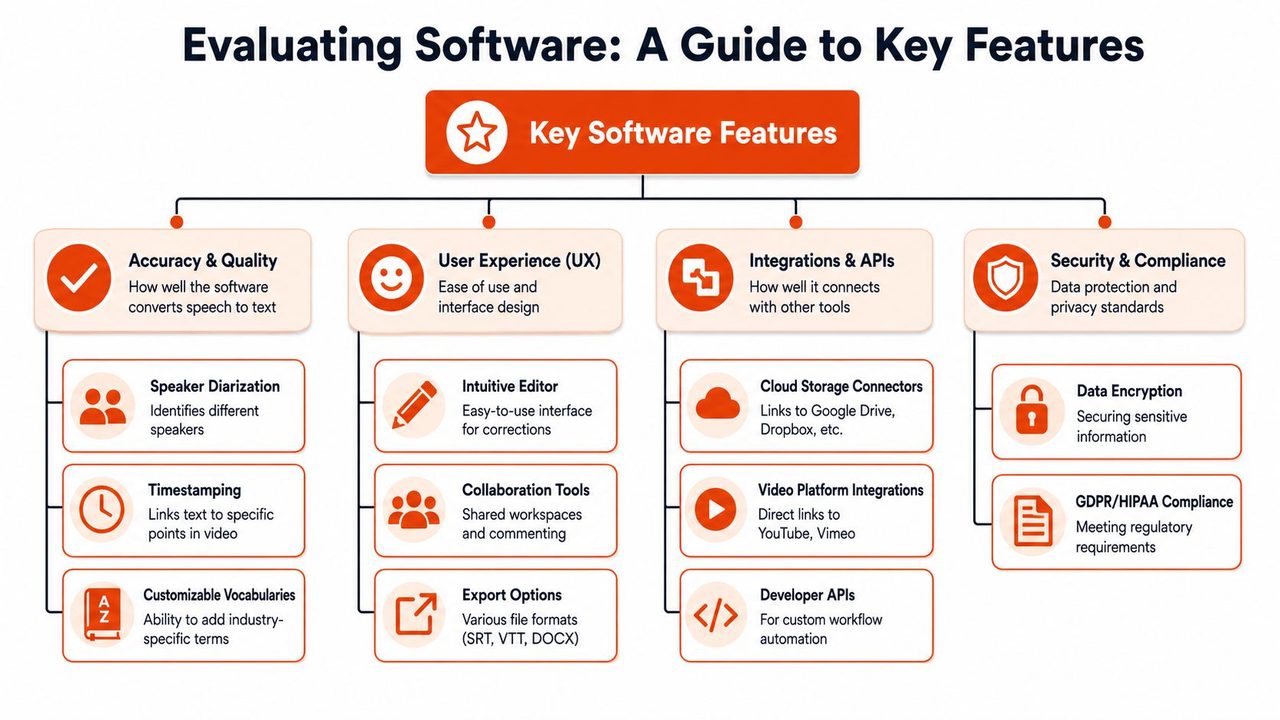
Accuracy is still the first filter. If the transcript is too wrong, every downstream feature becomes less valuable because the editor turns into a repair station.
According to TypeDef's overview of transcript processing efficiency and accuracy benchmarks, AI transcription systems typically achieve 90% to 95% accuracy on clear audio, while premium platforms can reach 97% to 99% under optimal conditions. That's good enough for many business workflows, but it doesn't mean every transcript is review-free.
Use those ranges to set expectations, not to pick a vendor from a homepage claim.
Noise Handling Decides Real-World Usability
Your team probably doesn't record in a studio. People join from laptops, talk over each other, sit near HVAC noise, or use compressed meeting audio. In those conditions, a tool that looks fine in a clean sample can become frustrating fast.
What to test:
- Background chatter: Upload a team meeting, not just a narrated demo.
- Accent variation: Include speakers your team works with.
- Overlapping speech: Check how the transcript handles interruptions rather than polished turn-taking.
A tool that performs well on your messy files will save more time than one that wins on ideal inputs only.
Speaker Diarization Changes Team Work
Speaker diarization is the feature that labels who said what. Teams underestimate it until they review a customer interview with six unlabeled paragraphs and no easy way to assign comments or decisions.
For PMs, diarization turns interviews into research artifacts. For support leaders, it helps separate customer statements from agent responses. For developers, it makes architecture discussions easier to summarize because decisions can be tied to the right person.
If your recordings involve more than one speaker, unlabeled transcripts create cleanup work that spreads to everyone else downstream.
Timestamps Make Review Bearable
A transcript without timestamps is only half useful. Timestamps let reviewers jump from text back to the exact moment in the recording, which matters when wording is ambiguous or context changes the meaning.
This is one area where experienced buyers ask a better question. Not “does it have timestamps?” but “how easy is it to review from them?” The best implementations make text and playback feel connected. Click the line, hear the audio, fix the sentence, move on.
To see how transcription connects with broader content workflows, especially when recordings feed into downstream media creation, AI-powered video production is a useful adjacent example. It highlights why transcript quality affects more than note-taking.
Here's a useful reference point from a tool-focused industry roundup. Sonix's review of video transcription software notes that accuracy above 95% on clean audio is a practical threshold for professional work, while real-world recordings often fall into the 85% to 95% range, which is why timestamped playback and in-browser editing matter so much.
Formatting Export and Editing Determine Adoption
Many evaluations frequently miss the mark. A tool can transcribe well and still fail in practice because the editor is clumsy or the export formats don't match how the team works.
Look for:
- An editor people can learn quickly: If fixing a line takes too many clicks, usage drops.
- Useful exports: Teams often need plain text, subtitle files, or documents that can be shared and annotated.
- Readable cleanup: Paragraphing, punctuation, and basic formatting should reduce review effort, not add to it.
When adoption stalls, it's often because the transcript is technically correct but operationally awkward.
Integrations Matter More Than Demo Quality
Standalone tools are fine for occasional use. Teams with steady recording volume need the transcript to move where work already happens. That may be a docs system, a research repository, a cloud drive, or an internal ticketing flow.
The question to ask is simple. After transcription, where does this text need to go next?
If the answer still involves copy-paste and manual renaming, the software hasn't really joined the workflow. It has just inserted another step.
Security and Compliance Aren't Edge Concerns
Security reviews don't just apply to hospitals and legal teams. Product teams record customer conversations. Developers discuss internal systems. Recruiting teams capture candidate interviews. Recordings often include names, roadmaps, account details, and internal decisions.
The practical screening questions are straightforward:
- Where is audio processed?
- Who can access stored files and transcripts?
- Can the team avoid cloud upload when policy requires it?
- What controls exist around retention and deletion?
A transcript is data. Treat it with the same care you'd apply to any other business record.
Transcription Workflows for Modern Teams
The value of video transcription software becomes obvious when you stop treating it as a utility and look at how different roles use it during the week.
For Product Managers
A PM runs five user interviews and ends the day with recordings, not insights. Without transcripts, the follow-up work becomes a second project. Someone has to revisit each call, pull quotes, map themes, and confirm who said what.
With a solid transcription workflow, the interview becomes searchable within minutes. The PM can scan for repeated objections, pull exact language for a spec, and jump back to the recording only when nuance matters. That changes the rhythm of research review. Notes stop being a bottleneck and start becoming evidence.
For Developers
Developers often sit through technical walkthroughs that should become documentation but never do. A senior engineer explains an integration, a deployment caveat, or a debugging pattern on a call. Everyone understands it in the moment. Two weeks later, the details are gone.
A transcript fixes that only if it's accurate enough to preserve technical terms and easy enough to clean. The useful workflow is to transcribe the walkthrough, review terminology, then turn key sections into internal docs, setup notes, or code-adjacent explanations. The transcript isn't the finished deliverable. It's the draft that saves the team from reconstructing context later.
Good transcription shortens the distance between a spoken explanation and durable team knowledge.
For Healthcare Teams
Healthcare is where workflow discipline matters most. A recorded consult or dictated summary can help a clinician create a draft note, but only inside an approved process with the right privacy controls and review steps.
In practice, the strongest setup usually includes:
- Private processing rules: Sensitive recordings should follow the team's data handling requirements.
- Human review before finalization: Clinical text needs verification, not blind acceptance.
- Terminology support: Medical language, names, and abbreviations need to be handled consistently.
The point isn't to replace review. It's to replace repetitive first-draft work so clinicians spend their effort validating and refining.
For Support and Marketing
Support teams sit on a lot of customer language they never fully reuse. Call recordings contain objections, bug descriptions, workarounds, and phrasing that should influence help content and product feedback loops. Marketing teams have the same issue with webinars, demos, and customer conversations.
Once those recordings are transcribed, two things happen. First, teams can search across what customers said. Second, content becomes reusable. A webinar transcript can become a recap, FAQ draft, social clips outline, or sales enablement notes. A support call transcript can become a bug summary or a knowledge base starting point.
Before transcription, recorded conversations are archives. After transcription, they become working material.
Your Buyer's Checklist for Choosing a Tool
Teams often don't need a giant procurement framework. They need a short list of questions strong enough to expose weak tools quickly. If you're comparing video transcription software, build your evaluation around real recordings and real output requirements.
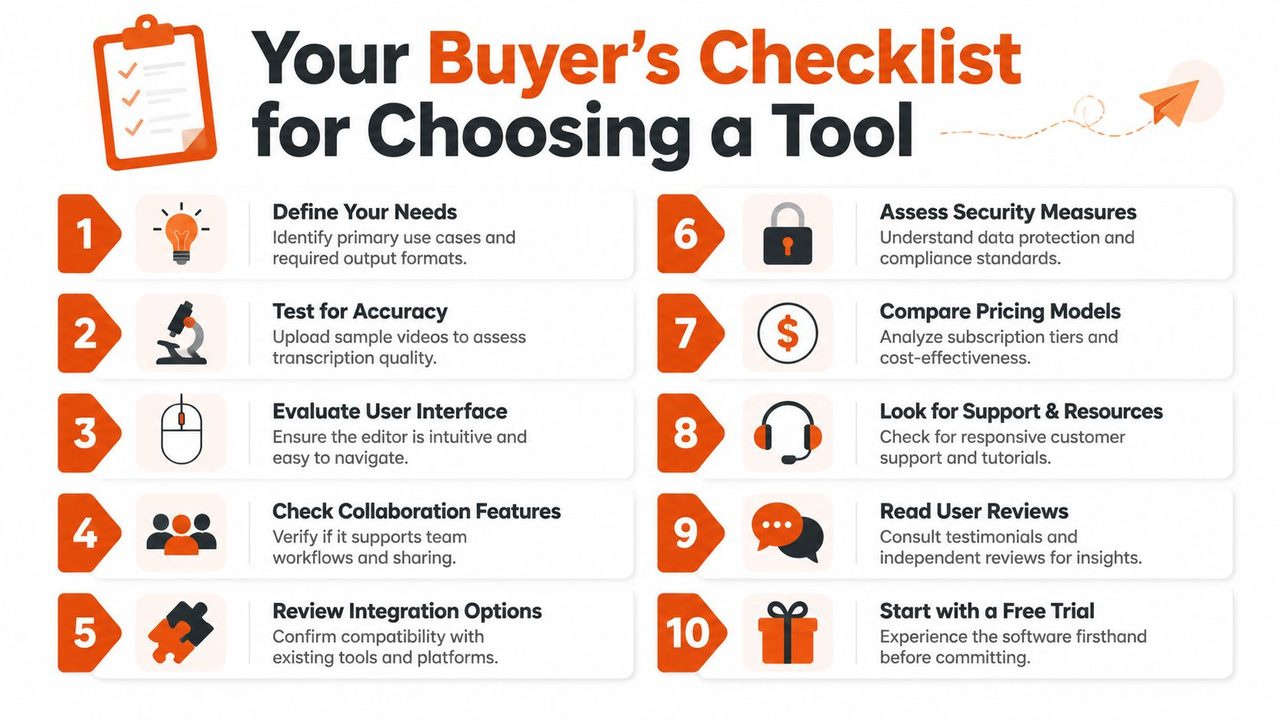
A practical way to approach this is to put the questions into a spreadsheet and score every vendor against the same sample set.
The questions worth asking vendors and yourself
- What recordings matter most? Start with the core use case. Customer interviews, sprint reviews, clinical dictation, webinars, and technical demos stress tools in different ways.
- How much correction work is acceptable? Don't ask whether a transcript is “accurate.” Ask whether your team would edit and use it.
- Do we need local processing? If privacy or policy is a constraint, this answer narrows the field immediately. For teams weighing local speech workflows, this overview of on-device speech recognition is useful background.
- Can the editor support fast review? The transcript and the playback need to stay tightly connected.
- How well does diarization hold up on our meetings? Test with the number of speakers you have, not a scripted two-person sample.
The checklist should cover workflow, not just features
Use a second pass to test operational fit:
| Evaluation area | What to check |
|---|---|
| Input fit | Can the tool handle the file types and sources your team already uses? |
| Review flow | Can someone correct errors without friction? |
| Output fit | Does the transcript export into the formats your team needs next? |
| Collaboration | Can multiple people review, comment, or share without workarounds? |
| Governance | Do retention, access, and processing choices match policy requirements? |
Buy based on your ugliest common recording, not the vendor's cleanest demo file.
One more filter helps. Ask who will own the transcript after it's generated. If the answer is vague, the tool may never become part of the team's routine. Software gets adopted when the next step after transcription is obvious.
From Purchase to Productivity Implementation Tips
A transcription rollout usually succeeds or fails in the first week. Teams either feed the tool realistic recordings, tune it for their language, and build a review habit, or they upload one rough meeting, see mistakes, and write it off.
The fix is simple. Treat setup as part of implementation, not as optional polish.
Configure for your vocabulary and destination
Many teams have words general models won't reliably handle on day one. Product names, customer names, internal acronyms, drug terms, codebase references, and feature codenames all create avoidable errors.
The strongest setup includes:
- A custom vocabulary: Add names and terms before the first big batch of files.
- Context-aware output rules: Decide whether the destination is a doc, an email, a chat summary, or a note.
- A clear review owner: Someone should validate terminology and final formatting for each use case.
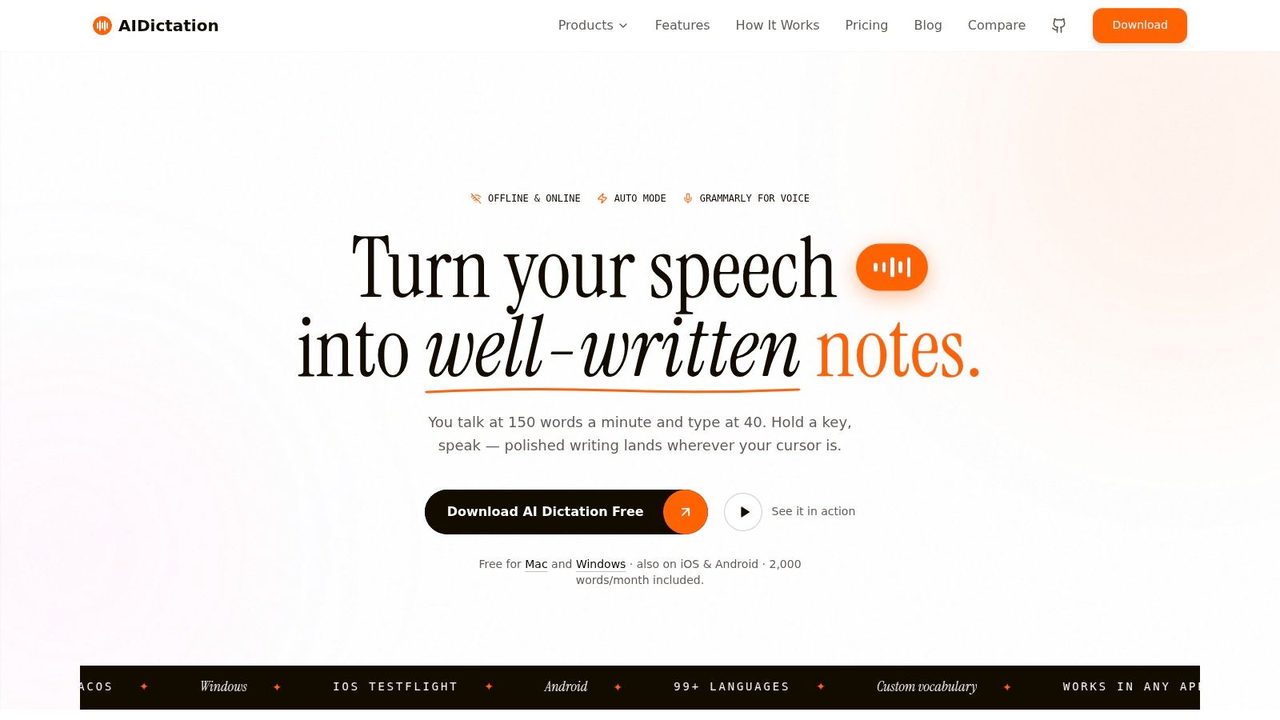
That's where tools with both local and cloud options can be practical. AIDictation is one example because it supports on-device recognition on macOS, cloud cleanup, custom dictionary controls, and context rules for different writing environments. In a team rollout, those settings matter more than another glossy promise about AI.
Clean audio before you judge the workflow
Many teams blame the transcription engine for problems that start in the recording itself. Remote calls, room echo, and laptop fans all make review harder. If your recordings are routinely messy, improving the audio input can be the fastest way to improve transcript usability. This guide to AI audio cleanup is a practical reference for that part of the process.
Build a review habit, not just a transcription habit
Don't let transcripts land as untouched drafts. Define what “done” means for each workflow.
For example:
- Research interview: Transcribe, label speakers, correct key quotes, tag themes.
- Technical walkthrough: Transcribe, fix terminology, extract action items, publish docs.
- Clinical dictation: Transcribe under the approved process, review, finalize, store according to policy.
A little structure upfront prevents the common failure mode where teams generate lots of transcripts and trust none of them.
Conclusion The Future Is Transcribed
Choosing video transcription software isn't really about buying a text generator. It's about deciding how spoken work becomes usable work. The right tool matches your privacy requirements, handles your real recording conditions, and fits the way your team reviews, edits, and reuses information.
The important decisions are practical. Local or cloud. Strong editor or weak one. Good enough on messy audio or only good on polished demos. Searchable transcript with timestamps or a block of text nobody wants to verify.
For PMs, developers, healthcare teams, and support or marketing functions, transcription has become part of the knowledge pipeline. Recorded conversations, interviews, demos, and consults don't need to stay trapped in media files. They can become drafts, documentation, notes, summaries, and evidence.
That's why this category keeps getting more important. As teams record more of their work, transcription becomes a foundational layer for search, collaboration, and automation.
If you want a practical place to start, AIDictation is worth a look for teams that need both transcription and day-to-day voice-to-text workflows, especially on macOS. It combines local and cloud processing options, supports audio and video transcription, and includes controls like custom vocabulary and context-aware formatting that make transcripts easier to turn into usable work.
Frequently Asked Questions
What does Video Transcription Software: Your 2026 Buyer's Guide cover?
You've probably done this the hard way at least once. A stakeholder sends over a customer interview, a recorded sprint review, or a webinar replay and asks for “quick notes.” An hour later, you're still toggling between pause, rewind, and type, trying to catch one sentence that sounded obvious in real time and impossible on the second listen.
Who should read Video Transcription Software: Your 2026 Buyer's Guide?
Video Transcription Software: Your 2026 Buyer's Guide is most useful for readers who want clear, practical guidance and a faster path to the main takeaways without guessing what matters most.
What are the main takeaways from Video Transcription Software: Your 2026 Buyer's Guide?
Key topics include Table of Contents, Why Manual Transcription Is No Longer an Option, The bottleneck isn't typing.
Ready to try AI Dictation?
Experience fast voice-to-text on your device. Free to download.
Download FreeRelated Posts
8 Best Bilingual Dictation Apps: 5 Tested + 3 Baselines
We tested five bilingual dictation apps on Russian-English code-switching, plus three common baselines. Compare WER, language recall, script, and workflow.
Audio & Video Transcription Powered by AI: A Practical Guide
Learn how audio & video transcription powered by AI works, what affects accuracy, and how to pick the right workflow for interviews, lectures, and meetings.
How to Dictate to Word on Mac and Windows
Learn how to dictate to Word on Mac and Windows with clear setup steps, microphone tips, voice commands, and fixes for common dictation problems.