Audio & Video Transcription Powered by AI: A Practical Guide
You've recorded a customer interview, downloaded a missed lecture, or saved a long video tutorial, and now the useful information is trapped inside a timeline. A product manager needs searchable quotes, a student needs readable notes, and a developer wants documentation without watching an entire recording again. Audio and video transcription powered by AI can help, but the important question isn't whether a tool can produce text. It's whether that text is reliable under your recording conditions, safe for the material you're handling, and formatted for the work that comes next.
The practical decisions are straightforward. Choose between on-device and cloud processing, evaluate how accents, noise, jargon, and overlapping speakers will affect accuracy, and select a workflow that matches the use case rather than trusting a generic accuracy headline. This guide treats AI transcription as a working system, with clear benefits and equally clear limits.
Table of Contents
- What AI Audio and Video Transcription Actually Does
- How the Technology Turns Speech into Searchable Text
- What Really Determines Transcription Accuracy
- On-Device vs Cloud Transcription Tradeoffs
- Recommended Workflows for Interviews, Lectures, Meetings and Dev Docs
- Privacy, Security and Compliance Considerations
- Where AI Transcription Is Headed and What to Do Next
What AI Audio and Video Transcription Actually Does
Consider three people working with the same basic capability. A product manager uploads a recorded customer interview and wants quotes with timestamps. A student catches up on a lecture and needs a readable transcript organized around the instructor's ideas. A developer turns a video tutorial into searchable documentation, including commands, decisions, and technical terms.
The tool may start with the same audio signal, but the useful output differs. The product manager needs speaker labels and careful quote verification. The student benefits from punctuation, headings, and slide references. The developer needs timestamps connected to code, terminology, and topics. Transcription is only the first layer.
AI transcription is better understood as a pipeline:
- Capture records speech from an audio or video file, microphone, meeting bot, or screen recording.
- Preprocessing adjusts the signal and attempts to reduce distractions such as hum, silence, or background noise.
- Recognition converts patterns in the sound into words.
- Formatting adds punctuation, timestamps, speaker labels, paragraphs, and sometimes summaries or action items.
- Delivery produces an editable transcript, captions, notes, searchable archive, or structured data for another application.
That distinction matters because “verbatim” and “clean” transcripts serve different purposes. A verbatim transcript tries to preserve fillers, repetitions, false starts, and unfinished sentences. A clean transcript removes some of that friction so a reader can understand the content quickly. If you're checking an interview quote, verbatim output is safer as a source record. If you're drafting a project brief, clean formatting may be more useful, provided someone verifies important details.
The market's scale reflects how broadly organizations now use this pipeline. The AI transcription market was estimated at about $4.5 billion in 2024 and is projected to reach roughly $19.2 billion by 2034, with a projected 15.6% compound annual growth rate from 2025 through 2034, according to Sonix's automated transcription statistics. That growth doesn't make every transcript dependable. It does show that transcription has become a workflow layer for meetings, media, healthcare, education, and searchable AI data.
For a simple way to extract text from an online video, you can try Rooy Development's tool. The right choice still depends on whether the recording is sensitive, whether you need live results, and how much review the final output can receive.
How the Technology Turns Speech into Searchable Text
A useful mental model is a careful human transcriber. They listen to the recording, separate speech from distractions, recognize words from context, mark who is speaking, and organize the result so another person can find a passage later. AI performs the same broad sequence through specialized models and processing stages.
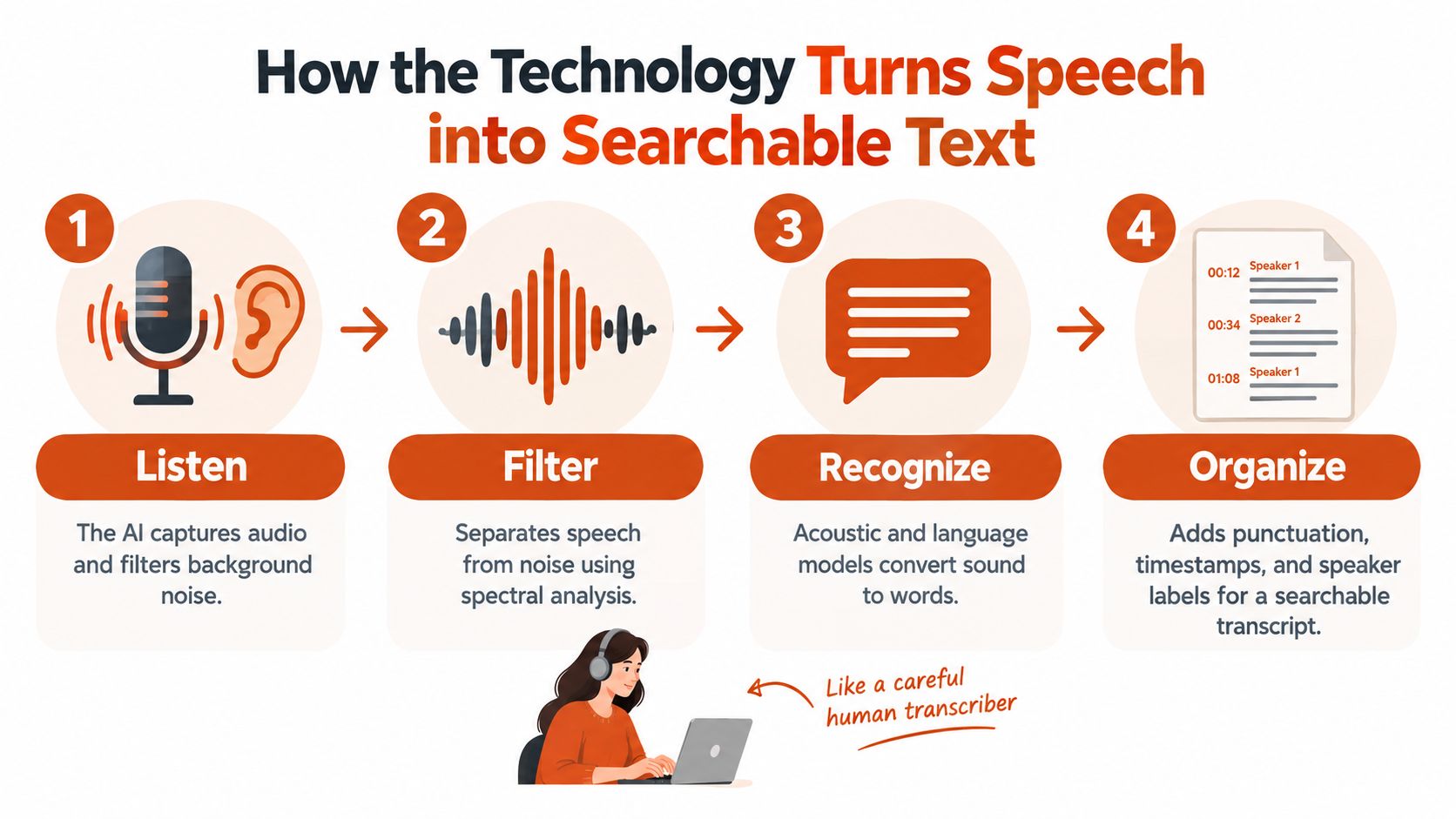
The four stages inside a transcription pipeline
First, capture and preprocessing. A system extracts the audio track from a video or receives a live audio stream. It may resample the signal, detect silence, normalize volume, separate channels, and reduce background noise. Preprocessing can make recognition easier, but it can't reconstruct words that were never captured clearly.
Second, acoustic modeling. The acoustic model maps sound patterns to likely speech units. Older speech recognition systems depended heavily on phoneme rules and statistical models. Modern systems use neural networks trained on large collections of spoken audio, allowing them to represent pronunciation differences and varied recording conditions more flexibly.
Third, language modeling. Sound alone can support several plausible interpretations. A language model uses surrounding words and learned language patterns to rank them. If a recording contains a technical product name, uncommon surname, or code term, the model may still choose a familiar word unless the system receives a custom vocabulary or useful context.
Modern engines often combine architectures such as connectionist temporal classification, commonly called CTC, with attention-based decoding. These approaches help models align sound with text without requiring a human to mark every boundary manually. They can handle accents and code-switching more effectively than older systems, though overlapping speakers and low-quality recordings remain difficult.
Finally, post-processing turns recognized words into a usable artifact. Punctuation models infer sentence boundaries. Diarization estimates when one speaker stops and another begins. Timestamping connects words or segments to the original recording. Confidence scores indicate how certain the system is about particular portions, which helps search, highlighting, caption review, and call summarization prioritize questionable passages.
A transcript can therefore fail in different ways. The words might be mostly correct but assigned to the wrong speaker. Timestamps might drift. Punctuation might change the apparent meaning. A clean-looking document can still contain a serious recognition error, especially around names, medication terms, legal language, or source code.
For a deeper explanation of the relationship between modern AI and speech recognition, explore AIDictation's guide to artificial intelligence in speech recognition. If you're editing a generated voiceover after changing the text, revid.ai transcript voice tweaks provides a relevant example of how transcription can become part of a wider audio and video production workflow.
The deployment choice follows from this pipeline. A local application runs the model on your computer and keeps the recording nearby. A cloud service streams or uploads audio to remote infrastructure, where larger models and additional processing may be available. That choice affects privacy, latency, resource use, and the quality of the finished transcript.
What Really Determines Transcription Accuracy
A clean recording can make AI transcription feel effortless. A crowded meeting can make the same system look unreliable. Accuracy isn't a single property of a vendor or model. It's an outcome produced by the microphone, room, speakers, language, subject matter, and whether the system processes the recording live or after the full file is available.
Word error rate, or WER, is the standard benchmark for speech-to-text quality. Historical progress is substantial. Early models released in 2015 reported about 13.25% WER, while the most accurate systems had reduced that to around 2.5% by 2023. English state-of-the-art systems were commonly near 5% average WER during that period, as described in the peer-reviewed speech recognition comparison published in PMC.
Those figures don't describe every meeting or interview. In the tested setup of one independent comparison, mean error rates were 20.63% for Google, 36% for Wit, and 38.1% for IBM, which shows how much results can vary by system and evaluation conditions. Another benchmark found 2.37% WER for WhisperX and 3.12% for Faster-Whisper on a real-time transcription workload, while WhisperX used about 4.86 GB of memory and had a load time of 4.83 seconds. The open-source ASR benchmarking report illustrates the tradeoff between recognition quality, startup delay, and hardware demand.
Conditions that change the result
| Factor | Impact on WER | Example scenario |
|---|---|---|
| Microphone placement | Distant or inconsistent speech gives the model a weaker signal | A laptop records a speaker across a reflective conference room |
| Reverberation and noise | Competing sounds obscure consonants and word boundaries | Air conditioning, traffic, or audience movement overlaps the speaker |
| Speaker changes | Diarization can assign words to the wrong person | Two participants interrupt each other during a meeting |
| Accent and speech rate | Pronunciation and compressed timing alter sound patterns | A fast speaker uses regional pronunciation |
| Code-switching | Language changes can confuse the active vocabulary | A multilingual team moves between English and another language |
| Domain terminology | Rare words may be replaced by familiar-sounding alternatives | A clinical note contains medication names or a developer says an internal API name |
A large mixed-domain benchmark reported about 5.26% median WER for a leading real-world batch model across 81.7 hours of audio, while a leading streaming model reached around 14.5% WER on challenging mixed datasets. The comparison from VexaScribe's transcription accuracy analysis captures an important operational point: live systems must decode before they have the full context, so streaming is often harder than batch transcription.
Practical rule: Evaluate a tool on recordings that resemble your real work, not on a clean demonstration clip.
Use a closer microphone, provide a custom vocabulary for names and technical terms, and review a sample before publishing or acting on the transcript. For medical, legal, financial, or quoted material, human verification remains part of the workflow rather than an optional polish step.
On-Device vs Cloud Transcription Tradeoffs
The cloud-versus-device decision isn't a simple choice between privacy and convenience. Each deployment model moves effort and risk to a different part of the workflow.
On-device transcription processes audio on a phone, laptop, workstation, or dedicated local server. Whisper-derived and vendor-specific engines can work without sending the recording to a remote service. That makes local processing attractive for clinical dictation, sensitive interviews, fieldwork, and situations where connectivity is unreliable. The constraint is local compute. Smaller models may be more practical on ordinary hardware, while larger models demand more memory, processing capacity, and battery.
Cloud transcription uploads or streams audio to remote infrastructure. Cloud providers can offer larger models, broader vocabularies, stronger diarization, language coverage, and cleanup features without requiring your team to maintain specialized hardware. They're often convenient for long recordings, shared workspaces, automated meeting capture, and multilingual analysis. The tradeoff is that your security review must include the recording, transcript, temporary files, logs, backups, and any subprocessors involved.
Compare the operating model
| Dimension | On-device | Cloud |
|---|---|---|
| Privacy posture | Audio can remain on the local machine | Audio and transcript move through a vendor's systems |
| Latency | Immediate processing is possible, depending on hardware | Live results depend on network quality and service response |
| Difficult audio | Local hardware may limit model size and processing speed | Larger remote models may offer stronger handling of complex input |
| Cost model | Usually tied to software, hardware, or model access | Often based on usage, storage, seats, or service plans |
| Offline behavior | Works without an internet connection when the model is installed | Usually requires connectivity for upload or streaming |
A hybrid design can balance the two. Capture and first-pass recognition can happen locally, while a cloud request handles optional cleanup, translation, or a difficult segment after policy approval. Another approach keeps sensitive recordings local and sends only redacted text or selected excerpts for downstream processing.
The operational choice should follow the consequence of exposure and the cost of an error. A journalist recording a confidential source may prioritize offline processing even if review takes longer. An academic analyzing multilingual lectures may accept cloud processing if the institution approves the vendor and the larger model materially improves language handling. A recurring internal meeting may need cloud integrations for speaker labels and action items, but still require retention limits and participant consent.
For more detail on the local model of speech recognition, see AIDictation's explanation of on-device speech recognition. The important question isn't “Which mode is universally better?” It's “Which failure is less acceptable in this workflow, data exposure, delay, compute burden, or recognition error?”
Recommended Workflows for Interviews, Lectures, Meetings and Dev Docs
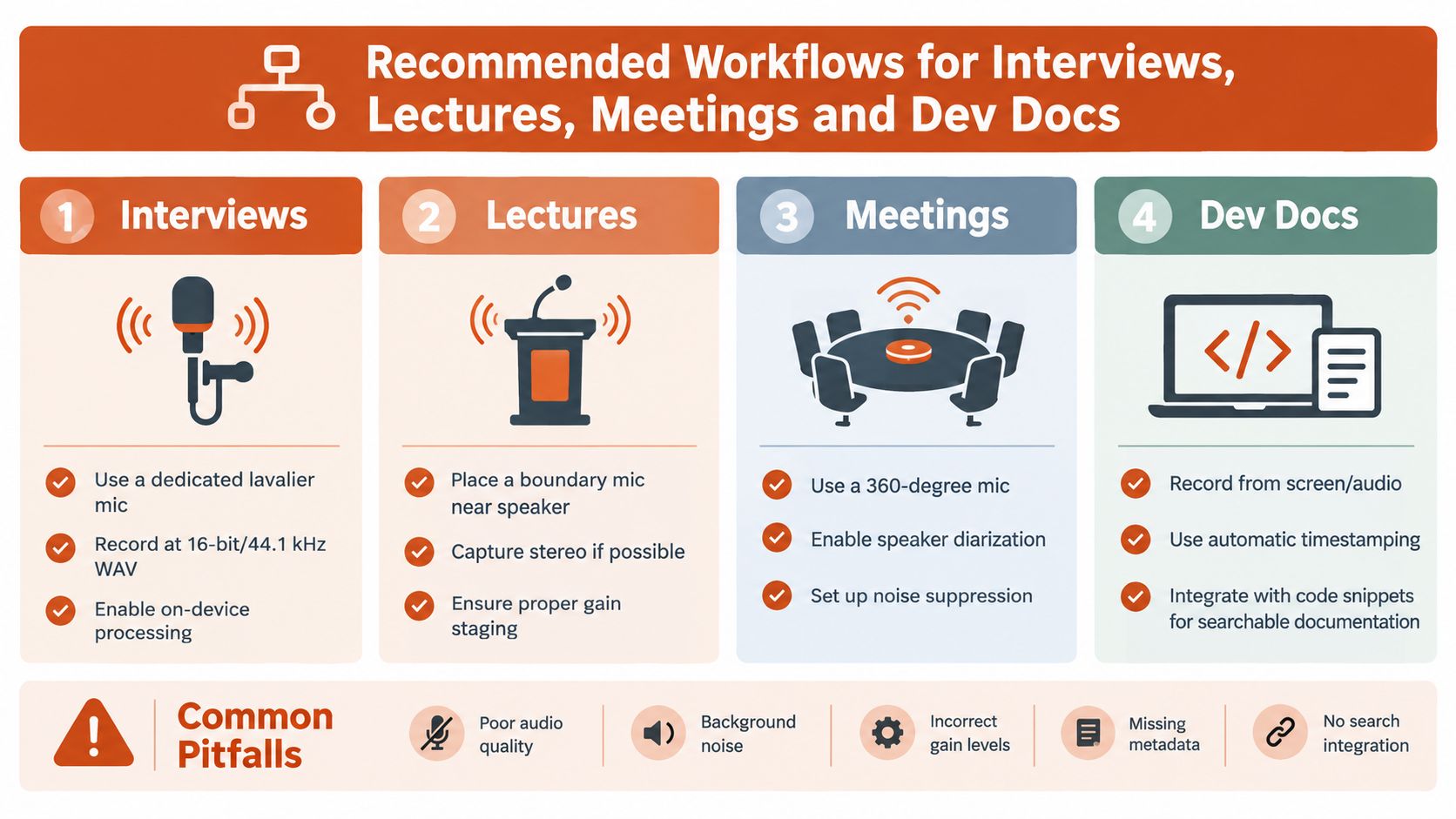
The recording setup often matters more than a last-minute transcript setting. Give the model a clear signal, preserve the original file, and decide in advance which parts require human verification.
Interviews
For journalism, research, or customer discovery, use a dedicated lavalier microphone when possible and record to 16-bit/44.1 kHz WAV. Keep the original recording untouched, then create a working copy for transcription and cleanup. If the source or subject matter is sensitive, an on-device first pass reduces unnecessary exposure.
Review the transcript against the audio before using quotations. Speaker labels and timestamps help you return to the source quickly, but neither should be treated as automatically authoritative when participants interrupt or speak over one another. Mark uncertain names and technical terms during the first review instead of guessing.
Lectures
A boundary microphone placed near the lecturer can produce a more useful signal than a distant laptop microphone. If the room and equipment support it, capture stereo and monitor gain so the speaker isn't buried beneath room noise.
Cloud processing may be useful when you need diarization, language support, or integration with slides. Add slide changes and chapter markers after recognition, then perform a terminology pass. A transcript that says a familiar word instead of a scientific term can mislead students even when the surrounding sentences look polished.
Meetings
Recurring teams benefit from a repeatable process rather than ad hoc uploads. A calendar-integrated recorder or meeting bot can capture the session, assign speaker labels, and extract action items, but the notes should pass through an approval step before publication.
Set expectations with participants, define who can access recordings, and decide when the source audio will be deleted. Summaries should point back to timestamped transcript passages, especially when an action item affects product scope, a customer commitment, or a compliance decision.
Developer documentation
Record pair-programming sessions, architecture reviews, and video tutorials with the screen and audio synchronized. Feed the transcript into a code-aware workflow that can identify decisions, TODOs, commands, API names, and unresolved questions. Store the approved output beside tickets, pull requests, or documentation pages so the team can search institutional memory without treating raw AI output as finished technical truth.
AIDictation offers audio and video transcription workflows that return editable text, with options to copy or download the result. It also supports local processing and cloud-based cleanup as separate operating modes, which can fit teams that need to choose between offline privacy and polished formatting.
Privacy, Security and Compliance Considerations
A transcript can contain the same sensitive information as the original recording, and sometimes more. Search, summaries, speaker labels, and extracted entities make information easier to find, copy, and circulate. Healthcare teams must consider HIPAA when recordings contain protected health information. Legal teams may need to protect attorney-client communications. EU organizations must assess GDPR requirements when audio or derived text leaves a device or crosses regional boundaries.
Privacy incidents involving meeting and clinical transcription have shown why approval can't be treated as an administrative detail. Independent reporting has documented cases involving unencrypted clinical audio and medical-meeting transcription added without authorization. The privacy analysis of healthcare meeting transcription also highlights the practical tension between cloud convenience and local control.
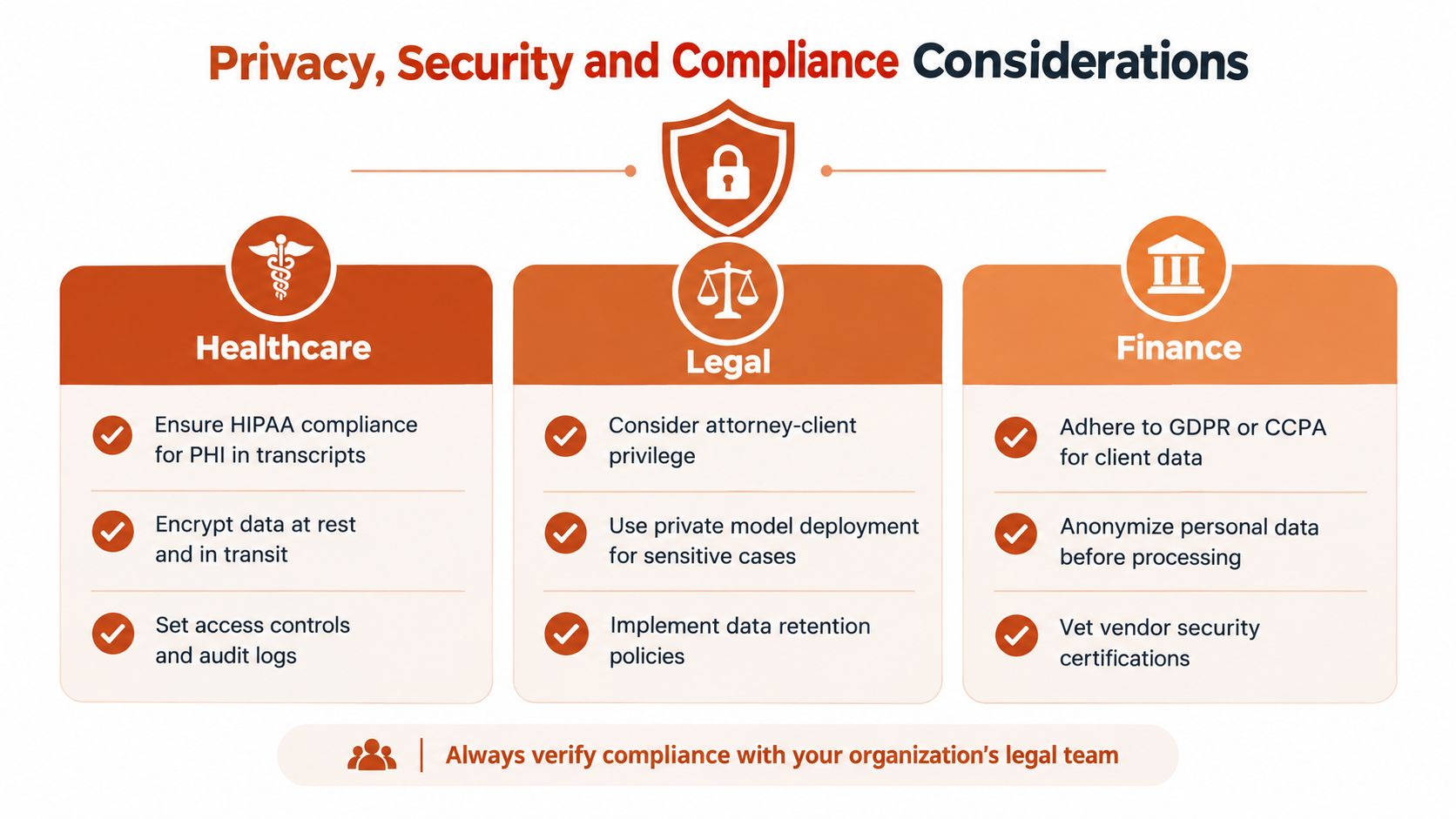
Audit the vendor before uploading audio
Ask direct questions and record the answers in your procurement file:
- Retention: How long are audio files, transcripts, embeddings, logs, and backups stored?
- Training use: Does the vendor train or fine-tune models on customer content, and can your organization opt out?
- Data location: Which regions process and store the data, and can you choose residency?
- Subprocessors: Which infrastructure and analytics providers can access the material?
- Deletion: Does deletion cover source audio, derived transcripts, caches, and backups, and is completion verified?
- Contracts: Is a data processing agreement available, and what do breach notification terms require?
- Access: Can administrators enforce roles, audit logs, single sign-on, and export controls?
Technical controls should match the sensitivity of the workflow. Redact names before cloud upload when the task allows it. Use automatic PII detection as a review aid, not as proof that every identifier has been removed. Encrypt local caches, restrict transcript permissions, and establish a documented deletion schedule. A data retention policy guide from AIDictation can help frame the questions your team needs to answer.
Security decision: Don't ask only whether a vendor says it is secure. Ask what data exists, where it travels, who can retrieve it, and how you can prove deletion.
On-device processing reduces the number of external systems involved, but it doesn't remove every risk. Local machines still need access controls, encryption, updates, backups, and careful handling of exported transcripts. Cloud processing can offer stronger collaboration and formatting, but only after the organization understands the full data path.
Where AI Transcription Is Headed and What to Do Next
The next useful improvements won't be measured only by a lower error rate on clean speech. They'll show up in the difficult moments that currently force people to pause, replay, and correct the record.
Speaker diarization is moving toward better separation of overlapping voices. That matters for journalists conducting multi-source interviews and teams reviewing meetings where people interrupt each other. A buyer should test diarization on actual meeting formats, because correct words assigned to the wrong speaker can still produce a misleading record.
Real-time translation can sit on top of recognition, giving students access to foreign-language lectures and helping multilingual teams follow live discussions. Translation adds another layer of uncertainty, so users should distinguish between live comprehension support and an authoritative translated record.
Smaller on-device models could make private, responsive transcription practical on more hardware. Developers documenting API calls offline, field researchers working without connectivity, and clinicians handling sensitive dictation all benefit when useful recognition and formatting stay close to the source.
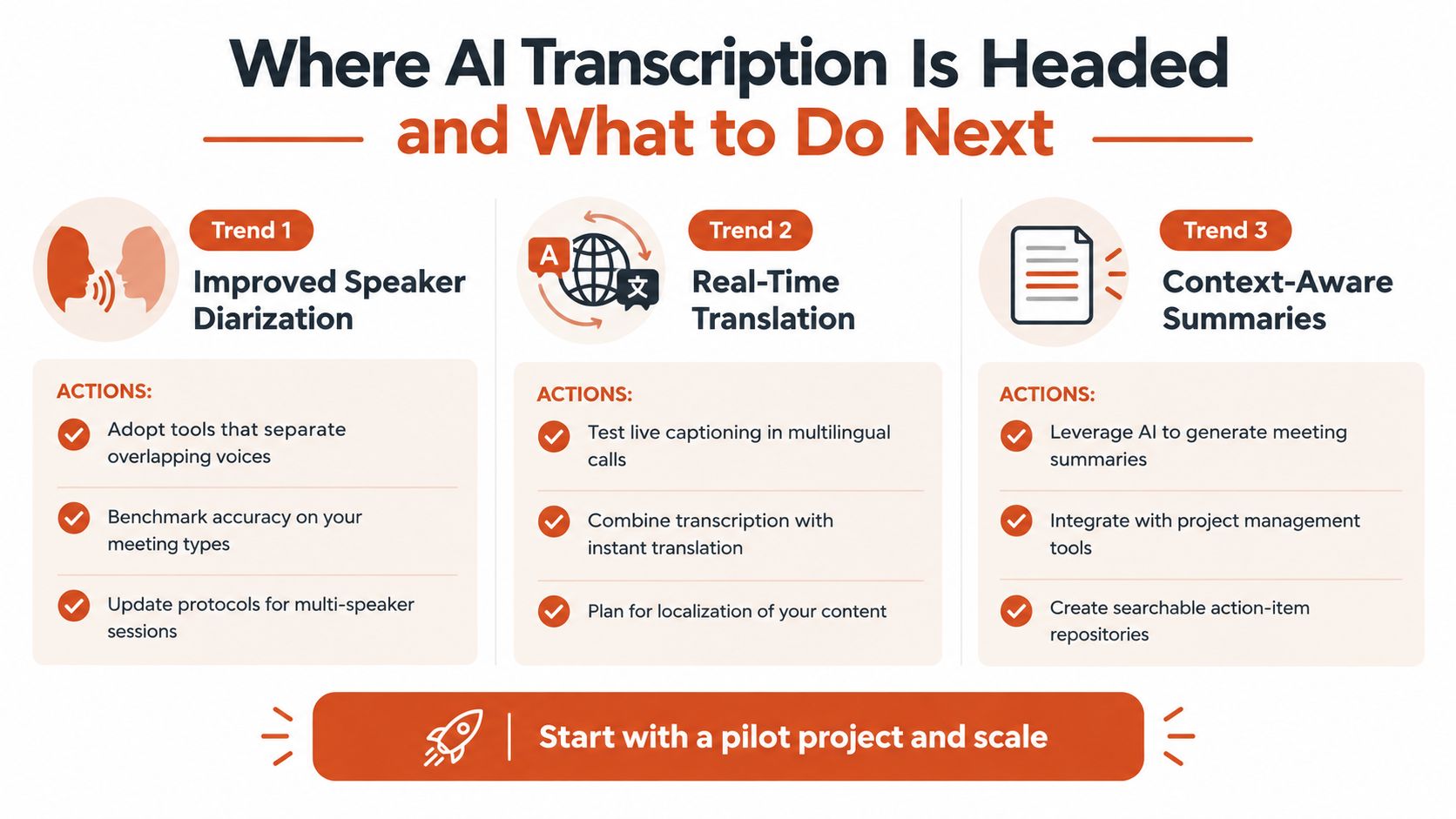
Use this week to turn those trends into concrete decisions:
- Audit one workflow: Identify where transcription currently saves time and where people correct it.
- Choose the processing boundary: Decide whether the recording stays on-device, goes to the cloud, or uses a hybrid path.
- Set a quality benchmark: Select representative recordings and define which errors require human review.
- Define retention rules: Specify who can access recordings and transcripts, and when each should be deleted.
- Run one pilot: Test a single feature, such as diarization, translation, or searchable technical terms, before expanding adoption.
The technology is mature enough for many everyday workflows, but not reliable enough to remove judgment from high-stakes ones. Treat the transcript as an editable evidence layer, verify consequential passages, and choose the deployment model that fits your risk tolerance.
If you need a practical way to turn recordings into editable text, visit AIDictation to explore audio and video transcription alongside on-device dictation and cloud-based cleanup. Test it with a representative recording, compare the output with your current workflow, and decide where local privacy or polished formatting matters most.
Frequently Asked Questions
What does Audio & Video Transcription Powered by AI: A Practical Guide cover?
You've recorded a customer interview, downloaded a missed lecture, or saved a long video tutorial, and now the useful information is trapped inside a timeline. A product manager needs searchable quotes, a student needs readable notes, and a developer wants documentation without watching an entire recording again.
Who should read Audio & Video Transcription Powered by AI: A Practical Guide?
Audio & Video Transcription Powered by AI: A Practical Guide is most useful for readers who want clear, practical guidance and a faster path to the main takeaways without guessing what matters most.
What are the main takeaways from Audio & Video Transcription Powered by AI: A Practical Guide?
Key topics include Table of Contents, What AI Audio and Video Transcription Actually Does, How the Technology Turns Speech into Searchable Text.
Ready to try AI Dictation?
Experience fast voice-to-text on your device. Free to download.
Download FreeRelated Posts
Email Dictation Software: What It Is and How to Choose
Learn what email dictation software is, how it works, and how to pick the right one. Covers accuracy, privacy, HIPAA, accents, and real buyer checklists.
Choosing a Medical Dictation App for Clinical Work
Compare medical dictation apps on HIPAA compliance, on-device vs cloud, medical vocabulary accuracy, EHR integration, and pricing to find the right fit.
Free Audio to Text Tools: 10 Options Compared for 2026
Compare 10 free audio to text tools: built-in recorders, free apps, offline models, and cloud APIs, with privacy and accuracy trade-offs.