AI Grammar Correction Explained from Rules to LLMs
You're halfway through a message when the cursor stops blinking and you notice the same old problem, the sentence sounds fine in your head but awkward on screen. Maybe it's a dictation transcript with missing punctuation, maybe it's a client email that needs to sound calmer, or maybe it's a clinical note that has to be accurate before anyone signs it. AI grammar correction exists for that gap between what people say and what they meant to write, and the interesting part is that it doesn't happen in one step, it happens in a pipeline.
Table of Contents
- From Spoken Mess to Polished Paragraph
- What AI Grammar Correction Actually Means
- The Detection to Rewrite Pipeline
- Rule Engines, Machine Learning, and Large Language Models
- How Accurate Is AI Grammar Correction Really
- On-Device Versus Cloud Trade-Offs
- Where Grammar Correction Plugs Into Real Workflows
- Practical Tips and What Comes Next
From Spoken Mess to Polished Paragraph
A clinician finishes a note into a Mac, and the transcript lands in front of them with half-formed phrases, a couple of filler words, and a few words that never quite survived the microphone. A developer does the same after a standup, then watches the raw speech settle into something that looks sendable. That moment feels like magic only until you notice how much work is hiding underneath it.
A helpful way to think about it is this, speech turns into text, then text gets cleaned, then the cleaned text gets checked again. The first pass is about getting words onto the page. The second pass is about grammar, punctuation, tone, and context. The third pass is about making sure the result still sounds like the person who spoke it.
If you want a broader view of the transcription side of the workflow, a practical reference is tools for perfect audio transcripts from ClearAudio, which sits right next to the grammar problem rather than replacing it. That distinction matters because a transcript can be accurate enough to read and still be bad enough to send.
Practical rule: if the text came from speech, assume the first draft is a translation, not a final document.
That's why the topic deserves more than a simple “fix grammar” button. Good systems don't just hunt for mistakes, they decide what kind of mistake it is, whether to rewrite it, and how much of the original sentence should survive. Once you see those layers, the feature stops looking like a black box and starts looking like an editor's workflow compressed into software.
What AI Grammar Correction Actually Means
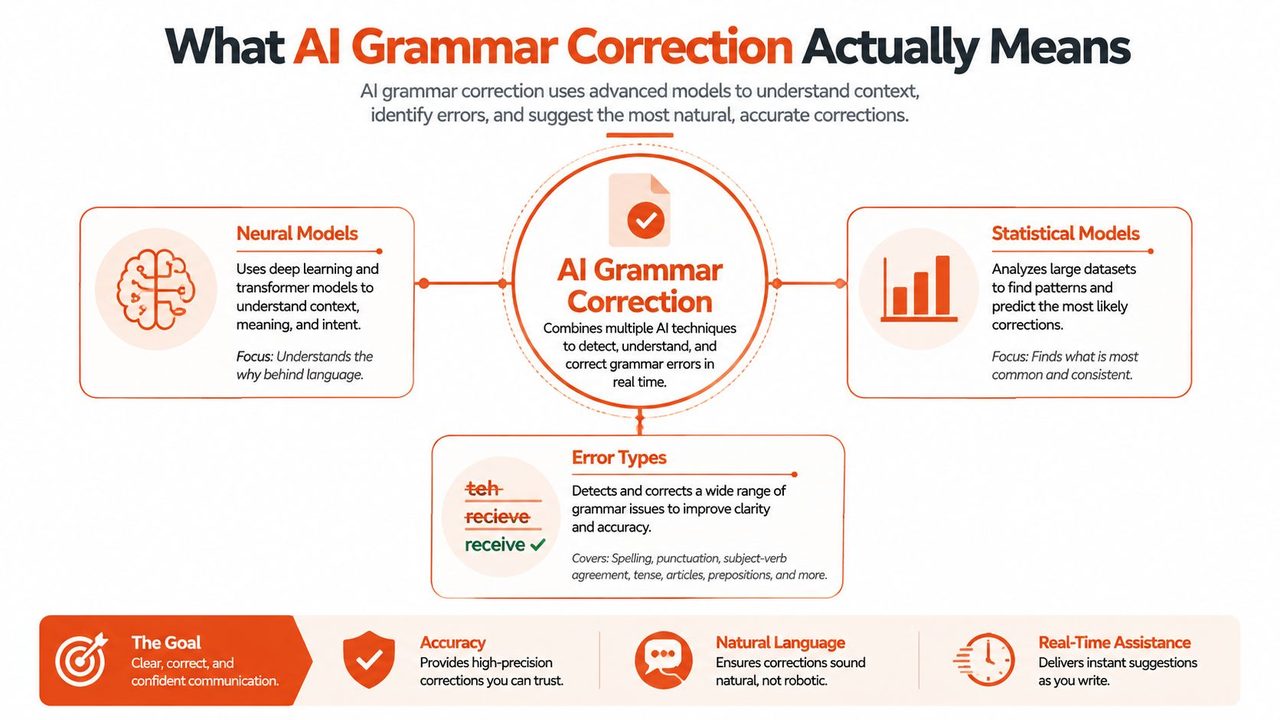
At the simplest level, AI grammar correction means software that can spot and fix errors in running text, then propose a cleaner version. Those errors can be mechanical, like punctuation and agreement, or stylistic, like awkward phrasing and tone that doesn't fit the app or audience. The key difference from ordinary autocorrect is that the system is trying to understand the sentence, not just match a typo against a dictionary.
Three generations of engines
The first generation was rule-based. A rule engine is like a copy editor with a printed style guide, fast and predictable, but limited to the cases someone thought to encode. It can catch obvious patterns, yet it struggles the moment the sentence structure gets messy.
The second generation used classical machine learning. These models learned from labeled examples of edits, so they generalized better across real writing than hard-coded rules. They still worked within a narrower lane, though, because their strengths depended on the quality and breadth of the data they were trained on.
The third generation uses large language models. These can rewrite whole passages, adjust tone, and smooth out phrasing in ways older systems couldn't. They act less like a dictionary checker and more like a trained assistant that has seen millions of examples of how people revise writing.
That sounds like a clean progression, but the world is messier. In production tools, rules still handle deterministic fixes, machine learning catches common patterns, and LLMs step in for broader rewrites. The best mental model is not “one model replaces the others,” it's “the product chooses the right layer for the job.”
The Detection to Rewrite Pipeline
A correction system usually starts by breaking text into tokens, which is just a technical way of saying it slices a sentence into analyzable pieces. After that, it looks for errors, proposes a rewrite, and then does a final cleanup pass for casing, punctuation, and formatting. That sequence matters because a system can only correct what it can first identify.
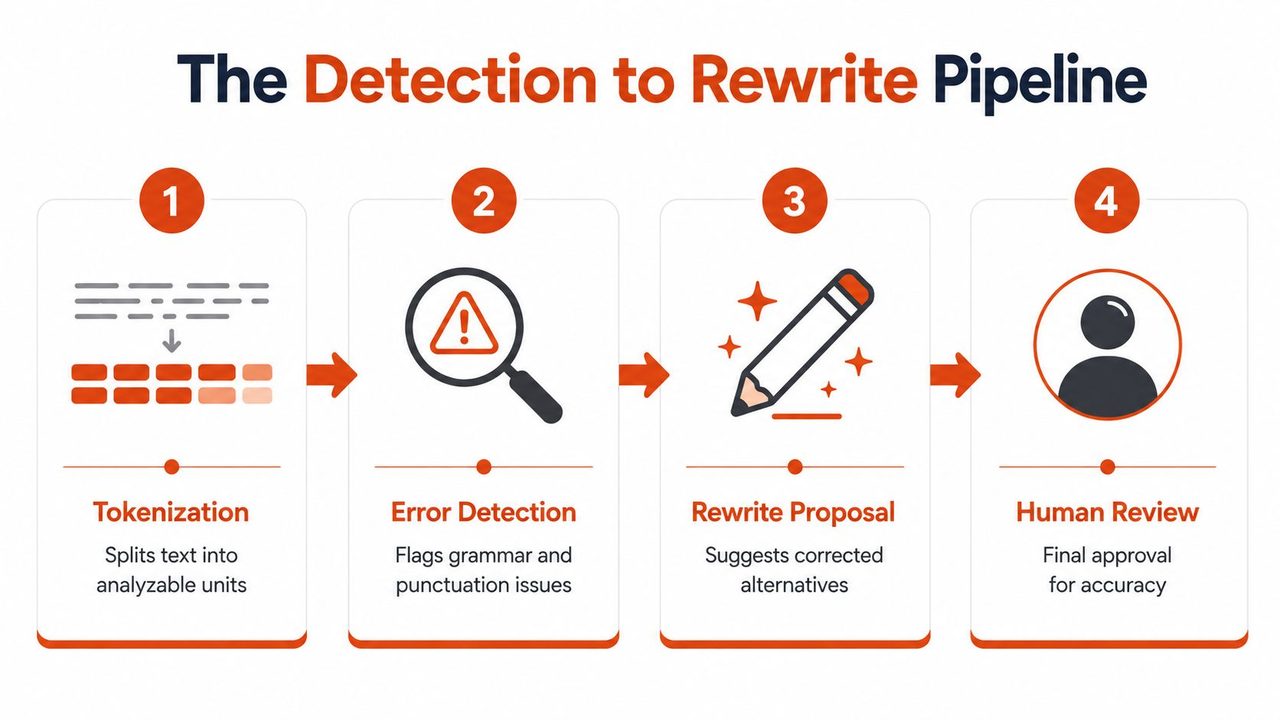
A sentence like “patient report needs reviewed after lunch” shows why each layer exists. Tokenization separates the words. Detection notices that “needs reviewed” is off. Rewrite proposes “needs to be reviewed” or a lighter repair depending on the surrounding text. Post-processing then restores the punctuation and casing so the output fits the document.
Why tagging matters in practice
Some systems treat this as a generation problem, but sequence tagging can be more controlled. Grammarly's GECToR uses token-level labels such as KEEP, DELETE, APPEND, and REPLACE on top of a BERT-like encoder, and it reported F0.5 scores of 65.3 on CoNLL-2014 and 72.4 on BEA-2019, while running up to 10× faster than transformer-NMT systems with inference times of 0.20–0.40 s versus 0.71–4.35 s (technical overview). That approach is useful when the software should repair grammar without drifting too far from the original wording.
A dictation workflow benefits from that restraint. Spoken notes often contain domain terms, abbreviations, and half-finished thoughts that shouldn't be rewritten into something more generic. You can see the same concern in the way transcription editing workflows tend to separate cleanup from meaning preservation.
The best correction pipeline is conservative where the meaning is fragile and more aggressive where the wording is obviously broken.
The final pass is where products feel polished or clumsy. If a tool fixes the grammar but leaves broken punctuation, random casing, or awkward list formatting behind, users still have to edit by hand. That's why the pipeline matters, because each stage solves a different part of the same problem.
Rule Engines, Machine Learning, and Large Language Models
Rule-based systems are easiest to trust because they behave consistently. If a sentence matches the rule, the system fixes it, and if it doesn't, nothing happens. That makes rule engines good for narrow tasks, especially when the cost of a false rewrite is higher than the cost of leaving a small error alone.
Machine learning widens the lens. It sees more of the sentence, so it handles patterns that rules miss, but it still needs labeled examples and careful tuning. Large language models go further by generating more fluent rewrites, which is useful for tone and clarity, but the output is also harder to predict and easier to overdo.
| Approach | Speed | Coverage | Control | Best Fit |
|---|---|---|---|---|
| Rule engines | Very fast | Narrow | High | Repetitive, deterministic fixes |
| Classical ML | Fast enough for production | Moderate | Medium | Common grammar patterns |
| Large language models | Variable, often heavier | Broad | Lower unless constrained | Tone, rewrites, context-sensitive cleanup |
A good production stack usually blends these layers instead of arguing about which one “wins.” The rule layer catches easy mistakes, the ML layer handles common syntax patterns, and the LLM layer helps when the user wants a sentence to sound more natural. If you're designing prompts or app behavior around that stack, no-code prompt engineering tips can help you shape output without pretending prompts are a substitute for product design.
That blend matters even more when grammar correction sits next to speech systems. A dictation product has to deal with recognition errors first, then written-language cleanup second, which is why speech recognition workflows and grammar correction should be designed together instead of treated as separate features. The product choice is less about ideology and more about how much control you need over the final sentence.
How Accurate Is AI Grammar Correction Really
A draft can look clean on screen and still hide a few weak joints. In AI grammar correction, accuracy depends on what the system is asked to do, whether it is spotting an error, tagging it, rewriting it, or cleaning up the final output after the rewrite. A recent industry summary says leading tools reached 94.7% accuracy in context-aware corrections, which suggests routine fixes like punctuation, agreement, and tone adjustment are getting close to what many users expect for everyday writing (source). That is useful, but it does not mean every sentence is safe to auto-accept.
Reading precision and recall without the math headache
The pipeline matters because each stage can fail in a different way. A dictation app may first detect that a sentence needs punctuation, then tag the part that looks wrong, then rewrite the line, then post-process spacing and capitalization before showing the result. A clinical notes tool faces a different burden, because a missed term can be more serious than an awkward sentence, while an email assistant may be allowed to be more aggressive with style cleanup. One evaluation reported 63.99% accuracy in noun-error detection, and another found overall grammar accuracy in some comparisons hovering around 70% relative to human editors (technical analysis). In plain language, the system still misses some mistakes and still suggests some fixes a human would reject.
The Portuguese evaluation gives a clearer feel for the trade-off. ChatGPT-based correction reached precision of 0.790, recall of 0.874, and an F-score of 0.805. The paper explains that about 22% of proposed edits were unnecessary and 12.6% of words were missed or improperly corrected. Precision tells you how often suggested edits are right. Recall tells you how much the system caught. F-score balances the two.
Practical rule: in high-stakes writing, a tool that sounds confident is not the same thing as a tool that is right.
That is why the failure modes matter more than the headline score. A rewrite engine can over-correct by changing a medical term, smoothing out a technical name that should have stayed exact, or turning a careful legal phrase into something that looks better but says less. In casual email, that may be annoying. In clinical documentation or a specification, it can be a problem.
The safest reading of the numbers is simple. AI grammar correction is already strong enough to save time, but not strong enough to replace human review where meaning carries real consequences. The closer the text is to regulated, technical, or externally published writing, the more you need a person in the loop. For a closer look at how offline processing affects that choice, see offline speech recognition workflows.
On-Device Versus Cloud Trade-Offs
A dictation app can clean up text in two very different places. It can do the work on the device, or send the text to a remote server and return a rewrite. The difference sounds technical, but for the person speaking, it changes a simple question, does this sentence stay here, or does it leave the machine before it is corrected?
On-device correction solves a very specific problem, privacy. Grammarly's unified on-device spelling-and-grammar model condenses multiple specialized models into a 1B-parameter local LLM, uses Grouped Query Attention, MLX for Apple silicon, and 4-bit quantization, and reaches 210 tokens/second on M2 Mac hardware while keeping correction quality intact (engineering overview). That makes local dictation cleanup practical on modern Macs without sending text off the device. For offline speech recognition workflows, that local-first setup matters because the transcript can be cleaned where it was created.
When local wins and when cloud wins
Local processing fits notes that must stay private, especially in healthcare, legal work, or internal company drafts. It also helps when latency matters, because the text does not have to travel over a network before the system tags and rewrites it. The pipeline stays close to the source, like keeping a proofreader at the same desk instead of in another office.
Cloud mode brings a different set of strengths. It usually handles longer context better, copes more easily with rarer languages, and can attempt bigger tone rewrites without running into device limits. That extra reach can help when a rough voice draft needs to become a polished email reply or a more structured summary.
Many products now let users switch modes instead of forcing one answer everywhere. AIDictation does this with Auto, Local, and Cloud modes, so a user can keep sensitive material local and still use cloud cleanup when the task calls for richer rewriting. It also lines up with the broader gap in public writing tools, which often talk about fixes in the abstract but do not answer the privacy question for dictation-heavy workflows (privacy discussion).
The practical decision is not a permanent choice between cloud and local. It is a workflow question. What kind of text is this, and what happens if it leaves the device before correction? For a quick internal note, cloud features may be worth it. For a patient note or a confidential memo, local inference is the safer default.
Where Grammar Correction Plugs Into Real Workflows
A dictation draft usually arrives with the rough edges still attached. Filler words stay in place, false starts interrupt the sentence, self-corrections pile up, and punctuation often goes missing. Grammar correction earns its keep by handling those layers one by one, first spotting the noise, then tagging what can be fixed, then rewriting only the parts that need repair, and finally cleaning up the output so the meaning still sounds like the speaker.
Email, clinical notes, and code text need different levels of correction
Email replies call for a lighter hand. A quick message to a colleague may need sentence cleanup, tone softening, and a little formatting help, but it should still sound like the person who wrote it. In voice-heavy workflows, people also use tools like interview confidence with AI to reduce hesitation and clean up delivery before the text ever reaches the inbox.
Clinical and legal notes need stricter restraint. A grammar system should correct mechanics while leaving diagnosis terms, quoted language, and document structure alone. If it starts rephrasing meaning, it has moved from editing into interpretation, and that is a different job.
Developer-facing writing has a different risk profile. Code comments, PR descriptions, and technical specs often include variable names, acronyms, and shorthand that look odd to a general-purpose model but are correct in context. The system has to protect those terms instead of “improving” them.
A useful pattern library looks like this:
- Dictation cleanup: remove filler words, restore punctuation, preserve terminology.
- Email replies: smooth tone, fix grammar, keep intent intact.
- Clinical or legal notes: correct mechanics only, avoid semantic rewrites.
- Developer writing: respect symbols, identifiers, and domain-specific phrasing.
The broader lesson is simple. Grammar correction works best when the app understands the document type and applies the right layer of the pipeline to it. A single generic policy is too blunt for all four workflows.
Practical Tips and What Comes Next
A rough dictation draft usually needs the same three passes every time. First, the system catches obvious errors. Then it tags names, terms, and quoted phrases that should stay fixed. Last, it rewrites the rest and runs a post-process check so the output still reads like the original speaker or writer. That layered flow matters because each step has a different job, much like an assembly line where one station cleans the parts, another labels them, and a final station checks the fit.
The simplest way to keep that process under control is to make the tool more predictable than clever. Keep a custom dictionary for names and technical terms, set app-specific context rules, and review anything that matters legally, clinically, or publicly before it leaves your desk. In dictation workflows, conservative tagging is usually the safer choice when preserving wording matters more than style.
What to watch next
Two problems still show up in real use. One is stronger multilingual correction for spoken text, especially when accents, self-corrections, and code-switching all appear in the same sentence. The other is evaluation that looks beyond a single score and checks whether the tool preserved meaning, terminology, and formatting under messy input.
The market is shifting from simple proofreading toward a broader writing layer. Industry reporting says more people now use AI-powered writing assistance every day, and leading tools are supporting more languages than they did a few years ago. That growth does not solve the hard cases, but it does show why privacy, control, and workflow fit matter more than ever, as noted earlier in the broader industry summary.
Practical rule: trust the tool to speed up the draft, not to own the final sentence.
If you want a dictation workflow that keeps that balance, AIDictation combines local and cloud correction modes, custom dictionaries, and context-aware cleanup for speech-to-text writing. It fits best when the grammar pass happens inside the same workflow that captured the words in the first place.
If you're trying to turn spoken drafts into clean text without giving up privacy or control, try AIDictation. It is built for dictation cleanup, grammar correction, and context-aware rewriting, so you can move from rough speech to usable writing in one workflow.
Frequently Asked Questions
What does AI Grammar Correction Explained from Rules to LLMs cover?
You're halfway through a message when the cursor stops blinking and you notice the same old problem, the sentence sounds fine in your head but awkward on screen. Maybe it's a dictation transcript with missing punctuation, maybe it's a client email that needs to sound calmer, or maybe it's a clinical note that has to be accurate before anyone signs it.
Who should read AI Grammar Correction Explained from Rules to LLMs?
AI Grammar Correction Explained from Rules to LLMs is most useful for readers who want clear, practical guidance and a faster path to the main takeaways without guessing what matters most.
What are the main takeaways from AI Grammar Correction Explained from Rules to LLMs?
Key topics include Table of Contents, From Spoken Mess to Polished Paragraph, What AI Grammar Correction Actually Means.
Ready to try AI Dictation?
Experience fast voice-to-text on your device. Free to download.
Download FreeRelated Posts
Voice to Text on Mac: Built-in Dictation vs the Best Apps (2026)
How to use voice to text on a Mac or MacBook: turn on built-in dictation, see where it falls short, and compare the best Mac voice to text apps for 2026.
How Artificial Intelligence in Speech Recognition Works
Discover how artificial intelligence in speech recognition converts voice to text, exploring models, on-device vs cloud, and future trends.
Offline Speech Recognition: A Complete Guide for 2026
Explore offline speech recognition: how it works, the trade-offs vs cloud ASR, and on-device deployment. A practical guide to privacy, latency, and accuracy.