What Is a Video Transcription? a Complete Guide 2026
Video transcription converts a video's spoken dialogue, and the sounds that carry meaning around it, into readable, searchable text, and captioning adds time alignment on top of that so the words land on screen as they're spoken. Modern automated systems typically report 5% to 20% Word Error Rates, which is why the text you get back works well as a reviewed draft rather than a finished record.
A recorded customer call sits in a shared drive. The pricing question the buyer asked is buried somewhere past the halfway mark, and the only way to find it is to scrub the timeline by hand. Nobody rewatches it, so what the buyer said never reaches the CRM, the help center or the onboarding doc.
That's the problem transcription solves, and it's where the confusion starts. When people ask what is a video transcription, they usually assume the answer is "captions." In practice, the text you read, the text that appears on screen and the text you publish are three separate deliverables, each with its own cleanup work and its own accuracy risks.
Table of Contents
- Video Transcription in Plain Terms
- Transcripts, Captions and Other Text Outputs
- How Automated Transcription Works Under the Hood
- Automated Versus Human Transcription Workflows
- What Changes Transcription Accuracy
- Who Uses Video Transcripts and Why
- Choose the Right Format and Check Accuracy Before Publishing
Video Transcription in Plain Terms
A marketing team has a one-hour webinar recording and needs new hires to find answers without watching the entire video. A transcript turns the recording into searchable text, so a trainee can look up a question, read the relevant passage and check the original recording if the wording matters.
The W3C's guidance on captions and transcripts describes a transcript as readable text representing spoken dialogue and relevant non-speech audio. It can stand alone as a document or be synchronized with the video as captions.
A transcript is a record of what was said, not a script prepared for performance. It may preserve false starts, filler words and reactions such as laughter. That detail can matter when someone needs to check a quotation or understand the conversation's context. A clean-read version, by contrast, may edit those elements for easier reading.
The distinction is simple: the transcript is the text; captions add timing so text appears in sync with the video. A transcript can help people search meetings, revisit a lecture, check interview quotes or turn a webinar into source material for an article. Captions serve viewers who need or prefer on-screen text synchronized with the recording. Automatically generated captions often need editing, so review the text against the audio before publishing.
Start with the original master recording, or a video file you have the rights to use. If you need the transcript to match a particular published cut, use the authorized file for that version. If permitted, download LinkedIn video for transcription.
Transcripts, Captions and Other Text Outputs
One recording doesn't produce one text file. It produces a family of outputs, and most of the mess in a transcription project comes from mixing them up. The ACM's 2025 technical brief on speech transcription separates a verbatim transcript, time-aligned captions, speaker-labeled dialogue, searchable text and an edited "clean read," and it puts typical Word Error Rates for modern speech-recognition systems at 5% to 20% while noting that no system has demonstrated reliable perfect accuracy across speaker demographics.
Each output holds something different.
| Output | What It Contains | Timing | Best For |
|---|---|---|---|
| Verbatim transcript | Every spoken word, including fillers and false starts | Optional timecodes | Legal review, research coding, audit trails |
| Clean-read transcript | Edited for grammar and readability, fillers removed | Optional timecodes | Articles, reports, meeting notes |
| Time-aligned captions | Spoken words and meaningful sounds such as music or laughter | Synchronized to the audio | Accessibility and video platforms |
| Speaker-labelled dialogue | Text tagged with who is speaking | Optional timecodes | Interviews, panels, depositions |
| Interactive transcript | Text that highlights as it is spoken and jumps to the video | Synchronized to the audio | Web pages and searchable video libraries |
Why the verbatim and clean-read versions both exist
A researcher coding a qualitative interview needs the false starts, the repeated words and the abandoned sentences, because hesitation can carry meaning. A communications team publishing the same interview needs a version that reads smoothly in a blog post. Those are two different products made from one recording, and the second must stay traceable to the first, since light editing can reverse a meaning when a negation gets dropped.
Why captions and transcripts fail differently
A caption file that isn't synchronized is useless, because the text appears at the wrong moment and viewers stop trusting it. A transcript doesn't depend on timing at all, but it does need timecodes if a reader is meant to jump back to the source passage and verify it. That's the difference between a document and a navigation aid.
Speaker labels answer a third question entirely. In an interview or a panel, "who said this" is often the most important fact in the file, and a transcript without labels forces the reader to guess.
Interactive transcripts combine all of the above, highlighting words as they're spoken and letting a click move the video to that point, which is why video caption generation workflows usually start from one master transcript and export multiple versions from it.
Decide the output before you transcribe. A verbatim legal record and a publishable blog post need different levels of cleanup, and retrofitting one into the other costs more than choosing up front.
How Automated Transcription Works Under the Hood
The path from a video file to usable text runs through a fixed sequence of stages. Knowing them tells you where an error came from, which beats guessing.
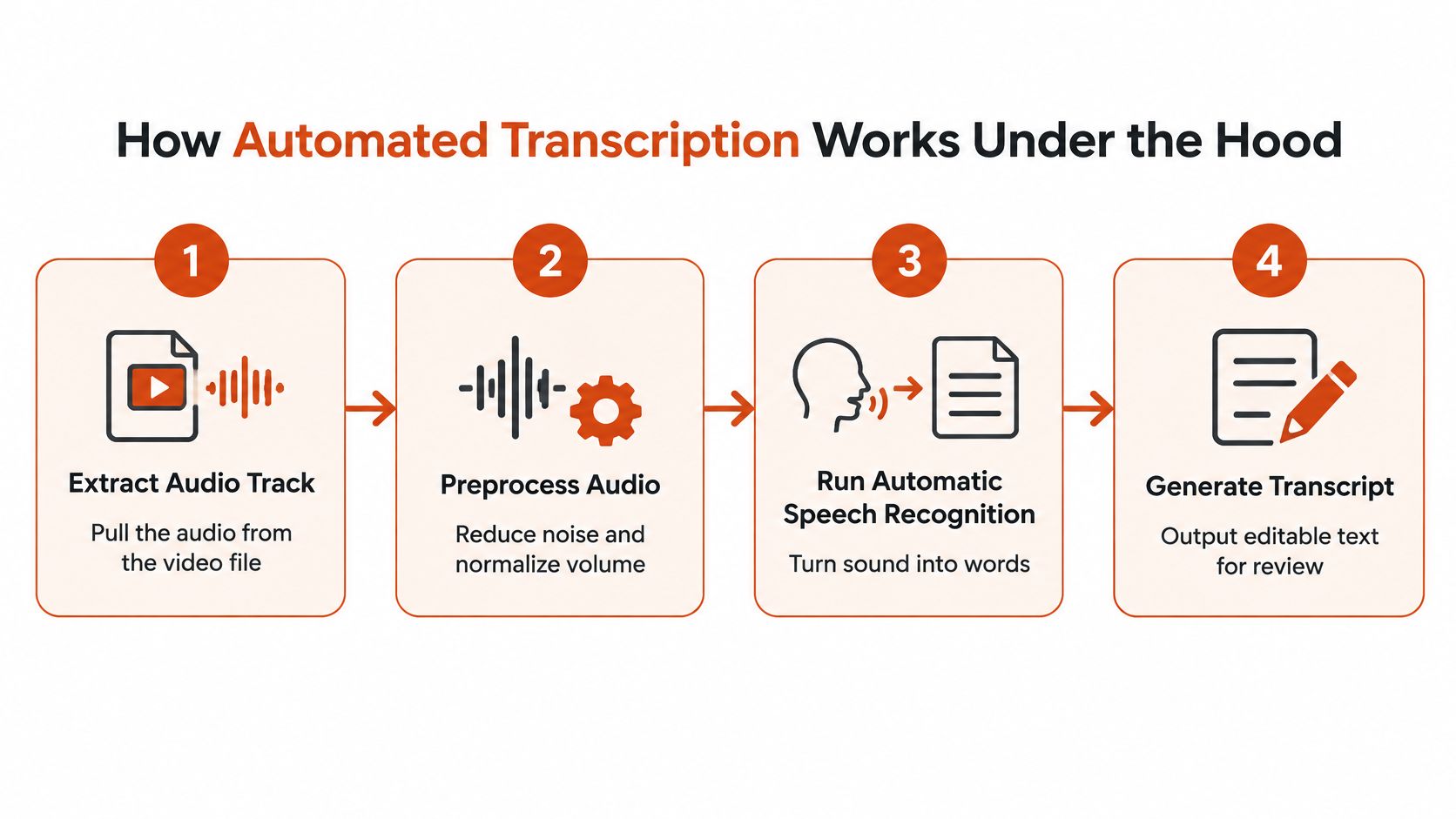
- Extract the audio track. The video container is stripped down to sound, because speech recognition never looks at the picture.
- Preprocess the audio. Noise reduction and volume normalization give the recognizer a cleaner signal. A quiet office recording needs less of this than a conference hall recording with a ceiling fan.
- Run automatic speech recognition. An acoustic model turns sound into candidate words, and a language model picks the most probable sequence among them.
- Normalize the text. Punctuation, capitalization and number formatting are added after recognition, so "twenty three percent" becomes "23%."
- Align each phrase to a timestamp. Alignment is what lets a caption appear at the right moment and lets a reader click a sentence to jump there.
- Add speaker labels where diarization is supported. Diarization answers a different question from recognition: who spoke, and where the turn changed.
Recognition asks what was said. Diarization asks who said it, and when. A system can be excellent at the first and mediocre at the second, which is why a transcript can contain perfect words attached to the wrong person.
If you'd rather watch the process than read it, this walkthrough covers the same ground visually.
The technical description matches what practitioners see. Research published through the ACM in 2024 describes the workflow as audio extraction and preprocessing followed by speech recognition, then text normalization and alignment so each phrase can sync with its position in the media. The same evaluation of 11 ASR services found substantial variation across vendors and samples and reported weaknesses in word-level timestamp prediction, which is the part viewers notice first when captions drift ahead of the speaker.
That's why a production transcript should keep its timecodes and surface confidence or review cues. A reviewer's time is best spent where the system is least sure, and an editor who can see low-confidence segments gets through an hour of audio far faster than one reading blind. For a deeper look at how the recognition stage itself is evolving, this explainer on artificial intelligence in speech recognition is worth the detour.
Automated Versus Human Transcription Workflows
Almost nobody runs a pure machine or pure human pipeline for anything important. The common reality is hybrid: the machine produces a draft and the timestamps in minutes, and a person edits against the audio. What changes between teams is how much of the second half they budget for.
Automated transcription wins on volume. It handles hundreds of hours without hiring, and it can run locally on a laptop or in the cloud depending on privacy needs. What it doesn't do is notice that the speaker said "not contraindicated" when the transcript reads "contraindicated." Names, jargon, numbers and speaker changes are where a machine draft needs eyes.
Human transcription wins on judgment. A trained transcriber catches context-dependent errors, handles overlapping speech and knows when a garbled phrase is a product name rather than a word. The cost is time and money per minute of audio, which is why full human transcription is usually reserved for records that will be read in a legal, clinical or publication context.
| Stage | Automated Transcription | Human Transcription |
|---|---|---|
| Turnaround | Minutes for most files | Hours to days, depending on length and queue |
| First-pass output | Draft text with timecodes | Finished text, typed against the audio |
| Timestamps | Generated automatically, may drift on fast speech | Added by the transcriber or a timing tool |
| Speaker labels | Available when diarization is supported | Assigned by the transcriber on listening |
| Review step | Required for names, numbers and jargon | Built into the process as a quality check |
| Best use | High volume, first drafts, search indexing | Final legal, clinical or publication records |
Rule of thumb: machines draft, people decide. The handoff point is the moment a document starts carrying consequences.
Notice which column gets a review step and which one is a review step. That asymmetry is the whole decision. If the output goes into a search index or an internal wiki, a machine draft with light cleanup is enough. If it becomes a clinical note or a deposition exhibit, the person editing is the product, and the software is only the starting point.
What Changes Transcription Accuracy
A recording made in a quiet room with a clear microphone is easier to transcribe than one with overlapping voices and background noise. That difference is why a vendor's accuracy percentage cannot predict exactly how a system will perform on your video.
Word Error Rate (WER) measures substitutions, deletions and insertions against a reference transcript, divided by the number of words in that reference. A 10% WER means roughly one word in ten differs. The score treats every word equally, though the consequences do not: an error in “no,” a dosage or a surname can change the meaning of a sentence.
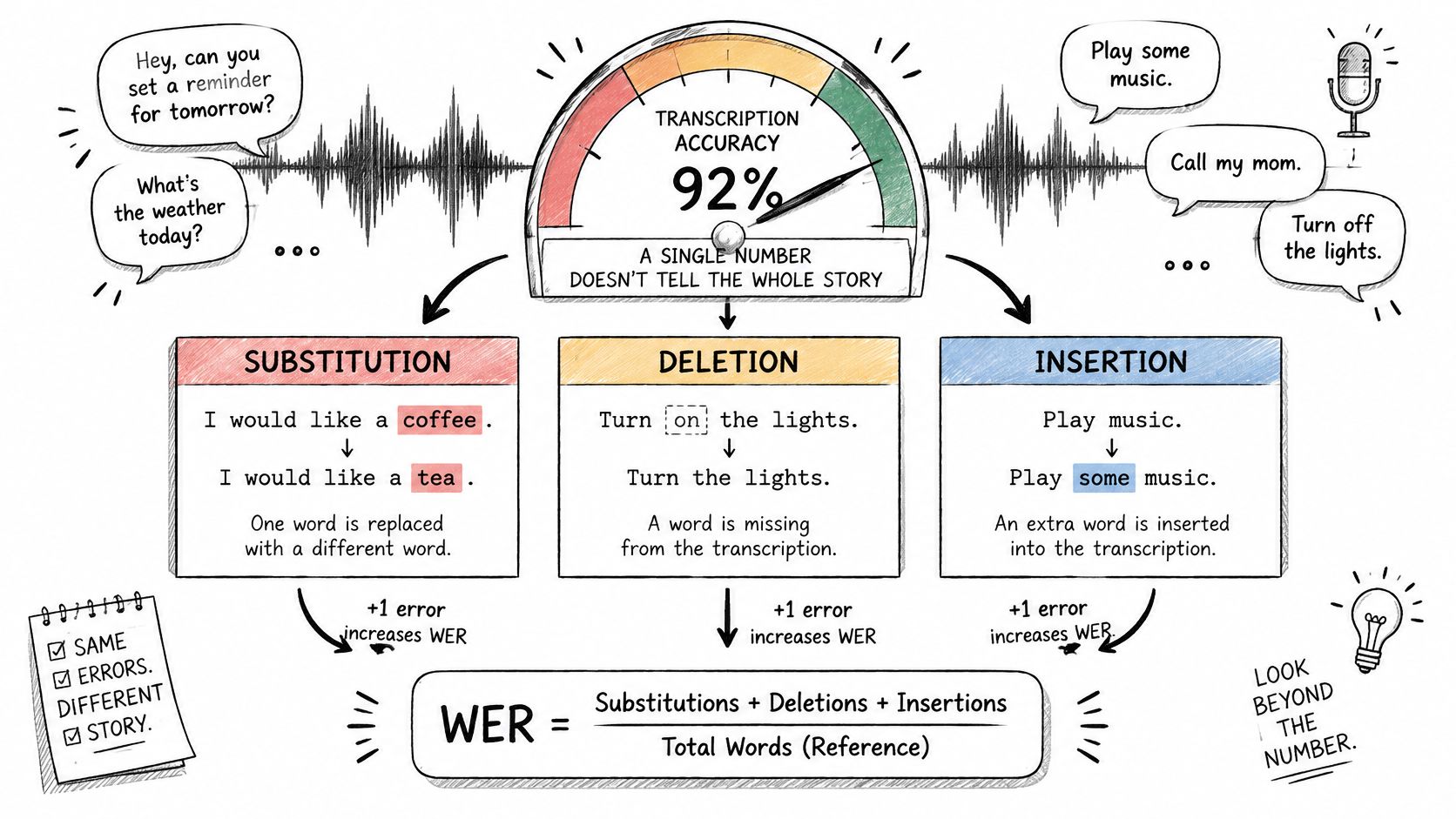
Several conditions affect the result. Background noise and overlapping speech obscure sounds. Accents and regional dialects may be less familiar to the recognition system, while uncommon terms such as drug names, part numbers and engineering units may not fit its language expectations. Distorted audio and speakers correcting themselves mid-sentence add further difficulty.
One Interspeech evaluation of YouTube captions reported a mean WER of 0.31 and found statistically significant dialect- and race-associated differences in the captions. That result describes the evaluated material, not a guaranteed score for another video. A system can also produce different results across speakers or recording conditions.
What that cleanup number really tells you
Text cleanup can make a transcript easier to read and search. It cannot prove that the words were heard correctly. A system may repair punctuation and grammar while smoothing a misheard technical term into a plausible-looking mistake. Check the wording against the audio, especially where meaning depends on a name, number or negation.
Use a consistent validation process:
- Test representative clips. Choose recordings with the microphones, speakers and room noise you expect to handle.
- Compare results by condition. Review performance across speakers, accents, noise levels and content types rather than relying on one overall score.
- Verify proper nouns and figures. Check names, dosages, dates and part numbers against the audio.
- Keep the audio and time-coded transcript. When a line seems wrong, timestamps help you find the relevant moment and correct it.
A polished transcript can still reverse a sentence's meaning. Judge accuracy by listening, not by how smoothly the text reads.
Who Uses Video Transcripts and Why
Three people, one recording, three different needs. Watching the same file turn into three different deliverables is the fastest way to understand why format decisions matter.
A researcher coding interviews
A doctoral candidate has 24 recorded interviews and a coding deadline. The transcript must be verbatim, because hesitation and self-correction carry analytic weight, and it must carry timestamps so every quotation in the final paper can be traced back to the exact moment it was said. A clean read would harm this work.
A product manager turning a call into an update
The same kind of recording, different purpose. A product manager needs the customer's problem, urgency and workaround, not a word-for-word record. What ships is a short summary and a stakeholder update, and the raw transcript stays in the folder as evidence.
A clinical team keeping a checkable record
Here the stakes change shape. The team needs a record it can verify against the audio, because a number or a negation that drifts changes a decision. That's exactly the case for keeping the verbatim version alongside any polished copy, and for treating the audio as the source of truth.
Accessibility remains the driver behind most of this work. In a 2024 survey by 3Play Media on the state of captioning, 90% of organizations captioned at least some of their content, while 39% captioned everything. Growth has been steep: Wistia's state of video report found that 254% more businesses captioned their videos in 2023 than in 2022.
Beyond accessibility, the same text feeds searchable meeting archives, podcast show notes, multilingual subtitles and content repurposing. Each of those consumers wants a different output from the list above, which is why "we need a transcript" is rarely a complete request.
Choose the Right Format and Check Accuracy Before Publishing
A transcript, a caption file and a clean-read version serve different jobs. Choose the format based on who or what will use the text.
| Format | Timestamps | Speaker Labels | Typical Use |
|---|---|---|---|
| SRT | Yes, per caption block | No native support | Captions for most video platforms |
| WebVTT | Yes, per cue | Supported with voice tags | Captions and interactive transcripts on the web |
| TXT | No | Only if typed into the text | Plain text for search and copy-paste |
| DOCX | Optional, typed in | Typed in as labels | Editable documents, comments and review |
| JSON | Word-level, with confidence scores | Included in the structure | Developer pipelines and detailed analysis |
For a video player to display synchronized text, use a caption format such as SRT or WebVTT. For publication and editing, choose a clean-read DOCX or TXT. JSON fits workflows where software needs structured details such as word-level timing or confidence scores. The transcript is the source text; captions add timing, and a clean-read version may remove conversational clutter. Keep those deliverables distinct when accuracy or traceability matters.
The pre-publication gate
A system's performance on a test recording cannot guarantee that every sentence in a particular file is correct. Before publishing, check the actual text against the audio:
- Confirm names and technical terms against the audio. Replay the segment rather than relying on a quick scan.
- Check every number and date against the recording. A transposed digit can change the meaning.
- Verify speaker changes against the timecodes. A correct quote assigned to the wrong person is still misleading.
- Make sure edited sentences preserve the original meaning. Keep the verbatim transcript when readers or reviewers may need to check the wording.
Examples of accessible transcript layouts for branded shows show how speaker turns and timestamps can remain readable without turning a page into a wall of dialogue.
Before you hit publish: make sure each claim can be checked against the audio.
AIDictation's free audio-to-text tool provides editable text you can copy. Transcription of audio and video files is included in the Pro plan. If you are refining a draft, this guide to transcription editing explains how to distinguish cleanup from changes that need verification.
For sensitive recordings, AIDictation's Local Mode runs transcription on-device, keeping the audio on your machine. Whatever tool you use, treat automated text as a draft and review it before publication. AIDictation offers a free audio-to-text tool for creating that draft.
Frequently Asked Questions
What does What Is a Video Transcription? a Complete Guide 2026 cover?
Video transcription converts a video's spoken dialogue, and the sounds that carry meaning around it, into readable, searchable text, and captioning adds time alignment on top of that so the words land on screen as they're spoken. Modern automated systems typically report 5% to 20% Word Error Rates, which is why the text you get back works well as a reviewed draft rather than a finished record.
Who should read What Is a Video Transcription? a Complete Guide 2026?
What Is a Video Transcription? a Complete Guide 2026 is most useful for readers who want clear, practical guidance and a faster path to the main takeaways without guessing what matters most.
What are the main takeaways from What Is a Video Transcription? a Complete Guide 2026?
Key topics include Table of Contents, Video Transcription in Plain Terms, Transcripts, Captions and Other Text Outputs.
Ready to try AI Dictation?
Experience fast voice-to-text on your device. Free to download.
Download FreeRelated Posts
Video Caption Generation Explained from Audio to SRT
Learn how video caption generation works end to end, from ASR and diarization to SRT/VTT export, accuracy metrics, and workflow best practices.
Audio & Video Transcription Powered by AI: A Practical Guide
Learn how audio & video transcription powered by AI works, what affects accuracy, and how to pick the right workflow for interviews, lectures, and meetings.