Voice Recognition Medical Software: A 2026 Buyer's Guide
You finish clinic, close the exam room door, and the demanding work starts. Notes are half done, the inbox is waiting, and the EHR still wants structured documentation that matches coding, compliance, and your own clinical memory while the visit is still fresh. That's the moment when most buyers start looking at voice recognition medical software.
The mistake is thinking this is mainly a speed purchase. It isn't. In practice, the decision turns on two harder questions. First, how much editing work will your clinicians still need to do after the software produces a draft? Second, where is patient audio and text processed, on the device, in the cloud, or both?
Those questions matter because medical voice tools are no longer niche. The global medical speech recognition software market was valued at USD 1,520.3 million in 2023 and is projected to reach USD 3,167.5 million by 2030, with a projected 11.16% CAGR from 2024 to 2030, while North America accounted for 51.3% of revenue in 2023 according to Grand View Research's medical speech recognition software market report. Clinics aren't experimenting at the edges anymore. They're making procurement decisions that affect documentation quality, privacy posture, and clinician trust.
Table of Contents
- The End of Endless Charting
- How Medical Voice Recognition Actually Works
- Evaluating Key Features and Real-World Accuracy
- On-Device vs Cloud The Critical Tradeoff
- Navigating HIPAA Compliance and Security
- Workflow Integration and Structured Note Generation
- Implementation Steps and Calculating Your ROI
The End of Endless Charting
Most clinics don't buy voice recognition medical software because they love new tools. They buy it because charting keeps leaking into evenings, lunch breaks, and the gaps between visits. The common complaint isn't just typing fatigue. It's the mental tax of reconstructing a visit after the patient has left, then trying to turn that memory into a note that is accurate, billable, and easy for the next clinician to trust.
That's why voice recognition has become a practical response to documentation overload. It gives clinicians a way to capture information closer to the moment of care, whether through direct dictation, ambient listening, or a hybrid workflow where the software drafts and the clinician finalizes. Used well, it can shorten the distance between encounter and completed chart.
Practical rule: Buy for reduced review effort, not for flashy demo transcription.
The products in this category now range from classic front-end dictation tools to AI scribes that attempt to produce structured notes. That spread matters. Some systems are really just faster keyboards. Others try to understand the clinical context and organize the output into usable sections. Buyers who treat those as the same thing usually end up disappointed.
Three questions separate a good purchase from an expensive trial:
- Editing burden: How often does the clinician need to fix medication names, negations, templated phrasing, or missing context?
- Workflow fit: Does the tool work inside the EHR and within the pace of the specialty, or does it create one more screen to manage?
- Privacy model: Can the clinic accept cloud processing, or does the workflow require local or hybrid handling of audio and text?
The clinics that get value from these tools usually narrow the use case first. Procedure notes, follow-up visits, referral letters, and field-by-field EHR dictation each demand different strengths. A strong ambient scribe may be weak at precise command-driven data entry. A good dictation engine may still need too much cleanup in conversational encounters.
How Medical Voice Recognition Actually Works
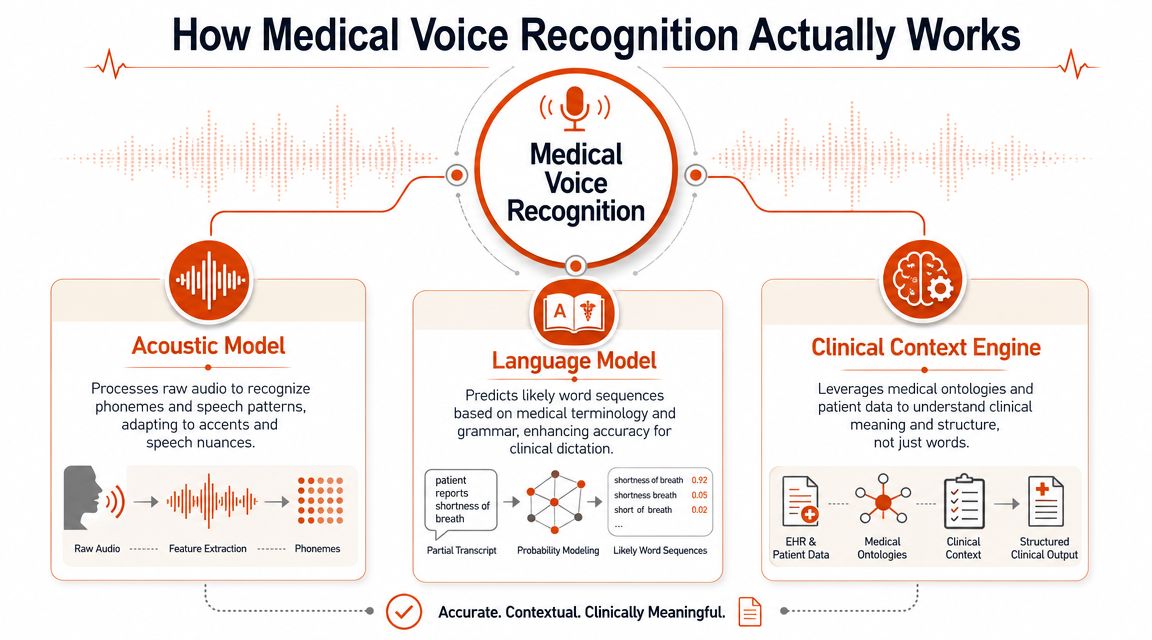
Medical voice recognition isn't one technology. It's a stack. If you only think of it as speech-to-text, you'll miss why some products fail in clinic while others become part of the daily workflow.
It starts with speech recognition, but that is only the first layer
The first layer is automatic speech recognition, often shortened to ASR. This is the part that converts audio into words. It listens to sound patterns, breaks speech into likely phonemes, and predicts what was said. In a quiet room with one speaker and predictable phrasing, that can work very well.
But medicine rarely sounds like a clean dictation booth. Clinicians pause, self-correct, speak quickly, use abbreviations, and switch between lay language and specialty language mid-sentence. Patients interrupt. Nurses add context. The software has to handle all of that without turning the note into a mess.
A useful way to approach this:
- A general dictation app behaves like a stenographer. It tries to capture every word.
- A medical voice platform needs to behave more like a trained scribe. It must know what matters, what can be ignored, and how to shape the output for clinical use.
Why medical-specific models matter
The second layer comes into play. The language model has to know medical vocabulary well enough to distinguish terms that sound similar but mean very different things in a chart. That includes drug names, abbreviations, procedures, anatomy, and specialty shorthand.
According to AssemblyAI's review of medical speech recognition software and APIs, specialized medical models can achieve up to 95%+ reported accuracy, and its own Medical Mode reports up to 94.4% accuracy because the models are tuned for clinical vocabulary rather than general speech. That matters because the problem in healthcare isn't generic misspelling. It's domain error. “Ileum” and “ilium” are not interchangeable. Neither are medication names that differ by a syllable.
The third layer is what many buyers actually want but don't name clearly enough. It's the NLP and formatting layer. After the transcription step, the system can identify medically relevant entities, remove filler words, detect self-corrections, and prepare the output as a structured note rather than a raw paragraph.
A raw transcript is documentation material. It is not yet documentation.
That distinction explains why demos often look impressive and pilots sometimes disappoint. A vendor may transcribe speech capably but still produce output that requires heavy clinician cleanup because the system doesn't format well, doesn't understand clinical sections, or doesn't handle command workflows reliably.
When evaluating tools, separate these three functions in your mind. Ask what handles audio recognition, what handles medical terminology, and what transforms the draft into a usable clinical document. If a vendor can't explain that clearly, implementation will be harder than the sales process suggests.
Evaluating Key Features and Real-World Accuracy
The headline number on a vendor page is usually “accuracy.” That number helps, but in healthcare it can also distract from the question that matters more. What kinds of mistakes remain, and how expensive are they to catch?
Accuracy claims are not enough
The cleanest way to evaluate voice recognition medical software is to split error into two categories. The first is ordinary transcription error, where the wording is wrong but easy to spot and fix. The second is clinically significant error, where the wording could change meaning, risk a bad handoff, or create a documentation problem that survives into the chart.
The risk is not theoretical. The AMA cites a study finding that in unedited speech-recognition clinical documents, 7 in 100 words had an error and 1 in 250 words had a clinically significant error in its guidance on how speech recognition software can work in practice. That is why “just review it quickly” is weak buying logic. In a high-volume clinic, review quality varies with fatigue and time pressure.
A useful procurement habit is to borrow evaluation discipline from broader AI systems work. Teams comparing engines or note-generation layers can learn from frameworks for evaluating AI agents and APIs, especially around task-based testing instead of relying on vendor averages.
You should also compare legacy dictation expectations against newer tools that promise cleanup and formatting. For clinics considering traditional medical dictation products, this review of Dragon medical dictation is a useful reference point for how command-heavy workflows differ from newer AI-assisted approaches.
Features that reduce cleanup time
The best feature list is not the longest one. It is the one that removes correction work from your clinicians.
Look for these in live testing:
- Custom vocabulary support: Names, local facility terms, medications, and specialty phrases should be teachable or configurable.
- Reliable commands: Clinicians need spoken controls for punctuation, navigation, insertion, and template movement if they dictate directly into the EHR.
- Template awareness: The system should fit the note style already used by the practice, not force a generic summary.
- Handling of self-corrections: Clinicians often revise mid-sentence. Good systems can resolve that gracefully instead of preserving both versions.
- Field-level workflow support: Some teams need full-note generation. Others need fast insertion into specific EHR fields.
Here is the practical test I recommend in pilots. Don't ask, “Was the transcript good?” Ask, “How many edits did the clinician make before they were willing to sign the note?” That reveals the actual cost.
If review takes longer than clinicians expected, the software hasn't solved the problem. It has shifted the work.
On-Device vs Cloud The Critical Tradeoff
The architecture decision shapes everything after procurement. It affects privacy review, latency, resilience during internet issues, vendor contracting, and clinician confidence. Many buyers leave this discussion too late and discover that the deployment model, not the transcript quality, is what their organization ultimately values.
A study discussed in research on provider attitudes toward speech recognition adoption reported that among 1,373 providers, 87% thought speech recognition was a good idea after six months. Even so, the broader lesson is not universal acceptance. It is that adoption is organizational, gradual, and shaped by trust, workflow fit, and governance decisions. The same research context also highlights that the choice between cloud and on-device processing affects latency, outage resilience, and data governance.
A visual comparison helps before you get into vendor demos.
The architecture changes the risk profile
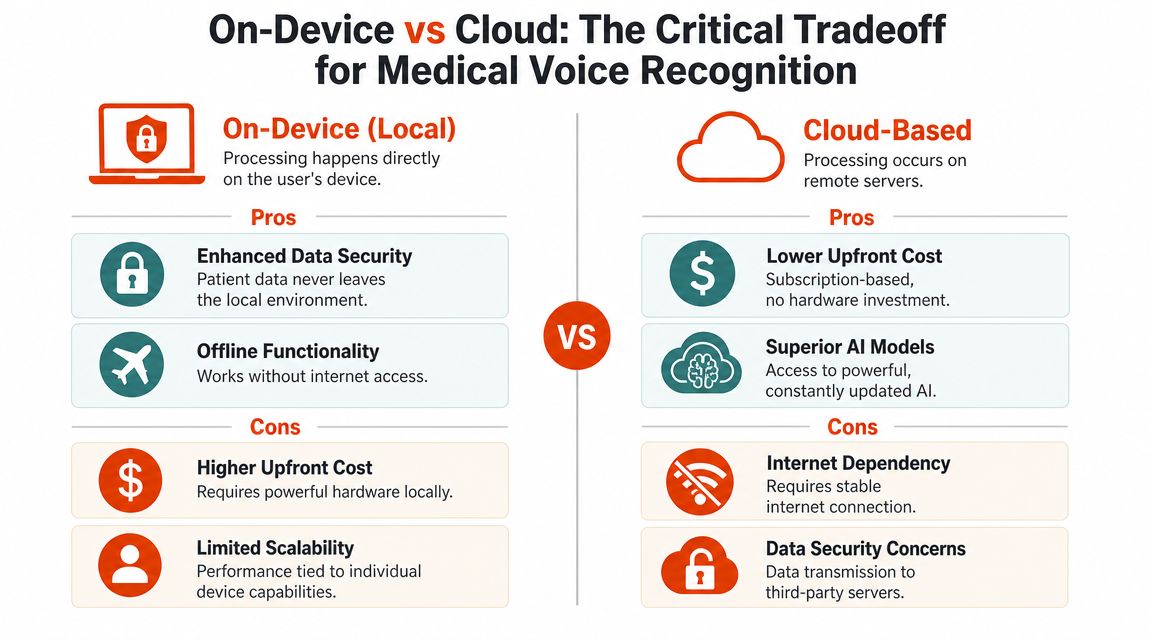
On-device processing keeps recognition local to the clinician's hardware. That can simplify privacy conversations because patient audio doesn't need to leave the device during recognition. It also improves outage resilience and can feel more responsive when the local model is well optimized.
Cloud processing shifts the heavy computation to remote infrastructure. That usually enables stronger language models, easier updates, and more advanced post-processing, especially for note cleanup and structuring. The tradeoff is that connectivity, vendor controls, and data governance become part of the workflow design.
For teams evaluating local-first options, this guide to offline dictation software is worth reviewing alongside cloud tools.
A short explainer can also help nontechnical stakeholders align on the choice:
A practical comparison
| Factor | On-Device Processing | Cloud Processing |
|---|---|---|
| Privacy posture | Audio can stay within the local environment | Data handling depends on vendor architecture and controls |
| Latency | Often feels immediate on capable hardware | Depends on connection quality and service responsiveness |
| Offline use | Works without internet if the product supports local models | Usually limited or unavailable without connectivity |
| Model sophistication | Constrained by device resources | Easier access to larger and frequently updated models |
| Operational dependency | Less exposure to internet outages | More exposure to connectivity and vendor uptime |
| IT considerations | Hardware and device management matter more | Vendor review and integration governance matter more |
A hybrid model is often the most realistic answer. Some products perform recognition locally, then use the cloud for cleanup or formatting when available. That can balance privacy and functionality if the vendor is clear about what stays local and what leaves the device. AIDictation, for example, offers an on-device mode on Apple Silicon and a cloud mode for cleanup and formatting, which is the kind of split architecture some clinics and independent clinicians now look for when they want local dictation with optional remote enhancement.
Navigating HIPAA Compliance and Security
“HIPAA compliant” is one of the least useful phrases in software buying unless the vendor can explain exactly how data is handled. Clinics need specifics. Where is audio processed? Is it retained? What is stored, for how long, and by whom? Who can access it? What happens during support, logging, or model improvement?
Ask how data moves, not just whether a vendor says compliant
For cloud-based voice recognition medical software, a Business Associate Agreement is not optional. If a vendor processes protected health information on your behalf, your organization needs a BAA that spells out responsibilities around safeguarding that data. Without it, the product may be technically impressive and still be the wrong choice for clinical use.
Encryption also needs to be broken into parts:
- Data in transit: Protection while audio or text moves between the clinic and the vendor.
- Data at rest: Protection for anything stored on servers, endpoints, or backups.
- Access controls: Limits on who inside your organization and inside the vendor's environment can view or retrieve data.
On-device software changes the burden, but it doesn't erase it. If recognition happens locally, your organization still has to think about endpoint security, device loss, user permissions, and whether dictated text later syncs into cloud systems elsewhere in the workflow.
Security risk follows the data path. If you don't know the path, you don't know the risk.
For teams that want a broader view of governance and regulatory review, these whitepapers on compliant AI software are helpful background reading, especially when legal, compliance, and IT need a shared framework. For a product-level overview of clinical speech tooling, this guide on speech recognition in healthcare is also useful context.
Vendor questions worth asking before a pilot
Ask these in writing before procurement moves forward:
- What data leaves the device, and at what point in the workflow?
- Is audio retained, and if so, for what operational reason?
- Can the vendor sign a BAA for the exact product configuration being deployed?
- Are transcripts, prompts, or metadata used for model training or service improvement?
- What administrative logs are kept, and do they contain patient-identifiable content?
- What controls exist for deletion, user access, and auditability?
A vendor that answers clearly is easier to implement than a vendor that only repeats a compliance label.
Workflow Integration and Structured Note Generation
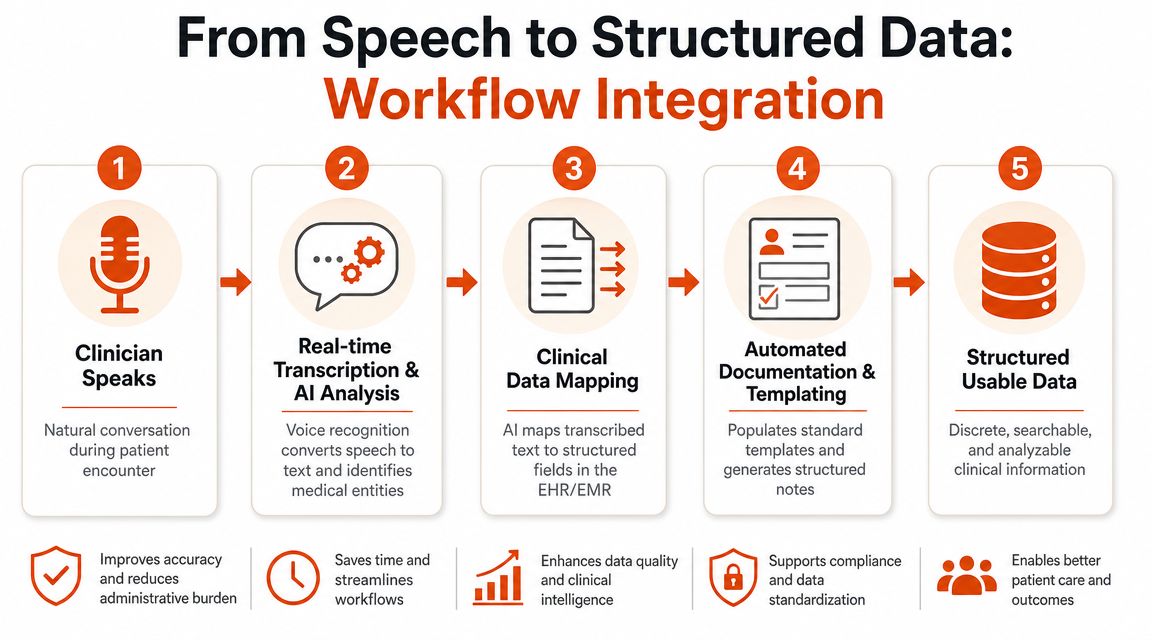
The most useful medical voice tools don't stop at transcription. They convert spoken clinical content into something closer to chart-ready documentation. That difference is what separates a decent dictation engine from a tool that can reduce charting drag.
From conversation to chart-ready note
A primary care visit is a good example. The patient starts with the reason for the visit. The clinician asks follow-ups, interrupts to clarify timing, rules out red flags, then summarizes a plan. Raw transcription of that exchange is usually not what belongs in the record.
Modern systems apply NLP after transcription to extract medically relevant entities, remove filler words, and map conversational speech into structured outputs such as SOAP notes, according to Freed's clinician guide to medical dictation software. That matters because the software is not just listening for words. It is trying to identify which parts belong under subjective history, objective findings, assessment, medications, and plan.
In a strong workflow, the clinician reviews a draft that already looks like a note. In a weak workflow, the clinician gets a long transcript and becomes the note generator.
What works in daily clinic flow
The right integration pattern depends on how your team documents.
Some specialties do better with ambient capture plus review. Others prefer direct field dictation inside the EHR. In many clinics, the most reliable setup is mixed. Use ambient note generation for visit summaries and use command-based dictation for precise fields, orders, or short addenda.
The best systems usually handle these practical details well:
- Filler removal: “Um,” “let me rephrase that,” and side comments should not survive into the note.
- Self-correction handling: If the clinician changes a statement mid-thought, the final draft should preserve the intended version.
- Template mapping: Follow-up notes, consult notes, and procedure notes need different structures.
- EHR insertion: Output has to land in the right place without awkward copy-paste steps.
A typical good day looks like this. The clinician talks naturally during the encounter. The system creates a structured draft. The clinician reviews, makes targeted edits, and signs. No major reconstruction. No second documentation session later that night.
A tool earns trust when clinicians edit for nuance, not because they have to rebuild the note from scratch.
When a pilot fails, the root cause is usually not “AI isn't ready.” It is one of three operational issues: the note structure doesn't match the specialty, the EHR integration is clumsy, or the software captures too much irrelevant speech and creates cleanup work.
Implementation Steps and Calculating Your ROI
Most failed deployments start too broadly. A clinic signs a contract, turns the tool on for everyone, and then tries to fix workflow problems in production. Voice recognition medical software works better when adoption is staged and measured.
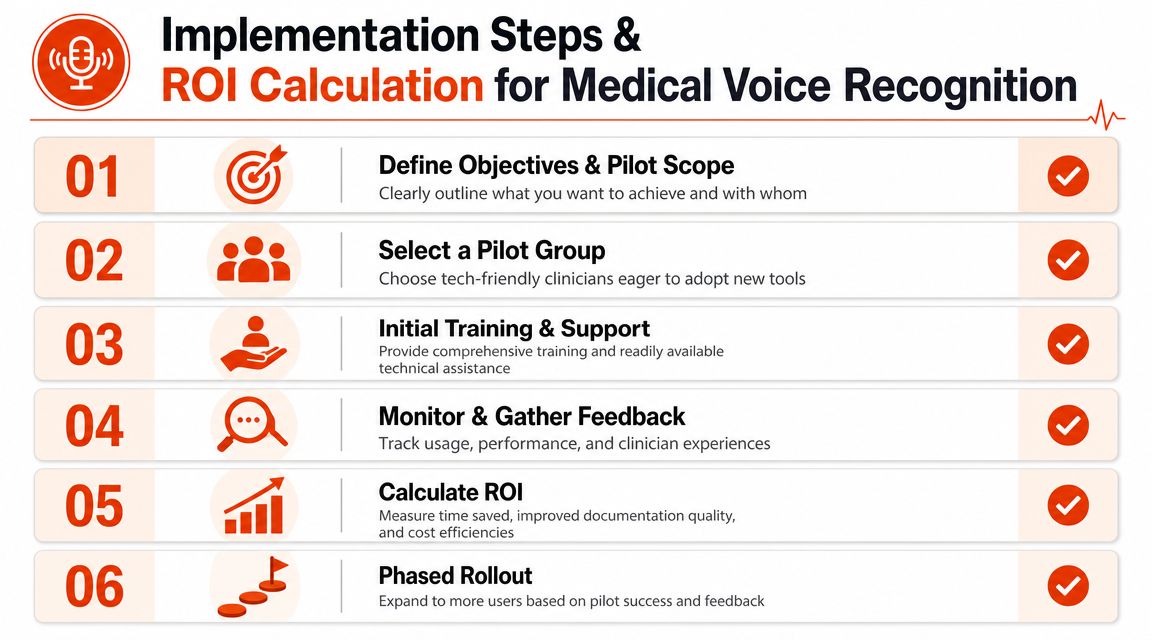
Roll out in phases
Start with a pilot group that actually wants to use the tool. That usually means clinicians who are motivated to change their documentation workflow and willing to give detailed feedback. Avoid making the first wave a cross-section of every resistant and overloaded user in the practice.
Use a short implementation checklist:
- Define the use case: Visit notes, referral letters, procedure notes, or direct EHR dictation.
- Choose success criteria: Faster chart completion, lower cleanup burden, fewer outsourced transcription needs, or better same-day note closure.
- Train for the actual workflow: Spoken commands, review habits, microphone setup, and note approval steps.
- Review samples weekly: Look at note quality, editing patterns, and error types, not just user sentiment.
- Scale by specialty: A setup that works in family medicine may not fit oncology, behavioral health, or the ED.
Calculate ROI beyond minutes saved
There is a real time-saving argument here. A 2021 analysis found speech recognition took 5.11 minutes to complete a form versus 8.9 minutes by typing, a 43% time efficiency gain, while a systematic review reported word error rates from 0.087 in controlled dictation settings to more than 50% in conversational or multi-speaker scenarios in the British Journal of Healthcare Management analysis. That combination tells buyers exactly what they need to hear. Speed gains are plausible. Cleanup burden varies sharply by context.
So calculate ROI with both sides of the equation:
- Time recovered: Faster draft creation and quicker chart completion
- Editing cost: Clinician minutes spent reviewing and correcting output
- Operational savings: Reduced dependence on outside transcription or manual documentation support
- Revenue timing: Charts completed sooner can support faster downstream billing workflows
- Workforce effect: Less after-hours charting can improve retention and reduce friction, even if that value is hard to put into a spreadsheet
The clinics that make a sound business case don't assume every dictated word becomes savings. They model the review step accurately. That is what turns a demo into an implementation plan.
If you're comparing local, cloud, and hybrid dictation workflows on macOS, AIDictation is one option to review. It offers on-device recognition and cloud-based cleanup in the same product, which makes it relevant for clinicians and teams trying to balance privacy, offline use, and polished draft generation without committing to a single deployment model.
Frequently Asked Questions
What does Voice Recognition Medical Software: A 2026 Buyer's Guide cover?
You finish clinic, close the exam room door, and the demanding work starts. Notes are half done, the inbox is waiting, and the EHR still wants structured documentation that matches coding, compliance, and your own clinical memory while the visit is still fresh.
Who should read Voice Recognition Medical Software: A 2026 Buyer's Guide?
Voice Recognition Medical Software: A 2026 Buyer's Guide is most useful for readers who want clear, practical guidance and a faster path to the main takeaways without guessing what matters most.
What are the main takeaways from Voice Recognition Medical Software: A 2026 Buyer's Guide?
Key topics include Table of Contents, The End of Endless Charting, How Medical Voice Recognition Actually Works.
Ready to try AI Dictation?
Experience fast voice-to-text on your device. Free to download.
Download FreeRelated Posts
Medical Transcription AI: A Clinical Guide
Explore how medical transcription AI works in clinical workflows. Learn about accuracy, HIPAA compliance, hallucination risks, and vendor selection.
10 Custom Dictionary Software Tools for Every Workflow
Compare 10 custom dictionary software tools for terminology, medical dictation, developer workflows, corpus research, and speech recognition.
Best Clinical Note Taking Software: 2026 Guide & Tips
Find the best clinical note taking software for 2026. Discover key features, selection tips, & workflow strategies to reduce burnout & boost documentation.