Best Clinical Note Taking Software: 2026 Guide & Tips
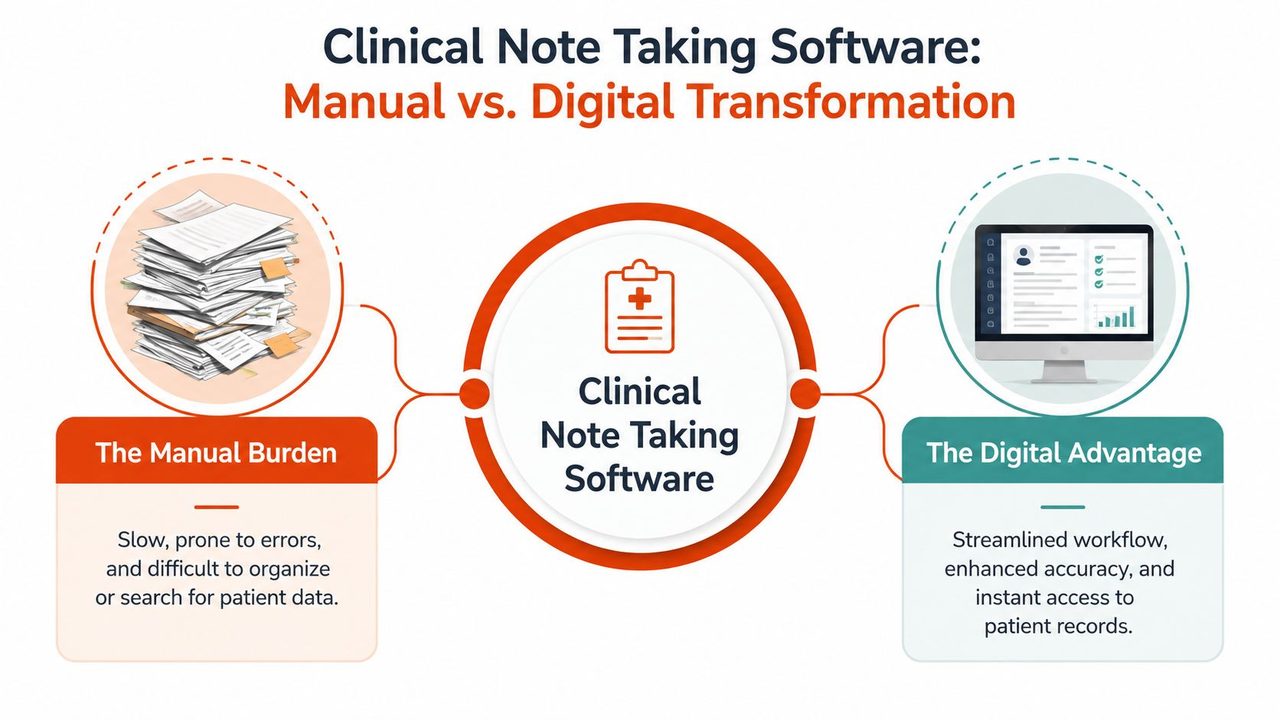
We have all been there. The last patient has left, the clinic is quieter, and the charting still is not done. Notes need cleanup, wording needs tightening, and the evening gets pulled into documentation that should have been finished during the day. For many clinics, clinical note taking software is not a nice extra, it is what keeps the work from piling up.
This is not only a personal productivity problem, it is a workflow problem that shows up across healthcare systems. Even in 2026, a BMJ investigation reported that 79% of NHS hospital trusts in England still relied on pen and paper for clinical notes to some extent, and only 21% reported fully paperless systems. The same review found that only 45 trusts, about 25%, had fully electronic prescribing, which shows how uneven documentation digitization still is in real-world healthcare workflows, even after long modernization efforts. Medical Xpress coverage of the BMJ investigation
The pressure on documentation is also changing what practices should expect from software. A good system can reduce after-hours charting, but an AI scribe or templating tool can also create note bloat if it adds more text than the clinician needs. Specialty fit matters just as much. A dermatology clinic, a mental health practice, and a primary care office all document differently, and software built for generic visit notes often misses those differences.
Table of Contents
- The End of After-Hours Charting
- What Is Clinical Note Taking Software
- Must-Have Features for Modern Practices
- Benefits and Potential Drawbacks to Consider
- How to Choose the Right Software for Your Clinic
- Implementation and Smarter Documentation Workflows
- A Privacy-First Option for Mac Users AIDictation
The End of After-Hours Charting
The charting burden usually doesn't arrive all at once. It starts as a few extra minutes after each visit, then becomes unfinished notes at lunch, then turns into a block of evening cleanup that keeps sliding later because the day's patients never really stop.
That is why clinical note taking software matters. The goal is not just faster typing. It is to keep documentation from taking over personal time, attention, and clinical judgment.
Why manual charting keeps hanging on
A lot of clinicians assume the friction comes from their own habits, but the larger issue is that many health systems still work with fragmented tools and mixed workflows. Hybrid documentation is still common, so software has to fit a real clinic environment rather than a clean digital ideal.
That kind of setup creates hidden costs. A clinician may use one system for notes, another for prescribing, and a third for communication, while paper or scanned documents still fill the gaps. Each extra handoff adds context switching, duplicate entry, and more chances for charting to spill beyond the visit itself.
Practical rule: if a tool only saves time in a perfect setup, it is not solving the actual workflow challenges we face.
Clinics need documentation software that fits messy reality. It has to handle mixed workflows, specialty-specific needs, and encounters that do not follow the same script every time. That is where the right system can support care without forcing the team to work around it, and it is also where a poor fit creates note bloat and more cleanup later, especially when teams are comparing tools against broader healthcare technology advancements. For teams evaluating dictation workflows, a clear overview of what a dictation tool does can help separate simple transcription from software that supports charting.
What Is Clinical Note Taking Software
A busy clinic needs more than a place to type. clinical note taking software is the documentation layer that helps clinicians capture encounter details, organize them in a usable record, and keep them connected to the rest of the chart. A plain word processor stores text. A clinical documentation tool is built to fit how care gets documented, reviewed, and carried forward.
That difference matters because the note is not the finish line. It has to support continuity of care, coding, compliance, and often the patient-facing summary that follows the visit. Software that only turns speech or typing into text covers only a small part of that workflow.
Smart assistant versus digital notepad
A basic dictation app records what you say, but it does not decide where that information belongs or how it should fit the chart. It behaves like a digital notepad, useful for capture, limited for structure.
Clinical note taking software goes further by shaping the note around the encounter itself. It can organize content into familiar sections, help populate chart-linked fields, and reduce the reformatting that usually falls on the clinician after the visit. The practical advantage is less manual cleanup, fewer missing details, and a draft that starts closer to the final record.
The value depends on how well the tool matches real documentation habits. Specialty workflows are rarely identical, and generic intake patterns often miss the details that matter in a specific service line. A cleaner fit with structured template guidance gives the software a better chance of supporting how clinicians chart, rather than forcing them to rebuild every note from scratch. For teams deciding whether voice capture belongs in the workflow, this overview of dictation is a useful reference point for separating simple transcription from documentation support.
Where it fits in the charting stack
Clinical note taking software usually sits inside, or beside, the EHR. In practice, it helps draft or organize the note close to the point of care, then move that content into the record without asking the clinician to re-enter the same information in multiple places. That makes documentation feel like part of the visit, not a separate clerical task that starts after the patient leaves.
The primary test is fit, not novelty. A tool can look advanced and still create friction if it does not match the specialty, the visit type, or the way the rest of the clinic already works. Teams that are comparing documentation tools with broader healthcare technology advancements usually get a better result when they treat note taking software as one piece of a larger workflow, not as a stand-alone gadget.
Must-Have Features for Modern Practices
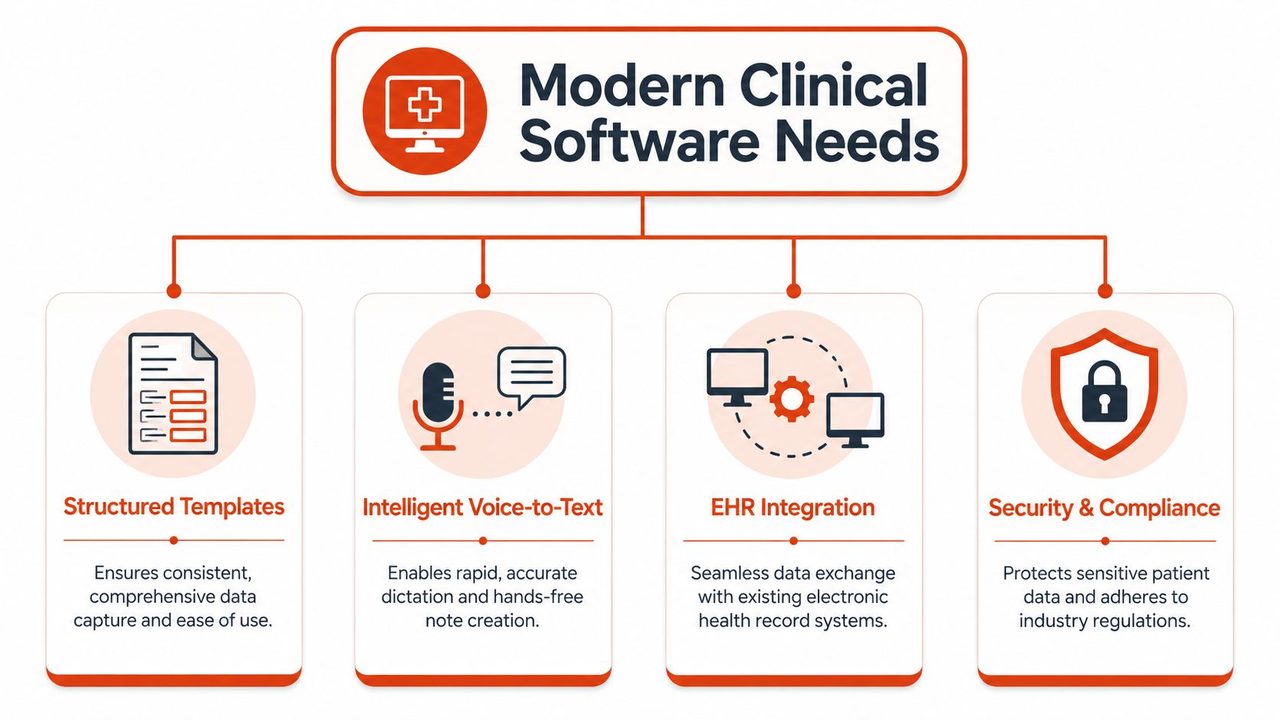
The strongest tools in this category are the ones that reduce friction where clinicians feel it most, during the encounter, after the encounter, and when someone else has to trust the note later. In a real clinic, that means the software has to help with speed, accuracy, and specialty fit without creating extra cleanup work.
Structured templates tied to encounter context
Structured templates are the backbone of useful documentation. When the fields match the encounter type, the software can guide the clinician toward the right level of detail and lower the chance that important items get buried in free text. The practical benefit is consistency, easier review, and notes that are simpler to audit later.
This matters even more in repeat visits. If the system understands the encounter context, it can bring forward medications, problem lists, and prior note material instead of making the clinician rebuild the chart from scratch each time. That is faster, and it reduces the mental load on staff who are already working through a full day of visits.
Voice Capture That Understands Medical Terminology
Voice-to-text looks straightforward until the system starts misreading drug names, speaker changes, or specialty-specific terms. The better systems turn ambient conversation into a structured draft in real time and sync that draft back into the EHR without distorting clinical meaning (real-time transcription and EHR sync guidance).
That matters because raw transcription volume is not the goal. A usable note preserves terminology, separates who said what, and places the content into sections such as SOAP or H&P in a way the team can rely on. If the output needs heavy cleanup, the tool has shifted work instead of removing it.
EHR integration that removes duplicate work
Good integration keeps the note from becoming another island of data entry. Bi-directional syncing lets the draft move into the record and, when appropriate, pull relevant chart data back into the workflow. Without that, clinicians end up copying the same information into multiple systems, which defeats the point of automation.
A tool that creates a second charting location usually adds work instead of removing it.
Security and compliance that do not get bolted on later
Clinical notes carry highly sensitive information, so security cannot be treated as a cosmetic feature. Clinics should expect HIPAA-aligned controls, careful access management, and vendor practices that match the risk level of patient documentation. In practice, that means security belongs in the first purchasing conversation, not the last procurement checkbox.
Benefits and Potential Drawbacks to Consider
A clinic usually feels the upside of modern documentation software first in the day-to-day rhythm of visits. Kaiser Permanente reported that over a 15-month period, its AI scribe was used in 2.5 million patient encounters and saved clinicians nearly 16,000 hours of documentation time (Harvard coverage of Kaiser Permanente's report). That kind of result matters because it changes how much charting gets pushed into lunch breaks, evenings, and other personal time.
The upside is more than speed
Harvard's 2025 reporting also pointed to a multi-system study in which ambient documentation tools were associated with a 21.2 percentage-point absolute reduction in physician burnout prevalence at 84 days at Mass General Brigham and a 30.7 percentage-point absolute increase in documentation-related well-being at 60 days at Emory Healthcare (Harvard coverage of Kaiser Permanente's report). Those findings point to more than typing relief. They suggest a different daily relationship with the chart, one where documentation feels less like a separate shift after clinic and more like part of the visit itself.
The benefit shows up fastest in high-volume practices where notes pile up all day. When software cuts typing, shortens cleanup, and reduces after-hours charting, staff usually notice the change quickly. For clinics comparing documentation tools, medical voice recognition software can be a useful reference point because the ultimate win is not just faster entry, it is reducing the amount of work that still has to be done after the patient leaves.
The downside is not always visible on day one
A 2026 review of ambient AI documentation found a different pattern alongside the efficiency gains. The tools could reduce clinician burden, but they also increased note length and still showed omission errors, with subspecialty notes adding 2,323.72 characters compared with primary care notes (2026 ambient AI review).
That is the difference between a useful note and a transcript. When a colleague has to wade through 2,000 words to find the assessment and plan, the AI has created more work, not less. Long notes can slow review, bury the key assessment, and create friction for coding, handoffs, and chart audits. The omission errors in the same review are a reminder that automation still needs clinical oversight, especially in specialties where the documentation structure is less standard than routine primary care.
A good note is complete enough to support care, but compact enough to be used.
The right way to evaluate these tools is to look at note quality, not just note speed. If the draft gets longer, the team needs a clear standard for trimming it without losing medically relevant detail, and that standard should fit the specialty, the clinicians, and the clinic's handoff process.
How to Choose the Right Software for Your Clinic
The best software choice usually isn't the most feature-rich one. It's the one that matches your specialty, your visit flow, and the kind of documentation pain your team has.
| Evaluation Criteria | What to Look For | Red Flags |
|---|---|---|
| Workflow fit | Supports your intake, visit, and post-visit documentation sequence | Forces staff to adapt every visit to the tool |
| Specialty support | Handles the terminology and note structure your clinicians use | Generic templates built only for primary care |
| EHR integration | Drafts move cleanly into the record | Manual copy-paste between systems |
| Security posture | Clear privacy controls and access discipline | Vague vendor statements about compliance |
| Vendor support | Onboarding, response time, and training that match clinical reality | Slow support and vague setup help |
Match the tool to the specialty
The 2026 software environment includes specialty-oriented tools for neurology, psychiatry, and therapy, which is a good sign, because generic ambient scribes often miss the nonstandard language and note structures these disciplines rely on (specialty-oriented tools overview). That's not a niche detail, it's the difference between a tool that fits and one that frustrates staff every day.
Many evaluations falter at this point. A clinic may be impressed by a polished demo, then discover that the note output doesn't reflect how the specialty documents assessment, risk, or follow-up. The safest choice is the one that mirrors your real documentation style, not the one that looks sleek in a sales call.
Ask how it behaves in your real workflow
If a vendor can't show you what happens before the visit, during the visit, and after the visit, the demo isn't complete. You want to know whether the system supports pre-visit prep, encounter capture, and post-visit summaries, or whether it only handles a narrow slice of the workflow.
For teams comparing note systems with broader speech tools, medical voice recognition software is a practical reference point because dictation accuracy alone doesn't guarantee documentation fit. A strong tool needs both language handling and workflow alignment.
Look for implementation realism
Support matters because documentation software touches habits, not just screens. A vendor should be able to explain onboarding, template customization, and how they handle edge cases like unusual visit types or multilingual notes. If the answer is always “the AI will figure it out,” that's a warning sign, not a plan.
Implementation and Smarter Documentation Workflows
Buying the software is the easy part. Getting it to stick inside a live clinic takes training, clear ownership, and a shared definition of what good documentation looks like for your team.
The clinics that see value fastest treat rollout as workflow redesign, not software installation. They decide who owns templates, who reviews output, and which note sections can be automated without giving up clinical control.
Build a review habit before you chase speed
AI-assisted note capture can save time, but clinicians still need a final review step. That matters most when the note supports billing, handoff, or specialty follow-up, because missing details usually create problems later rather than right away.
Training should focus on what to trust automatically and what to check line by line. If the team knows that structure, terminology, and medication lists need closer review, the software stays a helper instead of becoming a new source of risk.
Customize Templates for Your Real-World Visit Types
A template that works for a routine follow-up may fail completely for a behavioral health visit or a procedure note. Clinics should build around the visit patterns they run, not around an idealized workflow that looks tidy in a demo.
Specialty fit matters more than a generic promise of coverage. A clinic that documents complex assessments, recurring risk factors, or procedure details needs template structure that matches those notes from the start. If the tool can't reflect those differences, staff end up editing every chart back into shape.
For practices comparing documentation infrastructure more broadly, leading medical document retrieval firms are a useful reference point for how records move through a clinic. Retrieval, drafting, and final signoff all need to connect cleanly if the workflow is going to hold.
Keep the measurement simple
Track whether notes are getting completed sooner, whether edits are shrinking, and whether staff still feel buried after clinic hours. Those are practical signals that show whether the software is helping or shifting work around.
Some clinics also need to watch for note bloat. AI scribes can capture too much, too loosely, and the result is a longer chart that takes more time to review. A good implementation plan sets limits on what gets included, what gets summarized, and what should stay out of the final note.
The software should earn its place by reducing friction without creating new cleanup work. Harvard has reported how physicians are embracing AI note-taking tools, but the operational lesson for a clinic is simpler, the tool has to fit the specialty workflow, support review, and avoid turning documentation into another editing burden.
A Privacy-First Option for Mac Users AIDictation
For Mac-based clinicians who want voice capture without giving up privacy controls, AIDictation is a relevant option to evaluate. It offers Local Mode for offline, on-device dictation on Apple Silicon, and its cloud workflow adds cleanup, formatting, and custom dictionaries for medical terminology when online use makes sense.
That combination matters in clinical settings where sensitive content can't always be pushed to a cloud service. A hybrid dictation model gives teams a way to keep sensitive speech local while still using software to clean punctuation, handling filler words, and adapt output for notes or clinical correspondence.
The broader takeaway is simple. The right documentation tool should reduce cleanup, preserve terminology, and respect the realities of clinical privacy. For many Mac users, that means choosing a system built to support both fast dictation and careful data handling.
If your clinic is still losing time to after-hours chart cleanup, start by testing a workflow that respects both privacy and speed. Visit AIDictation to see how local dictation, cloud cleanup, and medical vocabulary support can fit into a documentation process that's faster without being careless.
Frequently Asked Questions
What does Best Clinical Note Taking Software: 2026 Guide & Tips cover?
We have all been there. The last patient has left, the clinic is quieter, and the charting still is not done.
Who should read Best Clinical Note Taking Software: 2026 Guide & Tips?
Best Clinical Note Taking Software: 2026 Guide & Tips is most useful for readers who want clear, practical guidance and a faster path to the main takeaways without guessing what matters most.
What are the main takeaways from Best Clinical Note Taking Software: 2026 Guide & Tips?
Key topics include Table of Contents, The End of After-Hours Charting, Why manual charting keeps hanging on.
Ready to try AI Dictation?
Experience fast voice-to-text on your device. Free to download.
Download FreeRelated Posts
Secure Medical Transcription: A Practical Guide for 2026
Learn how secure medical transcription works in 2026, from HIPAA controls and encryption to on-device vs cloud workflows, with a practical evaluation checklist.
Healthcare Data Security: HIPAA Compliance & Tech in 2026
Protect patient data with our 2026 guide to healthcare data security. Learn about HIPAA, technical controls & secure dictation apps to prevent breaches.
Clinical Documentation Software a Guide for Modern Clinics
Discover how clinical documentation software boosts accuracy, saves time, and ensures compliance. Our guide covers features, AI integration, and implementation.