AI Dictation vs Oravo: Bilingual Accuracy Test
AI Dictation produced the more faithful Russian-English transcript in our test. It scored 11.6% word error rate and preserved 26 of 27 English words. Oravo scored 17.1% before its AI enhancement and 22.6% after enhancement.
The product experience also felt different. AI Dictation stays out of the way while you work. In our hands, Oravo's overlay occupied too much screen space, made the app underneath harder to click, and could only be hidden by going into Settings.
We used the same public fashion interview from our earlier bilingual AI dictation benchmark. The speaker switches repeatedly between Russian and English, which exposes whether an app preserves the original words or normalizes everything toward one language.
Disclosure: AI Dictation is our product. The scoring below uses a fixed human reference and the captured product outputs. The overlay comments describe our hands-on experience with the tested Oravo version, not a claim that every user has the same setup or preference.
What did the AI Dictation vs Oravo test measure?
The comparison measured transcript fidelity on a 146-word Russian-English clip. We scored the text users received, not a provider's marketing benchmark or an isolated model leaderboard.
The source is a roughly 70-second fashion interview. Russian carries most of the grammar, but the speaker inserts English phrases such as "Mango colors," "capri pants," "look couture," "fabric," "price," and "spring and summer."
We tracked two numerical measures:
- Word error rate, or WER. This counts substitutions, deletions, and insertions against the human reference. Lower is better. We follow the standard accuracy framing described in Speechmatics' benchmarking guide.
- English-word preservation. We counted how many of the 27 English words remained recognizable in Latin script. Higher is better.
Numbers do not capture every failure, so we also checked whether each app reached the final sentence, preserved the switch between scripts, and changed words during its cleanup stage.
This is a hard test by design. A monolingual system can return grammatical Russian while erasing how the speaker actually talks. A good bilingual dictation app has to resist that temptation.
Which was more accurate, AI Dictation or Oravo?
AI Dictation was more accurate on both metrics. It made fewer word errors and retained nearly every English word in the mixed Russian sentence.
| Product output | WER | English words preserved |
|---|---|---|
| AI Dictation | 11.6% | 26/27 |
| Oravo, raw transcript | 17.1% | 18/27 |
| Oravo, AI enhancement enabled | 22.6% | 8/27 |
Oravo's raw output was readable and complete. It kept "Mango colors," "universal," "look couture," "fabric," "price," "very," "affordable," and "spring and summer." That is a respectable result for a clip that changes language inside the sentence.
The errors clustered around the language boundary. "capri pants" became "капри-пенс." "jacket" became "джакет." "on design" became "он дизайн." The phrase around "fit" became "If it were," replacing the original rather than merely changing its spelling.
AI Dictation retained 26 of the reference's 27 English words. It preserved phrases including "capri pants," "jacket," "fit," both instances of "fabric," and the final "spring and summer" in Latin script. Its remaining errors were smaller Russian grammar and wording differences.
The score does not mean AI Dictation is always more accurate. It means AI Dictation won this Russian-English clip under one fixed scoring method. Other accents, language pairs, microphones, and speaking styles need their own tests.
Did Oravo's AI enhancement improve the transcript?
No. Oravo's AI enhancement increased the error rate and removed much of the visible code-switching that the raw recognizer had preserved.
| Oravo mode | WER | English words preserved |
|---|---|---|
| Raw transcript | 17.1% | 18/27 |
| AI enhancement | 22.6% | 8/27 |
The enhanced version transliterated English words into Cyrillic:
- "fit" became "фит"
- "amazing" became "амейзинг"
- "look couture" became "лук кутюр"
- "couture prices" became "кутюр прайсис"
- "fabric" became "фабрик"
- "price" became "прайс"
That output may look more consistent to a Russian spellchecker, but it is less faithful to the speaker. The language switch was part of the sentence, not noise to remove.
The result is a useful warning about AI cleanup. A language model can improve punctuation and sentence boundaries while damaging a bilingual transcript. Clean-looking text is not necessarily accurate text.
How does AI Dictation handle bilingual cleanup differently?
AI Dictation tells its cleanup stage to preserve language switching and use reference vocabulary only when the transcript supports it. The cleanup stage is optional and cannot replace complete speech recognition.
We tested that distinction by passing Oravo's raw transcript through the same language-preserving cleanup prompt used in our benchmark. Its WER improved from 17.1% to 16.4%, and it still retained 18 of 27 English words. The prompt did not transliterate additional English into Cyrillic.
The improvement was modest because cleanup cannot recover audio it never heard. Once a recognizer replaces "fit" with "If it were" or writes "jacket" as "джакет," the transcript alone may not contain enough evidence for a safe correction.
AI Dictation therefore treats recognition and cleanup as separate jobs. Recognition must preserve the complete source. Cleanup can add punctuation, remove filler words, or apply a user's writing rules without translating the transcript into a single language.
Is Oravo's overlay easy to use over other apps?
Oravo's overlay felt too large in our hands and made the underlying app harder to click. We also found no quick hide control on the overlay itself. Hiding it required opening Oravo's Settings.
| Oravo overlay | AI Dictation overlay |
|---|---|
 |  |
The screenshots show the control layouts. Oravo presents a microphone toggle and recording control. AI Dictation puts its settings, microphone, and notes controls together in the floating overlay.
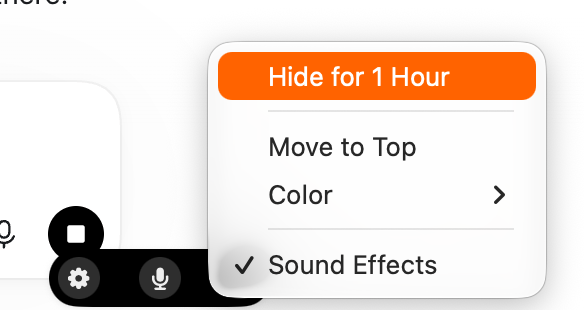
AI Dictation also exposes Hide for 1 Hour directly from the overlay menu. Temporarily clearing the controls takes one action and does not require leaving the current app to find a setting.
The problem was not the visual design alone. The overlay occupied enough space that reaching controls or text beneath it required extra movement and attention. Because it could not be dismissed in place, a temporary obstruction turned into a settings task.
That is especially awkward for desktop dictation. An overlay is supposed to confirm that recording is active, then stay out of the path between the user and the target app. Opening Settings to hide it breaks that flow.
AI Dictation uses a compact floating control so the recording state stays visible without covering a large part of the target app. The goal is not to create another workspace. It is to capture speech, return text, and disappear from the user's attention.
Overlay size is partly personal preference, and screen size changes the effect. A panel that feels acceptable on a large external display can become intrusive on a laptop. The relevant test is simple: can you keep dictating while interacting normally with the app underneath, and can you dismiss the overlay without leaving your work?
Does Oravo use Deepgram Nova-3?
We cannot verify Oravo's speech provider from its transcript. The raw output resembles results from a direct Nova-3 test without custom keyterms, but resemblance is not proof of the backend.
We investigated Nova-3 because the errors looked similar. In our separate direct API test, multilingual Nova-3 averaged 21.9% WER without keyterms and 18.9% with keyterms. English preservation improved from 18.3 to 23.5 words out of 27 when we supplied expected terms such as "Simon Chang," "capri pants," and "fabric."
Those numbers help explain what vocabulary prompting can do. They do not turn the Oravo result into a confirmed Deepgram result, and they do not belong in the product score table.
This distinction matters. Users choose an app, not an API parameter. The final text, overlay behavior, shortcuts, and cleanup rules are all part of the product experience even when two apps happen to share a recognition provider.
Should bilingual users choose AI Dictation or Oravo?
AI Dictation is the stronger choice for the Russian-English speech pattern tested here. It preserved more of the speaker's actual language switching, made fewer word errors, and used a smaller overlay that interfered less with the target app.
Oravo's raw recognition was usable. The bigger problem was what happened afterward. Its AI enhancement made the benchmark result worse, and its large overlay added friction during normal desktop work. Requiring Settings to hide that overlay compounded the problem.
This is one clip, not a universal ranking. Oravo may perform better on monolingual speech, other languages, or a workflow where its larger panel is useful. The comparison is still decisive for the job we tested: dense Russian-English dictation that should remain bilingual.
For more context, read the full multilingual dictation benchmark and our broader best voice-to-text software guide. To test your own speaking style, download AI Dictation, select the languages you use, and dictate the way you actually talk.
Frequently Asked Questions
Is AI Dictation more accurate than Oravo for bilingual speech?
AI Dictation was more accurate in our Russian-English test. It scored 11.6% WER and preserved 26 of 27 English words, while Oravo scored 17.1% before enhancement and 22.6% after enhancement.
Does Oravo preserve English words inside Russian speech?
Oravo preserved some English words, but several were transliterated or replaced. Its raw result kept 18 of 27 English words, and its enhanced result kept 8 of 27.
Should I use Oravo AI enhancement for bilingual dictation?
Not based on this test. Oravo's enhancement made the transcript look more uniform but increased WER from 17.1% to 22.6% and transliterated more English words into Cyrillic.
Does this test prove which speech model Oravo uses?
No. The Oravo output resembles one of our direct model tests, but transcript similarity cannot prove which provider or model an app uses.
Ready to try AI Dictation?
Experience fast voice-to-text on your device. Free to download.
Download FreeRelated Posts
Free Audio to Text Tools: 10 Options Compared for 2026
Compare 10 free audio to text tools: built-in recorders, free apps, offline models, and cloud APIs, with privacy and accuracy trade-offs.
8 Best Bilingual Dictation Apps: 5 Tested + 3 Baselines
We tested five bilingual dictation apps on Russian-English code-switching, plus three common baselines. Compare WER, language recall, script, and workflow.
Audio & Video Transcription Powered by AI: A Practical Guide
Learn how audio & video transcription powered by AI works, what affects accuracy, and how to pick the right workflow for interviews, lectures, and meetings.