How to Transcribe Meeting Minutes a Practical 2026 Guide
The 9:30 stand-up has just ended. Three people have already left, one remote attendee has disconnected, and the operations lead is looking at a half-finished notebook, a chat thread full of competing interpretations, and an inbox requesting the official minutes by noon. Nobody remembers exactly who accepted the release action, and the recording is sitting in a shared folder with no clear owner.
That situation isn't a typing failure. It's a workflow failure. Meeting minutes are a governance artifact, not a cleaned-up transcript, so the reliable process separates raw audio, working notes, reviewed evidence, and the final document. This guide explains how to transcribe meeting minutes in a way that works in noisy rooms, sensitive discussions, and distributed teams.
Table of Contents
- The Real Problem With Meeting Minutes Today
- Preparing the Room, the Roster, and the Audio
- Choosing a Transcription Method That Fits the Risk
- Running the Meeting Without Losing the Thread
- Turning Raw Transcript Into Usable Minutes
- Privacy, Confidentiality, and What Not to Write Down
- Your Reusable Transcription Workflow and Quick FAQ
The Real Problem With Meeting Minutes Today
Teams often treat transcription as a race to convert audio into text. That approach produces a long document, but it doesn't necessarily produce a trustworthy record. A raw transcript may contain false starts, private side comments, uncertain speaker labels, and preliminary opinions that were later replaced by a formal decision.
The danger appears when the raw transcript and published minutes become the same file. An off-the-cuff remark can become searchable, quotable, and difficult to contextualize. Teams then choose between two bad options, spending too much time polishing every sentence or distributing an under-reviewed record that creates legal, reputational, or operational risk.
Practical rule: Capture broadly, publish deliberately.
A better pipeline has distinct outputs:
- Raw recording: The original audio or video, protected by access controls and a retention rule.
- Working transcript: Searchable text used to verify what was said, with uncertain sections clearly flagged.
- Final minutes: A structured record of attendance, agenda items, decisions, actions, owners, and unresolved questions.
- Action register: The operational layer that moves commitments into a task system.
The distinction matters because formal minutes should usually preserve the substance of decisions without reproducing every conversational detour. For teams working with video files as well as audio, this guide by Klap for video creators offers useful context on turning recorded speech into editable text. The same principle applies to meeting governance: transcription is an input, not the finished record.
Assign ownership before the meeting. One person should own the recording, another should facilitate when the discussion is complex, and a named reviewer should approve the final minutes. If nobody owns the full chain, small ambiguities survive until the document is treated as official.
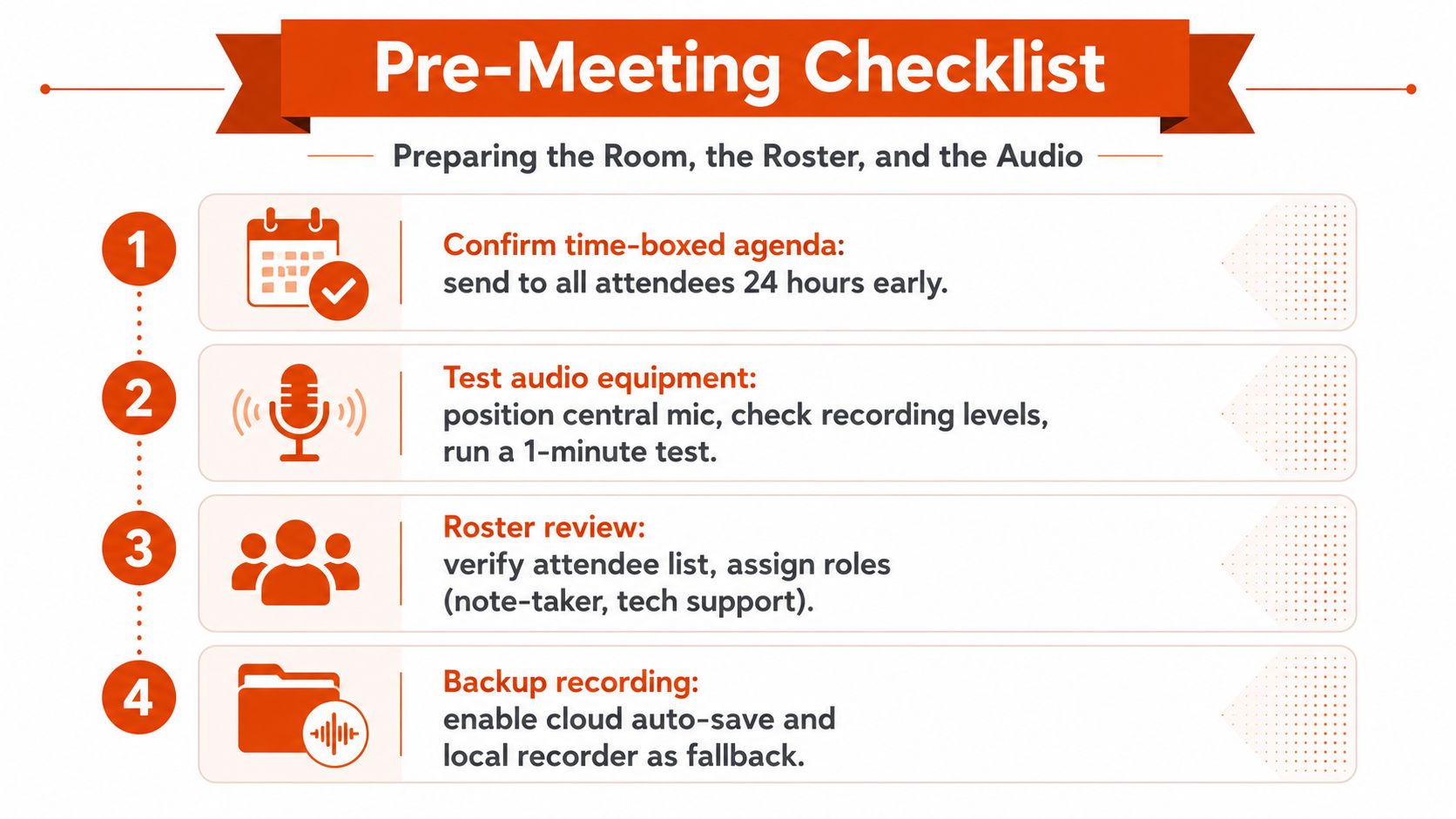
Preparing the Room, the Roster, and the Audio
Most transcription failures are created before anyone speaks. A tool can only interpret the signal it receives, and a perfect vocabulary list won't rescue distant, overlapping, or echo-filled audio.
Build the meeting skeleton first
The day before the meeting, prepare a time-boxed agenda with a named owner for each expected decision. Use those agenda items as headings in the minutes template. This gives the reviewer a clear place to put discussion, decisions, and actions, while also making it easier to identify off-topic material that needs special handling.
Prepare the attendee roster with full names, roles, and pronunciation notes. Add product names, clinical terms, customer names, and internal abbreviations to the transcription tool's custom dictionary when that option exists. Confirm whether external participants need explicit consent before recording, and communicate the recording status at the start.

Fix the room before fixing the transcript
Use a central tabletop or boundary microphone placed close to the main speakers. A laptop's built-in microphone often captures keyboard noise, room reflections, HVAC noise, and uneven speaker volume. Run a short test before the meeting, then listen to it through headphones. Check that the input isn't muted, the recording is saving, and remote audio isn't being captured only through a distorted speaker.
Assign a minute-taker whose live job is to mark decision points. The minute-taker can write short tags such as decision, action, owner, and open question beside timestamps. That small amount of structure reduces the amount of interpretation required later.
Choosing a Transcription Method That Fits the Risk
The right transcription method depends on the conversation's privacy, accuracy, cost, and turnaround requirements, in that order. A polished vendor demonstration says little about performance in a boardroom with overlapping speakers or a clinical discussion containing sensitive information.
| Method | Privacy | Typical Accuracy | Turnaround | Best For |
|---|---|---|---|---|
| On-device transcription | Audio stays on the device when configured locally | Strong on clear, single-speaker audio, weaker with cross-talk | Fast after capture | Sensitive internal discussions and private drafts |
| Cloud transcription | Requires vendor review, access controls, retention rules, and contractual safeguards | Often strong on clear multi-speaker recordings, but room conditions still matter | Usually fast | Routine internal meetings under an approved data-processing arrangement |
| Human transcription | Can be managed under a controlled confidentiality process | Best option when speaker attribution and evidentiary review matter | Slower | Depositions, board minutes, and records that may enter evidence |
On-device recognition is the sensible default for discussions involving personnel matters, patient information, financial details, or unannounced strategy. Local engines such as Whisper.cpp or Parakeet can keep the audio on the laptop, but they still need clean input and human review. Privacy doesn't compensate for a misheard owner or an incorrect decision.
Cloud services can provide speaker separation, searchable results, and rapid processing. Before sending audio, verify the provider's data-processing terms, retention behavior, access model, training policy, and regional hosting options. A signed agreement is a control, not proof that the workflow is appropriate for every meeting.
Human transcription remains slower and usually costs more, but it provides a reviewable path for high-stakes records. For teams comparing capture, cleanup, and editing workflows, this guide from Isolate Audio provides relevant background on post-production decisions. For a practical upload-based option, review the meeting transcription tool from AIDictation alongside your organization's privacy requirements.
Don't choose a method once and apply it forever. Classify the meeting first, then select the least risky method that can produce a usable record within the required window.
Running the Meeting Without Losing the Thread
The minute-taker's job during the meeting isn't to type every sentence. It's to preserve the path from discussion to accountable outcome while the recording captures the fuller context.
Start with the primary microphone near the most talkative participants. Use a second room microphone only when it improves coverage, not as an automatic addition. Mute laptops, move noisy devices away from the recording area, and ask remote participants to use headsets when their room audio creates echo.
Say important markers aloud. A transcript can recognize a clear, deliberate phrase more reliably than an implied conclusion buried in fast conversation.
| Phrase to Say Aloud | What It Tags in the Transcript | Example |
|---|---|---|
| “Decision” | A confirmed outcome | “Decision, we ship Friday.” |
| “Action item” | A task requiring follow-up | “Action item, Sarah, due next Tuesday.” |
| “Owner” | The accountable person or team | “Owner, the platform team.” |
| “Open question” | An unresolved issue | “Open question, whether the vendor supports the required export.” |
| “For the record” | A statement requiring careful verification | “For the record, that contradicts the Q2 forecast.” |
Keep a timestamp column beside shorthand notes. You don't need to interrupt the discussion to record every timecode. Mark the start of each agenda item, then capture the time whenever someone states a decision, assigns an action, or corrects the record.
Cross-talk requires intervention. When two people speak at once, write an overlap marker and ask them to restate the disagreement one at a time. In a sensitive meeting, don't infer who said what. Speaker-attribution errors are especially common when several people share one room, and real-world meeting audio can fall to roughly 88 to 93 percent accuracy for strong systems in ordinary conditions, with noisy settings reaching roughly 74 to 83 percent, according to meeting transcription accuracy benchmarks.
The facilitator should facilitate. The minute-taker should capture. Combining both roles works only for unusually simple meetings and creates avoidable gaps when the discussion becomes contentious.
Turning Raw Transcript Into Usable Minutes
A transcript becomes minutes through controlled editing, not automatic summarization alone. The cleanup process should leave an audit trail for important decisions while removing material that doesn't help readers understand what was agreed.
Clean the speakers before the sentences
Begin with diarization cleanup. Assign consistent labels, merge segments assigned to the wrong person, and flag unknown speakers rather than guessing. If the recording can't establish who made a statement, preserve the uncertainty in the working transcript and verify it with the participants.
Next, remove verbal clutter. Delete filler words, repeated starts, and abandoned sentences when they don't change meaning. Keep substantive self-corrections, apologies, denials, objections, and statements that alter the decision. A polished minute isn't a literary rewrite. It must remain faithful to the outcome and the relevant reasoning.
Structure around decisions and ownership
Group the material under the agenda. Write concise summaries in active language, then create separate records for decisions and actions. Each action should identify an owner and due date, or remain explicitly unassigned rather than appearing complete.
A useful final structure is:
- Meeting details: Date, purpose, attendees, absentees, and approval status.
- Agenda discussion: Short context under each item.
- Decision log: The decision, rationale where necessary, and timestamp.
- Action register: Action, owner, due date, and status.
- Open questions: Items deferred for later resolution.
- Source references: Links to the recording or transcript, restricted according to policy.
The benchmarks explain why review remains necessary. Clear English transcription is commonly reported at 95 percent or higher, while meeting-room conditions can produce materially higher error rates, as summarized by Scholarly's recording accuracy information. A 95 percent result can still leave roughly five errors per 100 words, enough to change a name, date, negation, or action.

Verify the record before distribution
Replay critical passages against the cleaned document. Check every decision, owner, deadline, number, product name, and statement containing a negation. A review at a slightly accelerated playback speed can make the process more efficient, but don't trade speed for certainty when the wording affects legal or operational accountability.
For practical guidance on removing filler and preserving meaning, see this transcription editing workflow. Export a searchable PDF for ordinary circulation and retain a structured Markdown or JSON representation when your archive or knowledge system needs machine-readable fields. Keep the raw transcript separate from both.
Privacy, Confidentiality, and What Not to Write Down
The largest transcription risk isn't bad punctuation. It's over-retention. A complete recording and verbatim transcript can preserve preliminary opinions, internal disagreement, personal information, and legal analysis long after the meeting's operational purpose has ended.
Treat minutes as a governed artifact. Apply the relevant retention schedule, legal-hold rules, access permissions, and disclosure requirements before distribution. A governance analysis from Diligent on AI meeting minutes warns that verbatim capture can expose material that creates discovery or regulatory concerns, even when the original discussion was informal.
Use a simple editorial boundary:
| Content Type | Default Treatment | When to Quote Verbatim |
|---|---|---|
| Decision and rationale | Summarize clearly | When exact wording changes the obligation |
| Action and ownership | Record explicitly | When a formal commitment must be preserved |
| Side conversation | Exclude from final minutes | Only when it materially affects the official record |
| Personal or regulated information | Redact or omit | Only when required for a documented purpose |
| Legal advice or preliminary views | Restrict and summarize carefully | Only after appropriate legal review |
Never include a side conversation just because the recorder captured it. Redact sensitive identifiers and unnecessary medical, employment, financial, or customer information before sending the minutes to a wider group. In minutes that may leave the company, role labels can reduce unnecessary exposure while preserving accountability.
Match the method to the risk. Board and HR discussions generally deserve local processing or a controlled human workflow. Routine product meetings may fit a cloud service when the organization has approved the provider, signed the required agreement, configured retention, and limited access. Local dictation tools such as Apple Dictation in offline mode, Whisper.cpp, and Parakeet can reduce data movement, but teams still need to manage the source recording and the final document.
Use this checklist with every template:
- Consent: Confirm that participants know whether recording and transcription are active.
- Scope: Capture only the meeting and agenda material that has a legitimate purpose.
- Redaction: Remove unnecessary personal, medical, financial, and confidential identifiers.
- Access: Restrict raw audio and working transcripts more tightly than final minutes.
- Retention: Set deletion or review dates for each artifact before the meeting occurs.
For teams evaluating AI-assisted workflows, this overview of AI transcription for meetings can help frame the difference between raw capture and edited output. The tool choice matters, but governance determines whether the record remains safe.
Your Reusable Transcription Workflow and Quick FAQ
Put the workflow in the runbook, not in one employee's memory.
Before the meeting
- Prepare the agenda: Add time boxes, decision owners, and a minutes template.
- Confirm the roster: Record names, roles, pronunciation notes, and consent requirements.
- Test the audio: Check the primary microphone, backup path, input level, and file destination.
- Assign ownership: Name the facilitator, minute-taker, recording owner, and final reviewer.
During the meeting
- Mark outcomes aloud: Use decision, action item, owner, and open question markers.
- Track timestamps: Note agenda starts and critical decisions.
- Control overlap: Pause and request a clean restatement when speakers talk over one another.
- Protect scope: Don't treat every captured side comment as minutes content.
After the meeting
- Separate artifacts: Preserve raw audio, working transcript, and final minutes in different access groups.
- Repair attribution: Fix labels and flag uncertain speakers.
- Edit for meaning: Remove filler, retain material corrections, and structure by agenda item.
- Verify critical text: Replay decisions, owners, dates, names, and disputed statements.
- Distribute and archive: Send the approved minutes to the intended audience, then apply retention rules.

Quick FAQ
What should you do if attendees are anonymous? Label them by the platform identity or a neutral speaker identifier, then flag the segments for confirmation. Don't invent names from context.
What happens if the recording fails mid-session? Mark the failure time, preserve the partial file, and reconstruct the missing portion from live notes and participant confirmation. Identify reconstructed material as reviewed notes, not as a verbatim transcript.
Should one-on-ones be transcribed? Only when the participants understand the purpose, consent, and retention rules. For sensitive performance or health discussions, concise approved notes may be safer than a full recording.
How long should audio be retained? Follow the applicable organizational policy, legal hold, and regulatory requirements. If no rule exists, don't retain recordings indefinitely by default. Decide the purpose, access period, and deletion owner before recording.
The workflow works when one accountable person carries it from preparation through publication. That ownership turns transcription from a rushed clerical task into a controlled record of what the organization decided.
AIDictation can turn uploaded meeting audio or video into editable transcript text for notes, summaries, follow-ups, and decisions, with local and cloud processing options for different privacy needs. Visit AIDictation to test a transcription workflow that keeps the raw capture separate from the minutes you approve and distribute.
Frequently Asked Questions
What does How to Transcribe Meeting Minutes a Practical 2026 Guide cover?
The 9:30 stand-up has just ended. Three people have already left, one remote attendee has disconnected, and the operations lead is looking at a half-finished notebook, a chat thread full of competing interpretations, and an inbox requesting the official minutes by noon.
Who should read How to Transcribe Meeting Minutes a Practical 2026 Guide?
How to Transcribe Meeting Minutes a Practical 2026 Guide is most useful for readers who want clear, practical guidance and a faster path to the main takeaways without guessing what matters most.
What are the main takeaways from How to Transcribe Meeting Minutes a Practical 2026 Guide?
Key topics include Table of Contents, The Real Problem With Meeting Minutes Today, Preparing the Room, the Roster, and the Audio.
Ready to try AI Dictation?
Experience fast voice-to-text on your device. Free to download.
Download FreeRelated Posts
Free Audio to Text Tools: 10 Options Compared for 2026
Compare 10 free audio to text tools: built-in recorders, free apps, offline models, and cloud APIs, with privacy and accuracy trade-offs.
Verbal Ink Transcription Workflows Today
Explore verbal ink transcription workflows, accuracy benchmarks, and how modern AI dictation tools compare to traditional human transcription services.
10 Meeting Transcript Template Resources
Compare 10 meeting transcript template resources for minutes, interviews, summaries, and action items, with practical guidance on choosing the right format.