Filler Word Removal: Polish Your Speech with AI
You finish a recording, open the transcript, and immediately see the problem. Every other sentence has an “um,” a restart, or a soft verbal placeholder that sounded harmless in the moment but now makes the whole thing feel less sharp. The message is good. The delivery just needs cleanup.
That's where filler word removal earns its keep. Not as vanity editing. As practical editing. If you publish a podcast, send dictated emails, write meeting notes from speech, or present for a living, those little disfluencies affect how fast people understand you and how polished your work feels.
I've seen the same pattern over and over. People either try to eliminate every filler while speaking and become stiff, or they dump everything into a tool and let it delete too much. The better approach is hybrid. Train the habit at the source. Edit with intent. Use AI where it saves real time. Keep a human eye on anything sensitive, technical, or nuanced.
Table of Contents
- Why Polished Speech Matters More Than You Think
- Train Your Brain Before You Record
- Manual Cleanup Workflows for Audio and Text
- Automate the Cleanup with AI Tools
- When Not to Remove Filler Words
- Frequently Asked Questions
Why Polished Speech Matters More Than You Think
Most listeners won't complain about filler words out loud. They'll just feel the drag. The point lands later, the sentence loses force, and your authority drops a notch even when your ideas are solid.
That matters in more places than people admit. Product demos, investor updates, client calls, clinical notes, dictated emails, podcast intros, lecture recordings. In each case, spoken language gets judged twice. First in the room, then again in the transcript or replay.
Clean verbatim is normal editing
Filler word removal is no longer some fussy post-production trick. In transcription and captioning, it's widely treated as a clean verbatim decision. A Virginia Commonwealth University research guide explicitly lists fillers such as “uh,” “um,” “you know,” and “like” as removable when they don't change meaning, which frames the practice as a standard editorial process rather than a rewrite (VCU guidance on filler words in captions and transcripts).
That distinction matters. You're not changing what someone meant. You're removing verbal static that written language doesn't need.
Practical rule: If deleting the filler preserves meaning, rhythm, and intent, it's cleanup. If deleting it changes tone or content, leave it in.
A lot of people already accept this principle in writing without thinking about it. Nobody objects to removing repeated words, fixing punctuation, or trimming a false start from an email draft. Spoken content deserves the same editorial judgment, especially if you're using speech as a drafting method for work. If that workflow is new to you, this guide on voice writing for everyday drafting is a useful primer.
Polished speech is part of the signal
Filler word removal also works best when it sits beside other cleanup choices. If the audio is noisy, listeners spend energy decoding the recording before they even get to your message. That's why I treat verbal cleanup and audio cleanup as a pair. Alongside transcript editing, it's worth reviewing these tips for eliminating audio distractions, because background noise and verbal clutter often create the same result. Friction.
You don't need perfectly sterile speech. You need speech that feels deliberate. That's a different standard, and a much more useful one.
Train Your Brain Before You Record
The fastest filler word removal happens before you hit record. Editing can save a weak take, but habit change saves every take after that.
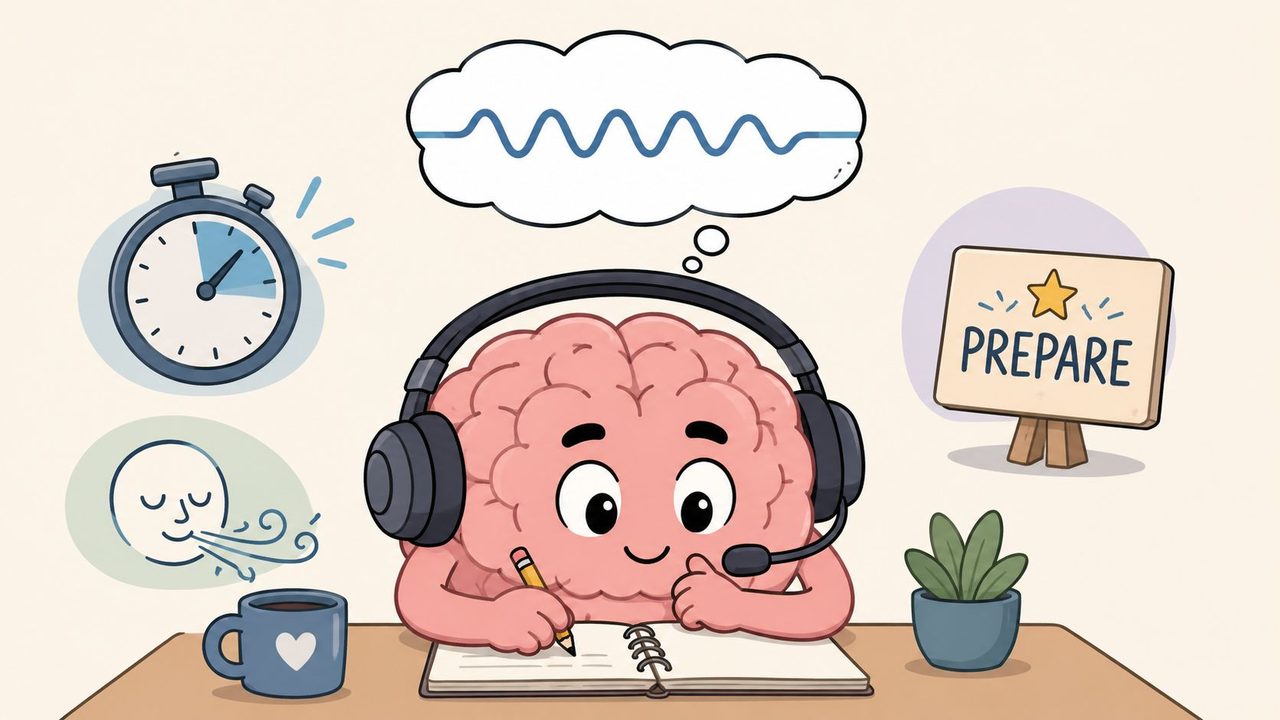
Advice often given here proves unhelpful. “Slow down” is too vague to help. What works is feedback, repetition, and replacing filler sounds with silence you can control. A physiology education review describes a practical workflow built around recording, reviewing, and using silent pausing and chunking to improve speaking habits (physiology review on feedback and self-analysis for speaking improvement).
Use the record review repeat loop
You don't need a formal speech coach to spot your patterns. Your recordings will tell you fast.
Try this for a week:
- Record short answers: Speak for one or two minutes on a topic you know well. Don't script it.
- Review with a pen or note app: Mark every repeated filler. Common favorites include: “Um.” “Like.” “You know.” “So.”
- Look for trigger moments: Fillers usually spike when you define something, switch topics, search for a term, or talk while thinking.
- Record again on the same topic: The second pass is usually tighter because your brain has already done the hard retrieval work.
The point isn't to shame yourself for sounding human. The point is pattern recognition. Once you hear your own habits clearly, they become easier to interrupt in real time.
Replace sound with silence
A clean pause beats a messy filler almost every time. In live speaking, a brief pause feels longer to you than it does to the audience. On playback, it usually sounds calm and controlled.
Silence is not a mistake. It's where your next sentence gets organized.
This is the shift that helps most speakers. They stop trying to become perfectly fluent and instead get comfortable being briefly quiet. That small change lowers fillers fast because it gives the brain somewhere else to go besides “uh.”
Practice it in low-stakes situations. Answer a colleague's question and let yourself pause before the key point. Leave space after a heading in a presentation. Breathe before the next sentence instead of filling it.
Chunk ideas before you say them
People often use fillers because they're trying to build a whole paragraph while talking. Don't do that. Build in pieces.
Chunking means breaking the message into short spoken units:
- Lead with the headline: Say the conclusion first.
- Add one support point: Not three at once.
- Give the example last: Examples are easier once the structure is clear.
Here's the difference in practice.
Instead of saying, “Um, what I think we should do is, like, probably change the onboarding flow because users are kind of getting stuck in the setup,” say: “We should change the onboarding flow. Users get stuck during setup.”
Same thought. Less clutter. More control.
Build a pre-recording routine that actually helps
Before a podcast, presentation, or dictated draft, keep the prep simple:
- Mark risky phrases: If you always ramble around a product name, date, or technical term, write it down first.
- Outline beats, not sentences: Full scripts make many speakers sound trapped. Three to five talking points are usually enough.
- Warm up with one throwaway take: Your first minute is often your noisiest. Burn it off privately.
What doesn't work is trying to sound perfect from the first word. That pressure creates more hesitation, not less.
Manual Cleanup Workflows for Audio and Text
Manual editing still has a place. If the content is high stakes, full of domain language, or headed for publication, hand cleanup gives you the most control. It's also slow. That's the trade-off.
I still recommend learning a manual workflow even if you plan to automate later. It teaches judgment. You start hearing which fillers interrupt the sentence and which ones are carrying timing, emphasis, or meaning.
Audio editing by ear and waveform
If you edit in a DAW, filler words often become easy to spot after a while. They tend to appear as short, low-information interruptions between stronger phrase shapes. Once you know the speaker's cadence, those little bumps start standing out.
A practical audio workflow looks like this:
- Make one pass for listening only: Don't cut yet. Drop markers where speech loses momentum.
- Zoom in on repeated offenders: “Um” and “uh” often cluster around transitions and sentence starts.
- Cut conservatively: Remove the filler and keep the natural breath and pacing around it.
- Audition every edit in context: A clean cut on the waveform can still sound abrupt in the sentence.
If you also remove dead air, overdo neither. Speech needs some space to breathe. For editors who want a clear explanation of timing edits, this glossary entry on silence removal in video and audio editing is worth a quick read.
Transcript cleanup for faster publishing
For text, manual cleanup is less glamorous but much faster than scrubbing waveforms. If you're starting from a transcript, you can often get to a readable draft quickly with a disciplined pass and a second review in context.
Use this order:
- First pass for obvious fillers: Remove standalone “um,” “uh,” and repeated throat-clearing phrases.
- Second pass for false starts: If a speaker restarts a sentence, keep the cleaner version.
- Third pass for readability: Fix punctuation, paragraph breaks, and capitalization after the clutter is gone.
- Final pass against audio if needed: Do this for names, technical terms, and anything sensitive.
If you need a starting point for generating text from recordings before editing, a dedicated audio transcription tool makes the review step much easier than working from scratch.
Filler word removal methods compared
| Attribute | Manual Removal | Automated Removal |
|---|---|---|
| Control | Highest. You decide every cut. | Lower unless the tool supports review before applying changes. |
| Speed | Slow, especially on long recordings. | Fast, especially for recurring fillers across a full transcript. |
| Accuracy in nuance | Better when the editor knows the subject matter. | Varies by tool and by how context-aware it is. |
| Effort | Tedious over time. | Much easier for routine cleanup. |
| Best use case | Sensitive, technical, or publish-critical material. | Draft cleanup, bulk processing, and everyday speech polishing. |
Manual editing is craft work. Automation is leverage. Most people need both, not a loyalty oath to one side.
The waste of time is pretending manual-only scales. It doesn't. But fully blind automation doesn't scale safely either when accuracy matters.
Automate the Cleanup with AI Tools
Modern tools earn their spot. Not because they replace judgment, but because they remove the repetitive work that drains it.
Descript documented a practical example from a 31-minute clip where its filler-word tool identified 223 filler words, and the feature detects common fillers such as “um” and “uh,” applies by default to an entire composition, and lets users preview each instance before deleting text and audio (Descript filler word removal documentation). That number lands because it matches what editors already know. Even short spoken content can carry a surprising amount of verbal debris.
What good automation actually does
A useful AI workflow doesn't just delete words. It should help you:
- Detect recurring fillers across the full recording
- Preview edits before committing
- Clean both transcript and timing when needed
- Preserve sentence intent instead of flattening it
- Export text that already feels publishable
That last point matters more than people think. Raw transcripts are useful records. Cleaned transcripts are usable drafts. If you dictate for work, the difference is huge.
I'm also skeptical of tools that make the process feel magical but hide the controls. Good filler word removal software should let you inspect edits, not just trust a black box. Fast is good. Unreviewable isn't.
The privacy problem most guides skip
There's another issue that rarely gets treated seriously enough. Privacy.
A lot of filler word removal happens inside cloud transcription pipelines. For casual use, that may be acceptable. For healthcare, legal, finance, internal product work, or executive communications, it often isn't. The problem isn't just whether a tool says it's secure. The primary question is where the audio goes, what gets stored, and whether confidential speech leaves the device at all.
One underserved reality in this category is the demand for local-first processing. Professionals handling HIPAA, GDPR, or SOX-sensitive material often need cleanup that doesn't depend on uploading spoken data. Generic “secure cloud” marketing doesn't answer the operational question they care about most. Does any part of my recording leave the machine?
That's why local processing matters. If a tool can run transcription and cleanup on-device, you avoid a whole class of governance concerns before they start.
Cloud convenience versus local control
This is the decision I see teams make badly. They compare features but ignore data flow.
Use cloud tools when the material is low risk and speed is the priority. Use local workflows when the recording contains client data, protected information, unreleased product details, or anything you wouldn't casually email around. If you need both, choose software that can switch modes depending on context rather than forcing every recording through the same path.
For readers thinking beyond filler cleanup alone, this guide on AI audio cleanup workflows is useful because it connects transcription quality, speech polishing, and post-processing in one workflow.
Later in the workflow, video can help clarify what this cleanup looks like in practice:
What works and what wastes time
What works:
- Bulk detection first, review second
- Using AI for draft cleanup, then human review for edge cases
- Choosing local processing for sensitive material
- Keeping a custom term list for names and technical language
What wastes time:
- Deleting fillers one by one without pattern tools
- Running confidential recordings through any app you haven't vetted
- Assuming every hesitation is meaningless
- Treating transcript cleanup as separate from audio clarity
The best AI tools don't just make speech shorter. They make it easier to trust the final result.
When Not to Remove Filler Words
Blanket deletion sounds efficient until it deletes something you needed.
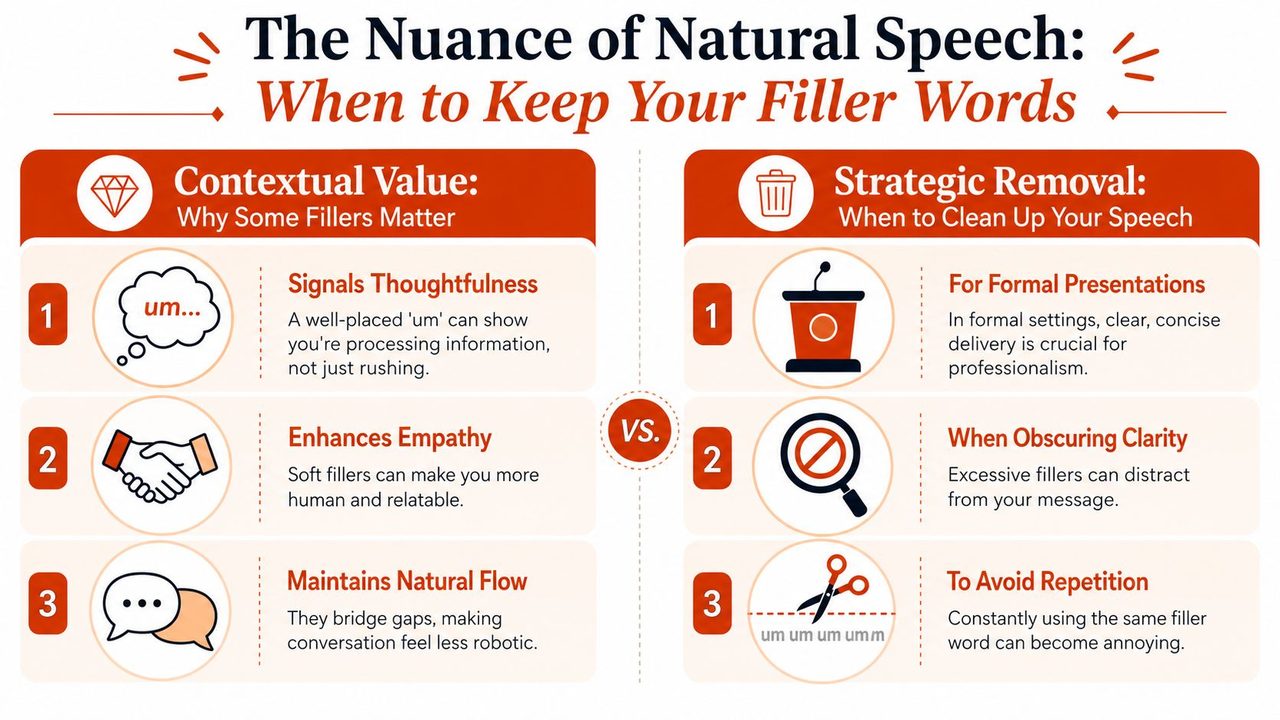
This is the part most guides gloss over. Not every “um” is useless. Sometimes it signals a self-correction. Sometimes it softens a statement. Sometimes it buys a second while the speaker searches for the exact term, and that hesitation is part of the meaning. In technical, legal, and clinical settings, that distinction matters.
Generic AI models have a 22% error rate in distinguishing between true fillers and contextually significant pauses, especially in non-native speakers. That raises a real risk of deleting meaningful hesitations or self-corrections in high-stakes material.
Keep them when they carry meaning
In conversational content, a filler can make speech sound human rather than mechanical. In interviews, coaching sessions, and story-driven podcasts, some disfluency helps preserve natural rhythm.
Fillers can sit next to corrections:
- Quoted speech: If you're preserving how someone spoke, scrubbing too hard can distort tone.
- Self-repairs: “We shipped on Thursday, um, Friday” contains a correction you can't flatten carelessly.
- Sensitive statements: A pause before a diagnosis, legal qualification, or technical caveat may reflect caution, not incompetence.
If removing the hesitation changes the intention, you're no longer editing for clarity. You're editing the thought itself.
Watch for false positives in specialized language
This gets harder when the material includes jargon, accented speech, or non-native cadence. A simple delete-all rule can confuse hesitation with content, or strip out the verbal markers that show someone is revising themselves in real time.
That's why context-aware review matters more in:
- Medical dictation
- Legal interviews
- Engineering discussions
- Developer documentation
- Research presentations
A rough transcript for internal reference can tolerate more aggressive cleanup. A record that needs precision cannot.
Use selective removal, not ideological removal
The smarter standard is selective editing. Remove distractions. Keep signals.
A good review pass asks three questions:
- Did the filler change meaning?
- Did it shape tone in a useful way?
- Would deleting it create a misleadingly clean version of what was said?
If the answer to all three is no, cut it. If not, leave it or revise with care.
That's also why I don't recommend chasing perfectly sterile speech. Audiences don't need a robot. They need someone clear, trustworthy, and easy to follow.
Frequently Asked Questions
Will removing filler words make my speech sound robotic
It can, if you remove every hesitation and every pause. Good filler word removal keeps natural rhythm. Cut the repeated clutter, keep the pacing, and don't strip out every human beat.
Is there a real difference between um and uh
In practice, most editors treat both as removable when they don't affect meaning. What matters more is function than the exact syllable. Is it just verbal padding, or is it attached to a correction, a quote, or a meaningful pause?
What's the best first step if I use too many fillers
Record a short unscripted explanation of something you know well. Review it once and count only your top one or two filler habits. Don't try to fix everything at once. Replace those moments with a deliberate pause, then record again.
Should I clean the transcript or the audio first
If the end product is writing, start with the transcript. If the end product is a podcast or presentation recording, listen to the audio first so you don't create awkward cuts. In both cases, save a final pass for context.
If you want a faster way to turn messy speech into clean, usable writing, AIDictation is worth a look. It's built for macOS and supports both local, privacy-first dictation and cloud-based cleanup, which makes it a practical fit for everyday drafting as well as sensitive professional work.
Frequently Asked Questions
What does Filler Word Removal: Polish Your Speech with AI cover?
You finish a recording, open the transcript, and immediately see the problem. Every other sentence has an “um,” a restart, or a soft verbal placeholder that sounded harmless in the moment but now makes the whole thing feel less sharp.
Who should read Filler Word Removal: Polish Your Speech with AI?
Filler Word Removal: Polish Your Speech with AI is most useful for readers who want clear, practical guidance and a faster path to the main takeaways without guessing what matters most.
What are the main takeaways from Filler Word Removal: Polish Your Speech with AI?
Key topics include Table of Contents, Why Polished Speech Matters More Than You Think, Clean verbatim is normal editing.
Ready to try AI Dictation?
Experience fast voice-to-text on your device. Free to download.
Download FreeRelated Posts
Is There a Speech to Text App for Mac? a Practical Guide
Is There a Speech to Text App for Mac. Wondering if there is a speech to text app for Mac? Compare built-in Dictation, on-device engines, and AI tools like
Dictation Software for Medical Professionals Compared
Compare dictation software for medical professionals. Evaluate accuracy, HIPAA privacy, ambient AI tradeoffs, and on-device tools like AIDictation.
How to Use Voice Dictation on Mac
Use Voice Dictation on Mac. Master voice dictation on your Mac — from built-in Apple features to third-party tools like AIDictation