Dictation Software for Medical Professionals Compared
The popular advice is simple: let an ambient AI scribe listen to every consultation and forget traditional dictation. That advice misses how clinical work happens. A physician may need to correct one medication in an EHR, dictate a referral letter into a separate application, write an urgent email, or document a procedure without recording an entire patient conversation. For those tasks, direct dictation remains faster, more controllable, and easier to contain.
The practical choice isn't “old dictation versus new AI.” It's deciding whether each documentation task needs clinician-led voice-to-text, encounter-wide note generation, or human transcription review. The right dictation software for medical professionals should fit the clinical environment, not force every task into one recording model.
| Workflow need | Direct dictation | Ambient AI scribing | Human review |
|---|---|---|---|
| Short chart correction | Strong fit | Poor fit | Useful for high-risk content |
| Referral letter or email | Strong fit across applications | Usually limited to supported workflows | Optional |
| Full patient encounter | Requires active clinician dictation | Strong fit | Recommended before signing |
| Offline or low-connectivity work | Often strongest | Frequently limited | Available if audio is captured securely |
| Exact control over wording | Immediate | Requires post-visit editing | Highest control |
| Sensitive documentation | Can minimize captured audio | Requires consent and recording governance | Depends on handling process |
Table of Contents
- Understanding Medical Dictation Software
- The Evolution of Clinical Voice Recognition
- Direct Dictation Versus Ambient AI Scribing
- Evaluating Accuracy and Error Management
- Navigating Privacy and HIPAA Compliance
- Comparing Top Dictation Solutions for Clinicians
- Choosing the Right Workflow for Your Practice
Understanding Medical Dictation Software
Medical dictation software converts a clinician's speech into text, either directly inside an application or through a system-wide input layer. The distinction matters. A browser-based ambient tool may be designed around a particular EHR and a complete encounter, while a flexible dictation layer can place spoken words wherever the cursor is active.
That difference is easy to overlook because ambient AI receives more attention. Yet clinical documentation rarely consists only of finished SOAP notes. It also includes a short amendment, a radiology impression, a discharge instruction, a referral, an insurance response, a message to a colleague, and a correction made after reviewing a result. Recording a full conversation for each of these tasks adds friction rather than removing it.
The overlooked value of direct control
Direct dictation works best when the clinician already knows what needs to be written. You speak the assessment, pause to correct a phrase, add a specific instruction, and continue. There's no need to wait for an encounter summary or remove irrelevant conversation from an automatically generated draft.
A system-wide tool is particularly useful for clinicians who move between an EHR, secure messaging, email, document editors, scheduling tools, and dictation templates. The workflow advantage is operational, not theoretical. The voice layer follows the clinician across applications, instead of tying documentation to one encounter window.
Radiology helped establish this model because high-volume reporting demanded faster transcription and turnaround. The historical record shows that clinical dictation began as a practical response to documentation pressure, not as a novelty. A concise history of the workflow and its clinical applications appears in this guide to medical dictation use cases.
Where ambient tools fit
Ambient AI scribing has a different starting point. It listens to a patient-clinician conversation, identifies relevant information, and drafts a structured note for review. That can be valuable during longitudinal visits where the clinician wants to keep attention on the patient rather than narrate every field.
The mistake is treating that strength as universal. More automation isn't always better when the task is a two-sentence correction, an offline report, or writing across several applications. Many practices will get better results by using ambient support for suitable encounters and direct dictation for everything around them.
The Evolution of Clinical Voice Recognition
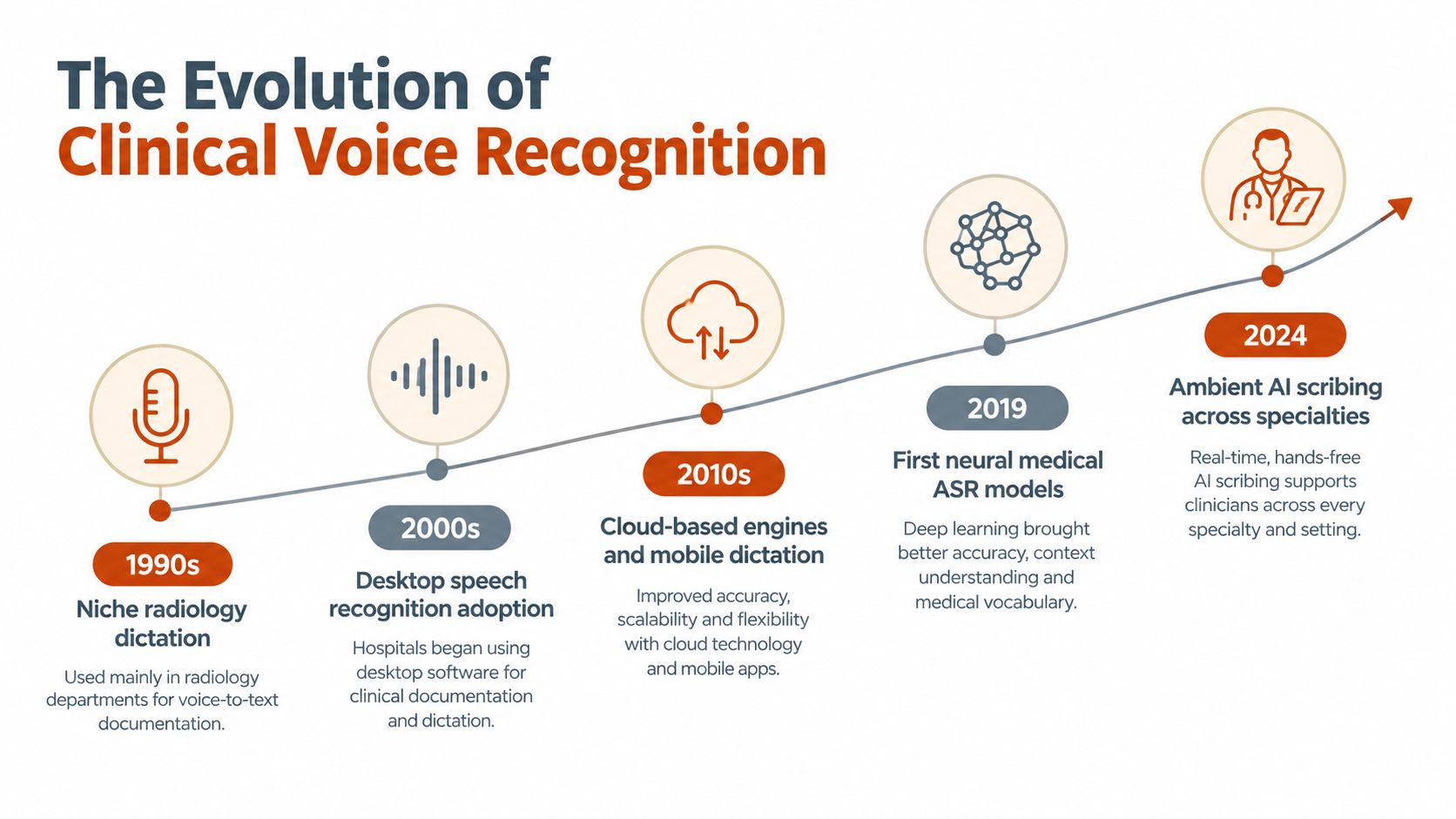
Clinical voice recognition emerged where documentation volume and turnaround pressure were especially difficult to manage. Radiology literature described dictation for transcription in health care during the 1980s, and radiology is largely credited with pioneering clinical voice-recognition documentation before the workflow spread to other specialties. The history is documented in this review of dictation in health care.
The early logic was straightforward. A radiologist could describe findings faster than a transcriptionist could receive, type, format, and return the report. Early research therefore focused on cost reduction and time savings compared with traditional transcriptionist-based dictation. The technology's purpose was productivity from the beginning.
From specialist reporting to general documentation
As speech recognition matured, medical dictation moved beyond radiology. Physicians in surgery, emergency medicine, pathology, cardiology, primary care, and other specialties began using voice input for reports, letters, notes, and EHR fields. The underlying need stayed consistent, but the vocabulary became more demanding.
A specialist doesn't speak ordinary prose. They use abbreviations, anatomical terms, medication names, procedure descriptions, measurements, and phrases whose meaning depends on context. A useful system must therefore do more than recognize sound. It must support specialty vocabulary, user corrections, templates, and a reliable editing process.
The evidence also shows why adoption wasn't based on accuracy alone. A systematic review covering medical speech recognition from 1990 to 2018 found reported word error rates ranging from 7.4% to 38.7%, while the percentage of documents containing errors ranged from 4.8% to 71%. The same review reported turnaround-time improvements ranging from 16.41% to 82.34% versus traditional dictation, with an overall improvement trend of 0.90% per year as the technology matured. These findings are summarized in the systematic review of medical speech recognition.
Why the history still matters
That history explains the current market. Ambient scribes add encounter-level automation, but direct dictation preserves the original clinical advantage: rapid, clinician-controlled production of documentation.
The tools changed from recorders and transcription queues to desktop applications, cloud engines, mobile microphones, and local speech models. The workflow question didn't change. Does the tool help the clinician create an accurate document with less friction, while preserving an appropriate review step?
In busy wards, the answer may involve several modes. A clinician might use ambient capture for a long consultation, direct dictation for a procedure note, and a secure review queue for medication-heavy documentation. Treating those as competing technologies oversimplifies the work.
Direct Dictation Versus Ambient AI Scribing
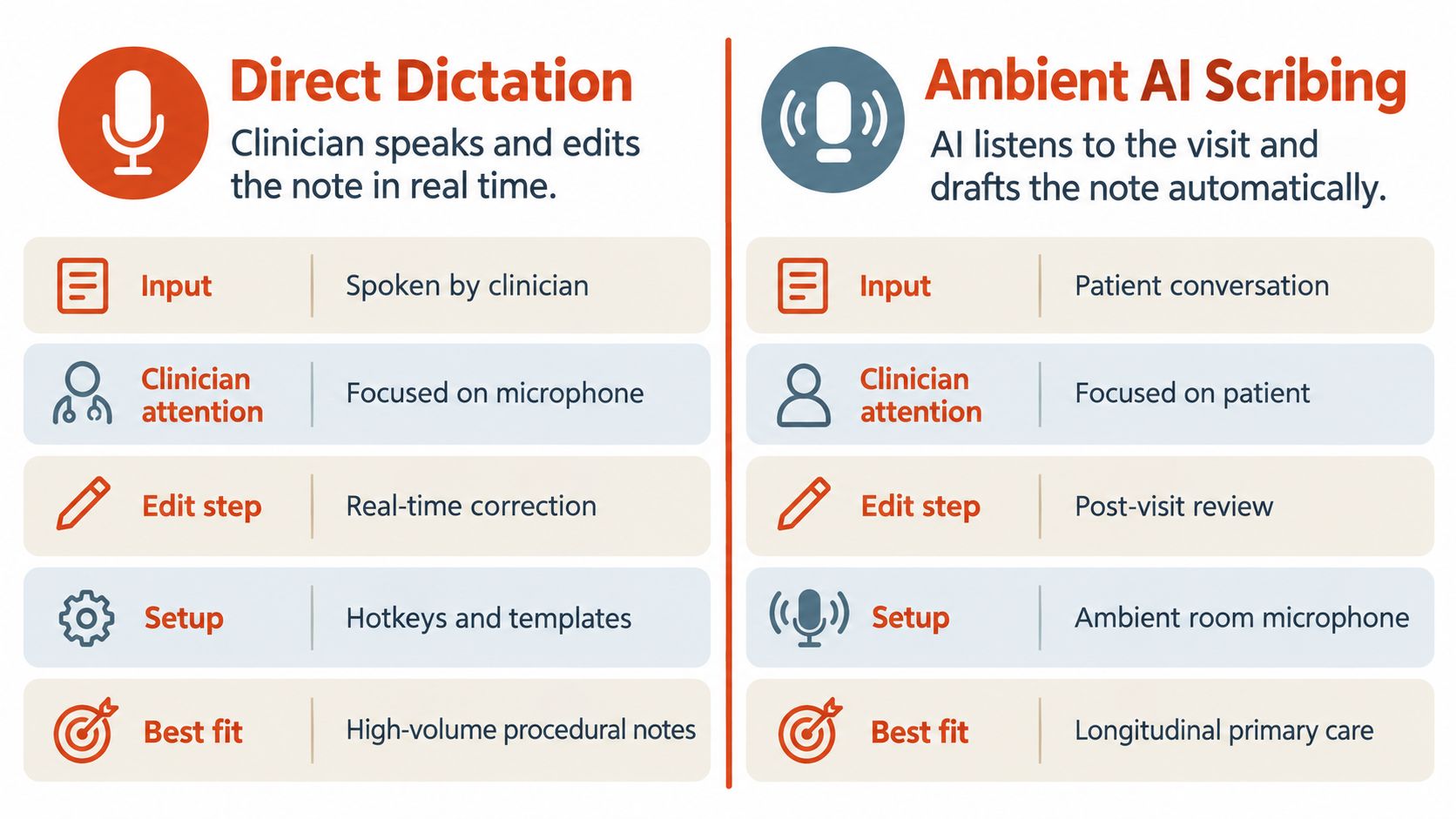
Direct dictation and ambient AI scribing solve different problems. Direct dictation starts with the clinician's narrative. Ambient scribing starts with the conversation and attempts to turn it into a structured clinical document.
| Dimension | Direct dictation | Ambient AI scribing |
|---|---|---|
| Input | Clinician speaks the intended content | Patient and clinician conversation |
| Attention | Clinician controls the dictation | Clinician focuses on the encounter |
| Editing | Corrections happen as the note is created | Review follows automatic drafting |
| Application range | Often system-wide | Commonly tied to a supported workflow |
| Privacy exposure | Audio can be limited to the dictated passage | The encounter may be captured in broader context |
| Best fit | Short notes, letters, reports, corrections | Longer conversations and structured encounter notes |
Direct dictation is the better operational choice when the clinician knows the output and needs it immediately. Referral letters, chart amendments, discharge instructions, procedure reports, and messages often benefit from this focused approach. It also works well when the text must be entered into an application that an ambient product doesn't support.
Ambient scribing earns its place during encounters where continuous note-taking competes with patient interaction. It can capture a broader narrative and produce a draft that the clinician edits afterward. That benefit depends on suitable consent, a controlled recording environment, adequate connectivity, and a review habit that catches omissions and context errors.
Match the tool to the encounter
A short specialist update doesn't need an ambient room microphone. A complex primary-care consultation may not be the ideal setting for continuous clinician-led narration. Mixed workflows are often more realistic than a single-tool mandate.
Operational rule: Use ambient capture when conversation is the source material. Use direct dictation when the clinician is the source of the document.
The following video provides another practical view of how the two approaches differ in clinical documentation workflows.
A flexible dictation layer can complement an ambient scribe rather than replace it. The scribe handles encounter synthesis. Direct dictation handles everything that happens before, after, and outside the scribe's supported workflow.
Evaluating Accuracy and Error Management
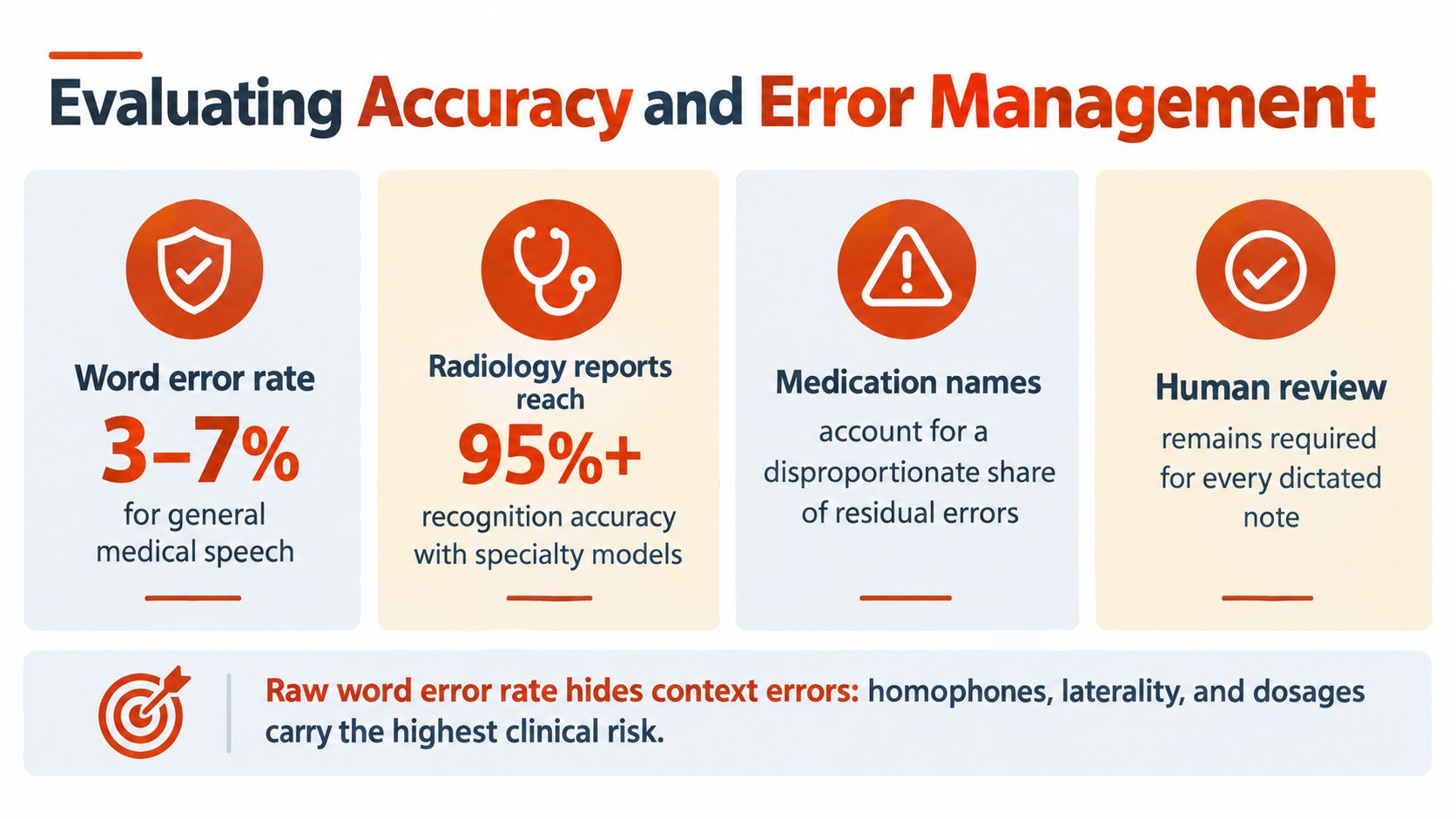
Accuracy isn't a single number. A speech engine can produce a plausible sentence while changing laterality, a medication, a dosage, or the meaning of a clinical finding. For that reason, clinicians should evaluate error type, correction effort, and final signed-note quality, not only a vendor's headline recognition claim.
The systematic review cited earlier found reported word error rates between 7.4% and 38.7% across medical speech-recognition studies, with substantial variation in documents containing errors. That range reflects differences in technology, specialty, study design, speakers, and review processes. It shouldn't be treated as a prediction for every current product.
Raw output isn't the final document
A multicenter analysis offers a useful operational distinction. Raw speech-recognition output had an overall error rate of 7.4 errors per 100 words. Professional transcriptionist review reduced that rate to 0.4 errors per 100 words, and the final physician-signed version reached 0.3 errors per 100 words. The study also found that 96.3% of initial speech-recognition transcriptions contained at least one error, compared with 42.4% of finalized notes. See the multicenter analysis of speech-recognition errors.
Those figures support a clear safety practice: voice recognition creates a draft, not an autonomous clinical decision. A good interface makes review easy by preserving the original audio when appropriate, highlighting uncertain text, supporting immediate correction, and allowing specialty terms to be added to a custom dictionary.
What to test during evaluation
Run a realistic pilot rather than reading only marketing material. Dictate medication names, anatomical terms, abbreviations, laterality, procedures, and common phrases from your specialty. Test the same passage with your normal microphone, speaking speed, accent, and ward background noise.
Evaluate these practical questions:
- Correction effort: Can you fix a wrong word without losing your place?
- Vocabulary control: Can you add a rare term, clinician name, or local abbreviation?
- Formatting: Does spoken punctuation produce a document that needs minimal cleanup?
- Context handling: Does the tool distinguish a note, email, referral, and message?
- Review visibility: Can you identify what the system heard before signing?
A polished paragraph is useful only if the clinician can verify it quickly. Speed without dependable review creates a hidden documentation burden.
Navigating Privacy and HIPAA Compliance
Privacy decisions begin with the audio, not the finished transcript. A cloud system may send recordings or transcribed content to remote infrastructure for processing, while an on-device system can keep recognition on the clinician's computer. Neither model is automatically safe or unsafe. The relevant question is whether the entire data flow matches the practice's governance requirements.
Purpose-built clinical products commonly advertise HIPAA readiness and Business Associate Agreements, but those labels don't answer every operational question. Ask where audio is processed, whether it is retained, how long transcripts remain available, who can access them, how deletion works, and whether administrators can audit use.
Cloud processing and local recognition
Cloud processing can support powerful models, centralized administration, and broad integration. It may also require dependable connectivity and a clear contractual framework for handling protected health information. A local model reduces exposure by keeping audio on the device, and it can continue working when the network is unavailable, but its vocabulary, hardware requirements, and cleanup capabilities may differ from a cloud engine.
The right choice depends on clinical risk and task complexity. For a short correction in a controlled environment, local processing may be entirely practical. For a long, noisy encounter requiring detailed formatting, a cloud service may produce a more polished draft, provided the organization accepts its data-handling model.
Privacy test: Don't ask only whether a vendor says “HIPAA compliant.” Ask what data leaves the device, what the vendor stores, and what the clinician can delete.
The same discipline should apply to adjacent communications infrastructure. Practices reviewing secure voice workflows may also benefit from this resource on a phone system for healthcare providers, particularly when voice, messaging, and patient information move through connected systems.
Build a defensible policy
A practical policy should define which tasks may use cloud processing, which require local recognition, when patient consent is necessary, and who reviews the final note. It should also cover personal devices, shared workstations, microphone permissions, account access, and incident response.
For a more detailed treatment of protected clinical transcription workflows, see this guide to secure medical transcription. The central principle is simple: privacy is a workflow property, not a checkbox attached to a product page.
Comparing Top Dictation Solutions for Clinicians
A useful comparison starts with workflow category rather than brand recognition. Enterprise EHR-integrated systems, specialist transcription platforms, ambient scribes, and standalone applications may all use speech recognition, but they impose different constraints.
| Solution type | Privacy model | Best-fit use case |
|---|---|---|
| EHR-integrated enterprise dictation | Often cloud-managed or organization-controlled, subject to contract and retention terms | Hospital networks that need centralized administration and deep EHR workflow support |
| Specialist medical transcription platform | May combine cloud recognition with transcriptionist review | Reports where accuracy review and transcription governance are central |
| Ambient AI scribe | Encounter audio is processed to create a structured draft, with vendor-specific retention and consent controls | Longer consultations where the clinician wants to focus on the patient |
| System-wide standalone dictation | Can support local or cloud processing, depending on the product | Clinicians writing across EHRs, email, documents, and secure messaging |
| Human transcription service | Audio and documents pass through a controlled review process | High-risk or complex documents requiring human quality control |
Enterprise integration
Enterprise tools are strongest when a hospital has a stable EHR environment, formal IT support, standardized templates, and a need to manage users centrally. Their weakness is usually flexibility. A system optimized for one EHR may be awkward for external referrals, email, cross-platform writing, or clinicians who work across several systems.
Specialist transcription services remain relevant when the organization values a review layer. The evidence on finalized documents shows why that layer can materially reduce residual errors, but it also introduces queue management, turnaround considerations, and governance responsibilities.
Flexible tools for mixed workflows
Standalone dictation is more useful when the clinician's work doesn't stay inside one application. Mac-first teams, private practices, and specialists may value a tool that supports system-wide input, local recognition, cloud cleanup, custom vocabulary, and application-specific formatting. AIDictation, for example, offers a macOS voice-to-text workflow with local offline recognition and an optional cloud mode for cleanup and formatting, according to the product information provided for this article.
Before selecting any product, assess how it handles the tasks that consume time outside the EHR. A practical overview of AI documentation software can help teams distinguish note generation from broader documentation automation. For readers comparing older desktop approaches with current options, this discussion of Dragon medical dictation provides useful context.
Don't choose based on the longest feature list. Choose the system that minimizes switching, supports the required privacy model, and makes review part of the normal workflow.
Choosing the Right Workflow for Your Practice
Start with the work, not the vendor. List the documents your team creates, where each document is written, whether it contains a full encounter or a focused narrative, and what happens if the first draft is wrong. That exercise usually reveals that one practice needs several modes rather than one universal solution.
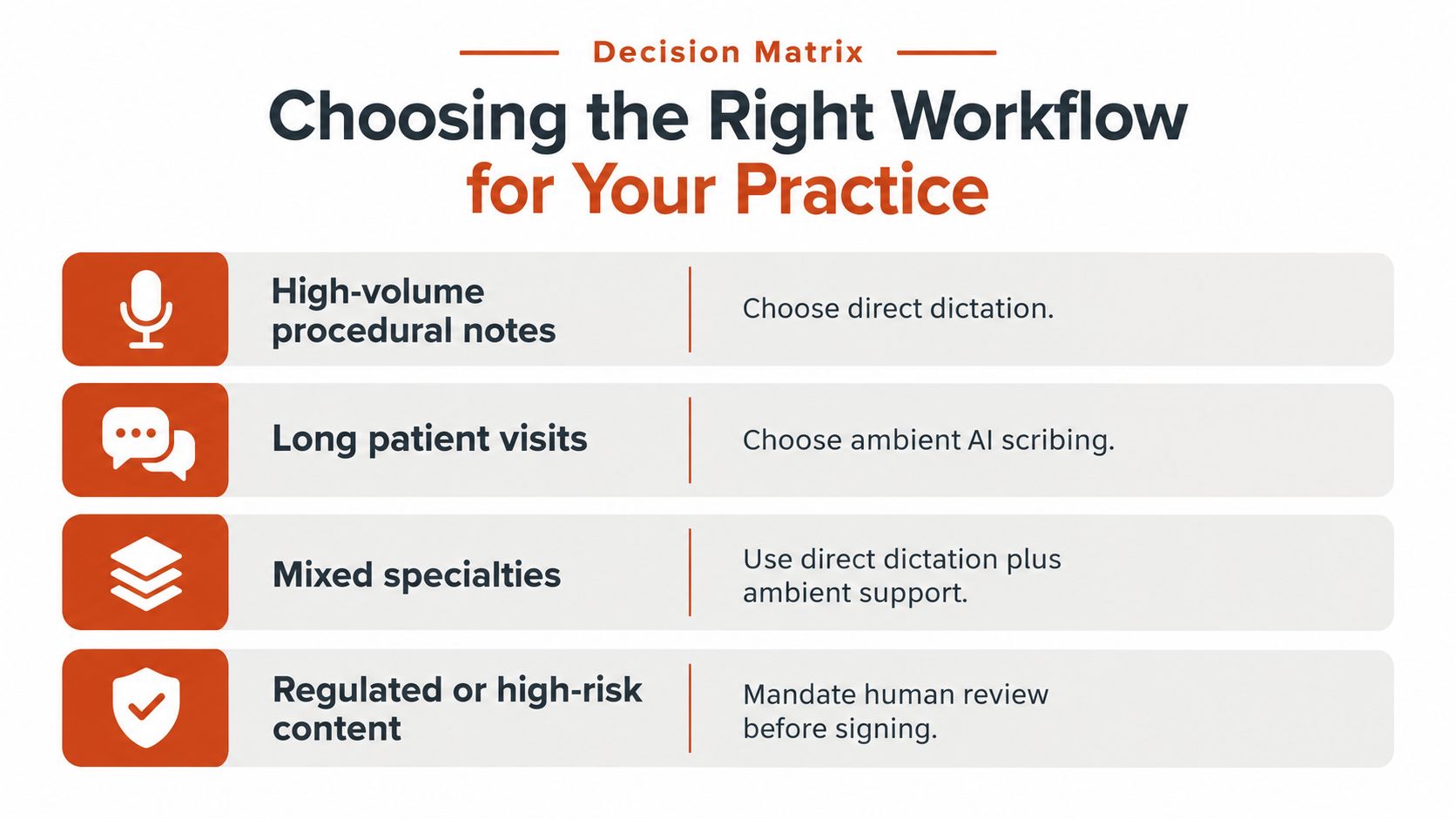
A practical decision matrix
| Practice situation | Default workflow | Reason |
|---|---|---|
| High-volume procedural or imaging reports | Direct dictation | The clinician controls the content and can produce focused documentation quickly |
| Long conversational visits | Ambient AI scribing | The system can capture the encounter while the clinician maintains patient attention |
| Mixed specialty and administrative work | Direct dictation plus ambient support | Each mode handles a different source of documentation |
| Poor connectivity or strict data minimization | Local or offline dictation | Audio can remain on the device and the workflow isn't dependent on a live connection |
| Medication-heavy or high-risk notes | Dictation or ambient draft plus human review | A second review protects against clinically consequential errors |
Test before rollout
Run a limited pilot with representative users and real documentation patterns, while following your organization's privacy and approval process. Compare local and cloud modes on terminology, background noise, correction speed, formatting, and behavior when connectivity fails.
Then configure the workflow around how clinicians work:
- Create specialty dictionaries: Add names, procedures, abbreviations, and uncommon terms that the baseline vocabulary misses.
- Set application rules: Use different formatting for EHR notes, referral letters, email, and secure chat.
- Define review ownership: Make it explicit who checks the draft, resolves uncertainty, and signs the final document.
- Measure friction qualitatively: Ask whether clinicians switch tools less often, correct errors quickly, and finish documentation within the intended workflow.
- Document retention choices: Record what audio and text the system keeps, for how long, and under whose access controls.
A rural clinic may prioritize offline reliability over cloud-based cleanup. A subspecialist may accept a little more editing in exchange for a local custom vocabulary. A hospital may prefer centralized governance and deep EHR integration. The right choice is the one that fits the encounter, the application, and the risk profile at the same time.
AIDictation offers system-wide voice-to-text on macOS, with local offline recognition and an optional cloud mode for cleanup, formatting, custom terminology, and context rules. Visit AIDictation to evaluate whether that combination fits your cross-application clinical documentation workflow and privacy requirements.
Frequently Asked Questions
What does Dictation Software for Medical Professionals Compared cover?
The popular advice is simple: let an ambient AI scribe listen to every consultation and forget traditional dictation. That advice misses how clinical work happens.
Who should read Dictation Software for Medical Professionals Compared?
Dictation Software for Medical Professionals Compared is most useful for readers who want clear, practical guidance and a faster path to the main takeaways without guessing what matters most.
What are the main takeaways from Dictation Software for Medical Professionals Compared?
Key topics include Table of Contents, Understanding Medical Dictation Software, The overlooked value of direct control.
Ready to try AI Dictation?
Experience fast voice-to-text on your device. Free to download.
Download FreeRelated Posts
How to Use Voice Dictation on Mac
Use Voice Dictation on Mac. Master voice dictation on your Mac — from built-in Apple features to third-party tools like AIDictation
10 Best Dictate Software for Mac in 2026
Compare the best dictate software for mac in 2026 by accuracy, privacy, pricing, features, and use case—from Apple Dictation to AIDictation.
10 Technical Writing Best Practices for 2026
Master technical writing best practices with actionable guidance on clarity, structure, code, reviews, accessibility, localization, metrics, and dictation.