Customer Support Email Mastery: From Reply to Resolution
In 2026, 89% of customers are projected to expect an email reply in under 1 hour, while the cross-industry average first response time is still 12 hours, according to Ringly's customer service response time benchmarks. That gap changes how we should think about customer support email. The job isn't to send a reply fast enough to clear the queue. The job is to move the customer from uncertainty to resolution, without sounding automated or forcing unnecessary back-and-forth.
Most advice on support email gets stuck at templates. Templates matter, but they're only the visible layer. Strong teams win on structure, tone, troubleshooting discipline, and the ability to use automation without losing trust. We get better results when we treat every customer support email as a small operational system: acknowledge quickly, diagnose clearly, guide decisively, and close with confidence.
Table of Contents
- The Anatomy of a High-Impact Support Email
- Mastering Empathy and a Human-First Tone
- Guiding Customers from Problem to Solution
- Balancing Efficiency with Authentic Personalization
- Closing the Loop and Measuring What Matters
The Anatomy of a High-Impact Support Email
A high-performing customer support email does four things in order. It tells the customer what this message is about, confirms that a capable human is handling it, gives the clearest next step, and ends with a clean handoff to whatever happens next. When any one of those pieces is weak, the customer has to do extra work.
Subject lines that reduce confusion
Most support subject lines fail because they're either too vague or too internal. “Regarding your case” says nothing. “RE: ticket update” makes sense to us, not to the customer. The best subject lines name the issue and signal motion.
| Ineffective Subject Line | High-Impact Subject Line |
|---|---|
| Re: Your request | Update on your login issue |
| Ticket received | We're reviewing your billing question |
| Important update | Your order delay, next steps inside |
| Follow-up | Fix for the export error you reported |
| Support response | Shipping update and what to expect next |
Specificity lowers friction. It also helps when customers search their inbox later. Teams that handle order-related questions can borrow ideas from SelfServe's guide to shipping emails, which shows how much clarity improves when the subject line reflects the customer's actual moment instead of the company's internal workflow.
Practical rule: If the customer can't identify the issue from the subject line alone, rewrite it.
Open strong, then make the path obvious
The opening line has one job. Remove uncertainty. A weak opener thanks the customer and stalls. A strong opener confirms understanding and signals action.
Compare these:
- Weak: Thanks for reaching out. We're sorry for the inconvenience.
- Better: I've reviewed your message and can see the export is failing after you click download.
- Best: I've reviewed your message and can see the export is failing after you click download. I'm going to walk you through the quickest fix first.
That second sentence matters. It tells the customer help has started.
The body should then follow a predictable order:
- State the issue in plain language so the customer knows you understood it.
- Give the next action before background detail.
- Use formatting that supports scanning, especially for steps, warnings, or choices.
- Separate what you know from what you're checking so you don't sound evasive.
When you write instructions, punctuation and formatting affect comprehension to a degree that is often underestimated. If your agents often cram multiple actions into one sentence, this short guide to punctuating lists in sentences is a useful refresher because readability is a support skill, not just a writing preference.
A good body also avoids overexplaining. Customers want enough context to trust the answer, not a transcript of our internal investigation. The test is simple. After reading the email once, can the customer tell what happened, what to do next, and when they'll hear from us again?
The closing should confirm ownership and lower the effort required to continue. “Let me know if you have questions” is polite but lazy. A better close names the next checkpoint: “If that reset doesn't work, reply with a screenshot of the error and I'll take it from there.” That line tells the customer exactly how to keep momentum.
Mastering Empathy and a Human-First Tone
Tone changes outcomes. Not because kindness is decorative, but because customers decide whether to cooperate based on whether the reply feels competent and fair. A cold message creates resistance. An overly soft one creates doubt. The strongest customer support email sounds calm, specific, and human.

Empathy is an operational skill
Empathy isn't the same as apologizing repeatedly. It starts by naming the customer's experience accurately. If someone has already tried three things before writing in, don't send a generic “please restart and try again.” That tells them you didn't read.
Use this sequence instead:
- Acknowledge the impact: “I can see this blocked your report submission.”
- Validate the effort already spent: “You've already retried it and checked permissions.”
- Show control: “I'm taking the next diagnostic step from here.”
That structure de-escalates because it proves attention. It also avoids a common mistake. Teams often jump straight to policy or troubleshooting. When customers are frustrated, they read that as deflection.
Here's the difference in feel:
You're right to be frustrated. You shouldn't have had to repeat those steps, and I'm going to keep this in one thread until we get it resolved.
That line does more than sound nice. It reduces the chance of channel switching, repeated explanations, and escalation driven by irritation rather than issue severity.
If you're building training for this skill, Sift AI's scaling customer empathy playbook is a useful companion because it treats empathy as repeatable language and process, not personality.
Write differently for email-first customers
One of the most neglected parts of support writing is audience fit. Some customers want short, rapid-fire replies. Others rely on email because they need context, clarity, and time to read carefully. That's especially important for older, email-first users. Clarity Voice notes that older customers lean heavily toward email for complex issues, yet companies often prioritize chat and social while making email support harder to find, which frustrates customers who depend on email for accessibility and clarity in this discussion of customer service questions.
That has practical consequences for writing style. For email-first customers, terse support can feel dismissive even when it's technically correct. We should adapt by:
- Providing fuller context: Explain what changed, what you checked, and what happens next.
- Reducing assumptions: Don't assume familiarity with product jargon or support shorthand.
- Using complete instructions: “Click Settings, then Billing, then Invoices” works better than “Check billing settings.”
A human-first tone also means knowing what not to write.
-
Don't say: “As previously stated.”
-
Say: “I'm restating the steps below so you have everything in one place.”
-
Don't say: “Unfortunately, that's our policy.”
-
Say: “Here's what I can do from here, and where the limit is.”
-
Don't say: “Please be patient.”
-
Say: “I'll update you by 3 PM even if the fix is still in progress.”
Customers read tone as a signal of whether we're helping or hiding. Word choice decides that quickly.
Guiding Customers from Problem to Solution
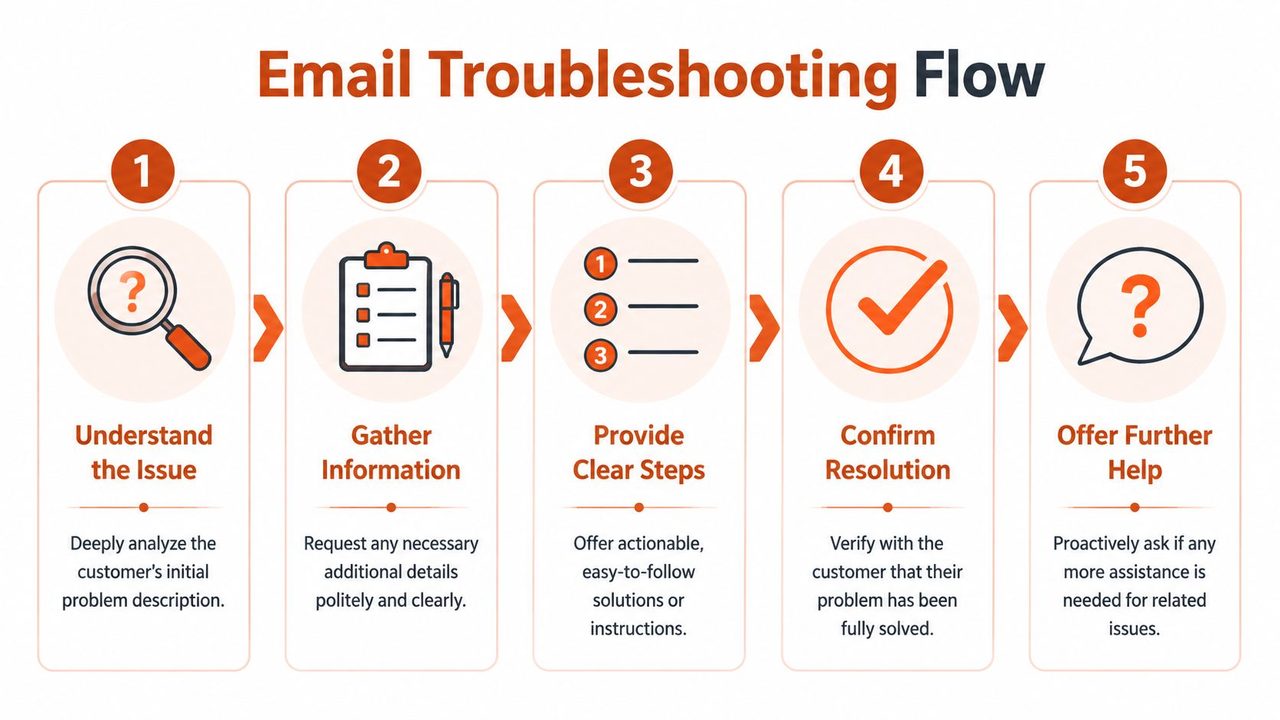
Support emails break down when they create a scavenger hunt. We ask for one detail, wait, ask for another, wait again, and turn a solvable issue into a long thread. Better troubleshooting starts with a shift in mindset. Don't ask, “What's wrong?” Ask, “What do we need to get you working again?”
Early in the thread, a visual process helps agents stay consistent.
Ask for the right information once
A solid troubleshooting email gathers facts in a format the customer can answer quickly. The mistake is sending a broad request like “Can you provide more details?” That creates ambiguity and low-quality replies.
Use bounded questions instead:
- For sequence problems: “What did you click immediately before the error appeared?”
- For timing issues: “When did you first notice this, in your local time?”
- For reproducibility: “Does it happen every time, or only on certain records?”
- For environment clues: “Are you seeing the same behavior in another browser or device?”
Group questions by purpose. Don't mix diagnostics, account verification, and workaround steps into one dense block. A readable email often looks like this:
- What I understand: A one or two sentence summary of the issue.
- What I need from you: A short list of exact details.
- What you can try now: Immediate steps that may restore function.
- What I'll do next: The next internal action and promised update.
This is also where formatting matters. Numbered steps reduce missed actions. Bold labels make the message skimmable. If your team wants to speed up drafting these structured replies without losing clarity, this guide on how to write faster and neater is relevant because speed only helps if the message stays readable.
A quick training video can also help agents internalize this pattern:
When there's no fix yet, give a usable path forward
Many teams lose trust. They send an apology, promise updates, and leave the customer blocked. That's not support. It's status reporting. Stripo points out that customers value immediate, actionable alternatives over vague promises of future resolution in its guide to customer service email response examples and best practices.
So when engineering is still investigating, the email should answer one question first: How can the customer keep moving today?
Don't send “we're looking into it” by itself. Send “here's how to complete the task until the permanent fix is ready.”
A good workaround email includes three parts:
- The temporary method: “Use CSV export from the Reports tab instead of the dashboard shortcut.”
- The limit of that workaround: “It won't include archived records.”
- The follow-up promise: “I'll confirm once the original export path is fixed.”
That middle piece matters. If we hide the limitation, the customer discovers it later and trusts us less.
Here's a usable structure for pending fixes:
We've confirmed the issue and our team is working on the permanent fix. In the meantime, you can complete the task by creating the invoice from the Orders page instead of Bulk Actions. That route will process new orders correctly, but it won't pull historical notes. I'll update you by tomorrow morning with status, even if the fix is still in progress.
That email keeps the customer productive. It also signals ownership, realism, and respect for their time.
Balancing Efficiency with Authentic Personalization
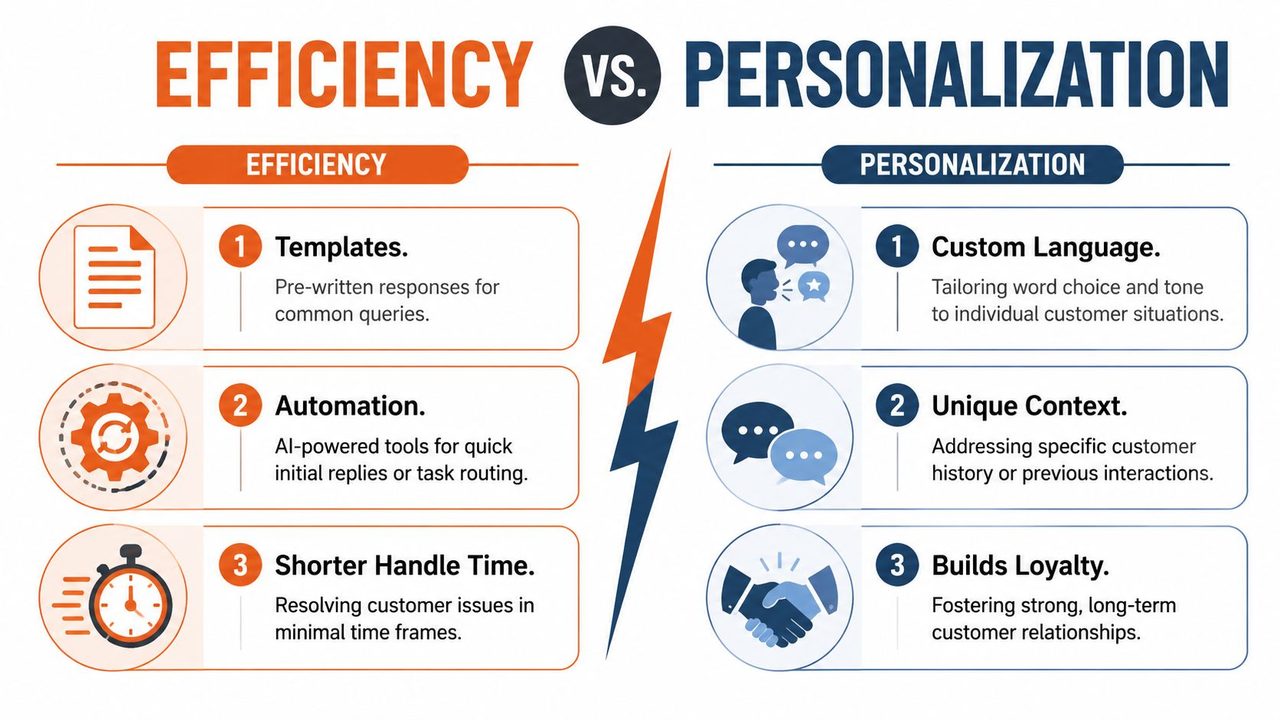
The debate between canned replies and custom writing is usually framed the wrong way. It isn't template versus human. It's whether the team has built reusable scaffolding that leaves room for judgment. Without scaffolding, response quality becomes inconsistent. Without judgment, every message sounds mass-produced.
Templates fail when they replace judgment
A template is useful for recurring facts, predictable workflows, and compliance-sensitive phrasing. It's harmful when it becomes a substitute for reading the ticket. Customers can tell the difference fast.
Here's the practical comparison:
| Approach | What it gets right | Where it fails |
|---|---|---|
| Full bespoke email | Precise, high-trust, adapted to context | Slow, inconsistent, hard to scale |
| Raw canned response | Fast, consistent, easy to train | Sounds generic, often misses nuance |
| Snippet-based hybrid | Fast on routine details, flexible on tone and context | Requires disciplined library management |
The hybrid model is the one most mature teams settle on. We store the repeated parts, then write the parts that prove a human read the case.
A practical hybrid model
Think of every customer support email as 80% reusable structure and 20% situational judgment. The reusable structure includes product steps, policy language, standard expectations, security wording, and link blocks. The judgment layer includes the summary of the issue, the customer's actual frustration, the chosen workaround, and the tone.
Build your snippet library around components, not full speeches:
- Acknowledgment snippets: receipt confirmed, owner assigned, next update time
- Diagnostic snippets: browser/version request, reproduction request, screenshot request
- Expectation-setting snippets: investigating, escalated, awaiting fix, workaround available
- Closing snippets: confirmation request, reopen invitation, next checkpoint
That gives agents speed without forcing them into robotic phrasing.
A template should answer the repeated part of the problem. The agent should answer the customer.
Automation belongs here too, but only for specific tasks. Use it to route emails, insert known details, trigger acknowledgments, and prefill structured drafts. Don't use it to hide weak reading comprehension. If your AI layer drafts support messages, GitDocAI's AI guidelines resource is a useful reference for setting practical guardrails around review, accuracy, and tone.
On the writing side, some teams now use voice dictation to draft replies quickly, then clean the output before sending. One option is AIDictation's Gmail speech-to-text workflow, which turns spoken input into formatted email text. That kind of tool fits best when agents know the case well and want to produce a natural-sounding reply faster than they can type.
The key is review discipline. Before sending a semi-automated reply, agents should check four things:
- Did we mention the customer's actual issue, not the category label?
- Did we adapt the wording to the customer's level of urgency and familiarity?
- Did we remove any sentence that sounds like internal process instead of customer guidance?
- Did we leave a clear next step?
Efficiency should reduce wasted motion. It should never reduce attentiveness.
Closing the Loop and Measuring What Matters
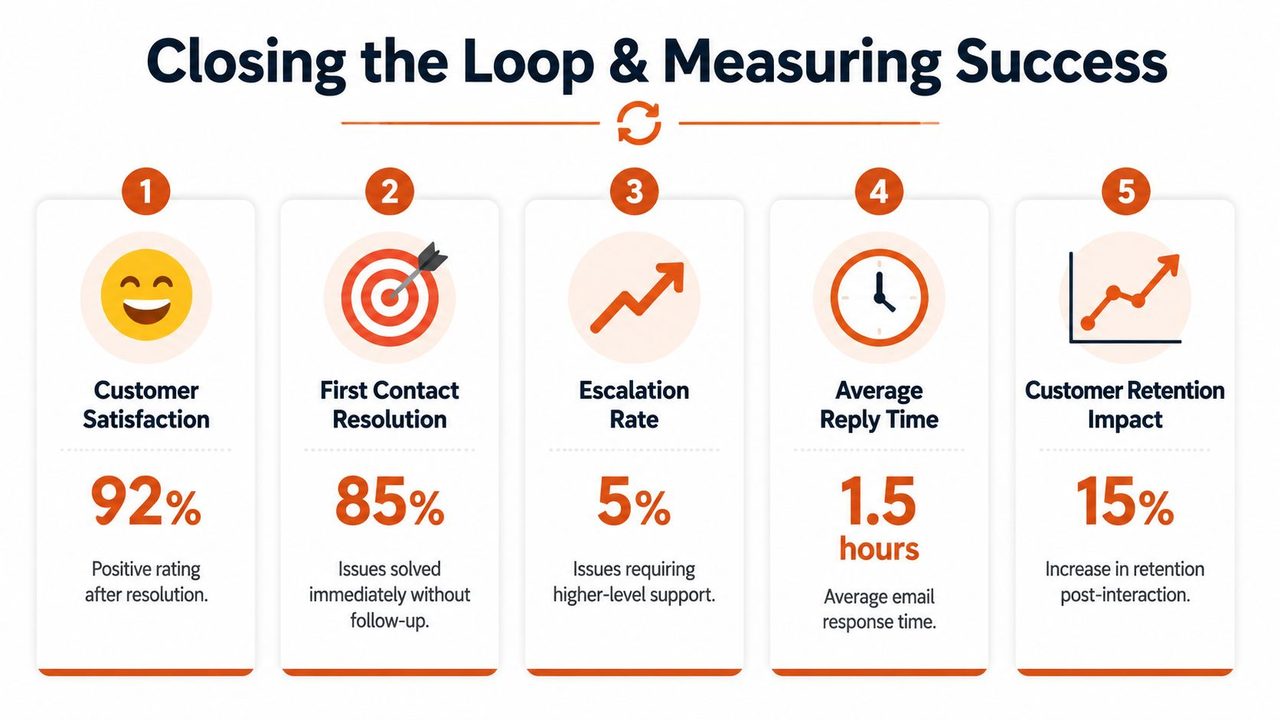
A closed ticket is only useful if the customer agrees the issue is resolved or knows exactly what to do next. Teams that optimize for internal closure codes instead of customer progress usually pay for it later through reopen volume, duplicate tickets, and avoidable escalations.
Closure is a customer outcome
Strong closing emails describe the result in plain language and remove uncertainty.
Instead of writing, “We have completed the troubleshooting procedure,” write, “You should now be able to submit the form normally.” The customer does not care which internal workflow we finished. They care whether their task works again.
This matters even more in partial-resolution cases. Sometimes we cannot deliver a permanent fix in the first reply. In those situations, the close should state three things clearly: what changed, what temporary workaround is available, and when the customer should expect the next update. That balance is where support strategy shows up. We keep the queue moving, but we do not pretend a workaround is the same as a fix.
Escalations need the same discipline. If another team has to step in, the customer should not have to retell the story. A good handoff email preserves context for the next owner and sets expectations for the customer in the same note.
Use closing language like this:
- Resolution confirmed: “The setting has been corrected, and your reports should now export normally.”
- Customer verification invited: “Please try the same action again and reply if anything still looks off.”
- Temporary path explained: “Our engineering team is still working on the root cause. For now, exporting from the web dashboard will work while we finish the permanent fix.”
- Reopen path made easy: “If the problem returns, reply to this same thread so we keep all context together.”
That last line reduces fragmentation. Customers are far more likely to stay in one thread when we make it easy.
Measure the metrics that change agent behavior
A support team does not need a huge scorecard. It needs a small set of metrics that lead to better replies and better follow-through.
Start with first response time, but do not stop there. Median first response time is often more useful than the average because a handful of unusually old or unusually fast tickets can distort the picture. If leadership reviews only averages, long waits can hide inside a number that looks acceptable.
Response time also needs context. A fast acknowledgment can help during busy periods, but it should not be mistaken for meaningful progress. We track two separate moments: time to first human response and time to first useful response. That distinction keeps automation in its proper place. Auto-replies buy reassurance. They do not solve confusion.
For day-to-day management, these metrics are the ones worth reviewing:
- Median first response time: shows what a typical customer experiences
- Time to first useful response: shows how quickly we provide real direction, not just receipt confirmation
- Reopen rate: shows whether our “resolved” emails resolved anything
- Escalation rate by issue type: shows where frontline guidance is weak or authority is too limited
- CSAT with comment review: shows how customers felt, and why
- Repeat contact rate: shows whether customers had to ask again because the first email was unclear or incomplete
Read those metrics together, not in isolation. A team can hit response targets and still create extra work if agents send vague answers, overuse macros, or close tickets before the customer can verify the result. On the other hand, a slightly slower team can outperform on CSAT if replies are specific, honest, and easy to act on.
The pattern review matters more than the dashboard.
If median first response time slips, inspect staffing, routing rules, and inbox coverage. If reopen rate rises, inspect closing language and troubleshooting quality. If CSAT drops for one customer segment, inspect whether the team is matching tone, detail level, and next-step guidance to that audience. New users often need more context. Experienced admins usually want concise steps and fewer explanations.
This is the loop-closing work. We are not just asking, “Did we answer?” We are asking, “Did the customer get unstuck, and can we repeat that outcome at scale?”
If your team handles a high volume of customer support email, drafting replies by voice can help agents move faster without sacrificing clarity. AIDictation is a macOS voice-to-text app that turns spoken input into clean, formatted writing for email, with options for on-device dictation and cloud-based cleanup. It fits well for support teams that already know what they want to say and need a quicker way to produce polished replies in Gmail or other desktop workflows.
Frequently Asked Questions
What does Customer Support Email Mastery: From Reply to Resolution cover?
In 2026, 89% of customers are projected to expect an email reply in under 1 hour, while the cross-industry average first response time is still 12 hours, according to Ringly's customer service response time benchmarks. That gap changes how we should think about customer support email.
Who should read Customer Support Email Mastery: From Reply to Resolution?
Customer Support Email Mastery: From Reply to Resolution is most useful for readers who want clear, practical guidance and a faster path to the main takeaways without guessing what matters most.
What are the main takeaways from Customer Support Email Mastery: From Reply to Resolution?
Key topics include Table of Contents, The Anatomy of a High-Impact Support Email, Subject lines that reduce confusion.
Ready to try AI Dictation?
Experience fast voice-to-text on your device. Free to download.
Download FreeRelated Posts
10 Professional Email Writing Tips for 2026
Master your inbox with these 10 professional email writing tips. Learn to write clear, concise, and effective emails that get results. For 2026.
A Better Customer Support Response: A Practical Guide
Learn how to write a better customer support response with our practical guide. Master tone, empathy, and speed with actionable workflows, templates, and tools.