Cloud vs Local Dictation: Which Mode to Use
Stop asking whether cloud is smarter or local is safer. That loyalty test gives you the wrong answer for daily dictation. You're deciding where each step runs, what happens when Wi-Fi drops, and whether the text at your cursor is raw recognition or finished writing. Pick the placement first. Then pick the mode.
Table of Contents
- Cloud vs Local Is a Placement Decision
- Cloud Local and Auto Compared at a Glance
- Privacy and What Stays on the Device
- Accuracy Latency and AI Cleanup
- Cost Break Even by Volume and Risk
- Modes That Fit Real Dictation Jobs
- Choose Your Default Mode Today
Cloud vs Local Is a Placement Decision
The popular advice says cloud wins on intelligence and local wins on privacy. That framing fails clinicians, developers, and writers who dictate every day. You don't face one choice. You face three states, and you'll probably use more than one before lunch.
Local Mode runs Parakeet v3 on Apple Silicon, needs no internet, and keeps audio on your Mac. You get immediate insertion and a rougher transcript, especially with mixed languages, mumbling, or noise. That's the right trade when the sentence can't leave the machine or the network can't be trusted.
Cloud Mode uses the network so the same utterance can come back as finished writing. Grammar and punctuation get fixed, fillers disappear, self-corrections resolve, and app-aware formatting can shape the output as a paragraph, list, or email. You're not just buying transcription. You're buying editing you'd otherwise do by hand.
The three states in plain language
- Local Mode: Recognition stays on device, cleanup stays minimal, and offline work keeps moving.
- Cloud Mode: Text goes out for AI cleanup, formatting, and context-aware writing help.
- Auto Mode: The app picks the engine for the moment, online or offline, and it's only trustworthy if you can tell which path ran.
Auto is not magic middleware. It's a routing rule. If Auto switches paths, it changes your privacy posture and your expected finish. Demand visibility before you trust it as a default.
Score every mode on six things, in this order: accuracy, time to cursor, privacy, cost, cleanup, and outage behavior. If you've got two minutes, use the table in the next section and decide. Come back only for the constraint that can flip a cell, such as patient text, airplane Wi-Fi, or an email that must be send-ready. Don't start with accuracy. Start with the failure you can't accept.
Cloud vs local is a placement and failure-mode decision, not a brand preference.
That mindset changes the question from "which engine is best" to "which step may leave, which step must stay, and what changes when the connection dies." Answer those three parts and the mode usually picks itself.
Cloud Local and Auto Compared at a Glance
| Criterion | Local Mode | Cloud Mode | Auto Mode |
|---|---|---|---|
| Everyday English accuracy | Strong on Apple Silicon for clear speech | Strong, then grammar and punctuation cleanup | Uses the engine that fits the moment |
| Accents, mumbles, noise | Usable but rougher | Better capture plus cleanup | Prefers cloud when online |
| Mixed languages | Weaker offline | Handles mixed speech better when connected | Offline fallback is rougher |
| Time to cursor | No network round trip | Adds network time, still fast on a stable link | Local when offline or when speed wins |
| What can leave the Mac | Audio and text stay on device | Text goes to the cloud for cleanup | Path-specific, and it must be visible |
| AI cleanup and formatting | Raw transcript, light local result | Fillers, self-corrections, lists, emails, per-app tone | Cleanup only when the cloud path runs |
| Internet | Not required | Required | Works offline with a quality drop |
| Marginal cost | Near zero after the Mac is owned | Uses 2,000 free monthly words, then Pro | Stays local to save cloud words |
Three cells get misread constantly.
First, cleanup is not word accuracy. Cloud cleanup changes how finished the text looks. It fixes grammar, punctuation, fillers, and phrasing, but that doesn't prove every word was heard correctly. If you dictate a mumbled medication name or a bilingual aside, a polished sentence can still contain the wrong noun. Read names, numbers, and terms regardless of mode.
Second, mixed languages and noisy speech are where offline results get rougher. Clear, everyday English at a desk is Local Mode's comfortable territory. A code-switched sentence, a quiet aside in a shared room, or speech over clinic background noise pushes you toward Cloud Mode when privacy allows it.
What Auto actually does
Auto's rule should stay simple: Cloud when the network is up and cleanup is wanted, Local when you're offline or when speed matters. We built Auto to pick the best speech recognition engine for every situation, whether offline or online. The essential condition is that you can see which engine ran. Without that signal, you can't audit privacy or predict finish.
Third, cloud isn't automatically slower end to end. An NSF-supported study of cloud and edge data centers found "performance inversion" at 40–60% edge utilization, where edge queuing delays offset lower network latency and cloud execution delivered better end-to-end latency. A busy Mac can erase Local Mode's network advantage.
Mark one hard constraint before you chase accuracy. If privacy or offline access is required, Local wins that row outright. If neither constraint binds you, then compare cleanup value against network time and cost.
Privacy and What Stays on the Device
Ask one question for every utterance: did this leave the Mac? Not "is dictation private" in the abstract. That vague question hides the split that matters.
Recognition can stay on device while cleanup runs in the cloud. In that setup, your audio file never leaves, but the text of your note does. For a clinician or engineer, that's the whole ballgame. The sensitive content is usually in the words, not the waveform.
Here's how local transcription keeps spoken audio on the Mac:
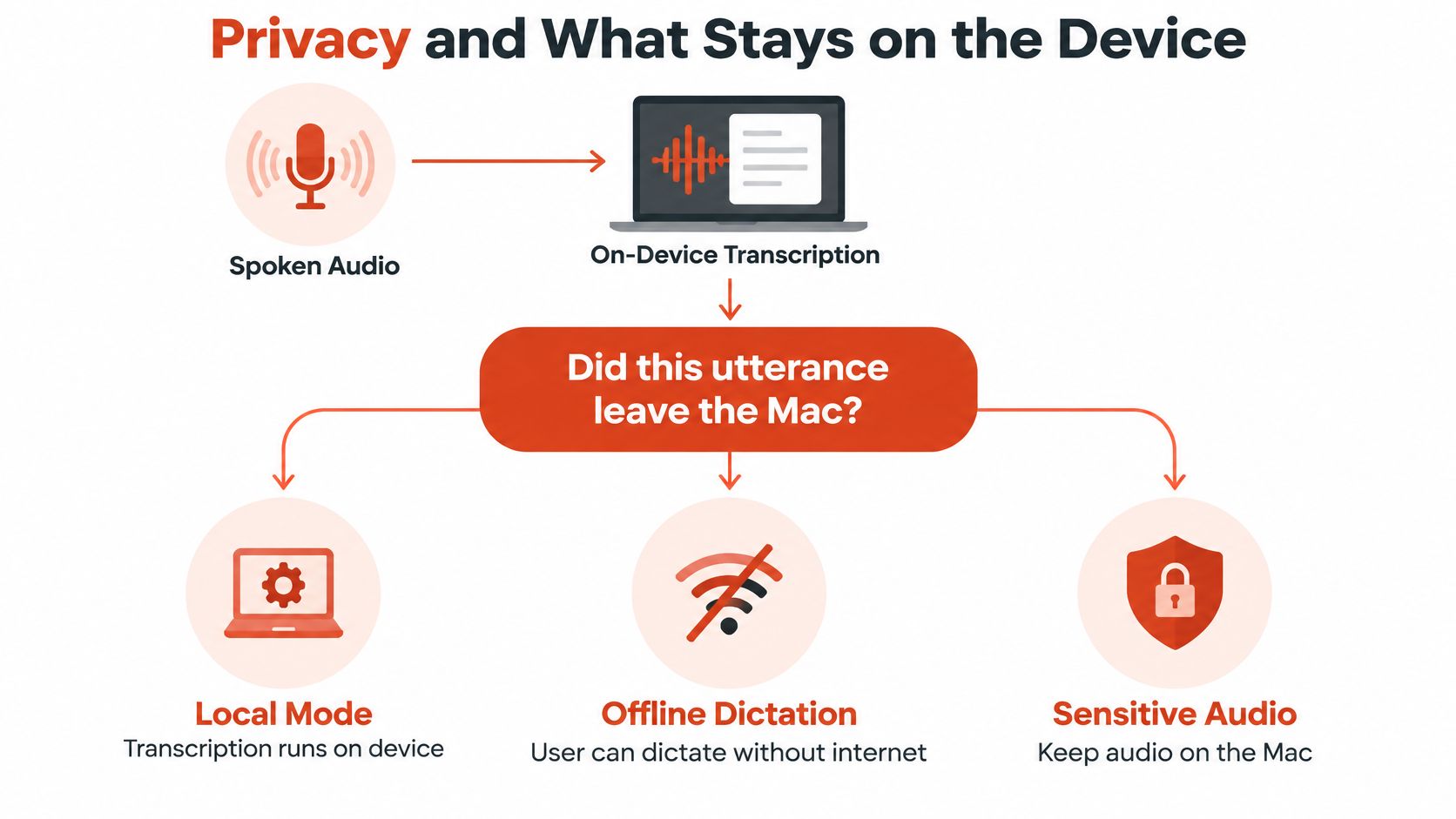
In Local Mode, transcription runs on device, so you can dictate offline and keep sensitive audio on your machine. That's the mode to force when the content itself is the risk. Our privacy by design approach to dictation starts from that on-device option, and transport on the cloud path uses 256-bit SSL. SOC 2 is pending. Don't upgrade that posture in your head. We won't claim a signed BAA here, and you shouldn't treat Cloud Mode as HIPAA compliant by itself.
Keep it local or send it for cleanup
- Force Local: Patient identifiers and clinical details, unreleased financials, source code that includes secrets, and embargoed interview quotes.
- Cloud is fine: A routine status email, a chat reply, or a first draft with no confidential names or figures.
- Check the path: If Auto ran, confirm which engine handled the utterance before you paste it into a sensitive system.
Practical rule: If the sentence would be a problem in a vendor log, force Local and skip cleanup.
Context rules follow the same boundary. You can set a professional tone for mail and a casual tone for chat, but only on a path that's allowed to send text out. Formatting convenience never outranks the content rule.
When you later share a cloud-polished draft, don't forget the artifacts that travel with copied text. A quick pass focused on removing hidden characters from AI drafts helps before you paste sensitive work into another system. It's a small hygiene step, and it beats discovering stray formatting in a clinical or legal document.
Write your one-line rule before you turn Auto on. Name what never leaves, in concrete terms your future tired self can apply at speed. If you can't write that line, you're not ready for Auto as a default.
Accuracy Latency and AI Cleanup
Separate two scores that marketing loves to blend. Word accuracy is whether the engine heard the right words. Finished writing is whether you can send the result without repairing it. Cloud Mode's clearest win is the second score, not a guaranteed win on the first.
The image below shows that gap between raw speech and polished output:
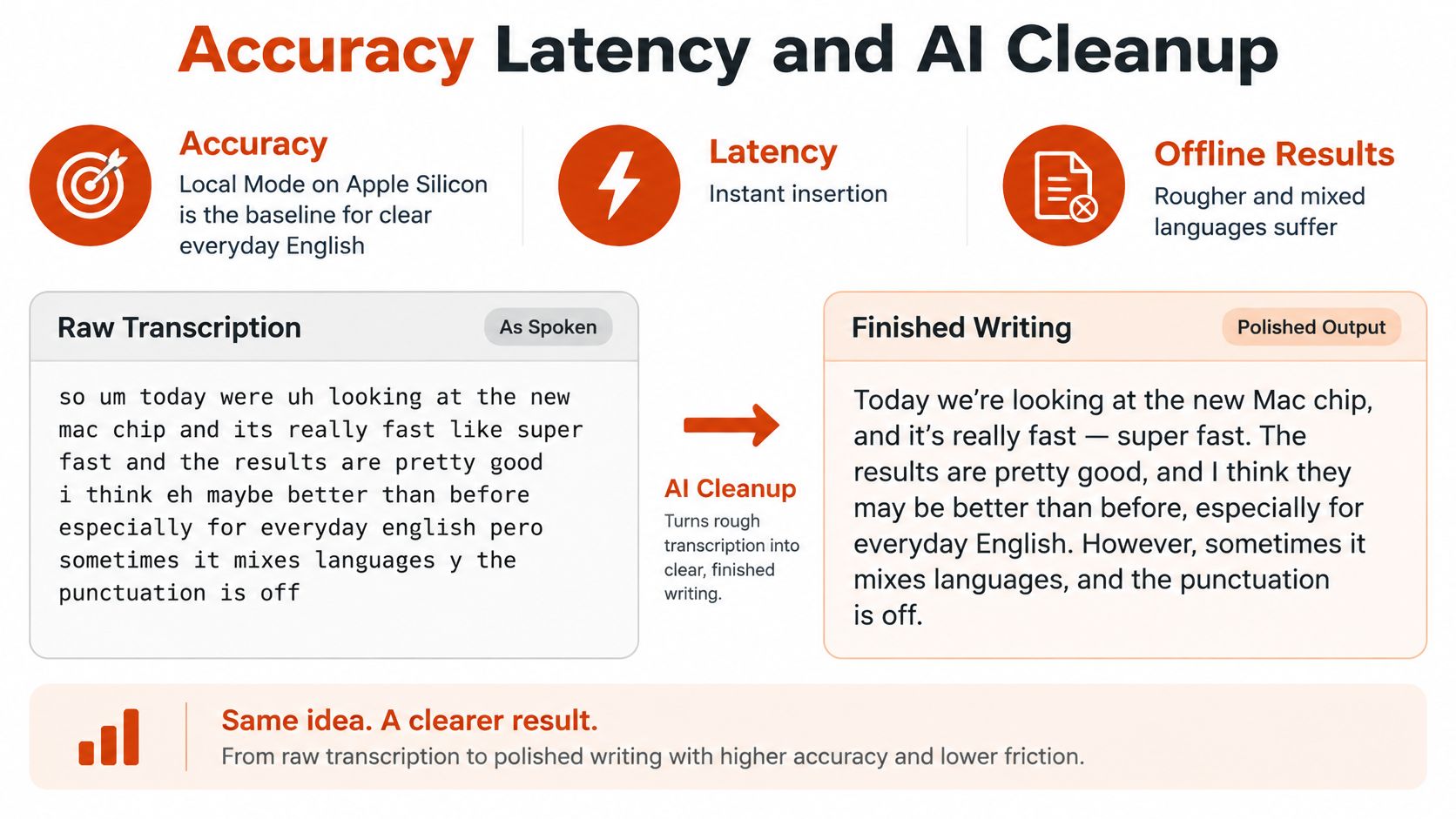
Local Mode on Apple Silicon is your baseline for clear everyday English and instant insertion. Its failure cases are predictable. Offline results are rougher, mixed languages suffer, and a mumbled proper name is exactly where you'll feel it. Say you dictate a note, drop in a Spanish phrase a patient used, then return to English. Expect the local transcript to need your eyes on that seam.
Cloud Mode handles accents, mumbles, and background noise better as an input problem, then improves the finish. It fixes grammar and punctuation, strips fillers, and resolves self-corrections such as "scratch that." That cleanup raises perceived quality a lot. We're not claiming a published word-error-rate percentage for it, and you shouldn't let any vendor blur that line.
What the latency evidence does and doesn't prove
Local processing removes the network round trip, and directional evidence supports that advantage. In a reproducible edge-versus-cloud benchmark using 1.5 million messages across 30 independent runs, edge processing achieved mean latency of 39.69 ms, while cloud processing averaged 116.87 ms, approximately 2.94× higher. Cloud processing also reached a 95th-percentile latency of 248.19 ms, whereas edge processing remained below the 100 ms real-time threshold, with 3.57× higher jitter and 9.90× higher packet loss in the cloud configuration.
Treat those numbers as directional, not as a dictation guarantee. They came from an IoT simulation with a particular broker and network model, not from speech recognition on your Mac. What they explain well is why unstable Wi-Fi and travel favor local insertion. Tail latency and jitter are what you feel as unpredictable pauses mid-sentence.
Watch this short demonstration before you judge cleanup on your own speech patterns:
Load can reverse the local advantage. If your Mac is already busy with a build, a video call, and screen sharing, local queuing can cost more time than a network round trip saves. That's why the practical pattern is hybrid: local for capture and immediate insertion, cloud for heavier cleanup when the text may leave. If you transcribe social video too, Instagram transcripts with Vid Kraken shows the same raw-versus-finished distinction in a different workflow.
Measure the whole pipeline, not model time alone. Time capture, transcription, cleanup, formatting, and insertion, first on an idle Mac and then under your normal sustained load. Local wins when the next word must appear now. Cloud wins when you'd otherwise spend minutes repairing a paragraph.
Cost Break Even by Volume and Risk
"Which is cheaper" is the wrong question. Ask at what volume, quality bar, and privacy rule each mode becomes cheaper. The answer changes between a two-line chat reply and a send-ready spec.
The chart below frames break-even by volume and quality bar, not by a single price:
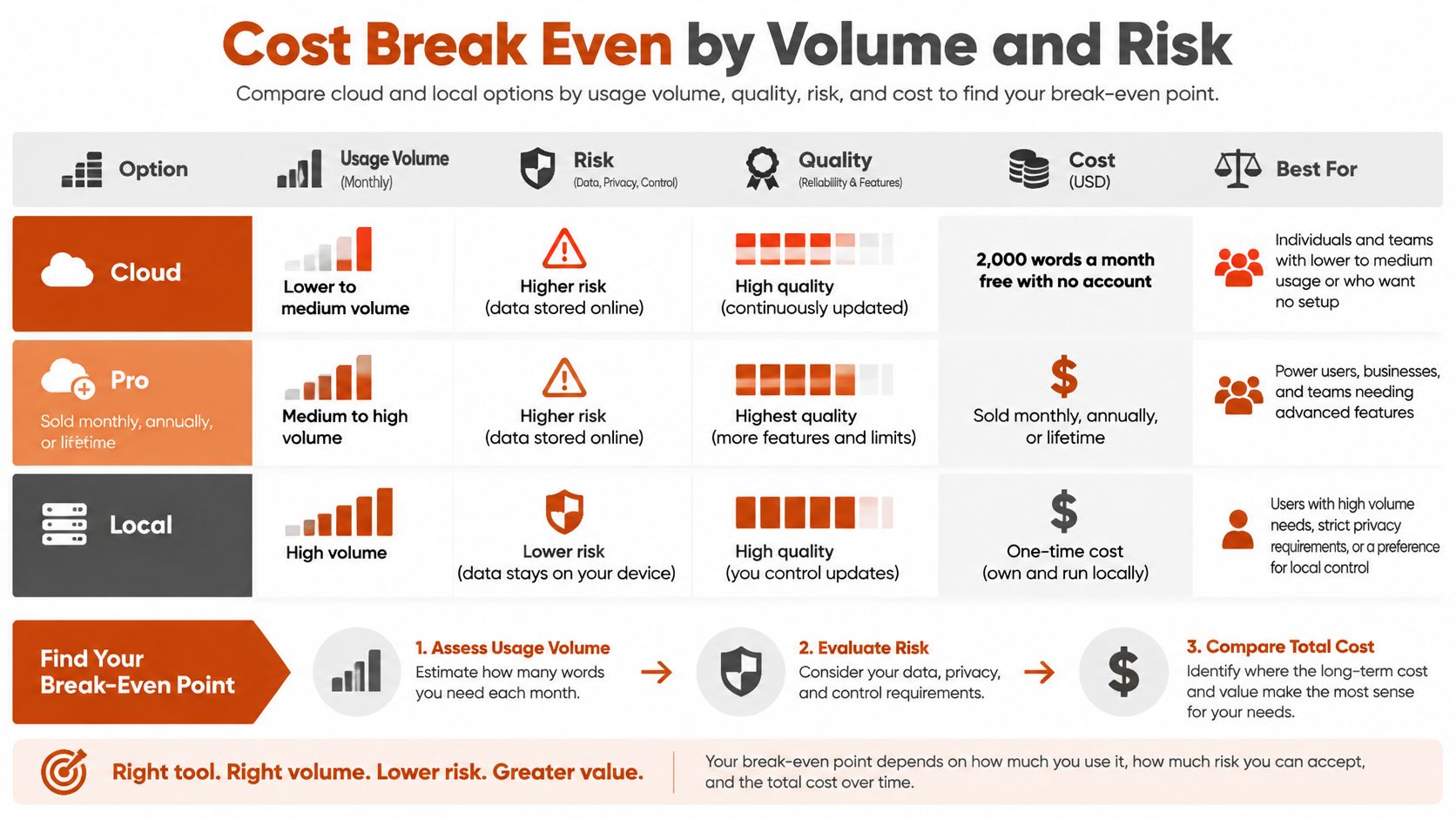
AIDictation includes 2,000 words a month free with no account. Pro, sold monthly, annually, or lifetime, provides unlimited cloud use, translation into English, and audio or video transcription. Check current terms on our dictation pricing and plan options before you model anything, and don't let anyone quote you a break-even without your own editing rate in it.
Local Mode has near-zero marginal cost after the Mac you already own. Its hidden costs are real, though: a capable Apple Silicon machine, model updates, and your editing time when a rougher offline transcript isn't send-ready. Cloud Mode avoids local model upkeep and scales cleanup, but it spends your free allowance and then your plan on every utterance, including short chats that never needed polish.
| Volume or job | Cloud Mode cost driver | Local Mode cost driver |
|---|---|---|
| Routine chat and short replies | Wasted spend if cleanup is not needed | Raw text is usually fine |
| Send-ready email or spec | Cleanup earns its cost if editing minutes drop | Draft plus the editing time you price yourself |
| Strict privacy rule | Not applicable for sensitive text | Stays on device at any volume |
Run the break-even on paper
- Count monthly words: Estimate what you dictate, not what you type.
- Split the pile: Mark each job as must-be-polished or raw-is-fine.
- Price your minutes: Multiply cleanup minutes saved by what your time costs.
- Buy only on evidence: Choose Pro if saved editing beats the plan cost.
The enterprise parallel is instructive. Flexera's State of the Cloud report found organizations estimated 21% of cloud workloads and data had been repatriated, while 33% of respondents were spending more than $12 million annually on public cloud. Metered features get expensive when they run on work that didn't need them. Sending every chat line through cleanup is the dictation version of that trap.
Under 2,000 words a month with a strict privacy rule, free Local is the rational default. Add downtime to your model too. A local path still produces a draft during an outage, when cloud spend buys you nothing.
Modes That Fit Real Dictation Jobs
| Job | Use this mode | Why | If the network drops |
|---|---|---|---|
| Clinical note with identifiers | Local | Text must not leave the Mac | Keep dictating, expect a rougher raw note |
| Code comments or specs without secrets | Auto | Formatting helps, privacy still matters | Local draft, no cloud formatting |
| Email, PRD, or stakeholder update | Cloud or Auto | Per-app tone and cleanup | Raw local text until you are back online |
| Chat or short replies | Auto, prefer Local if sensitive | Polish is optional | Still usable, less tidy |
| Airplane or unstable Wi-Fi | Local | No round trip available | This is the normal path, not a failure |
| Confidential interview or meeting | Local | Audio and quotes stay on device | Recording stays on device, no cloud polish |
| ESL speech into polished English | Cloud | Cleanup and English translation need the service | Capture locally, translate later |
| Long-form first draft | Cloud when online | Momentum matters more than line edits | Keep talking locally, clean up on reconnect |
Clinical work is the clearest placement call. Capture stays local because the note must remain useful without sending text out, a pattern our medical dictation app guide for clinical workflows treats as the starting constraint. Healthcare organizations make the same split at infrastructure scale: healthcare coverage of cloud versus on-premises storage reports more than 80% of healthcare organizations still keep over half of their infrastructure outside the public cloud, while nearly 40% keep at least 90% on-premises. Latency-sensitive clinical workflows need predictable local access, while backups, archives, and analytics can use cloud elasticity later.
Developers sit in the middle. Use Auto for comments and specs, and let Cloud format lists or headings only when the text contains no secrets. If a snippet includes a token, internal hostname, or unreleased architecture detail, force Local for that utterance. Creators working across devices sometimes compare this setup with Chromebook dictation extensions for creators, and the placement question follows them there. The device changes, the rule doesn't.
What failover actually changes
State outage behavior out loud before it happens to you:
- Capture continues: Auto keeps accepting speech on device.
- Cleanup pauses: Formatting, per-app tone, and polish wait for the cloud path.
- Quality drops: Mixed-language handling and rough edges get worse offline.
- Privacy tightens: Text isn't sent while you're offline, which is a benefit, not a bug.
- The switch must show: You need to see that the engine changed.
Don't expect accuracy to stay constant offline, and don't invent retry queues that nobody promised you. The honest degraded mode is a usable raw draft with tighter privacy and weaker finish. For travelers, field clinicians, and anyone on dead clinic Wi-Fi, that's still a working tool.
Writers and students are Cloud Mode's sweet spot when the material may leave. We're strongest at first drafts, collaborative notes, and long-form writing where capturing momentum matters more than polishing each sentence. Multilingual speakers who need publishable English should use Cloud, including Pro translation into English, and shouldn't expect the offline model to match that finish. Capture locally when you're offline, then translate and clean up when you're back.
Choose Your Default Mode Today
Set one of three defaults and stop renegotiating per utterance.
If your daily work may send text to a cloud service, set Auto and let it use Cloud when cleanup earns its latency. If your work cannot send text off the machine, force Local and accept the rougher transcript and weaker mixed-language handling. If the job is a send-ready email or spec on stable office Wi-Fi, force Cloud for that session.
We'll state the product limit plainly: AIDictation is not built for teams that need admin controls, or for work that cannot send text to the cloud. If you need an enterprise control plane, don't treat Auto as a substitute for one. Buy for the workflow described here, not for governance we don't sell.
The two-pass hotkey test
Install the Mac app, pick a hotkey, and run one honest comparison:
- Dictate locally: Hold the hotkey and dictate the same roughly 80-word note into a real text field in Local Mode.
- Dictate in cloud: Repeat the identical note in Cloud Mode, same field, same speaking pace.
- Score usability: Compare time until the text is usable, not just time until words appear, and confirm you could tell which engine ran.
Keep Auto if Local was good enough for your sensitive apps and Cloud clearly saved editing on the rest. Use the free 2,000 words to make that call before you pay for Pro. Add names and technical terms to the custom dictionary only after the mode choice is settled, so you don't confuse a vocabulary fix with an engine difference.
Judge the mode by time to usable text, and lock the default that wins on your real jobs.
Lock your default by testing the same note in Local and Cloud, then keep the mode that gets you to usable text faster without breaking your privacy rule. AIDictation gives you on-device dictation, cloud cleanup and formatting, and Auto routing in one Mac app, starting with 2,000 free words a month and no account. Visit us, run the two-pass test today, and set the default your work needs.
Frequently Asked Questions
What does Cloud vs Local Dictation: Which Mode to Use cover?
Stop asking whether cloud is smarter or local is safer. That loyalty test gives you the wrong answer for daily dictation.
Who should read Cloud vs Local Dictation: Which Mode to Use?
Cloud vs Local Dictation: Which Mode to Use is most useful for readers who want clear, practical guidance and a faster path to the main takeaways without guessing what matters most.
What are the main takeaways from Cloud vs Local Dictation: Which Mode to Use?
Key topics include Table of Contents, Cloud vs Local Is a Placement Decision, The three states in plain language.
Ready to try AI Dictation?
Experience fast voice-to-text on your device. Free to download.
Download FreeRelated Posts
Custom Dictionary for Word: Set Up AIDictation Vocabulary
Learn how to build a custom dictionary for word in AIDictation: add names, technical terms and acronyms, import in bulk and fix errors.
10 Custom Dictionary Software Tools for Every Workflow
Compare 10 custom dictionary software tools for terminology, medical dictation, developer workflows, corpus research, and speech recognition.
This May Take Several Minutes: Dictation UX Best Practices
Master user-facing wait messages like "this may take several minutes" for dictation. Explore UX, accessibility, and alternatives