Assistive Technology and Cerebral Palsy
A parent is standing in a therapy clinic, looking at a stroller, a walker, a communication board, and a tablet mount, wondering which one matters. An adult with cerebral palsy is comparing software, switches, and seating options, trying to figure out what will help at work instead of adding one more frustrating setup. A teacher has been told a student “needs assistive tech,” but nobody has translated that phrase into something usable during a real school day.
That uncertainty is common. Assistive technology can sound technical, expensive, and overwhelming. In practice, it's often much simpler. It's any tool that helps a person do something more safely, more comfortably, more independently, or more consistently. Sometimes that tool is a pencil grip. Sometimes it's a powered wheelchair. Sometimes it's a speech-generating device or eye-tracking system.
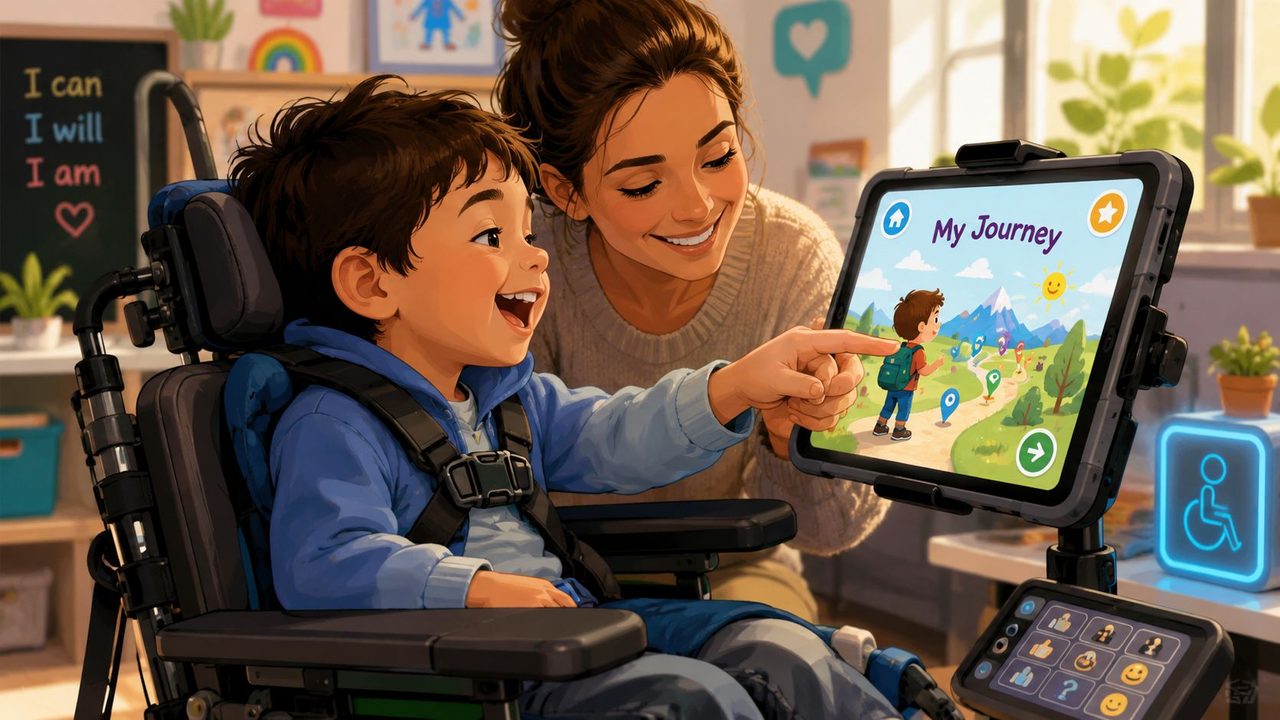
Cerebral palsy affects an estimated 18 million people worldwide, and U.S. prevalence is commonly reported at about 1 in 345 children, with up to 10,000 infants in the United States diagnosed each year according to cerebral palsy prevalence statistics. That's why assistive technology and cerebral palsy belong in the same conversation about daily living, school access, employment, and long-term planning.
For many families, the first practical questions aren't about diagnosis. They're about what fits in the home, what counts as equipment, and what insurance may view as medically necessary. If you're sorting out the equipment side of that picture, this complete guide to DME for home use helps clarify where durable medical equipment overlaps with assistive tools. If communication access is part of the concern, this overview of voice-to-text accessibility tools shows how speech support can widen participation when typing or speaking clearly is hard.
Table of Contents
- Introduction Unlocking Potential Through Technology
- The Four Pillars of Assistive Technology for Cerebral Palsy
- Choosing the Right Tools The Personal Assessment Process
- Assistive Technology in Action Daily Life and Workflows
- Mastering Your Technology Implementation and Training
- Funding Your Toolkit Navigating Insurance and Support Systems
- Measuring Success and Building a Lifelong Strategy
Introduction Unlocking Potential Through Technology
The most helpful way to think about assistive technology and cerebral palsy is this. The device isn't the outcome. Participation is the outcome.
A child who can sit with better support may finally use both hands during art. A teenager with a power mobility option may start making plans with friends without waiting for someone else to push. An adult who can access a computer with less physical effort may keep energy for work, parenting, or study instead of spending it all on input.
People sometimes get stuck because they assume there must be one best device. There usually isn't. Cerebral palsy affects movement, coordination, posture, speech, and endurance in very individual ways. Good assistive technology responds to that reality. It doesn't force a person to adapt to generic equipment.
Practical rule: Ask “What task is hard right now?” before asking “What device should we buy?”
That question changes everything. It shifts the conversation from labels to function. Instead of “Do we need AAC?” the question becomes “How will this child answer questions in class, tell us when they're uncomfortable, and make choices with less effort?” Instead of “Should we get a wheelchair?” the question becomes “How will this person move through school, home, work, and community spaces without exhausting themselves?”
This is also why the strongest plans usually combine low-tech and high-tech supports. A slanted writing board may help in one setting. Eye-gaze access may help in another. A seating adjustment can improve eating, speaking, and computer access all at once.
The Four Pillars of Assistive Technology for Cerebral Palsy
The easiest way to make this topic manageable is to group tools by function. Individuals don't need a random list of products. They need a map.
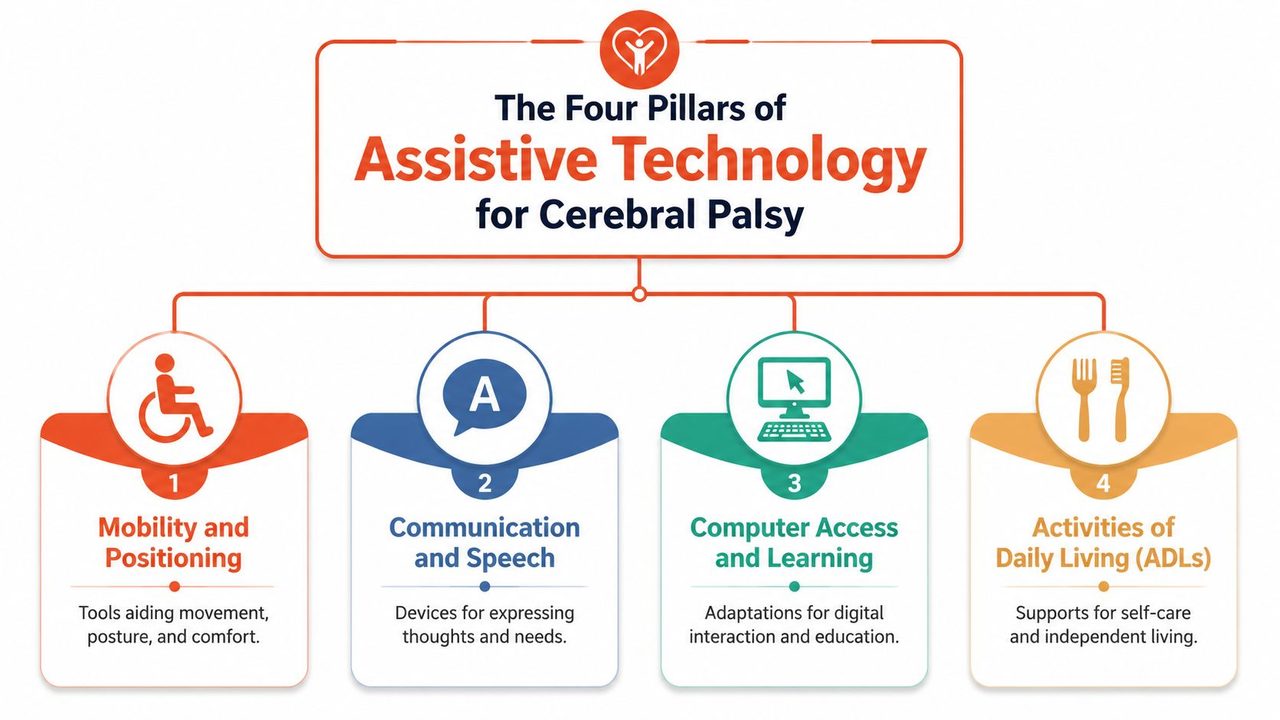
Mobility and positioning
This pillar supports movement, posture, alignment, comfort, and endurance. It includes wheelchairs, walkers, standers, gait trainers, supportive seating, cushions, orthoses, and transfer aids.
This category often has the biggest ripple effect. A seating system that keeps the pelvis stable can improve head control, visual attention, arm use, and tolerance for classroom or work tasks. Better positioning can also reduce the effort needed for eating, communication, and play.
A useful way to sort mobility tools is by the job they do:
| Need | Examples |
|---|---|
| Posture and stability | supportive chairs, lateral supports, positioning cushions, lower-extremity orthoses |
| Movement across spaces | walkers, manual wheelchairs, powered wheelchairs, gait trainers |
| Access to tasks | tray systems, height adjustments, mounts, transfer supports |
A review of assistive devices and technologies for cerebral palsy found that most studied tools focus on gross motor function, especially walking, posture, and mobility, while also supporting independence in self-care and interpersonal participation through this scoping review on AT for cerebral palsy. That matters because families sometimes underestimate how often a mobility tool improves much more than mobility.
Communication and speech
When speech is difficult to understand or hard to produce consistently, communication tools become essential, not optional. Cerebral palsy often requires alternative input modalities because speech and fine-motor limits can make standard keyboards or speech alone insufficient, as outlined in this guide to assistive devices for communication access.
That can include:
- Speech-generating devices that turn typed or selected words into spoken output
- Communication boards for symbols, words, routines, and choices
- Eye-tracking systems when hand access is limited
- Typing aids and access supports for more consistent input
- Screen readers and text output tools for multi-sensory access
Some readers get confused here because they think “communication device” means one expensive machine. In real life, communication is often layered. A person may use a paper board in the bathroom, a tablet in class, and a partner-assisted system when fatigued.
Communication works best when the access method matches the person's motor pattern. For some people that's direct touch. For others it's switches, scanning, or eye gaze.
If you want a plain-language overview of how spoken output supports reading, writing, and communication, this article on what text to speech is and how it works is a useful companion.
Computer access and learning
This pillar covers what happens when a person needs to use a device for school, work, or creative tasks but standard input gets in the way.
Examples include keyguards, enlarged keyboards, switch access, alternative mice, head tracking, eye-gaze control, word prediction, and customized display settings. Sometimes a very small change solves a large problem. A well-placed switch may outperform a touch screen if touch causes accidental hits. A mount at the right angle may matter more than upgrading software.
The key design question is simple: How much precision does this task demand, and is that realistic for the user? If the answer is no, the technology should reduce the demand. Larger targets, scanning choices, predictive text, and fewer required movements usually beat systems that expect fine motor accuracy all day.
Daily living and environmental control
This category often gets less attention, even though it has the most visible impact at home. It includes adapted utensils, dressing aids, bath equipment, writing supports, grips, slanted boards, switch-operated toys, and environmental controls for lights, doors, or media devices.
These tools are important because independence isn't only about school performance or clinic goals. It's also about brushing teeth with less help, turning on music without calling someone over, or participating in meal prep instead of watching from the side.
A short checklist helps clarify where daily living tools fit best:
- Self-care tasks: adaptive toothbrushes, feeding supports, bathing aids
- Home control: accessible switches, remote interfaces, simplified controls
- Leisure and play: accessible gaming, switch toys, modified art tools
- Written tasks: grips, weighted pens, slanted boards, paper stabilizers
Low-tech solutions belong here just as much as digital ones. In many homes, the most-used support is the one that's easy to reach, easy to repeat, and doesn't require setup every single time.
Choosing the Right Tools The Personal Assessment Process
The best assistive technology plans don't start with a catalog. They start with a person doing a real task in a real place.
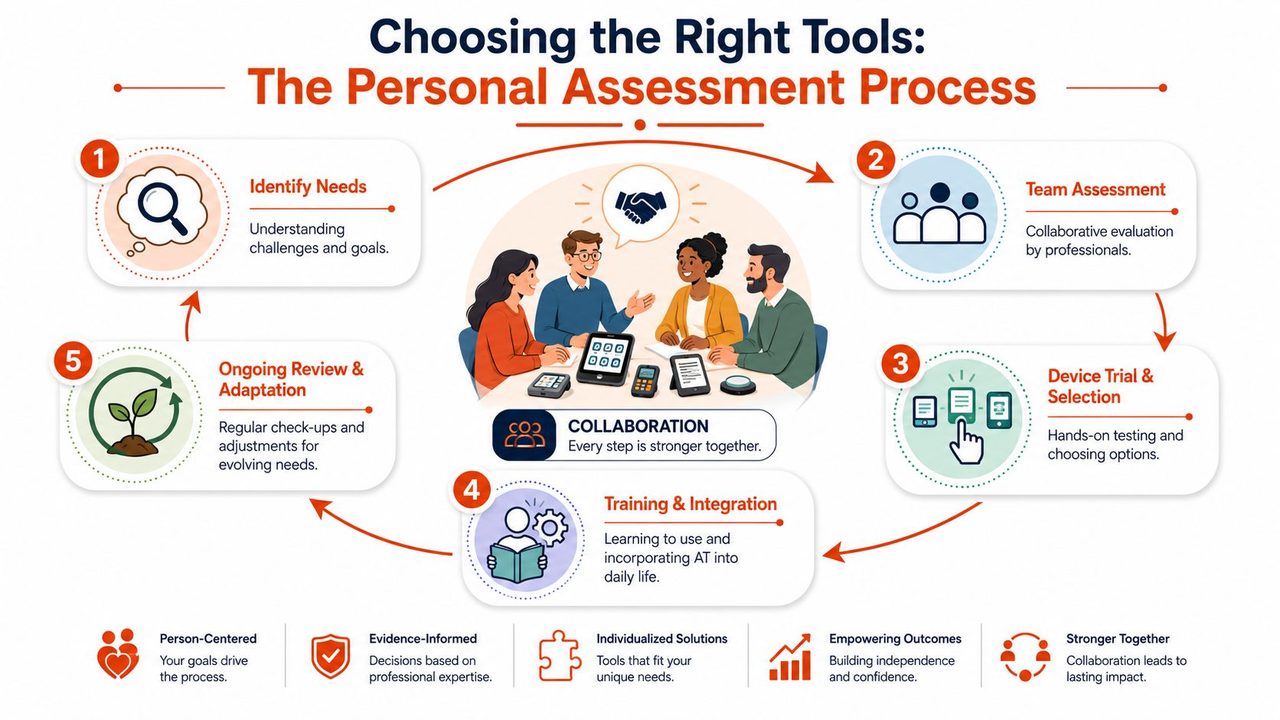
Start with participation not product
I tell families to begin with three sentences:
- What do you want to do?
- What gets in the way?
- What part of that problem is physical, communication-related, sensory, or environmental?
That framing keeps the process grounded. “I want to eat lunch with less spilling.” “I want to answer questions in class.” “I want to use a laptop for work without needing someone to reposition me every ten minutes.” Those goals are specific enough to guide good choices.
One study found that assistive technology use in cerebral palsy is often multi-device, with a median of 2.5 devices per child across positioning, mobility, self-care, training, stimulation, and play, according to this PubMed study on assistive technology use in children with cerebral palsy. That's a helpful reminder that one tool rarely solves everything.
Who should be at the table
A strong assessment usually includes the person with cerebral palsy, family or caregivers, and the professionals who know the task demands.
That often means:
- Occupational therapists: daily activities, hand use, seating for function, school access
- Physical therapists: mobility, transfers, gait-related supports, positioning
- Speech-language pathologists: AAC, speech, language, access for communication
- Teachers or employers: actual task expectations in class or on the job
- ATP or vendor specialists: equipment setup, trials, compatibility, mounting
Not every case needs every person at once. But the more complex the need, the more important coordination becomes. A communication device selected without considering seating may fail because the body position makes access too hard. A mobility base chosen without accounting for school desks, van transport, or home doorways may create new barriers.
If wheelchair choice is part of that process, this guide with tips for choosing an active wheelchair can help families think through weight, portability, and everyday use questions before trial appointments.
Trials matter more than brochures
A trial tells you things a spec sheet can't. You see whether the person can access the controls after fatigue sets in. You notice if the device blocks visual contact during conversation. You learn whether setup time is manageable in a busy classroom or workday.
Try the device during the task that actually matters. A tool that looks good in clinic may fail at the dinner table, in algebra class, or at a crowded reception desk.
During trials, pay attention to five practical issues:
- Body fit: Can the person maintain alignment and comfort?
- Access effort: How hard is it to activate consistently?
- Speed: Is the tool too slow for the environment?
- Portability: Can caregivers, teachers, or the user move and set it up?
- Carryover: Will people use it outside therapy?
The right answer is the one that works often enough to become part of life, not the one with the longest feature list.
Assistive Technology in Action Daily Life and Workflows
A school morning
A student arrives at school with a tablet mounted at an angle that supports a clear view and easier hand access. During attendance, the teacher asks a simple question. The student answers using a switch-linked communication app with text-to-speech output. At writing time, the same student uses a slanted surface and adapted stylus for short responses, then shifts back to the tablet for longer work.
That combination matters. One tool supports speed. Another supports endurance. Another supports participation with classmates instead of relying on an adult to interpret every attempt.
Community mobility and social life
A teenager uses a powered wheelchair for longer distances at school and in the community. At first, the family thinks of it as a transportation device. Within weeks, they notice something bigger. The teen starts choosing where to go, how long to stay, and who to sit with.
A well-chosen mobility device can have effects that spill into confidence, relationships, and self-care. Research on assistive devices for cerebral palsy supports that pattern. Devices aimed at walking and posture can also improve independence in everyday participation, as discussed earlier in the article.
The best mobility technology often gives back time and decision-making, not just movement.
Work on a real deadline
An adult with motor and speech challenges works in a role that involves email, notes, and documentation. On some days, direct typing is possible for brief tasks. On more fatiguing days, the person uses eye-gaze or other alternative computer access to control, dictate, and edit. A privacy-sensitive workflow may rely on local processing in clinical or administrative settings, while polished outgoing messages may depend on tools that can clean up formatting and self-corrections before sending.
The workflow matters as much as the device. If opening the app, placing the cursor, selecting the mode, and correcting output takes too long, productivity drops. If shortcuts are easy and the setup matches the person's motor pattern, the system becomes sustainable.
For people who rely on mobile access in everyday routines, these iPhone accessibility shortcuts can reduce taps and make common tasks easier to launch.
A good workflow usually includes:
- One fast method for short communication
- One reliable method for longer writing
- A backup option for fatigue or technical problems
- Saved settings for the places used most often
That's what effective assistive technology and cerebral palsy planning looks like in real life. Not one miracle device. A set of workable pathways.
Mastering Your Technology Implementation and Training
Getting the device is a milestone. It isn't the finish line.
Build use into routines
Most abandoned assistive technology fails for a practical reason. It takes too long to set up, nobody is sure when to use it, or the first week feels discouraging and everyone settles back into old habits.
Start small and place the tool inside existing routines. Use the communication system at breakfast choices, not only in therapy. Practice wheelchair positioning before the school rush, not when everyone is already late. Build computer access into one predictable work task before trying to overhaul the whole day.
A simple implementation plan works better than a vague hope that the device will “just become natural.” Write down:
- When it will be used
- Who sets it up
- What success looks like this week
- What problem means settings need to change
Train the whole support circle
The person using the technology needs training, but so does everyone around them. Parents need to know how to charge, position, and troubleshoot. Teachers need to know how to wait for a response and include the device naturally. Aides need to avoid overhelping. Employers may need straightforward guidance on setup and expectations.
One common mistake is teaching features before function. Teach the job first. “Use this page to answer social questions.” “Use this switch to scan through choices.” “Use this seating adjustment before meals.” People learn faster when each skill is attached to a meaningful outcome.
If a support person doesn't know how the technology fits into the task, they're likely to bypass it during busy moments.
Follow-up matters. Bodies change, routines change, school teams change, and work demands change. Revisit positioning, access settings, vocabulary, mounts, and workflow details before frustration builds. Small adjustments made early often prevent abandonment later.
Funding Your Toolkit Navigating Insurance and Support Systems
Families often think the hardest part is choosing the device. In many cases, the harder part is getting the device paid for, delivered, configured, and supported over time.
The system is often the hardest part
Access barriers aren't just about whether a product exists. The disability-innovation field has been described as chronically underfunded and fragmented, and access to assistive technology is often a systems problem involving reimbursement and service delivery infrastructure, as outlined by CPARF on disability innovation and access barriers.
That rings true in practice. A person may qualify clinically and still face delays because documentation is incomplete, responsibility is split across agencies, or nobody has addressed training, repairs, or replacement planning.
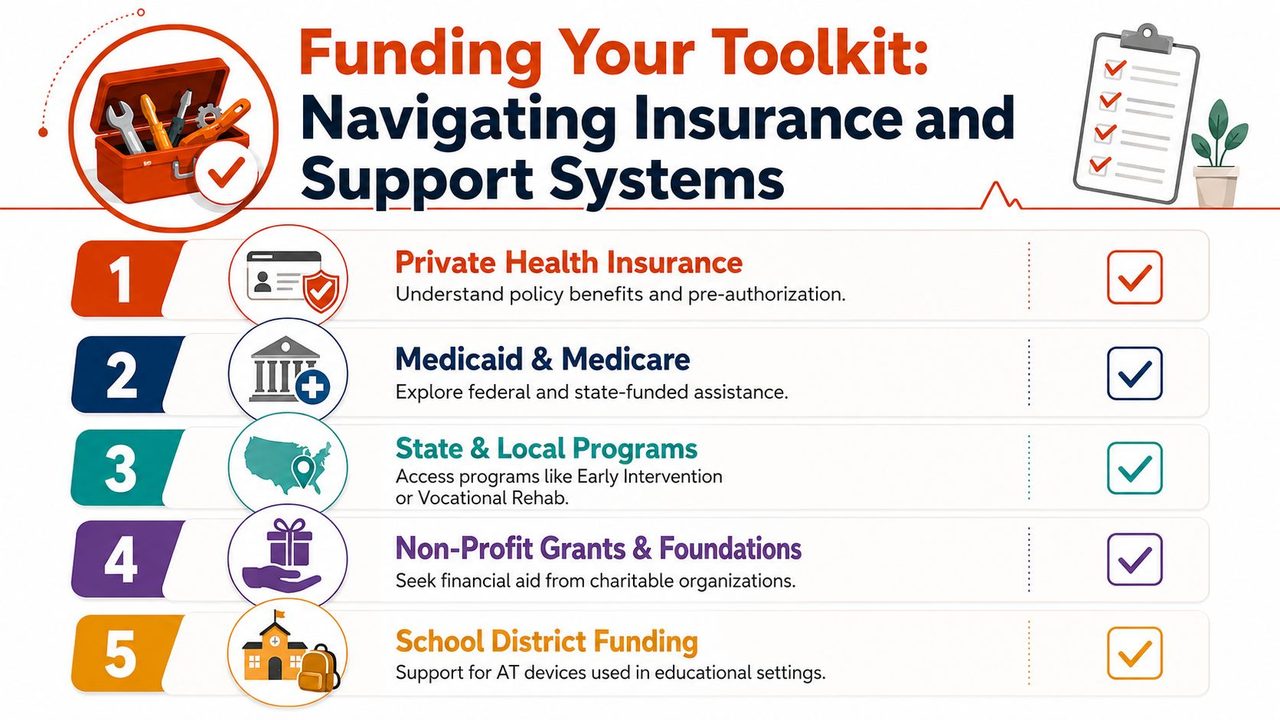
Common funding pathways
Different systems pay for assistive technology for different reasons. That's where many people get tripped up.
| Funding pathway | What it often focuses on |
|---|---|
| Private health insurance | medical necessity, home use, mobility, seating, certain communication devices |
| Medicaid or related public coverage | medically necessary supports, state-specific rules, documentation-heavy requests |
| Early Intervention and school systems | access to education, participation in school routines, communication for learning |
| Vocational rehabilitation or adult service systems | work access, training, job participation, some technology related to employment |
| Nonprofit or community funding | gap filling, smaller equipment needs, urgent support when formal systems stall |
School funding causes a lot of confusion. If a device is needed for a student to participate in education, the school may be responsible for providing or supporting that access through the student's educational plan. But school-funded access doesn't always solve home use, summer use, repairs, or transition-to-adulthood questions. Ask directly how equipment can be used across settings and who owns it.
For adults and families navigating broader long-term support questions, this article on support for disabled adults is a helpful reminder that equipment access is only one part of a wider support system.
What strengthens a funding request
Approvals tend to improve when the documentation ties the device to a necessary function, not just a preference. Useful language includes what the person cannot do safely or consistently now, what alternatives have been tried, and how the recommended tool supports participation in daily tasks.
A strong packet usually includes:
- A clear evaluation report: functional limits, observed performance, and why the recommended option fits
- Trial results: what was tested and what worked or failed
- Letters of medical or therapeutic support: language tied to daily function
- Quotes and product details: exact model, components, and required accessories
- Implementation needs: training, mounting, repairs, and follow-up support
If a denial happens, don't assume the recommendation was wrong. Often the issue is wording, missing justification, or a mismatch between the payer's criteria and the report. Appeals are part of the process more often than people expect, and persistence matters.
Measuring Success and Building a Lifelong Strategy
What Success Looks Like
A good result often shows up in ordinary moments. A child answers a question before the class has moved on. A parent steps back because less hands-on help is needed. A worker finishes a shift with enough energy left for dinner, conversation, or a hobby. Those are the kinds of changes that matter.
Device performance still matters, of course. But assistive technology is not a success because it works well on a table during a trial. It is a success when it helps the person take part in real life with less effort, more control, and fewer barriers.
A helpful way to measure progress is to look at function and participation together:
- Independence: Is the person doing more with less physical or verbal help?
- Consistency: Can they do the task in the places that matter, not only during therapy or practice?
- Comfort and endurance: Does the tool reduce strain, frustration, or fatigue over time?
- Participation: Are they joining in more fully at home, at school, at work, or in the community?
- Satisfaction: Do they choose to use it, or do they avoid it?
Those markers tell you more than novelty or technical complexity. In practice, a low-tech tool used every day often does more for participation than an advanced system that stays packed away.
Good assistive technology begins to feel like a familiar part of the day, much like a well-fitted pair of glasses or a favorite kitchen tool. It supports the task without demanding constant attention.
Plan for change, not permanence
A lifelong strategy starts with one simple idea. Needs change.
Cerebral palsy is lifelong, but daily demands do not stay still. Bodies change. Roles change. Environments change. A setup that fits a second grader may not fit a teenager managing longer writing tasks, and a system that worked in school may need different supports in college, work, or adult services.
That is why the goal is not to find one final device and be done. The goal is to build a process for reviewing, adjusting, and replacing tools as life changes. The best long-term plans work like a good home program from therapy. They are consistent, flexible, and based on what the person needs right now.
Transitions deserve extra attention because they often expose gaps that were easy to miss before. School to work. Pediatric to adult care. Parent-managed routines to self-directed routines. In each stage, the question shifts from "What can this device do?" to "What does this person need to do, in this new setting, with this level of support?"
A practical long-term strategy includes regular check-ins around a few questions:
- What matters most right now?
- Which tool is part of daily life, and which one keeps getting left aside?
- What setup problem keeps slowing things down?
- What new demands are coming in the next setting?
- Who will handle training, updates, repairs, or replacement if needs change?
The strongest outcomes come from treating assessment, training, funding, and follow-up as one connected system. That is how people maintain access over time, rather than starting over every time life shifts.
If writing is one of the tasks that takes too much energy, AIDictation can help turn speech into cleaner, ready-to-send text on macOS. It's especially useful for people who need a faster way to draft emails, notes, or reports while balancing motor effort, fatigue, privacy needs, and the realities of daily workflow.
Frequently Asked Questions
What does Assistive Technology and Cerebral Palsy cover?
A parent is standing in a therapy clinic, looking at a stroller, a walker, a communication board, and a tablet mount, wondering which one matters. An adult with cerebral palsy is comparing software, switches, and seating options, trying to figure out what will help at work instead of adding one more frustrating setup.
Who should read Assistive Technology and Cerebral Palsy?
Assistive Technology and Cerebral Palsy is most useful for readers who want clear, practical guidance and a faster path to the main takeaways without guessing what matters most.
What are the main takeaways from Assistive Technology and Cerebral Palsy?
Key topics include Table of Contents, Introduction Unlocking Potential Through Technology, The Four Pillars of Assistive Technology for Cerebral Palsy.
Ready to try AI Dictation?
Experience fast voice-to-text on your device. Free to download.
Download FreeRelated Posts
7 Dyslexia Examples of Writing You Need to See
Explore 7 common dyslexia examples of writing, from letter reversals to phonetic spelling. Understand the signs and discover helpful accommodations.
Master Code by Voice: Hands-Free Coding on macOS
Ditch the keyboard! Code by voice with our 2026 macOS guide. Covers setup, AIDictation tools, workflows, & debugging for a truly hands-free coding experience.
Find Your Voice: A Cerebral Palsy Communication Device Guide
Explore the complete guide to choosing a cerebral palsy communication device. Learn about types, assessment, funding, and training to find the right voice.