What Is a Bug Report: Essential Guide for 2026

You're probably here because you've seen both extremes. Someone reports, “the app is broken,” and the team loses half a day chasing basic details. Or a developer asks for one more screenshot, one more browser version, one more attempt to reproduce the issue, and everyone gets irritated.
That's why the answer to what is a bug report matters more than generally perceived. A bug report isn't just a note that something failed. It's the handoff between the person who observed the problem and the person who has to diagnose it under pressure. When that handoff is clear, fixes move. When it's vague, frustration spreads to QA, product, support, and engineering.
Good bug reporting is less about bureaucracy and more about respect for everyone's time. A strong report reduces guesswork, shortens back-and-forth, and gives developers a fair shot at reproducing the issue quickly.
Table of Contents
- Why a Great Bug Report Is Your Most Powerful Tool
- Anatomy of a Perfect Bug Report
- From Vague to Valuable Examples and a Reusable Template
- Understanding the Bug Triage and Communication Workflow
- Common Bug Reporting Mistakes to Avoid
- Pro Tips for Faster More Accurate Reporting
Why a Great Bug Report Is Your Most Powerful Tool
A vague message like “checkout is broken” creates work, not clarity. The developer has to ask where it happened, what browser you used, whether the issue is consistent, and what you expected to happen. By the time those answers arrive, the original context may already be gone.
A bug report is the professional version of that conversation. It turns a complaint into a usable record. It gives the team one place to see the issue, understand the impact, and decide what to do next.
What makes this important isn't just process discipline. Software bugs cost the global economy trillions of dollars annually and claim approximately 50% of developers' time, which means half of many teams' capacity goes to defect work instead of building new features. That makes efficient reporting more than a QA nicety. It's a productivity issue with real operational weight.
A bug report is a communication tool first
The most useful mindset shift is this: a bug report is written for another human being. Usually, that human didn't see the failure happen. They weren't on your machine. They weren't in your browser session. They don't know which click sequence triggered the problem.
So the job of the report is to bridge that gap.
A good report answers the developer's first questions before they have to ask them:
- What failed: Name the specific behavior, not just the area of the product.
- Who saw it: Was it a tester, support agent, internal user, or customer?
- How to repeat it: Give the shortest reliable path to reproduce.
- Why it matters: Explain the user impact without exaggeration.
Practical rule: If a developer can read your report and attempt reproduction without messaging you first, you're doing it right.
Good reports reduce friction on both sides
Reporters often think their job ends at “I found the bug.” It doesn't. The report is part of the fix. If it's unclear, the team pays for that ambiguity through extra triage, duplicate tickets, and avoidable delays.
Developers feel that cost immediately. They don't get blocked by the existence of bugs. They get blocked by missing information, mixed signals, and reports that confuse symptom with cause.
A great bug report lowers that friction. It helps the developer stay in diagnostic mode instead of detective mode. It also helps product managers and QA leads prioritize with less debate because the impact is documented clearly.
That's why I train teams to treat bug reporting as collaborative writing. You're not filing paperwork. You're giving someone else the best possible starting point for a fix.
Anatomy of a Perfect Bug Report
A bug report is a structured document that captures a software defect in a way the team can act on. At minimum, it should include a clear title, description, reproduction steps, environment details, expected versus actual results, and supporting evidence such as screenshots or logs, as outlined in this bug report glossary entry from Docsie.
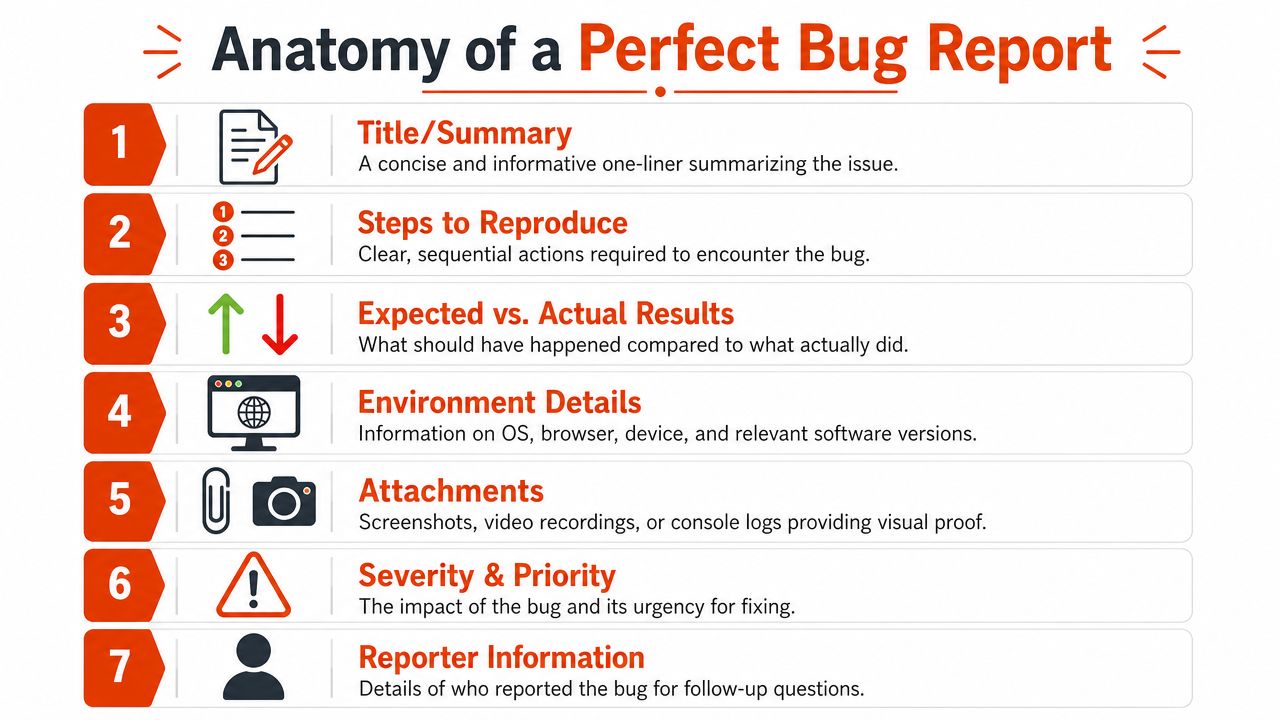
The difference between an acceptable report and a strong one comes down to whether a developer can reproduce the issue with confidence. Research in the ACM paper on bug reporting found that report quality is directly tied to a developer's ability to reproduce and fix an issue, and that strong reports use numbered steps, a specified test environment, and a neutral description in ways that help them get resolved faster, as discussed in the ACM research on bug report quality.
Start with the minimum needed to reproduce
The fastest reports are often the simplest.
-
Title or summary
Write one line that identifies the feature and the failure. “Login button unresponsive on Safari after password reset” is far better than “Login issue.” -
Steps to reproduce
Number each step. Don't describe what you were generally doing. Describe the exact sequence. -
Expected result and actual result
Providing these details makes many reports actionable. State what should have happened, then state what did happened.
Here's a useful mental model: if your report reads like a tiny test case that failed, you're close.
Later, if you're formalizing broader requirements, it helps to align bug reporting with the same discipline used in writing clear product specifications.
Add context that lowers ambiguity
Once reproduction is covered, add the details that prevent wasted cycles:
- Environment details: Operating system, browser, device, app version, or other relevant setup.
- Severity and priority: Severity describes impact. Priority reflects urgency for the team.
- Attachments: Screenshots, screen recordings, error messages, or logs.
- Reporter information: Include who found it so follow-up questions don't stall.
Visual evidence matters because it shows the failure as the user saw it, not just as the reporter remembers it.
A short walkthrough helps make this concrete:
The best reports are specific without being dramatic. “Observed on Chrome after submitting empty required field” helps. “This page is totally broken” doesn't.
A perfect bug report isn't the longest report. It's the one with the fewest unanswered questions.
From Vague to Valuable Examples and a Reusable Template
Teams typically don't struggle with the definition of a bug report. They struggle with the gap between knowing the format and writing one under time pressure.
That's why examples help. Once you can see the difference between a weak report and a useful one, the standard becomes obvious. Reports with visual evidence and detailed context tend to be resolved more quickly and accurately, which is why attachments and structured detail are worth the extra minute when you file the issue.
A weak report
Title: Login doesn't work
Description:
I tried to log in and it failed. Please fix ASAP.
This report creates immediate problems. There's no environment, no exact behavior, no reproduction path, and no clue whether “failed” means wrong password handling, a frozen button, a redirect loop, or a server error.
A useful report
Title: Login form returns spinner indefinitely after valid credentials on Chrome
Description:
Observed on the web app login page after entering valid test credentials.
Steps to reproduce:
- Open the login page.
- Enter a valid email and password.
- Click Log In.
- Wait for redirect.
Expected result:
User is redirected to the dashboard.
Actual result:
The button enters loading state and remains on a spinner. No redirect occurs.
Environment:
macOS, Chrome, web app staging environment.
Attachments:
Screen recording showing indefinite spinner. Screenshot of console error if available.
Severity:
Major
Priority:
High
That version gives the developer a place to start. It also gives triage enough detail to decide impact.
Universal bug report template
If your team needs a standard format, keep it lightweight and consistent. This works well in Jira, GitHub, Linear, Notion, or support forms used for addressing Static Forms functionality issues.
For teams that also document discoveries, test notes, and supporting artifacts, a simple process for research documentation workflows keeps bug reports from turning into scattered chat fragments.
| Field | Description | Example |
|---|---|---|
| Title | Concise one-line summary of the issue | Checkout button remains disabled after valid address entry |
| Description | Short statement of what was observed | User cannot proceed from shipping step |
| Steps to Reproduce | Numbered sequence to trigger the bug | 1. Add item to cart 2. Open checkout 3. Enter address 4. Click Continue |
| Expected Result | What should happen | Continue button enables and advances to payment |
| Actual Result | What actually happens | Button stays disabled and no inline error appears |
| Environment | OS, browser, device, app version, account state | Windows 11, Edge, desktop, production |
| Attachments | Screenshot, recording, relevant log or error text | Screen recording of disabled button |
| Severity | Product impact | Major |
| Priority | Urgency for scheduling | Medium |
| Reporter | Who filed it and where to follow up | QA team, support escalation |
A reusable template matters because it removes decision fatigue. People write better reports when the format does part of the thinking for them.
Understanding the Bug Triage and Communication Workflow
Submitting a report isn't the end of the process. It's the beginning of a workflow that decides whether the issue gets verified, prioritized, assigned, fixed, and retested.
That's important for reporters to understand because not every ticket moves immediately. Sometimes the team can't reproduce it yet. Sometimes it's a duplicate. Sometimes the issue is real but lower priority than a production outage or revenue-blocking defect.
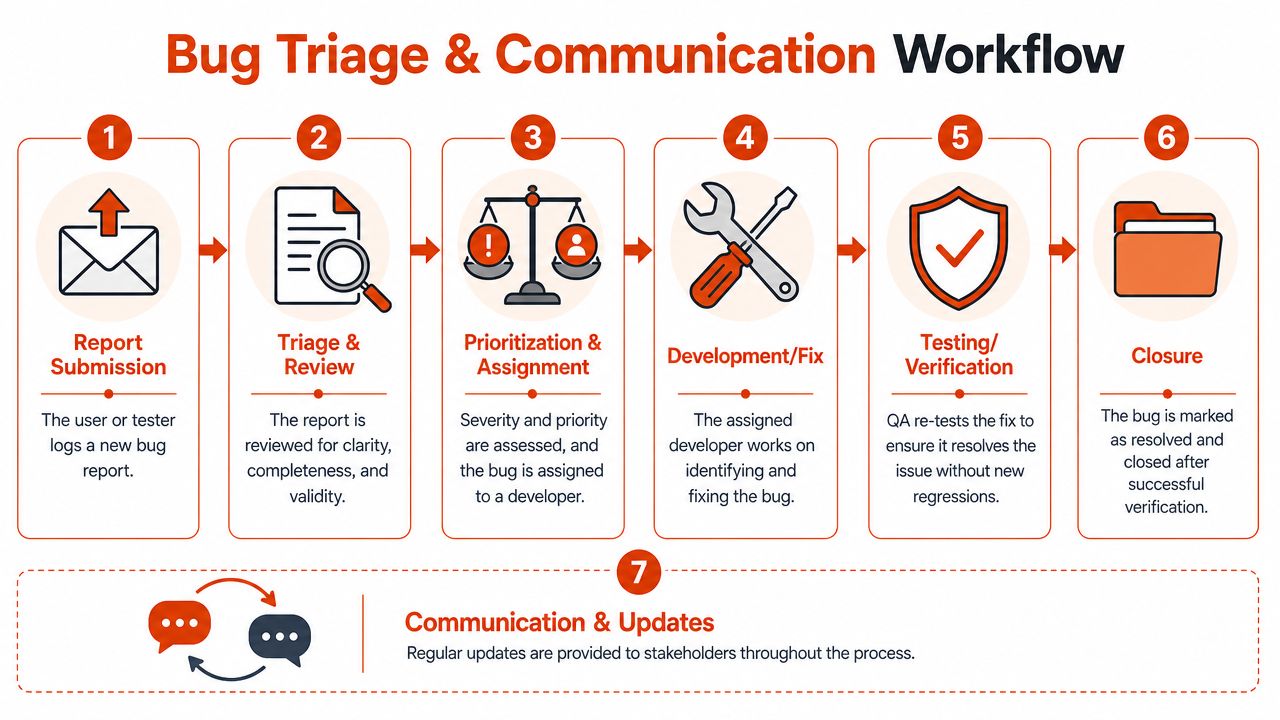
What happens after submit
A typical bug workflow looks like this:
- Submission: A tester, support agent, clinician, PM, or user records the issue.
- Triage and review: QA or engineering checks whether the report is clear, valid, and reproducible.
- Prioritization and assignment: The team evaluates impact and routes the bug to the right developer.
- Development and fix: Engineering diagnoses the root cause and implements a change.
- Verification: QA retests the issue and checks for regressions.
- Closure: The ticket is resolved only after the fix is confirmed.
If you want a broader view of how ticketing systems work, it helps explain why bug reports often move through statuses before anyone touches code.
Why communication matters during triage
Triage is where weak reports usually fail. Not because the bug isn't real, but because the evidence is too thin to act on confidently.
That's why communication quality matters as much as technical detail. A good report should help answer these triage questions:
| Triage question | Why the team asks it |
|---|---|
| Can we reproduce this? | If not, the fix may target the wrong problem |
| How many users are affected? | Impact changes priority |
| Is this a duplicate? | Duplicate cleanup protects team time |
| Is it a bug, expected behavior, or support request? | Routing matters |
| What changed recently? | Releases and config changes often narrow the search |
Clear bug reports survive triage because they lower uncertainty.
Operationally, this is part of system health, not just QA hygiene. Teams that care about reliability treat bug reports as inputs into broader incident and quality practices, which is why bug handling belongs alongside system reliability work, not outside it.
The practical takeaway is simple. When you submit a report, expect a conversation. The best reports shorten that conversation, but they don't replace it.
Common Bug Reporting Mistakes to Avoid
Bad bug reports usually fail in familiar ways. They're too broad, too emotional, too technical in the wrong places, or they combine several separate issues into one ticket.
The result is predictable. Triage slows down, developers ask basic questions, and the reporter feels ignored when the actual problem is that the report didn't travel well.
The mistakes that slow teams down
The most common avoidable errors are these:
- Multiple issues in one report: If the checkout button fails, the price label is misaligned, and the coupon field clears unexpectedly, file separate tickets.
- Duplicate reporting: Search the tracker before filing. Duplicate cleanup consumes time that could go into diagnosis.
- Subjective language: “This is horrible” doesn't help. Describe the behavior, not your frustration.
- Missing impact statement: If the issue blocks a user task, say so plainly.
- No reproduction attempt: If you can't reproduce it again, say that too. Intermittent bugs are real, but the report should reflect uncertainty accurately.
One subtle mistake matters more than people realize. Reporters often describe conclusions instead of observations. “The API is failing” may be a guess. “The Save button returns an error message after click” is something the team can verify.
Bug report versus diagnostic log
Non-technical reporters often get stuck at this point.
A bug report is the human-readable explanation of what happened, how to reproduce it, and what the impact was. A diagnostic log is machine-generated evidence such as stack traces, console output, or device logs. Both can be useful, but they are not interchangeable.
Research on user reporting behavior suggests that up to 40% of bug report rejections stem from non-technical reporters attaching raw system logs without the human-readable context needed to act on them, according to this discussion of bug report and log confusion from Virtuoso QA.
That's especially common in cross-functional teams. A product manager pastes a console trace. A clinician exports an error dump from a medical app. A support agent forwards a crash log with no reproduction steps. The developer still has to ask the same core questions.
Use this rule:
- Write the bug report first: What happened, where, when, and how to reproduce it.
- Attach logs second: Only as supporting evidence.
- Translate impact clearly: Explain what the user couldn't do.
Logs are evidence. They are not the story.
Once teams learn that distinction, report quality improves quickly.
Pro Tips for Faster More Accurate Reporting
Once your team has the basics down, the next win is speed. The challenge isn't knowing what a bug report should contain. The challenge is capturing good detail while the context is still fresh.
That means reducing friction at the moment of reporting. If a report feels slow to write, people shorten it too aggressively or postpone it until key details are gone.
Capture better evidence with less effort
A few habits make reports better without making them longer:
- Record the screen for short workflows: A brief recording often explains timing issues better than a static screenshot.
- Copy the exact error text: Don't paraphrase alert messages if you can paste them exactly.
- Note account state: Admin user, trial user, expired session, and feature-flag exposure can all matter.
- Include recent change context: If the issue appeared after an update, release, config change, or data import, say that directly.
- Stop after the relevant path: Developers don't need your whole afternoon. They need the shortest reliable route to the failure.

A lot of teams also underestimate the value of drafting the report immediately in plain language, then cleaning it up after. That preserves the observational detail that gets lost when you wait.
Use voice dictation when speed matters
This is the productivity tip most bug-report guides miss. If you're walking through a failure, testing on a device, switching between windows, or documenting an issue right after a customer call, speaking your observations is often faster than typing them.
Voice dictation works especially well for:
- Step-by-step reproduction notes: Speak each action as you perform it.
- Observed versus expected behavior: Capture the difference while it's visible.
- Cross-functional reporting: PMs, support teams, and clinicians can describe impact naturally, then edit for structure.
- Follow-up clarifications: It's easier to add missing context quickly without opening a long typing session.
The key is to dictate the human-readable part first. Say what you clicked, what you expected, what happened instead, and why it matters. Then attach your screenshot, screen recording, or log.
Fast reporting only helps if the report stays clear. Speed without structure just creates faster confusion.
Teams get better results when they treat bug reporting like field notes that become a formal record a minute later, not an essay they have to compose from scratch.
If you want a faster way to capture those field notes, AIDictation is built for exactly that kind of work. It lets you speak reproduction steps, observed behavior, and user impact in real time, then turns that speech into clean, ready-to-send writing on your Mac. For busy QA leads, product managers, developers, and healthcare professionals, that can make bug reporting easier to do well while the details are still fresh.
Frequently Asked Questions
What does What Is a Bug Report: Essential Guide for 2026 cover?
You're probably here because you've seen both extremes. Someone reports, “the app is broken,” and the team loses half a day chasing basic details.
Who should read What Is a Bug Report: Essential Guide for 2026?
What Is a Bug Report: Essential Guide for 2026 is most useful for readers who want clear, practical guidance and a faster path to the main takeaways without guessing what matters most.
What are the main takeaways from What Is a Bug Report: Essential Guide for 2026?
Key topics include Table of Contents, Why a Great Bug Report Is Your Most Powerful Tool, A bug report is a communication tool first.
Ready to try AI Dictation?
Experience fast voice-to-text on your device. Free to download.
Download FreeRelated Posts
Software Code Documentation: The Practical Developer Guide
Master software code documentation with expert best practices for API docs, inline comments, and READMEs. Boost team velocity with proven workflows.
Master Code by Voice: Hands-Free Coding on macOS
Ditch the keyboard! Code by voice with our 2026 macOS guide. Covers setup, AIDictation tools, workflows, & debugging for a truly hands-free coding experience.
Voice-to-Text for Developers: Speed Up Your Coding Workflow
Learn how developers use voice dictation to write better documentation, commit messages, and code comments 10x faster. Setup guide for Mac developers included.