System Reliability: Build Resilient Apps for 2026
You're probably shipping features into a stack that already feels crowded. A frontend talks to APIs, APIs talk to databases, background jobs call third-party services, and somewhere in the path there's authentication, storage, logging, and alerting. Everything works in staging. Then a customer tries the product during a live meeting, on unstable Wi-Fi, under a deadline, and the system picks that exact moment to become “mostly available.”
That's the gap between a functioning app and a reliable one.
Product teams often treat reliability as infrastructure hygiene. Developers see it as retries, health checks, and dashboards. Leaders talk about uptime after an outage. Users don't split it that way. They only know whether the product kept its promise when they needed it. If it didn't, every polished flow, every clever feature, and every roadmap win becomes secondary.
Reliable systems don't happen because a team cares a lot. They happen because people design for failure, measure the right things, practice recovery, and make trade-offs on purpose. That work is especially visible in modern AI products, where local processing, cloud services, privacy constraints, and variable model behavior all introduce new failure modes.
Table of Contents
- Why System Reliability Is Your Most Important Feature
- Understanding the Foundations of a Reliable System
- How to Measure System Reliability with Key Metrics
- Designing Resilient Systems with Proven Patterns
- Validating Reliability Through Monitoring and Testing
- Mastering Incident Response and Postmortems
- Balancing Reliability with Cost and Other Realities
Why System Reliability Is Your Most Important Feature
A product manager launches a new workflow for meeting notes. The UI is clean, the prompts are tuned, and the demo goes well. A week later, the first serious complaints don't mention design. They mention trust. Notes didn't save after a reconnect. A transcript appeared late enough to miss the follow-up email. A user retried, got a duplicate result, and stopped depending on the feature.
That's what system reliability looks like in practice. It isn't a narrow ops concern. It's the product's ability to produce the expected outcome, at the moment the user needs it, under conditions that aren't ideal.
Reliability is a user promise
A feature that fails during a critical moment creates more damage than a feature that was never shipped. Users can work around an absent capability. They have a harder time working around false confidence. If your app implies “go ahead, you can depend on this,” and then collapses under routine stress, users learn the wrong lesson. They don't just distrust the feature. They distrust the product team's judgment.
For AI-heavy applications, that trust boundary is even thinner. Users already know model quality can vary. If the delivery path is also unstable, they won't separate model issues from system issues. They'll conclude that the product is unreliable.
Reliability is the feature that makes every other feature believable.
Reliability changes business outcomes
Teams usually discover this after an outage, but the better lesson comes earlier. Reliability affects onboarding, retention, support volume, roadmap confidence, and even how aggressively sales can position the product. A workflow that works only in ideal conditions isn't ready for real customers.
Developers feel this first through pager fatigue and defensive coding. Product managers feel it through delayed launches and exception handling. Customers feel it through hesitation. Once they start asking “will this still work if my network drops?” or “can I trust this with sensitive content?” you're already in reliability territory.
The strongest teams treat reliability as part of feature definition. Not after QA. Not after scale. During design.
Understanding the Foundations of a Reliable System
A reliable system behaves more like a well-engineered bridge than a collection of clever parts. Nobody evaluates a bridge by saying it feels sturdy overall. Engineers look at load paths, joints, materials, stress points, and failure modes. Software needs the same discipline.
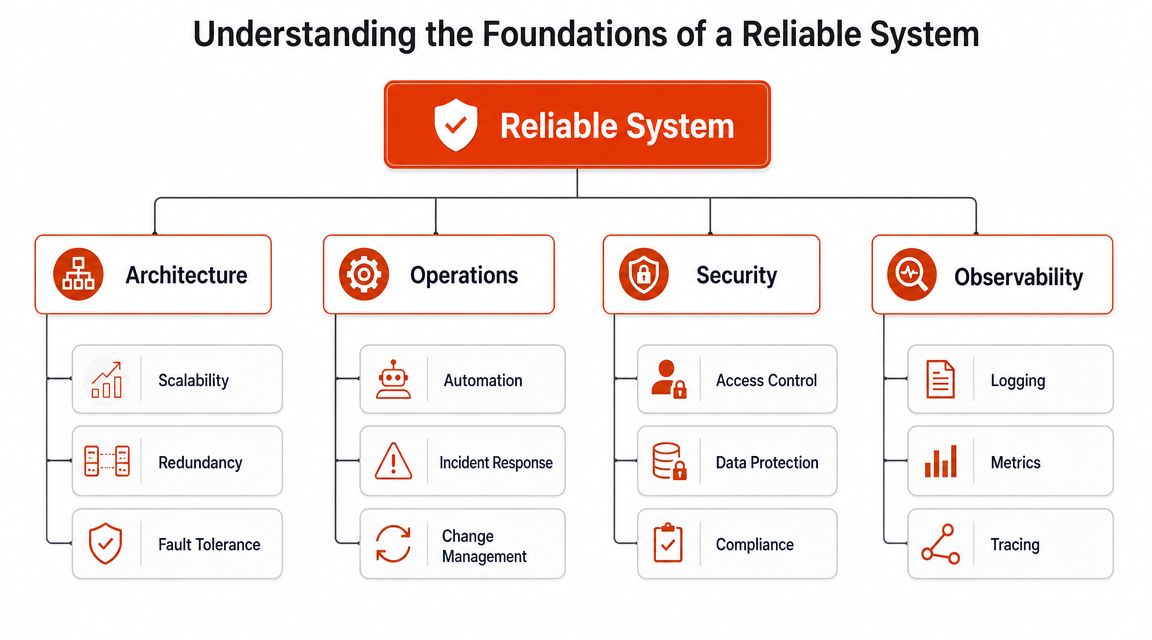
A bridge is only as strong as its joints
In reliability engineering, the system isn't treated like a fuzzy health score. The overall result is modeled from component behavior because time-to-failure depends on how the blocks interact. Engineers gather component life and event data from field data, accelerated life tests, warranty data, and supplier records, then estimate each component's distribution and combine them into a system model to see where redesign or redundancy will matter most, as explained in ReliaSoft's overview of system reliability analysis.
That sounds hardware-heavy, but the mindset transfers directly to software.
Your “components” may be:
- A mobile client that handles intermittent connectivity poorly
- An auth service that turns a minor token issue into a hard failure
- A queue worker that retries forever and creates duplicate side effects
- A third-party AI endpoint with variable latency
- A local inference path that protects privacy but has capability limits
The lesson is simple. You can't improve system reliability by talking about the whole app in general terms. You have to identify the pieces, the dependencies between them, and the points where one weak link can pull down the user journey.
What teams miss in software systems
Architecture is often mapped by service ownership. That's useful, but it's not enough. Reliability work starts when you map the user-critical path. For a dictation workflow, that path might include audio capture, buffering, model selection, processing, text rendering, autosave, and sync. If any one of those steps fails badly, the user experiences “the app broke,” even if your core service stayed up.
That's why visualizing your data flows is more than a documentation exercise. It forces the team to see hidden dependencies, shared failure points, and places where fallback logic should exist but doesn't.
A second miss is treating observability, security, and operations as support functions instead of design inputs. They aren't add-ons. They determine whether a good architecture survives real use.
A practical design review should ask:
- What must always work: Define the smallest user outcome that can't fail without breaking trust.
- What can degrade safely: Decide which enhancements can disappear while the core path remains usable.
- What dependencies are shared: Find the components that can fail multiple features at once.
- What data cannot leave the device: Privacy requirements often reshape the reliability strategy itself.
- What happens when assumptions break: Network loss, stale config, rate limits, and malformed payloads should be treated as normal operating conditions.
For developer teams building voice and text workflows, this becomes especially concrete in systems that switch between local and remote processing. The architecture choices discussed in voice-to-text tools for developers are a good reminder that capability, privacy, and resilience are often intertwined, not separate concerns.
Practical rule: Don't ask whether the app is reliable. Ask which component can fail without the user noticing, and which one can't.
How to Measure System Reliability with Key Metrics
You can't improve what nobody can define. Reliability becomes actionable when the team agrees on a small set of metrics that connect technical behavior to user expectations.
Availability is the headline, not the whole story
Availability gets the most attention because it compresses a lot of pain into a simple number. A widely used benchmark is five nines, or 99.999% uptime, which allows only about 5.26 minutes of downtime per year, according to Cortex's explanation of software reliability metrics. That number is useful because it forces teams to confront how little room there is for visible failure.
But availability can also mislead. A service may be “up” while requests queue, responses arrive too late, or users can't complete the task that matters. A green status page doesn't mean the product is dependable.
That's why reliability teams also track MTBF and MTTR. The same Cortex reference notes that availability is driven by both failure frequency and repair speed. If you improve one while the other stays weak, overall reliability may not improve in the way users feel it.
Metrics that change product decisions
Here's the practical version of the main metrics:
| Metric | What It Measures | Goal Example |
|---|---|---|
| Availability | Whether the service is reachable and operational for users | Keep the core user path available during normal and degraded conditions |
| MTBF | How long the system runs between failures | Reduce repeat incidents by eliminating common failure triggers |
| MTTR | How quickly the team restores service after failure | Shorten diagnosis, rollback, and recovery time |
| SLO | The internal reliability target the team aims to meet | Set a reliability objective for the workflow users depend on most |
| SLA | The external commitment made to customers | Promise only what operations and engineering can consistently support |
MTBF and MTTR often create the most honest engineering discussions.
If failures are rare but recovery is slow, you need better runbooks, sharper alerting, and easier rollback.
If recovery is fast but failures are frequent, your architecture or release process is unstable.
If both are weak, you don't have a reliability problem in one service. You have a delivery problem across the system.
A useful pattern is to pair product workflows with service level indicators that users care about. For example, “audio captured and rendered as text without manual retry” is more useful than “API server responded successfully.” The second is easier to track. The first is what determines trust.
The best reliability metric is the one that tells you whether the user completed the job, not whether one component returned a status code.
There's also a political reality. SLOs help product and engineering negotiate with shared understanding. They define what level of failure is acceptable for a given feature, and they create a common language for release pacing, error budgets, and prioritization. SLAs come later. If you promise customers more than your architecture, staffing, and incident response can support, the contract becomes a source of recurring pain.
Designing Resilient Systems with Proven Patterns
Resilient systems don't try to eliminate failure. They decide how failure should behave.
That distinction matters in modern AI applications because the system often depends on a mix of local compute, network access, external models, and post-processing. A voice workflow might support more than one recognition path. One path may offer richer cleanup and formatting, while another works offline and keeps data on-device. That kind of product is a good example of why resilience is a design pattern problem, not just an uptime problem.
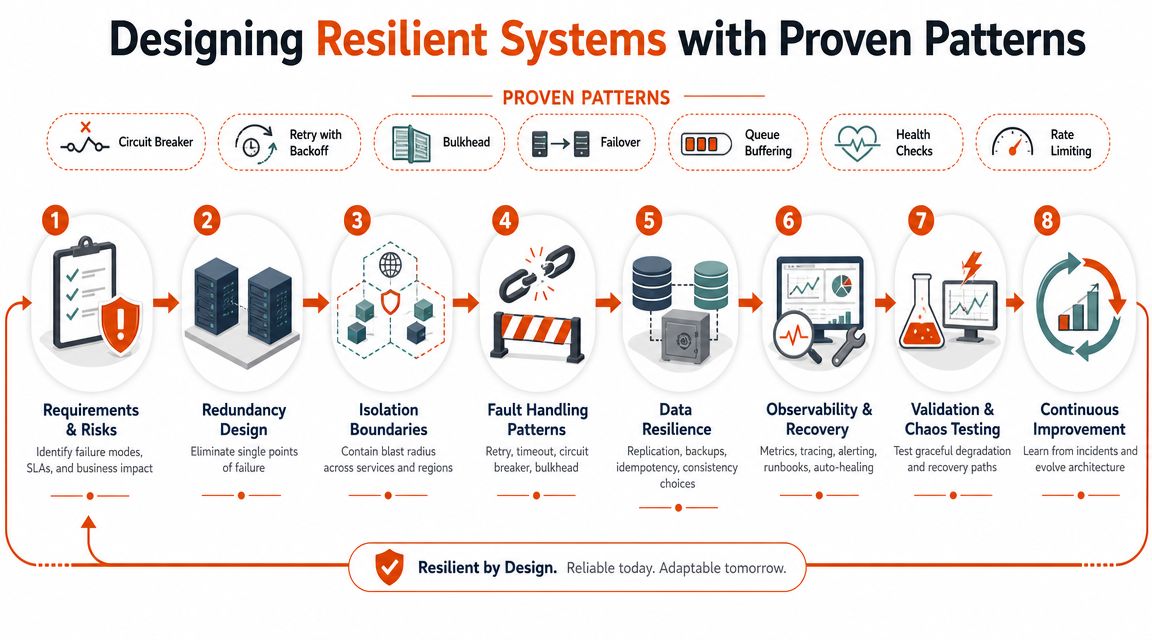
Redundancy is useful when failure paths differ
Redundancy helps only when the backup fails differently from the primary path. Two services that depend on the same weak network edge or the same bad release process don't give you much protection.
For an AI dictation product, a strong pattern is a dual-path design:
- Cloud processing can offer cleanup, formatting, and richer language handling.
- Local processing can keep working when the connection is poor or when privacy requirements prevent data transfer.
That's not just a convenience feature. It's a reliability strategy. The user still gets a usable outcome even when one path is unavailable.
For this reason, teams should study practical high-availability patterns, not just abstract diagrams. Cloudvara's guide on preventing downtime is a useful reference for thinking through failover and availability choices in real systems.
Graceful degradation beats total failure
A resilient product doesn't insist on full capability or nothing. It knows how to degrade.
A few patterns work repeatedly:
- Failover: When one processing path fails, route the request to a second viable path.
- Graceful degradation: If enhanced formatting or cleanup isn't available, still return raw usable output.
- Fallback mode: If real-time syncing breaks, store locally and sync later.
- Load shedding: Protect the core path by dropping optional work under stress.
- Circuit breaking: Stop hammering a struggling dependency. Fail fast and recover cleanly.
- Idempotent writes: Let retries happen without duplicating user-visible side effects.
A product team often resists graceful degradation because it fears inconsistency. That concern is valid. Users may notice differences between local and cloud outputs, for example. But a bounded reduction in quality is usually better than a blank screen, a spinning loader, or a silent drop of user data.
Here's a useful demonstration of the mindset behind resilient architecture:
The strongest fallback designs are explicit. Users should know what changed. If the app switched to offline handling, say so. If advanced cleanup is temporarily unavailable, say so. Hidden degradation creates confusion. Visible degradation creates trust.
A good example in voice tooling is the trade-off between offline privacy and richer cloud assistance. Teams evaluating offline voice-to-text workflows can see how fallback logic often overlaps with privacy and latency decisions.
A fallback path is part of the product, not a hidden emergency switch for ops.
Validating Reliability Through Monitoring and Testing
Design patterns are only theory until the system survives contact with production.
Reliability validation has two halves. Monitoring tells you what the system is doing now. Testing tells you how it behaves when reality gets worse. Teams that rely on only one side end up either surprised in production or blind during diagnosis.
Monitoring tells you what happened
Monitoring is reactive, and that's not a criticism. You need reactive visibility because incidents begin as facts, not hypotheses.
The three most useful signals still come from:
- Metrics, which show rate, error, latency, saturation, and workload shape
- Logs, which preserve event detail and application context
- Traces, which connect work across service boundaries
Used well, these signals answer different questions. Metrics tell you something is wrong. Logs help explain what failed. Traces show where the request path bent or broke.
The failure mode I see most often is selective observability. Teams instrument the core API but ignore queues, client retries, local caches, or third-party edges. Then an outage lands in the seams between systems, exactly where nobody can see it clearly.
Testing tells you what could happen next
Testing is proactive. It creates evidence before users create pain.
Standard QA catches functional regressions. Reliability testing goes further:
- Load testing asks whether the system stays usable under sustained pressure.
- Failure injection asks what happens when a dependency slows down, errors out, or returns malformed data.
- Chaos experiments ask whether the system and the team can tolerate realistic breakage without losing control.
- Recovery drills ask whether failover, rollback, and runbooks work the way people assume they do.
These methods complement monitoring instead of replacing it. Monitoring tells you the auth service timed out. A failure drill tells you whether the app falls back gracefully or strands the user in a partial state.
A practical testing program should include both technical and human validation:
- Technical checks: Can the system recover from lost connectivity, partial writes, and stale state?
- Operational checks: Do on-call engineers know what to do without improvising?
- Product checks: Does the user still understand what happened, what was saved, and what they should do next?
Systems rarely fail in the exact way diagrams predict. Test the messy versions.
If your team only runs happy-path tests, you're validating functionality, not reliability.
Mastering Incident Response and Postmortems
Every system fails eventually. The quality bar isn't whether failure happens. It's how the team handles the first minutes, the next hour, and the learning afterward.
A mature incident practice turns panic into sequence. Detect, respond, resolve, learn. These concepts are widely known. Fewer teams build the habits that make them work under pressure.
A good incident process reduces blast radius
An incident response process should be boring in the best way. People need clear roles, simple escalation paths, and predictable communication.
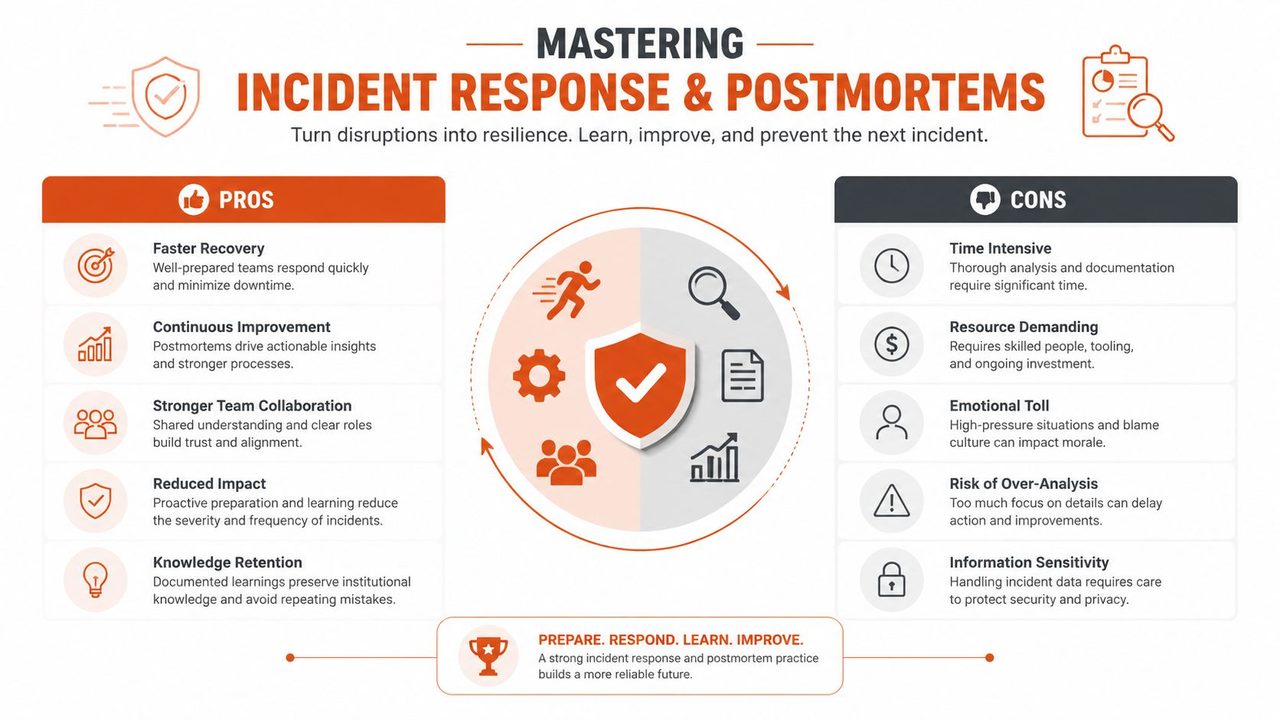
The operational flow usually looks like this:
- Detection: Alerts fire on symptoms that matter, not just infrastructure noise.
- Triage: One person establishes scope, severity, and likely affected user paths.
- Containment: The team limits damage through rollback, feature flags, traffic shaping, or dependency isolation.
- Resolution: Engineers restore service first, then clean up secondary effects.
- Communication: Stakeholders hear what happened, what users should expect, and when the next update will come.
The biggest mistakes are cultural, not technical. Too many responders join without role clarity. Too much time goes into root-cause debate before service is restored. People chase dashboards instead of following a runbook. Product and support teams get updates late, so customers receive conflicting messages.
Teams building or refining this muscle can borrow useful structure from Halo AI on incident management, especially around procedure discipline and response flow.
Blameless postmortems produce better systems
Once the service is stable, the essential reliability work begins.
A weak postmortem asks, “Who caused this?” A strong postmortem asks, “Why did our system, process, and decision environment allow this to reach users?” That shift is not about being soft. It's about being accurate. In complex systems, incidents usually come from interacting conditions, missing safeguards, bad assumptions, and time pressure.
A blameless postmortem should capture:
- What changed
- What signals appeared first
- Which defenses failed or were missing
- What made diagnosis slower than it should've been
- What action will reduce recurrence or impact
One useful test is whether the action items change the system rather than requesting that humans “be more careful.” Humans under pressure are part of the environment. Reliable teams design around that fact.
Leadership signal: If engineers feel they must defend themselves during postmortems, the organization will keep relearning the same outage.
The strongest postmortems create artifacts that improve the next incident. Better alerts. Cleaner ownership. Simpler rollback. Stronger defaults. Shorter paths from symptom to decision.
Balancing Reliability with Cost and Other Realities
The wrong reliability goal can waste money, slow product learning, and still disappoint users.
Teams sometimes talk as if the target is obvious: make the system as reliable as possible. In practice, reliability competes with cost, latency, development speed, privacy, complexity, and feature scope. Good engineering leaders don't avoid those trade-offs. They make them explicit.
Perfect reliability is a bad planning target
Not every workflow needs the same reliability posture. A background suggestion engine can tolerate more disruption than note capture during a live customer call. A cloud enhancement path may be optional. A local recording path may be essential. The right target depends on user harm, not engineering pride.
There's another hard reality. Teams often need reliability estimates before they have clean production data. Public content on system reliability spends a lot of time on tidy series and parallel math, but much less on the harder real-world problem of incomplete, inconsistent, or borrowed component data. The National Academies notes that design-stage reliabilities can come from similar components, supplier data, or expert judgment, and that top-down similarity analysis can be used instead of only bottom-up failure-rate modeling, as discussed in this National Academies chapter on reliability estimation.
That matters because product decisions don't wait for perfect evidence.
Consider a modern dictation product. One mode may keep processing on-device for privacy and independence from connectivity. Another may use cloud assistance for cleanup and formatting. The local path may be more reliable in poor-network environments and for sensitive content. The cloud path may produce better polished output. Neither is “better” in every context. Each reflects a different choice about user trust, risk, and cost. Product teams comparing tools in categories like voice-to-text software for 2026 are really comparing reliability models as much as feature lists.
A practical checklist for product decisions
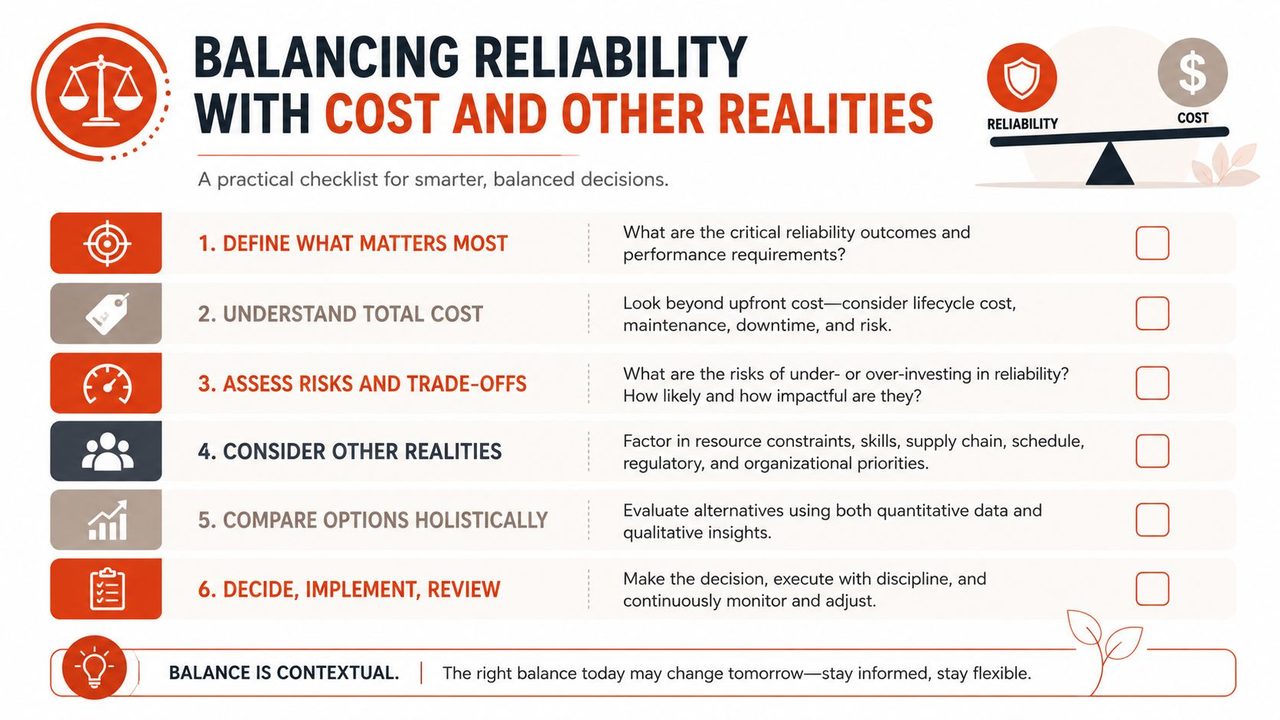
Use this checklist before you approve a major workflow or architecture change:
- Define the critical user moment: What action must work for the product to feel trustworthy?
- Separate core from premium behavior: Which parts need hard reliability, and which can degrade without breaking trust?
- Choose where privacy changes architecture: If data must stay local, design reliability around that constraint early.
- Price the complexity: Every backup path, queue, and failover mechanism adds operational burden.
- Plan for weak evidence: If field data is limited, document what came from supplier input, similar systems, or expert judgment.
- Decide what you won't optimize: Some gains in reliability aren't worth the latency, cost, or reduced shipping speed.
Product managers should treat reliability like a budget. Spend it where failure would change user behavior. Developers should treat it like architecture, not cleanup work. And leaders should stop asking for “maximum reliability” without naming the user outcome that deserves it.
A dependable system isn't the one with the fanciest diagram. It's the one that keeps its promise under the constraints the business has.
If your team wants a practical example of reliability trade-offs done well in an AI workflow, AIDictation is worth a look. It combines on-device and cloud-based voice-to-text paths, which makes privacy, fallback behavior, and resilience concrete instead of theoretical. For product managers and developers evaluating modern dictation tools, it's a useful way to see how system reliability decisions show up in the user experience.
Frequently Asked Questions
What does System Reliability: Build Resilient Apps for 2026 cover?
You're probably shipping features into a stack that already feels crowded. A frontend talks to APIs, APIs talk to databases, background jobs call third-party services, and somewhere in the path there's authentication, storage, logging, and alerting.
Who should read System Reliability: Build Resilient Apps for 2026?
System Reliability: Build Resilient Apps for 2026 is most useful for readers who want clear, practical guidance and a faster path to the main takeaways without guessing what matters most.
What are the main takeaways from System Reliability: Build Resilient Apps for 2026?
Key topics include Table of Contents, Why System Reliability Is Your Most Important Feature, Reliability is a user promise.
Ready to try AI Dictation?
Experience fast voice-to-text on your device. Free to download.
Download Free