Speech and Language Apps for iPad: A Clinical Guide
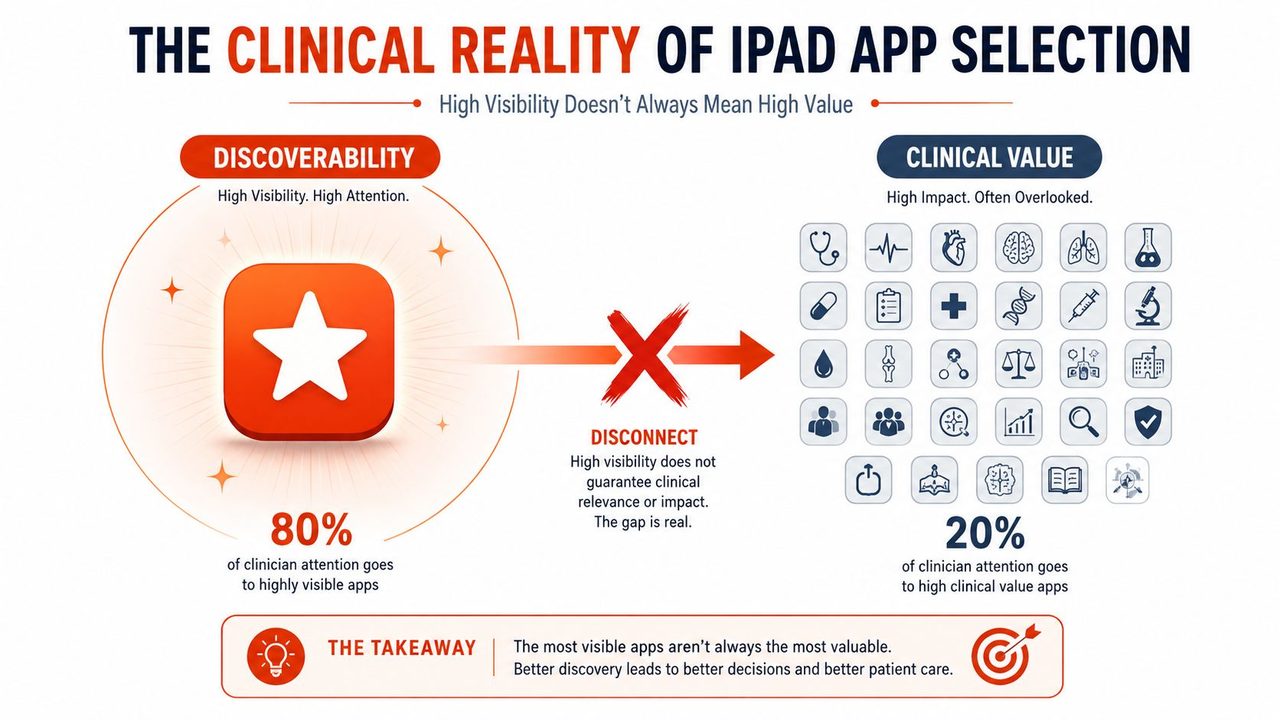
Popular app roundups tell clinicians to look for bright icons, age bands, and “fun” activities. That advice misses the part that matters in real practice. Speech and language apps for iPad only become useful when they fit the session goal, respect privacy constraints, and work in the rooms where clinicians practice, including places with weak connectivity and strict data rules.
The iPad has been in therapy long enough to move past novelty. In school-based practice, clinicians used iPads for an average of 20 minutes to work on a range of speech and language goals, with stronger use in language and vocabulary than articulation, and the apps reported most often split cleanly by function, with Articulation Station leading articulation use and Super Duper leading language and vocabulary work (ERIC study). That early pattern still matters because it shows how quickly app use becomes routine, but also how fast clinicians sort tools into a small trusted set.
Table of Contents
- The Clinical Reality of iPad App Selection
- Understanding Communication Architecture in Apps
- Evaluating Apps for Clinical Utility and Data Tracking
- The Privacy and Offline Functionality Gap
- Matching Tools to Specific Therapy Goals
- Integrating Apps into Therapy and Daily Workflows
The Clinical Reality of iPad App Selection
The biggest mistake is treating the app store like a therapy library. It isn't. A large 2020 review of adult speech-language therapy apps found 2,680 apps across Google Play, the Apple App Store, and web searches, but only 70 met the review's inclusion criteria for quality and relevance, or 2.61% of the total (JMIR mHealth and uHealth). That gap explains why clinicians return to a short list of tools instead of chasing every new download.
The clinical filter is real
A polished interface can still be the wrong tool. In practice, the filter is simple. Does the app help me deliver therapy, track change, or support communication without creating extra work? If it does not, the app may be entertaining, but it is not clinically useful.
That is why many teams end up with a compact toolkit. They do not need dozens of apps that each do one thing poorly. They need a few that hold up across sessions, staff members, and settings. The earlier school-based clinician findings make that visible, because the strongest use clustered around language and vocabulary, not a broad scatter of novelty activities. The same pattern shows up in my own workflow when an app has to work across different caseloads and documentation demands. For a related look at communication tools for a specific clinical population, the cerebral palsy communication device guide is a useful companion piece.
Practical rule: if an app cannot survive a real session without constant setup, it is probably not worth adding to the rotation.
Why popularity misleads
App store visibility often reflects marketing, not therapy value. A therapist can download a highly rated app and still find that the prompts are too rigid, the data tools are absent, or the design does not match a child's language profile. The review of adult apps is useful precisely because it shows how quickly the market narrows once usefulness is tested.
The same logic is why clinicians should compare apps against the goal, not the store category. An articulation drill app, a vocabulary-building app, and a support tool for nonspeaking users solve different problems. Even when they all sit under the umbrella of speech and language apps for iPad, they should not be judged by the same standard. A tool that works well for practice drills can still fail when the goal is real-time communication, and a communication app with solid structure can feel slow for simple carryover work.
Understanding Communication Architecture in Apps
A lot of confusion starts when people talk about apps as if they were one category. They are not. A review in Augmentative and Alternative Communication grouped 21 iPad AAC apps into three functional classes, symbols-only, symbols plus text-to-speech, and text-to-speech-only, which is a far better lens than age range or star rating. That matters because communication architecture shapes who can use the app, how quickly they can use it, and what kind of support it can provide.
Symbols only versus speech output
Symbols-only apps work well when the goal is visual support, choice-making, or early language access without adding synthesized speech. They can suit learners who do better with uncluttered screens and clear icon-based navigation. The trade-off is straightforward, there is no voice output built in, so the adult or communication partner carries more of the burden for interpreting and expanding the message.
Symbols plus text-to-speech apps are the most flexible for many AAC users because they combine visual representation with audible output. That architecture supports both comprehension and expressive communication in one tool. It also creates more setup demands, because vocabulary, button layout, and voice settings need to fit the user's motor and cognitive profile.
Text-to-speech-only tools make sense when the user already has a language system and mainly needs fast output. They are less about teaching symbol navigation and more about getting a message out efficiently after the message has already been formed.
Design features that change the user experience
The same AAC review also examined speech settings, display design, feedback features, rate enhancement, access, motor competencies, and cost. That list is a practical checklist. A well-designed display helps the user find words quickly. Feedback features can confirm selections. Rate enhancement reduces the effort of producing a message. Access methods matter when motor planning is inconsistent or limited.
A good app does not just “have vocabulary.” It has a communication architecture that fits the user's hands, eyes, and language level.
For clinicians who are evaluating device-based communication workflows, the on-device speech recognition overview is a useful reference for comparing local processing with cloud-dependent setups.
Evaluating Apps for Clinical Utility and Data Tracking
A polished interface can hide weak therapy logic. The true test is whether an app lets you shape the task around the client, then review what happened afterward. In school settings, clinicians used iPads as session tools rather than novelty items, and the work centered on language goals instead of a narrow drill format. That pattern matters because app popularity does not tell you whether the tool supports actual therapy decisions.
Run a five-minute audit
Start with customization. Can you change word lists, prompts, or target items without rebuilding the whole activity? If yes, the app can usually follow a therapy hierarchy. If no, it may only fit a very narrow slice of users.
Then check whether the app records performance in a way you can use. Some apps store raw scores but do not show meaningful progress over time. Others let you tag responses, save sessions, or compare target accuracy across visits. That difference becomes important when you need to justify intervention changes or explain progress to caregivers.
Look for flexibility, not just polish
Difficulty control matters too. Strong clinical tools let you adjust field size, cueing level, response mode, or task complexity. A child who needs a reduced set of choices should not be forced into a default grid built for someone else. An adult with aphasia may need a slower pace, simpler language, or supported access to saved phrases.
The older app review still gives a useful split here. In that school-based study, Articulation Station was the most commonly used app for articulation goals, while Super Duper was most common for language and vocabulary work. That does not mean those are the only solid options. It does show that clinicians already sort tools by function, and that is the right way to evaluate them.
For a closer look at storing or handling client information safely, the healthcare data security guide is worth reading before you let any app touch your workflow.
Five-minute audit: open the app, change one target list, run one trial, save the data, and see whether you can explain the result to a parent or colleague without guessing.
The Privacy and Offline Functionality Gap
Consumer reviews often fail clinicians. A good therapy app isn't just responsive. It has to fit the environment where it's used. Hospitals, schools, home health visits, and community sessions all create different constraints, and not all of them are friendly to constant connectivity or casual data sharing.
The older SLP handout on app selection specifically says lists should note whether an app can run offline or requires Wi‑Fi/3G/4G, which tells you the issue is not optional, even if many roundups skip it (Stony Brook Children's guidance). That point still holds in practice. If you work in a place with weak signal, strict device policies, or limited time to troubleshoot logins, the most elegant cloud feature in the world won't help.
Offline use changes where an app is viable
Once an app is downloaded and activated, many iOS speech apps can continue functioning without being connected, which matters for travel, field work, and rooms with poor reception. The challenge is knowing which parts of the app depend on connectivity before you build a session around them. If you discover that during the appointment, you've already lost time.
Privacy matters just as much. Clinicians should ask what information the app stores, where it stores it, and whether user data leaves the device. That question is especially important when a child's vocabulary set, a client's voice recordings, or session notes can be tied to identifiable health information.
A useful mindset is to choose the tool that creates the least exposure while still doing the job. That's often the more boring option, and in healthcare, boring is usually safer. For teams that need to think through secure communication workflows, Translators USA's HIPAA compliant interpreting guide offers a helpful adjacent framework.
Why the contrarian choice is often the right one
The app with the most features is not always the most usable. In noisy settings, a stable offline app can beat a flashy platform that stalls when the connection drops. In schools, a privacy-first setup can reduce headaches with device management and parent communication. In hospitals, reliability matters more than novelty.
That's the core trade-off. Operational fit beats marketing every time.
Matching Tools to Specific Therapy Goals
The right app depends on the clinical job in front of you. Pediatric articulation, adult aphasia support, and AAC for nonspeaking users all sit under the same label, but they call for different tool types. App store popularity does not solve that problem, and clinicians have long chosen different tools for articulation work than for language and vocabulary support.
Pediatric articulation
Articulation work benefits from apps that give repeatable practice without burying the child in extra choices. In school settings, Articulation Station has been used often for that reason, since articulation usually calls for clean stimuli, quick pacing, and simple response tracking. The app does not need to feel flashy. It needs to support repetition and give feedback fast enough to keep the child engaged.
That matters in real sessions. If the interface slows the student down, you lose practice time and the child loses the rhythm that makes drill useful. A good articulation app keeps the attention on speech sounds, not on hunting through menus.
Adult aphasia recovery
Adult aphasia work usually needs more than drill. Word-finding support, supported conversation, and structured practice all matter, especially when the client needs to move from app performance to interaction. Kuraplan's role-play activity worksheet can help turn a tablet task into a conversation bridge, which is often where clinical work starts. The app and the worksheet should support one another.
In practice, that means choosing tools that let the person rehearse language in context, then use that language with a partner. If the app stays trapped inside the screen, it may produce correct answers without helping the client communicate outside the session.
AAC and nonspeaking users
For nonspeaking users, architecture matters more than novelty. The app has to fit the user's motor access, communication intent, and the amount of partner support available. The AAC review's split between symbols-only, symbols plus text-to-speech, and text-to-speech-only is useful because it keeps attention on how the person communicates, not just on how many pages the app contains (ASHA journal review).
The best AAC choice is the one the user can access consistently. A system that looks impressive in a demo but fails under fatigue, speed pressure, or partner turnover will not hold up in daily use.
A clean toolkit usually includes one app for structured practice, one for communication support, and one backup method for times when the primary option is unavailable. That keeps the folder manageable and the workflow realistic.
Integrating Apps into Therapy and Daily Workflows
A good app can still fail if the session structure is weak. I've watched therapists hand a child an iPad, let the activity play out, and call that therapy. That is not enough. The app has to sit inside a plan that includes prompting, turn-taking, language expansion, and a route back to real-world communication.
One practical model is a 30-minute block with a clear split. Use the first part for guided app work, where the client practices the target with support. Use the middle for a transfer task, such as naming, requesting, or answering a question without the app's immediate scaffold. Use the last part to review what worked and what needs another trial.
Co-engagement beats passive screen time
The adult in the room matters. A therapist or parent can sit beside the user, model language, and help bridge the app to the interaction. That matters especially for AAC, where the goal is not just a correct tap but a successful message in context. The screen is a tool, not the endpoint.
For home practice, the strongest apps are the ones families can repeat without extra training. When a caregiver knows where to tap, how to cue, and how to respond, the app becomes part of a communication routine instead of a novelty. The same holds in school, where consistency across staff often matters more than feature depth.
AIDictation belongs in this conversation as one option for spoken dictation on iPhone and iPad. It lets users speak into text fields inside other apps, which can support quick note capture or message drafting when typed entry is slow. That kind of bridge tool is useful when the workflow calls for fast text entry rather than a full therapy app.
Privacy and offline access shape whether an app can be used in clinics, schools, and home programs. Some tools depend on constant connectivity or broad cloud access, which creates problems in healthcare settings where devices move between staff, families, and shared networks. A clinician has to ask a basic question before adoption, can this app still function when Wi-Fi is unreliable, and does it fit the setting's data handling expectations.
Activity-based apps and communication-architecture tools also serve different purposes. An activity-based app may help with practice, review, or reinforcement, while a communication-architecture tool has to support the user's actual message path, partner support, and access method. Mixing those roles without a plan usually leads to clutter on the device and weak carryover in session.
For more ideas on embedding these practices into daily routines, the Friendly ABA Premier communication guide offers practical strategies.
The return on an app comes from how often it gets used in context, not from how long it sits on the home screen.
The next step is simple. Audit the apps already on your iPad, remove the ones that do not support a real clinical task, and replace them with tools that fit your privacy, offline, and tracking needs. If you want a dictation workflow that respects those same operational concerns, visit AIDictation and see how it can fit alongside your clinical toolkit.
Frequently Asked Questions
What does Speech and Language Apps for iPad: A Clinical Guide cover?
Popular app roundups tell clinicians to look for bright icons, age bands, and “fun” activities. That advice misses the part that matters in real practice.
Who should read Speech and Language Apps for iPad: A Clinical Guide?
Speech and Language Apps for iPad: A Clinical Guide is most useful for readers who want clear, practical guidance and a faster path to the main takeaways without guessing what matters most.
What are the main takeaways from Speech and Language Apps for iPad: A Clinical Guide?
Key topics include Table of Contents, The Clinical Reality of iPad App Selection, The clinical filter is real.
Ready to try AI Dictation?
Experience fast voice-to-text on your device. Free to download.
Download FreeRelated Posts
Medical Voice Recognition Software: A Complete 2026 Guide
Explore medical voice recognition software in 2026. This guide covers HIPAA compliance, accuracy standards, clinical workflows, ROI, and selection criteria.
Medical Speech to Text Software: 2026 Buyer's Guide
Discover top medical speech to text software for 2026. Get key requirements, deployment (cloud/local), EHR integration, & choose the ideal solution.