How to Keep Minutes for a Meeting: Steps and Templates
You closed the pricing review twenty minutes ago. Six people talked, a vendor figure got said once, and the chair asked you to send the minutes before lunch. Your notes are half sentences, one name you are not sure you heard, and a deadline that might have been "next Friday." That is where most records fail. If you cannot say what was decided, who owns it, and by which date, the meeting did not leave a record. It left a memory. Knowing how to keep minutes for a meeting means treating them as a governed decision record: the fields that prove the meeting was valid, the wording of each motion, and the controlled file that remains after everyone logs off.
Table of Contents
- What Minutes Must Record and How to Set Them Up
- Capturing Decisions and Motions During the Meeting
- Worked Example of Finished Minutes
- Tracking Owners, Deadlines and Open Actions
- Circulating, Approving and Storing the Final Minutes
What Minutes Must Record and How to Set Them Up
Copy this field list into the template before anyone joins. A later reader should be able to prove the meeting was valid and see exactly what the body decided.
| Field | What to record | Example entry |
|---|---|---|
| Meeting details | Name, date, start time, location or platform | Q3 Pricing Review, 14 May 2026, 10:00, video call |
| Attendance | Attendees, absentees and guests | Present: Lee, Patel, Dana, Ruiz, Okafor (guest for item 3); absent: Chen |
| Quorum | Whether enough members were present to decide | Quorum met (5 required, 6 present) |
| Decisions | Motion or decision in plain action wording | Approve the vendor contract for Q3 |
| Vote result | Adopted, defeated, postponed or referred, with count | Adopted 5-1 |
| Conflicts of interest | Declared conflicts and whether the person left the room | Dana declared a conflict and left for item 4 |
| Action items | Task, one named owner, due date | Sam Lee, revised budget v3, due 21 May 2026 |
| Adjournment | End time and next meeting date | Closed 11:15; next meeting 11 June 2026 |
The Association of Corporate Counsel guidance on memorializing board and committee meetings states that minutes should document the official actions of a corporation's board, committees, and stockholders, and should also record the presiding officer, attendance, quorum, notice or waiver of notice, start and adjournment times, and, for telephone meetings, confirmation that participants could hear one another. Those lines are what later show the meeting was properly convened.
Henry M. Robert first published his manual in February 1876, with a second edition in July 1876. That text is the Project Gutenberg text of Robert's Rules of Order. In the UK, companies are expected to write down directors' meeting minutes and keep them for the retention period company law sets.
What to leave out
Leave out verbatim debate, personal commentary, sensitive medical or HR detail, and who said what unless that name changes the decision. Summarize a dissent in one sentence, then record the vote. Live captions can be necessary so people can participate. The transcript those captions produce does not automatically need to be kept. Retention belongs to the approved minutes, not to every caption file or working draft.
A missed meeting should still answer three questions from the minutes alone: what was decided, by whom, and what happens next.
Six setup steps
- Turn the agenda into headings. One heading per item keeps the minutes in meeting order.
- Add a header block. Meeting name, date, time, location or video link, chair, minute-taker, and expected attendees.
- Give quorum and prior-minute approval their own lines. Both get checked later, often by someone who was not in the room.
- Leave space under each item. Motion, proposer, and outcome, written as actions rather than conversation.
- Pre-fill attendees from the calendar invite. Correct the list in the first two minutes, including guests and the item they attended for.
- Save the file in one approved shared folder. Use a consistent name such as
Board_Minutes_2026-05-14_Draft, and keep every later version in that same folder.
Name the minute-taker in the header. That person owns the draft file until the chair accepts the text. Do not keep a second copy in a personal inbox. One folder, one current file, older drafts marked by date in the filename.
Healthcare, technology, and other regulated teams rely on that shape when a handoff or a compliance review arrives months later: the decision, the named owner, the due date, and a file someone can still open.
Capturing Decisions and Motions During the Meeting
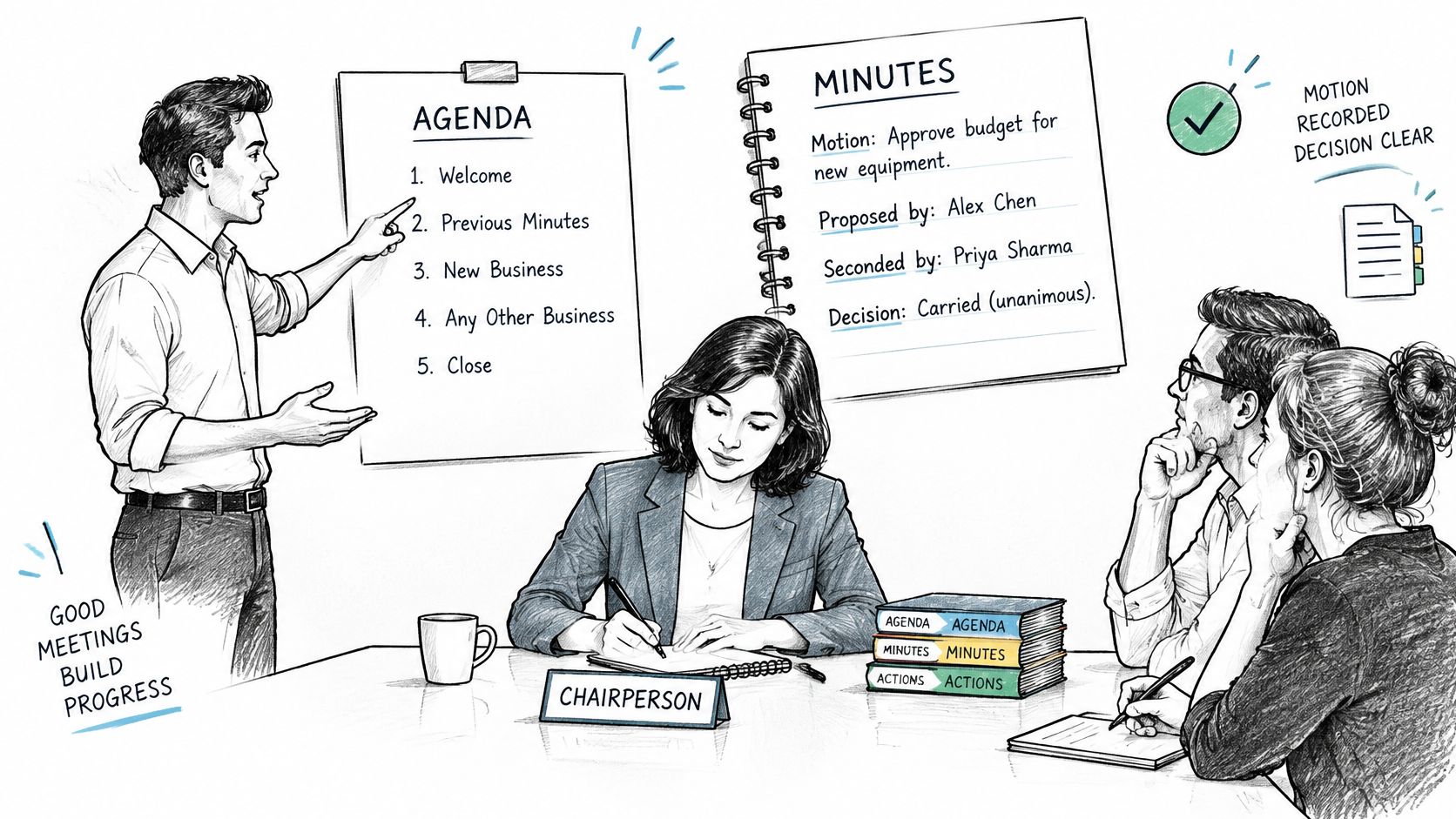
Write what the body did, not what people said. The Rutgers guidance on taking meeting minutes is built on that rule: follow the agenda, give each item its own section, and capture the motion, proposer, seconder when required, amendments, disposition, and vote.
A chair and a note-taker working from the same agenda is the setup that keeps decisions from getting lost in side talk.
The decision line
For every decision, capture the motion in plain words, the proposer, the seconder if your rules require one, any amendment, the outcome (adopted, defeated, postponed, or referred), and the vote count. Record individual names on a vote only for a roll call or when governing rules require it. A clean line looks like this:
Item 3. Approve the vendor contract for Q3 at 84,000 USD. Proposed: Patel. Seconded: Ruiz. Adopted 5-1.
Mark each item Discussed or Decided so a later reader sees status without rereading the paragraph. Keep any discussion to one or two sentences: the issue considered and the conclusion reached. No personal opinions, and no reconstruction of who argued what.
Before you move on, read back any decision that carries a deadline or a budget figure. People correct a number they just heard. They rarely correct it from a draft sent three days later.
Closing the meeting
Stay in agenda order even when the conversation jumps. If the chair returns to an earlier item, add the new decision under that item rather than at the bottom of your notes. Close with the adjournment time, then check that every agenda item has an outcome, including "deferred to the next meeting."
A full audio capture is a different product from the minutes. If you want a recording as a checking aid, our workflow can put live notes, decisions, action items, and follow-up questions into one shared Google Doc, and a separate meeting recording and transcription guide covers when that recording should exist at all. The minutes remain the record you approve. The recording is source material you reconcile against, then handle under its own retention rule.
Circulate the draft promptly for factual correction and formal approval. Waiting until the next meeting means people are correcting from memory, which is the failure you were hired to prevent.
Worked Example of Finished Minutes
Here is one finished set, built so a reader who missed the call can still act.
Q3 Pricing Review 14 May 2026, 10:00, video call Chair: Lee. Minutes: Patel
Present: Lee, Patel, Dana, Ruiz, Okafor (guest for item 3) Absent: Chen Quorum: Met (5 required, 6 present)
Item 1. Previous minutes. Approved without amendment. Adopted 6-0.
Item 3. Vendor contract. Motion: approve the vendor contract for Q3. Proposed: Ruiz. Seconded: Patel. Adopted 5-1. The contract value stated in the motion stands. The discussion that preceded the vote is not restated.
Item 4. Pricing tiers. Dana declared a conflict and left the room for this item. Decision deferred to the next meeting. One member objected that the tier schedule still mixed list price with a one-off discount. The objection is noted. No vote was taken.
Action register Sam Lee, revised budget v3, 21 May 2026, Open, check 28 May.
Corrections due 18 May 2026. Adjourned 11:15. Next meeting 11 June 2026.
What a missed reader can answer
Three checks, and only these, decide whether the excerpt works.
- What was decided? The prior minutes passed 6-0. The Q3 vendor contract passed 5-1. Pricing tiers were not decided.
- Who is on the hook? Sam Lee owns the revised budget. Dana was out of the room for item 4, so Dana did not vote on it.
- What happens next? Corrections close on 18 May. The budget checkpoint is 28 May. The deferred pricing item returns on 11 June.
The 5-1 count carries the vendor decision. A paragraph about who preferred another supplier would not. Okafor is named as a guest for item 3 only, which stops a later reader from treating a visitor as a voting member for the whole meeting. Chen's absence is on the record, so nobody has to guess whether a missing signature means a missed email.
If the vote count and the owner line are both present, the debate can stay out.
That is the trade-off worth making. A longer narrative feels safer while you are typing, because it looks complete. Six months later it is harder to search, easier to misread, and more likely to include a comment nobody meant to keep. The short form above is what I would file.
Tracking Owners, Deadlines and Open Actions
Every commitment uses one line: Owner, deliverable, due date, status or next checkpoint.
Sam Lee, revised budget v3, 21 May 2026, Open, check 28 May.
Keep the reason for the decision on a separate short line. "Board approved the Q3 vendor contract, 5-1" is context. "Sam Lee, revised budget v3, 21 May 2026" is the task. Mixing them buries the task inside a paragraph nobody scans on Monday morning.
Assign one accountable person. A pair of names means neither person thinks the item is theirs. Use a real date, 21 May 2026, not "next Friday," because "next Friday" moves every time someone forwards the file. Read high-risk actions back before adjournment, especially anything with money, a customer commitment, or a regulatory date.
A large-scale meeting-effectiveness study treats effective execution as a clear purpose, a clear structure, and actionable points, while also cautioning that research on specific meeting interventions is not strongly experimental. Track your own action closure rate as an internal benchmark. Do not borrow someone else's percentage and call it proof.
Right after the meeting, reconcile names, dates, and figures against the agenda or the recording. Send the minutes with a labeled action register and a stated correction deadline. At the next meeting, open on the prior register. Do not delete an unresolved item because it is awkward.
| Status | What it means | What to do |
|---|---|---|
| Open | Owner has not finished and the deadline has not passed | Confirm the owner and date, then set a checkpoint |
| Overdue | Deadline passed without completion | Raise it first and agree a new date with the owner |
| Completed | Deliverable confirmed as done | Record the completion date and close the item |
| Superseded | Replaced by a later decision | Link to the new decision and keep the original on record |
Overdue items go first, while everyone is still paying attention. Completed items get a completion date, not a silent disappearance. Superseded items stay on the register with a pointer to the later decision, so an auditor can see why the original task stopped. If the register lives in a shared workspace, it helps to find help with workspace action items so ownership does not depend on one person's inbox. A practical setup for action item tracking keeps that same four-status language from meeting to meeting.
Circulating, Approving and Storing the Final Minutes
The hard part starts after adjournment. 92% of firms in a 2025/26 communications-governance report were reported to struggle with capturing business communications for record-keeping and supervisory obligations, according to the Theta Lake Digital Communications Governance Report. Minutes fail the same way when the only copy sits in a personal drive.
The post-meeting checklist
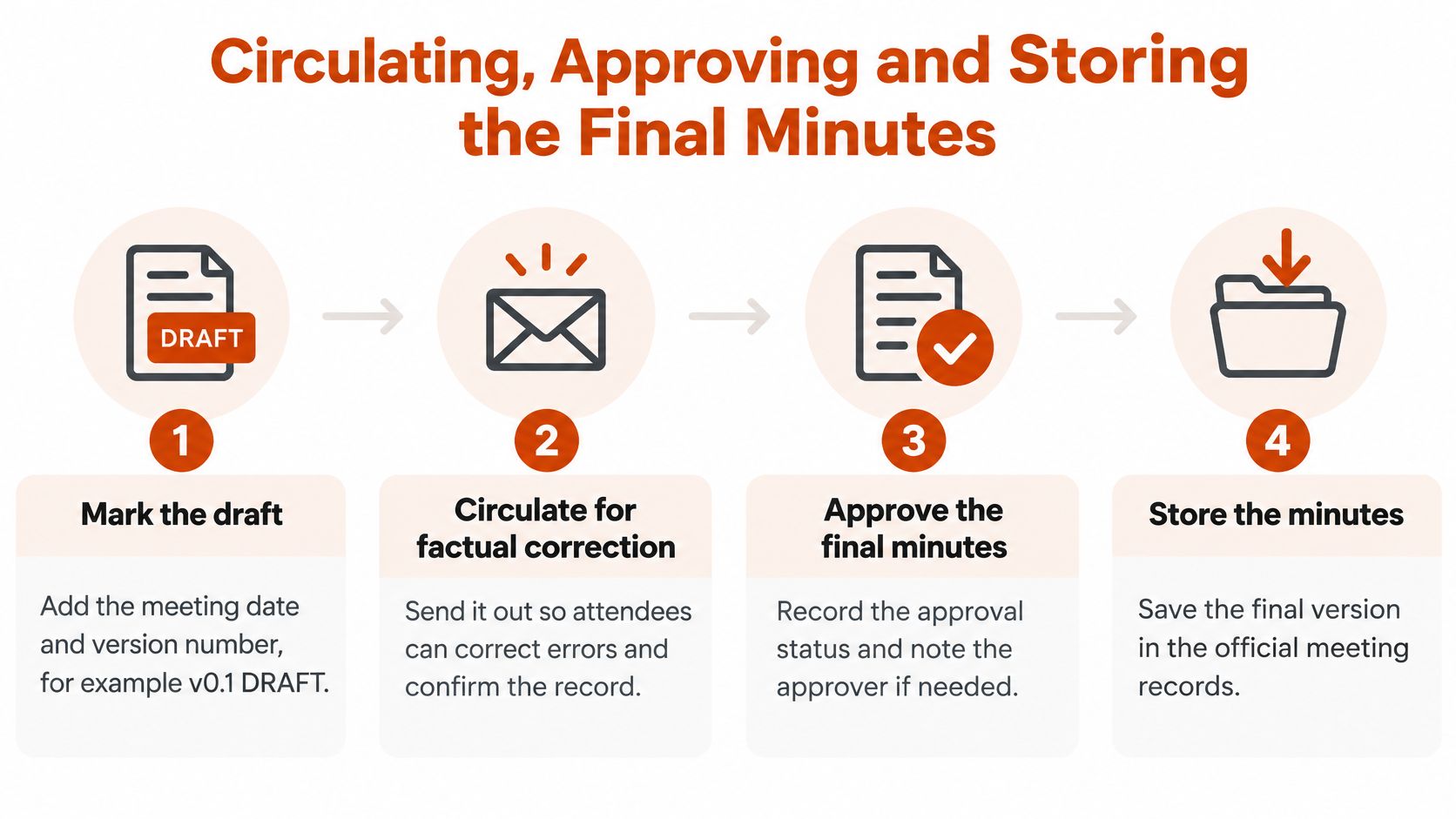
- Mark the draft. Meeting date and version, for example v0.1 DRAFT, in the filename and in the header.
- Circulate for factual correction with a stated deadline. Ask people to correct names, numbers, and motions, not to rewrite tone.
- Record approval and any amendments at the next meeting, with the date of that approval.
- Publish one controlled final version and name the owner who holds it.
- Apply a retention label that follows your policy, sector rules, and any litigation hold.
- Delete or preserve recordings under documented rules, separate from the minutes.
When the minute-taker changes, the template, the folder, and the filename convention transfer with a named owner. Final records move off personal computers and personal accounts into approved secure storage, with backups. Procedures have to be writable by the next clerk, not locked inside one person's habits.
Retention periods differ by jurisdiction, sector, contract, and litigation hold. The principle that does not change is controlled access, auditable versions, and no indefinite keeping just because storage is cheap. Retained drafts can widen litigation and discovery exposure, so keep only the final approved minutes where policy allows, and destroy drafts on the schedule that policy sets. Teams that must show who changed a governed record can compare their setup with audit trail requirements for CEFs. A written data retention policy is what tells you which of the four rows below applies.
| Record | Retention rule | Where it lives |
|---|---|---|
| Final approved minutes | Retain as the authoritative record under your retention policy | Controlled, access-restricted repository |
| Draft minutes | Archive or delete after approval, per policy | Marked DRAFT in the controlled folder, not in personal accounts |
| Meeting recording | Follow a separate retention and access policy | Restricted folder with need-to-know access |
| Action tracker | Keep until every item is closed or superseded | Shared team tool with one named owner |
Sparse bullets from the meeting can be expanded into readable documentation that teammates review and comment on before you freeze the final version. Once that version is approved, comments stop, the draft label comes off, and later edits go through a new minute, not a quiet overwrite.
AIDictation turns the spoken decisions from a meeting into clean text you can shape into minutes, action lines, and a draft your colleagues can correct. Use it to capture the motion, the owner, and the date while the call is still fresh, then file only the approved version. Visit AIDictation and run your next meeting through that workflow.
Frequently Asked Questions
What does How to Keep Minutes for a Meeting: Steps and Templates cover?
You closed the pricing review twenty minutes ago. Six people talked, a vendor figure got said once, and the chair asked you to send the minutes before lunch.
Who should read How to Keep Minutes for a Meeting: Steps and Templates?
How to Keep Minutes for a Meeting: Steps and Templates is most useful for readers who want clear, practical guidance and a faster path to the main takeaways without guessing what matters most.
What are the main takeaways from How to Keep Minutes for a Meeting: Steps and Templates?
Key topics include Table of Contents, What Minutes Must Record and How to Set Them Up, What to leave out.
Ready to try AI Dictation?
Experience fast voice-to-text on your device. Free to download.
Download FreeRelated Posts
Meeting Transcription AI: Accuracy and Privacy
Meeting transcription AI: how on-device and cloud tools work, which accuracy numbers matter, and privacy steps before you act.
10 Meeting Transcript Template Resources
Compare 10 meeting transcript template resources for minutes, interviews, summaries, and action items, with practical guidance on choosing the right format.
Meeting Transcription and Summary Workflow That Works
A practical meeting transcription and summary workflow covering capture, cleanup, action items, templates, and privacy settings.