AI Dictation vs Soniox App: Bilingual Accuracy and Mac UX
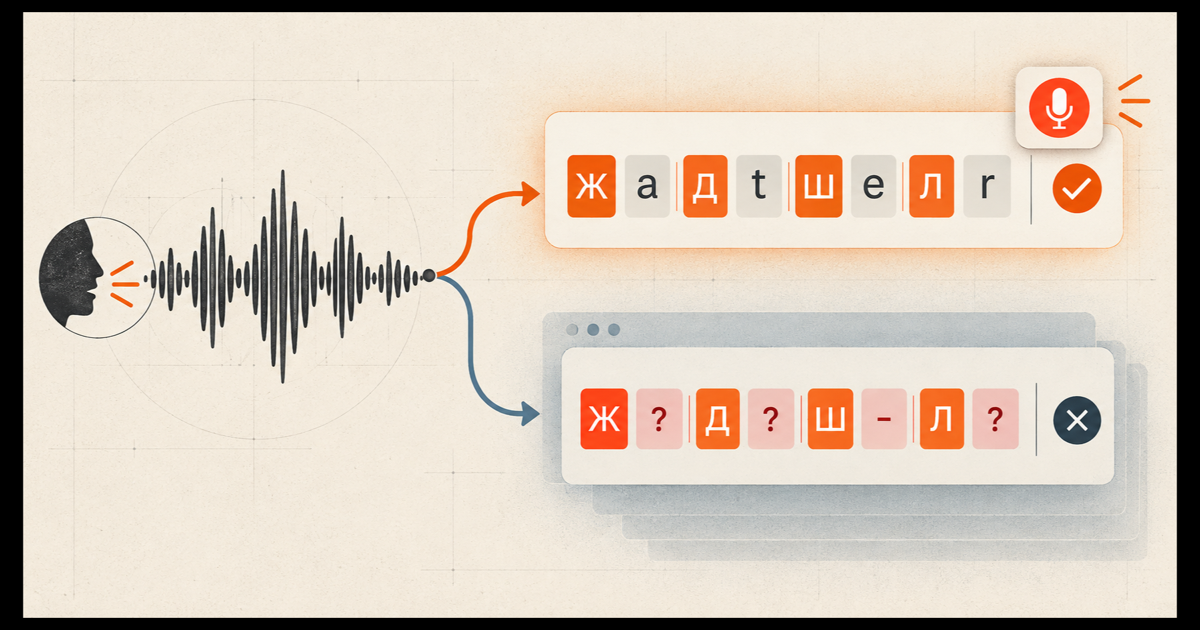
AI Dictation produced the stronger Russian-English transcript in our test. Against the same 146-word human reference, AI Dictation scored 12.3% word error rate and preserved 26 of 27 English tokens. Soniox App 1.6.0 scored 17.1% WER and preserved 20 of 27.
That gap is interesting because AI Dictation's current cloud mode uses Soniox speech technology. It is also easy to misread. Soniox the speech API and Soniox App are not interchangeable products, and the captured app settings were not identical: AI Dictation had English and Russian enabled, while Soniox App showed that no languages were selected.
Disclosure: AI Dictation is our product. We scored the captured outputs against a fixed reference. The UX assessment is subjective, and the installed-app analysis describes Soniox 1.6.0, not every past or future release.
What did we test?
We used the 70-second fashion interview from our bilingual AI dictation benchmark. Russian carries the grammar, but the speaker switches into English for phrases such as "Mango colors," "capri pants," "fit," "look couture," "fabric," and "spring and summer."
Each output was compared with the same 146-word human transcript. We measured:
- Word error rate, or WER. Substitutions, deletions, and insertions divided by the 146 reference words. Lower is better.
- English-token recall. The share of 27 English words that remained in Latin script. Higher is better.
- Completeness. Whether the app reached the closing sentence without dropping a section.
| Product output | WER | English tokens preserved | Complete |
|---|---|---|---|
| AI Dictation, English and Russian enabled | 12.3% | 26/27 (96.3%) | Yes |
| Soniox App 1.6.0, no languages selected | 17.1% | 20/27 (74.1%) | Yes |
The language-setting difference matters. Soniox App itself warned that adding languages improves transcription accuracy. We therefore treat 17.1% as the result of the captured product state, not the best score Soniox App could necessarily achieve after manual configuration.
Full AI Dictation vs Soniox App scorecard
This table includes every criterion in our product test plan. A dash means we have not completed the controlled protocol yet, not that the product failed.
| Test | AI Dictation | Soniox App 1.6.0 | Status |
|---|---|---|---|
| Keeps English words | 26/27 (96.3%) | 20/27 (74.1%) | Measured on existing clip |
| Overall accuracy | 12.3% WER | 17.1% WER | Measured on existing clip |
| Does not translate or change script | 1/27 English tokens affected | 7/27 affected | Reviewed against reference |
| Speed, key release to inserted text | — | — | Needs 10-run p50/p90 screen-recording test |
| Short phrases, 1–3 words | — | — | Needs dedicated latency run |
| Cleanup quality | — | — | Needs five-sentence correction rubric |
| Native app, idle RAM, size | SwiftUI/AppKit; about 73 MB idle RSS; 32 MB on disk | Tauri/WebKit; about 116 MB across two idle processes; 31 MB on disk | Bundle and process inspection |
| First working sentence | — | — | Existing installs; fresh-install stopwatch not run |
| Slack, Gmail, Notion, ChatGPT, Claude Code, Cursor | — | — | Six-app insertion matrix not run |
| Ukrainian-English and Belarusian-English | — | — | Two human-recorded clips still required |
| Support response | — | — | Same-question response timer not started |
| Unlimited dictation price | $8.49/month | $19.99/month | Public pricing pages, September 16, 2026 |
The resource figures are resident memory snapshots from this Mac, not universal requirements. Idle memory changes with open windows, cache state, and operating-system pressure. We have not published “while dictating” memory because that sample still needs to be captured under the same recording protocol for both apps.
What did Soniox App transcribe correctly?
Soniox App completed the recording and kept much of the mixed-language structure. It preserved "Mango colors," "design," "universal," "fit," both instances of "amazing," "look couture," "couture prices," both instances of "fabric," "details," "price," "very," "affordable," and "spring and summer."
The result was readable without a missing middle or ending:
Модно в этом сезоне, на ваш взгляд и на взгляд Саймона Чена: mango colors. Шёлк очень модный, очень модные пиджаки с какими-то деталями, модные брюки, капри, pencil — модно. И это всё он design.
Джинсы он очень красивые делает: можно одеть капри-джинсы, красивую блузку под низ, накинуть жакет — и можно так на работу тоже выйти, и можно так пойти погулять потом. Так что он universal: и модно всё, всё красивое, и fit у него amazing, amazing на всех.
У него look couture, без этих couture prices. Его костюмы — смотря какой fabric, смотря откуда приходит fabric, смотря сколько details. В этом пиджаке price может быть от 225, самый дорогой — 380. Так оно very, очень-очень affordable.
Ну что ж, замечательно. Ну и заключение, чисто традиционный вопрос: ваши пожелания нашим милым, обаятельным телезрительницам.
Я вам желаю хорошей spring and summer, чтобы приходили, красиво одевались, и мы вам можем помочь.
Where did Soniox App lose the language switching?
The largest error came in a short fashion phrase: capri pants became "капри, pencil." That is not just a spelling difference. One English phrase was transliterated, split, and partly replaced with a different English word.
Other switches moved from Latin to Cyrillic:
Simonbecame "Саймона"onbecame "он"- the second
capribecame "капри" jacketbecame "жакет"- the first
detailsbecame "деталями"
These changes explain the 74.1% English-token recall. The meaning remained mostly recoverable, but the transcript did not fully preserve how the speaker moved between languages.
AI Dictation kept 26 of 27 English tokens in Latin script. Its missing token was Simon, which appeared as "Саймон." It still made Russian wording errors, but it retained more of the speaker's deliberate code-switching.
Why can two Soniox-powered products produce different text?
A speech model does not determine the finished transcript by itself. The app around it chooses the audio stream, language hints, vocabulary, endpointing, when to finalize the recording, and what cleanup happens afterward.
AI Dictation's current cloud pipeline sends English and Russian language context, preserves code-switching during cleanup, and waits for the final audio buffer before committing the transcript. Soniox App used its own product pipeline, and this run had no languages selected. The products can therefore diverge even when their recognition technology comes from the same company.
This is why API leaderboards cannot substitute for app testing. People use the complete pipeline, not a model name.
Is Soniox App native on macOS?
Soniox provides a downloadable Mac app. The installed Soniox 1.6.0 bundle was signed by Soniox Inc, notarized by Apple, and packaged as an Apple silicon macOS application.
Its main interface is not a fully native AppKit or SwiftUI UI, however. Inspection of the installed executable identified Tauri 2.9.5, tauri_runtime_wry, Tauri webview commands, embedded HTML and JavaScript, and Apple's WebKit framework. The precise description is a Tauri/WebKit desktop app with native system integrations, not "no Mac app" and not a fully native Mac interface.
The architecture is compact. The downloaded Soniox 1.6.0 Apple silicon disk image was 16.2 MB, and the installed app occupied about 31 MB. Its Rust/Tauri shell handles global shortcuts, microphone capture, window behavior, updates, and text insertion; WebKit renders the dashboard. The bundle points to Soniox cloud backends and does not include the hundreds of megabytes of speech-model weights expected from a large local recognizer.
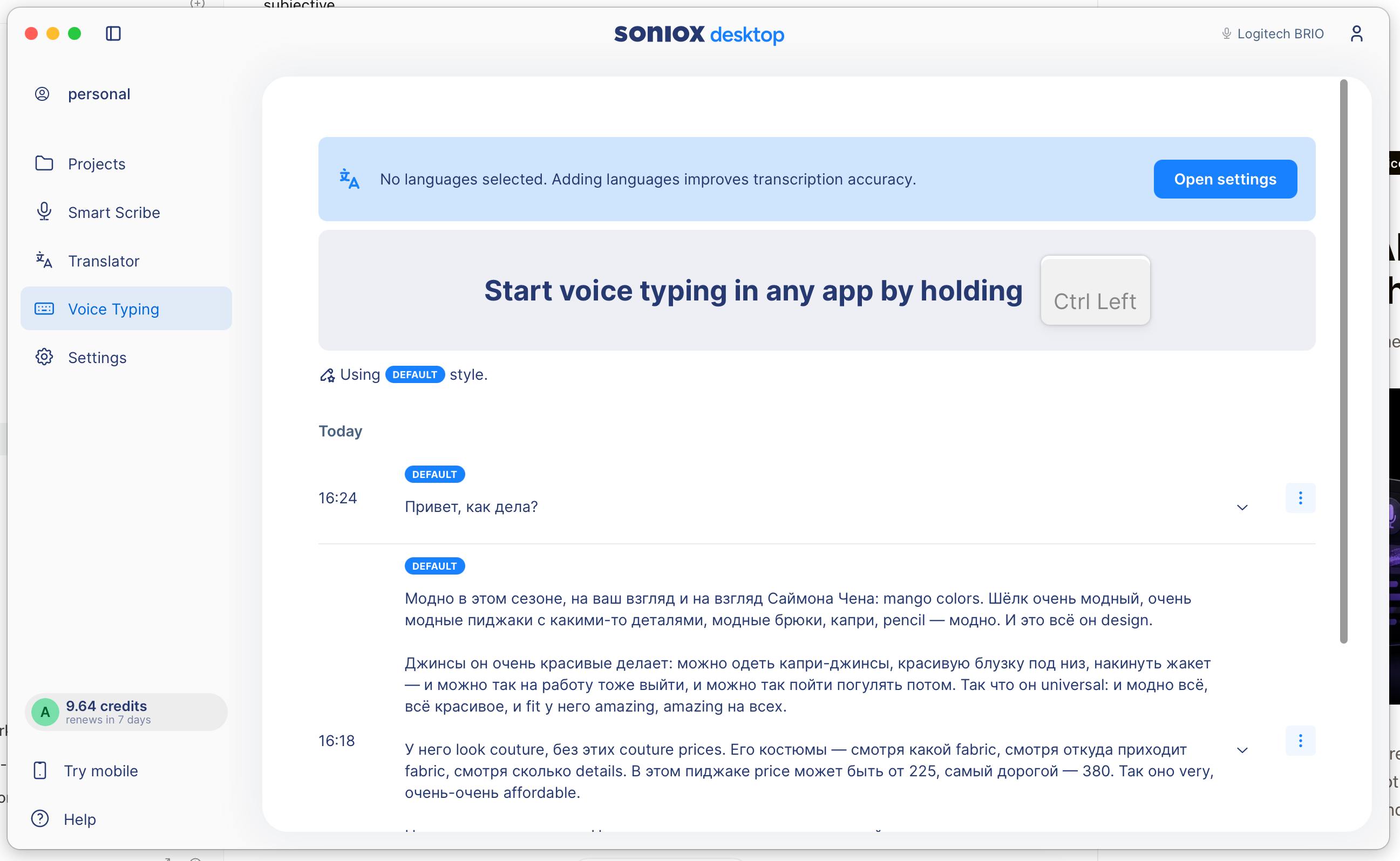
That implementation choice is not automatically bad. Tauri apps can be small and capable. In our hands, though, Soniox App felt less at home on macOS than AI Dictation's native interface. The Voice Typing screen uses a large dashboard window, a persistent navigation rail, and substantial empty space around a task that often needs only a shortcut and a compact recording state.
That is a preference, not an accuracy metric. Some users may prefer the larger project-oriented workspace. We prefer a dictation tool that stays out of the target app until its settings or history are needed.
Should bilingual Mac users choose AI Dictation or Soniox App?
AI Dictation is the stronger choice for the specific Russian-English workflow tested here. It preserved more English words, produced fewer total edits, and uses a native Mac interface designed around a compact dictation flow.
Soniox App still produced a complete, usable transcript. Its score may improve after selecting English and Russian, and its Projects, Smart Scribe, and Translator sections may suit users who want a broader transcription workspace rather than a focused voice-typing utility.
This one clip cannot settle every language pair or workflow. It does show why the product layer matters. AI Dictation outperformed Soniox App even while using Soniox speech technology underneath, because model choice is only one part of the text a user receives.
Price also separates the products. AI Dictation Pro lists unlimited dictation at $8.49 per month. Soniox App Pro lists unlimited Voice Typing, Smart Scribe, and Translator at $19.99 per month. Soniox includes a broader workspace; AI Dictation costs less for someone whose main job is writing by voice.
For the full model table, read the bilingual and multilingual dictation benchmark or the broader best voice-to-text software guide. You can also compare AI Dictation vs Diktuy and AI Dictation vs Oravo. To test your own language mix, download AI Dictation, enable the languages you speak, and dictate normally.
Frequently Asked Questions
Is AI Dictation more accurate than Soniox App for bilingual speech?
AI Dictation was more accurate in this Russian-English test. It scored 12.3% WER and preserved 26 of 27 English tokens. Soniox App 1.6.0 scored 17.1% WER and preserved 20 of 27 in the captured run.
Why do AI Dictation and Soniox App produce different transcripts?
AI Dictation uses Soniox speech technology, but each product controls its own language hints, vocabulary, recording flow, endpointing, transcript assembly, and cleanup. A shared speech provider does not make two product pipelines identical.
Was the Soniox App test configured with English and Russian?
No. The captured Soniox App screen showed that no languages were selected and said adding languages could improve accuracy. AI Dictation had English and Russian enabled, so this is a comparison of the tested product states rather than identical language settings.
Is Soniox App a native Mac app?
Soniox 1.6.0 is a signed and notarized macOS app, but its main interface is built with Tauri and rendered through Apple's WebKit webview. It is better described as a webview-based desktop app than a fully native AppKit or SwiftUI interface.
Does one recording prove that AI Dictation is always better?
No. This result applies to one 70-second Russian-English recording and the settings shown. Other language pairs, microphones, accents, and Soniox language settings may produce different results.
Ready to try AI Dictation?
Experience fast voice-to-text on your device. Free to download.
Download FreeRelated Posts
Free Audio to Text Tools: 10 Options Compared for 2026
Compare 10 free audio to text tools: built-in recorders, free apps, offline models, and cloud APIs, with privacy and accuracy trade-offs.
How to Use Voice Dictation on Mac
Use Voice Dictation on Mac. Master voice dictation on your Mac — from built-in Apple features to third-party tools like AIDictation
8 Best Bilingual Dictation Apps: 5 Tested + 3 Baselines
We tested five bilingual dictation apps on Russian-English code-switching, plus three common baselines. Compare WER, language recall, script, and workflow.