Email Response Time: A Practical Guide to Faster Replies
A one-hour email reply satisfies 89% of customers, while waiting a full day satisfies only 56%. Yet the commonly cited average for companies that respond is approximately 12 hours and 10 minutes, based on benchmark compilations rather than a universal standard. Toister Solutions shows why response time affects customer perception, but speed alone isn't the operating model teams need.
The right question isn't “How fast should we answer every email?” It's “How quickly does this message need acknowledgment, and what level of answer does it require?” A workable policy separates customer expectations, interruption cost, and safety. That distinction matters even more when the inbox handles leads, professional services, support requests, or clinical communication.
Table of Contents
- What Email Response Time Actually Means
- Benchmarks and What Customers Actually Expect
- The Hidden Cost of Faster Replies
- Designing Response Time SLAs That Work
- When Faster Replies Are Not Safer
- Tactics, Templates, and Sample SLA Language
What Email Response Time Actually Means
Email response time usually means first response time, or FRT: the interval between receiving a message and sending the first genuine human reply. It isn't the same as time to resolution. An acknowledgment that says “We've received this and will update you” may stop the first-response clock, but it doesn't resolve the sender's problem.
The measurement also needs a defined clock. Business-hours response time excludes evenings, weekends, and closed holidays, while elapsed-time measurement counts continuously. A five-hour reply during staffed hours signals a queue problem. A five-hour reply spanning a period when the team was closed may be perfectly acceptable. Global teams should publish working windows and apply them consistently.
A commonly cited cross-industry benchmark puts responding companies at approximately 12 hours and 10 minutes, while best-in-class teams are reported to reply in under one hour. Those figures are benchmark compilations, not a universal service standard. For a useful explanation of the related question, how fast firms respond to leads offers helpful context on why the first reply deserves its own operational target.
Practical rule: Set separate targets for acknowledgment, substantive response, and resolution. One number can't describe all three.
Benchmarks and What Customers Actually Expect
A 2018 survey of more than 1,200 consumers found that a reply within one hour satisfied 89% of customers, while a response within 15 minutes was characterized as “world-class” service. A four-hour reply satisfied 70% of respondents, but satisfaction fell to 56% after a full day. The findings are reported by Toister Solutions.
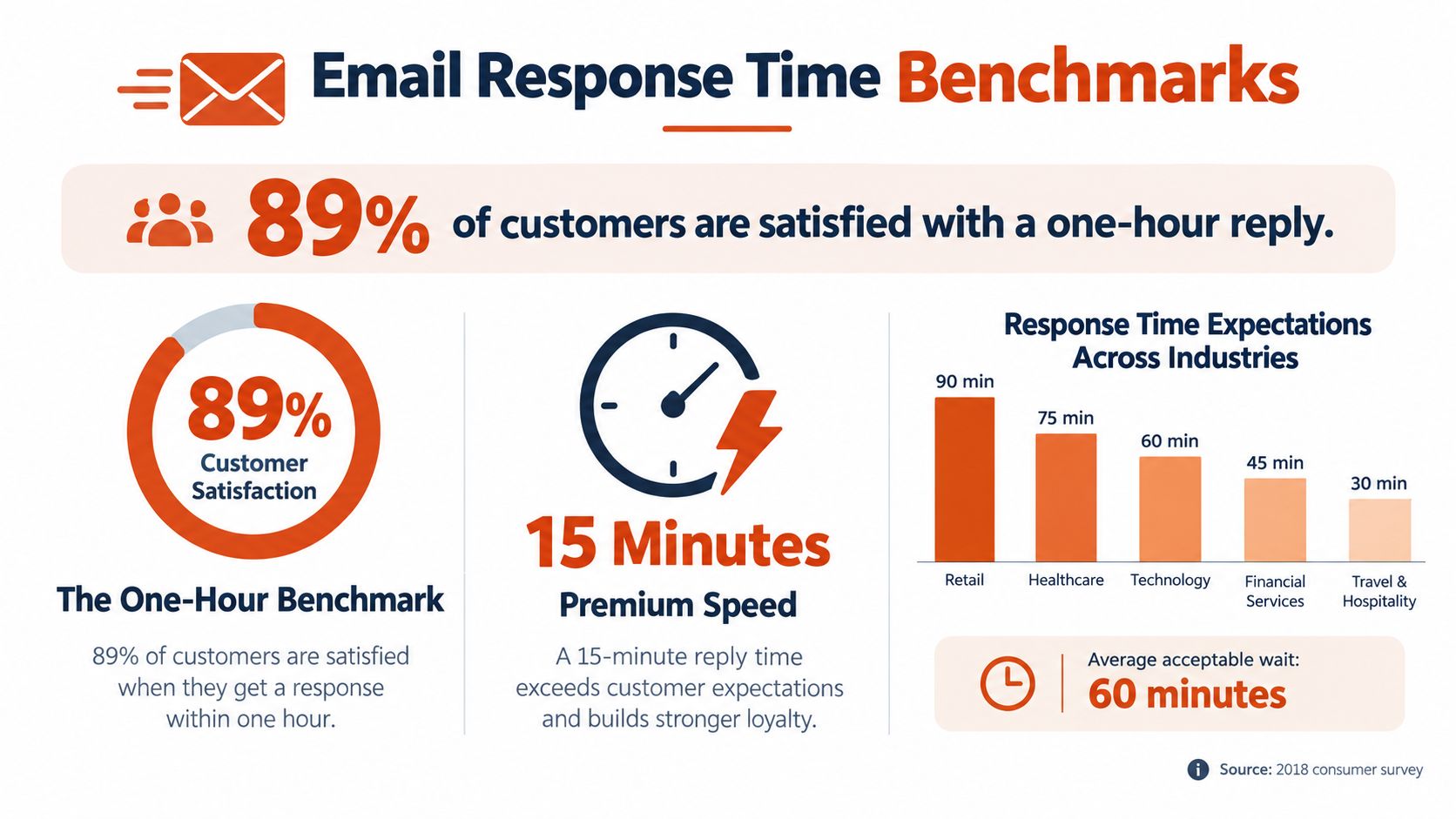
Those figures create a clear operating picture. Fifteen minutes is an exceptional service target, not a sensible universal promise. One hour is a strong floor for an inbox where a delayed reply can damage a customer relationship, leave a lead waiting, or block a professional from moving forward. Four hours can still satisfy most respondents, but it leaves more room for frustration than a prompt acknowledgment.
The contrast with typical performance is the important part. If responding companies average roughly 12 hours and 10 minutes, a team that acknowledges messages within an hour gives customers a noticeably different experience, even if the complete answer comes later.
Internal communication follows a different social contract. Coworkers may accept a response within the same business day, especially for routine coordination. External customers, prospects, and clients usually judge the organization through the first reply they receive. Don't use an internal norm to govern a customer-facing queue.
The Hidden Cost of Faster Replies
Instant replies can make a team look responsive while making the work worse. An observational workplace study found that 70% of participants opened email within six seconds of a notification, and 85% did so within two minutes. Returning to the prior work rate took an average of 64 seconds after the interruption, according to the workplace email study published by Communications of the ACM.
That recovery time is only the visible cost. A notification can break concentration during analysis, documentation, coding, or clinical administration. If every message receives an immediate response, the team may lower email response time while increasing the time required to complete higher-value work.
A better policy separates urgency from availability:
- Disable noncritical alerts so routine mail doesn't dictate the workday.
- Batch processing windows around queue needs, rather than checking continuously.
- Escalate urgent messages through a defined channel instead of hoping someone notices an inbox notification.
- Measure interruption load alongside first-response time, including messages opened per hour and time spent returning to interrupted tasks.
Teams dealing with overloaded inboxes can use this guide to handling email overload to tighten triage. The objective isn't slow communication. It's deliberate responsiveness, where fast handling is reserved for messages whose consequences justify the interruption.
Designing Response Time SLAs That Work
A useful SLA starts with priority and consequence, not an industry average. Separate the queue by what happens if the sender waits, then define the first acknowledgment and the complete-answer target independently.
| Message Type | First Response | Complete Resolution | Notes |
|---|---|---|---|
| Urgent or work-blocking | Within one staffed hour | As soon as the responsible owner can safely complete it | Acknowledge immediately, escalate when needed |
| Routine customer or client request | Within the published business-hours target | By the committed update time | State the next step if research is required |
| FYI or low-consequence coordination | During the next planned processing window | When action is actually required | Don't interrupt focused work unnecessarily |
| Research-required request | Acknowledge receipt and give an update time | After verification and review | Never use a vague “soon” promise |
Track the median first-response time to understand the typical experience and the 90th-percentile first-response time to expose the slow tail. Also track SLA breaches by priority and time to full resolution. An average can look healthy while urgent messages remain stuck.
Apply business-hours logic to the queue. A message received after closing shouldn't create a misleading elapsed-time failure if the published SLA only covers staffed hours. Distributed teams also need time-zone ownership, handoff rules, and a clear definition of when the clock starts.
Boundaries belong in the policy. A reported systematic review found that 72% of employees feel pressure to answer work communications outside regular hours, while fewer than 20% of organizations had addressed the systemic causes, as summarized by GetMailbird's review of response-time culture. Teams should publish office hours, suppress noncritical notifications, and define the escalation route for true emergencies. Resources on video chat availability for coaching clients illustrate why communication hours need to be explicit when clients use more than one channel. For customer-facing operations, this customer support email guide can help turn those expectations into repeatable handling practices.
When Faster Replies Are Not Safer
Healthcare portals show why speed can't outrank judgment. Published guidance commonly suggests 4 to 8 business hours for routine portal messages, acknowledgment within 1 to 2 hours for urgent messages, and resolution within one business day for non-clinical matters. It also directs urgent clinical questions away from email entirely, as described in guidance on slow patient-response times.
A safe workflow separates three events:
- Acknowledgment: Confirm that the message arrived.
- Routing: Direct urgent symptoms or potential emergencies to the phone line or emergency services.
- Resolution: Provide a clinically appropriate answer only after identity, records, and relevant details have been checked.
A fast acknowledgment isn't a clinical answer. Staff shouldn't share sensitive results before identity verification, and they shouldn't create false reassurance to meet a first-response target. Auto-replies should use plain language, explain when the inbox is monitored, and provide accessible routing instructions. Where patients need another language or disability accommodation, the message should account for that from the start.
The same principle applies to legal, financial, and other sensitive inboxes. Response speed measures access to the team. It doesn't certify the quality or safety of the information sent.
Tactics, Templates, and Sample SLA Language
Start with a small operating toolkit. For urgent messages, use a short acknowledgment template: “We've received your request, assigned it to [team or person], and will provide the next update by [time].” For routine work, batch processing into scheduled windows. Turn off noncritical notifications, then reserve alerts for queues with a defined escalation path.
For complex replies, dictation can reduce the mechanical effort of drafting while leaving review with the sender. AIDictation turns speech into formatted writing, and its local mode can process dictation on compatible Apple Silicon Macs without an internet connection. Use this guide to writing emails faster to structure a voice-drafted response, then verify names, dates, commitments, and sensitive details before sending.
Fast replies don't have to sound mechanical. Teams can see how keeps teams human by combining clear ownership with a personal next step, rather than sending empty acknowledgments.
Use this wording in a shared policy:
We measure first response time during published business hours. Urgent or work-blocking messages receive an acknowledgment within the urgent queue target, while routine requests receive a response within the routine queue target. An acknowledgment confirms ownership and the next update time, but it doesn't replace a complete answer. Messages requiring clinical, legal, or security review may be routed to another channel before resolution.
Then review the queue next week. Identify unanswered messages, classify them by consequence, set processing windows, publish office hours, and inspect the slowest responses instead of relying on one average.
AIDictation helps you capture and clean up email drafts by voice, with local and cloud modes, formatting, custom terminology, and context-aware writing options. Visit AIDictation to reduce drafting friction while keeping triage, review, and safe sending under your team's control.
Frequently Asked Questions
What does Email Response Time: A Practical Guide to Faster Replies cover?
A one-hour email reply satisfies 89% of customers, while waiting a full day satisfies only 56%. Yet the commonly cited average for companies that respond is approximately 12 hours and 10 minutes, based on benchmark compilations rather than a universal standard.
Who should read Email Response Time: A Practical Guide to Faster Replies?
Email Response Time: A Practical Guide to Faster Replies is most useful for readers who want clear, practical guidance and a faster path to the main takeaways without guessing what matters most.
What are the main takeaways from Email Response Time: A Practical Guide to Faster Replies?
Key topics include Table of Contents, What Email Response Time Actually Means, Benchmarks and What Customers Actually Expect.
Ready to try AI Dictation?
Experience fast voice-to-text on your device. Free to download.
Download FreeRelated Posts
How to Write Emails Faster: Boost Your Productivity
Discover how to write emails faster with actionable tips for triage, templates, shortcuts, editing, and voice dictation to boost productivity.
How to Read the Emails Using Voice on macOS
Learn how to read the emails hands-free on macOS using AIDictation. Set up voice workflows to summarize, draft, and manage your inbox with privacy-first tools.
How to Handle Email Overload Without Losing Your Mind
Learn how to handle email overload with a tested system for triage, batching, automation, delegation, and faster replies using voice-to-text tools.